display TOYOTA COROLLA iM 2017 11.G Owner's Manual
[x] Cancel search | Manufacturer: TOYOTA, Model Year: 2017, Model line: COROLLA iM, Model: TOYOTA COROLLA iM 2017 11.GPages: 384, PDF Size: 8.88 MB
Page 163 of 384
1634-5. Using the driving support systems
4
Driving
COROLLA iM_U (OM12K64U)
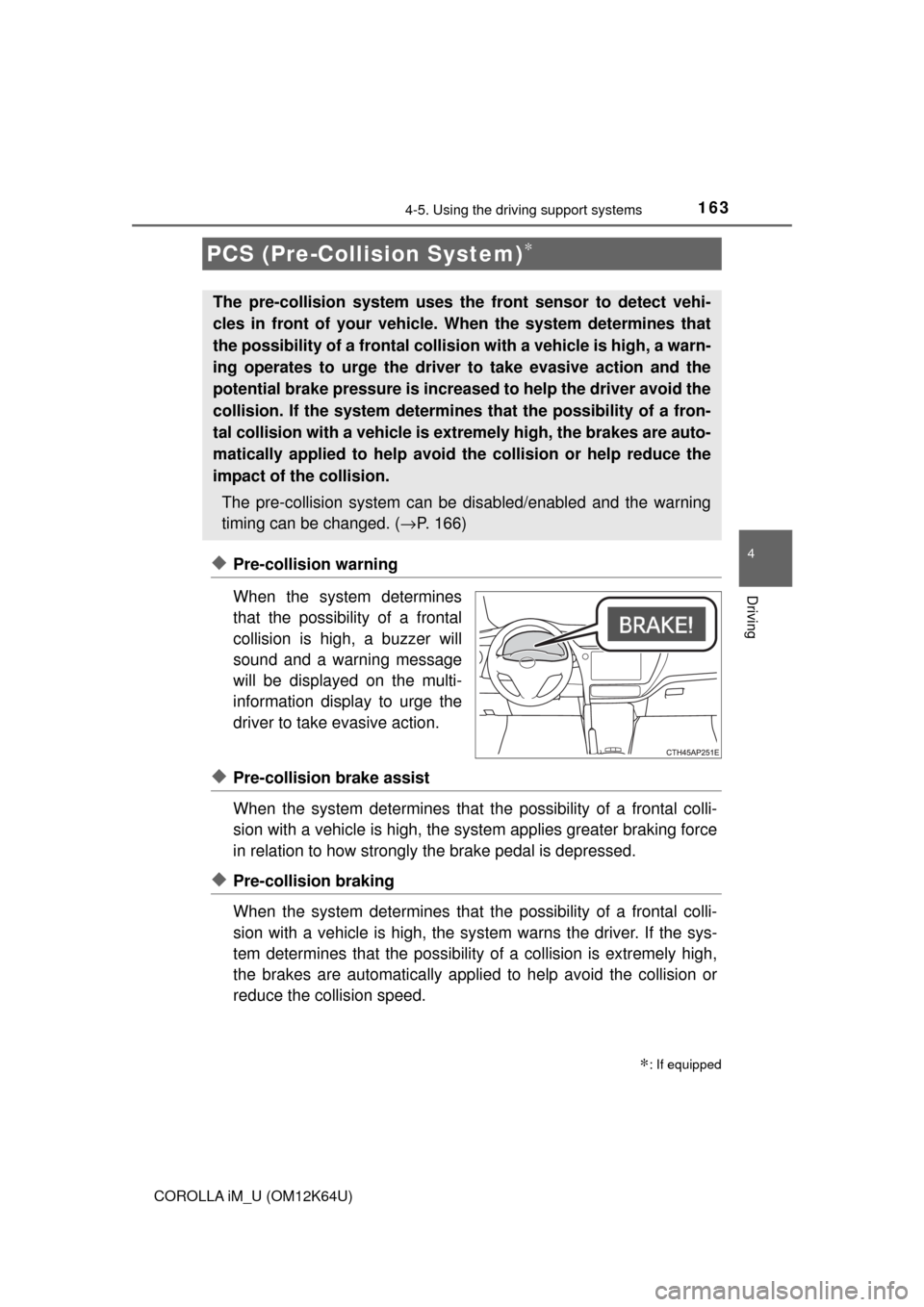
◆Pre-collision warning
When the system determines
that the possibility of a frontal
collision is high, a buzzer will
sound and a warning message
will be displayed on the multi-
information display to urge the
driver to take evasive action.
◆Pre-collision brake assist
When the system determines that the possibility of a frontal colli-
sion with a vehicle is high, the system applies greater braking force
in relation to how strongly the brake pedal is depressed.
◆Pre-collision braking
When the system determines that the possibility of a frontal colli-
sion with a vehicle is high, the system warns the driver. If the sys-
tem determines that the possibility of a collision is extremely high,
the brakes are automatically applied to help avoid the collision or
reduce the collision speed.
PCS (Pre-Collision System)∗
∗: If equipped
The pre-collision system uses the front sensor to detect vehi-
cles in front of your vehicle. When the system determines that
the possibility of a frontal collision with a vehicle is high, a warn-
ing operates to urge the driver to take evasive action and the
potential brake pressure is increased to help the driver avoid the
collision. If the system determines that the possibility of a fron-
tal collision with a vehicle is extremely high, the brakes are auto-
matically applied to help avoid the collision or help reduce the
impact of the collision.
The pre-collision system can be disabled/enabled and the warning
timing can be changed. (→P. 166)
Page 166 of 384
1664-5. Using the driving support systems
COROLLA iM_U (OM12K64U)■
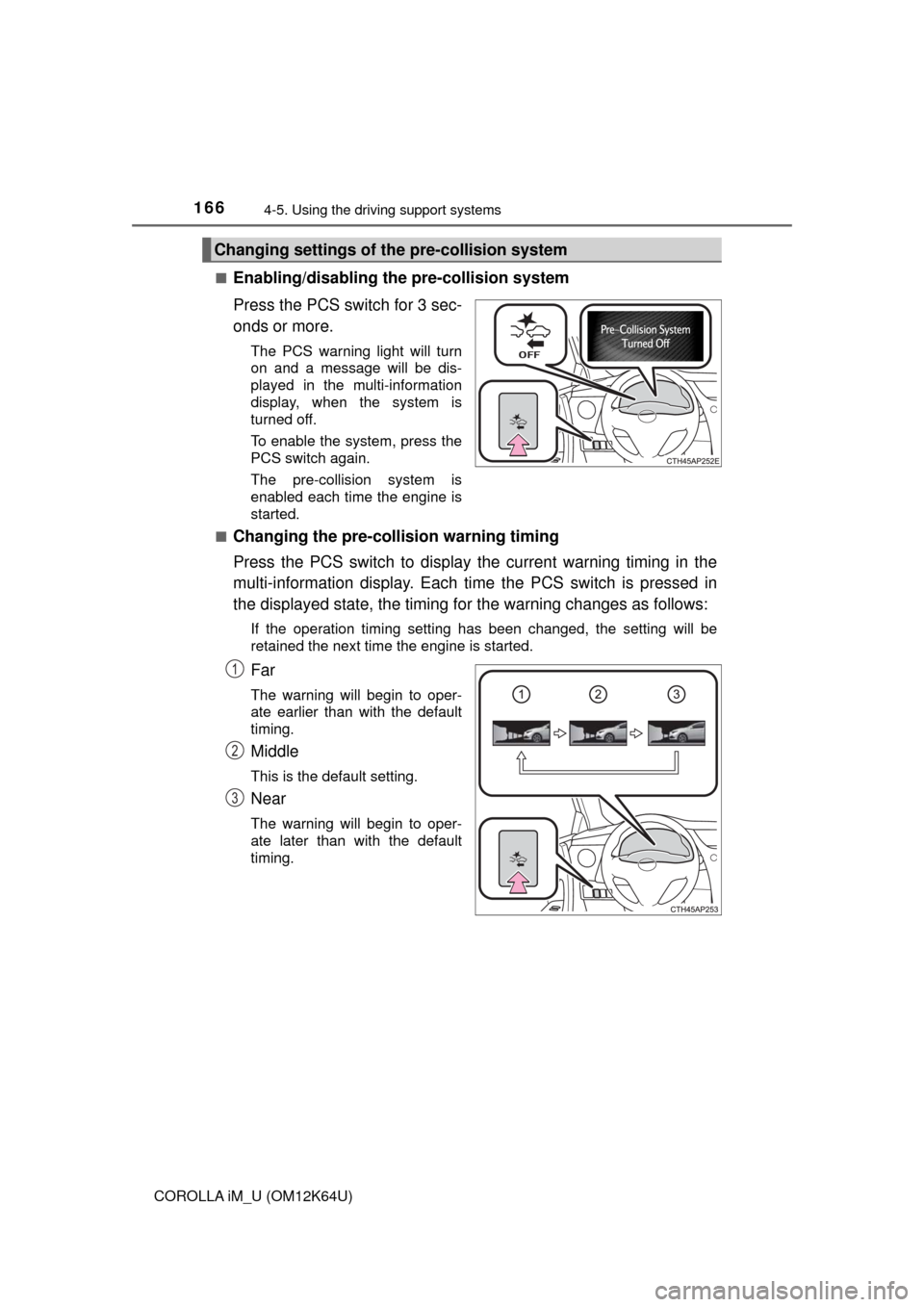
Enabling/disabling the pre-collision system
Press the PCS switch for 3 sec-
onds or more.
The PCS warning light will turn
on and a message will be dis-
played in the multi-information
display, when the system is
turned off.
To enable the system, press the
PCS switch again.
The pre-collision system is
enabled each time the engine is
started.
■
Changing the pre-collision warning timing
Press the PCS switch to display the current warning timing in the
multi-information display. Each time the PCS switch is pressed in
the displayed state, the timing for the warning changes as follows:
If the operation timing setting has been changed, the setting will be
retained the next time the engine is started.
Far
The warning will begin to oper-
ate earlier than with the default
timing.
Middle
This is the default setting.
Near
The warning will begin to oper-
ate later than with the default
timing.
Changing settings of the pre-collision system
1
2
3
Page 175 of 384
1754-5. Using the driving support systems
4
Driving
COROLLA iM_U (OM12K64U)■If the PCS warning light flashes or illuminates and a warning message is
displayed on the multi-information display
The pre-collision system may be temporarily unavailable or there may be a
malfunction in the system.
●In the following situations, the warning light will turn off, the message will
disappear and the system will become operational when normal operating
conditions return:
• When the area around the front sensor is hot, such as in the sun
• When the windshield is fogged up or covered with condensation or ice
(→P. 199)
• When the front sensor or the area around either sensor is cold, such as in
an extremely cold environment
• If the area in front of the front sensor is obstructed, such as when the
hood is open
●If the PCS warning light continues to flash or illuminate or the warning mes-
sage does not disappear, the system may be malfunctioning. Have the vehi-
cle inspected by your Toyota dealer immediately.
■If VSC is disabled
●If TRAC and VSC are disabled (→P. 188), the pre-collision brake assist and
pre-collision braking functions are also disabled. However, the pre-collision
warning function will still operate.
●The PCS warning light illuminates and “VSC Turned Off Pre-Collision Brake
System Unavailable” is displayed on the multi-information display.
Page 176 of 384
1764-5. Using the driving support systems
COROLLA iM_U (OM12K64U)
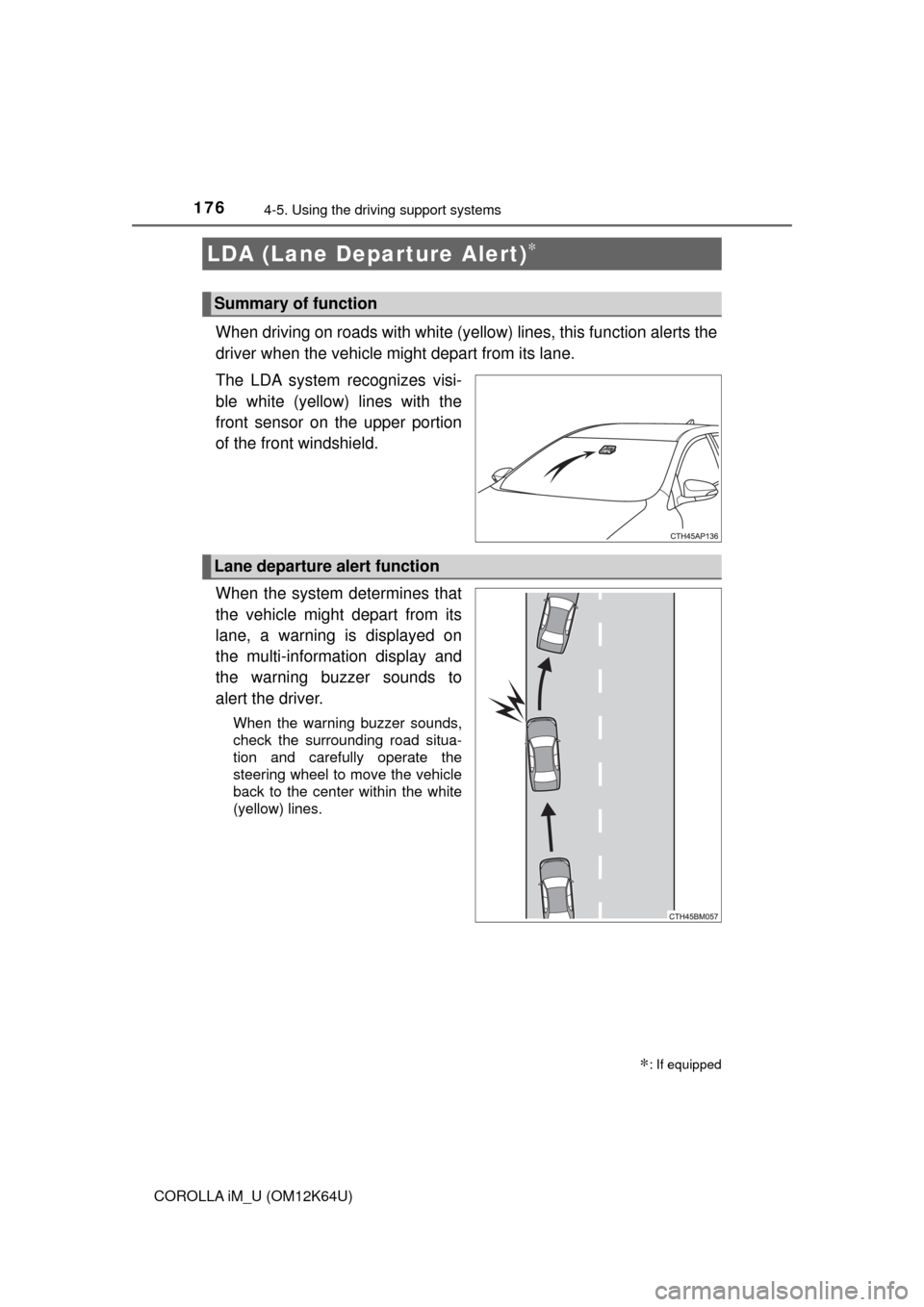
When driving on roads with white (yellow) lines, this function alerts the
driver when the vehicle might depart from its lane.
The LDA system recognizes visi-
ble white (yellow) lines with the
front sensor on the upper portion
of the front windshield.
When the system determines that
the vehicle might depart from its
lane, a warning is displayed on
the multi-information display and
the warning buzzer sounds to
alert the driver.
When the warning buzzer sounds,
check the surrounding road situa-
tion and carefully operate the
steering wheel to move the vehicle
back to the center within the white
(yellow) lines.
LDA (Lane Departure Alert)∗
∗: If equipped
Summary of function
Lane departure alert function
Page 178 of 384
1784-5. Using the driving support systems
COROLLA iM_U (OM12K64U)
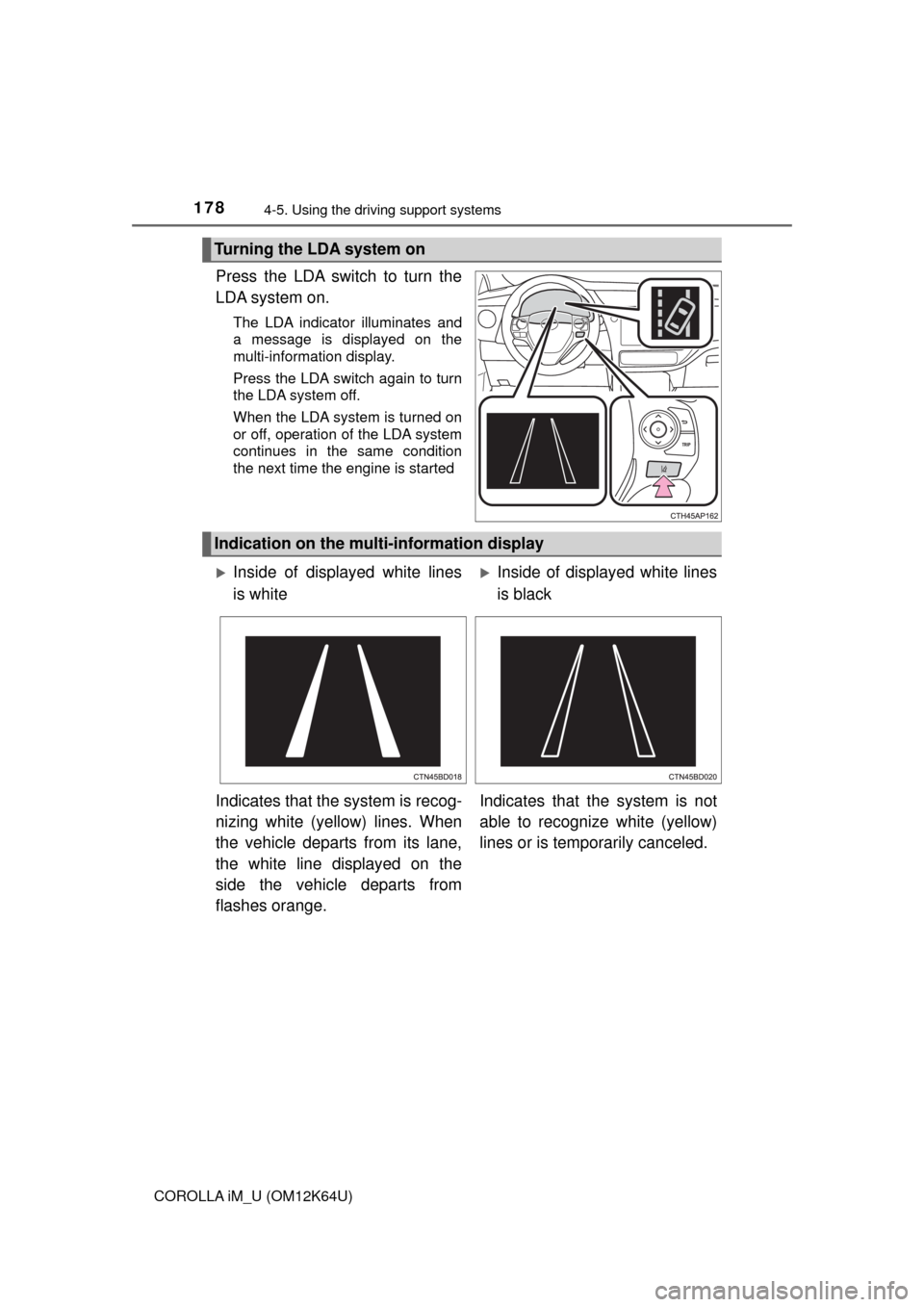
Press the LDA switch to turn the
LDA system on.
The LDA indicator illuminates and
a message is displayed on the
multi-information display.
Press the LDA switch again to turn
the LDA system off.
When the LDA system is turned on
or off, operation of the LDA system
continues in the same condition
the next time the engine is started
Turning the LDA system on
Indication on the multi-information display
Inside of displayed white lines
is whiteInside of displayed white lines
is black
Indicates that the system is recog-
nizing white (yellow) lines. When
the vehicle departs from its lane,
the white line displayed on the
side the vehicle departs from
flashes orange.Indicates that the system is not
able to recognize white (yellow)
lines or is temporarily canceled.
Page 184 of 384
1844-6. Using the driving support systems
COROLLA iM_U (OM12K64U)
■Cruise control can be set when
Vehicles with a continuously variable transmission
●The shift lever is in the D or range 4 or higher of M has been selected.
●Vehicle speed is above approximately 25 mph (40 km/h).
Vehicles with a manual transmission
Vehicle speed is above approximately 25 mph (40 km/h).
■Accelerating after setting the vehicle speed
●The vehicle can be accelerated by operating accelerator pedal. After accel-
erating, the set speed resumes.
●Even without canceling the cruise control, the set speed can be increased
by first accelerating the vehicle to the desired speed and then pushing the
lever down to set the new speed.
■Automatic cruise control cancelation
Cruise control is automatically canceled in any of the following situations.
●Actual vehicle speed falls more than approximately 10 mph (16 km/h) below
the set speed.
At this time, the memorized set speed is not retained.
●Actual vehicle speed is below approximately 25 mph (40 km/h).
●VSC is activated.
●TRAC is activated for a period of time.
●When the VSC or TRAC system is turned off by pressing the VSC OFF
switch.
■If “Cruise Control Malfunction Visit Your Dealer” is displayed on the
multi-information display
Press the “ON-OFF” button once to deactivate the system, and then press
the button again to reactivate the system.
If the cruise control speed cannot be set or if the cruise control cancels imme-
diately after being activated, there may be a malfunction in the cruise control
system. Have the vehicle inspected by your Toyota dealer.
Page 187 of 384
1874-6. Using the driving support systems
4
Driving
COROLLA iM_U (OM12K64U)
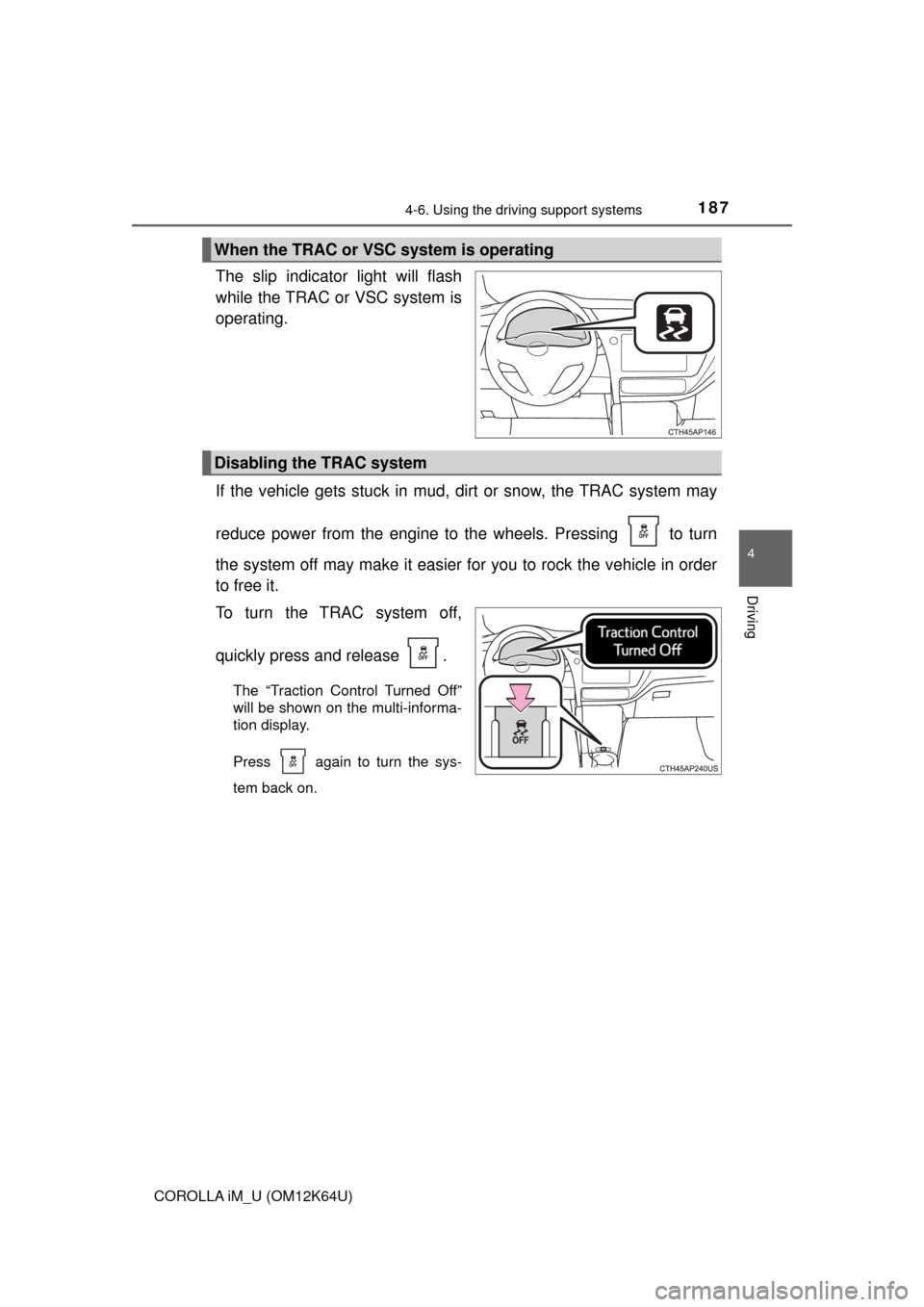
The slip indicator light will flash
while the TRAC or VSC system is
operating.
If the vehicle gets stuck in mud, dirt or snow, the TRAC system may
reduce power from the engine to the wheels. Pressing to turn
the system off may make it easier for you to rock the vehicle in order
to free it.
To turn the TRAC system off,
quickly press and release .
The “Traction Control Turned Off”
will be shown on the multi-informa-
tion display.
Press again to turn the sys-
tem back on.
When the TRAC or VSC system is operating
Disabling the TRAC system
Page 188 of 384
1884-6. Using the driving support systems
COROLLA iM_U (OM12K64U)
■Turning off both TRAC and VSC systems
To turn the TRAC and VSC systems off, press and hold for more than 3
seconds while the vehicle is stopped.
The VSC OFF indicator light will come on and the “Traction Control Turned
Off” will be shown on the multi-information display.
Press again to turn the systems back on.
■When the message is displayed on the multi-information display show-
ing that TRAC has been disabled even if has not been pressed
TRAC and hill-start assist control cannot be operated. Contact your Toyota
dealer.
■Sounds and vibrations caused by the ABS, brake assist, TRAC and VSC
systems
●A sound may be heard from the engine compartment when the engine is
started or just after the vehicle begins to move. This sound does not indicate
that a malfunction has occurred in any of these systems.
●Any of the following conditions may occur when the above systems are
operating. None of these indicates that a malfunction has occurred.
• Vibrations may be felt through the vehicle body and steering.
• A motor sound may be heard after the vehicle comes to a stop.
• The brake pedal may pulsate slightly after the ABS is activated.
• The brake pedal may move down slightly after the ABS is activated.
■EPS operation sound
When the steering wheel is operated, a motor sound (whirring sound) may be
heard. This does not indicate a malfunction.
■Automatic reactivation of TRAC and VSC systems
After turning the TRAC and VSC systems off, the systems will be automati-
cally re-enabled in the following situations:
●When the engine switch is turned to the “LOCK” position
●If only the TRAC system is turned off, the TRAC will turn on when vehicle
speed increases
If both the TRAC and VSC systems are turned off, automatic re-enabling will
not occur when vehicle speed increases.
■Reduced effectiveness of the EPS system
The effectiveness of the EPS system is reduced to prevent the system from
overheating when there is frequent steering input over an extended period of
time. The steering wheel may feel heavy as a result. Should this occur, refrain
from excessive steering input or stop the vehicle and turn the engine off. The
EPS system should return to normal within 10 minutes.
Page 215 of 384
215
5
Interior features
COROLLA iM_U (OM12K64U)
5-4. Other interior features
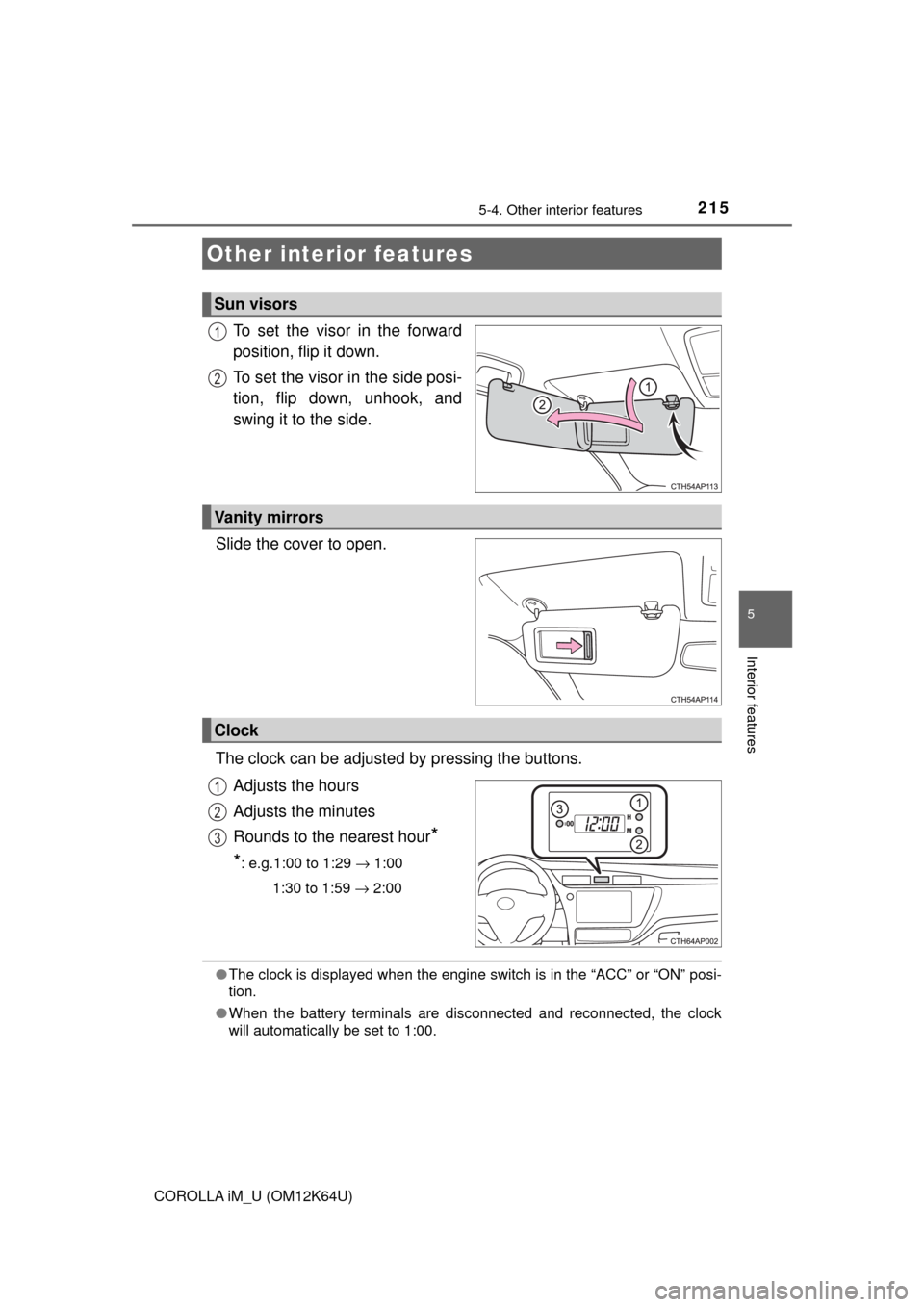
To set the visor in the forward
position, flip it down.
To set the visor in the side posi-
tion, flip down, unhook, and
swing it to the side.
Slide the cover to open.
The clock can be adjusted by pressing the buttons.
Adjusts the hours
Adjusts the minutes
Rounds to the nearest hour
*
*: e.g.1:00 to 1:29 → 1:00
1:30 to 1:59 → 2:00
●The clock is displayed when the engine switch is in the “ACC” or “ON” posi-
tion.
●When the battery terminals are disconnected and reconnected, the clock
will automatically be set to 1:00.
Other interior features
Sun visors
1
2
Vanity mirrors
Clock
1
2
3
Page 227 of 384
2276-2. Maintenance
6
Maintenance and care
COROLLA iM_U (OM12K64U)
■Repair and replacement
It is recommended that genuine Toyota parts be used for repairs to ensure
performance of each system. If non-Toyota parts are used in replacement or if
a repair shop other than a Toyota dealer performs repairs, confirm the war-
ranty coverage.
■Resetting the message indicating maintenance is required (U.S.A. only)
After the required maintenance is performed according to the maintenance
schedule, please reset the message.
To reset the message, follow the procedure described below:
While the engine is running, switch the multi-information display to the set-
tings display. (→P. 76)
Select “Scheduled Maintenance” on the settings display.
Select “Yes” on the “Scheduled Maintenance” screen.
“The Data Has Been Reset” will be displayed on the multi-information display
when the reset procedure has been completed.
■Allow inspection and repairs to be performed by a Toyota dealer
●Toyota technicians are well-trained specialists and are kept up to date with
the latest service information. They are well informed about the operations
of all systems on your vehicle.
●Keep a copy of the repair order. It proves that the maintenance that has
been performed is under warranty coverage. If any problem should arise
while your vehicle is under warranty, your Toyota dealer will promptly take
care of it.
WARNING
■If your vehicle is not properly maintained
Improper maintenance could result in serious damage to the vehicle and
possible death or serious injury.
■Handling of the battery
●Engine exhaust, some of its constituents, and a wide variety of automobile
components contain or emit chemicals known to the State of California to
cause cancer and birth defects and other reproductive harm. Work in a
well ventilated area.
●Oils, fuels and fluids contained in vehicles as well as waste produced by
component wear contain or emit chemicals known to the State of Califor-
nia to cause cancer and birth defects or other reproductive harm. Avoid
exposure and wash any affected area immediately.
●Battery posts, terminals and related accessories contain lead and lead
compounds which are known to cause brain damage. Wash your hands
after handling. (→P. 246)
1
2
3