display TOYOTA COROLLA iM 2017 11.G User Guide
[x] Cancel search | Manufacturer: TOYOTA, Model Year: 2017, Model line: COROLLA iM, Model: TOYOTA COROLLA iM 2017 11.GPages: 384, PDF Size: 8.88 MB
Page 79 of 384
792. Instrument cluster
2
Instrument cluster
COROLLA iM_U (OM12K64U)
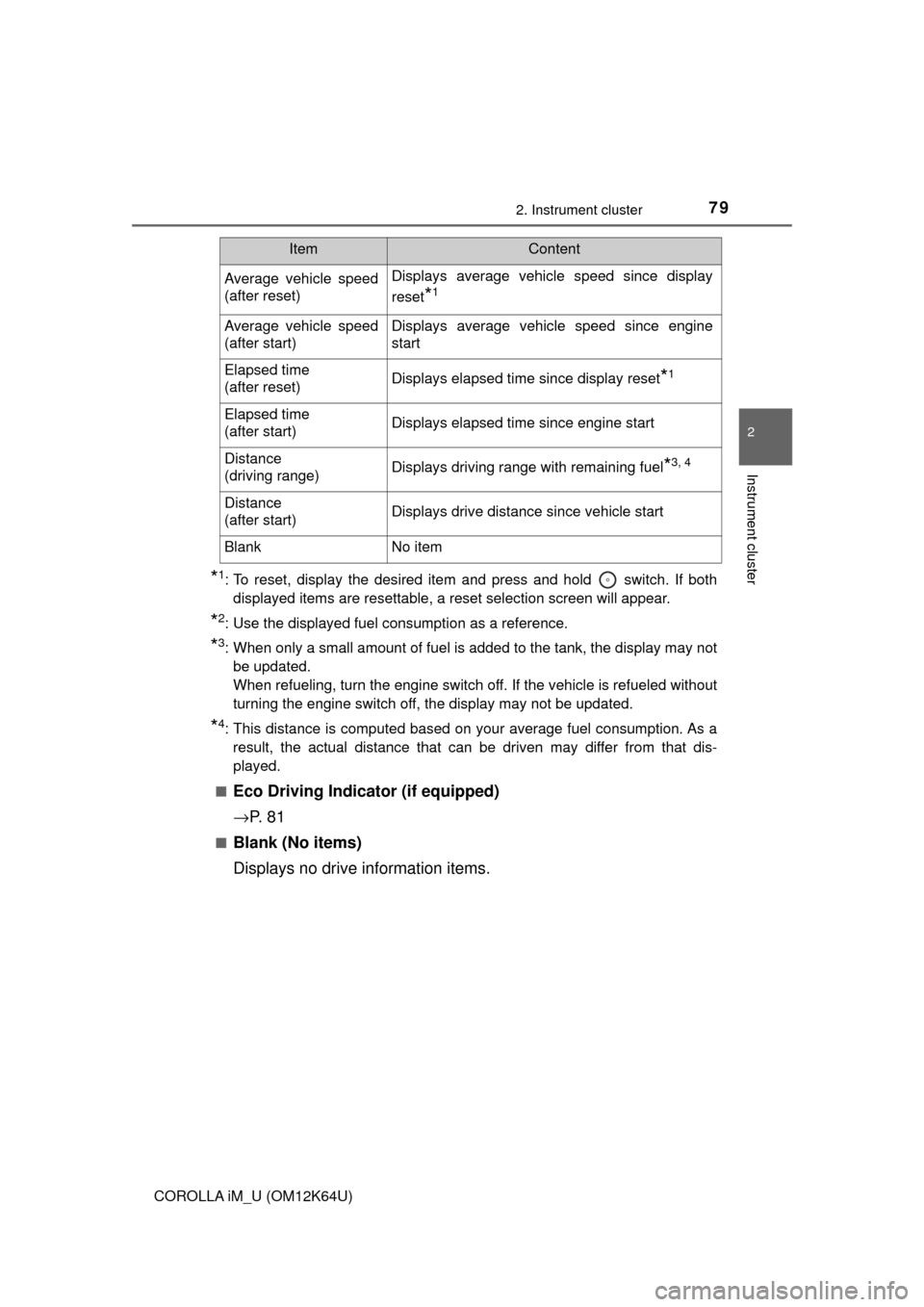
*1: To reset, display the desired item and press and hold switch. If both
displayed items are resettable, a reset selection screen will appear.
*2: Use the displayed fuel consumption as a reference.
*3: When only a small amount of fuel is added to the tank, the display may not
be updated.
When refueling, turn the engine switch off. If the vehicle is refueled without
turning the engine switch off, the display may not be updated.
*4: This distance is computed based on your average fuel consumption. As a
result, the actual distance that can be driven may differ from that dis-
played.
■
Eco Driving Indicator (if equipped)
→P. 8 1
■Blank (No items)
Displays no drive information items.
Average vehicle speed
(after reset)Displays average vehicle speed since display
reset
*1
Average vehicle speed
(after start)Displays average vehicle speed since engine
start
Elapsed time
(after reset)Displays elapsed time since display reset*1
Elapsed time
(after start)Displays elapsed time since engine start
Distance
(driving range)Displays driving range with remaining fuel*3, 4
Distance
(after start)Displays drive distance since vehicle start
BlankNo item
ItemContent
Page 80 of 384

802. Instrument cluster
COROLLA iM_U (OM12K64U)
◆Settings display
■LDA (Lane Departure Alert) warning sensitivity (if equipped)
LDA warning sensitivity can be set to 2 different levels.
■Eco Driving Indicator Light (if equipped)
Select to activate/deactivate the Eco Driving Indicator Light.
■Language
Select to change the language on the display.
■Units
Select to change the units of measure displayed on the multi-infor-
mation display.
■Drive information 1/Drive information 2
Select to select up to 2 items that will be displayed on the Drive
information 1 screen and Drive information 2 screen respectively.
(→P. 78)
■Scheduled Maintenance (U.S.A. only)
Select to reset the message indicating maintenance is required
after the required maintenance is performed. (→P. 227)
■Initialize Display
Select to reset the meter display settings. (→P. 350)
Page 81 of 384
812. Instrument cluster
2
Instrument cluster
COROLLA iM_U (OM12K64U)
■Eco Driving Indicator (if equipped)
Eco Driving Indicator will not operate under the following conditions:
●The shift lever is in any position other than D.
●Sport mode is selected.
●The vehicle speed is approximately 80 mph (130 km/h) or higher.
■Brightness of the meters (day mode and night mode)
●The brightness of the meters are changed between day mode and night
mode.
• Day mode: When the tail lights are off or when the tail lights are on but
the surrounding area is bright
• Night mode: When the tail lights are on and the surrounding area is dark
●When in night mode, the brightness will be reduced slightly unless the
meters are set to the maximum brightness level.
■Suspension of the settings display
●While driving, the multi-information display cannot be changed to setting
mode. Before changing the settings, stop the vehicle in a safe place.
●In the following situations, operation of some of the settings display may be
temporarily suspended.
• When a warning message appears on the multi-information display
• When the vehicle begins to move
■When disconnecting and reconnecting battery terminals
The drive information data will be reset.
■Liquid crystal display
Small spots or light spots may appear on the display. This phenomenon is
characteristic of liquid crystal displays, and there is no problem continuing to
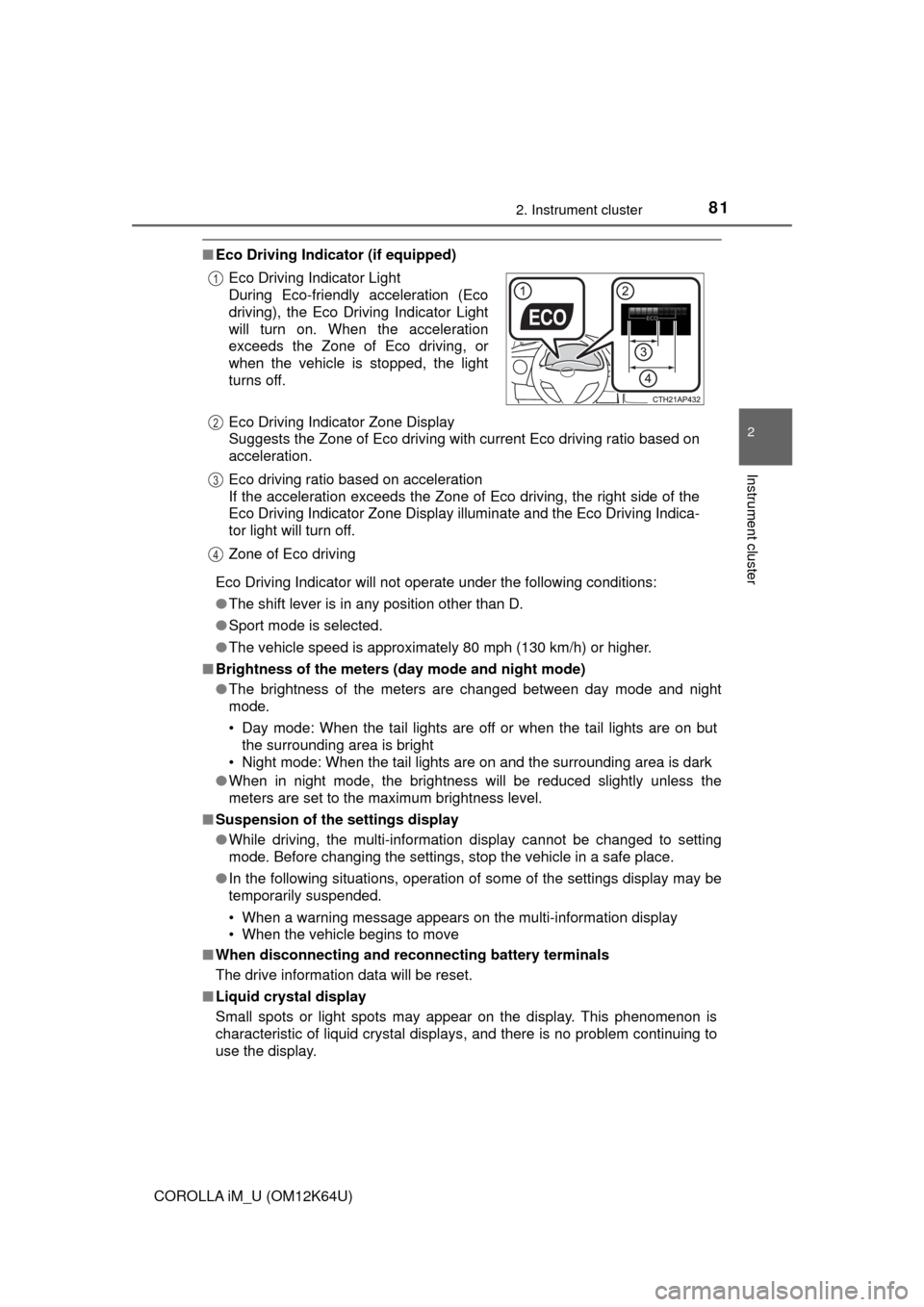
use the display. Eco Driving Indicator Light
During Eco-friendly acceleration (Eco
driving), the Eco Driving Indicator Light
will turn on. When the acceleration
exceeds the Zone of Eco driving, or
when the vehicle is stopped, the light
turns off.
Eco Driving Indicator Zone Display
Suggests the Zone of Eco driving with current Eco driving ratio based on
acceleration.
Eco driving ratio based on acceleration
If the acceleration exceeds the Zone of Eco driving, the right side of the
Eco Driving Indicator Zone Display illuminate and the Eco Driving Indica-
tor light will turn off.
Zone of Eco driving
1
2
3
4
Page 82 of 384
822. Instrument cluster
COROLLA iM_U (OM12K64U)
WARNING
■Caution for use while driving
●When operating the multi-information display while driving, pay extra
attention to the safety of the area around the vehicle.
●Do not look continuously at the multi-information display while driving as
you may fail to see pedestrians, objects on the road, etc. ahead of the
vehicle.
■The information display at low temperatures
Allow the interior of the vehicle to warm up before using the liquid crystal
information display. At extremely low temperatures, the information display
monitor may respond slowly, and display changes may be delayed.
For example, there is a lag between the driver’s shifting and the new gear
number appearing on the display. This lag could cause the driver to down-
shift again, causing rapid and excessive engine braking and possibly an
accident resulting in death or injury.
■Cautions during setting up the display
As the engine needs to be running during setting up the display, ensure that
the vehicle is parked in a place with adequate ventilation. In a closed area
such as a garage, exhaust gases including harmful carbon monoxide (CO)
may collect and enter the vehicle. This may lead to death or a serious
health hazard.
NOTICE
■While setting up the display
To prevent battery discharge, ensure that the engine is running while setting
up the display features.
Page 90 of 384
903-2. Opening, closing and locking the doors
COROLLA iM_U (OM12K64U)
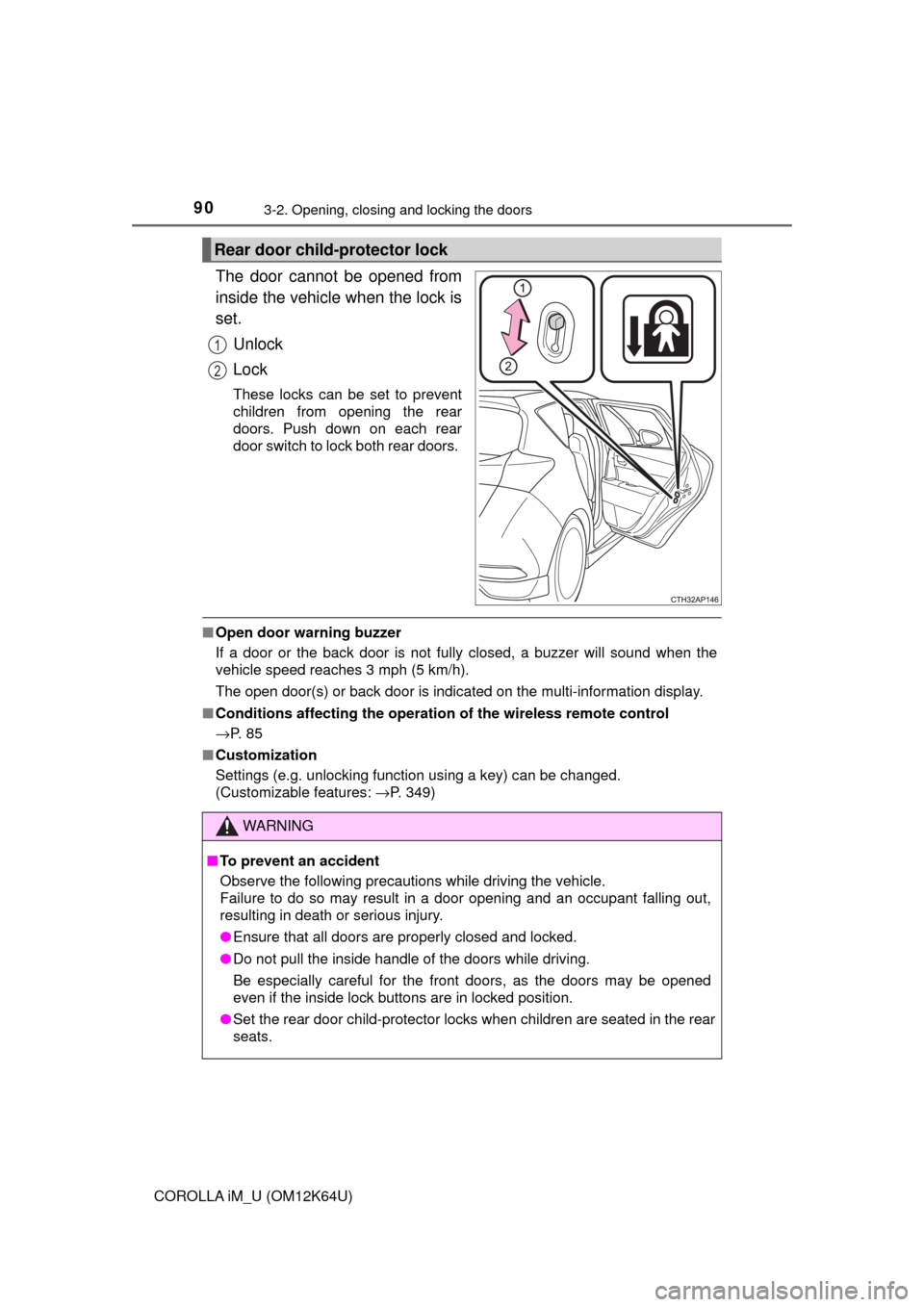
The door cannot be opened from
inside the vehicle when the lock is
set.
Unlock
Lock
These locks can be set to prevent
children from opening the rear
doors. Push down on each rear
door switch to lock both rear doors.
■Open door warning buzzer
If a door or the back door is not fully closed, a buzzer will sound when the
vehicle speed reaches 3 mph (5 km/h).
The open door(s) or back door is indicated on the multi-information display.
■Conditions affecting the operation of the wireless remote control
→P. 8 5
■Customization
Settings (e.g. unlocking function using a key) can be changed.
(Customizable features: →P. 349)
Rear door child-protector lock
1
2
WARNING
■To prevent an accident
Observe the following precautions while driving the vehicle.
Failure to do so may result in a door opening and an occupant falling out,
resulting in death or serious injury.
●Ensure that all doors are properly closed and locked.
●Do not pull the inside handle of the doors while driving.
Be especially careful for the front doors, as the doors may be opened
even if the inside lock buttons are in locked position.
●Set the rear door child-protector locks when children are seated in the rear
seats.
Page 91 of 384
913-2. Opening, closing and locking the doors
3
Operation of each component
COROLLA iM_U (OM12K64U)■
Door lock switch
→P. 8 9
■Wireless remote control
→P. 8 8
■Key
→P. 8 8
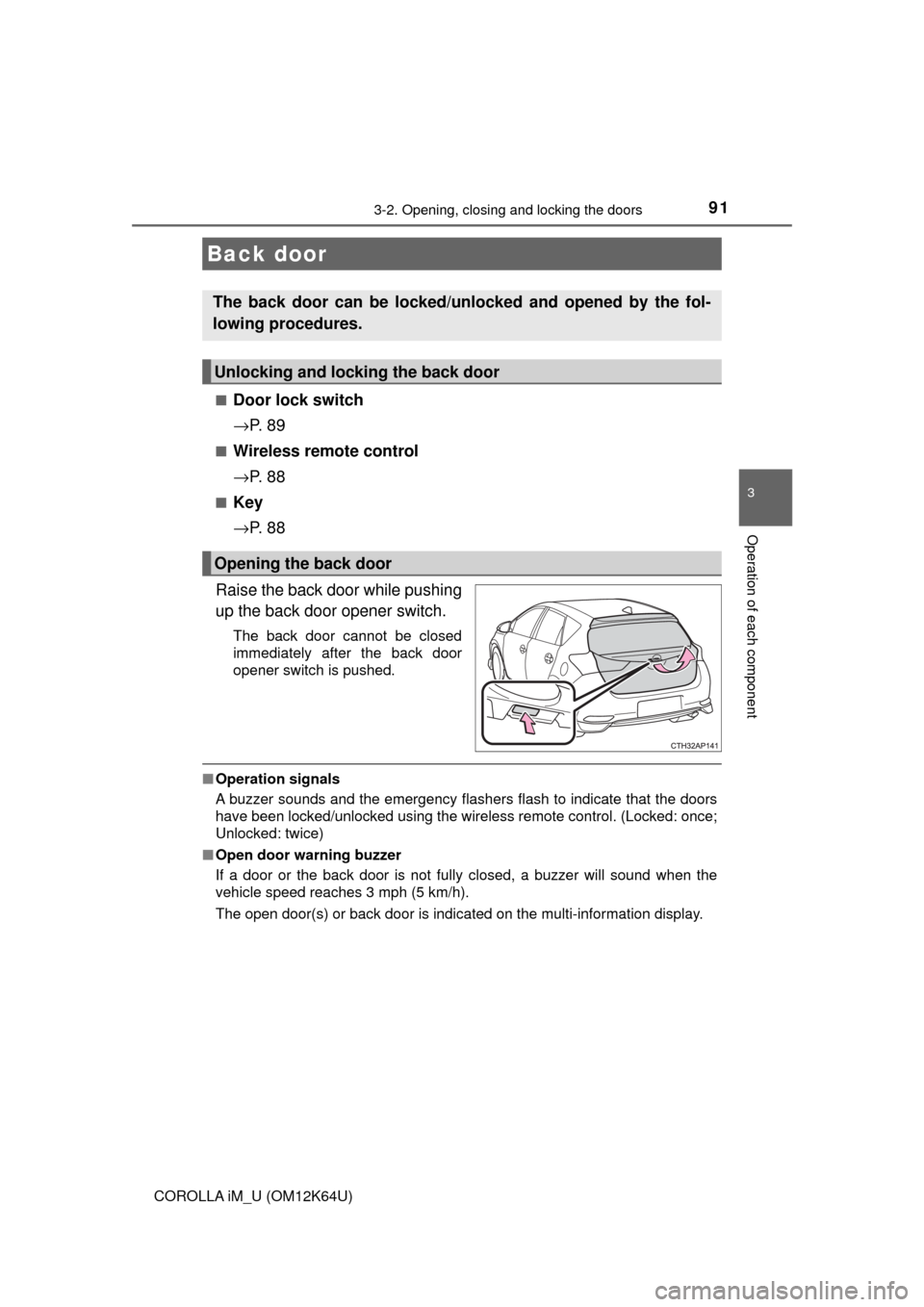
Raise the back door while pushing
up the back door opener switch.
The back door cannot be closed
immediately after the back door
opener switch is pushed.
■Operation signals
A buzzer sounds and the emergency flashers flash to indicate that the doors
have been locked/unlocked using the wireless remote control. (Locked: once;
Unlocked: twice)
■Open door warning buzzer
If a door or the back door is not fully closed, a buzzer will sound when the
vehicle speed reaches 3 mph (5 km/h).
The open door(s) or back door is indicated on the multi-information display.
Back door
The back door can be locked/unlocked and opened by the fol-
lowing procedures.
Unlocking and locking the back door
Opening the back door
Page 113 of 384
1134-1. Before driving
4
Driving
COROLLA iM_U (OM12K64U)
WARNING
Observe the following precautions.
Failure to do so may result in death or serious injury.
■When driving the vehicle
●Do not drive if you are unfamiliar with the location of the brake and accel-
erator pedals to avoid depressing the wrong pedal.
• Accidentally depressing the accelerator pedal instead of the brake
pedal will result in sudden acceleration that may lead to an accident.
• When backing up, you may twist your body around, leading to a diffi-
culty in operating the pedals. Make sure to operate the pedals properly.
• Make sure to keep a correct driving posture even when moving the
vehicle only slightly. This allows you to depress the brake and accelera-
tor pedals properly.
• Depress the brake pedal using your right foot. Depressing the brake
pedal using your left foot may delay response in an emergency, result-
ing in an accident.
●Do not drive the vehicle over or stop the vehicle near flammable materials.
The exhaust system and exhaust gases can be extremely hot. These hot
parts may cause a fire if there is any flammable material nearby.
●During normal driving, do not turn off the engine. Turning the engine off
while driving will not cause loss of steering or braking control, but the
power assist to these systems will be lost. This will make it more difficult to
steer and brake, so you should pull over and stop the vehicle as soon as it
is safe to do so.
However, in the event of an emergency, such as if it becomes impossible
to stop the vehicle in the normal way: →P. 283
●Use engine braking (downshift) to maintain a safe speed when driving
down a steep hill.
Using the brakes continuously may cause the brakes to overheat and lose
effectiveness. (→P. 131, 137)
●Do not adjust the display, the positions of the steering wheel, the seat, or
the inside or outside rear view mirrors while driving.
Doing so may result in a loss of vehicle control.
●Always check that all passengers’ arms, heads or other parts of their body
are not outside the vehicle.
●Do not drive in excess of the speed limit. Even if the legal speed limit per-
mits it, do not drive over 85 mph (140 km/h) unless your vehicle has high-
speed capability tires. Driving over 85 mph (140 km/h) may result in tire
failure, loss of control and possible injury. Be sure to consult a tire dealer
to determine whether the tires on your vehicle are high-speed capability
tires or not before driving at such speeds.
Page 133 of 384
1334-2. Driving procedures
4
Driving
COROLLA iM_U (OM12K64U)
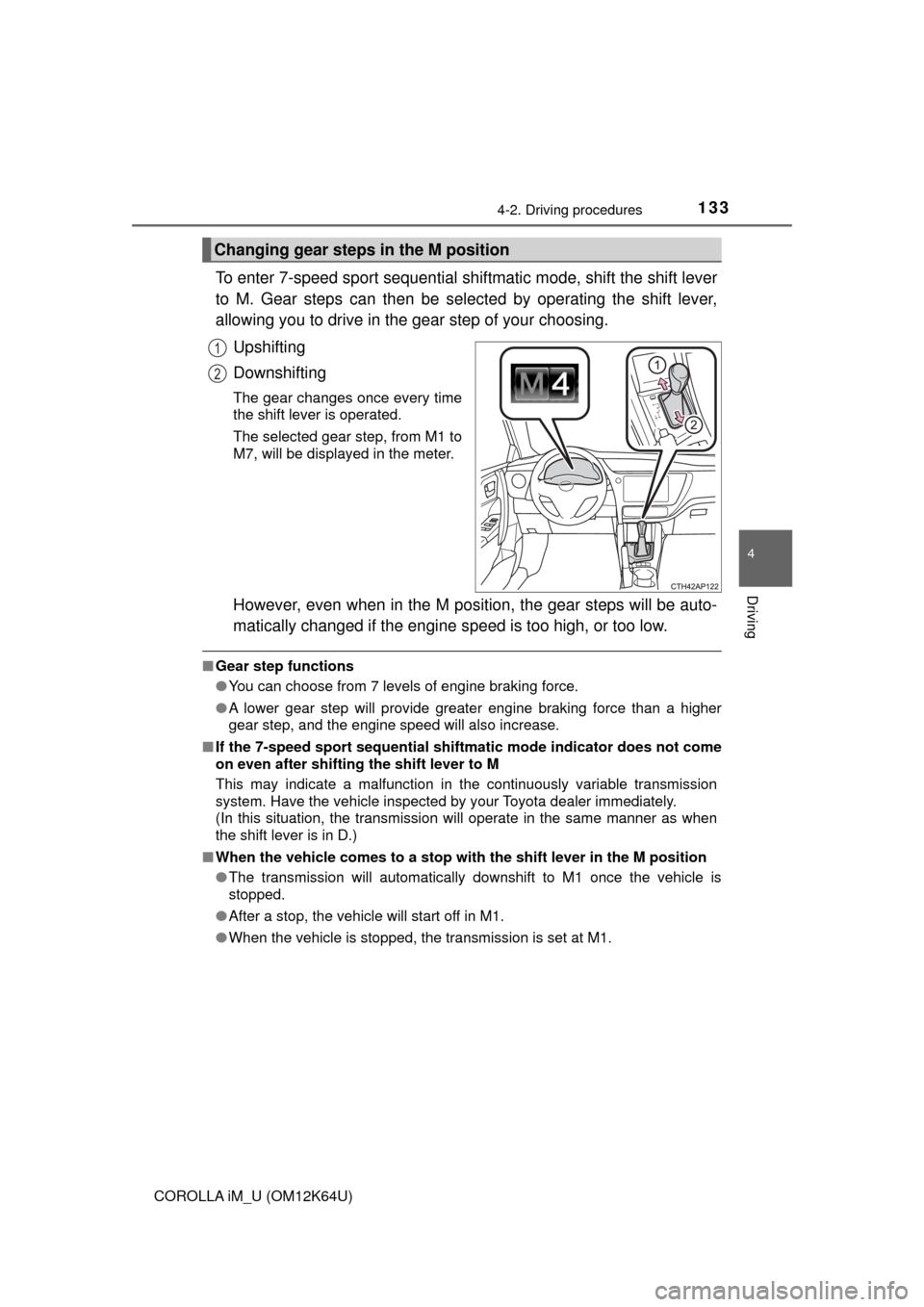
To enter 7-speed sport sequential shiftmatic mode, shift the shift lever
to M. Gear steps can then be selected by operating the shift lever,
allowing you to drive in the gear step of your choosing.
Upshifting
Downshifting
The gear changes once every time
the shift lever is operated.
The selected gear step, from M1 to
M7, will be displayed in the meter.
However, even when in the M position, the gear steps will be auto-
matically changed if the engine speed is too high, or too low.
■Gear step functions
●You can choose from 7 levels of engine braking force.
●A lower gear step will provide greater engine braking force than a higher
gear step, and the engine speed will also increase.
■If the 7-speed sport sequential shiftmatic mode indicator does not come
on even after shifting the shift lever to M
This may indicate a malfunction in the continuously variable transmission
system. Have the vehicle inspected by your Toyota dealer immediately.
(In this situation, the transmission will operate in the same manner as when
the shift lever is in D.)
■When the vehicle comes to a stop with the shift lever in the M position
●The transmission will automatically downshift to M1 once the vehicle is
stopped.
●After a stop, the vehicle will start off in M1.
●When the vehicle is stopped, the transmission is set at M1.
Changing gear steps in the M position
1
2
Page 140 of 384
1404-2. Driving procedures
COROLLA iM_U (OM12K64U)
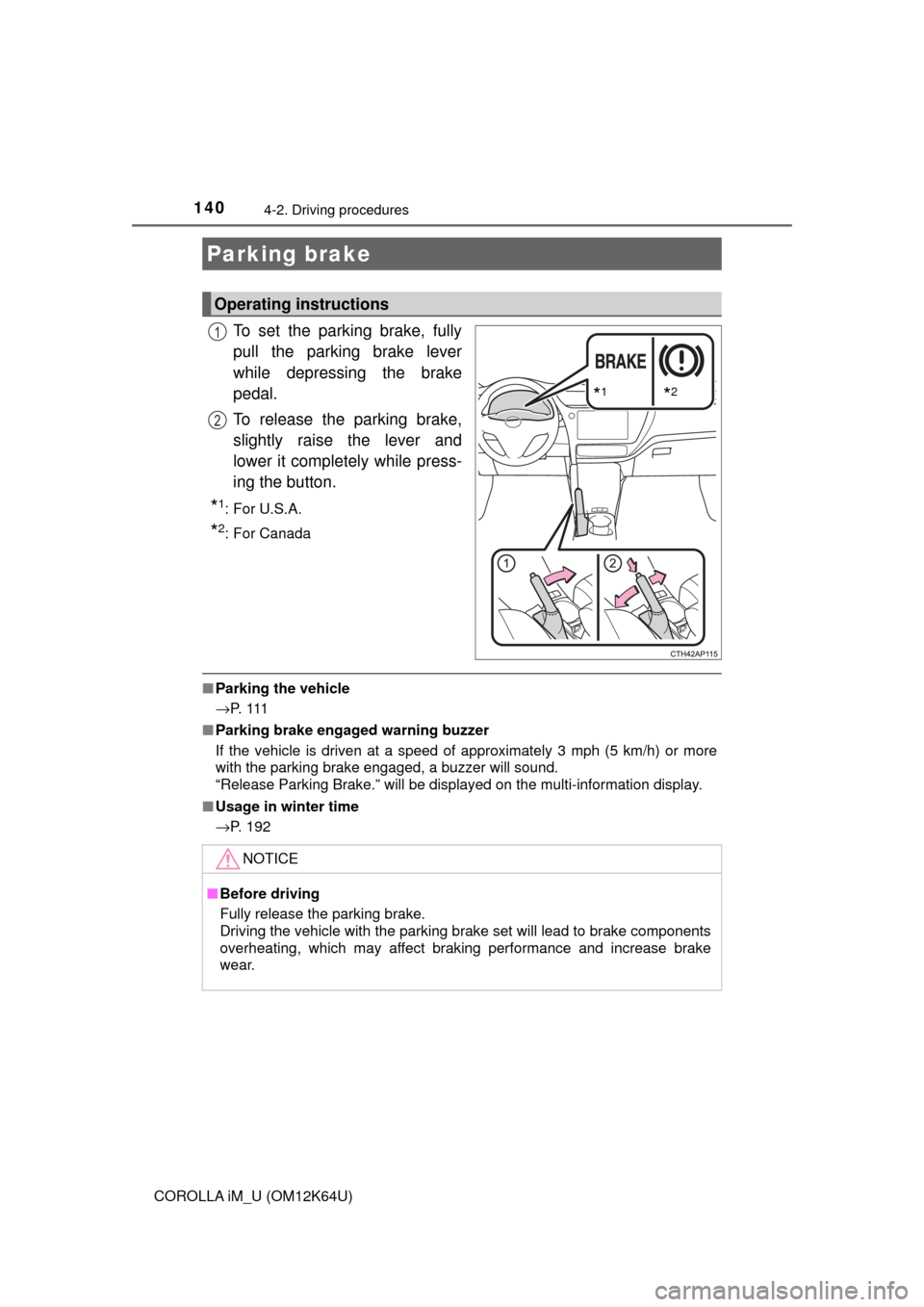
To set the parking brake, fully
pull the parking brake lever
while depressing the brake
pedal.
To release the parking brake,
slightly raise the lever and
lower it completely while press-
ing the button.
*1:For U.S.A.
*2: For Canada
■Parking the vehicle
→P. 1 1 1
■Parking brake engaged warning buzzer
If the vehicle is driven at a speed of approximately 3 mph (5 km/h) or more
with the parking brake engaged, a buzzer will sound.
“Release Parking Brake.” will be displayed on the multi-information display.
■Usage in winter time
→P. 192
Parking brake
Operating instructions
*1*2
1
2
NOTICE
■Before driving
Fully release the parking brake.
Driving the vehicle with the parking brake set will lead to brake components
overheating, which may affect braking performance and increase brake
wear.
Page 147 of 384
1474-3. Operating the lights and wipers
4
Driving
COROLLA iM_U (OM12K64U)
■When “Headlight System Malfunction Visit Your Dealer” is displayed on
the multi-information display
The system may be malfunctioning. Have the vehicle inspected by your
Toyota dealer immediately.
■High beam automatic turning on or off conditions
●When all of the following conditions are fulfilled, the high beam will be auto-
matically turned on (after approximately 1 second):
• Vehicle speed is approximately 21 mph (33 km/h) or more.
• The area ahead of the vehicle is dark.
• There are no vehicles ahead with headlights or tail lights turned on.
• There are few streetlights on the road ahead.
●If any of the following conditions is met, the high beams will turn off automat-
ically:
• Vehicle speed is below approximately 17 mph (27 km/h).
• The area ahead of the vehicle is not dark.
• Vehicles ahead have their headlights or tail lights turned on.
• There are many streetlights on the road ahead.
■Front sensor detection information
●The high beam may not be automatically turned off in the following situa-
tions:
• When vehicles ahead suddenly appear from a curve
• When the vehicle is cut in front of by another vehicle
• When vehicles ahead are hidden from sight due to repeated curves, road
dividers or roadside trees
• When vehicles ahead appear from the faraway lane on wide road
• When vehicles ahead have no lights
●The high beam may be turned off if a vehicle ahead that is using fog lights
without using the headlights is detected.
●House lights, street lights, traffic signals, and illuminated billboards or signs
may cause the high beam to switch to the low beams, or the low beams to
remain on.
●The following factors may affect the amount of time taken to turn the high
beam on or off:
• The brightness of headlights, fog lights, and tail lights of vehicles ahead
• The movement and direction of vehicles ahead
• When a vehicle ahead only has operational lights on one side
• When a vehicle ahead is a two-wheeled vehicle
• The condition of the road (gradient, curve, condition of the road surface,
etc.)
• The number of passengers and amount of luggage
●The high beam may be turned on or off when the driver does not expect it.
●Bicycles or similar objects may not be detected.