display TOYOTA DYNA 100/150 2012 Owners Manual (in English)
[x] Cancel search | Manufacturer: TOYOTA, Model Year: 2012, Model line: DYNA 100/150, Model: TOYOTA DYNA 100/150 2012Pages: 240, PDF Size: 15.05 MB
Page 76 of 240
70GAUGES, METERS AND SERVICE REMINDER INDICATORS
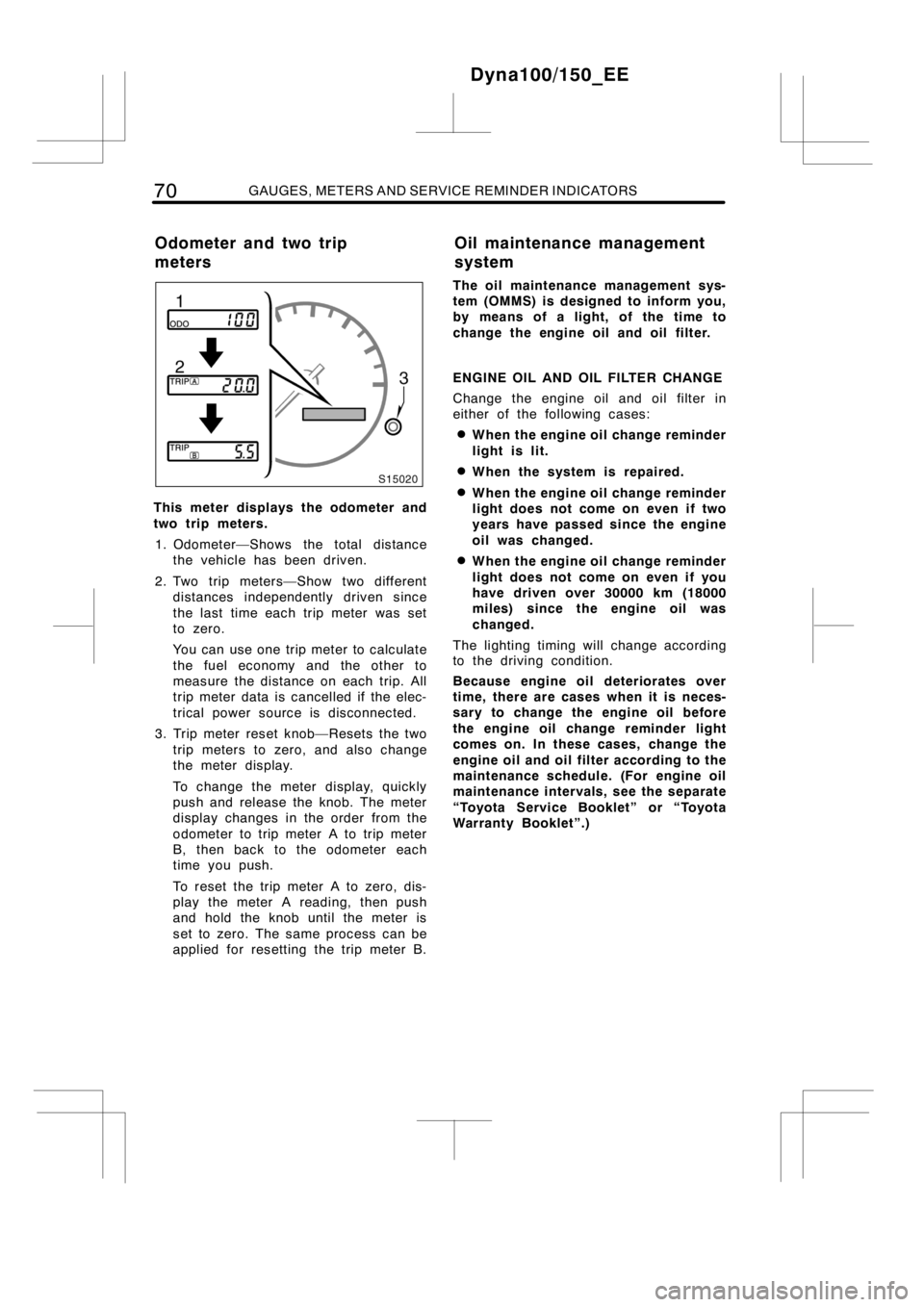
This meter displays the odometer and
two trip meters.
1. Odometer—Shows the total distance
the vehicle has been driven.
2. Two trip meters—Show two different
distances independently driven since
the last time each trip meter was set
to zero.
You can use one trip meter to calculate
the fuel economy and the other to
measure the distance on each trip. All
trip meter data is cancelled if the elec-
trical power source is disconnected.
3. Trip meter reset knob—Resets the two
trip meters to zero, and also change
the meter display.
To change the meter display, quickly
push and release the knob. The meter
display changes in the order from the
odometer to trip meter A to trip meter
B, then back to the odometer each
time you push.
To reset the trip meter A to zero, dis-
play the meter A reading, then push
and hold the knob until the meter is
set to zero. The same process can be
applied for resetting the trip meter B.The oil maintenance management sys-
tem (OMMS) is designed to inform you,
by means of a light, of the time to
change the engine oil and oil filter.
ENGINE OIL AND OIL FILTER CHANGE
Change the engine oil and oil filter in
either of the following cases:
DWhen the engine oil change reminder
light is lit.
DWhen the system is repaired.
DWhen the engine oil change reminder
light does not come on even if two
years have passed since the engine
oil was changed.
DWhen the engine oil change reminder
light does not come on even if you
have driven over 30000 km (18000
miles) since the engine oil was
changed.
The lighting timing will change according
to the driving condition.
Because engine oil deteriorates over
time, there are cases when it is neces-
sary to change the engine oil before
the engine oil change reminder light
comes on. In these cases, change the
engine oil and oil filter according to the
maintenance schedule. (For engine oil
maintenance intervals, see the separate
“Toyota Service Booklet” or “Toyota
Warranty Booklet”.)
Dyna100/150_EE
Odometer and two trip
metersOil maintenance management
system
Page 78 of 240

72GAUGES, METERS AND SERVICE REMINDER INDICATORS
RESETTING THE SYSTEM
After an engine oil and oil filter
change, perform the following proce-
dure to reset the system.
1. Set the odometer and two trip meters
display to trip meter A with the engine
switch “ON” and turn the engine switch
to the “LOCK” position.
2. Turn the engine switch to the “ON”
position while pushing the trip meter
reset knob. At this time, do not start
the engine and keep pushing the reset
knob.
3. Release the reset knob more than one
second after the trip meter displays
“000000”. Thesystem is reset.
For the locations of odometer and two trip
meters and trip meter reset knob and the
procedure about trip meter A setting, see
“Odometer and two trip meters” on page
70.
The system must also be reset ifengine
oil and oil filter are changed before the
light comes on.
If the engine oil change reminder light
remains on after performing the above
procedure, repeat the procedure again.
NOTICE
Reset the system only after an engine
oil and oil filter change. If you reset
the system at any other time, it can-
not inform you of the correct time to
change the engine oil and oil filter.
Dyna100/150_EE
Page 92 of 240

86AUDIO SYSTEM
AF (Alternative Frequencies)
This button is used for seeking RDS (Ra-
dio Data System) stations all over the
band (see “RDS display”).
Push “AF” for less than 2 seconds to
receive the same program while tuning in
an RDS station. “AF” will appear on the
display. When reception conditions worsen,
a network which broadcasts the same pro-
gram will be selected using the AF (Alter-
native Frequencies) list from the RDS sta-
tion.
To change the AF mode, push “AF” for at
least 2 seconds. When “REG ON” appears
on the display, the radio will select the
RDS station which has the same PI (Pro-
gram Identification) code. When “REG
OFF” appears on the display, the radio
will select the RDS station which has the
same three−digit number PI (Program
Identification) code.
If the radio cannot find an RDS station for
60 seconds, the radio will mute all the
programs and begin seeking an RDS sta-
tion of the same PI code by using the AF
list. If the radio cannot seek out any sta-
tion in one pass because the signals are
too weak, the radio will begin seeking
again with sensitivity boosted to search
out weak stations. At this time, “DX” will
appear on the display. A beep will sound
and “PI SEEK” will appear on the display
to tell you when this feature starts opera-
tion.
If the signal gets extremely weak, the
radio will stop seeking a station and
“NOTHING” will appear on the display for
2 seconds. After this, if the radio cannot
receive a TA station for 20 seconds, the
radio will begin seeking again.
To cancel the AF mode, push “AF” once
again.BAL (Balance)
This knob lets you adjust the balance be-
tween the right and left speakers.
Pull out “PWR·VOL/BAL” and turn it.
BAND
Push “BAND” to switch between the LW/
MW and UKW bands.
“LW”, “MW” or “U1”, “U2” or “U3” will
appear on the display. Thesesystems al-
low you to set eighteen UKW stations,
three for each buttons.
If the audiosystem is off, you can turn
on the radio by pushing “BAND”.
PRESET (Preset buttons)
These buttons are used to preset and
tune in radio stations.
To preset a station to a button: Tune in
the desired station (see “TUNE” buttons).
Push and hold down the button until you
hear a beep—this will set the station to
the button. The button location will appear
on the display.
To tune in to a preset station: Push the
button for the station you want. The but-
ton location and station frequency will ap-
pear on the display.
These systems can store one LW/MW and
three UKW stations for each button. (The
display will show “LW/MW”, “U1”, “U2” or
“U3” when you push “BAND”.) The preset
station memory will be canceled out if the
power source is interrupted (battery dis-
connected or fuse blown).
Dyna100/150_EE
Page 93 of 240

AUDIO SYSTEM87
PTY (Program Type)
Push “PTY”. If the button is pushed while
receiving a PTY code of the RDS station,
the current program type (“NEWS”,
“SPORT”, “TALK”, “POP”, “CLASSICS”)
will appear on the display. If another pro-
gram type is desired, push “PTY” until
your desired program type appears.
If no PTY code of RDS station is re-
ceived, “NO PTY” will appear on the dis-
play.
If either “TUNE
” or “TUNE”is
pushed while the program type is ap-
peared on the display, the radio will
search a station that carries PTY code. If
the radio cannot seek out any stations,
“NOTHING” will appear on the display.
If the system is left untouched for 6 se-
conds while the program type is displayed,
or if another operation is made, the pro-
gram type display will disappear and the
radio will broadcast a program of the last
program type displayed.
PWR·VOL (Power·Volume)
Push “PWR·VOL” to turn the audiosystem
on and off. Turn “PWR·VOL” to adjust the
volume.
RDS (Radio Data System) display
The radio will automatically switch to the
RDS mode to receive an RDS station
while tuned to UKW broadcasts. “RDS”
and the name of the RDS station will
appear on the display.ST (Stereo reception) display
Your radio automatically changes to stereo
reception when a stereo broadcast is re-
ceived. “ST” appears on the display. If the
signal becomes weak, the radio reduces
the amount of channel separation to pre-
vent the weak signal from creating noise.
If the signal becomes extremely weak, the
radio switches from stereo to mono recep-
tion.
TA (Traffic Announcement)
This button is used for receiving TA sta-
tions all over the band.
EON (Enhanced Other Network)system—
If the RDS station (with EON data) you
are listening to is not broadcasting a traf-
fic information program at the TA (Traffic
Announcement) mode, the radio will be
switched to the traffic information program
automatically by using the EON AF list.
After the traffic information ends, the radio
will return to the initial program automati-
cally. A beep will sound to tell you when
this feature starts and ends the operation.
Push “TA” to switch the radio mode to TP.
“TP” will appear on the display.
In the TP mode, the radio will begin seek-
ing a TP station. When a TP station is
received, the program service name will
appear on the display. When also in AF
mode, the radio will seek a TP station by
using the AF list.
If the radio cannot seek out any TP sta-
tions, “NOTHING” will appear on the dis-
play for 2 seconds and start searching a
TP station again.
Once a TP station is received, if the TP
signal is halted for 20 seconds, the radio
will seek another TP station automatically.
Push “TA” once again to switch the radio
mode to TA. “TA TP” will appear on the
display.
Dyna100/150_EE
Page 94 of 240

88AUDIO SYSTEM
In the TA mode, the radio will begin seek-
ing a TP station. It sounds only when a
TP station is received. When a TP station
is received, the program service name will
appear on the display. In the AF mode,
the radio will also begin seeking a TP
station by using the AF list.
While the radio is seeking a TP station,
“TP SEEK” appears on the display. If the
radio cannot seek out any TP stations,
“NOTHING” will appear on the display for
2 seconds and the radio will begin seek-
ing a TP station again.
Once a TP station is received, if the TP
signal is halted for 20 seconds, the radio
will seek another TP station automatically.
“TA” volume memory function—The volume
at receiving the traffic announcement is
memorized.
When “TA” is received next time, the sys-
tem compares the volume before “TA” is
received with the memorized TA volume
and automatically selects the louder vol-
ume. However, the range of volume
memory is limited: if the volume received
previously is greater than the maximum
range of the volume, this will become the
maximum range and if it is less than the
minimum, this volume will be the minimum
range.
You can adjust the volume independently
from the memorized “TA” volume range
while receiving a “TA” station. (Refer to
“PWR·VOL”.)
To return to the normal mode from the TA
mode, push “TA” once again.
TONE
Move the “TONE” ring around “PWR·VOL”
to adjust the tone.TUNE
Tuning
Push and release the “
” (up) or “”
(down) side of “TUNE” to step up or down
the station band. If you hear a beep, you
held the button too long and the radio will
go into the seek mode.
Seeking
In the seek mode, the radio finds and
plays the next station up or down the
station band.
To seek a station, push and hold the “
”
or “
” side of “TUNE” until you hear a
beep. Do this again to find another sta-
tion.
Dyna100/150_EE