display TOYOTA FJ CRUISER 2011 1.G Owners Manual
[x] Cancel search | Manufacturer: TOYOTA, Model Year: 2011, Model line: FJ CRUISER, Model: TOYOTA FJ CRUISER 2011 1.GPages: 528, PDF Size: 10.93 MB
Page 4 of 528

TABLE OF CONTENTSIndex
4
3-4. Using the hands-free phone system (for cellular phone)
Hands-free phone system features ............................ 278
Using the hands-free phone system ................... 282
Making a phone call ........... 291
Setting a cellular phone...... 296
Security and system setup ................................ 302
Using the phone book ........ 307
3-5. Using the interior lights Interior lights list ................. 315
• Interior lights .................... 316
• Personal lights ................. 317
3-6. Using the storage features List of storage features....... 318
• Glove box ......................... 319
• Cup holders (front) ........... 319
• Cup holders (rear) ............ 322
• Bottle holders ................... 323
• Auxiliary box ..................... 324
3-7. Other interior features Sun visors .......................... 325
Vanity mirrors ..................... 326
Clock .................................. 327
Outside temperature display .............................. 328
Power outlet (12V DC) ....... 329
Power outlet (115V AC) ..... 330
Armrest............................... 336
Floor mat ............................ 337
Luggage storage box (vehicles without sub
woofer) ............................. 339 Luggage compartment
features ............................ 340
Compass ............................ 343
4-1. Maintenance and care Cleaning and protecting the vehicle exterior ........... 350
Cleaning and protecting the vehicle interior ............ 353
4-2. Maintenance Maintenance requirements .................... 356
General maintenance ......... 358
Emission inspection and maintenance (I/M)
programs .......................... 361
4-3. Do-it-yourself maintenance Do-it-yourself service precautions ....................... 362
Hood ................................... 366
Engine compartment .......... 367
Tires.................................... 381
Tire inflation pressure ......... 387
Wheels................................ 391
Air conditioning filter ........... 394
Key battery ......................... 397
Checking and replacing fuses ................................. 399
Light bulbs .......................... 410
4Maintenance and care
Page 101 of 528
101
1
1-7. Safety information
Before driving
Installing child restraints
Follow the child restraint system manufacturer’s instructions. Firmly
secure child restraints to the r ear seats using the LATCH anchors or
a seat belt. Attach the top teth er strap when installing a child
restraint.
The lap/shoulder belt can be used if your child restraint system is
not compatible with the LATCH (Low er Anchors and Tethers for Chil-
dren) system.
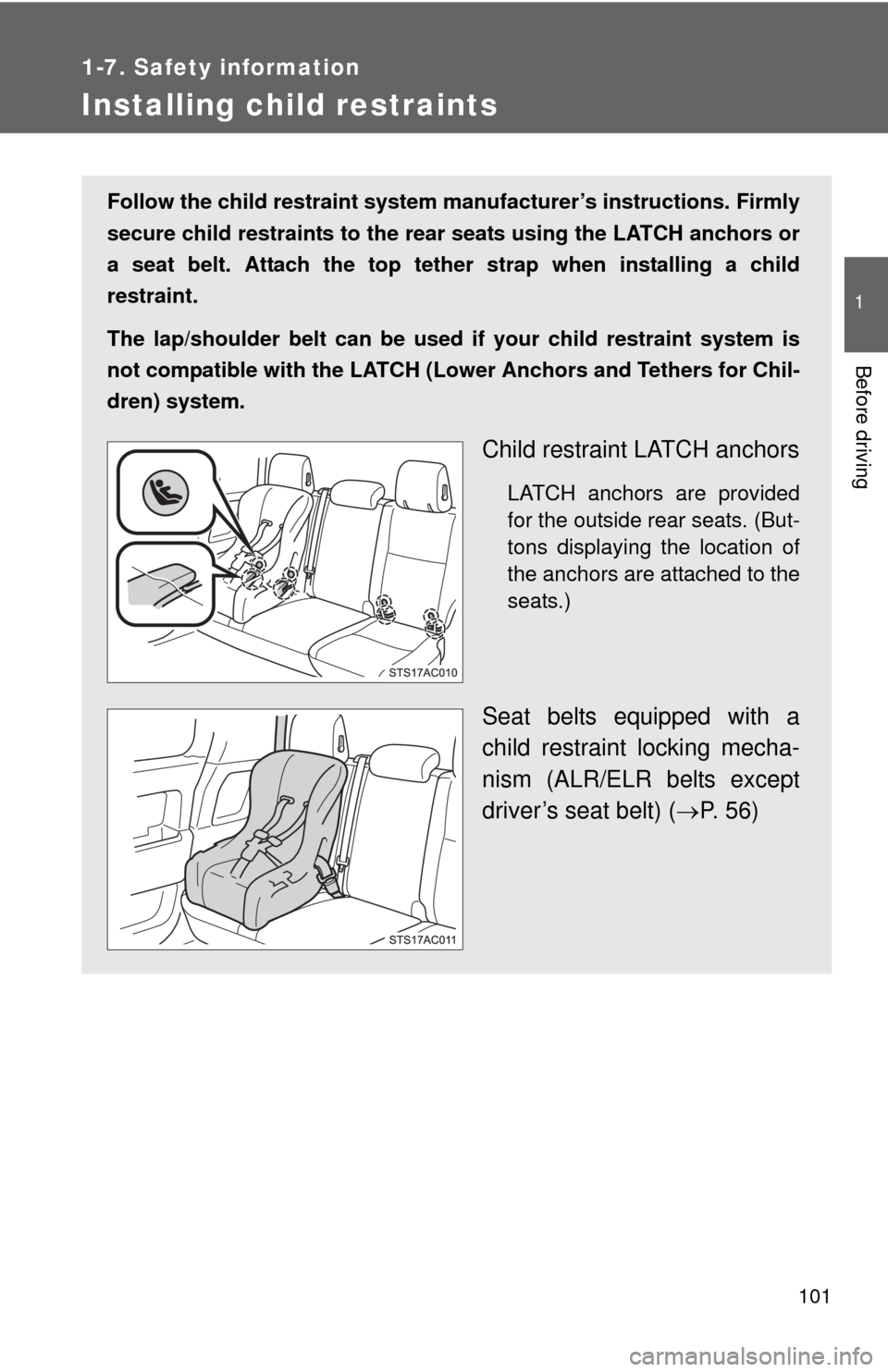
Child restraint LATCH anchors
LATCH anchors are provided
for the outside rear seats. (But-
tons displaying the location of
the anchors are attached to the
seats.)
Seat belts equipped with a
child restraint locking mecha-
nism (ALR/ELR belts except
driver’s seat belt) ( P. 56)
Page 135 of 528
135
2
When driving
2-2. Instrument cluster
Gauges and meters
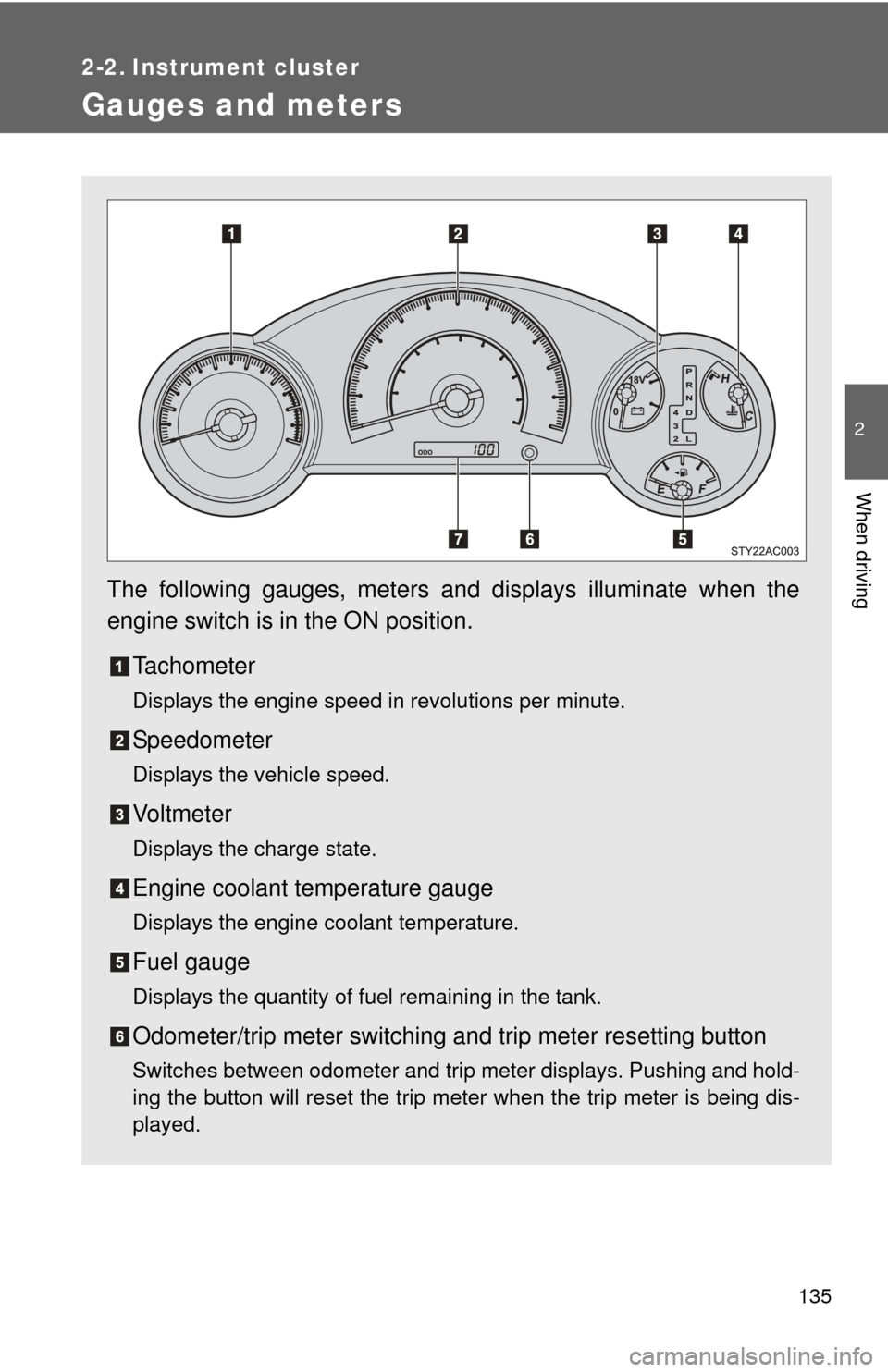
The following gauges, meters and displays illuminate when the
engine switch is in the ON position.Tachometer
Displays the engine speed in revolutions per minute.
Speedometer
Displays the vehicle speed.
Vo l t m e t e r
Displays the charge state.
Engine coolant temperature gauge
Displays the engine coolant temperature.
Fuel gauge
Displays the quantity of fuel remaining in the tank.
Odometer/trip meter switching and trip meter resetting button
Switches between odometer and trip meter displays. Pushing and hold-
ing the button will reset the trip meter when the trip meter is being dis-
played.
Page 136 of 528
136 2-2. Instrument cluster
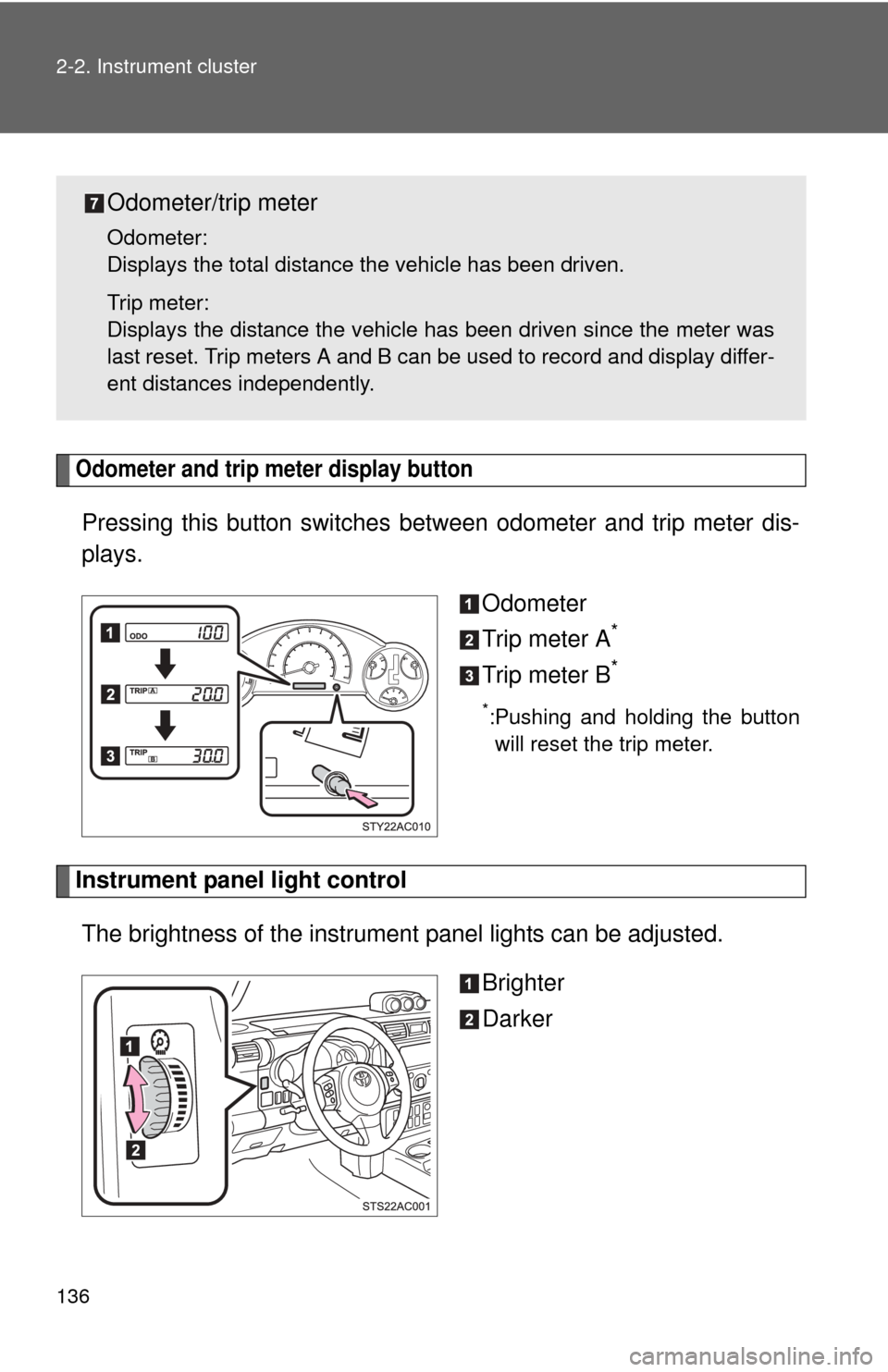
Odometer and trip meter display button
Pressing this button switches between odometer and trip meter dis-
plays.
Odometer
Trip meter A
*
Trip meter B*
*:Pushing and holding the buttonwill reset the trip meter.
Instrument panel light control
The brightness of the instrument panel lights can be adjusted.
Brighter
Darker
Odometer/trip meter
Odometer:
Displays the total distance the vehicle has been driven.
Trip meter:
Displays the distance the vehicle has been driven since the meter was
last reset. Trip meters A and B can be used to record and display differ-
ent distances independently.
Page 141 of 528
141
2-2. Instrument cluster
2
When driving
Accessor y meter
: If equipped
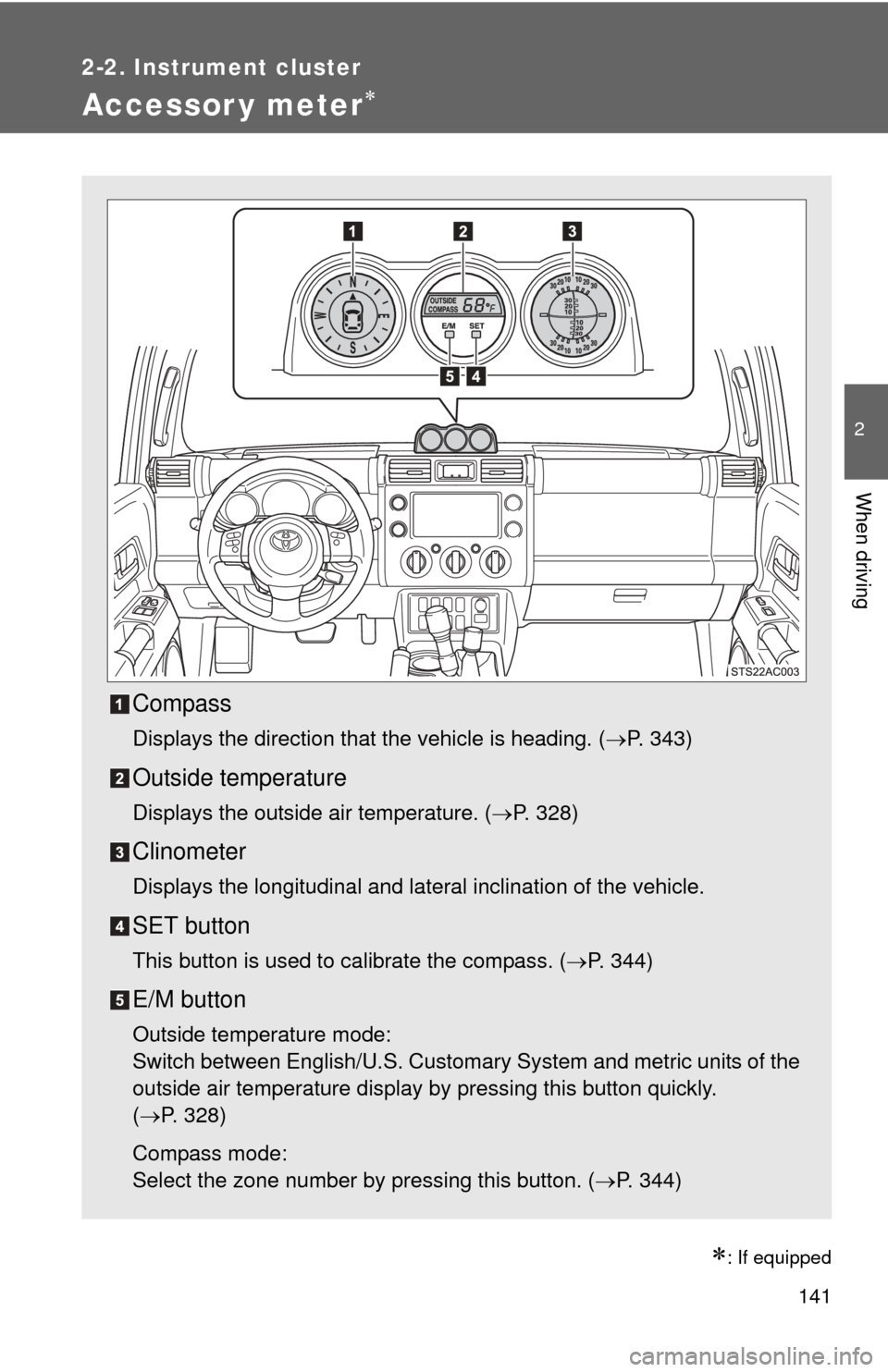
Compass
Displays the direction that the vehicle is heading. (P. 343)
Outside temperature
Displays the outside air temperature. (P. 328)
Clinometer
Displays the longitudinal and lateral inclination of the vehicle.
SET button
This button is used to calibrate the compass. ( P. 344)
E/M button
Outside temperature mode:
Switch between English/U.S. Customary System and metric units of the
outside air temperature display by pressing this button quickly.
(P. 328)
Compass mode:
Select the zone number by pressing this button. ( P. 344)
Page 142 of 528

142 2-2. Instrument cluster
CAUTION
■Caution while driving
Do not adjust the display.
Doing so may cause the driver to mishandle the vehicle and cause an acci-
dent, resulting in death or serious injury.
Page 157 of 528
157
2-4. Using other driving systems
2
When driving
Rear view monitor system
: If equipped
■The rear view monitor system can be operated when
The shift lever is in R, the back door is fully closed and the engine switch is
ON.
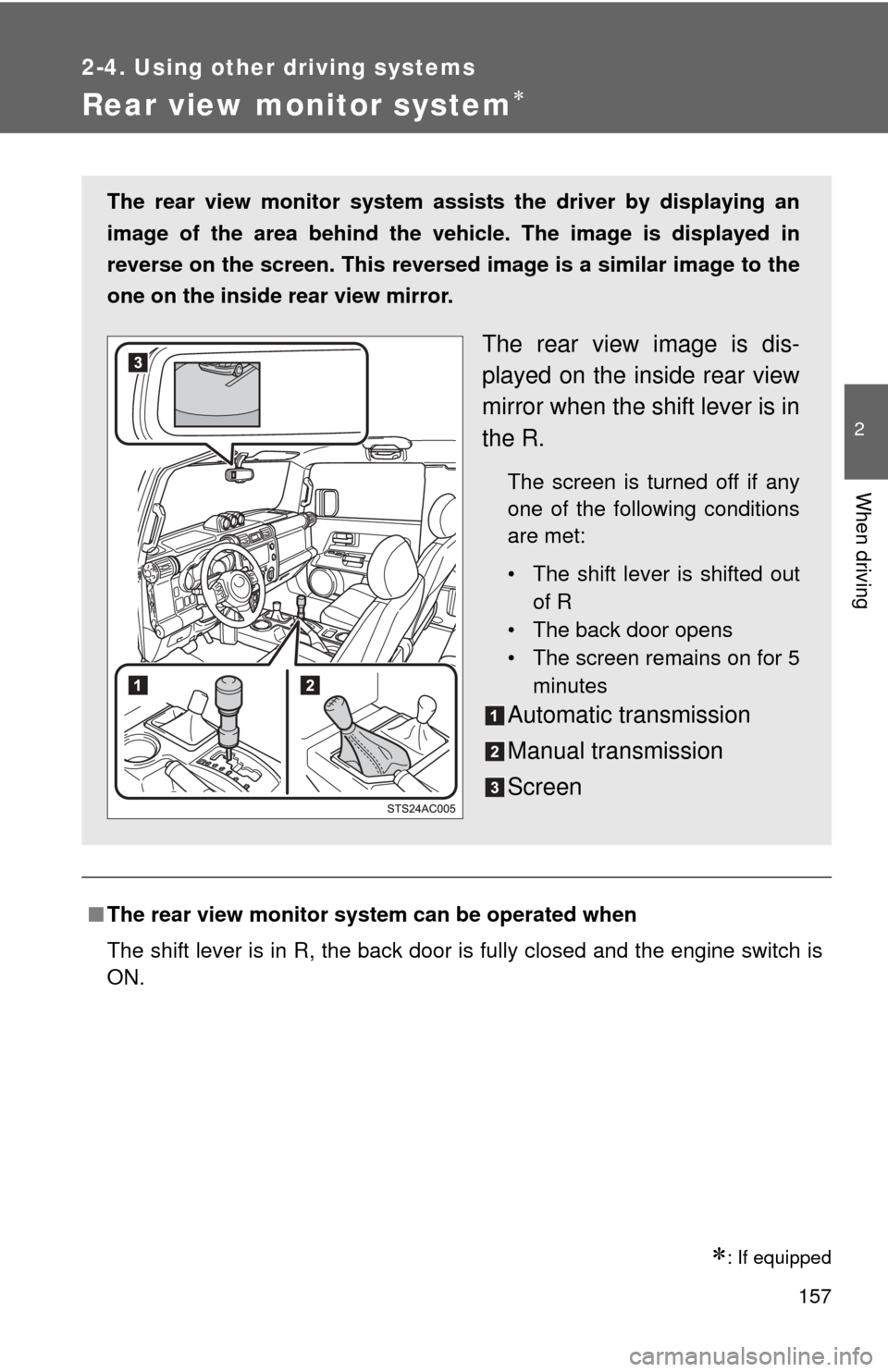
The rear view monitor system assists the driver by displaying an
image of the area behind the veh icle. The image is displayed in
reverse on the screen. This reversed im age is a similar image to the
one on the inside rear view mirror.
The rear view image is dis-
played on the inside rear view
mirror when the shift lever is in
the R.
The screen is turned off if any
one of the following conditions
are met:
• The shift lever is shifted out of R
• The back door opens
• The screen remains on for 5
minutes
Automatic transmission
Manual transmission
Screen
Page 158 of 528
158 2-4. Using other driving systems
■Switching the screen ON/OFF mode
■ Displayed area
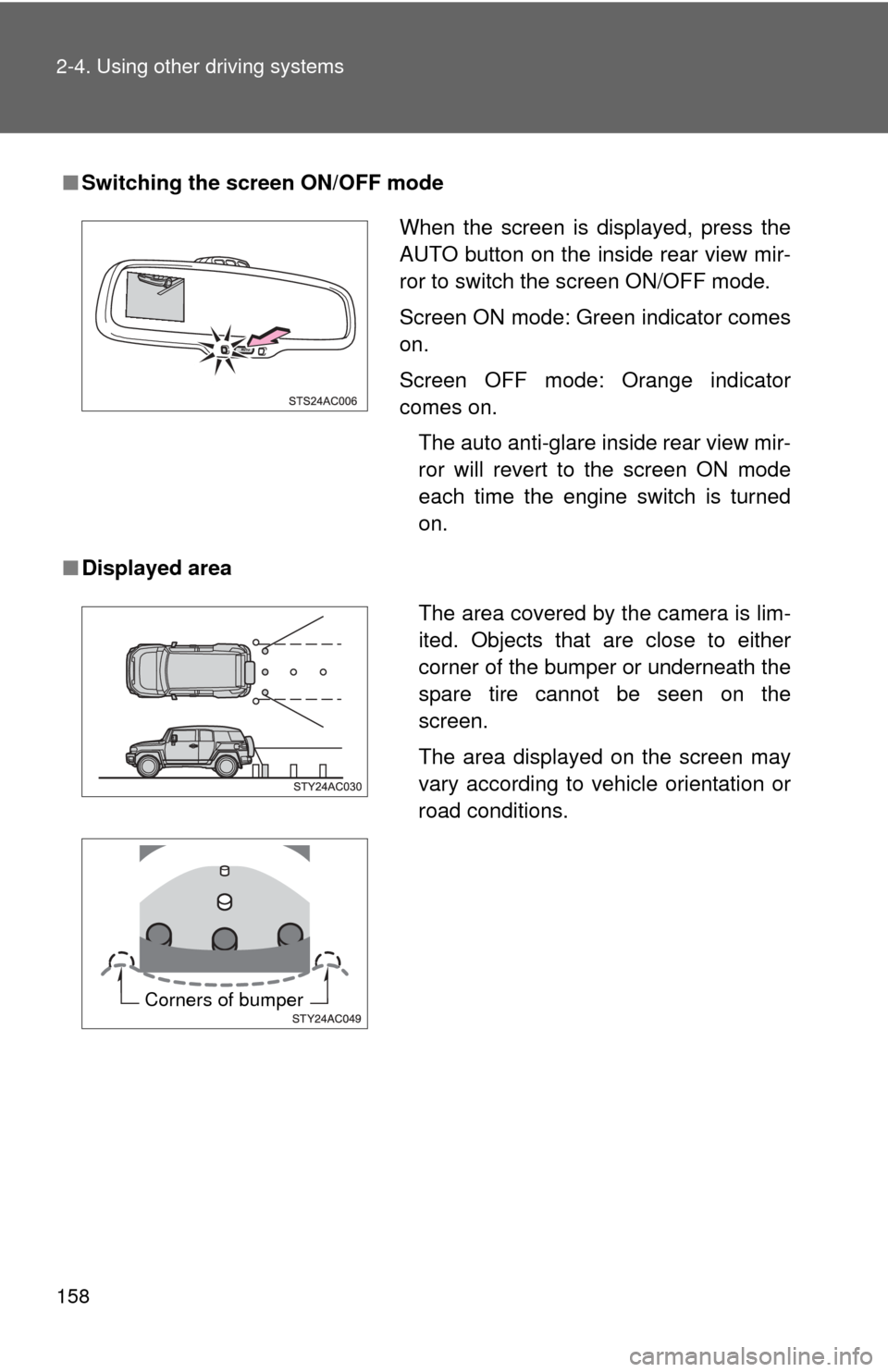
When the screen is displayed, press the
AUTO button on the inside rear view mir-
ror to switch the screen ON/OFF mode.
Screen ON mode: Green indicator comes
on.
Screen OFF mode: Orange indicator
comes on.
The auto anti-glare inside rear view mir-
ror will revert to the screen ON mode
each time the engine switch is turned
on.
The area covered by the camera is lim-
ited. Objects that are close to either
corner of the bumper or underneath the
spare tire cannot be seen on the
screen.
The area displayed on the screen may
vary according to vehicle orientation or
road conditions.
Corners of bumper
Page 160 of 528
160 2-4. Using other driving systems
CAUTION
■When using the rear view monito r system, observe the following pre-
cautions to avoid an accident that coul d result in death or serious inju-
ries.
● Never depend solely on the monitor system when reversing.
● Always check visually and with the mirrors to confirm your intended path is
clear.
● Depicted distances between objects and flat surfaces differ from actual
distances.
■ Conditions which may affect the rear view monitor system
● If the back of the vehicle has been hit, the camera’s position and mounting
angle may have changed. Have the vehicle inspected by your Toyota
dealer.
● Rapid temperature changes, such as when hot water is poured on the
vehicle in cold weather, may cause the system to function abnormally.
● If the camera lens is dirty, it cannot transmit a clear image. Rinse with
water and wipe with a soft cloth. If extremely dirty, wash with a mild
cleanser and rinse.
● The displayed image may be darker and moving images may be slightly
distorted when the system is cold.
NOTICE
●As the camera has a water proof construction, do not detach, disassemble
or modify it. This may cause incorrect operation.
● If the camera lens becomes dirty, it cannot transmit a clear image. If water
droplets, snow, or mud adhere to the lens, rinse with water and wipe with a
soft cloth. If the lens is extremely dirty, wash it with a mild cleanser and
rinse.
● Do not allow organic solvent, car wax, window cleaner or glass coat to
adhere to the camera. If this happens, wipe it off as soon as possible.
● When washing the vehicle, do not apply intensive bursts of water to the
camera or camera area. Doing so may result in the camera malfunction-
ing.
Page 205 of 528
Interior features3
205
3-3. Using the Bluetooth® audio
system
Bluetooth
® audio
system ........................... 262
Using the Bluetooth
®
audio system.................. 265
Operating a Bluetooth
®
enabled portable
player ............................. 270
Setting up a Bluetooth
®
enabled portable
player ............................. 272
Bluetooth
® audio system
setup .............................. 277
3-4. Using the hands-free phone system (for cellular phone)
Hands-free phone system features .......................... 278
Using the hands-free phone system ................ 282
Making a phone call ......... 291
Setting a cellular phone ... 296
Security and system setup .............................. 302
Using the phone book ...... 307 3-5. Using the interior lights
Interior lights list ............... 315
• Interior lights .................. 316
• Personal lights ............... 317
3-6. Using the storage features List of storage features .... 318
• Glove box....................... 319
• Cup holders (front) ......... 319
• Cup holders (rear) .......... 322
• Bottle holders ................. 323
• Auxiliary box .................. 324
3-7. Other interior features Sun visors ........................ 325
Vanity mirrors ................... 326
Clock ................................ 327
Outside temperature display............................ 328
Power outlet (12V DC) ..... 329
Power outlet (115V AC) ... 330
Armrest ............................ 336
Floor mat .......................... 337
Luggage storage box (vehicles without sub
woofer) ........................... 339
Luggage compartment features .......................... 340
Compass .......................... 343