check engine TOYOTA FR-S 2013 (in English) User Guide
[x] Cancel search | Manufacturer: TOYOTA, Model Year: 2013, Model line: FR-S, Model: TOYOTA FR-S 2013Pages: 412, PDF Size: 5.3 MB
Page 134 of 412

134 2-1. Driving procedures
NOTICE
■Avoiding damage to vehicle parts
●Do not turn the steering wheel fully in either direction and hold it there for
an extended period of time.
Doing so may damage the power steering motor.
● When driving over bumps in the road, drive as slowly as possible to avoid
damaging the wheels, underside of the vehicle, etc.
● On vehicles with an automatic transmission, do not race the engine for
more than 5 seconds in any position except the N or P position when the
brake is applied or when chocks are used in the wheels. This may cause
the transmission fluid to overheat.
■ If you get a flat tire while driving
A flat or damaged tire may cause the following situations. Hold the steering
wheel firmly and gradually depress the br ake pedal to slow down the vehicle.
● It may be difficult to control your vehicle.
● The vehicle will make abnormal sounds or vibrations.
● The vehicle will lean abnormally.
Information on what to do in case of a flat tire ( P. 314)
■ When encountering flooded roads
Do not drive on a road that has flooded after heavy rain etc. Doing so may
cause the following serious damage to the vehicle:
●Engine stalling
● Short in electrical components
● Engine damage caused by water immersion
In the event that you drive on a flooded road and the vehicle is flooded, be
sure to have your Scion dealer check the following:
● Brake function
● Changes in quantity and quality of oil and fluid used for the engine, trans-
mission, differential, etc.
● Lubricant condition for the propeller shaft, bearings and suspension joints
(where possible) and the function of all joints, bearings, etc.
Page 135 of 412
135
2-1. Driving procedures
2
When driving
Engine (ignition) switch
■Starting the engine
Vehicles with an au tomatic transmission
Check that the parking brake is set.
Check that the shift lever is set in P.
Firmly depress the brake pedal.
Turn the engine switch to the “START” position to start the
engine.
Vehicles with a manual transmission Check that the parking brake is set.
Check that the shift lever is set in N.
Firmly depress the clutch pedal.
Turn the engine switch to the “START” position to start the
engine.
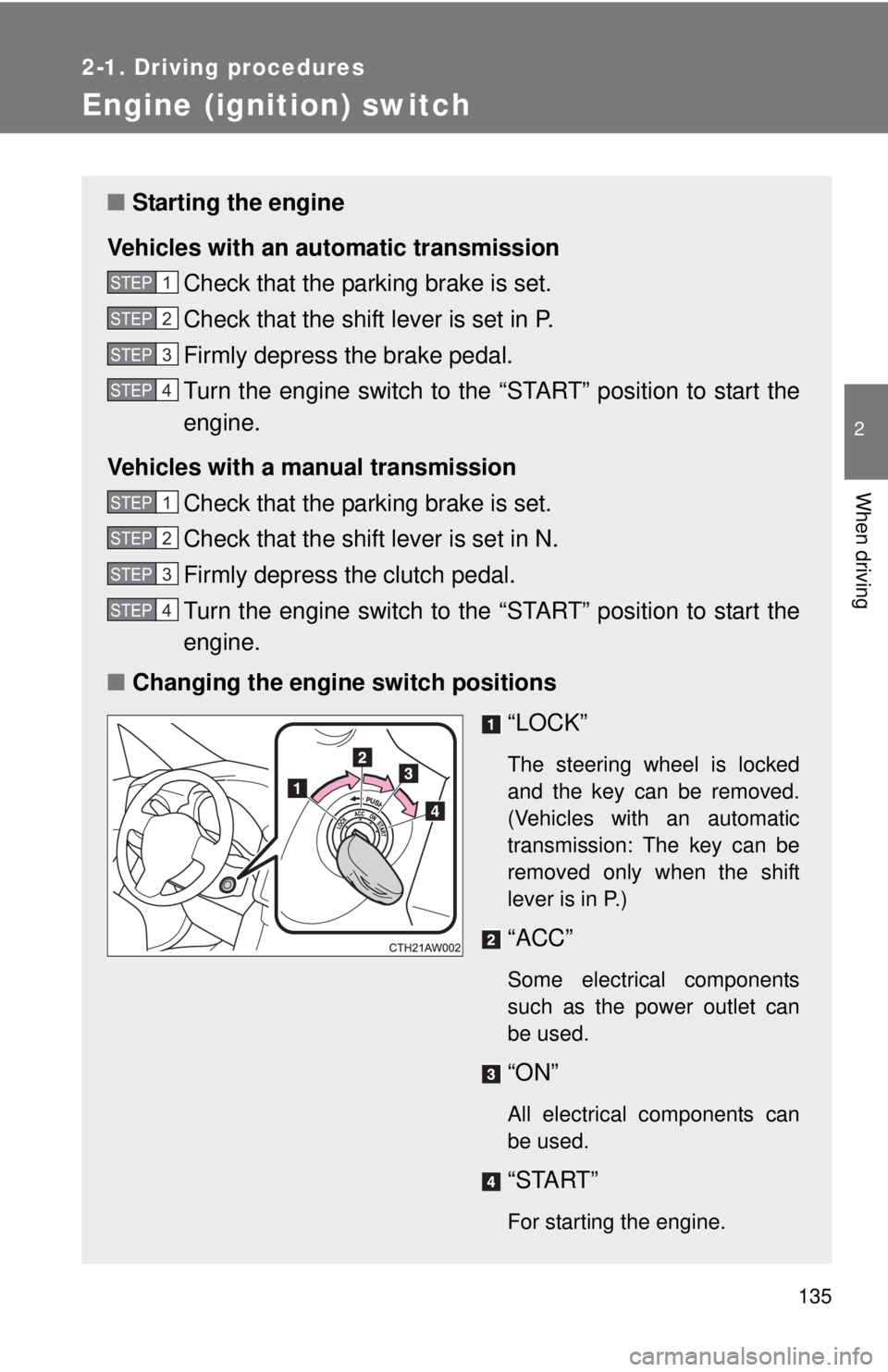
■ Changing the engine switch positions
“LOCK”
The steering wheel is locked
and the key can be removed.
(Vehicles with an automatic
transmission: The key can be
removed only when the shift
lever is in P.)
“ACC”
Some electrical components
such as the power outlet can
be used.
“ON”
All electrical components can
be used.
“START”
For starting the engine.
STEP 1
STEP 2
STEP 3
STEP 4
STEP 1
STEP 2
STEP 3
STEP 4
Page 137 of 412

137
2-1. Driving procedures
2
When driving
CAUTION
■
When starting the engine
Always start the engine while sitting in the driver's seat. Do not depress the
accelerator pedal while starting the engine under any circumstances.
Doing so may cause an accident resulting in death or serious injury.
■ Caution when driving
Do not turn the engine switch to the “LOCK” position while driving. If, in an
emergency, you must turn the engine off while the vehicle is moving, turn the
engine switch only to the “ACC” position to stop the engine. An accident may
result if the engine is stopped while driving. (P. 337)
NOTICE
■To prevent battery discharge
Do not leave the engine switch in the “ACC” or “ON” position for long periods
of time without the engine running.
■ When starting the engine
●Do not crank the engine for more than 10 seconds at a time. This may
overheat the starter and wiring system.
If the engine does not start, turn the engine switch to the “LOCK” position
and try to start the engine again after waiting for 10 seconds or more.
● Do not race a cold engine.
● If the engine becomes difficult to start or stalls frequently, have your vehi-
cle checked by your Scion dealer immediately.
Page 148 of 412
148
2-1. Driving procedures
Tur n signal lever
■Turn signals can be operated when
The engine switch is in the “ON” position.
■ If the indicators flash faster than usual
Check that a light bulb in the turn signal lights has not burned out.
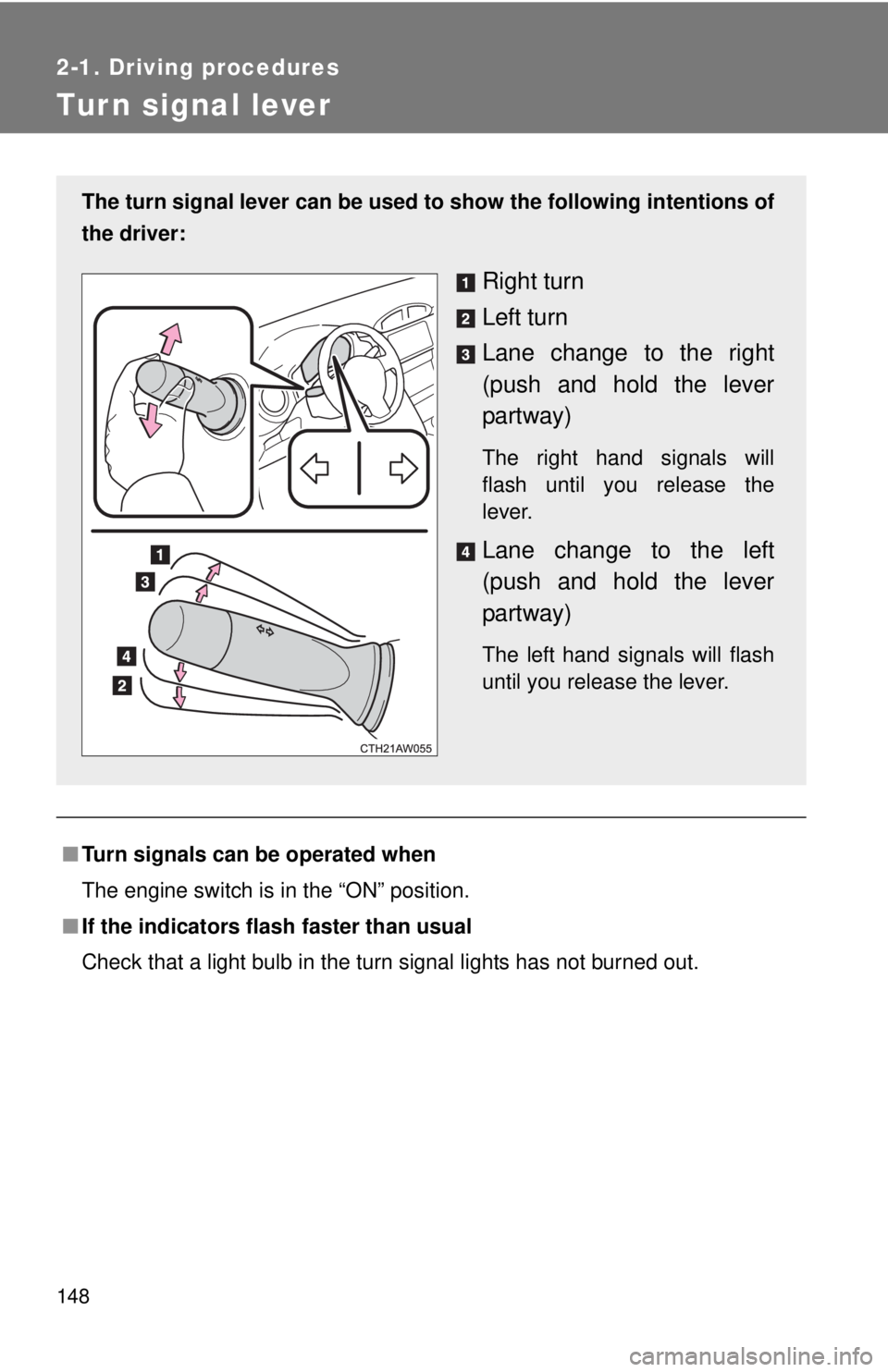
The turn signal lever can be used to show the following intentions of
the driver:
Right turn
Left turn
Lane change to the right
(push and hold the lever
partway)
The right hand signals will
flash until you release the
lever.
Lane change to the left
(push and hold the lever
partway)
The left hand signals will flash
until you release the lever.
Page 154 of 412

154 2-2. Instrument cluster
NOTICE
■To prevent damage to the engine and its components
●Do not let the indicator needle of the tachometer enter the red zone, which
indicates the maximum engine speed.
● The engine may be overheating if the temperature gauge is in the red
zone (H). In this case, immediately stop the vehicle in a safe place, and
check the engine after it has cooled completely. (
P. 332)
Page 157 of 412
157
2-2. Instrument cluster
2
When driving
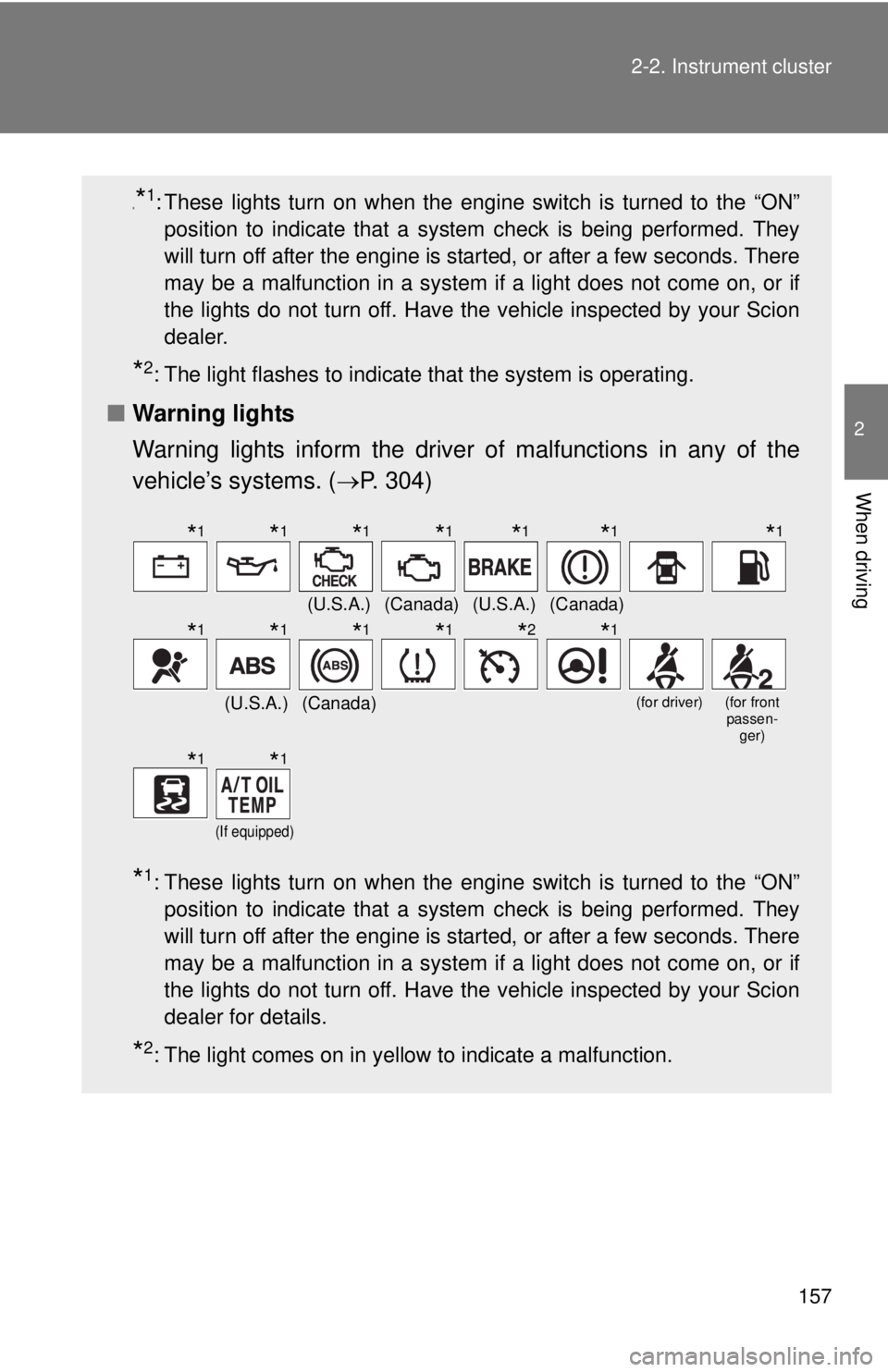
x*1: These lights turn on when the engine switch is turned to the “ON”
position to indicate that a system check is being performed. They
will turn off after the engine is started, or after a few seconds. There
may be a malfunction in a system if a light does not come on, or if
the lights do not turn off. Have the vehicle inspected by your Scion
dealer.
*2: The light flashes to indicate that the system is operating.
■ Warning lights
Warning lights inform the driver of malfunctions in any of the
vehicle’s systems. ( P. 304)
*1: These lights turn on when the engine switch is turned to the “ON”
position to indicate that a system check is being performed. They
will turn off after the engine is started, or after a few seconds. There
may be a malfunction in a system if a light does not come on, or if
the lights do not turn off. Have the vehicle inspected by your Scion
dealer for details.
*2: The light comes on in yellow to indicate a malfunction.
(U.S.A.)(Canada)(U.S.A.)(Canada)
(U.S.A.)(Canada)(for driver)(for front passen- ger)
(If equipped)
*1*1*1*1*1*1*1
*1*1*1*1*2*1
*1*1
Page 167 of 412
167
2-3. Operating the lights and windshield wipers
2
When driving
■
The windshield wipers and washer can be operated when
The engine switch is in the “ON” position.
■ If no windshield washer fluid sprays
Check that the washer nozzles are not blocked if there is washer fluid in the
windshield washer fluid reservoir.
CAUTION
■Caution regarding the use of washer fluid
When it is cold, do not use the washer fluid until the windshield becomes
warm. The fluid may freeze on the windshield and cause low visibility. This
may lead to an accident, resulting in death or serious injury.
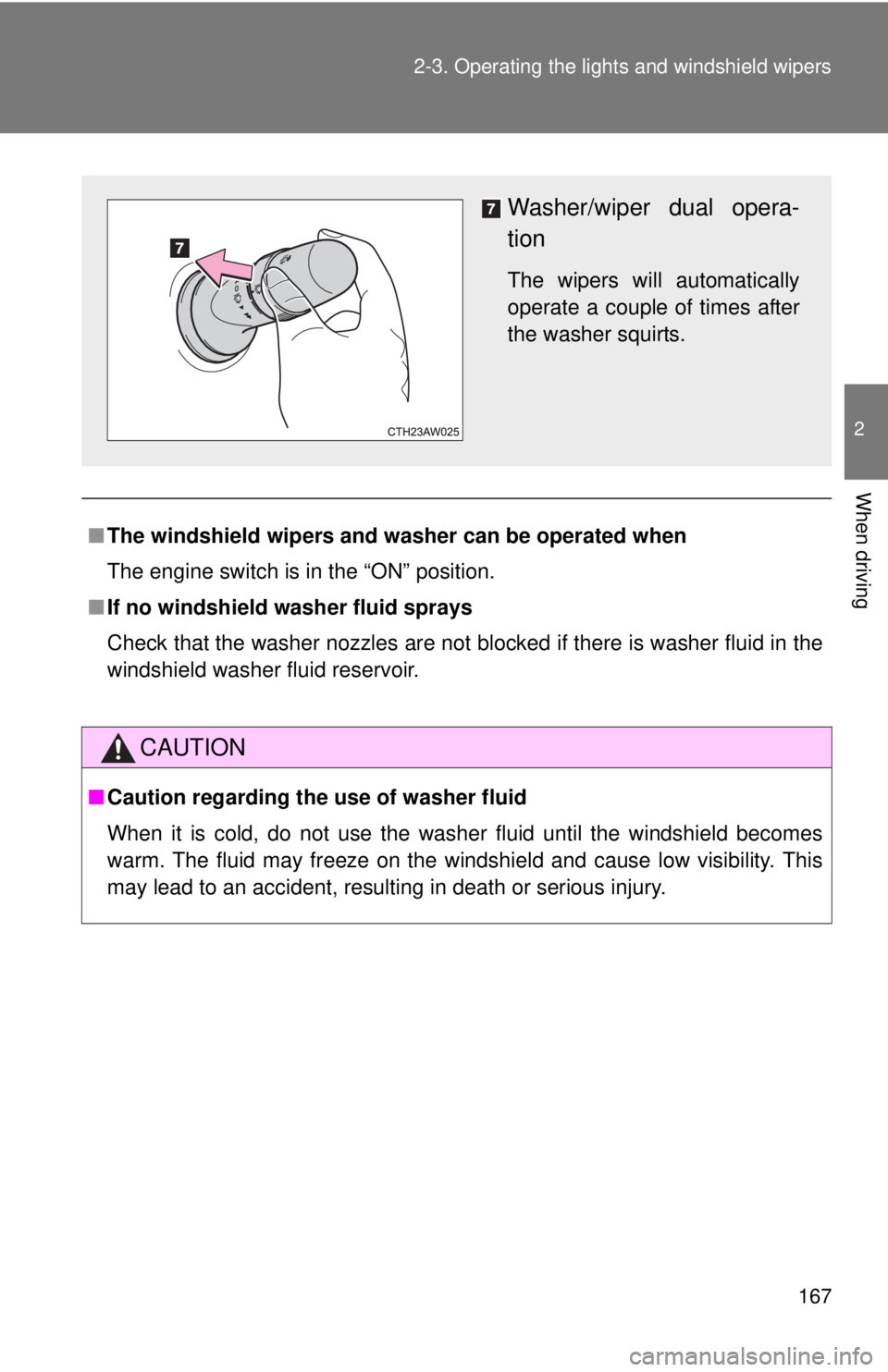
Washer/wiper dual opera-
tion
The wipers will automatically
operate a couple of times after
the washer squirts.
Page 184 of 412
184
2-5. Driving information
Winter driving tips
Carry out the necessary preparations and inspections before driving
the vehicle in winter. Always drive the vehicle in a manner appropri-
ate to the prevailing weather conditions.
■ Pre-winter preparations
●Use fluids that are appropriate to the prevailing outside tem-
peratures.
• Engine oil
• Washer fluid
● Have a service technician inspect the condition of the battery.
● Have the vehicle fitted with four snow tires.
Make sure to install 4 tires that are of the specified size, and that all
4 tires are the same size, same maker, same brand and tread pat-
tern.
■Before driving the vehicle
Perform the following according to the driving conditions.
●Do not try to forcibly open a window or move a wiper that is
frozen. Pour warm water over the frozen area to melt the ice.
Wipe away the water immediately to prevent it from freezing.
● To ensure proper operation of th e climate control system fan,
remove any snow that has accumulated on the air inlet vents
in front of the windshield.
● Check for and remove any excess ice or snow that may have
accumulated on the exterior li ghts, vehicle's roof, chassis,
around the tires or on the brakes.
● Remove any snow or mud from the bottom of your shoes
before getting in the vehicle.
Page 216 of 412
216 3-5. Other interior features
CAUTION
Observe the following precautions.
Failure to do so may cause the driver's floor mat to slip, possibly interfering
with the pedals while driving. An unexpectedly high speed may result or it may
become difficult to stop the vehicle, leading to a serious accident.
■When installing a floor mat
●Do not use floor mats designed for other models or different model year
vehicles, even if they are Scion Genuine floor mats.
● Front: Always install the floor mat securely using the retaining hooks (clips)
provided.
● Do not use two or more floor mats on top of each other.
● Do not place the floor mat bottom-side up or upside-down.
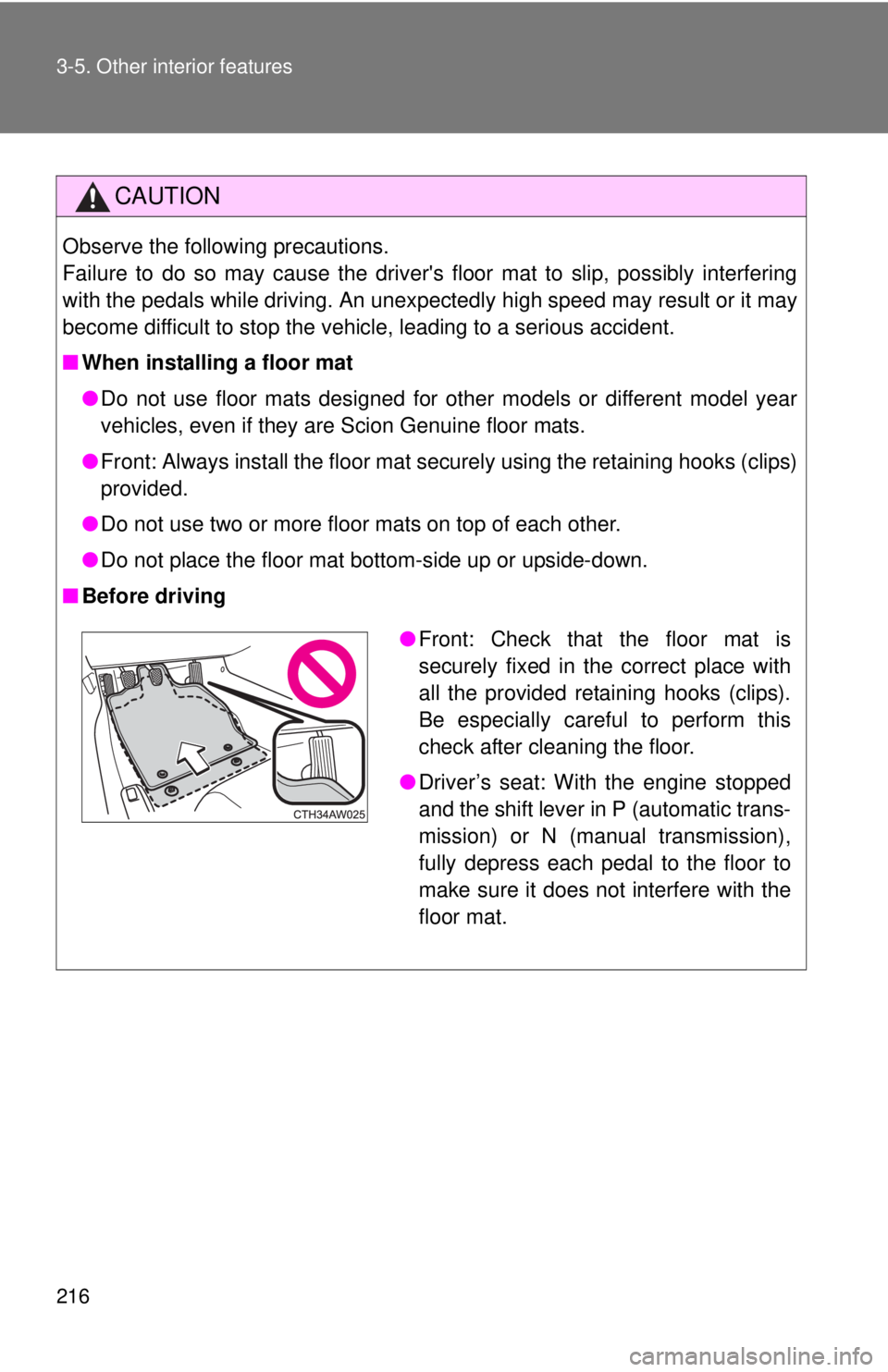
■ Before driving
●Front: Check that the floor mat is
securely fixed in the correct place with
all the provided retaining hooks (clips).
Be especially careful to perform this
check after cleaning the floor.
● Driver’s seat: With the engine stopped
and the shift lever in P (automatic trans-
mission) or N (manual transmission),
fully depress each pedal to the floor to
make sure it does not interfere with the
floor mat.
Page 219 of 412
Maintenance and care4
219
4-1. Maintenance and careCleaning and protecting the vehicle exterior......... 220
Cleaning and protecting the vehicle interior.......... 224
4-2. Maintenance Maintenance requirements .................. 228
General maintenance....... 230
Emission inspection and maintenance (I/M)
programs........................ 233 4-3. Do-it-yourself
maintenance
Do-it-yourself service precautions .................... 234
Hood ................................ 237
Positioning a floor jack ..... 239
Engine compartment ........ 241
Tires ................................. 254
Tire inflation pressure ...... 261
Wheels ............................. 265
Air conditioning filter......... 268
Wireless remote control key battery ..................... 270
Checking and replacing fuses .............................. 273
Light bulbs........................ 281