door lock TOYOTA FR-S 2013 Owners Manual (in English)
[x] Cancel search | Manufacturer: TOYOTA, Model Year: 2013, Model line: FR-S, Model: TOYOTA FR-S 2013Pages: 412, PDF Size: 5.3 MB
Page 1 of 412

TABLE OF CONTENTS
1
1Before drivingAdjusting and operating features such as door locks,
mirrors, and steering column.
2When drivingDriving, stopping and safe-driving information.
3Interior fea-
turesAir conditioning and audio systems, as well as other in-
terior features for a comfortable driving experience.
4Maintenance
and careCleaning and protecting your vehicle, performing do-it-
yourself maintenance, and maintenance information.
5When trouble
arisesWhat to do if the vehicle needs to be towed, gets a flat
tire, or is involved in an accident.
6Vehicle
specificationsDetailed vehicle information.
7For ownersReporting safety defects for US owners, and seat belt
and SRS airbag instructions for Canadian owners
IndexAlphabetical listing of information contained in this
manual.
Page 2 of 412

TABLE OF CONTENTSIndex
2
1-1. Key informationKeys ..................................... 20
1-2. Opening, closing and locking the doors and
trunk
Wireless remote control ....... 22
Doors.................................... 25
Trunk .................................... 28
1-3. Adjustable components (seats, mirrors,
steering wheel)
Front seats ........................... 33
Rear seats ............................ 36
Head restraints ..................... 38
Seat belts ............................. 40
Steering wheel ..................... 47
Anti-glare inside rear view mirror .................................. 48
Outside rear view mirrors ..... 49
1-4. Opening and closing the windows
Power windows .................... 52
1-5. Refueling Opening the fuel tank cap .... 55
1-6. Theft deterrent system Engine immobilizer system ................................ 59
Theft prevention labels (U.S.A.) .............................. 61 1-7. Safety information
Correct driving posture ......... 62
SRS airbag (Supplemental Restraint System airbag) .... 64
Front passenger occupant classification system ........... 99
Child restraint systems ....... 107
Installing child restraints ..... 111
2-1. Driving procedures Driving the vehicle .............. 122
Engine (ignition) switch....... 135
Automatic transmission ...... 138
Manual Transmission ......... 145
Turn signal lever ................. 148
Parking brake ..................... 149
Horn .................................... 150
2-2. Instrument cluster Gauges and meters ............ 151
Indicators and warning lights ................................. 155
Multi-information display ..... 159
2-3. Operating the lights and windshield wipers
Headlight switch ................. 164
Windshield wipers and washer .............................. 166
2-4. Using other driving systems
Cruise control ..................... 169
Driving assist systems ........ 174
1Before driving
2When driving
Page 9 of 412
9
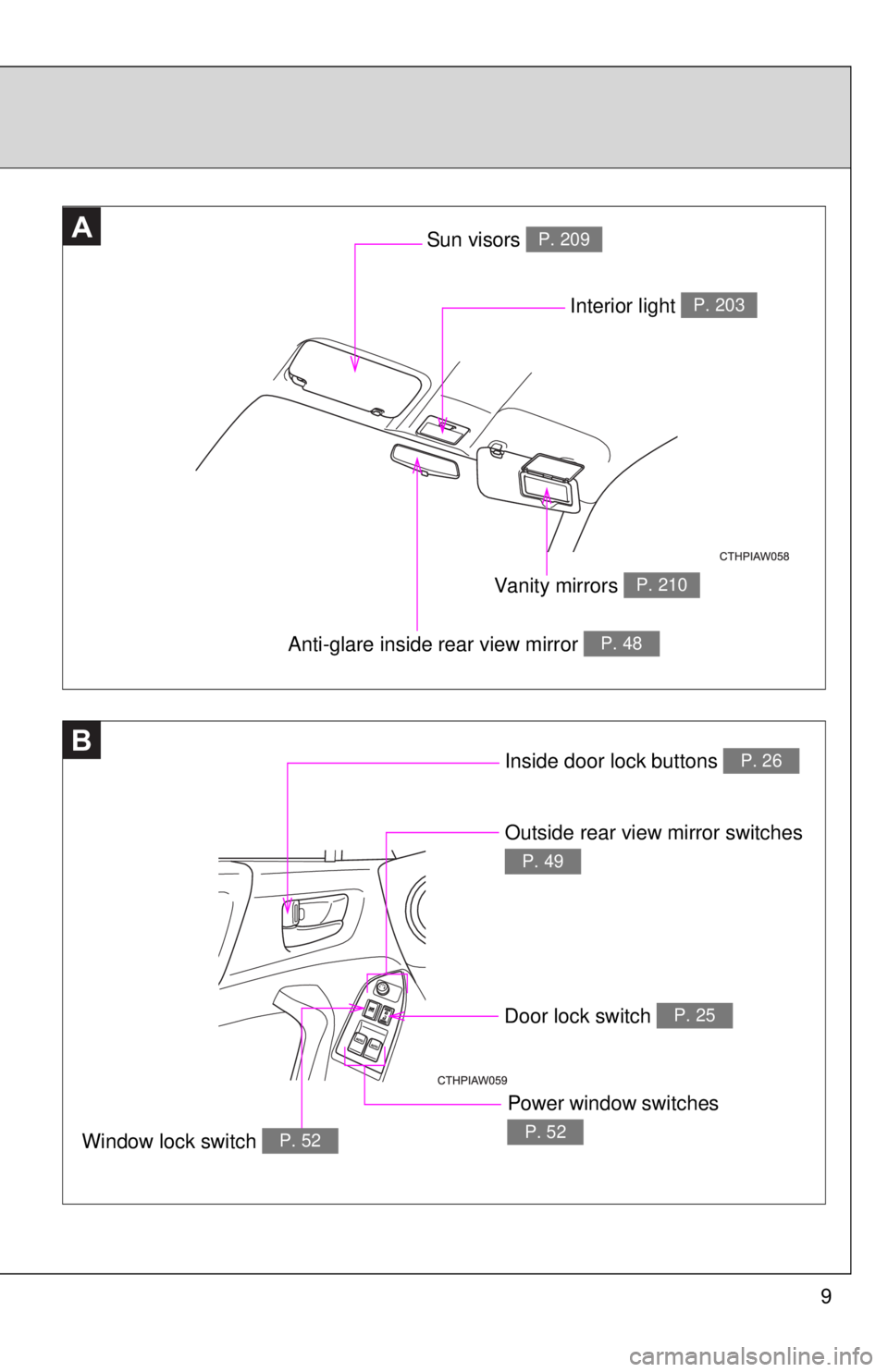
B
AA
Anti-glare inside rear view mirror P. 48
Interior light P. 203
Vanity mirrors P. 210
Sun visors P. 209
Inside door lock buttons P. 26
Outside rear view mirror switches
P. 49
Window lock switch P. 52
Power window switches
P. 52
Door lock switch P. 25
Page 11 of 412
11
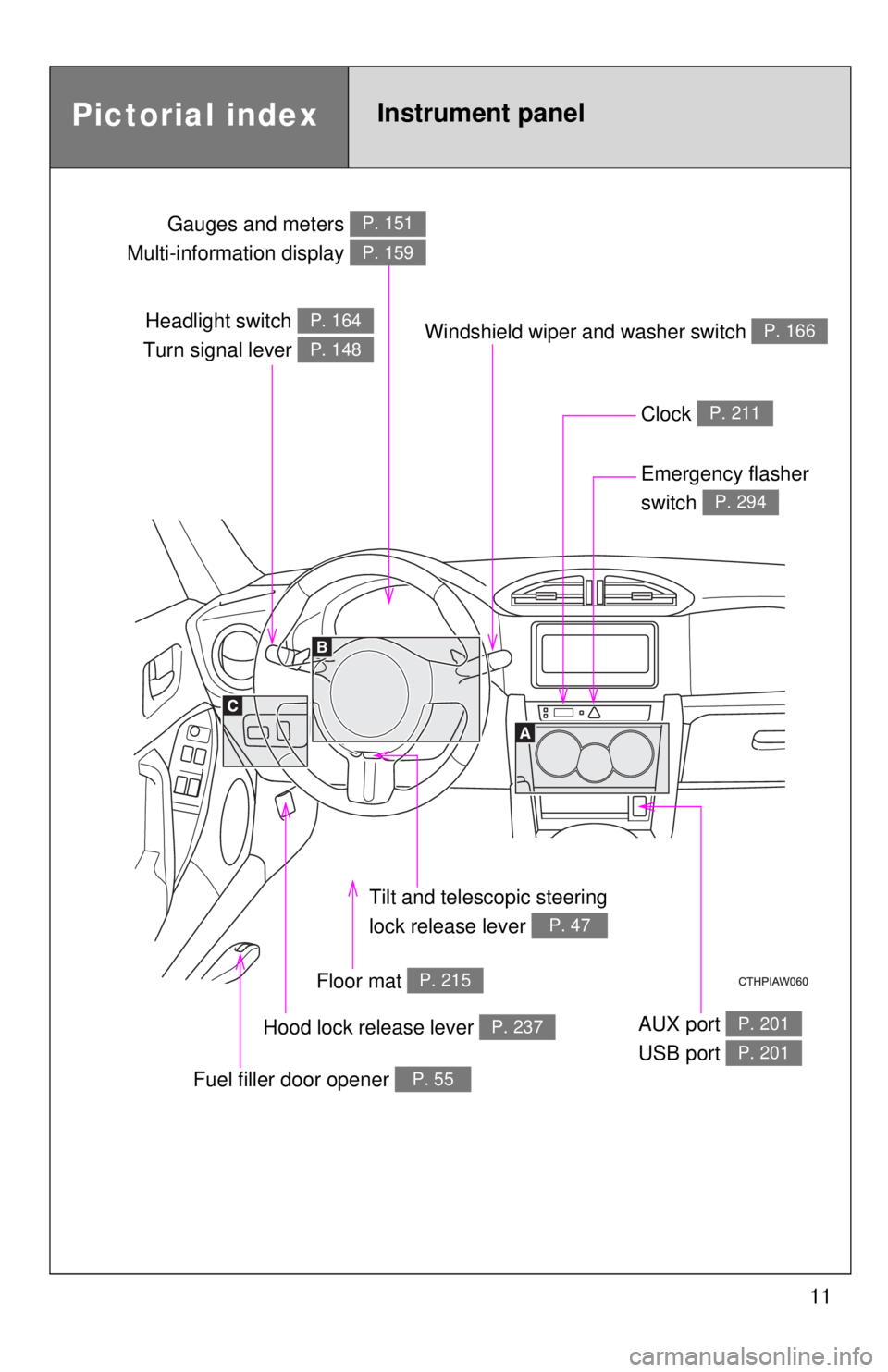
Headlight switch
Turn signal lever P. 164
P. 148
Gauges and meters
Multi-information display P. 151
P. 159
Clock P. 211
Windshield wiper and washer switch P. 166
Emergency flasher
switch
P. 294
Tilt and tele scopic steering
lock release lever
P. 47
Floor mat P. 215
Hood lock release lever P. 237
Fuel filler door opener P. 55
AUX port
USB port P. 201
P. 201
Pictorial indexInstrument panel
Page 19 of 412
Before driving1
19
1-1. Key informationKeys ................................... 20
1-2. Opening, closing and locking the doors and
trunk
Wireless remote control ..... 22
Doors ................................. 25
Trunk .................................. 28
1-3. Adjustable components (seats, mirrors,
steering wheel)
Front seats ......................... 33
Rear seats.......................... 36
Head restraints................... 38
Seat belts ........................... 40
Steering wheel ................... 47
Anti-glare inside rear view mirror ....................... 48
Outside rear view mirrors.............................. 49
1-4. Opening and closing the windows
Power windows .................. 52 1-5. Refueling
Opening the fuel tank cap ................................... 55
1-6. Theft deterrent system Engine immobilizer system ............................. 59
Theft prevention labels (U.S.A.) ............................ 61
1-7. Safety information Correct driving posture....... 62
SRS airbag (Supplemental Restraint System
airbag).............................. 64
Front passenger occupant classification system ........ 99
Child restraint systems..... 107
Installing child restraints ........................ 111
Page 22 of 412
22
1-2. Opening, closing and locking the doors and trunk
Wireless remote control
■Operation signals
Doors: A buzzer sounds and the emergency flashers flash to indicate that
the doors have been locked/unlocked. (Locked: once; Unlocked:
twice)
Trunk: A buzzer sounds to indicate that the trunk has been unlocked.
■ Panic mode
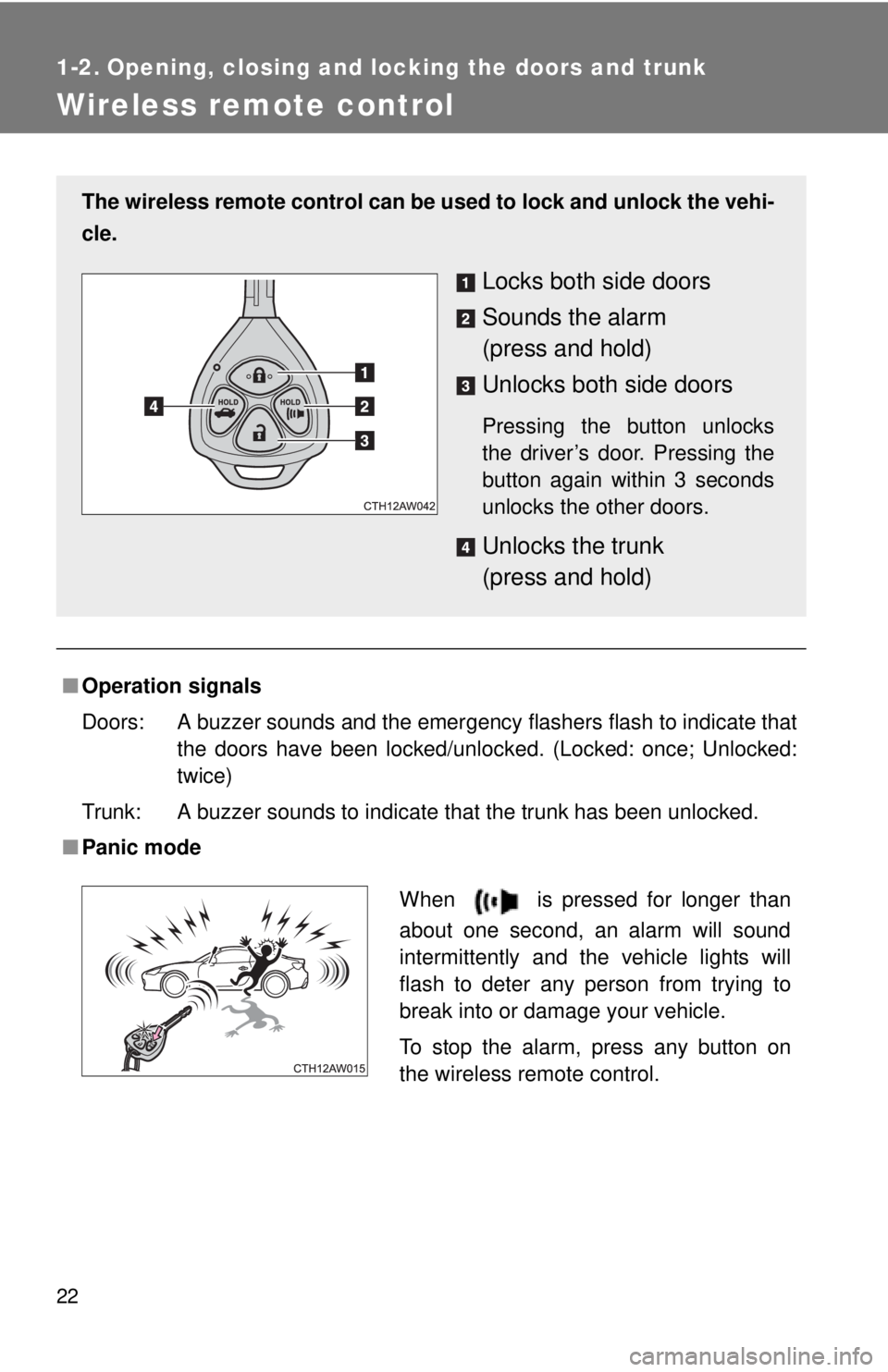
The wireless remote control can be used to lock and unlock the vehi-
cle.
Locks both side doors
Sounds the alarm
(press and hold)
Unlocks both side doors
Pressing the button unlocks
the driver’s door. Pressing the
button again within 3 seconds
unlocks the other doors.
Unlocks the trunk
(press and hold)
When is pressed for longer than
about one second, an alarm will sound
intermittently and the vehicle lights will
flash to deter any person from trying to
break into or damage your vehicle.
To stop the alarm, press any button on
the wireless remote control.
Page 23 of 412
23
1-2. Opening, closing and locking the doors and trunk
1
Before driving
■
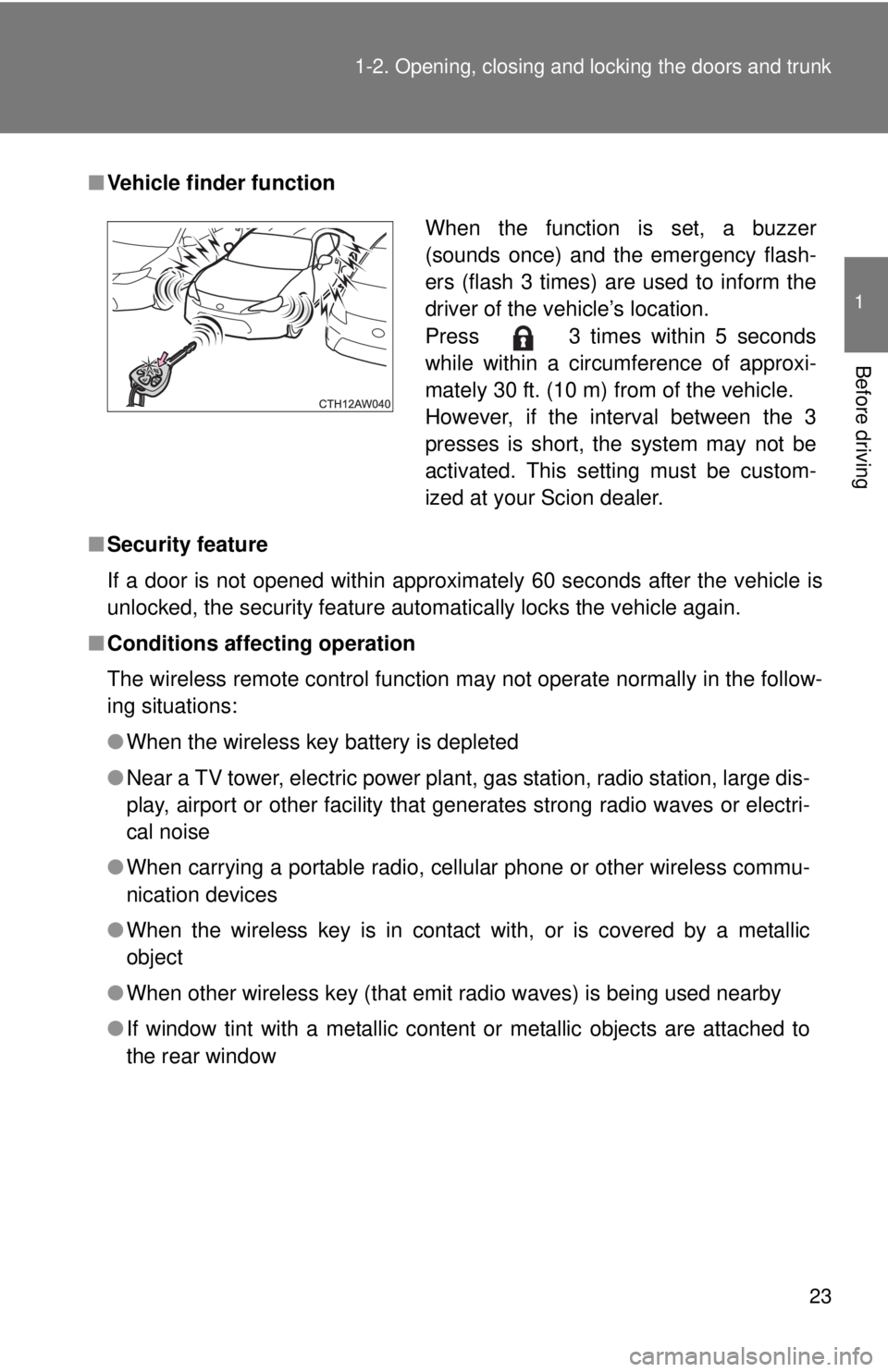
Vehicle finder function
■ Security feature
If a door is not opened within approximately 60 seconds after the vehicle is
unlocked, the security feature automatically locks the vehicle again.
■ Conditions affecting operation
The wireless remote control function may not operate normally in the follow-
ing situations:
●When the wireless key battery is depleted
● Near a TV tower, electric power plant, gas station, radio station, large dis-
play, airport or other facility that generates strong radio waves or electri-
cal noise
● When carrying a portable radio, cell ular phone or other wireless commu-
nication devices
● When the wireless key is in contact with, or is covered by a metallic
object
● When other wireless key (that emit radio waves) is being used nearby
● If window tint with a metallic content or metallic objects are attached to
the rear window
When the function is set, a buzzer
(sounds once) and the emergency flash-
ers (flash 3 times) are used to inform the
driver of the vehicle’s location.
Press 3 times within 5 seconds
while within a circumference of approxi-
mately 30 ft. (10 m) from of the vehicle.
However, if the interval between the 3
presses is short, the system may not be
activated. This setting must be custom-
ized at your Scion dealer.
Page 24 of 412

24 1-2. Opening, closing and locking the doors and trunk
■Key battery depletion
If the wireless remote control function does not operate, the battery may be
depleted. Replace the battery when necessary. ( P. 270)
■ When the wireless remote control battery is fully depleted
P. 270
■ Customization that can be conf igured at your Scion dealer
Settings (e.g. wireless remote control system) can be changed.
(Customizable features P. 369)
■ Certification for wireless remote control
For vehicles sold in the U.S.A.
FCC ID: HYQ23AAA FCC ID: HYQ12BBY
NOTE:
This device complies with part 15 of the FCC Rules. Operation is subject to
the following two conditions: (1) This device may not cause harmful interfer-
ence, and (2) this device must accept any interference received, including
interference that may cause undesired operation.
FCC WARNING:
Changes or modifications not expressly approved by the party responsible
for compliance could void the user's authority to operate the equipment.
For vehicles sold in Canada
NOTE:
Operation is subject to the following two conditions: (1) this device may not
cause interference, and (2) this device must accept any interference, includ-
ing interference that may cause undesired operation of the device.
NOTE:
L’utilisation de ce dispositif est autorisée seulement aux deux conditi\
ons sui-
vantes: (1) il ne doit pas produire de brouillage, et (2) l’utilisateur du disposi-
tif doit être prêt à accepter tout brouillage radioélectrique reçu, même si ce
brouillage est susceptible de compromettre le fonctionnement du dispositif.
Page 25 of 412
25
1
1-2. Opening, closing and locking the doors and trunk
Before driving
Doors
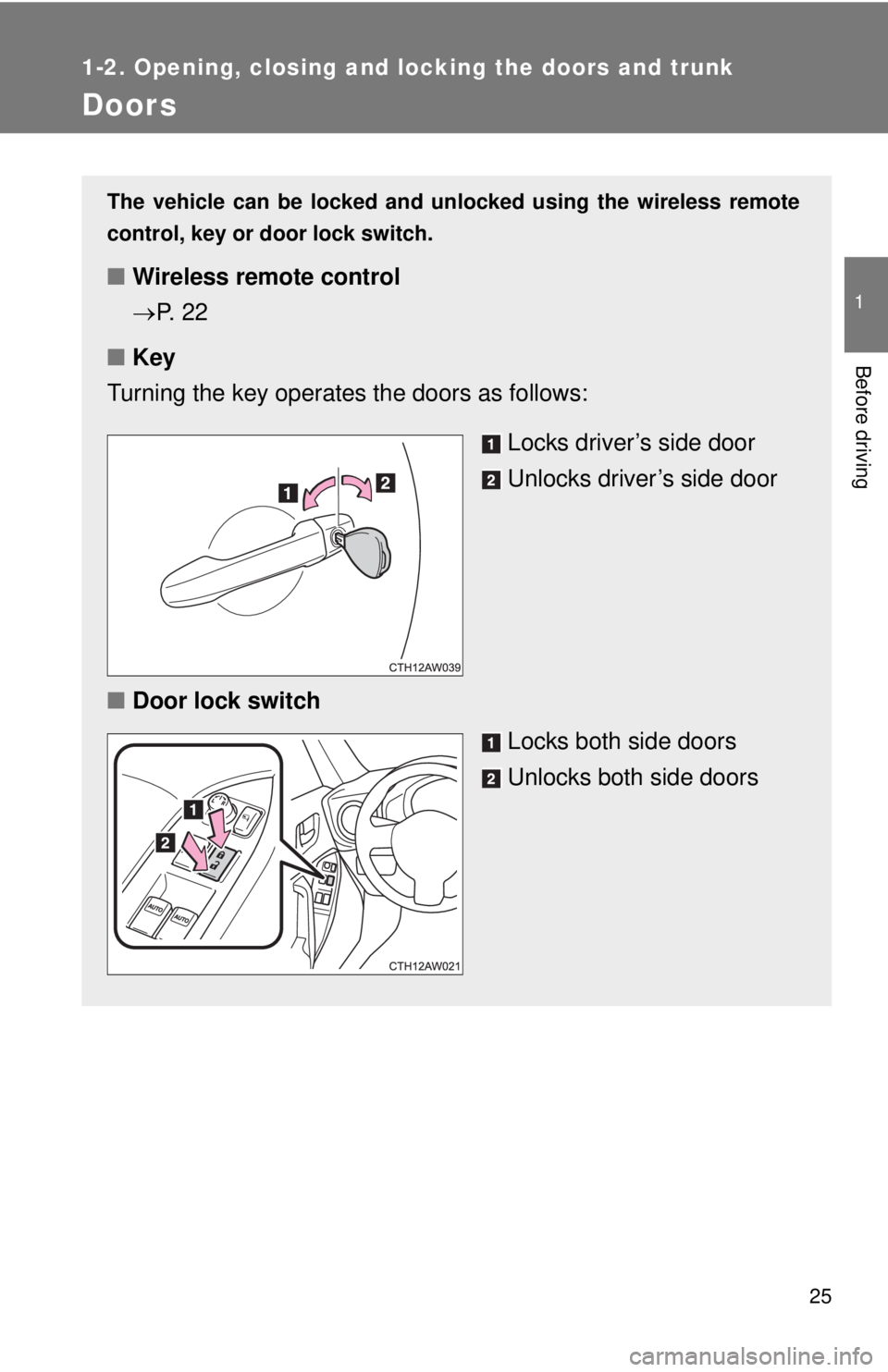
The vehicle can be locked and unlocked using the wireless remote
control, key or door lock switch.
■Wireless remote control
P. 2 2
■ Key
Turning the key operates the doors as follows:
Locks driver’s side door
Unlocks driver’s side door
■ Door lock switch
Locks both side doors
Unlocks both side doors
Page 26 of 412
26 1-2. Opening, closing and locking the doors and trunk
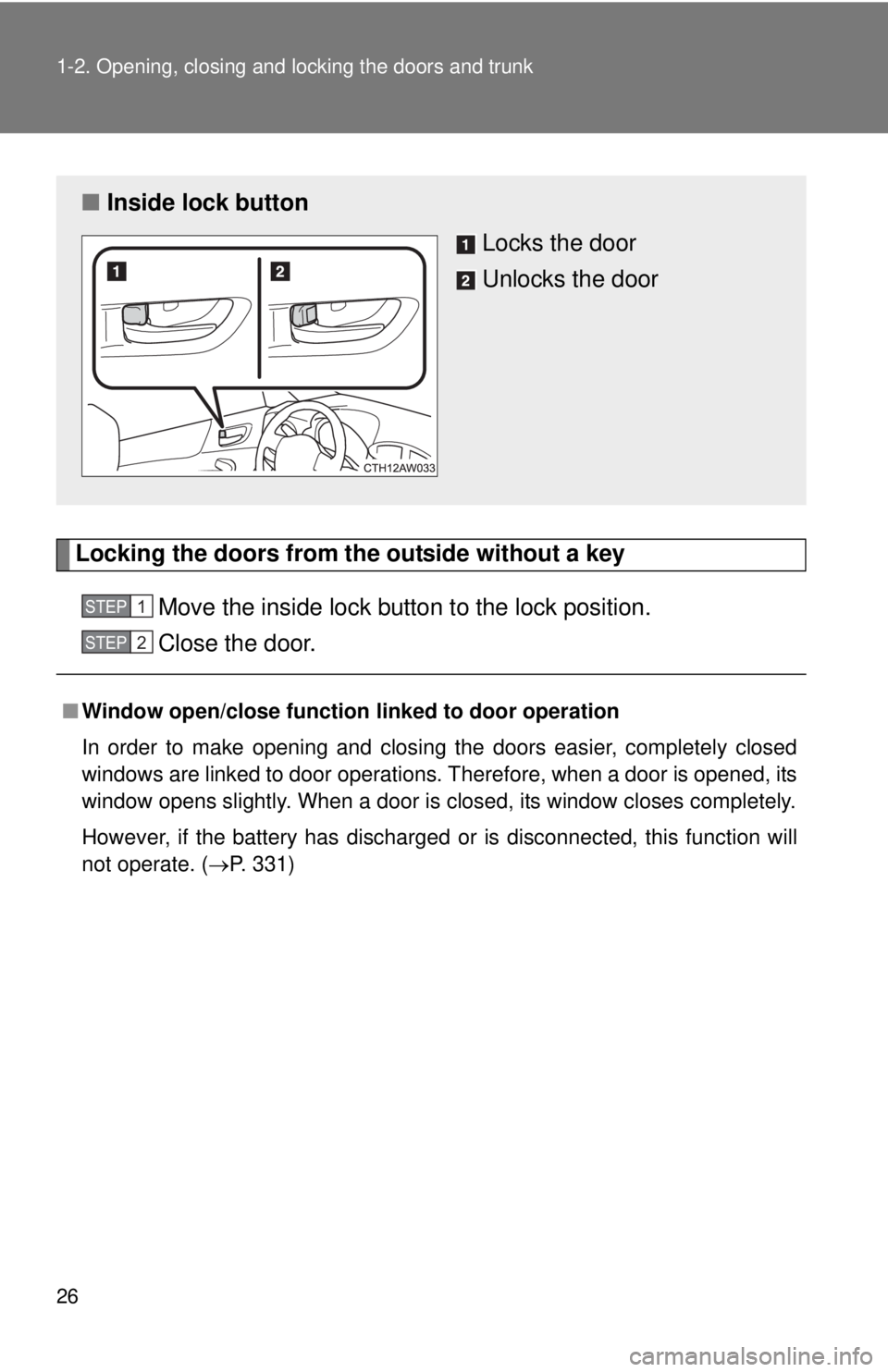
Locking the doors from the outside without a keyMove the inside lock button to the lock position.
Close the door.
■Window open/close function linked to door operation
In order to make opening and closing the doors easier, completely closed
windows are linked to door operations. Therefore, when a door is opened, its
window opens slightly. When a door is closed, its window closes completely.
However, if the battery has discharged or is disconnected, this function will
not operate. ( P. 331)
■Inside lock button
Locks the door
Unlocks the door
STEP 1
STEP 2