key TOYOTA FR-S 2014 (in English) User Guide
[x] Cancel search | Manufacturer: TOYOTA, Model Year: 2014, Model line: FR-S, Model: TOYOTA FR-S 2014Pages: 412, PDF Size: 9.19 MB
Page 28 of 412
28
1-2. Opening, closing and locking the doors and trunk
Trunk
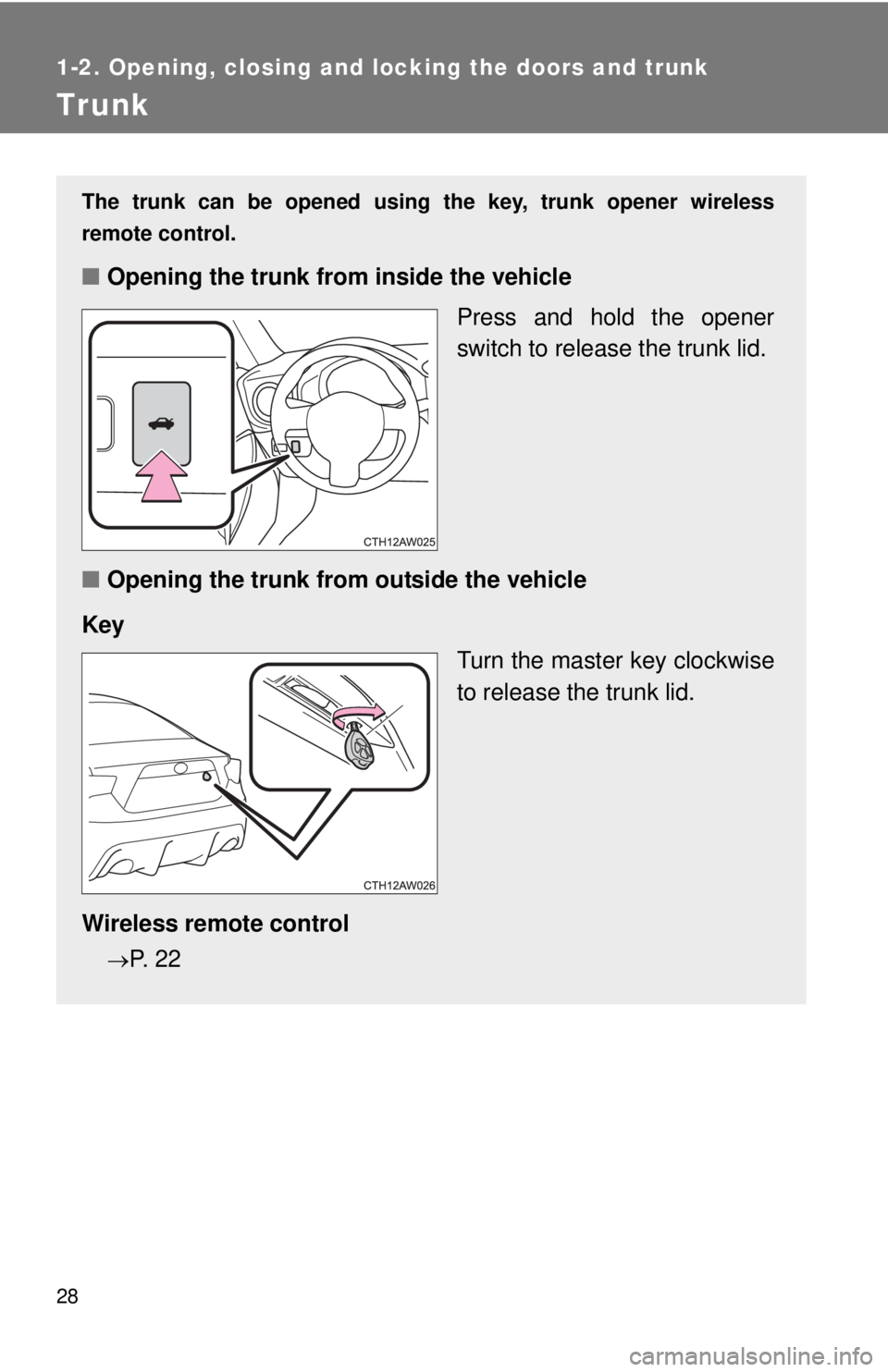
The trunk can be opened using the key, trunk opener wireless
remote control.
■Opening the trunk from inside the vehicle
Press and hold the opener
switch to release the trunk lid.
■Opening the trunk from outside the vehicle
Key
Turn the master key clockwise
to release the trunk lid.
Wireless remote control
P. 2 2
Page 29 of 412
29 1-2. Opening, closing and locking the doors and trunk
1
Before driving
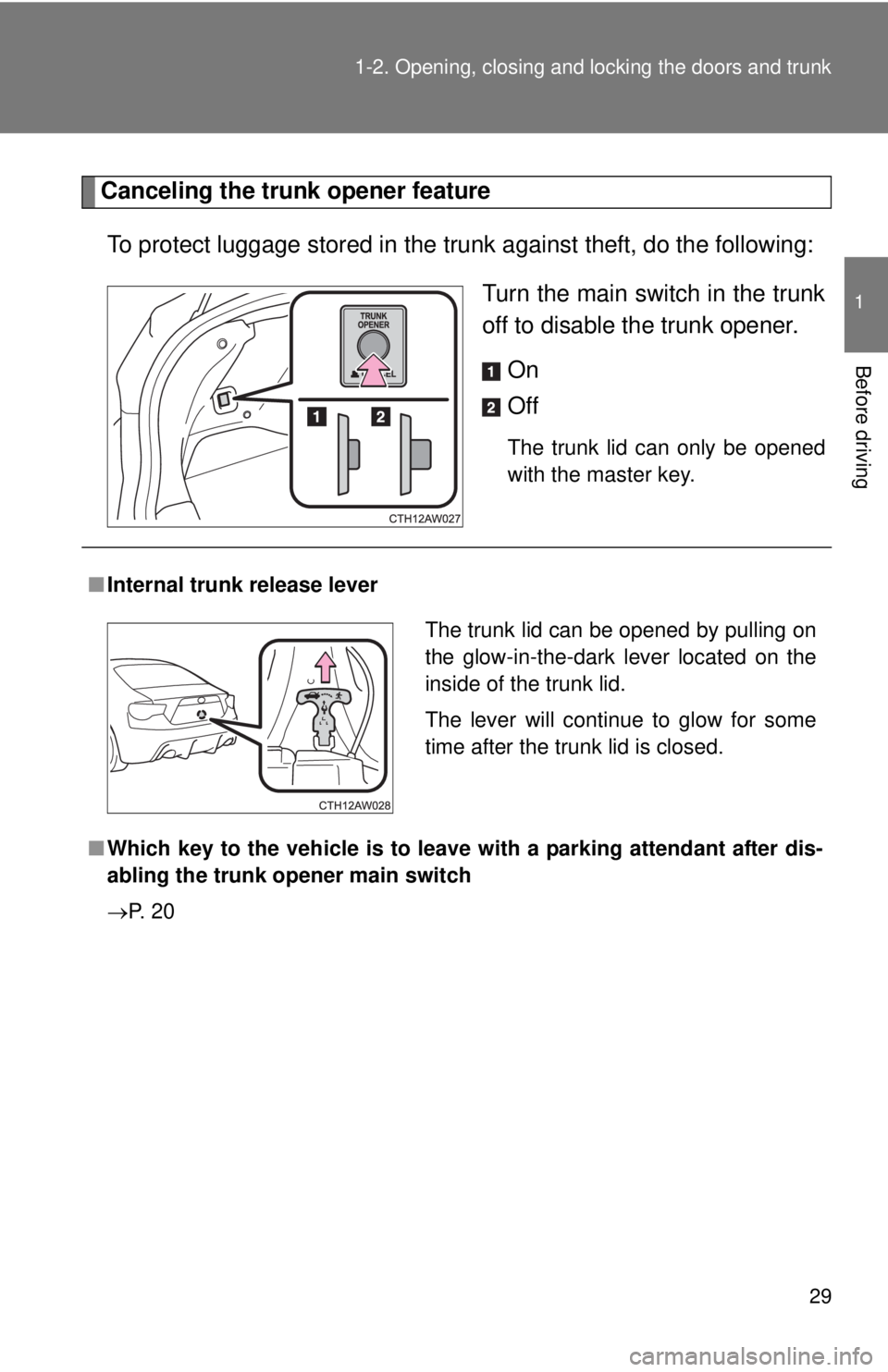
Canceling the trunk opener feature
To protect luggage stored in the trunk against theft, do the following:
Turn the main switch in the trunk
off to disable the trunk opener.
On
Off
The trunk lid can only be opened
with the master key.
■Internal trunk release lever
■Which key to the vehicle is to leave with a parking attendant after dis-
abling the trunk opener main switch
P. 2 0
The trunk lid can be opened by pulling on
the glow-in-the-dark lever located on the
inside of the trunk lid.
The lever will continue to glow for some
time after the trunk lid is closed.
Page 59 of 412
59
1
Before driving
1-6. Theft deterrent system
Engine immobilizer system
■When the vehicle cannot be started with the registered key
Remove the key and try again.
■System maintenance
The vehicle has a maintenance-free type engine immobilizer system.
■Conditions that may cause the system to malfunction
●If the key is in contact with a metallic object
●If the key is in close proximity to or touching a key to the security system
(key with a built-in transponder chip) of another vehicle
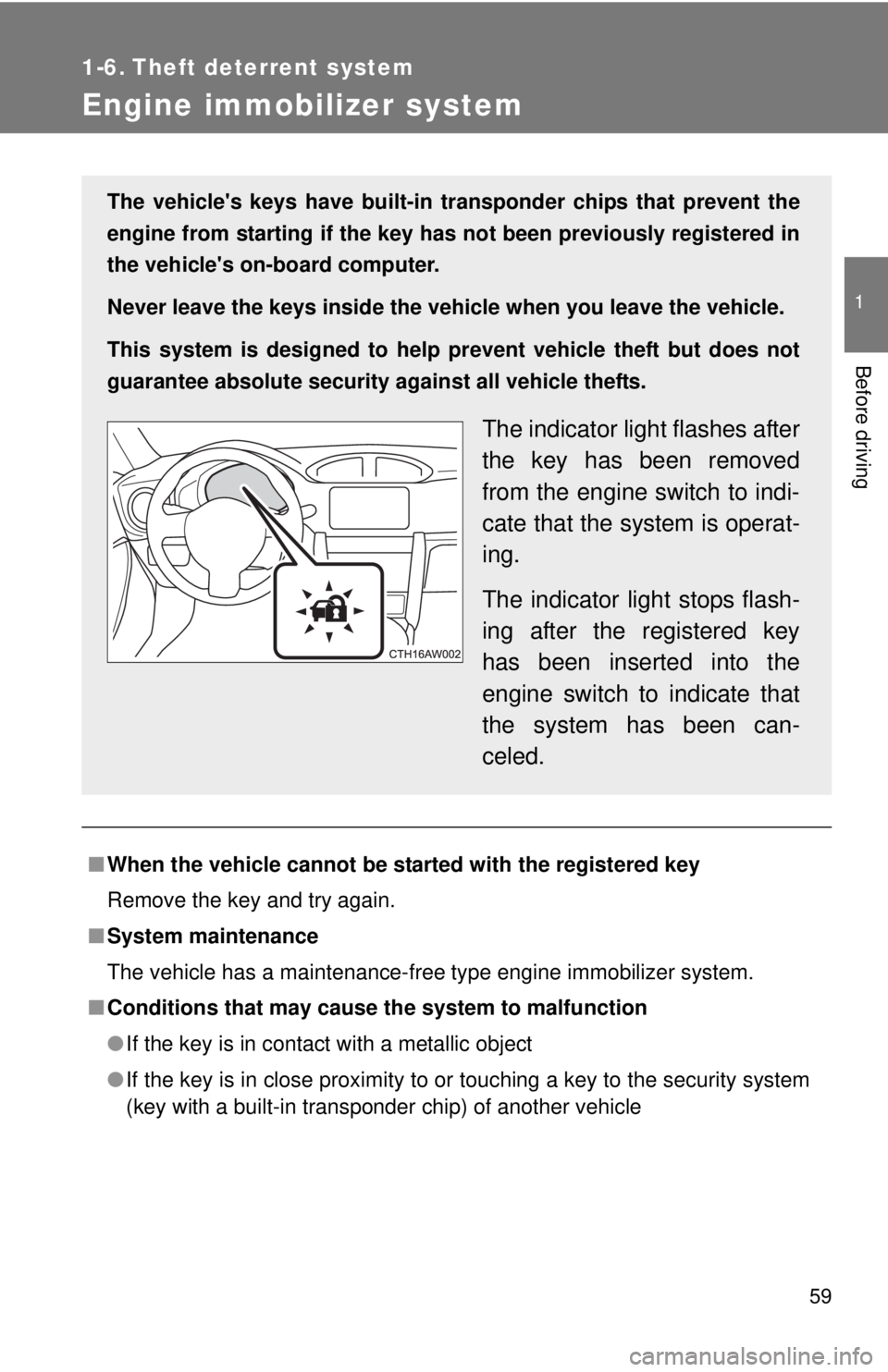
The vehicle's keys have built-in transponder chips that prevent the
engine from starting if the key has not been previously registered in
the vehicle's on-board computer.
Never leave the keys inside the vehicle when you leave the vehicle.
This system is designed to help prevent vehicle theft but does not
guarantee absolute security against all vehicle thefts.
The indicator light flashes after
the key has been removed
from the engine switch to indi-
cate that the system is operat-
ing.
The indicator light stops flash-
ing after the registered key
has been inserted into the
engine switch to indicate that
the system has been can-
celed.
Page 123 of 412
123 2-1. Driving procedures
2
When driving
■Parking the vehicle
Vehicles with an automatic transmission
With the shift lever in D, depress the brake pedal.
Shift the shift lever to P. (P. 138)
Set the parking brake. (P. 149)
Turn the engine switch to the “LOCK” position to stop the
engine.
Lock the door, making sure that you have the key on your
person.
If parking on a hill, block the wheels as needed.
Vehicles with a manual transmission
While depressing the clutch pedal, depress the brake
pedal.
Shift the shift lever to N. (P. 145)
Set the parking brake. (P. 149)
Turn the engine switch to the “LOCK” position to stop the
engine.
Lock the door, making sure that you have the key on your
person.
If parking on a hill, shift the shift lever to 1 or R and block the
wheels as needed.
STEP 1
STEP 2
STEP 3
STEP 4
STEP 5
STEP 1
STEP 2
STEP 3
STEP 4
STEP 5
Page 135 of 412
135
2-1. Driving procedures
2
When driving
Engine (ignition) switch
■Starting the engine
Vehicles with an automatic transmission
Check that the parking brake is set.
Check that the shift lever is set in P.
Firmly depress the brake pedal.
Turn the engine switch to the “START” position to start the
engine.
Vehicles with a manual transmission
Check that the parking brake is set.
Check that the shift lever is set in N.
Firmly depress the clutch pedal.
Turn the engine switch to the “START” position to start the
engine.
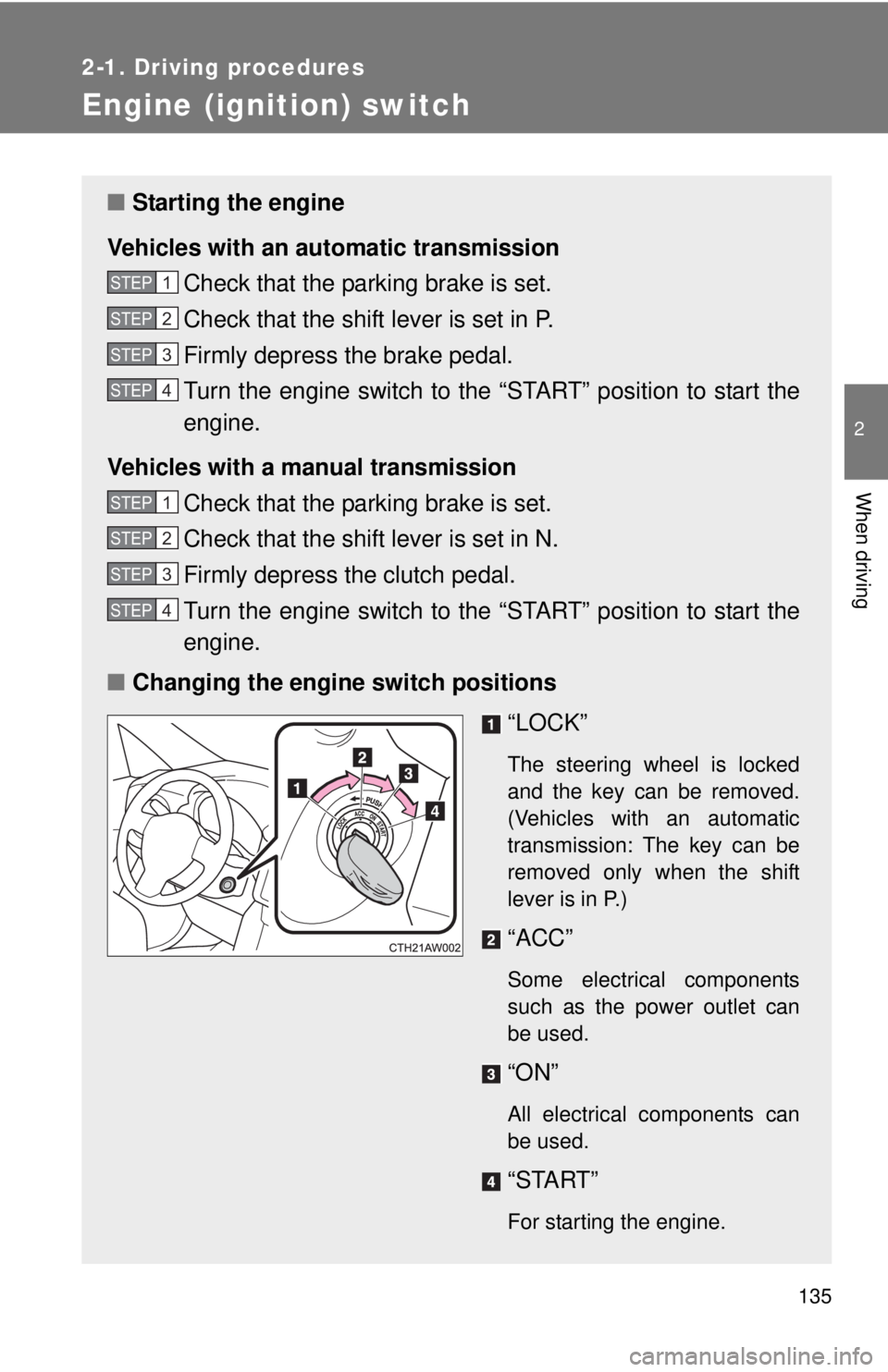
■Changing the engine switch positions
“LOCK”
The steering wheel is locked
and the key can be removed.
(Vehicles with an automatic
transmission: The key can be
removed only when the shift
lever is in P.)
“ACC”
Some electrical components
such as the power outlet can
be used.
“ON”
All electrical components can
be used.
“START”
For starting the engine.
STEP 1
STEP 2
STEP 3
STEP 4
STEP 1
STEP 2
STEP 3
STEP 4
Page 136 of 412
136 2-1. Driving procedures
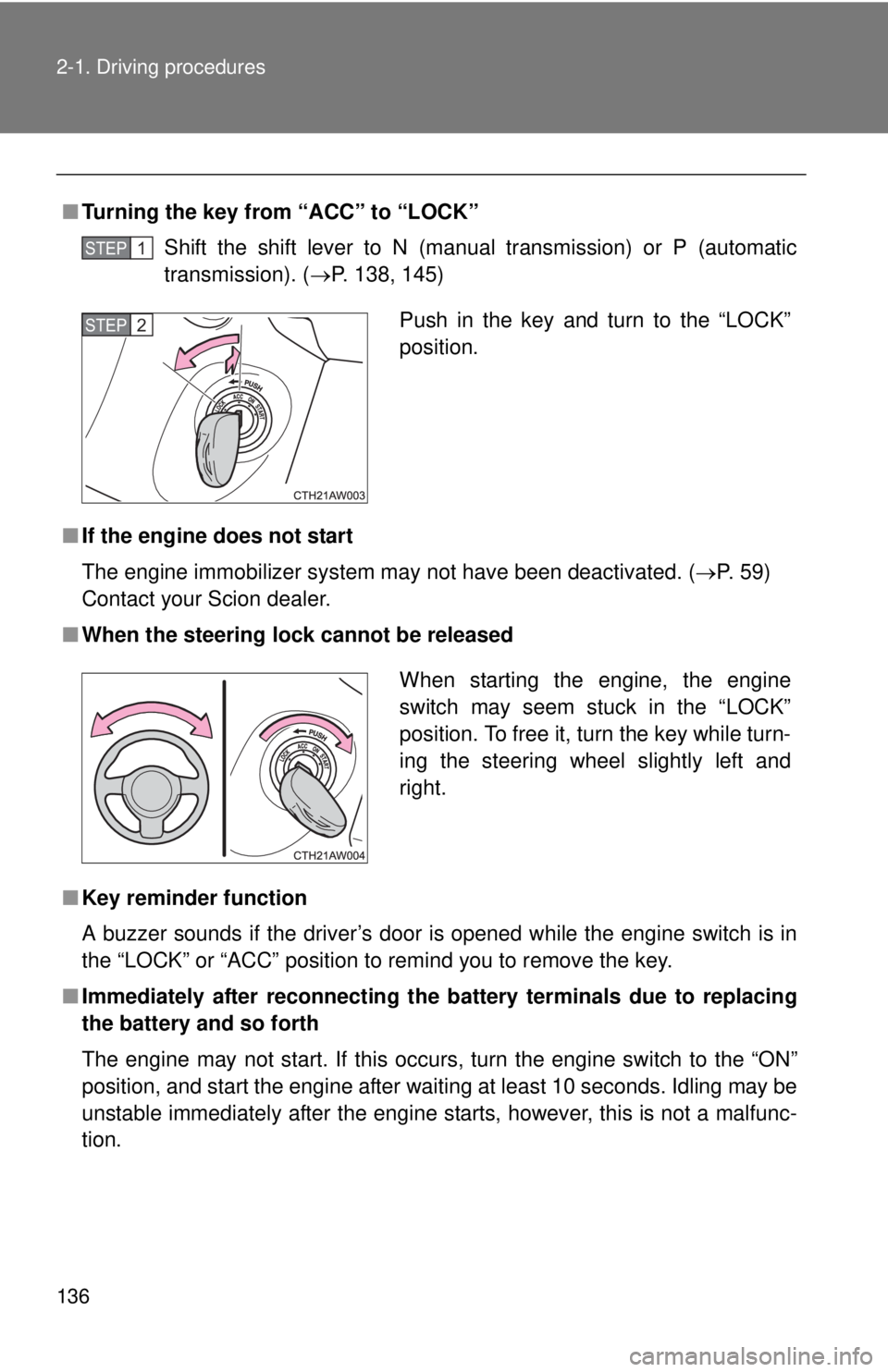
■Turning the key from “ACC” to “LOCK”
Shift the shift lever to N (manual transmission) or P (automatic
transmission). (P. 138, 145)
■If the engine does not start
The engine immobilizer system may not have been deactivated. (P. 59)
Contact your Scion dealer.
■When the steering lock cannot be released
■Key reminder function
A buzzer sounds if the driver’s door is opened while the engine switch is in
the “LOCK” or “ACC” position to remind you to remove the key.
■Immediately after reconnecting the battery terminals due to replacing
the battery and so forth
The engine may not start. If this occurs, turn the engine switch to the “ON”
position, and start the engine after waiting at least 10 seconds. Idling may be
unstable immediately after the engine starts, however, this is not a malfunc-
tion.
STEP 1
Push in the key and turn to the “LOCK”
position.STEP 2
When starting the engine, the engine
switch may seem stuck in the “LOCK”
position. To free it, turn the key while turn-
ing the steering wheel slightly left and
right.
Page 165 of 412

165 2-3. Operating the lights and windshield wipers
2
When driving
■Daytime running light system
●Vehicles with an automatic transmission: To make your vehicle more visi-
ble to other drivers, the headlights turn on automatically (at a reduced
intensity) whenever the engine is started, the shift lever is shifted out of P
and the parking brake is released. Daytime running lights are not
designed for use at night.
●Vehicles with a manual transmission: To make your vehicle more visible
to other drivers, the headlights turn on automatically (at a reduced inten-
sity) whenever the engine is started and the parking brake is released.
Daytime running lights are not designed for use at night.
●Compared to turning on the headlights, the daytime running light system
offers greater durability and consumes less electricity, so it can help
improve fuel economy.
■Light reminder buzzer
A buzzer sounds when the engine switch is turned to “LOCK” position and
the driver's door is opened with the key removed from the engine switch
while the lights are turned on.
NOTICE
■To prevent battery discharge
Do not leave the lights on longer than necessary when the engine is not run-
ning.
Page 219 of 412
Maintenance and care4
219
4-1. Maintenance and care
Cleaning and protecting
the vehicle exterior......... 220
Cleaning and protecting
the vehicle interior.......... 224
4-2. Maintenance
Maintenance
requirements .................. 228
General maintenance....... 230
Emission inspection and
maintenance (I/M)
programs........................ 2334-3. Do-it-yourself
maintenance
Do-it-yourself service
precautions .................... 234
Hood ................................ 237
Positioning a floor
jack ................................ 239
Engine compartment ........ 241
Tires ................................. 254
Tire inflation pressure ...... 261
Wheels ............................. 265
Air conditioning filter......... 268
Wireless remote control
key battery ..................... 270
Checking and replacing
fuses .............................. 273
Light bulbs........................ 281
Page 270 of 412
270
4-3. Do-it-yourself maintenance
Wireless remote control key batter y
Replace the battery with a new one if it is depleted.
■You will need the following items:
●Flathead screwdriver
●Lithium battery CR2016
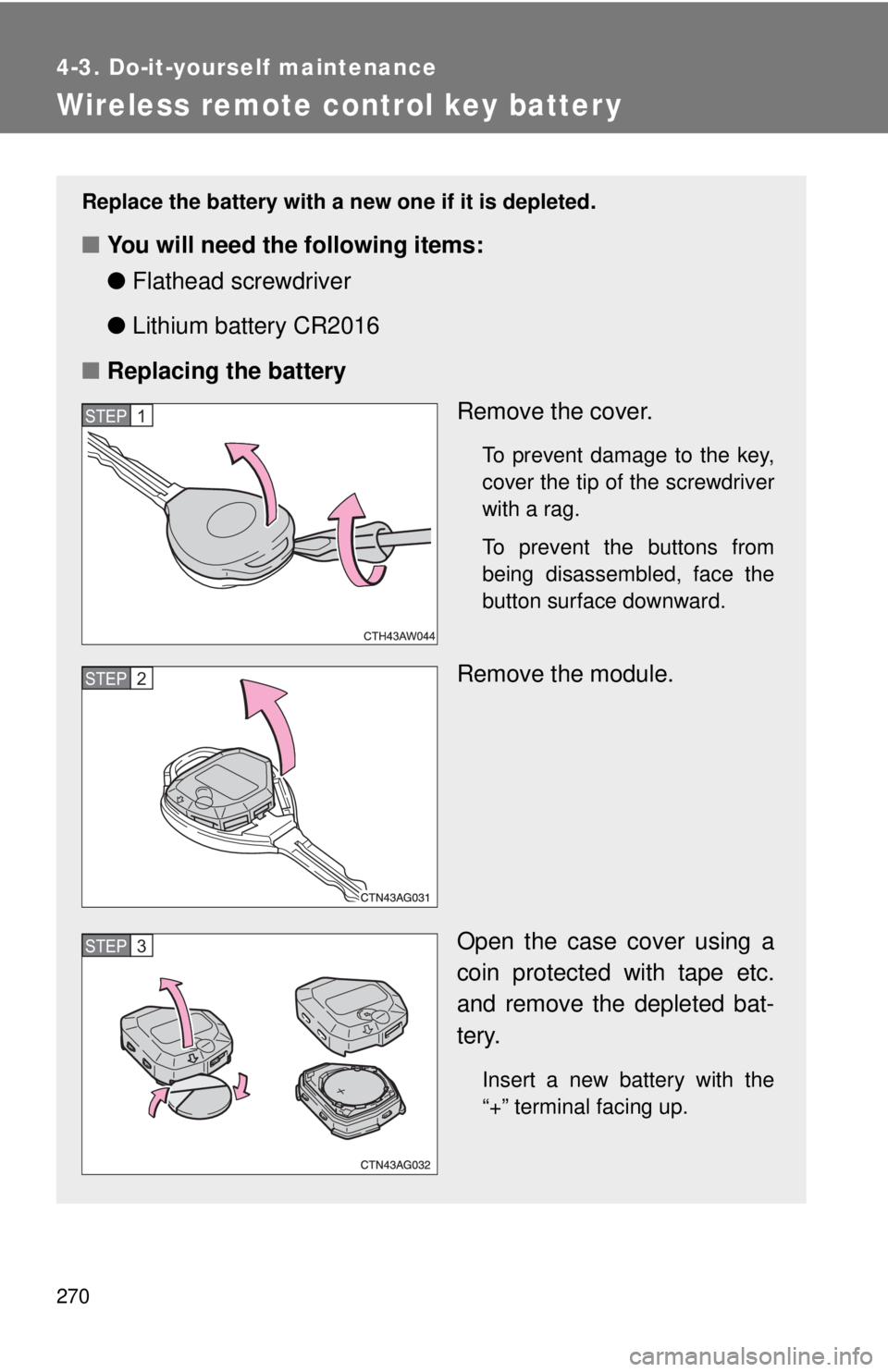
■Replacing the battery
Remove the cover.
To prevent damage to the key,
cover the tip of the screwdriver
with a rag.
To prevent the buttons from
being disassembled, face the
button surface downward.
Remove the module.
Open the case cover using a
coin protected with tape etc.
and remove the depleted bat-
tery.
Insert a new battery with the
“+” terminal facing up.
STEP 1
STEP 2
STEP 3
Page 271 of 412
271 4-3. Do-it-yourself maintenance
4
Maintenance and care
■Use a CR2016 lithium battery
●Batteries can be purchased at your Scion dealer, local electrical appli-
ance shops or camera stores.
●Replace only with the same or equivalent type recommended by the
manufacturer.
●Dispose of used batteries according to local laws.
■If the key battery is depleted
The following symptoms may occur:
●The wireless remote control will not function properly.
●The operational range will be reduced.
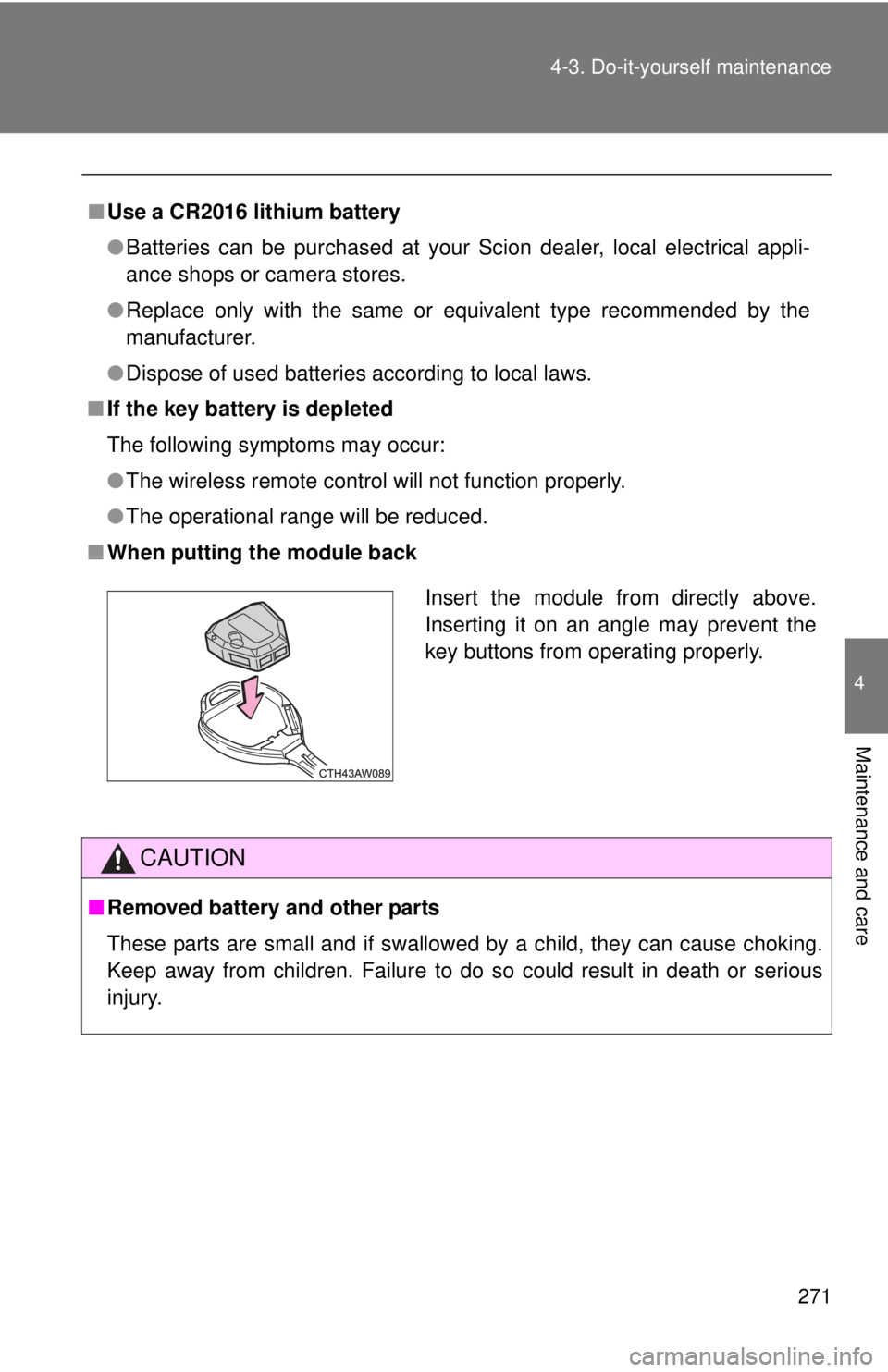
■When putting the module back
CAUTION
■Removed battery and other parts
These parts are small and if swallowed by a child, they can cause choking.
Keep away from children. Failure to do so could result in death or serious
injury.
Insert the module from directly above.
Inserting it on an angle may prevent the
key buttons from operating properly.