warning TOYOTA GR SUPRA 2022 User Guide
[x] Cancel search | Manufacturer: TOYOTA, Model Year: 2022, Model line: GR SUPRA, Model: TOYOTA GR SUPRA 2022Pages: 356, PDF Size: 39.14 MB
Page 38 of 356
383-1. CONTROLS
13 Horn, entire surface
14 Unlock hood P.292 15
Unlocking the trunk lid
P. 8 0
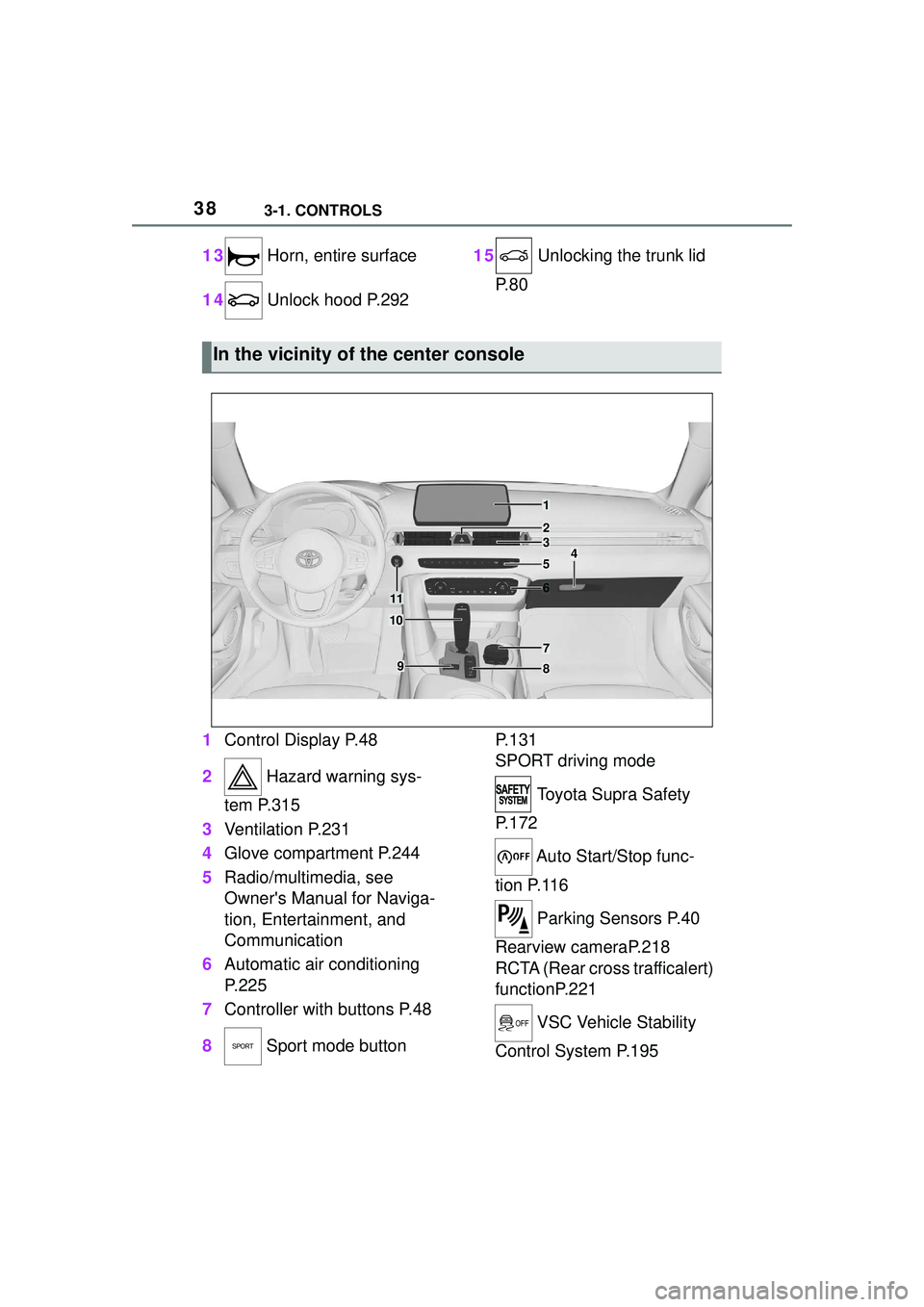
1 Control Display P.48
2 Hazard warning sys-
tem P.315
3 Ventilation P.231
4 Glove compartment P.244
5 Radio/multimedia, see
Owner's Manual for Naviga-
tion, Entertainment, and
Communication
6 Automatic air conditioning
P.225
7 Controller with buttons P.48
8 Sport mode button P. 1 3 1
SPORT driving mode
Toyota Supra Safety
P. 1 7 2
Auto Start/Stop func-
tion P.116
Parking Sensors P.40
Rearview cameraP.218
RCTA (Rear cross trafficalert)
functionP.221
VSC Vehicle Stability
Control System P.195
In the vicinity of the center console
1
4
23
5
6
7
89
10
11
Page 44 of 356
443-1. CONTROLS
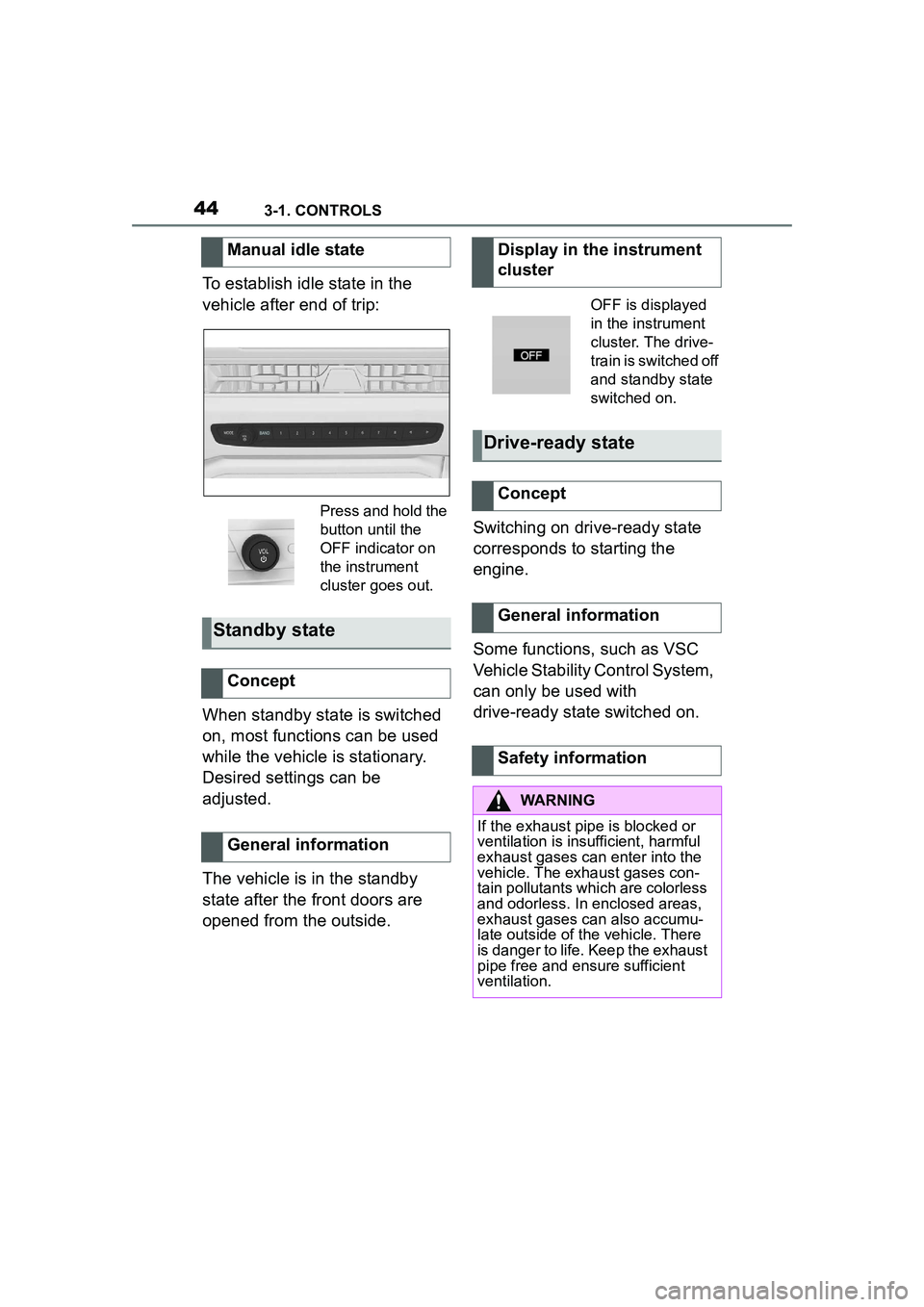
To establish idle state in the
vehicle after end of trip:
When standby state is switched
on, most functions can be used
while the vehicle is stationary.
Desired settings can be
adjusted.
The vehicle is in the standby
state after the front doors are
opened from the outside.Switching on drive-ready state
corresponds to starting the
engine.
Some functions, such as VSC
Vehicle Stability Control System,
can only be used with
drive-ready state switched on.
Manual idle state
Press and hold the
button until the
OFF indicator on
the instrument
cluster goes out.
Standby state
Concept
General information
Display in the instrument
cluster
OFF is displayed
in the instrument
cluster. The drive-
train is switched off
and standby state
switched on.
Drive-ready state
Concept
General information
Safety information
WARNING
If the exhaust pipe is blocked or
ventilation is insufficient, harmful
exhaust gases can enter into the
vehicle. The exhaust gases con-
tain pollutants which are colorless
and odorless. In enclosed areas,
exhaust gases can also accumu-
late outside of the vehicle. There
is danger to life. Keep the exhaust
pipe free and ensure sufficient
ventilation.
Page 45 of 356
453-1. CONTROLS
3
CONTROLS
1Depress the brake pedal.
2 Press the Start/Stop button. The ignition is activated auto-
matically for a brief time and is
stopped as soon as the engine
starts.
Most of the indicator/warning
lights in the instrument cluster
light up for a varied length of
time.
Depending on the engine condi-
tion, the full drive power may not
be available for approximately
30 seconds after starting the
engine. In this case, the vehicle
will not accelerate as usual.
READY in the instrument cluster
indicates that drive-ready state
is switched on.
1
Engage selector lever posi-
tion P with the vehicle
stopped.
2 Press the Start/Stop button.
The engine is switched off. The
vehicle switches into standby state.
3Set the parking brake.
WARNING
An unsecured vehicle can begin
to move and possibly roll away.
There is a risk of an accident.
Before exiting, secure the vehicle
against rolling.
In order to ensure that the vehicle
is secured against rolling away,
follow the following:
• Set the parking brake.
• On uphill grades or on a down-
hill slope, turn the front wheels
in the direction of the curb.
• On uphill grades or on a down- hill slope, also secure the vehi-
cle, for instance with a wheel
chock.
NOTICE
In the case of repeated starting
attempts or repeated starting in
quick succession, the fuel is not
burned or is inadequately burned.
The catalytic converter can over-
heat. There is a risk of damage to
property. Avoid repeated starting
in quick succession.
Switching on drive-ready
state
Concept
Drive-ready state
is switched on via
the Start/Stop but-
ton:
Automatic transmission
Gasoline engine
Display in the instrument
cluster
Switching off drive-ready
state
Page 46 of 356
463-1. CONTROLS
This chapter describes all stan-
dard, country-specific and
optional features offered with
the series. It also describes fea-
tures that are not necessarily
available in your vehicle, e. g.,
due to the selected options or
country versions. This also
applies to safety-related func-
tions and systems. When using
these functions and systems,
the applicable laws and regula-
tions must be observed.
The Toyota Supra Command
combines the functions of many
switches.
These functions can be oper-
ated as follows:
Via the Controller.
Via the touchscreen.
Via the voice activation sys-
tem. Letters and numbers can be
entered using the Controller or
the touchscreen. The key-
board's display changes auto-
matically.
When entering names and
addresses, the choice is nar-
rowed down with every letter
entered and letters may be
Toyota Supra Com-
mand
Vehicle features and
options
Operating concept
Principle
General information
Safety information
WARNING
Operating the integrated informa-
tion systems and communication
devices while driving can distract
from traffic. It is possible to lose
control of the vehicle. There is a
risk of an accident. Only use the
systems or devices when the traf-
fic situation allows. As warranted,
stop and use the systems and
devices while the vehicle is sta-
tionary.
Input and display
Letters and numbers
SymbolFunction
orChange between capital
and lower-case letters.
Insert blank space.
Use voice activation.
Confirm entry.
Entry comparison
Page 69 of 356
693-1. CONTROLS
3
CONTROLS
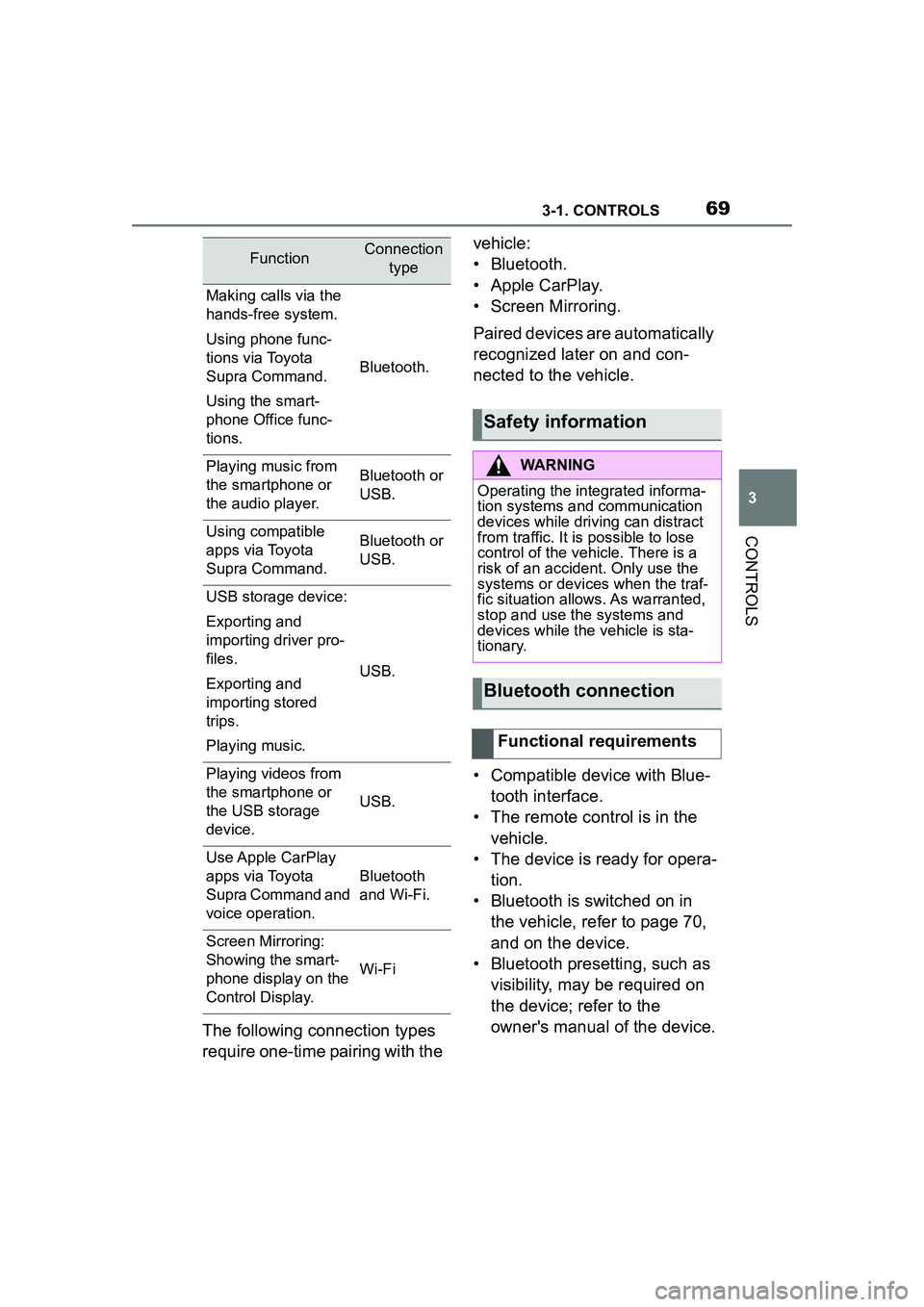
The following connection types
require one-time pairing with the vehicle:
• Bluetooth.
• Apple CarPlay.
• Screen Mirroring.
Paired devices are automatically
recognized later on and con-
nected to the vehicle.
• Compatible device with Blue-
tooth interface.
• The remote control is in the vehicle.
• The device is ready for opera- tion.
• Bluetooth is switched on in the vehicle, refer to page 70,
and on the device.
• Bluetooth presetting, such as visibility, may be required on
the device; refer to the
owner's manual of the device.
FunctionConnection type
Making calls via the
hands-free system.
Using phone func-
tions via Toyota
Supra Command.
Using the smart-
phone Office func-
tions.
Bluetooth.
Playing music from
the smartphone or
the audio player.Bluetooth or
USB.
Using compatible
apps via Toyota
Supra Command.Bluetooth or
USB.
USB storage device:
Exporting and
importing driver pro-
files.
Exporting and
importing stored
trips.
Playing music.
USB.
Playing videos from
the smartphone or
the USB storage
device.
USB.
Use Apple CarPlay
apps via Toyota
Supra Command and
voice operation.
Bluetooth
and Wi-Fi.
Screen Mirroring:
Showing the smart-
phone display on the
Control Display.
Wi-Fi
Safety information
WARNING
Operating the integrated informa-
tion systems and communication
devices while driving can distract
from traffic. It is possible to lose
control of the vehicle. There is a
risk of an accident. Only use the
systems or devices when the traf-
fic situation allows. As warranted,
stop and use the systems and
devices while the vehicle is sta-
tionary.
Bluetooth connection
Functional requirements
Page 77 of 356
773-1. CONTROLS
3
CONTROLS
This chapter describes all stan-
dard, country-specific and
optional features offered with
the series. It also describes fea-
tures and functions that are not
necessarily available in your
vehicle, e.g., due to the selected
options or country versions. This
also applies to safety-related
functions and systems. When
using these functions and sys-
tems, the applicable laws and
regulations must be observed.
The vehicle is supplied with two
remote controls with integrated
key.
Each remote control contains a
replaceable battery. Replacing
the battery, refer to page 81.
Depending on the equipment
and country version, various
settings, refer to page 90, can
be configured for the button
functions.
A driver profile, refer to page 65,
with personal settings can be
assigned to a remote control.
To prevent possible locking in of the remote control, take the
remote control with you when
exiting the vehicle.
Opening and closing
Vehicle features and
options
Remote control
General information
Safety information
WARNING
The vehicle key has a button cell
battery. Batteries or button cells
can be swallowed and lead to
serious or fatal injuries within two
hours, for example, due to internal
burns or chemical burns. There is
an injury hazard or danger to life.
Keep the vehicle key and batter-
ies out of reach for children.
Immediately seek medical help if
there is any suspicion that a bat-
tery or button cell has been swal-
lowed or is located in any part of
the body.
WARNING
People or animals in the vehicle
can lock the doors from the inside
and lock themselves in. In this
case, the vehicle cannot be
opened from the outside. There is
a risk of injury. Take the remote
control with you so that the vehi-
cle can be opened from the out-
side.
WARNING
For some country versions,
unlocking from the inside is only
possible with special knowledge.
Persons who spend a lengthy
time in the vehicle while being
exposed to extreme tempera-
tures are at risk of injury or death.
Do not lock the vehicle from the
outside when there are people in
it.
Page 78 of 356
783-1. CONTROLS
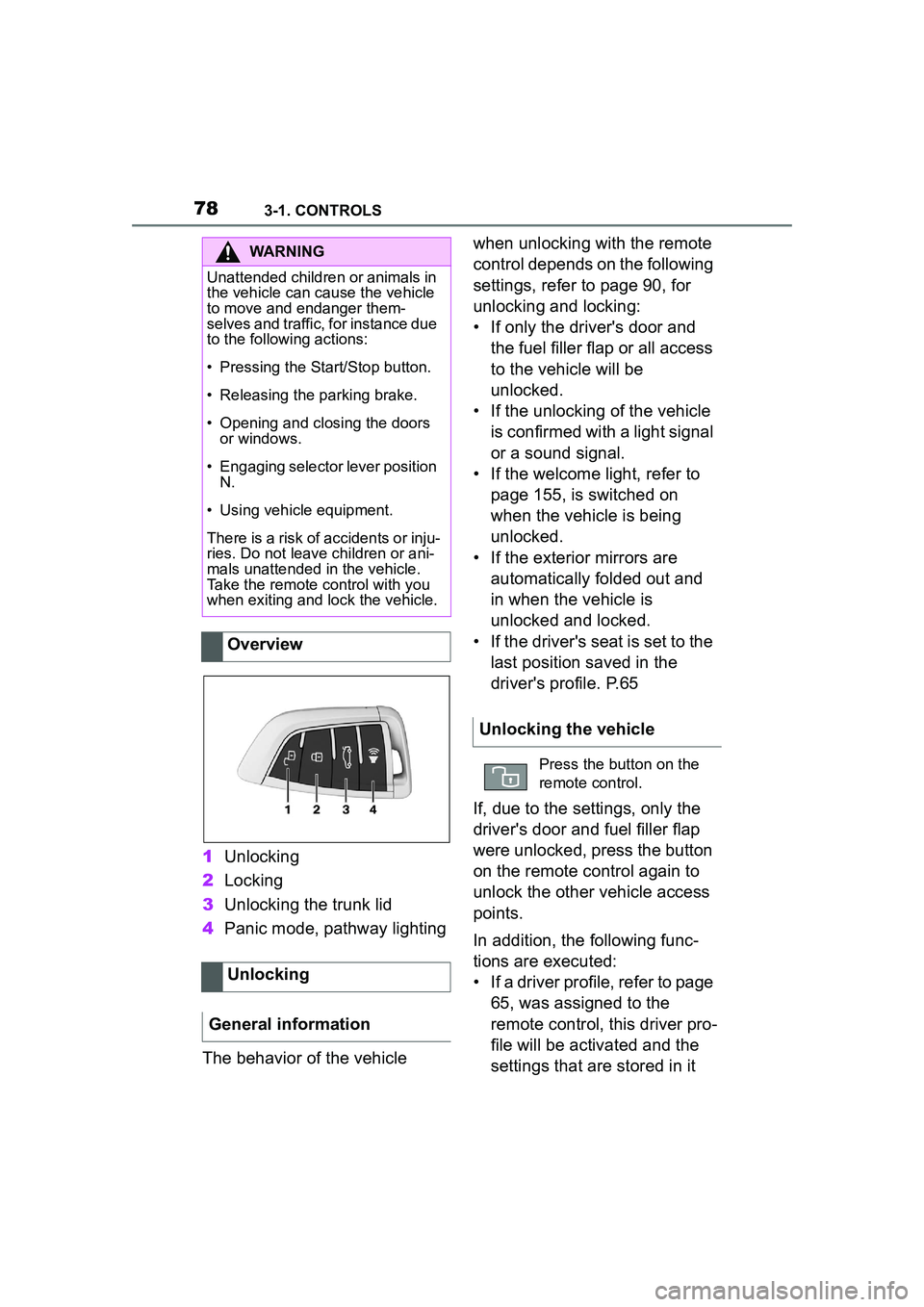
1Unlocking
2 Locking
3 Unlocking the trunk lid
4 Panic mode, pathway lighting
The behavior of the vehicle when unlocking with the remote
control depends on the following
settings, refer to page 90, for
unlocking and locking:
• If only the driver's door and
the fuel filler flap or all access
to the vehicle will be
unlocked.
• If the unlocking of the vehicle is confirmed with a light signal
or a sound signal.
• If the welcome light, refer to page 155, is switched on
when the vehicle is being
unlocked.
• If the exterior mirrors are automatically folded out and
in when the vehicle is
unlocked and locked.
• If the driver's seat is set to the last position saved in the
driver's profile. P.65
If, due to the settings, only the
driver's door and fuel filler flap
were unlocked, press the button
on the remote control again to
unlock the other vehicle access
points.
In addition, the following func-
tions are executed:
• If a driver profile, refer to page 65, was assigned to the
remote control, this driver pro-
file will be activated and the
settings that are stored in it
WARNING
Unattended children or animals in
the vehicle can cause the vehicle
to move and endanger them-
selves and traffic, for instance due
to the following actions:
• Pressing the Start/Stop button.
• Releasing the parking brake.
• Opening and closing the doors or windows.
• Engaging selector lever position
N.
• Using vehicle equipment.
There is a risk of accidents or inju-
ries. Do not leave children or ani-
mals unattended in the vehicle.
Take the remote control with you
when exiting and lock the vehicle.
Overview
Unlocking
General information
Unlocking the vehicle
Press the button on the
remote control.
Page 79 of 356
793-1. CONTROLS
3
CONTROLS
will be applied.
• The interior lights are switched on, unless they were
manually switched off. For
switching the interior lights
on/off manually, refer to page
158.
• Folded in exterior mirrors are folded out.
If the exterior mirrors were folded in
via the button in the car’s interior,
they will not be folded out when
unlocking.
• With alarm system: The alarm
system, refer to page , will be
switched off.
After opening one of the front
doors, the vehicle is ready for
operation, refer to page 44.
The light functions may depend
on the ambient brightness.
The windows are opened, as
long as the button on the remote
control is pressed.
The behavior of the vehicle
during locking with the remote
control depends on the following settings, refer to page 90:
• If the locking of the vehicle is
confirmed with a light signal
or a sound signal.
• If the exterior mirrors are automatically folded in when
the vehicle is locked. The
exterior mirrors are not folded
in when the hazard warning
flashers are switched on.
• If the headlight courtesy delay feature is activated during
locking.
1 Close the driver's door.
2 Press the button on the
remote control.
The following functions are exe-
cuted:
• All doors, the trunk lid, and the fuel filler flap are locked.
• With alarm system: The alarm system will be switched on.
If the drive-ready state is still
switched on when you lock the
vehicle, the vehicle horn honks
twice. In this case, the
drive-ready state must be
switched off by means of the
Start/Stop button.
Convenient opening
Opening
Press and hold the button
on the remote control.
Locking
General information
Locking the vehicle
Page 80 of 356
803-1. CONTROLS
The windows are closed in the
area close to the vehicle, as
long as the button on the remote
control is pressed.
The function is not available for
the first 10 seconds after lock-
ing.
• The interior lights are switched on, unless they were
manually switched off. For
switching the interior lights
on/off manually, refer to page
158.
• Depending on the settings, the exterior lighting, refer to
page 155, will be switched on. The light functions may depend
on the ambient brightness.
To avoid locking the vehicle key
in the vehicle, do not place the
vehicle key in the cargo area.
You can set up if the doors will
be unlocked when the trunk lid
is opened with the remote con-
trol. Settings, refer to page 90.
You can trigger the alarm sys-
With Smart Key System:
convenient closing
Safety information
WARNING
With convenient closing, body
parts can be jammed. There is a
risk of injury. Make sure that the
area of movement of the doors is
clear during convenient closing.
Closing
Press and hold the button
on the remote control after
locking.
Switching on the interior
and exterior lights
Press the button on the
remote control with the
vehicle locked.
Trunk lid
General information
Safety information
WARNING
Body parts can be jammed when
operating the trunk lid. There is a
risk of injury. Make sure that the
area of movement of the trunk lid
is clear during opening and clos-
ing.
NOTICE
During opening, the trunk lid piv-
ots back and up. There is a risk of
damage to property. Make sure
that the area of movement of the
trunk lid is clear during opening
and closing.
Unlocking
Press and hold the button
on the remote control for
approx. 1 second.
Panic mode
Page 81 of 356
813-1. CONTROLS
3
CONTROLS
tem if you find yourself in a dan-
gerous situation.
To switch off the alarm: press
any button.
Set the duration, refer to page
155.1
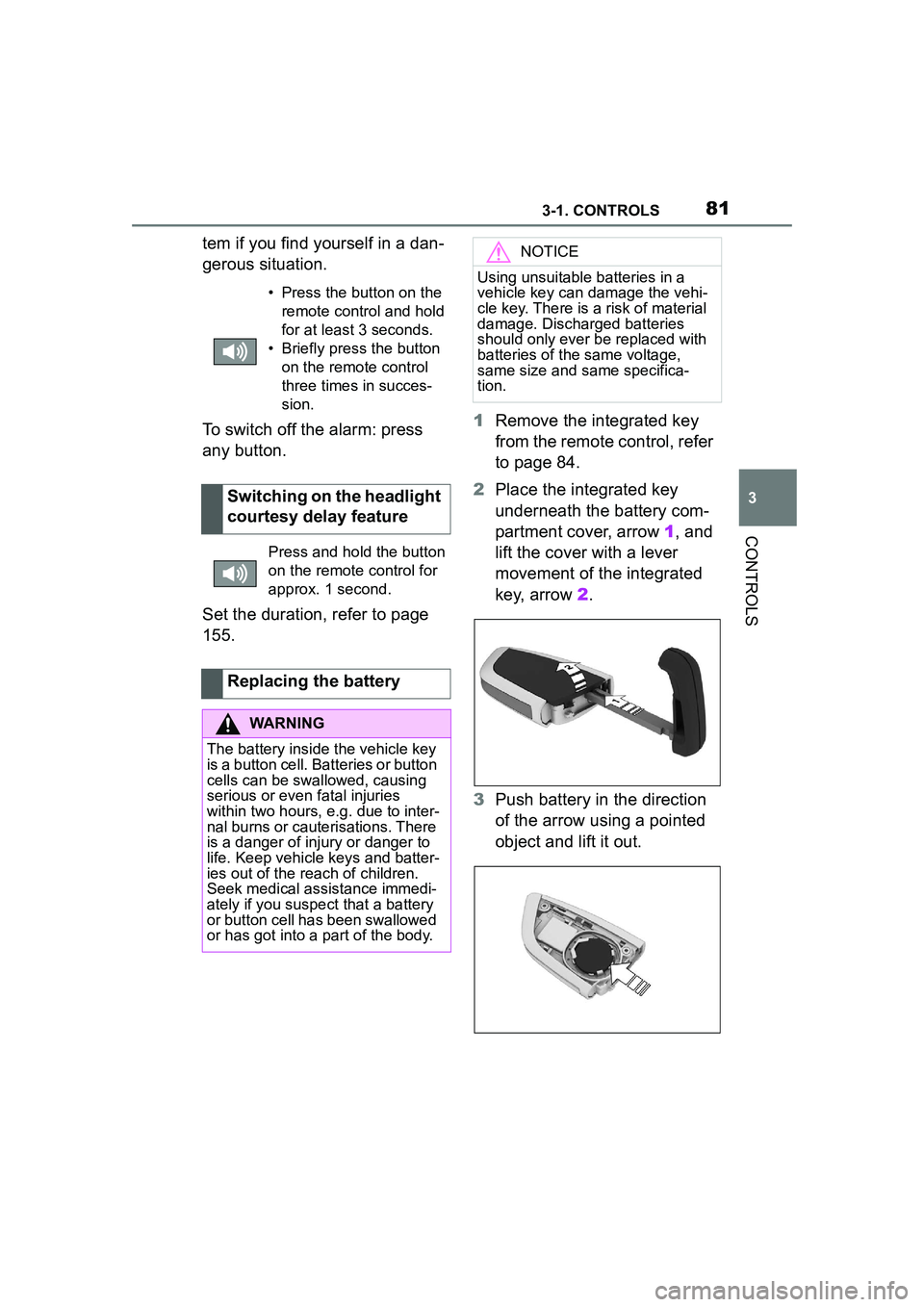
Remove the integrated key
from the remote control, refer
to page 84.
2 Place the integrated key
underneath the battery com-
partment cover, arrow 1, and
lift the cover with a lever
movement of the integrated
key, arrow 2.
3 Push battery in the direction
of the arrow using a pointed
object and lift it out.
• Press the button on the
remote control and hold
for at least 3 seconds.
• Briefly press the button on the remote control
three times in succes-
sion.
Switching on the headlight
courtesy delay feature
Press and hold the button
on the remote control for
approx. 1 second.
Replacing the battery
WARNING
The battery inside the vehicle key
is a button cell. Batteries or button
cells can be swallowed, causing
serious or even fatal injuries
within two hours, e.g. due to inter-
nal burns or cauterisations. There
is a danger of injury or danger to
life. Keep vehicle keys and batter-
ies out of the reach of children.
Seek medical assistance immedi-
ately if you suspect that a battery
or button cell has been swallowed
or has got into a part of the body.
NOTICE
Using unsuitable batteries in a
vehicle key can damage the vehi-
cle key. There is a risk of material
damage. Discharged batteries
should only ever be replaced with
batteries of the same voltage,
same size and same specifica-
tion.