lights TOYOTA GR YARIS 2020 User Guide
[x] Cancel search | Manufacturer: TOYOTA, Model Year: 2020, Model line: GR YARIS, Model: TOYOTA GR YARIS 2020Pages: 458, PDF Size: 105.69 MB
Page 38 of 458
36
YARIS(GR) Owner's Manual_Europe_M52L09_en
1-1. For safe use
due to the extremely high speed
deployment (inflation) by hot gases.
●A loud noise and white powder will be
emitted.
●Parts of the airbag module (steering
wheel hub, airbag cover and inflator) as well as the front seats, parts of the front and rear pillars, and roof side
rails, may be hot for several minutes. The airbag itself may also be hot.
●The windshield may crack.
●The brakes and stop lights will be con-
trolled automatically. ( →P.220)
●The interior lights will turn on automat-
ically. ( →P.238)
●The emergency flashers will turn on
automatically. ( →P.306)
●Fuel supply to the engine will be
stopped. ( →P.314)
●Vehicles with eCall: If any of the fol-
lowing situations occur, the system is
designed to send an emergency call* to the eCall control center, notifying
them of the vehicle’s location (without needing to push the “SOS” button) and an agent will attempt to speak
with the occupants to ascertain the level of emergency and assistance required. If the occupants are unable
to communicate, the agent automati- cally treats the call as an emergency and helps to dispatch the necessary
emergency services. ( →P.62) • An SRS airbag is deployed.• A seat belt pretensioner is activated.
• The vehicle is involved in a severe rear-end collision.*: In some cases, the call cannot be
made. ( →P. 6 4 )
■SRS airbag deployment conditions
(SRS front airbags)
●The SRS front airbags will deploy in
the event of an impact that exceeds the set threshold level (the level of force corresponding to an approxi-
mately 20 - 30 km/h [12 - 18 mph] frontal collision with a fixed wall that does not move or deform).
However, this threshold velocity will be
considerably higher in the following situ- ations:• If the vehicle strikes an object, such
as a parked vehicle or sign pole, which can move or deform on impact• If the vehicle is involved in an under-
ride collision, such as a collision in which the front of the vehicle “under-rides”, or goes under, the bed of a
truck
●Depending on the type of collision, it is
possible that only the seat belt pretensioners will activate.
■SRS airbag deployment conditions (SRS side and curtain shield air-
bags)
●The SRS side and curtain shield air-
bags will deploy in the event of an impact that exceeds the set threshold level (the level of force corresponding
to the impact force produced by an approximately 1500 kg [3300 lb.] vehi-cle colliding with the vehicle cabin
from a direction perpendicular to the vehicle orientation at an approximate speed of 20 - 30 km/h [12 - 18 mph]).
●Both SRS curtain shield airbags may also deploy in the event of a severe
frontal collision.
■Conditions under which the SRS airbags may deploy (inflate), other than a collision
The SRS front airbags and SRS side and curtain shield airbags may also deploy if a serious impact occurs to the
underside of your vehicle. Some exam- ples are shown in the illustration.
●Hitting a curb, edge of pavement or hard surface
●Falling into or jumping over a deep hole
●Landing hard or falling
Page 64 of 458
62
YARIS(GR) Owner's Manual_Europe_M52L09_en
1-3. Emergency assistance
1-3.Emerg ency as sista nce
*1: If equipped
*2: Operates within the eCall coverage.
The system name differs depending
on the country.
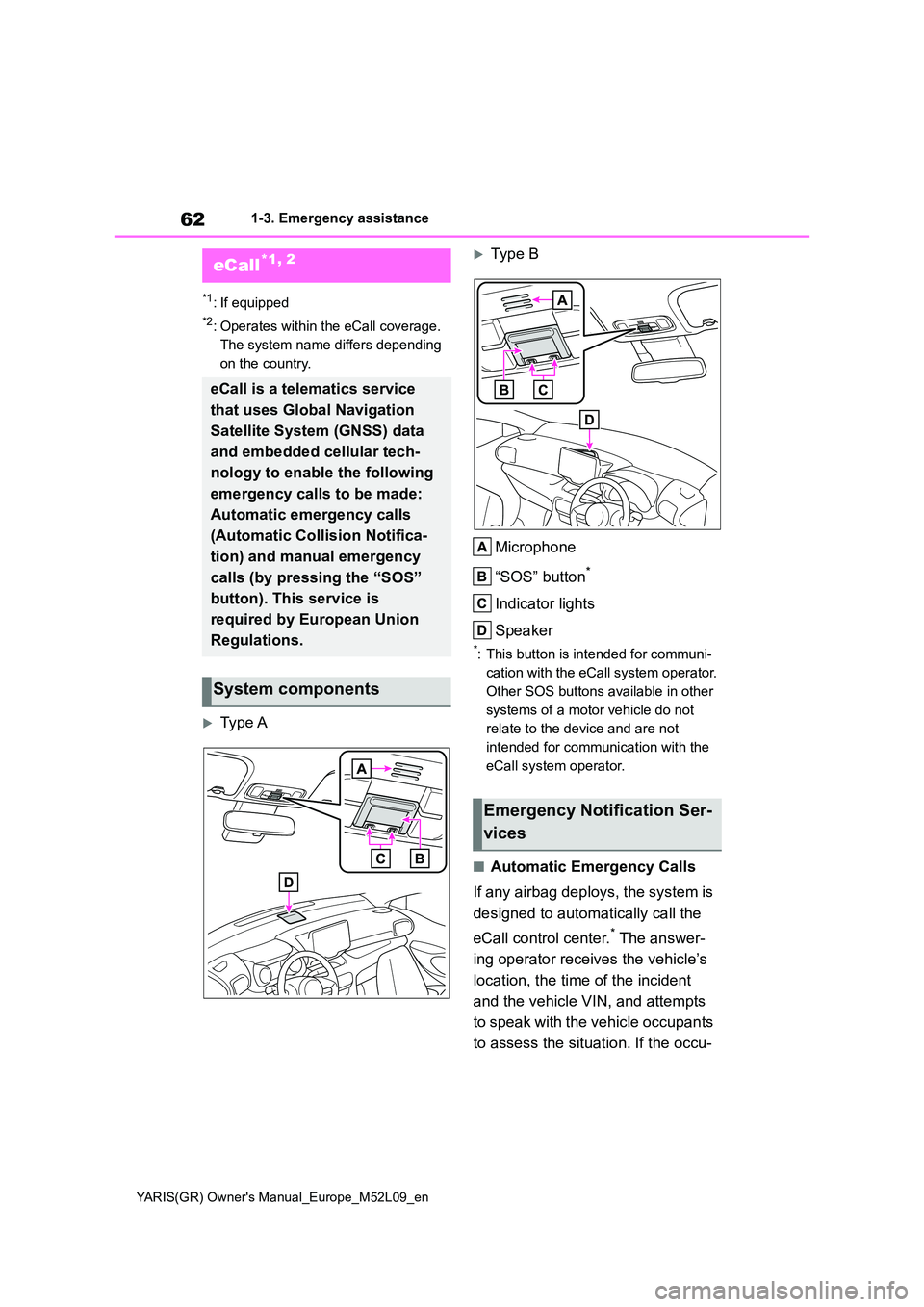
Type A
Typ e B
Microphone
“SOS” button*
Indicator lights
Speaker
*: This button is intended for communi-
cation with the eCall system operator.
Other SOS buttons available in other
systems of a motor vehicle do not
relate to the device and are not
intended for communication with the
eCall system operator.
■Automatic Emergency Calls
If any airbag deploys, the system is
designed to automatically call the
eCall control center.* The answer-
ing operator receives the vehicle’s
location, the time of the incident
and the vehicle VIN, and attempts
to speak with the vehicle occupants
to assess the situation. If the occu-
eCall*1, 2
eCall is a telematics service
that uses Global Navigation
Satellite System (GNSS) data
and embedded cellular tech-
nology to enable the following
emergency calls to be made:
Automatic emergency calls
(Automatic Collision Notifica-
tion) and manual emergency
calls (by pressing the “SOS”
button). This service is
required by European Union
Regulations.
System components
Emergency Notification Ser-
vices
Page 65 of 458
63
1
YARIS(GR) Owner's Manual_Europe_M52L09_en
1-3. Emergency assistance
For safety and security
pants are unable to communicate,
the operator automatically treats
the call as an emergency and con-
tacts the nearest emergency ser-
vices provider (112 system etc.) to
describe the situation and request
that assistance be sent to the loca-
tion.
*: In some cases, the call cannot be
made. ( →P. 6 4 )
■Manual Emergency Calls
In the event of an emergency, press
the “SOS” button to call the eCall
control center.* The answering
operator will determine your vehi-
cle’s location, assess the situation,
and dispatch the necessary assis-
tance required.
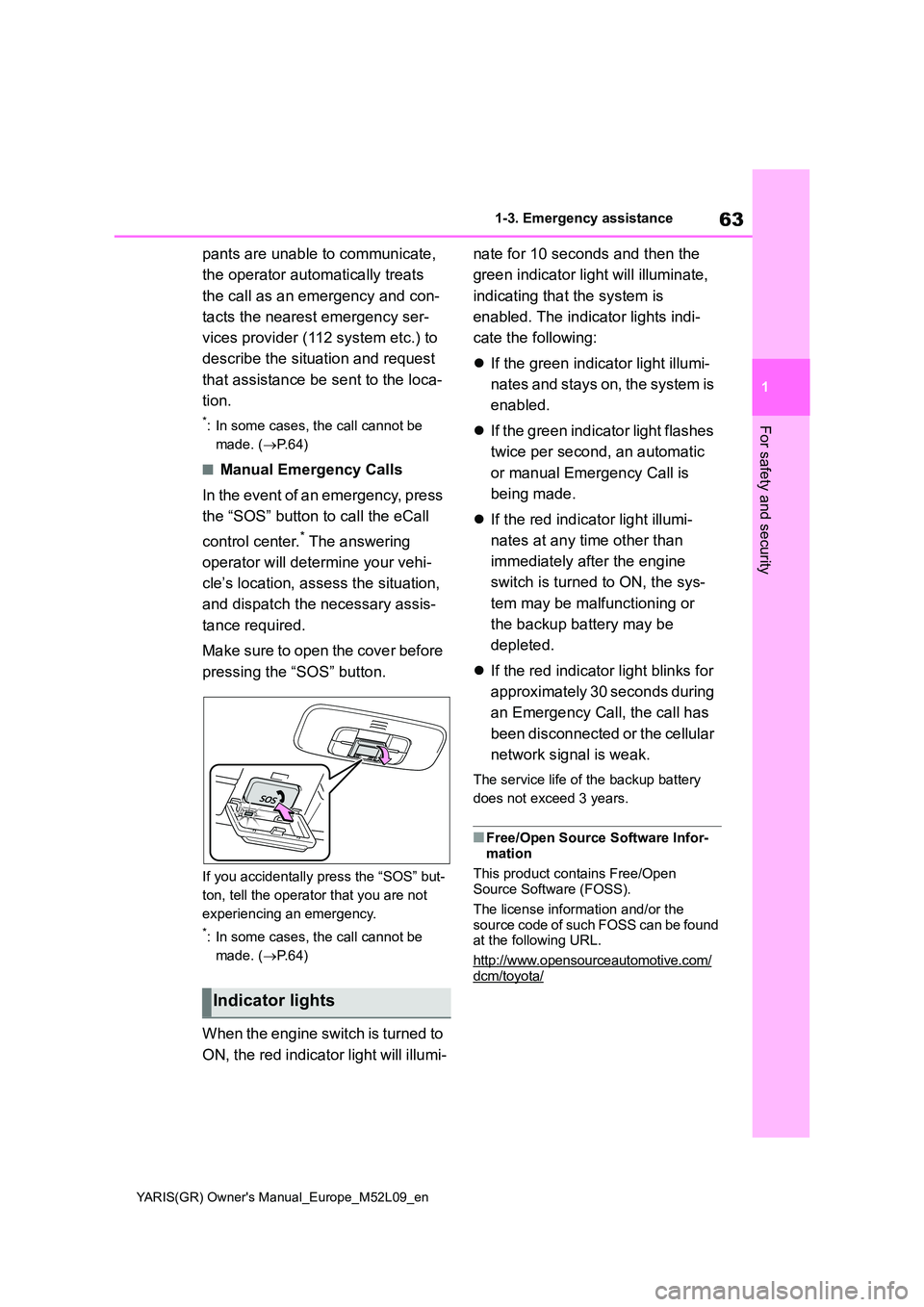
Make sure to open the cover before
pressing the “SOS” button.
If you accidentally press the “SOS” but-
ton, tell the operator that you are not
experiencing an emergency.
*: In some cases, the call cannot be
made. ( →P. 6 4 )
When the engine switch is turned to
ON, the red indicator light will illumi-
nate for 10 seconds and then the
green indicator light will illuminate,
indicating that the system is
enabled. The indicator lights indi-
cate the following:
z If the green indicator light illumi-
nates and stays on, the system is
enabled.
z If the green indicator light flashes
twice per second, an automatic
or manual Emergency Call is
being made.
z If the red indicator light illumi-
nates at any time other than
immediately after the engine
switch is turned to ON, the sys-
tem may be malfunctioning or
the backup battery may be
depleted.
z If the red indicator light blinks for
approximately 30 seconds during
an Emergency Call, the call has
been disconnected or the cellular
network signal is weak.
The service life of the backup battery
does not exceed 3 years.
■Free/Open Source Software Infor- mation
This product contains Free/Open Source Software (FOSS).
The license information and/or the
source code of such FOSS can be found at the following URL.
http://www.opensourceautomotive.com/
dcm/toyota/
Indicator lights
Page 66 of 458
64
YARIS(GR) Owner's Manual_Europe_M52L09_en
1-3. Emergency assistance
WARNING
■When the Emergency Call may not be made
●It may not be possible to make Emergency Calls in any of the fol-lowing situations. In such cases,
report to emergency services pro- vider (112 system etc.) by other means such as nearby public
phones.
• Even when the vehicle is in the cel-
lular phone service area, it may be difficult to connect to the eCall con-trol center if the reception is poor or
the line is busy. In such cases, even though the system attempts to con-nect to the eCall control center, you
may not be able to connect to the eCall control center to make Emer-gency Calls and contact emergency
services.
• When the vehicle is out of the cellu-
lar phone service area, the Emer- gency Calls cannot be made.
• When any related equipment (such as the “SOS” button panel, indicator lights, microphone, speaker, DCM,
antenna, or any wires connecting the equipment) is malfunctioning, damaged or broken, the Emer-
gency Call cannot be made.
• During an Emergency Call, the sys-
tem makes repeated attempts to connect to the eCall control center. However, if it cannot connect to the
eCall control center due to poor radio wave reception, the system may not be able to connect to the
cellular network and the call may finish without connecting. The red indicator light will blink for approxi-
mately 30 seconds to indicate this disconnection.
●If the battery’s voltage decreases or there is a disconnection, the system may not be able to connect to the
eCall control center.
●The Emergency Call system might not work outside of EU area, depending on the available infra-
structure in the country.
■When the Emergency Call sys-
tem is replaced with a new one
The Emergency Call system should be registered. Contact any authorized
Toyota retailer or Toyota authorized repairer, or any reliable repairer.
■For your safety
●Please drive safely.The function of this system is to
assist you in making the Emer- gency Call in case of accidents such as traffic accidents or sudden
medical emergencies, and it does not protect the driver or passengers in any way. Please drive safely and
fasten your seatbelts at all times for your safety.
●In case of an emergency, make lives the top priority.
●If you smell anything burning or other unusual smells, leave the vehicle and evacuate to a safe area
immediately.
●If the airbags deploy when the sys-
tem is operating normally, the sys- tem makes emergency call. The system also makes emergency call
when the vehicle is struck from the rear or rolls over, even if the airbags do not deploy.
●For safety, do not make the Emer-gency Call while driving.
Making calls during driving may cause mishandling of the steering wheel, which may lead to unex-
pected accidents. Stop the vehicle and confirm the safety of your surroundings before
making the Emergency Call.
Page 81 of 458
2
79
YARIS(GR) Owner's Manual_Europe_M52L09_en
2
Vehicle status information and indicators
Vehicle status informa-
tion and indicators
2-1. Instrument cluster
Warning lights and indicators
......................................... 80
Gauges and meters ............ 83
Multi-information display ..... 86
Head-up display.................. 92
Fuel consumption information
......................................... 96
Page 82 of 458
80
YARIS(GR) Owner's Manual_Europe_M52L09_en
2-1. Instrument cluster
2-1.In strument clu ste r
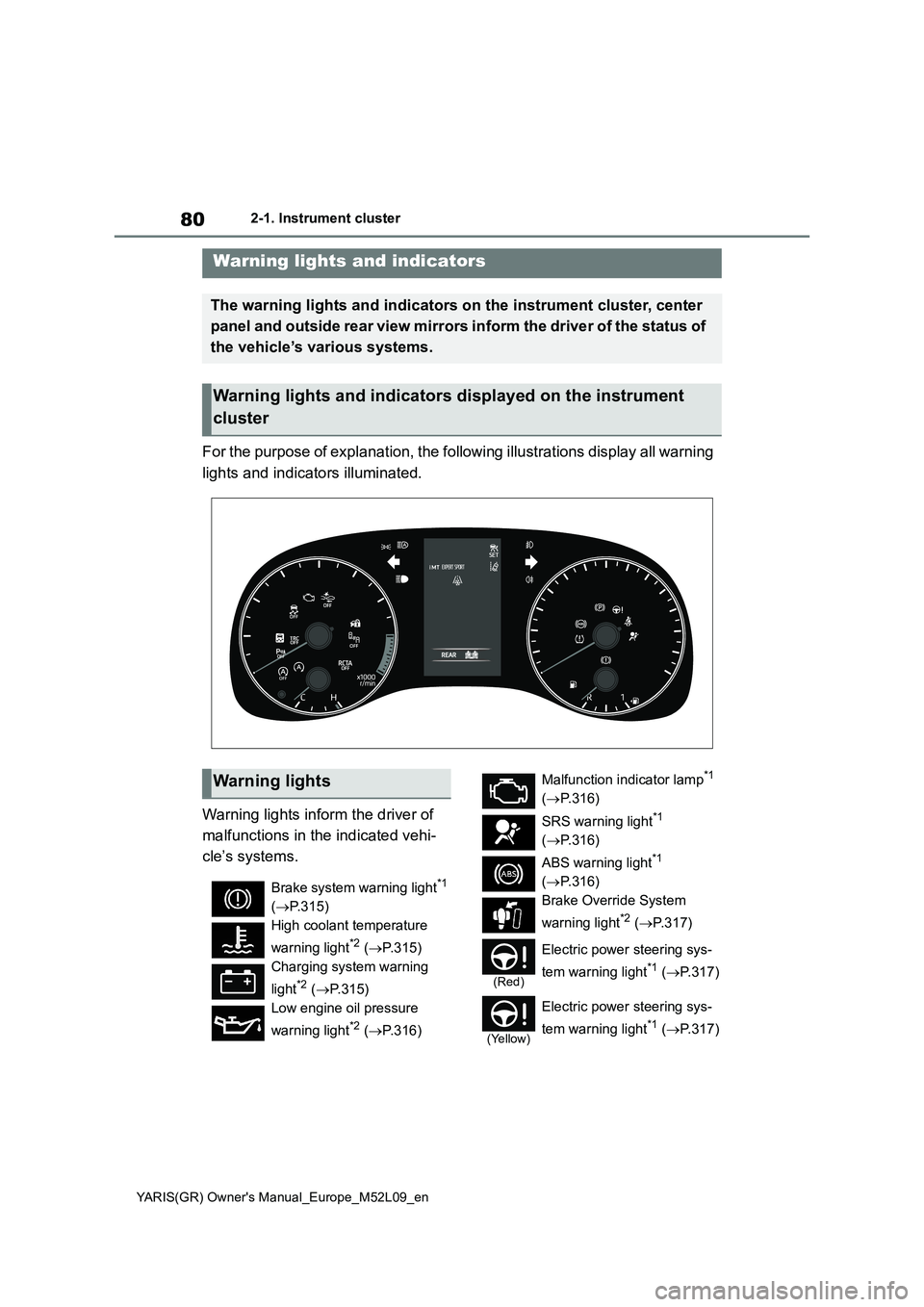
For the purpose of explanation, the following illustrations display all warning
lights and indicators illuminated.
Warning lights inform the driver of
malfunctions in the indicated vehi-
cle’s systems.
Warning lights and indicators
The warning lights and indicators on the instrument cluster, center
panel and outside rear view mirrors inform the driver of the status of
the vehicle’s various systems.
Warning lights and indicators displayed on the instrument
cluster
Warning lights
Brake system warning light*1
( →P.315)
High coolant temperature
warning light*2 ( →P.315)
Charging system warning
light*2 ( →P.315)
Low engine oil pressure
warning light*2 ( →P.316)
Malfunction indicator lamp*1
( →P.316)
SRS warning light*1
( →P.316)
ABS warning light*1
( →P.316)
Brake Override System
warning light*2 ( →P. 3 1 7 )
(Red)
Electric power steering sys-
tem warning light*1 ( →P.317)
(Yellow)
Electric power steering sys-
tem warning light*1 ( →P.317)
Page 83 of 458
81
2
YARIS(GR) Owner's Manual_Europe_M52L09_en
2-1. Instrument cluster
Vehicle status information and indicators
*1: These lights come on when the
engine switch is turned to ON to indi-
cate that a system check is being
performed. They will turn off after the
engine is started, or after a few sec-
onds. There may be a malfunction in
a system if the lights do not come
on, or turn off. Have the vehicle
inspected by any authorized Toyota
retailer or Toyota authorized repairer,
or any reliable repairer.
*2: This light illuminates on the multi-
information display.
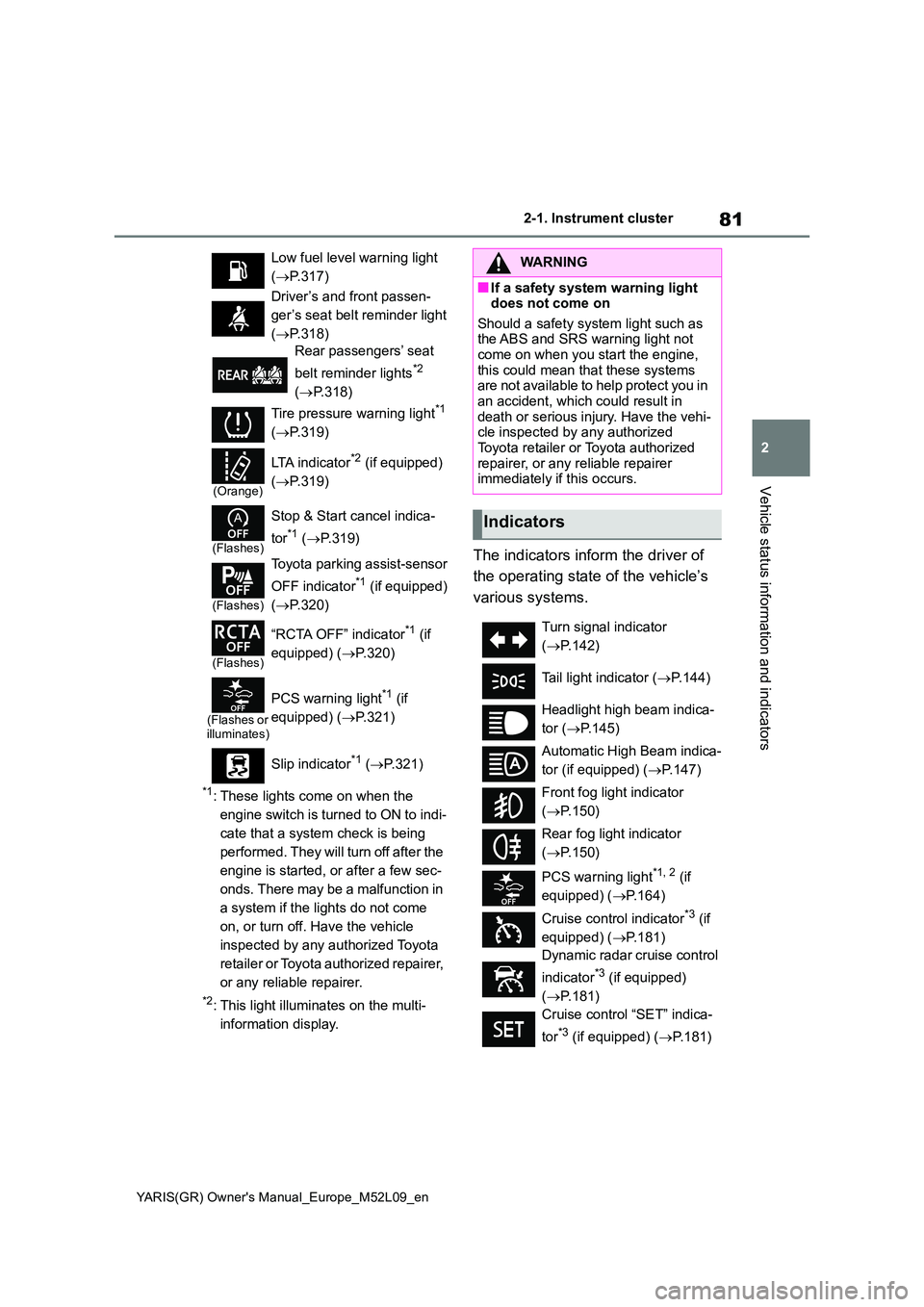
The indicators inform the driver of
the operating state of the vehicle’s
various systems.
Low fuel level warning light
( →P.317)
Driver’s and front passen-
ger’s seat belt reminder light
( →P.318)
Rear passengers’ seat
belt reminder lights*2
( →P.318)
Tire pressure warning light*1
( →P.319)
(Orange)
LTA indicator*2 (if equipped)
( →P.319)
(Flashes)
Stop & Start cancel indica-
tor*1 ( →P.319)
(Flashes)
Toyota parking assist-sensor
OFF indicator*1 (if equipped)
( →P.320)
(Flashes)
“RCTA OFF” indicator*1 (if
equipped) ( →P.320)
(Flashes or illuminates)
PCS warning light*1 (if
equipped) ( →P.321)
Slip indicator*1 ( →P.321)
WARNING
■If a safety system warning light does not come on
Should a safety system light such as the ABS and SRS warning light not come on when you start the engine,
this could mean that these systems are not available to help protect you in an accident, which could result in
death or serious injury. Have the vehi- cle inspected by any authorized Toyota retailer or Toyota authorized
repairer, or any reliable repairer immediately if this occurs.
Indicators
Turn signal indicator
( →P.142)
Tail light indicator ( →P.144)
Headlight high beam indica-
tor ( →P.145)
Automatic High Beam indica-
tor (if equipped) ( →P.147)
Front fog light indicator
( →P.150)
Rear fog light indicator
( →P.150)
PCS warning light*1, 2 (if
equipped) ( →P.164)
Cruise control indicator*3 (if
equipped) ( →P.181)
Dynamic radar cruise control
indicator*3 (if equipped)
( →P.181)
Cruise control “SET” indica-
tor*3 (if equipped) ( →P.181)
Page 84 of 458
82
YARIS(GR) Owner's Manual_Europe_M52L09_en
2-1. Instrument cluster
*1: These lights come on when the
engine switch is turned to ON to indi-
cate that a system check is being
performed. They will turn off after the
engine is started, or after a few sec-
onds. There may be a malfunction in
a system if the lights do not come
on, or turn off. Have the vehicle
inspected by any authorized Toyota
retailer or Toyota authorized repairer,
or any reliable repairer.
*2: This light comes on when the system
is turned off.
*3: This light illuminates on the multi-
information display.
*4: Depending on the operating condi-
tion, the color and illuminating/flash-
ing state of the light change.
*5: This light illuminates on the outside
rear view mirrors.
*6: When the outside temperature is
approximately 3°C (37°F) or lower,
this indicator will flash for approxi-
mately 10 seconds, then stay on.
*7: This light illuminates on the center
panel.
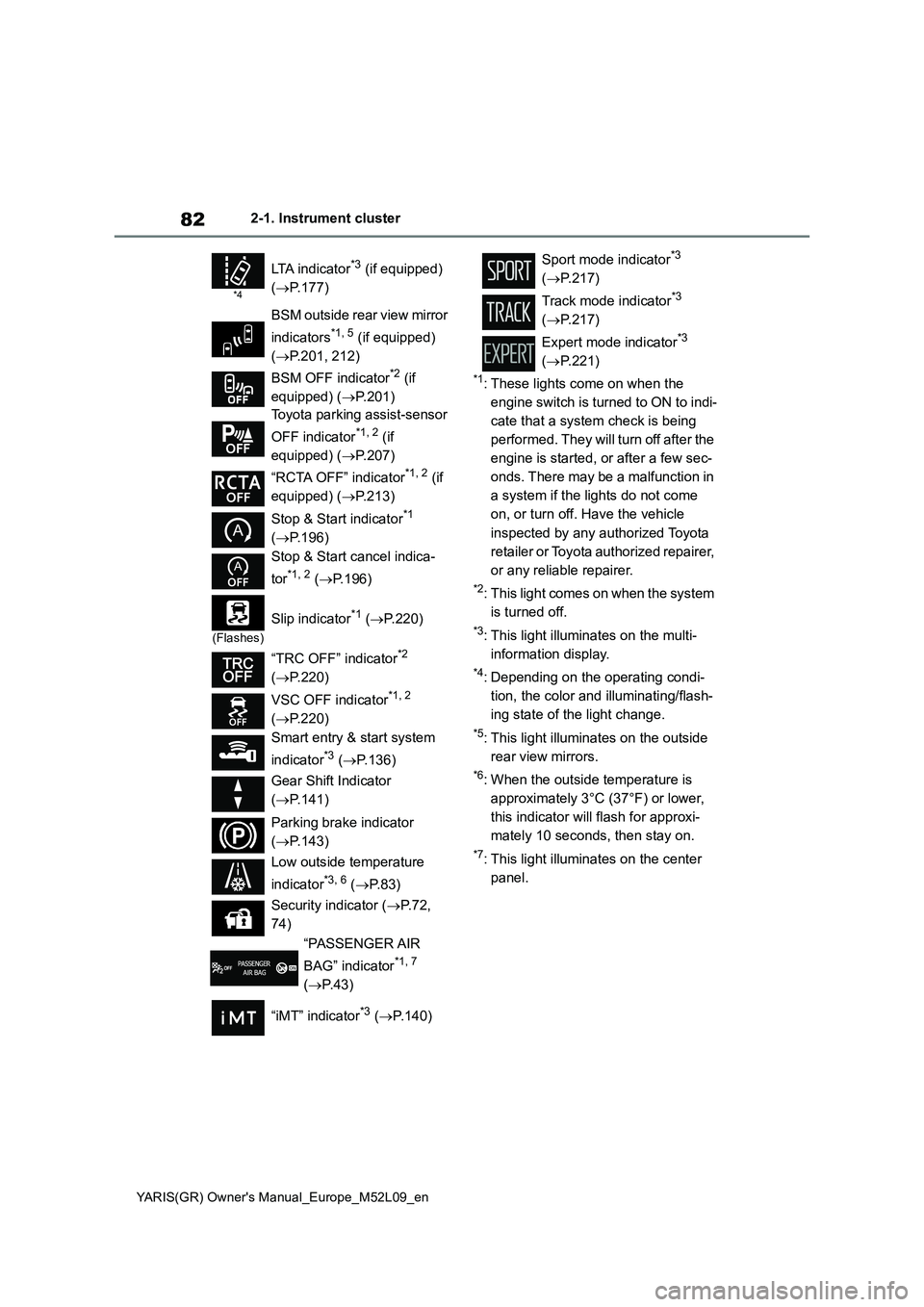
*4
LTA indicator*3 (if equipped)
(→P.177)
BSM outside rear view mirror
indicators
*1, 5 (if equipped)
(→P.201, 212)
BSM OFF indicator
*2 (if
equipped) (→P.201)
Toyota parking assist-sensor
OFF indicator
*1, 2 (if
equipped) (→P.207)
“RCTA OFF” indicator
*1, 2 (if
equipped) (→P.213)
Stop & Start indicator
*1
(→P.196)
Stop & Start cancel indica-
tor
*1, 2 (→P.196)
(Flashes)
Slip indicator*1 (→P.220)
“TRC OFF” indicator
*2
(→P.220)
VSC OFF indicator
*1, 2
(→P.220)
Smart entry & start system
indicator
*3 (→P.136)
Gear Shift Indicator
(→P.141)
Parking brake indicator
(→P.143)
Low outside temperature
indicator
*3, 6 (→P. 8 3 )
Security indicator (→P. 7 2 ,
74)
“PASSENGER AIR
BAG” indicator
*1, 7
(→P.43)
“iMT” indicator
*3 (→P.140)
Sport mode indicator*3
(→P.217)
Track mode indicator
*3
(→P.217)
Expert mode indicator
*3
(→P.221)
Page 88 of 458
86
YARIS(GR) Owner's Manual_Europe_M52L09_en
2-1. Instrument cluster
selected on the multi-information dis-
play, the system may be malfunctioning.
Have the vehicle inspected by any
authorized Toyota retailer or Toyota
authorized repairer, or any reliable
repairer.
The brightness of the instrument
panel lights can be adjusted on
select to the multi-information
display.
The brightness of the instrument panel
lights can be adjusted separately for
when the tail lights are on and off.
1Press or to select of
the multi-information display.
2Press or to select ,
and then press and hold the
.
3Press or to change the
brightness.
■Instrument cluster brightness
adjustment
The instrument cluster brightness levels
when the tail lights are on and off can be
adjusted individually. However, when
the surroundings are bright (daytime,
etc.), turning on the tail lights will not
change the instrument cluster bright-
ness.
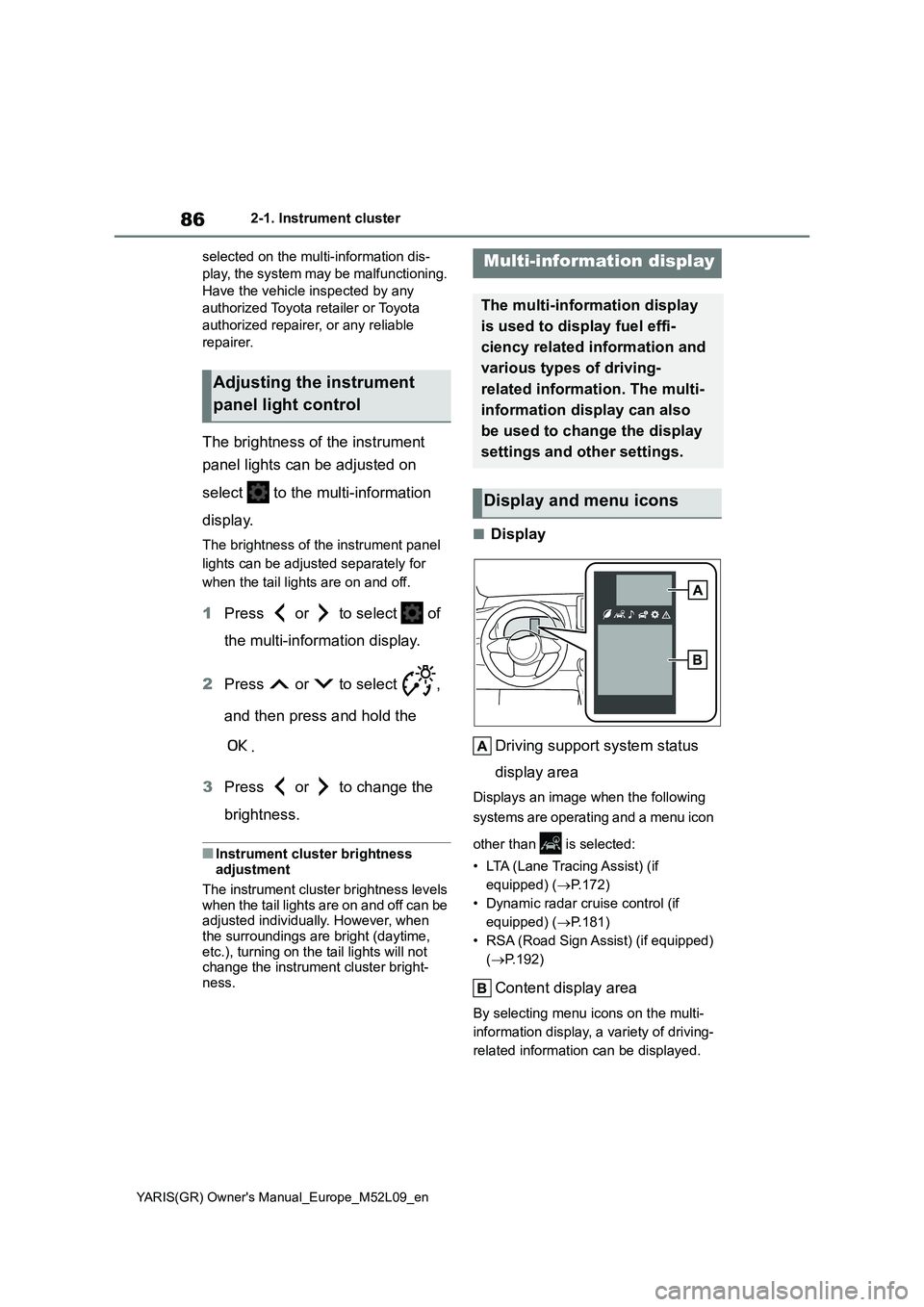
■Display
Driving support system status
display area
Displays an image when the following
systems are operating and a menu icon
other than is selected:
• LTA (Lane Tracing Assist) (if
equipped) (→P.172)
• Dynamic radar cruise control (if
equipped) (→P.181)
• RSA (Road Sign Assist) (if equipped)
(→P.192)
Content display area
By selecting menu icons on the multi-
information display, a variety of driving-
related information can be displayed.
Adjusting the instrument
panel light control
Multi-information display
The multi-information display
is used to display fuel effi-
ciency related information and
various types of driving-
related information. The multi-
information display can also
be used to change the display
settings and other settings.
Display and menu icons
Page 123 of 458
121
3
YARIS(GR) Owner's Manual_Europe_M52L09_en
3-4. Adjusting the steering wheel and mirrors
Before driving
The height of the rear view mirror
can be adjusted to suit your driving
posture.
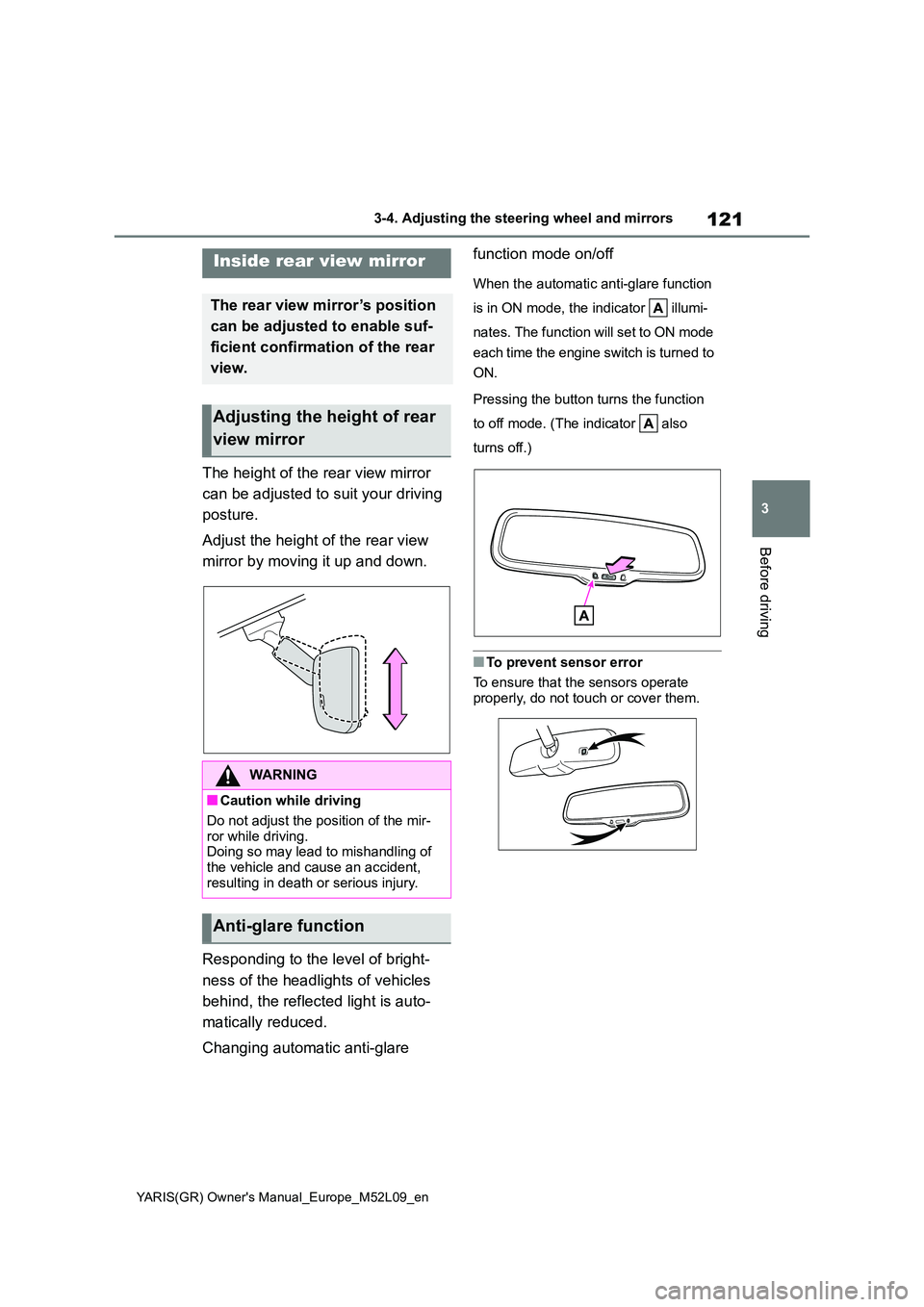
Adjust the height of the rear view
mirror by moving it up and down.
Responding to the level of bright-
ness of the headlights of vehicles
behind, the reflected light is auto-
matically reduced.
Changing automatic anti-glare
function mode on/off
When the automatic anti-glare function
is in ON mode, the indicator illumi-
nates. The function will set to ON mode
each time the engine switch is turned to
ON.
Pressing the button turns the function
to off mode. (The indicator also
turns off.)
■To prevent sensor error
To ensure that the sensors operate properly, do not touch or cover them.
Inside rear view mirror
The rear view mirror’s position
can be adjusted to enable suf-
ficient confirmation of the rear
view.
Adjusting the height of rear
view mirror
WARNING
■Caution while driving
Do not adjust the position of the mir-
ror while driving. Doing so may lead to mishandling of the vehicle and cause an accident,
resulting in death or serious injury.
Anti-glare function