tow TOYOTA GR YARIS 2020 Owner's Manual
[x] Cancel search | Manufacturer: TOYOTA, Model Year: 2020, Model line: GR YARIS, Model: TOYOTA GR YARIS 2020Pages: 458, PDF Size: 105.69 MB
Page 175 of 458
173
4
YARIS(GR) Owner's Manual_Europe_M52L09_en
4-5. Using the driving support systems
Driving
WARNING
●When your vehicle is towing a trailer or during emergency towing
■Preventing LTA system malfunc-tions and operations performed
by mistake
●Do not modify the headlights or place stickers, etc., on the surface
of the lights.
●Do not modify the suspension, etc.
If the suspension, etc., needs to be replaced, contact any authorized Toyota retailer or Toyota authorized
repairer, or any reliable repairer.
●Do not install or place anything on
the hood or grille. Also, do not install a grille guard (bull bars, kan-garoo bar, etc.).
●If your windshield needs repairs, contact any authorized Toyota
retailer or Toyota authorized repairer, or any reliable repairer.
■Conditions in which functions may not operate properly
In the following situations, the func-
tions may not operate properly and the vehicle may depart from its lane. Drive safely by always paying careful
attention to your surroundings and operate the steering wheel to correct the path of the vehicle without relying
solely on the functions.
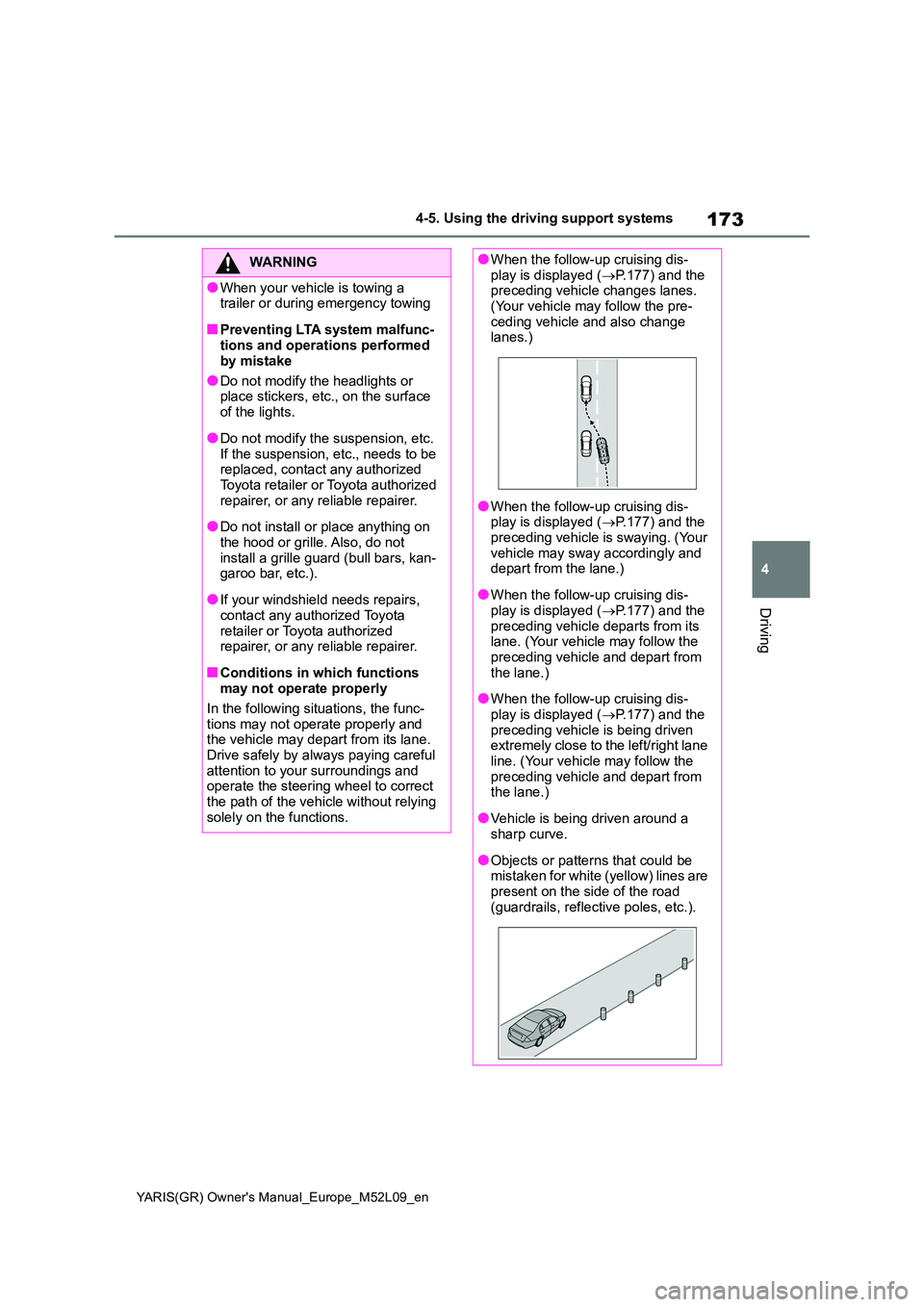
●When the follow-up cruising dis- play is displayed ( →P.177) and the preceding vehicle changes lanes.
(Your vehicle may follow the pre- ceding vehicle and also change lanes.)
●When the follow-up cruising dis-play is displayed ( →P.177) and the
preceding vehicle is swaying. (Your vehicle may sway accordingly and depart from the lane.)
●When the follow-up cruising dis-play is displayed ( →P.177) and the
preceding vehicle departs from its lane. (Your vehicle may follow the preceding vehicle and depart from
the lane.)
●When the follow-up cruising dis-
play is displayed ( →P.177) and the preceding vehicle is being driven extremely close to the left/right lane
line. (Your vehicle may follow the preceding vehicle and depart from the lane.)
●Vehicle is being driven around a sharp curve.
●Objects or patterns that could be mistaken for white (yellow) lines are
present on the side of the road (guardrails, reflective poles, etc.).
Page 185 of 458
183
4
YARIS(GR) Owner's Manual_Europe_M52L09_en
4-5. Using the driving support systems
Driving
WARNING
●Assisting the driver to judge proper following distance
The dynamic radar cruise control
determines whether the following dis-
tance between the driver’s own vehi-
cle and a designated vehicle traveling
ahead is within a set range. It is not
capable of making any other type of
judgement. Therefore, it is absolutely
necessary for the driver to remain vig-
ilant and to determine whether or not
there is a possibility of danger in any
given situation.
●Assisting the driver to operate the
vehicle
The dynamic radar cruise control
does not include functions which will
prevent or avoid collisions with vehi-
cles ahead of your vehicle. Therefore,
if there is ever any possibility of dan-
ger, the driver must take immediate
and direct control of the vehicle and
act appropriately in order to ensure
the safety of all involved.
■Situations unsuitable for dynamic radar cruise control
Do not use dynamic radar cruise con-
trol in any of the following situations. Doing so may result in inappropriate speed control and could cause an
accident resulting in death or serious injury.
●Roads where there are pedestrians, cyclists, etc.
●In heavy traffic
●On roads with sharp bends
●On winding roads
●On slippery roads, such as those covered with rain, ice or snow
●On steep downhills, or where there are sudden changes between sharp up and down gradients
Vehicle speed may exceed the set speed when driving down a steep hill.
●At entrances to freeways and high-ways
●When weather conditions are bad enough that they may prevent the sensors from detecting correctly
(fog, snow, sandstorm, heavy rain, etc.)
●When there is rain, snow, etc., on the front surface of the radar or front camera
●In traffic conditions that require fre-quent repeated acceleration and
deceleration
●During emergency towing
●When an approach warning buzzer is heard often
Page 203 of 458
201
4
YARIS(GR) Owner's Manual_Europe_M52L09_en
4-5. Using the driving support systems
Driving
*: If equipped
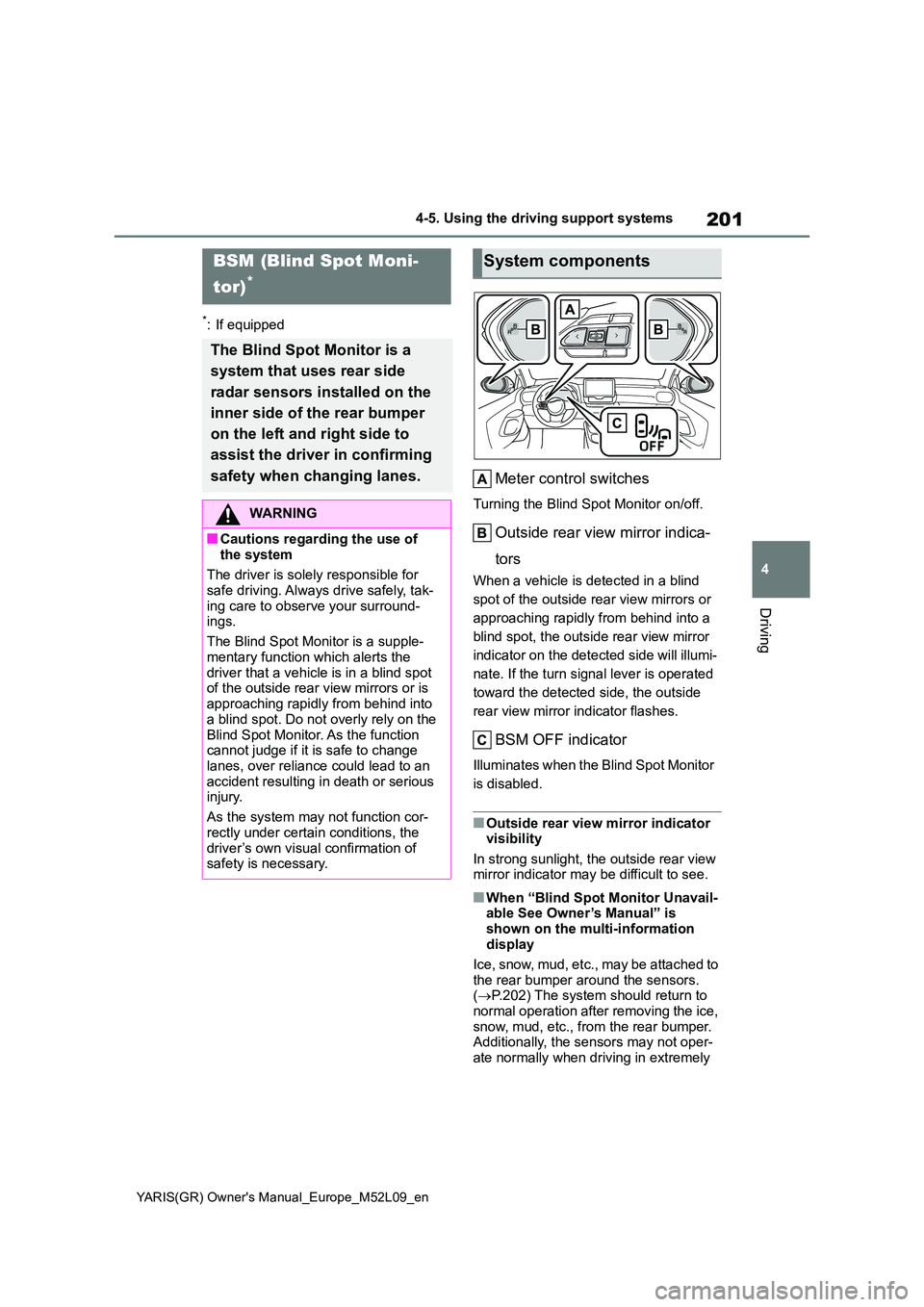
Meter control switches
Turning the Blind Spot Monitor on/off.
Outside rear view mirror indica-
tors
When a vehicle is detected in a blind
spot of the outside rear view mirrors or
approaching rapidly from behind into a
blind spot, the outside rear view mirror
indicator on the detected side will illumi-
nate. If the turn signal lever is operated
toward the detected side, the outside
rear view mirror indicator flashes.
BSM OFF indicator
Illuminates when the Blind Spot Monitor
is disabled.
■Outside rear view mirror indicator visibility
In strong sunlight, the outside rear view mirror indicator may be difficult to see.
■When “Blind Spot Monitor Unavail-able See Owner’s Manual” is
shown on the multi-information display
Ice, snow, mud, etc., may be attached to
the rear bumper around the sensors. ( →P.202) The system should return to normal operation after removing the ice,
snow, mud, etc., from the rear bumper. Additionally, the sensors may not oper-ate normally when driving in extremely
BSM (Blind Spot Moni-
tor)*
The Blind Spot Monitor is a
system that uses rear side
radar sensors installed on the
inner side of the rear bumper
on the left and right side to
assist the driver in confirming
safety when changing lanes.
WARNING
■Cautions regarding the use of
the system
The driver is solely responsible for safe driving. Always drive safely, tak-
ing care to observe your surround- ings.
The Blind Spot Monitor is a supple-
mentary function which alerts the driver that a vehicle is in a blind spot of the outside rear view mirrors or is
approaching rapidly from behind into a blind spot. Do not overly rely on the
Blind Spot Monitor. As the function cannot judge if it is safe to change lanes, over reliance could lead to an
accident resulting in death or serious injury.
As the system may not function cor-
rectly under certain conditions, the driver’s own visual confirmation of safety is necessary.
System components
Page 207 of 458
205
4
YARIS(GR) Owner's Manual_Europe_M52L09_en
4-5. Using the driving support systems
Driving
■The Blind Spot Monitor is opera-
tional when
The Blind Spot Monitor is operational
when all of the following conditions are
met:
●The Blind Spot Monitor is on.
●The shift lever is in a position other
than R.
●The vehicle speed is greater than
approximately 16 km/h (10 mph).
■The Blind Spot Monitor will detect a
vehicle when
The Blind Spot Monitor will detect a
vehicle present in the detection area in
the following situations:
●A vehicle in an adjacent lane over-
takes your vehicle.
●You overtake a vehicle in adjacent
lane slowly.
●Another vehicle enters the detection
area when it changes lanes.
■Conditions under which the system
will not detect a vehicle
The Blind Spot Monitor is not designed
to detect the following types of vehicles
and/or objects:
●Small motorcycles, bicycles, pedestri-
ans, etc.*
●Vehicles traveling in the opposite
direction
●Guardrails, walls, signs, parked vehi-
cles and similar stationary objects*
●Following vehicles that are in the
same lane*
●Vehicles traveling 2 lanes away from
your vehicle*
●Vehicles which are being overtaken
rapidly by your vehicle*
*
: Depending on the conditions, detec-
tion of a vehicle and/or object may
occur.
■Conditions under which the system
may not function correctly
●The Blind Spot Monitor may not detect
vehicles correctly in the following situ-
ations:
• When the sensor is misaligned due to
a strong impact to the sensor or its
surrounding area
• When mud, snow, ice, a sticker, etc.,
is covering the sensor or surrounding
area on the rear bumper
• When driving on a road surface that is
wet with standing water during bad
weather, such as heavy rain, snow, or
fog
• When multiple vehicles are approach-
ing with only a small gap between
each vehicle
• When the distance between your vehi-
cle and a following vehicle is short
• When there is a significant difference
in speed between your vehicle and
the vehicle that enters the detection
area
• When the difference in speed
between your vehicle and another
vehicle is changing
• When a vehicle enters a detection
area traveling at about the same
speed as your vehicle
• As your vehicle starts from a stop, a
vehicle remains in the detection area
• When driving up and down consecu-
tive steep inclines, such as hills, dips
in the road, etc.
• When driving on roads with sharp
bends, consecutive curves, or uneven
surfaces
• When vehicle lanes are wide, or when
driving on the edge of a lane, and the
vehicle in an adjacent lane is far away
from your vehicle
• When towing a trailer
• When an accessory (such as a bicycle
carrier) is installed to the rear of the
vehicle
• When there is a significant difference
in height between your vehicle and
the vehicle that enters the detection
area
• Immediately after the Blind Spot Moni-
tor is turned on
Page 211 of 458
209
4
YARIS(GR) Owner's Manual_Europe_M52L09_en
4-5. Using the driving support systems
Driving
●Sharply-angled objects
●Low objects
●Tall objects with upper sections pro-
jecting outwards in the direction of
your vehicle
■Situations in which the system may
not operate properly
Certain vehicle conditions and the sur-
rounding environment may affect the
ability of a sensor to correctly detect
objects. Particular instances where this
may occur are listed below.
●There is dirt, snow, water drops or ice
on a sensor. (Cleaning the sensors
will resolve this problem.)
●A sensor is frozen. (Thawing the area
will resolve this problem.)
In especially cold weather, if a sensor
is frozen the sensor display may be
displayed abnormally, or objects, such
as a wall, may not be detected.
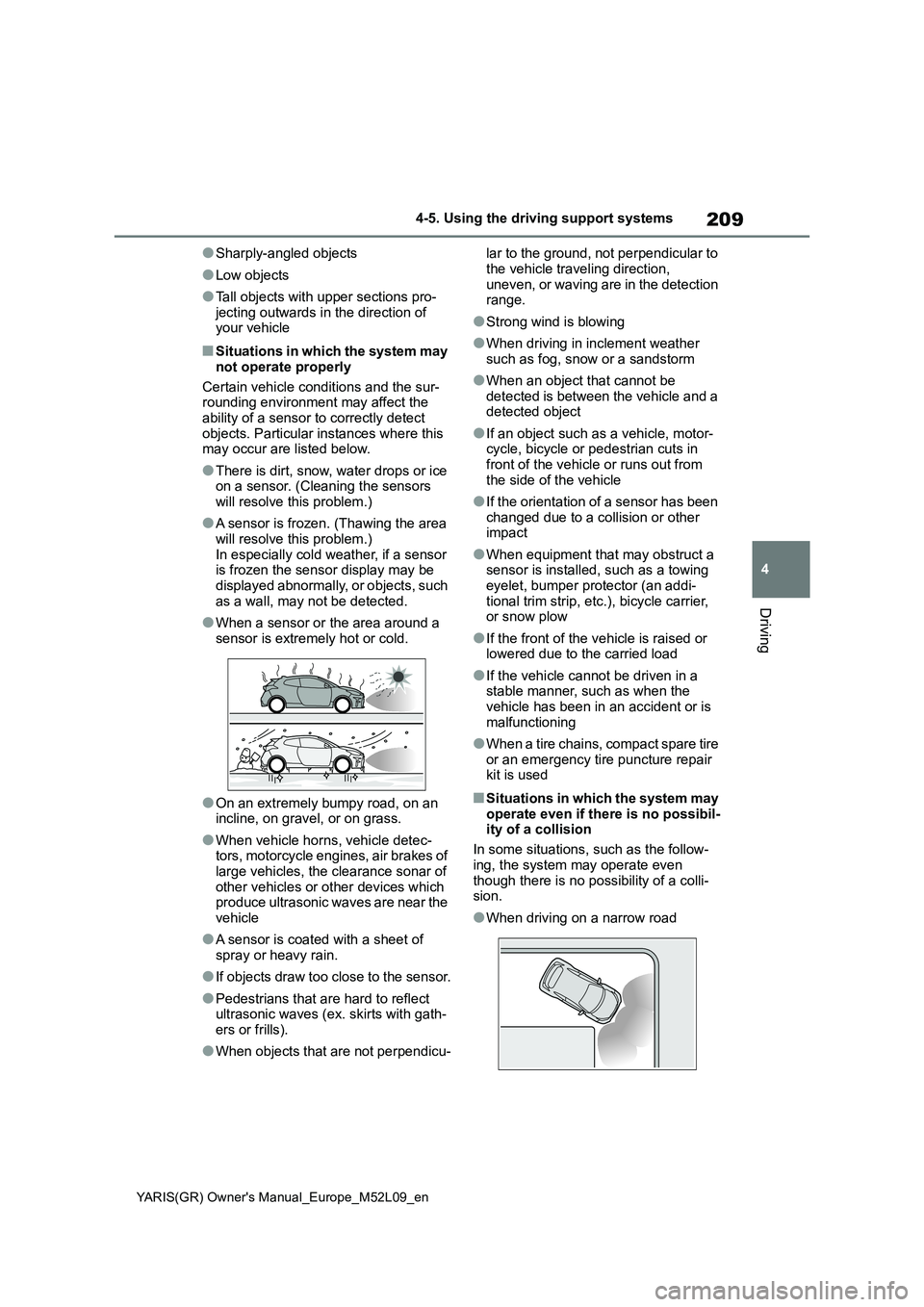
●When a sensor or the area around a
sensor is extremely hot or cold.
●On an extremely bumpy road, on an
incline, on gravel, or on grass.
●When vehicle horns, vehicle detec-
tors, motorcycle engines, air brakes of
large vehicles, the clearance sonar of
other vehicles or other devices which
produce ultrasonic waves are near the
vehicle
●A sensor is coated with a sheet of
spray or heavy rain.
●If objects draw too close to the sensor.
●Pedestrians that are hard to reflect
ultrasonic waves (ex. skirts with gath-
ers or frills).
●When objects that are not perpendicu-lar to the ground, not perpendicular to
the vehicle traveling direction,
uneven, or waving are in the detection
range.
●Strong wind is blowing
●When driving in inclement weather
such as fog, snow or a sandstorm
●When an object that cannot be
detected is between the vehicle and a
detected object
●If an object such as a vehicle, motor-
cycle, bicycle or pedestrian cuts in
front of the vehicle or runs out from
the side of the vehicle
●If the orientation of a sensor has been
changed due to a collision or other
impact
●When equipment that may obstruct a
sensor is installed, such as a towing
eyelet, bumper protector (an addi-
tional trim strip, etc.), bicycle carrier,
or snow plow
●If the front of the vehicle is raised or
lowered due to the carried load
●If the vehicle cannot be driven in a
stable manner, such as when the
vehicle has been in an accident or is
malfunctioning
●When a tire chains, compact spare tire
or an emergency tire puncture repair
kit is used
■Situations in which the system may
operate even if there is no possibil-
ity of a collision
In some situations, such as the follow-
ing, the system may operate even
though there is no possibility of a colli-
sion.
●When driving on a narrow road
Page 212 of 458
210
YARIS(GR) Owner's Manual_Europe_M52L09_en
4-5. Using the driving support systems
●When driving toward a banner, flag,
low-hanging branch or boom barrier (such as those used at railroad cross-ings, toll gates and parking lots)
●When there is a rut or hole in the sur-face of the road
●When driving on a metal cover (grat-ing), such as those used for drainage
ditches
●When driving up or down a steep
slope
●If a sensor is hit by a large amount of
water, such as when driving on a flooded road
●There is dirt, snow, water drops or ice on a sensor. (Cleaning the sensors will resolve this problem.)
●A sensor is coated with a sheet of spray or heavy rain
●When driving in inclement weather such as fog, snow or a sandstorm
●When strong winds are blowing
●When vehicle horns, vehicle detec-tors, motorcycle engines, air brakes of large vehicles, the clearance sonar of
other vehicles or other devices which produce ultrasonic waves are near the vehicle
●If the front of the vehicle is raised or lowered due to the carried load
●If the orientation of a sensor has been changed due to a collision or other
impact
●The vehicle is approaching a tall or
curved curb
●Driving close to columns (H-shaped
steel beams, etc.) in multi-story park- ing garages, construction sites, etc.
●If the vehicle cannot be driven in a
stable manner, such as when the vehicle has been in an accident or is malfunctioning
●On an extremely bumpy road, on an incline, on gravel, or on grass
●When a tire chains, compact spare tire or an emergency tire puncture repair
kit is used
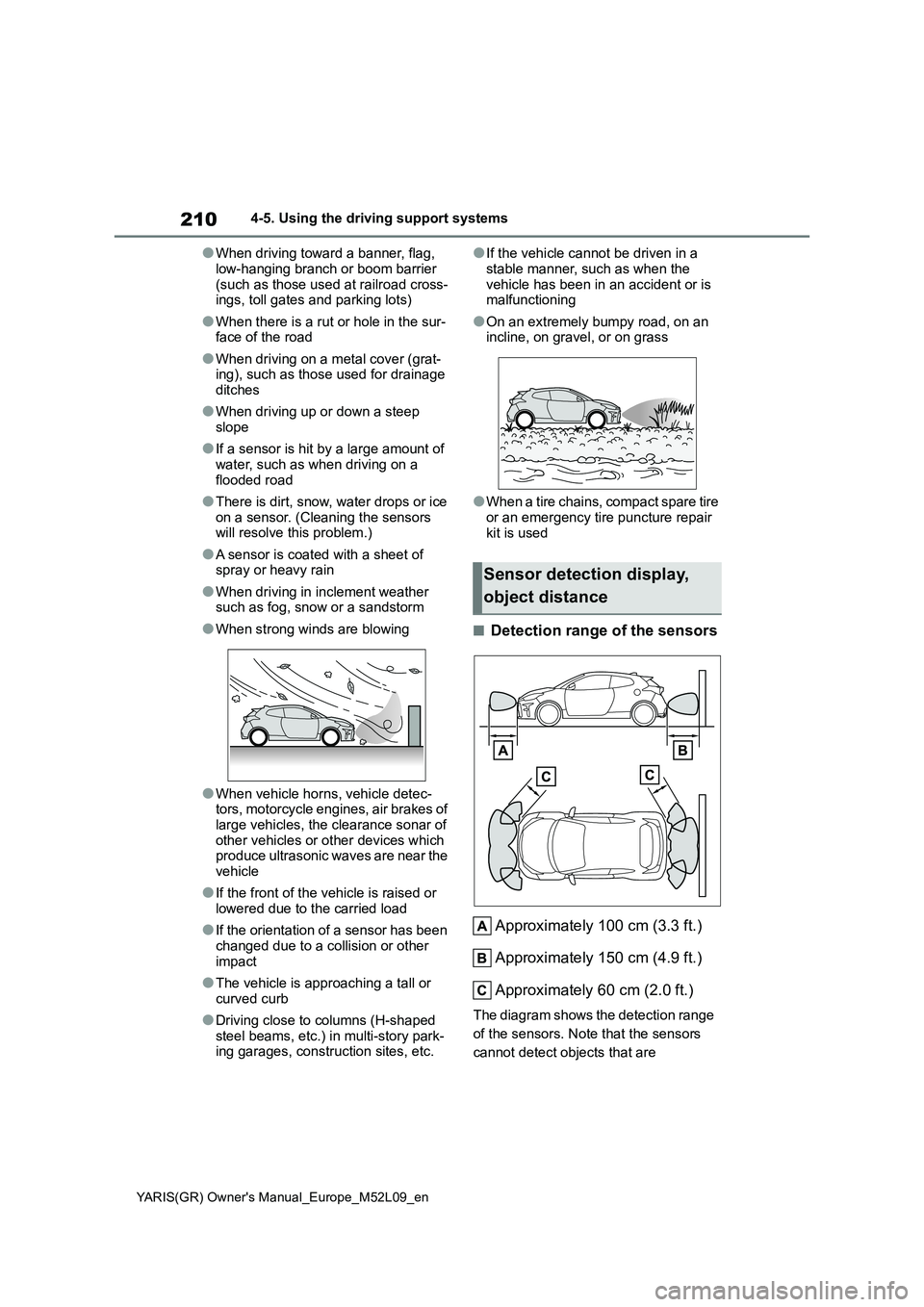
■Detection range of the sensors
Approximately 100 cm (3.3 ft.)
Approximately 150 cm (4.9 ft.)
Approximately 60 cm (2.0 ft.)
The diagram shows the detection range
of the sensors. Note that the sensors
cannot detect objects that are
Sensor detection display,
object distance
Page 217 of 458
215
4
YARIS(GR) Owner's Manual_Europe_M52L09_en
4-5. Using the driving support systems
Driving
●When the vehicle speed exceeds a
certain speed.
●When there is a malfunction in a sen-
sor or the system is temporarily unavailable.
●When the operating function is dis-abled manually.
●When the engine switch is turned off.
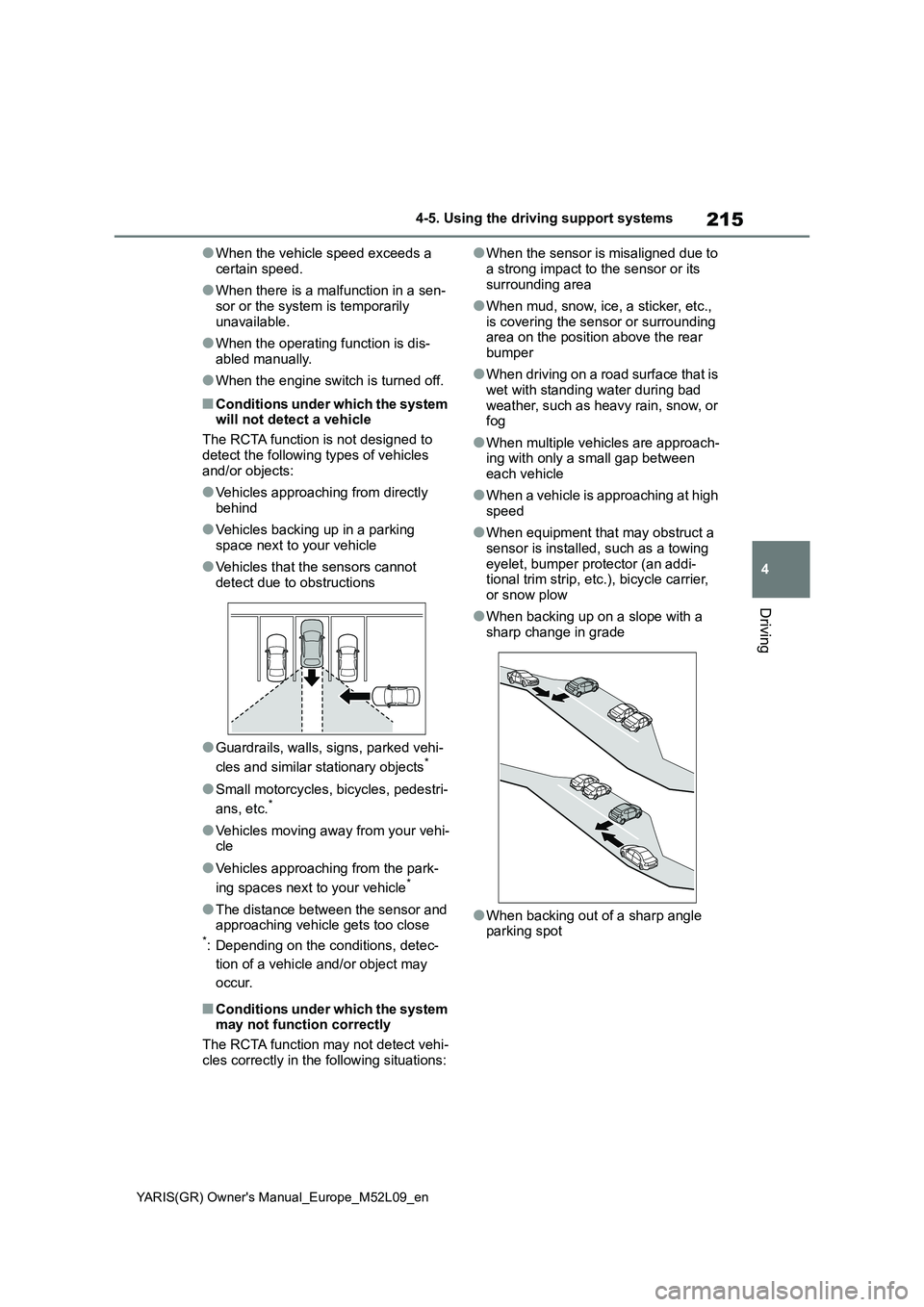
■Conditions under which the system will not detect a vehicle
The RCTA function is not designed to
detect the following types of vehicles and/or objects:
●Vehicles approaching from directly behind
●Vehicles backing up in a parking space next to your vehicle
●Vehicles that the sensors cannot detect due to obstructions
●Guardrails, walls, signs, parked vehi-
cles and similar stationary objects*
●Small motorcycles, bicycles, pedestri-
ans, etc.*
●Vehicles moving away from your vehi- cle
●Vehicles approaching from the park-
ing spaces next to your vehicle*
●The distance between the sensor and approaching vehicle gets too close*: Depending on the conditions, detec-
tion of a vehicle and/or object may
occur.
■Conditions under which the system may not function correctly
The RCTA function may not detect vehi-
cles correctly in the following situations:
●When the sensor is misaligned due to
a strong impact to the sensor or its surrounding area
●When mud, snow, ice, a sticker, etc., is covering the sensor or surrounding area on the position above the rear
bumper
●When driving on a road surface that is
wet with standing water during bad weather, such as heavy rain, snow, or fog
●When multiple vehicles are approach-ing with only a small gap between
each vehicle
●When a vehicle is approaching at high
speed
●When equipment that may obstruct a
sensor is installed, such as a towing eyelet, bumper protector (an addi-tional trim strip, etc.), bicycle carrier,
or snow plow
●When backing up on a slope with a
sharp change in grade
●When backing out of a sharp angle parking spot
Page 218 of 458
216
YARIS(GR) Owner's Manual_Europe_M52L09_en
4-5. Using the driving support systems
●When towing a trailer
●When there is a significant difference in height between your vehicle and
the vehicle that enters the detection area
●When a sensor or the area around a sensor is extremely hot or cold
●If the suspension has been modified or tires of a size other than specified are installed
●If the front of the vehicle is raised or lowered due to the carried load
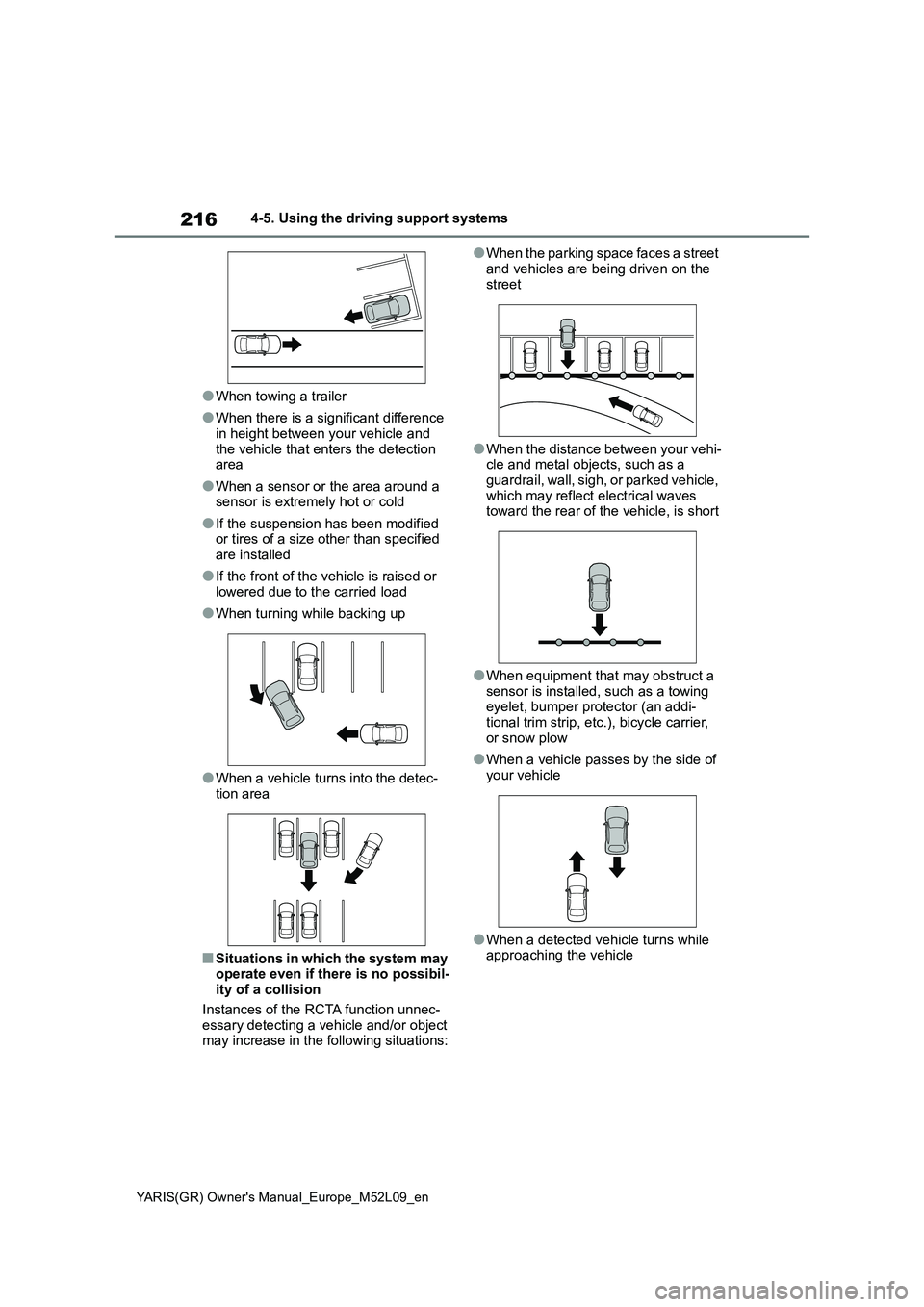
●When turning while backing up
●When a vehicle turns into the detec-tion area
■Situations in which the system may operate even if there is no possibil-ity of a collision
Instances of the RCTA function unnec- essary detecting a vehicle and/or object may increase in the following situations:
●When the parking space faces a street
and vehicles are being driven on the street
●When the distance between your vehi-cle and metal objects, such as a guardrail, wall, sigh, or parked vehicle,
which may reflect electrical waves toward the rear of the vehicle, is short
●When equipment that may obstruct a sensor is installed, such as a towing eyelet, bumper protector (an addi-
tional trim strip, etc.), bicycle carrier, or snow plow
●When a vehicle passes by the side of your vehicle
●When a detected vehicle turns while approaching the vehicle
Page 219 of 458
217
4
YARIS(GR) Owner's Manual_Europe_M52L09_en
4-5. Using the driving support systems
Driving
●When there are spinning objects near
your vehicle such as the fan of an air conditioning unit
●When water is splashed or sprayed toward the rear bumper, such as from a sprinkler
●Moving objects (flags, exhaust fumes, large rain droplets or snowflakes, rain
water on the road surface, etc.)
●When the distance between your vehi-
cle and a guardrail, wall, etc., that enters the detection area is short
●Gratings and gutters
●When a sensor or the area around a
sensor is extremely hot or cold
●If the suspension has been modified
or tires of a size other than specified are installed
●If the front of the vehicle is raised or lowered due to the carried load
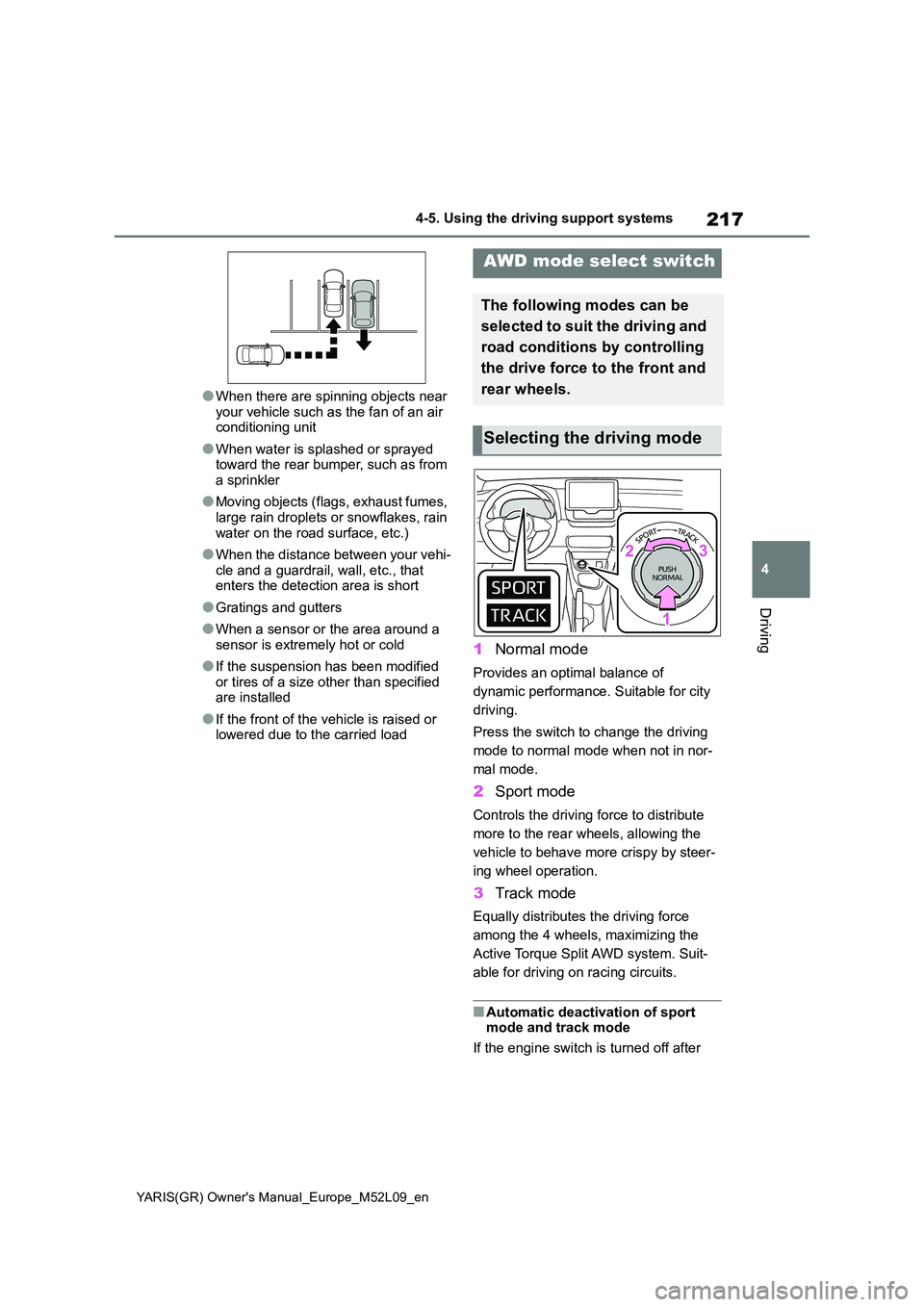
1 Normal mode
Provides an optimal balance of
dynamic performance. Suitable for city
driving.
Press the switch to change the driving
mode to normal mode when not in nor-
mal mode.
2 Sport mode
Controls the driving force to distribute
more to the rear wheels, allowing the
vehicle to behave more crispy by steer-
ing wheel operation.
3 Track mode
Equally distributes the driving force
among the 4 wheels, maximizing the
Active Torque Split AWD system. Suit-
able for driving on racing circuits.
■Automatic deactivation of sport mode and track mode
If the engine switch is turned off after
AWD mode select switch
The following modes can be
selected to suit the driving and
road conditions by controlling
the drive force to the front and
rear wheels.
Selecting the driving mode
Page 269 of 458
267
6
YARIS(GR) Owner's Manual_Europe_M52L09_en
6-4. Do-it-yourself maintenance
Maintenance and care
6-4.Do-it-y ours elf main ten ance
Do-it-yourself service
precautions
If you perform maintenance by
yourself, be sure to follow the
correct procedure as given in
these sections.
Maintenance
ItemsParts and tools
Battery con-
dition
( →P.275)
•Warm water
• Baking soda
• Grease
• Conventional wrench
(for terminal clamp
bolts)
Engine cool-
ant level
( →P.273)
• “Toyota Super Long
Life Coolant” or a simi-
lar high quality eth-
ylene glycol-based
non-silicate, non-
amine, non-nitrite and
non-borate coolant
with long-life hybrid
organic acid technol-
ogy.
“Toyota Super Long
Life Coolant” is pre-
mixed with 50% cool-
ant and 50% deionized
water.
• Funnel (used only for
adding coolant)
Engine oil
level
( →P.271)
• “Toyota Genuine Motor
Oil” or equivalent
• Rag or paper towel
• Funnel (used only for
adding engine oil)
Fuses
( →P.297)
• Fuse with same
amperage rating as
original
Light bulbs
( →P.301)
• Bulb with same num-
ber and wattage rating
as original
• Flathead screwdriver
•Wrench
Radiator,
condenser
( →P.274)
⎯
Tire inflation
pressure
( →P.290)
• Tire pressure gauge
• Compressed air
source
Washer fluid
( →P.274)
• Water or washer fluid
containing antifreeze
(for winter use)
• Funnel (used only for
adding water or
washer fluid)
WARNING
The engine compartment contains many mechanisms and fluids that
may move suddenly, become hot, or become electrically energized. To avoid death or serious injury, observe
the following precautions.
■When working on the engine
compartment
●Keep hands, clothing and tools away from the moving fan and
engine drive belt.
●Be careful not to touch the engine,
radiator, exhaust manifold, etc. right after driving as they may be hot. Oil and other fluids may also be hot.
●Do not leave anything that may burn easily, such as paper and
rags, in the engine compartment.
ItemsParts and tools