lane assist TOYOTA GR YARIS 2020 Owners Manual
[x] Cancel search | Manufacturer: TOYOTA, Model Year: 2020, Model line: GR YARIS, Model: TOYOTA GR YARIS 2020Pages: 458, PDF Size: 105.69 MB
Page 5 of 458
3
YARIS(GR) Owner's Manual_Europe_M52L09_en
TABLE OF CONTENTS
1
6
5
4
3
2
8
7
4-3. Operating the lights and wip-
ers
Headlight switch.................. 144
Automatic High Beam ......... 147
Fog light switch ................... 150
Windshield wipers and washer
.......................................... 150
4-4. Refueling
Opening the fuel tank cap ... 153
4-5. Using the driving support sys-
tems
Toyota Safety Sense ........... 155
PCS (Pre-Collision System) 160
LTA (Lane Tracing Assist) ... 172
Dynamic radar cruise control
.......................................... 181
RSA (Road Sign Assist) ...... 192
Stop & Start system ............ 196
BSM (Blind Spot Monitor) ... 201
Toyota parking assist-sensor
.......................................... 206
RCTA (Rear Crossing Traffic
Alert) ................................. 212
AWD mode select switch .... 217
GPF (Gasoline Particulate Filter)
system .............................. 218
Driving assist systems ........ 219
4-6. Driving tips
Winter driving tips ............... 226
5-1. Using the air conditioning
system and defogger
Automatic air conditioning sys-
tem.................................... 230
Heated steering wheel/seat
heaters.............................. 235
5-2. Using the interior lights
Interior lights list .................. 237
5-3. Using the storage features
List of storage features ....... 239
Luggage compartment features
.......................................... 241
5-4. Other interior features
Other interior features ......... 244
6-1. Maintenance and care
Cleaning and protecting the
vehicle exterior ................. 248
Cleaning and protecting the
vehicle interior .................. 251
6-2. Matte paint care guide (if
equipped)
Basic knowledge about matte
clear coat .......................... 254
Washing your vehicle.......... 258
Frequently Asked Questions
.......................................... 261
6-3. Maintenance
Maintenance requirements . 265
5Interior features
6Maintenance and care
Page 19 of 458

17
YARIS(GR) Owner's Manual_Europe_M52L09_en
Pictorial index
*: If equipped
Meter control switches ....................................................................P.87
Phone switch*1...............................................................................P.245
Vehicle-to-vehicle distance switch*2............................................P.186
LTA (Lane Tracing Assist) switch*2...............................................P.172
Cruise control switches*2
Dynamic radar cruise control*2.........................................................P.181
Audio remote control switches*1..................................................P.245
Talk switch*1...................................................................................P.245
*1: For vehicles with navigation/multimedia system, refer to “Navigation and multi-
media system Owner’s manual”.
*2: If equipped
Page 25 of 458
23
YARIS(GR) Owner's Manual_Europe_M52L09_en
Pictorial index
*: If equipped
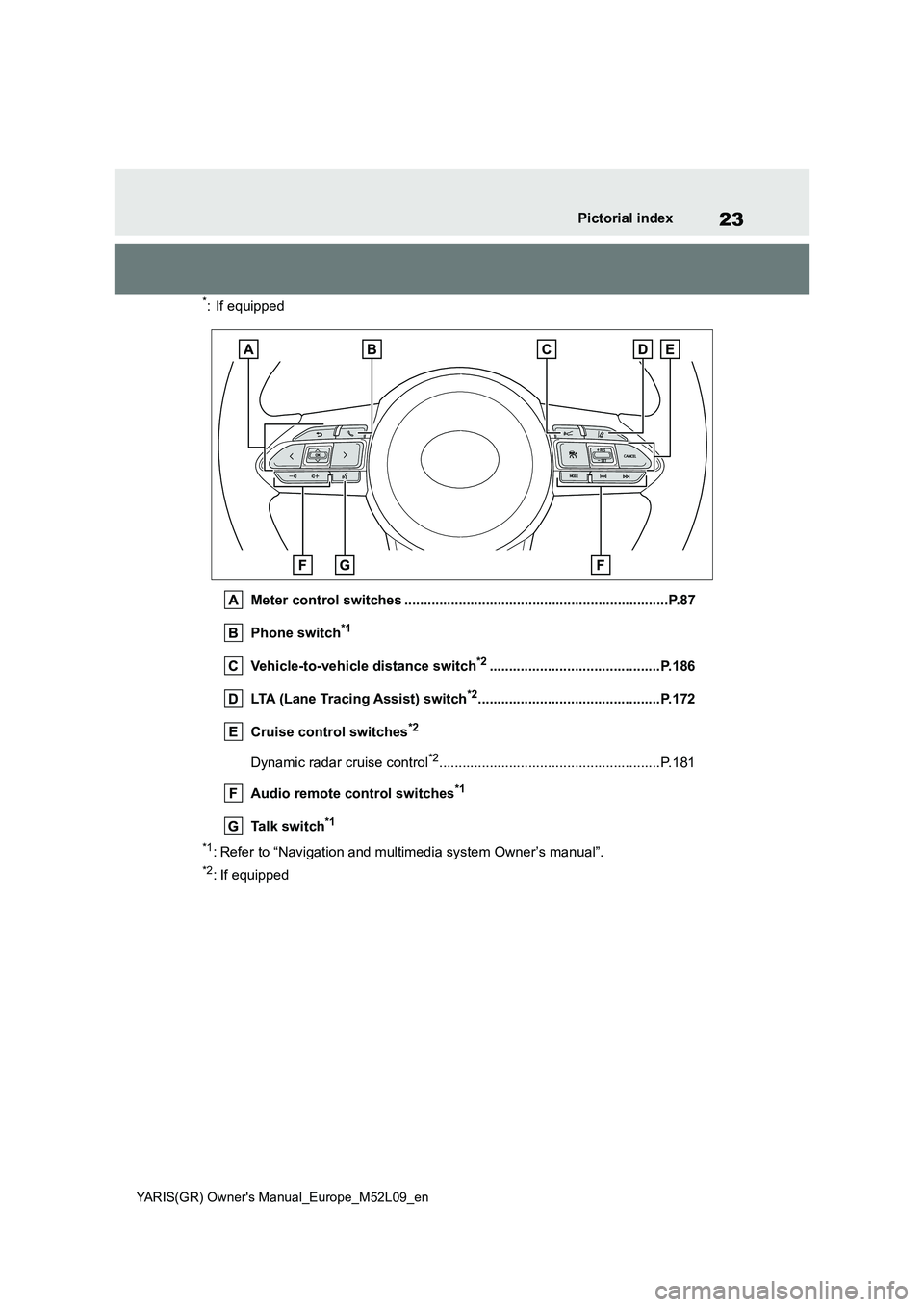
Meter control switches ....................................................................P.87
Phone switch*1
Vehicle-to-vehicle distance switch*2............................................P.186
LTA (Lane Tracing Assist) switch*2...............................................P.172
Cruise control switches*2
Dynamic radar cruise control*2.........................................................P.181
Audio remote control switches*1
Talk switch*1
*1: Refer to “Navigation and multimedia system Owner’s manual”.
*2: If equipped
Page 88 of 458
86
YARIS(GR) Owner's Manual_Europe_M52L09_en
2-1. Instrument cluster
selected on the multi-information dis-
play, the system may be malfunctioning.
Have the vehicle inspected by any
authorized Toyota retailer or Toyota
authorized repairer, or any reliable
repairer.
The brightness of the instrument
panel lights can be adjusted on
select to the multi-information
display.
The brightness of the instrument panel
lights can be adjusted separately for
when the tail lights are on and off.
1Press or to select of
the multi-information display.
2Press or to select ,
and then press and hold the
.
3Press or to change the
brightness.
■Instrument cluster brightness
adjustment
The instrument cluster brightness levels
when the tail lights are on and off can be
adjusted individually. However, when
the surroundings are bright (daytime,
etc.), turning on the tail lights will not
change the instrument cluster bright-
ness.
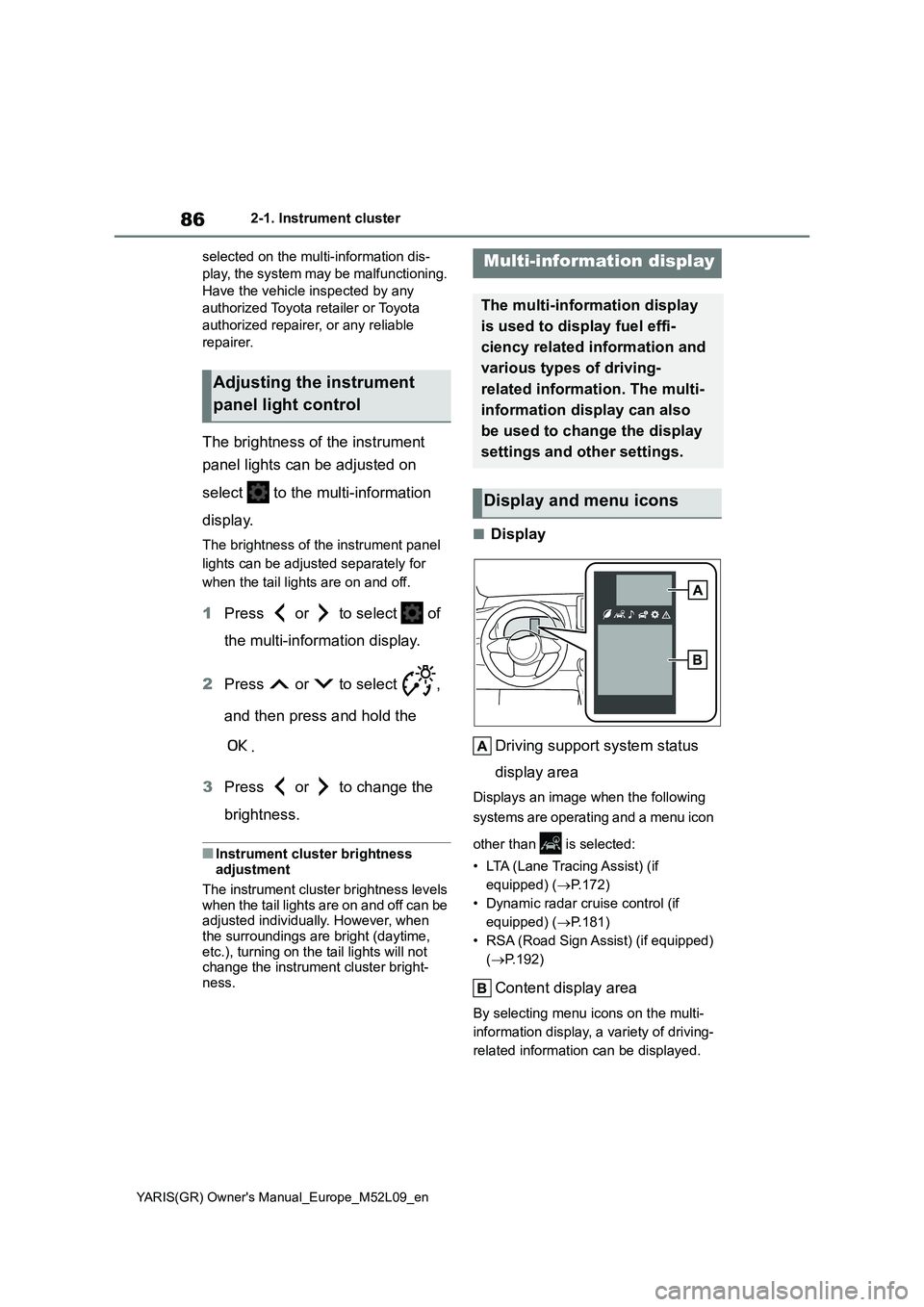
■Display
Driving support system status
display area
Displays an image when the following
systems are operating and a menu icon
other than is selected:
• LTA (Lane Tracing Assist) (if
equipped) (→P.172)
• Dynamic radar cruise control (if
equipped) (→P.181)
• RSA (Road Sign Assist) (if equipped)
(→P.192)
Content display area
By selecting menu icons on the multi-
information display, a variety of driving-
related information can be displayed.
Adjusting the instrument
panel light control
Multi-information display
The multi-information display
is used to display fuel effi-
ciency related information and
various types of driving-
related information. The multi-
information display can also
be used to change the display
settings and other settings.
Display and menu icons
Page 91 of 458
89
2
YARIS(GR) Owner's Manual_Europe_M52L09_en
2-1. Instrument cluster
Vehicle status information and indicators
■Driving support system infor-
mation
Select to display the operational
status of the following systems:
zLTA (Lane Tracing Assist) (if
equipped) (→P.172)
zDynamic radar cruise control (if
equipped) (→P.181)
■Navigation system-linked dis-
play (if equipped)
Select to display the following navi-
gation system-linked information:
zRoute guidance to destination
zCompass display (heading-up
display)
■Route guidance to destination dis-
play
When the route guidance to destination
display is enabled on the head-up dis-
play, it will not be displayed on the multi-
information display. (→P.92)
Select to enable selection of an
audio source or track on the meter
using the meter control switches.
This menu icon can be set to be dis-
played/not displayed in .
■Drive information
2 items that are selected using the
“Drive Info Items” setting (average
speed, distance and total time) can
be displayed vertically.
The displayed information changes
according to the “Drive Info Type”
setting (since the system was
started or between resets). (→P.90)
Use the displayed information as a ref-
erence only.
Following items will be displayed.
z“Trip”
• “Average Speed”: Displays the aver-
age vehicle speed since engine start*
• “Distance”: Displays the distance
driven since engine start*
• “Total Time”: Displays the elapsed
time since engine start*
*
: These items are reset each time the
engine stops.
z“Total”
• “Average Speed”: Displays the aver-
age vehicle speed since the display
was reset
*
• “Distance”: Displays the distance
driven since the display was reset*
• “Total Time”: Displays the elapsed
time since the display was reset*
*
: To reset, display the desired item and
press and hold the meter control
switch.
■Tire inflation pressure
Displays inflation pressure of each
Driving support system
information display
Audio system-linked dis-
play (if equipped)
Vehicle information display
Page 96 of 458
94
YARIS(GR) Owner's Manual_Europe_M52L09_en
2-1. Instrument cluster
■Enabling/disabling of the head-up display
If the head-up display is disabled, it will remain disabled when the engine switch is turned off then back to ON.
■Display brightness
The brightness of the head-up display
can be adjusted on of the multi-
information display. Also, it is automati-
cally adjusted according to the ambient
brightness.
■Driving support system status
display
Displays the operational status of
the following systems:
z Dynamic radar cruise control (if
equipped) ( →P.181)
z LTA (Lane Tracing Assist) (if
equipped) ( →P.172)
Details of content displayed on the
head-up display may differ from that
displayed on the multi-information dis-
play. For details, refer to the explana-
tion of each system.
■Navigation system-linked dis-
play area (if equipped)
Displays the following items which
are linked to the navigation system:
z Street name
z Route guidance to destination
z Compass (heading-up display)
Pop-up displays for the following
systems will be displayed when
necessary:
■Driving support systems
Displays a warning/sugges-
tion/advice message or the operat-
ing state of a relevant system.
z PCS (Pre-Collision System) (if
equipped) ( →P.160)
z LTA (Lane Tracing Assist) (if
equipped) ( →P.172)
z Brake Override System
( →P.128)
Details of content displayed on the
head-up display may differ from that
displayed on the multi-information dis-
play. For details, refer to the explana-
tion of each system.
WARNING
■Caution for changing settings of
the head-up display
If the engine is running when chang- ing the display settings, ensure that
the vehicle is parked in a place with adequate ventilation. In a closed area such as a garage, exhaust gases
including harmful carbon monoxide (CO) may collect and enter the vehi-cle. This may lead to death or a seri-
ous health hazard.
NOTICE
■When changing the settings of the head-up display
To prevent battery discharge, ensure
that the engine is running while changing the settings of the head-up display.
Driving support system sta-
tus/navigation system-
linked display area
Pop-up display
Page 129 of 458
4
127
YARIS(GR) Owner's Manual_Europe_M52L09_en
4
Driving
Driving
4-1. Before driving
Driving the vehicle ............ 128
Cargo and luggage ........... 134
Trailer towing .................... 135
4-2. Driving procedures
Engine (ignition) switch..... 136
Manual transmission......... 139
Turn signal lever ............... 142
Parking brake ................... 143
4-3. Operating the lights and wip-
ers
Headlight switch ............... 144
Automatic High Beam ....... 147
Fog light switch ................. 150
Windshield wipers and washer
....................................... 150
4-4. Refueling
Opening the fuel tank cap. 153
4-5. Using the driving support
systems
Toyota Safety Sense ......... 155
PCS (Pre-Collision System)
........................................ 160
LTA (Lane Tracing Assist) . 172
Dynamic radar cruise control
........................................ 181
RSA (Road Sign Assist) .... 192
Stop & Start system .......... 196
BSM (Blind Spot Monitor) . 201
Toyota parking assist-sensor
........................................ 206
RCTA (Rear Crossing Traffic
Alert) ............................... 212
AWD mode select switch .. 217
GPF (Gasoline Particulate Fil-
ter) system ...................... 218
Driving assist systems ...... 219
4-6. Driving tips
Winter driving tips ............. 226
Page 157 of 458
155
4
YARIS(GR) Owner's Manual_Europe_M52L09_en
4-5. Using the driving support systems
Driving
4-5.Using the d riving s upport sy ste ms
*: If equipped
■PCS (Pre-Collision System)
→ P. 1 6 0
■LTA (Lane Tracing Assist)
→ P. 1 7 2
■AHB (Automatic High Beam)
→ P. 1 4 7
■RSA (Road Sign Assist) (if
equipped)
→ P. 1 9 2
■Dynamic radar cruise control
→ P. 1 8 1
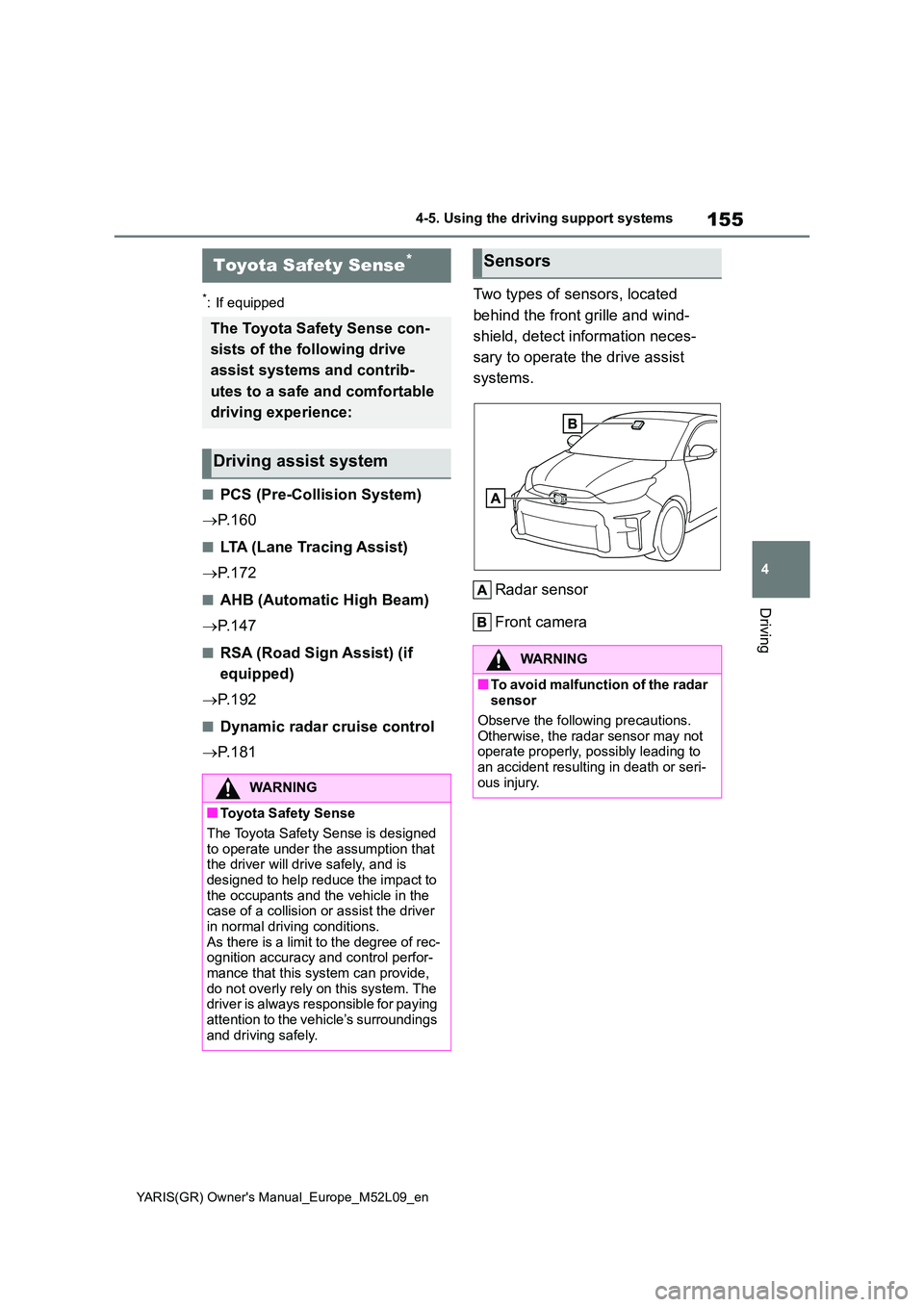
Two types of sensors, located
behind the front grille and wind-
shield, detect information neces-
sary to operate the drive assist
systems.
Radar sensor
Front camera
Toyota Safety Sense*
The Toyota Safety Sense con-
sists of the following drive
assist systems and contrib-
utes to a safe and comfortable
driving experience:
Driving assist system
WARNING
■Toyota Safety Sense
The Toyota Safety Sense is designed to operate under the assumption that the driver will drive safely, and is
designed to help reduce the impact to the occupants and the vehicle in the case of a collision or assist the driver
in normal driving conditions. As there is a limit to the degree of rec-ognition accuracy and control perfor-
mance that this system can provide, do not overly rely on this system. The driver is always responsible for paying
attention to the vehicle’s surroundings and driving safely.
Sensors
WARNING
■To avoid malfunction of the radar sensor
Observe the following precautions.
Otherwise, the radar sensor may not operate properly, possibly leading to an accident resulting in death or seri-
ous injury.
Page 164 of 458
162
YARIS(GR) Owner's Manual_Europe_M52L09_en
4-5. Using the driving support systems
the possibility of a frontal collision is
high, the system applies greater
braking force in relation to how
strongly the brake pedal is
depressed.
■Pre-collision braking
If the system determines that the
possibility of a frontal collision is
extremely high, the brakes are
automatically applied to help avoid
the collision or reduce the impact of
the collision.
■Emergency steering assist (for
region A)
If the system determines that the
possibility of a collision with a
pedestrian is high and that there is
sufficient space for the vehicle to be
steered into within its lane, and the
driver has begun evasive maneuver
or steering, emergency steering
assist will assist the steering move-
ments to help enhance the vehicle
stability and for lane departure pre-
vention.
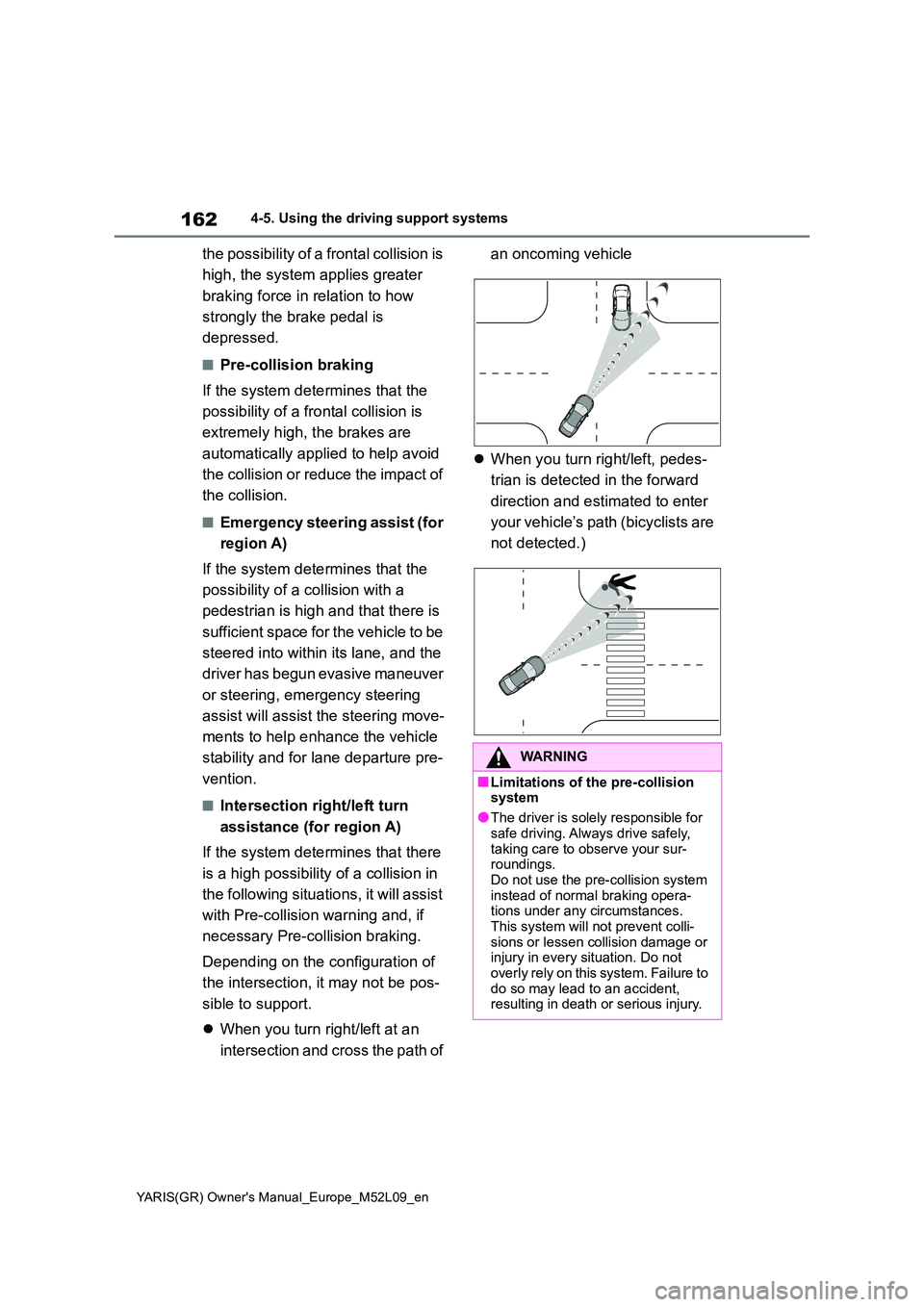
■Intersection right/left turn
assistance (for region A)
If the system determines that there
is a high possibility of a collision in
the following situations, it will assist
with Pre-collision warning and, if
necessary Pre-collision braking.
Depending on the configuration of
the intersection, it may not be pos-
sible to support.
z When you turn right/left at an
intersection and cross the path of
an oncoming vehicle
z When you turn right/left, pedes-
trian is detected in the forward
direction and estimated to enter
your vehicle’s path (bicyclists are
not detected.)
WARNING
■Limitations of the pre-collision system
●The driver is solely responsible for
safe driving. Always drive safely, taking care to observe your sur-roundings.
Do not use the pre-collision system instead of normal braking opera-tions under any circumstances.
This system will not prevent colli- sions or lessen collision damage or injury in every situation. Do not
overly rely on this system. Failure to do so may lead to an accident, resulting in death or serious injury.
Page 165 of 458
163
4
YARIS(GR) Owner's Manual_Europe_M52L09_en
4-5. Using the driving support systems
Driving
WARNING
●Although this system is designed to help avoid a collision or help reduce
the impact of the collision, its effec- tiveness may change according to various conditions, therefore the
system may not always be able to achieve the same level of perfor-mance.
Read the following conditions care- fully. Do not overly rely on this sys-tem and always drive carefully.
• Conditions under which the system may operate even if there is no pos-
sibility of a collision: →P. 1 6 7
• Conditions under which the system
may not operate properly: →P. 1 6 9
●Do not attempt to test the operation
of the pre-collision system yourself. Depending on the objects used for testing (dummies, cardboard
objects imitating detectable objects, etc.), the system may not operate properly, possibly leading to an
accident.
■Pre-collision braking
●When the pre-collision braking function is operating, a large amount of braking force will be
applied.
●If the vehicle is stopped by the
operation of the pre-collision brak- ing function, the pre-collision brak-ing function operation will be
canceled after approximately 2 sec- onds. Depress the brake pedal as necessary.
●The pre-collision braking function may not operate if certain opera-tions are performed by the driver. If
the accelerator pedal is being depressed strongly or the steering wheel is being turned, the system
may determine that the driver is tak- ing evasive action and possibly pre-vent the pre-collision braking
function from operating.
●In some situations, while the pre-
collision braking function is operat- ing, operation of the function may be canceled if the accelerator pedal
is depressed strongly or the steer- ing wheel is turned and the system determines that the driver is taking
evasive action.
●If the brake pedal is being
depressed, the system may deter- mine that the driver is taking eva-sive action and possibly delay the
operation timing of the pre-collision braking function.
■Emergency steering assist (for region A)
●As emergency steering assist oper-
ation will be canceled when the sys- tem determines that lane departure prevention function has been com-
pleted.
●Emergency steering assist may not
operate or may be cancel in the fol- lowing cases as the system may determine the driver is taking
actions.
• If the accelerator pedal is being
depressed strongly, the steering wheel is being operated sharply, the brake pedal is being depressed
or the turn signal lever is being operated. In this case, the system may determine that the driver is tak-
ing evasive action and the emer- gency steering assist may not operate.