change time TOYOTA GR YARIS 2022 User Guide
[x] Cancel search | Manufacturer: TOYOTA, Model Year: 2022, Model line: GR YARIS, Model: TOYOTA GR YARIS 2022Pages: 470, PDF Size: 113.17 MB
Page 141 of 470

139
4
Owner's Manual_Europe_M52P63_en
4-2. Driving procedures
Driving
gears more smoothly. Additionally,
when the clutch pedal is operated,
the iMT helps reduce shift shock,
allowing for lighter shift operations
when driving on a winding road or
incline.
Press the “iMT” switch.
The “iMT” indicator will illuminate in
green. Press the switch again to cancel
iMT.
■The iMT may not operate when
In the following situations, iMT may not operate.
However, this does not indicate a mal- function.
●The clutch pedal is not fully depressed.
●The clutch pedal is not fully released, such as if a foot is resting on the clutch pedal.
●Shift operation is performed after the vehicle has been coasting with the
shift lever in N.
●The shift lever is not operated for a
long time after the clutch pedal is depressed.
After the shift lever is moved, unless
your foot is completely removed from the clutch pedal, the iMT may not oper-ate and the engine speed may not be
controlled optimally for the next gear change. To enable the iMT, release the clutch pedal completely and then
depress it again before operating the
shift lever.
■If the “iMT” indicator illuminates in
yellow
The iMT may be temporarily unavailable or malfunctioning. Have the vehicle
inspected at any authorized Toyota retailer or Toyota authorized repairer, or any reliable repairer.
The Gear Shift Indicator is a guide
to help the driver achieve improved
fuel economy and reduced exhaust
emissions within limits of engine
performance.
Shift-up indicator
Shift-down indicator
■Gear Shift Indicator display
Gear Shift Indicator may not be dis- played when your foot is placed on the
clutch pedal.
WARNING
■Limitations of the iMT
iMT is not a system that prevents shift lever operation error or engine over
revving. Depending on the situation, iMT may not operate normally and the shift position may not be changed
smoothly. Overly relying on iMT may cause an unexpected accident.
Gear Shift Indicator
Page 142 of 470
140
Owner's Manual_Europe_M52P63_en
4-2. Driving procedures
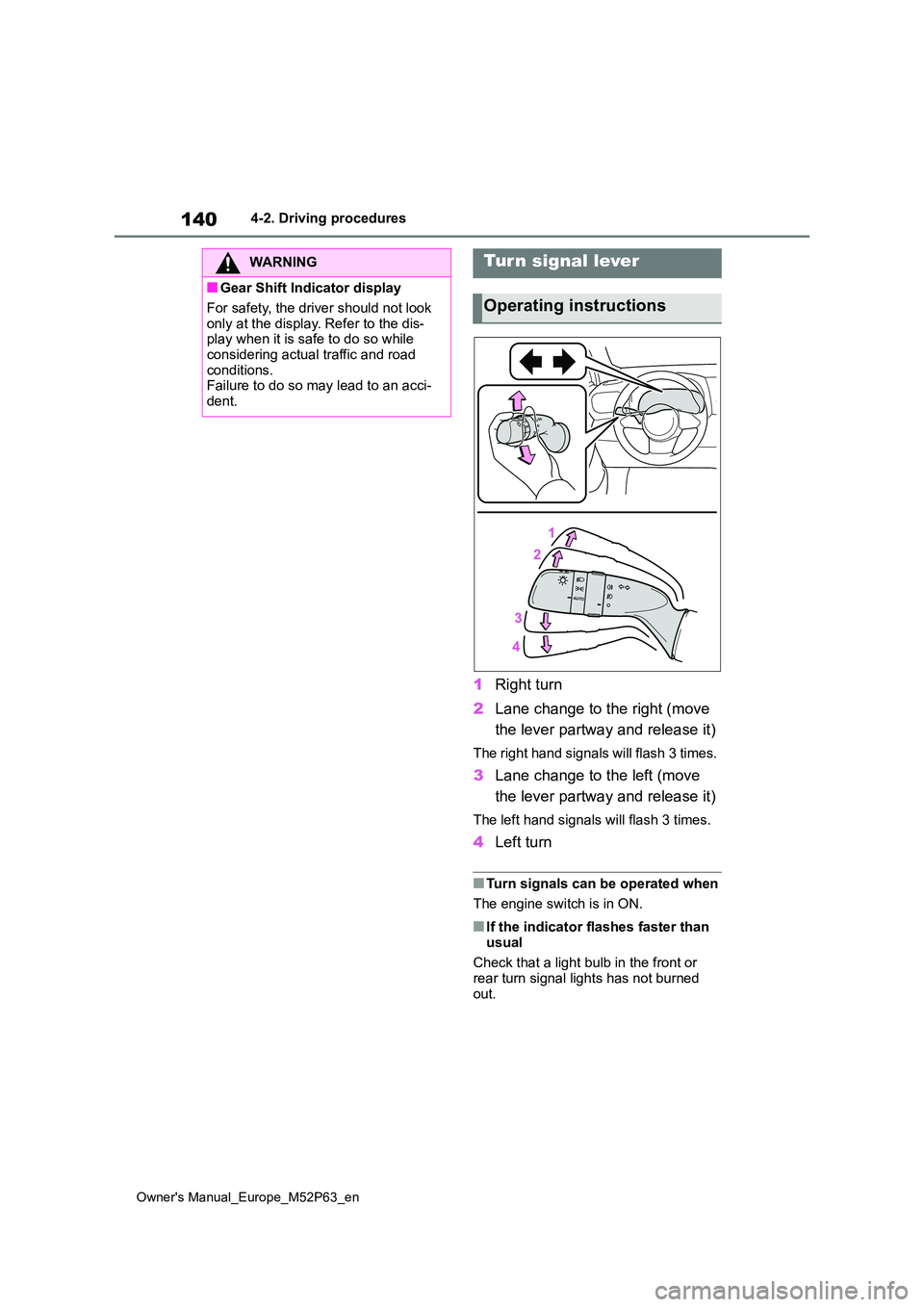
1Right turn
2 Lane change to the right (move
the lever partway and release it)
The right hand signals will flash 3 times.
3 Lane change to the left (move
the lever partway and release it)
The left hand signals will flash 3 times.
4 Left turn
■Turn signals can be operated when
The engine switch is in ON.
■If the indicator flashes faster than
usual
Check that a light bulb in the front or rear turn signal lights has not burned
out.
WARNING
■Gear Shift Indicator display
For safety, the driver should not look
only at the display. Refer to the dis- play when it is safe to do so while considering actual traffic and road
conditions. Failure to do so may lead to an acci-dent.
Turn signal lever
Operating instructions
Page 148 of 470
146
Owner's Manual_Europe_M52P63_en
4-3. Operating the lights and wipers
• When vehicles ahead cannot be
detected due to repeated curves, road dividers or roadside trees• When vehicles ahead appear in a far-
away lane on a wide road • When the lights of vehicles ahead are not on
●The high beams may be turned off if a vehicle ahead that is using fog lights
without its headlights turned on is detected.
●House lights, streetlights, traffic sig-nals, and illuminated billboards or signs and other reflective objects may
cause the high beams to change to the low beams, or the low beams to remain on.
●The following factors may affect the amount of time taken for the high
beams to turn on or off: • The brightness of the headlights, fog lights, and tail lights of vehicles ahead
• The movement and direction of vehi- cles ahead• When a vehicle ahead only has oper-
ational lights on one side • When a vehicle ahead is a two-wheeled vehicle
• The condition of the road (gradient, curve, condition of the road surface, etc.)
• The number of passengers and amount of luggage in the vehicle
●The high beams may turn on or off unexpectedly.
●Bicycles or similar vehicles may not be detected.
●In the following situations the system may not be able to correctly detect the surrounding brightness level. This
may cause the low beams to remain on or the high beams to flash or daz-zle pedestrians or vehicles ahead. In
such a case, it is necessary to manu- ally switch between the high and low beams.
• When driving in inclement weather (heavy rain, snow, fog, sandstorms, etc.)
• When the windshield is obscured by
fog, mist, ice, dirt, etc.
• When the windshield is cracked or damaged• When the front camera is deformed or
dirty • When the temperature of the front camera is extremely high
• When the surrounding brightness level is equal to that of headlights, tail lights or fog lights
• When headlights or tail lights of vehi- cles ahead are turned off, dirty, chang-ing color, or not aimed properly
• When the vehicle is hit by water, snow, dust, etc., from a preceding vehicle
• When driving through an area of inter- mittently changing brightness and darkness
• When frequently and repeatedly driv- ing ascending/descending roads, or roads with rough, bumpy or uneven
surfaces (such as stone-paved roads, gravel roads, etc.)• When frequently and repeatedly tak-
ing curves or driving on a winding road• When there is a highly reflective
object ahead of the vehicle, such as a sign or mirror• When the back of a preceding vehicle
is highly reflective, such as a con- tainer on a truck• When the vehicle’s headlights are
damaged or dirty, or are not aimed properly• When the vehicle is listing or titling
due to a flat tire, a trailer being towed, etc.• When the headlights are changed
between the high beams and low beams repeatedly in an abnormal manner
• When the driver believes that the high beams may be flashing or dazzling pedestrians or other drivers
Page 159 of 470
157
4
Owner's Manual_Europe_M52P63_en
4-5. Using the driving support systems
Driving
●In the following situations, if the situation has changed (or the vehicle has been
driven for some time) and the normal operating conditions are d etected, the mes- sage will disappear and the system will become operational.
If the message does not disappear, contact any authorized Toyot a retailer or Toyota authorized repairer, or any reliable repairer.• When the temperature around the radar sensor is outside of the operational range,
such as when the vehicle is in the sun or in an extremely cold environment • When the front camera cannot detect objects in front of the ve hicle, such as when driving in the dark, snow, or fog, or when bright lights are sh ining into the front
camera • Depending on the conditions in the vicinity of the vehicle, th e radar may judge the surrounding environment can not be properly recognized. In that case, “Pre-Colli-
sion System Unavailable See Owner’s Manual” is displayed.
Page 165 of 470
163
4
Owner's Manual_Europe_M52P63_en
4-5. Using the driving support systems
Driving
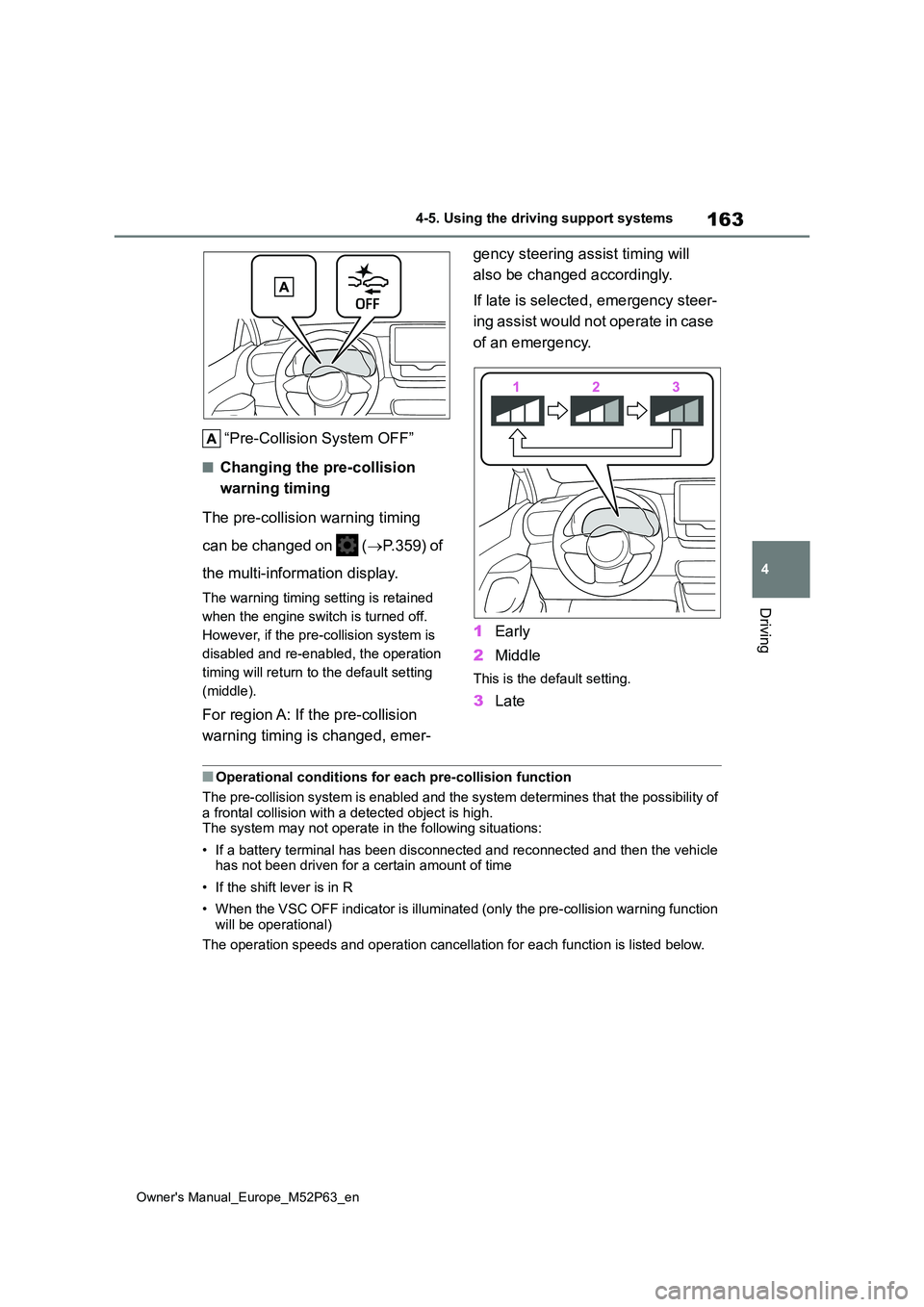
“Pre-Collision System OFF”
■Changing the pre-collision
warning timing
The pre-collision warning timing
can be changed on ( P.359) of
the multi-information display.
The warning timing setting is retained
when the engine switch is turned off.
However, if the pre-collision system is
disabled and re-enabled, the operation
timing will return to the default setting
(middle).
For region A: If the pre-collision
warning timing is changed, emer-
gency steering assist timing will
also be changed accordingly.
If late is selected, emergency steer-
ing assist would not operate in case
of an emergency.
1 Early
2 Middle
This is the default setting.
3Late
■Operational conditions for each pre-collision function
The pre-collision system is enabled and the system determines t hat the possibility of a frontal collision with a detected object is high.The system may not operate in the following situations:
• If a battery terminal has been disconnected and reconnected an d then the vehicle has not been driven for a certain amount of time
• If the shift lever is in R
• When the VSC OFF indicator is illuminated (only the pre-collis ion warning function will be operational)
The operation speeds and operation cancellation for each functi on is listed below.
Page 170 of 470
168
Owner's Manual_Europe_M52P63_en
4-5. Using the driving support systems
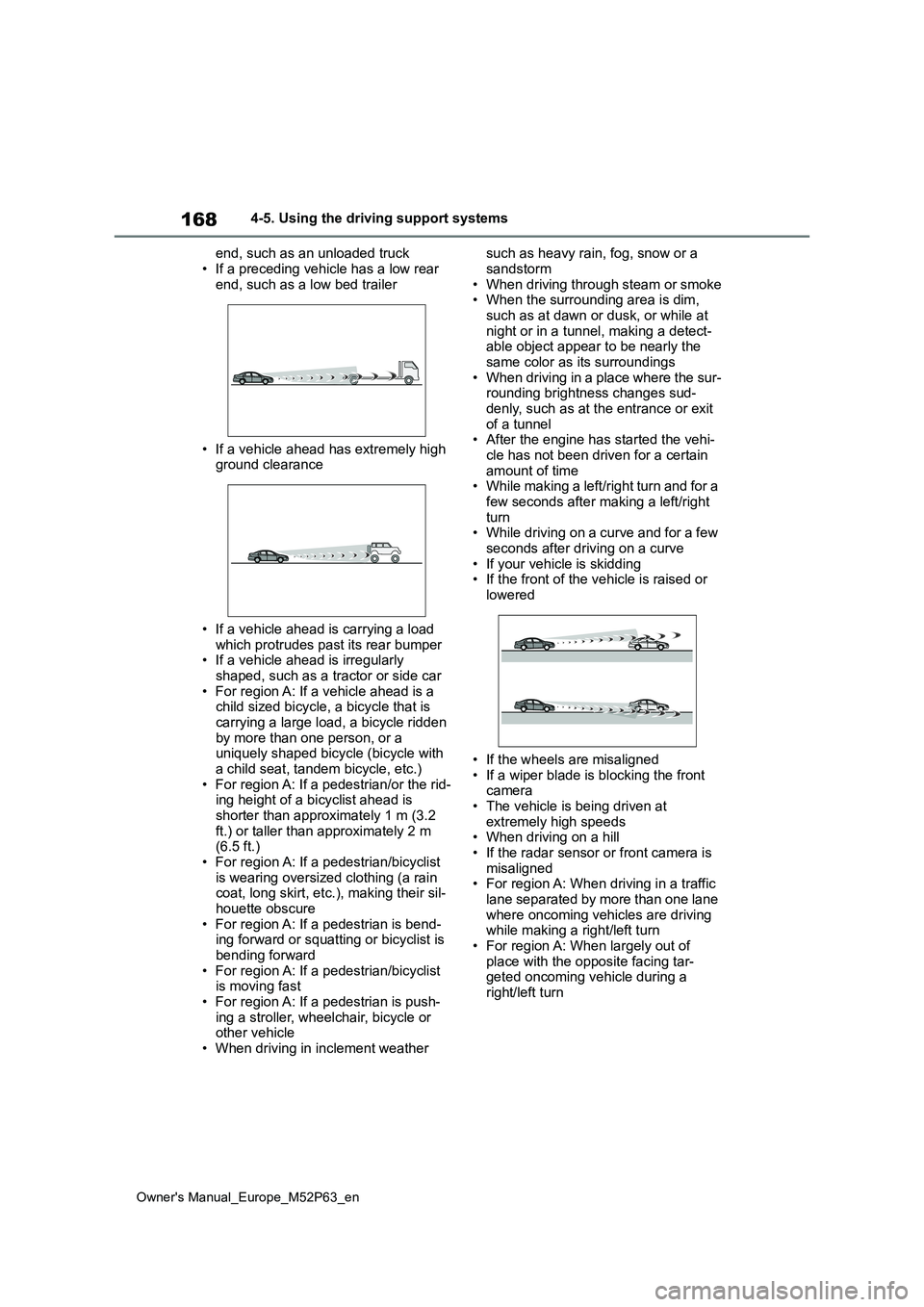
end, such as an unloaded truck
• If a preceding vehicle has a low rear end, such as a low bed trailer
• If a vehicle ahead has extremely high ground clearance
• If a vehicle ahead is carrying a load which protrudes past its rear bumper• If a vehicle ahead is irregularly
shaped, such as a tractor or side car • For region A: If a vehicle ahead is a child sized bicycle, a bicycle that is
carrying a large load, a bicycle ridden by more than one person, or a uniquely shaped bicycle (bicycle with
a child seat, tandem bicycle, etc.) • For region A: If a pedestrian/or the rid-ing height of a bicyclist ahead is
shorter than approximately 1 m (3.2 ft.) or taller than approximately 2 m (6.5 ft.)
• For region A: If a pedestrian/bicyclist is wearing oversized clothing (a rain coat, long skirt, etc.), making their sil-
houette obscure • For region A: If a pedestrian is bend-ing forward or squatting or bicyclist is
bending forward • For region A: If a pedestrian/bicyclist is moving fast
• For region A: If a pedestrian is push- ing a stroller, wheelchair, bicycle or other vehicle
• When driving in inclement weather
such as heavy rain, fog, snow or a
sandstorm • When driving through steam or smoke• When the surrounding area is dim,
such as at dawn or dusk, or while at night or in a tunnel, making a detect-able object appear to be nearly the
same color as its surroundings • When driving in a place where the sur-rounding brightness changes sud-
denly, such as at the entrance or exit of a tunnel• After the engine has started the vehi-
cle has not been driven for a certain amount of time• While making a left/right turn and for a
few seconds after making a left/right turn• While driving on a curve and for a few
seconds after driving on a curve • If your vehicle is skidding• If the front of the vehicle is raised or
lowered
• If the wheels are misaligned
• If a wiper blade is blocking the front camera• The vehicle is being driven at
extremely high speeds • When driving on a hill• If the radar sensor or front camera is
misaligned • For region A: When driving in a traffic lane separated by more than one lane
where oncoming vehicles are driving while making a right/left turn• For region A: When largely out of
place with the opposite facing tar- geted oncoming vehicle during a right/left turn
Page 175 of 470
173
4
Owner's Manual_Europe_M52P63_en
4-5. Using the driving support systems
Driving
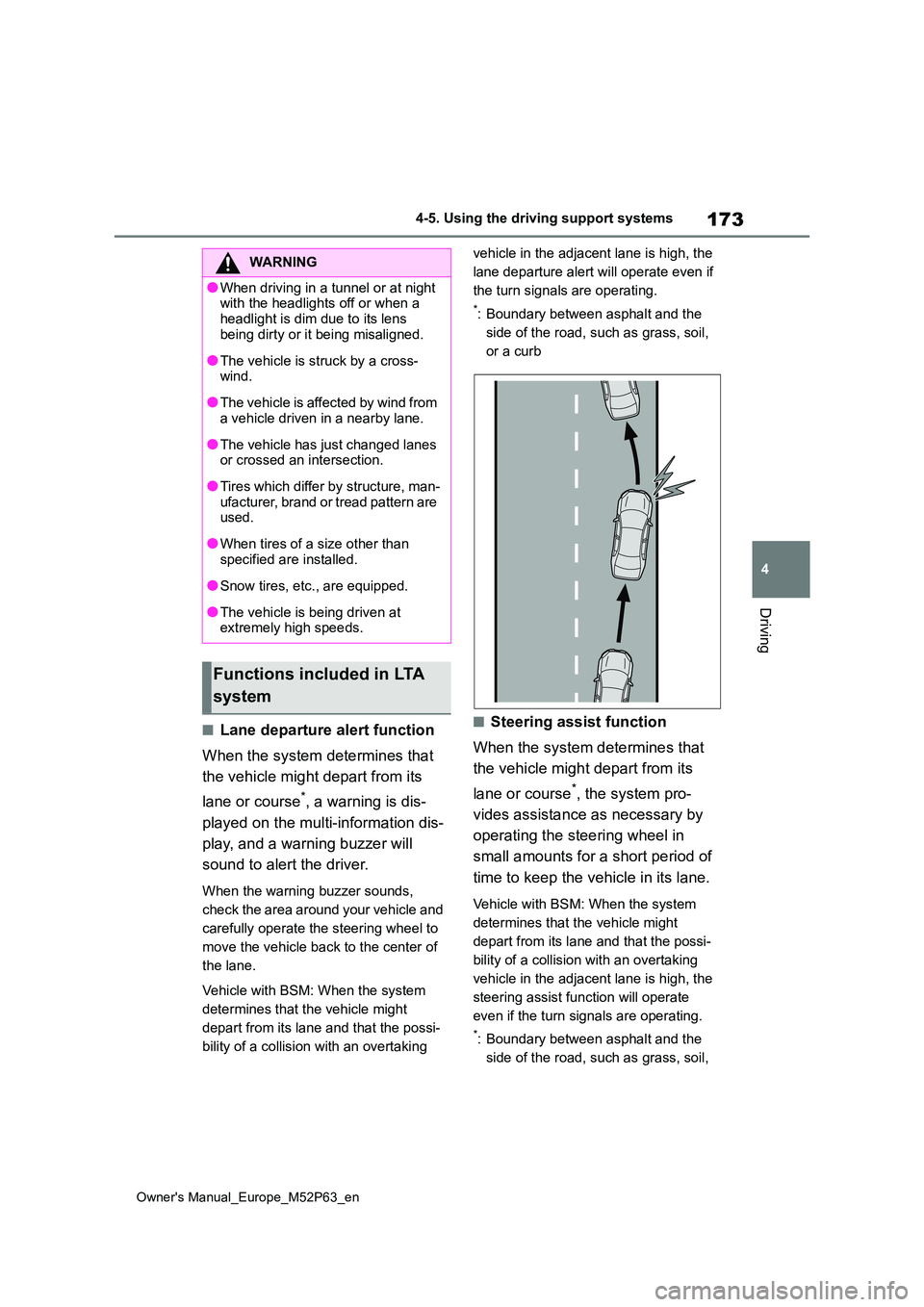
■Lane departure alert function
When the system determines that
the vehicle might depart from its
lane or course*, a warning is dis-
played on the multi-information dis-
play, and a warning buzzer will
sound to alert the driver.
When the warning buzzer sounds,
check the area around your vehicle and
carefully operate the steering wheel to
move the vehicle back to the center of
the lane.
Vehicle with BSM: When the system
determines that the vehicle might
depart from its lane and that the possi-
bility of a collision with an overtaking
vehicle in the adjacent lane is high, the
lane departure alert will operate even if
the turn signals are operating.
*: Boundary between asphalt and the
side of the road, such as grass, soil,
or a curb
■Steering assist function
When the system determines that
the vehicle might depart from its
lane or course*, the system pro-
vides assistance as necessary by
operating the steering wheel in
small amounts for a short period of
time to keep the vehicle in its lane.
Vehicle with BSM: When the system
determines that the vehicle might
depart from its lane and that the possi-
bility of a collision with an overtaking
vehicle in the adjacent lane is high, the
steering assist function will operate
even if the turn signals are operating.
*: Boundary between asphalt and the
side of the road, such as grass, soil,
WARNING
●When driving in a tunnel or at night with the headlights off or when a
headlight is dim due to its lens being dirty or it being misaligned.
●The vehicle is struck by a cross-wind.
●The vehicle is affected by wind from a vehicle driven in a nearby lane.
●The vehicle has just changed lanes or crossed an intersection.
●Tires which differ by structure, man-ufacturer, brand or tread pattern are used.
●When tires of a size other than specified are installed.
●Snow tires, etc., are equipped.
●The vehicle is being driven at extremely high speeds.
Functions included in LTA
system
Page 177 of 470
175
4
Owner's Manual_Europe_M52P63_en
4-5. Using the driving support systems
Driving
■Turning the lane centering
function ON/OFF
Press the LTA switch.
The lane centering function will change
between ON/OFF each time the switch
is pressed.
The current setting will be displayed on
the multi-information display.
Lane centering function ON
“LTA Steering Assist Active Lane
Centering Active”
Lane centering function OFF
“LTA Steering Assist Active”
■Tu r n i n g t h e LTA s y s t e m O F F
Press and hold the LTA switch
The LTA indicator light turns off when
the LTA is turned OFF.
Press the switch again to turn the sys-
tem on.
The LTA is turned ON each time the
engine switch is turned to ON.
However, the lane centering function
keeps either the ON/OFF state prior to
the engine switch being turned OFF.
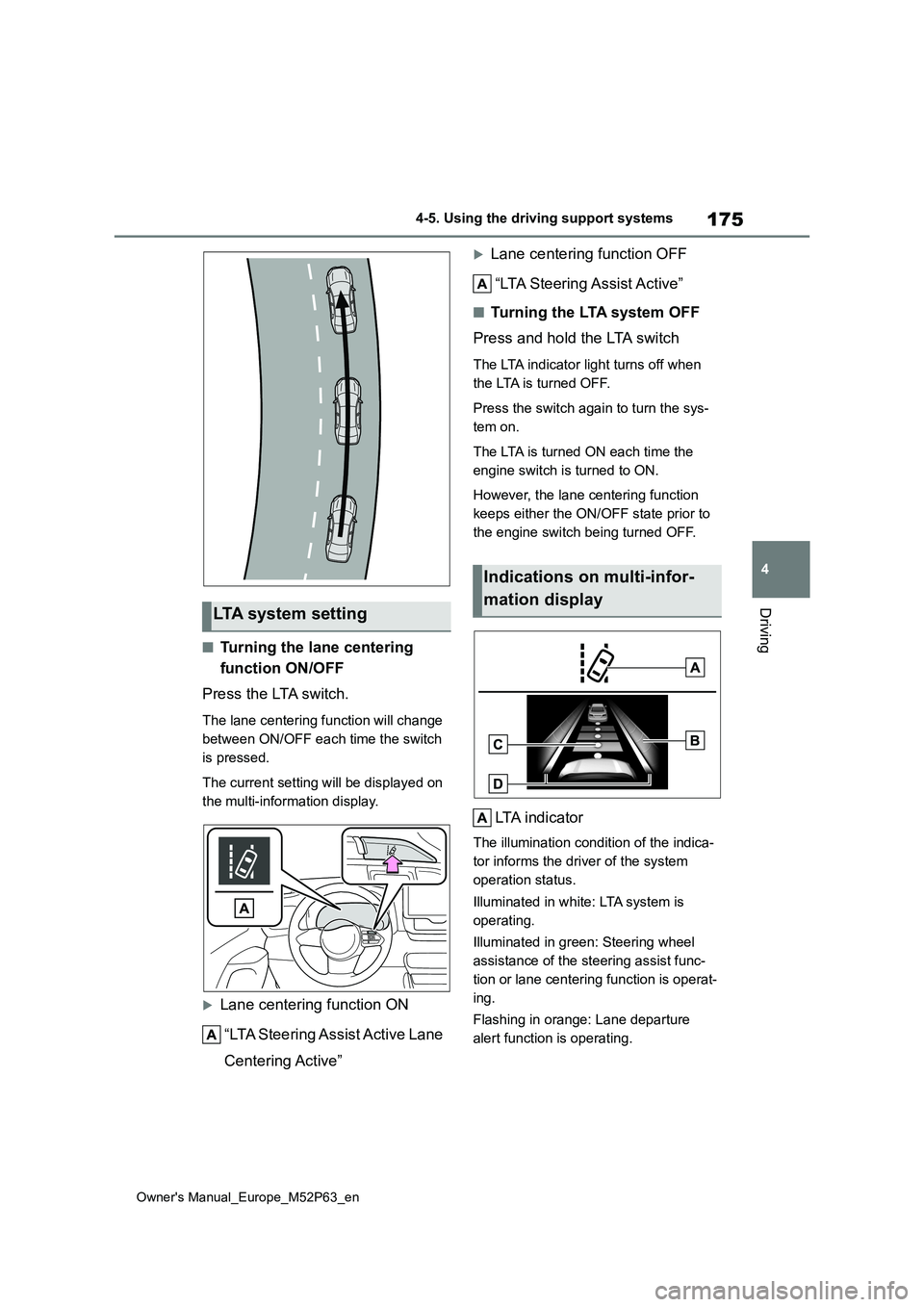
LTA indicator
The illumination condition of the indica-
tor informs the driver of the system
operation status.
Illuminated in white: LTA system is
operating.
Illuminated in green: Steering wheel
assistance of the steering assist func-
tion or lane centering function is operat-
ing.
Flashing in orange: Lane departure
alert function is operating.
LTA system setting
Indications on multi-infor-
mation display
Page 186 of 470
184
Owner's Manual_Europe_M52P63_en
4-5. Using the driving support systems
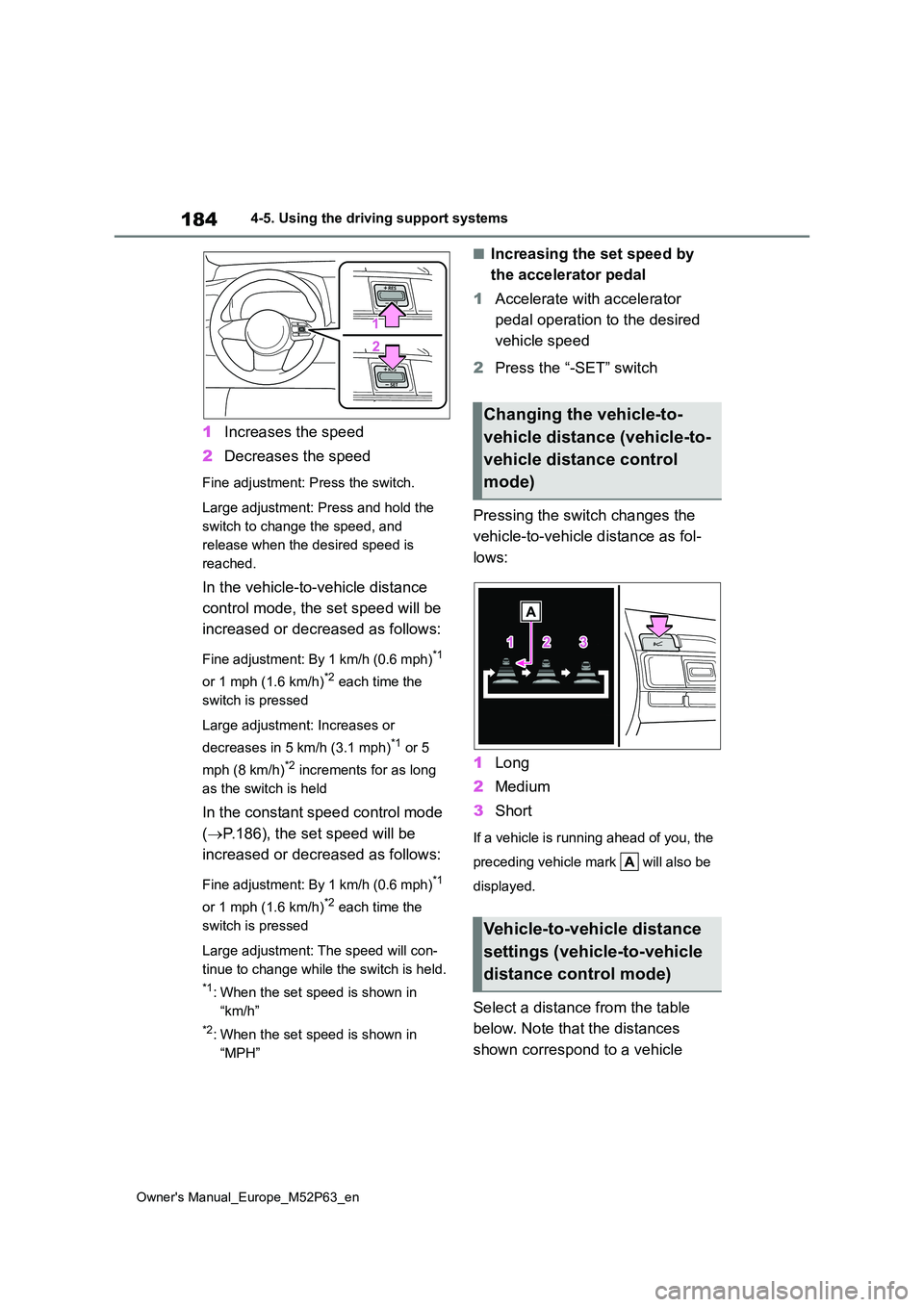
1Increases the speed
2 Decreases the speed
Fine adjustment: Press the switch.
Large adjustment: Press and hold the
switch to change the speed, and
release when the desired speed is
reached.
In the vehicle-to-vehicle distance
control mode, the set speed will be
increased or decreased as follows:
Fine adjustment: By 1 km/h (0.6 mph)*1
or 1 mph (1.6 km/h)*2 each time the
switch is pressed
Large adjustment: Increases or
decreases in 5 km/h (3.1 mph)*1 or 5
mph (8 km/h)*2 increments for as long
as the switch is held
In the constant speed control mode
( P.186), the set speed will be
increased or decreased as follows:
Fine adjustment: By 1 km/h (0.6 mph)*1
or 1 mph (1.6 km/h)*2 each time the
switch is pressed
Large adjustment: The speed will con-
tinue to change while the switch is held.
*1: When the set speed is shown in
“km/h”
*2: When the set speed is shown in
“MPH”
■Increasing the set speed by
the accelerator pedal
1 Accelerate with accelerator
pedal operation to the desired
vehicle speed
2 Press the “-SET” switch
Pressing the switch changes the
vehicle-to-vehicle distance as fol-
lows:
1 Long
2 Medium
3 Short
If a vehicle is running ahead of you, the
preceding vehicle mark will also be
displayed.
Select a distance from the table
below. Note that the distances
shown correspond to a vehicle
Changing the vehicle-to-
vehicle distance (vehicle-to-
vehicle distance control
mode)
Vehicle-to-vehicle distance
settings (vehicle-to-vehicle
distance control mode)
Page 190 of 470
188
Owner's Manual_Europe_M52P63_en
4-5. Using the driving support systems
matically canceled in the following situa-
tions:
●Actual vehicle speed is more than
approximately 16 km/h (10 mph) below the set vehicle speed.
●Actual vehicle speed falls below approximately 30 km/h (20 mph).
●VSC is activated.
●TRC is activated for a period of time.
●When the VSC or TRC system is turned off.
●Pre-collision braking is activated.
●When the shift lever is in N or the clutch pedal is depressed for a certain amount of time or more.
●The parking brake is operated.
If constant speed control mode is auto-
matically canceled for any reasons other than the above, there may be a malfunc-tion in the system. Contact any autho-
rized Toyota retailer or Toyota authorized repairer, or any reliable repairer.
■The Dynamic Radar Cruise Control
with Road Sign Assist may not operate properly when
As the Dynamic Radar Cruise Control
with Road Sign Assist may not operate properly in conditions in which RSA may not operate or detect correctly
( P.192), when using this function, make sure to check the speed limit sign displayed.
In the following situations, the set speed may not be changed to the recognized speed limit by pressing and holding the
“+RES”/“-SET” switch.
●If speed limit information is not avail-
able
●When the recognized speed limit is
the same as the set speed
●When the recognized speed limit is
outside of the speed range that the dynamic radar cruise control system can operate
■Brake operation
A brake operation sound may be heard and the brake pedal response may change, but these are not malfunctions.
■Warning messages and buzzers for
dynamic radar cruise control
Warning messages and buzzers are used to indicate a system malfunction or
to inform the driver of the need for cau- tion while driving. If a warning message is shown on the multi-information dis-
play, read the message and follow the instructions. ( P.156, 321)
■When the sensor may not be cor- rectly detecting the vehicle ahead
In the case of the following and depend- ing on the conditions, operate the brake pedal when deceleration of the system
is insufficient or operate the accelerator pedal when acceleration is required.
As the sensor may not be able to cor-
rectly detect these types of vehicles, the approach warning ( P.185) may not be activated.
●Vehicles that cut in suddenly
●Vehicles traveling at low speeds
●Vehicles that are not moving in the
same lane
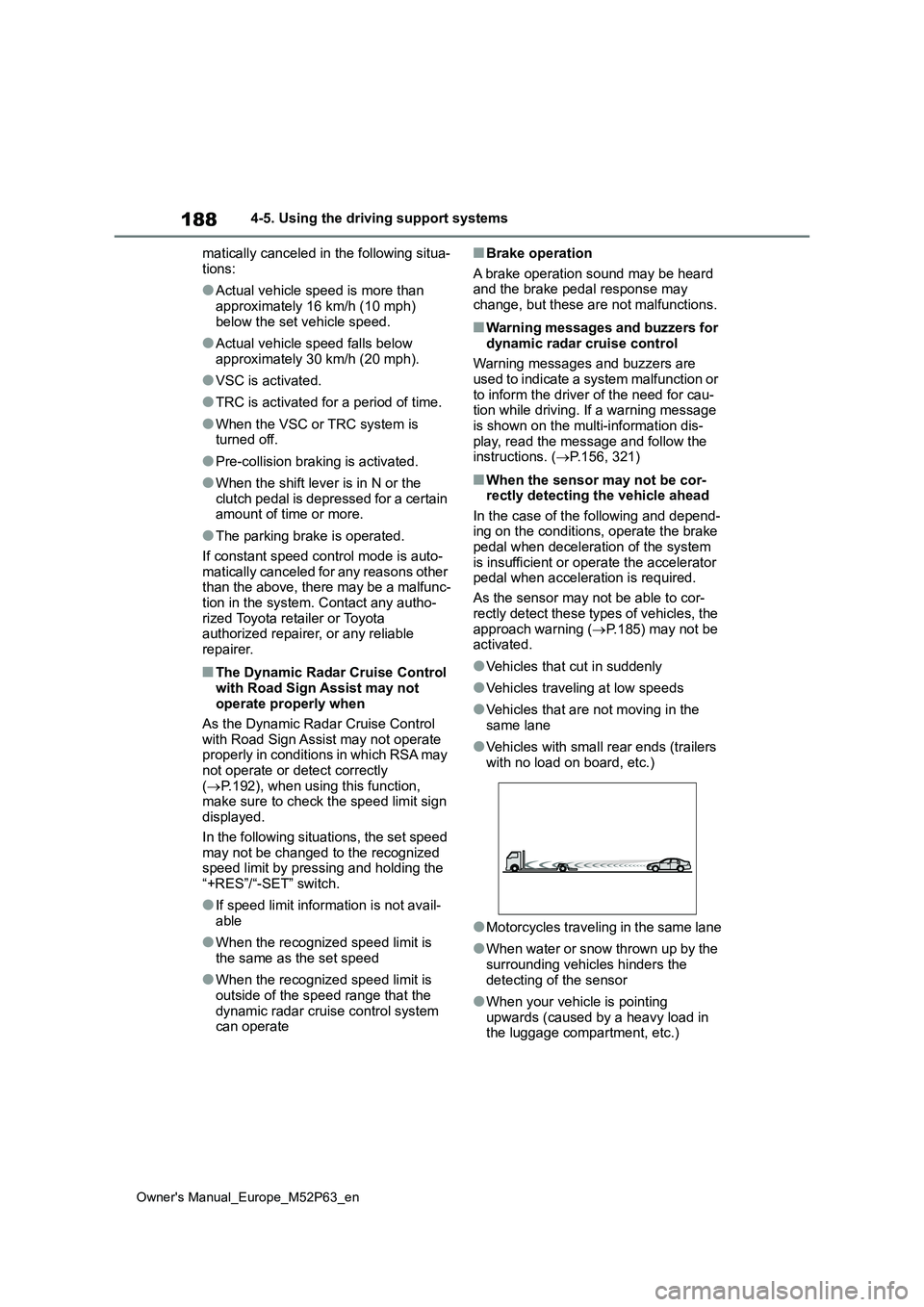
●Vehicles with small rear ends (trailers
with no load on board, etc.)
●Motorcycles traveling in the same lane
●When water or snow thrown up by the surrounding vehicles hinders the
detecting of the sensor
●When your vehicle is pointing
upwards (caused by a heavy load in the luggage compartment, etc.)