power steering TOYOTA GR YARIS 2023 Owners Manual
[x] Cancel search | Manufacturer: TOYOTA, Model Year: 2023, Model line: GR YARIS, Model: TOYOTA GR YARIS 2023Pages: 470, PDF Size: 113.17 MB
Page 4 of 470
2
Owner's Manual_Europe_M52P63_en
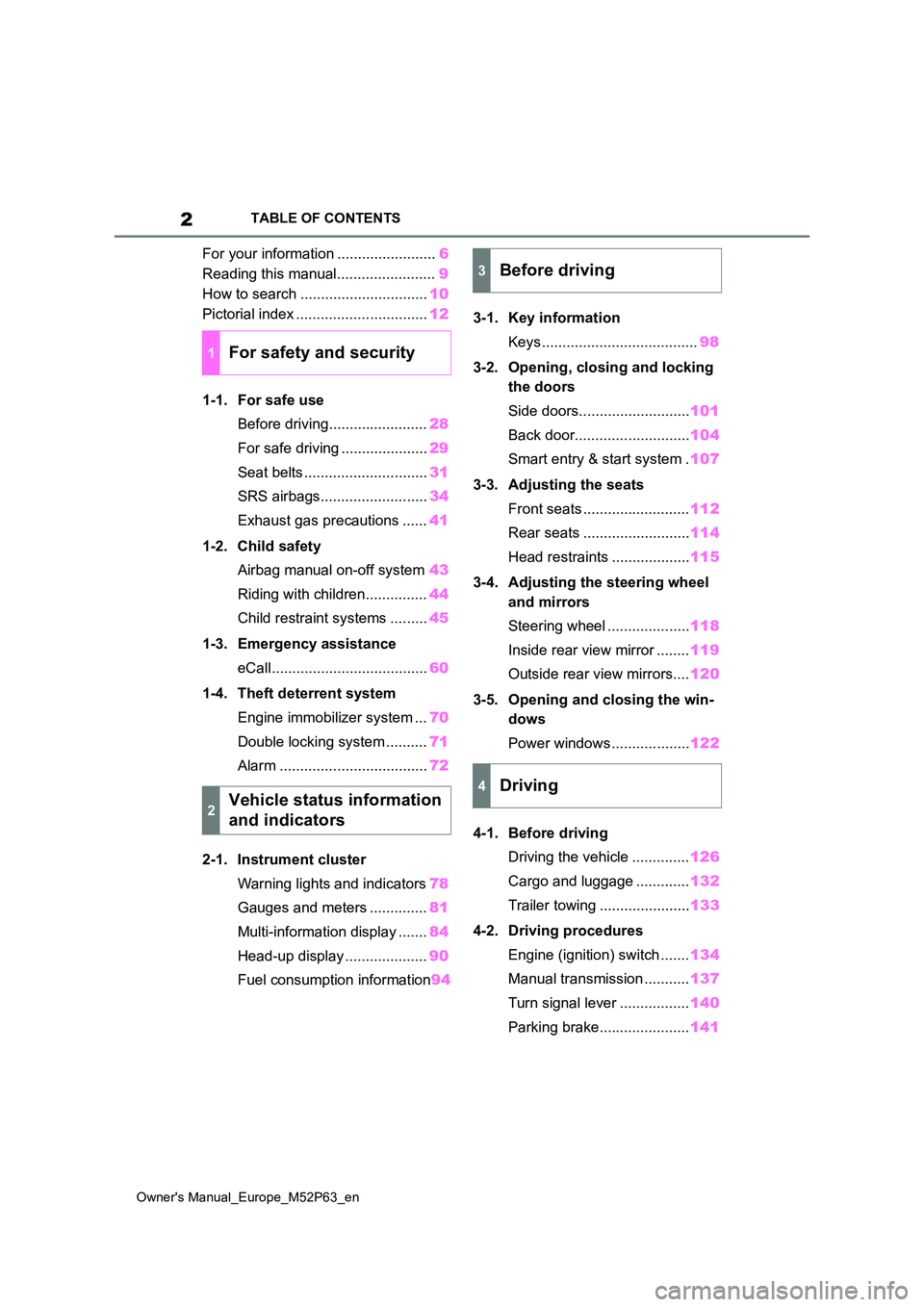
TABLE OF CONTENTS
For your information ........................6
Reading this manual........................ 9
How to search ............................... 10
Pictorial index ................................ 12
1-1. For safe use
Before driving........................ 28
For safe driving ..................... 29
Seat belts .............................. 31
SRS airbags.......................... 34
Exhaust gas precautions ...... 41
1-2. Child safety
Airbag manual on-off system 43
Riding with children............... 44
Child restraint systems ......... 45
1-3. Emergency assistance
eCall...................................... 60
1-4. Theft deterrent system
Engine immobilizer system ... 70
Double locking system .......... 71
Alarm .................................... 72
2-1. Instrument cluster
Warning lights and indicators 78
Gauges and meters .............. 81
Multi-information display ....... 84
Head-up display .................... 90
Fuel consumption information 94
3-1. Key information
Keys ...................................... 98
3-2. Opening, closing and locking
the doors
Side doors........................... 101
Back door............................ 104
Smart entry & start system . 107
3-3. Adjusting the seats
Front seats .......................... 112
Rear seats .......................... 114
Head restraints ................... 115
3-4. Adjusting the steering wheel
and mirrors
Steering wheel .................... 118
Inside rear view mirror ........ 119
Outside rear view mirrors.... 120
3-5. Opening and closing the win-
dows
Power windows ................... 122
4-1. Before driving
Driving the vehicle .............. 126
Cargo and luggage ............. 132
Trailer towing ...................... 133
4-2. Driving procedures
Engine (ignition) switch ....... 134
Manual transmission ........... 137
Turn signal lever ................. 140
Parking brake...................... 141
1For safety and security
2Vehicle status information
and indicators
3Before driving
4Driving
Page 18 of 470
16
Owner's Manual_Europe_M52P63_en
Pictorial index
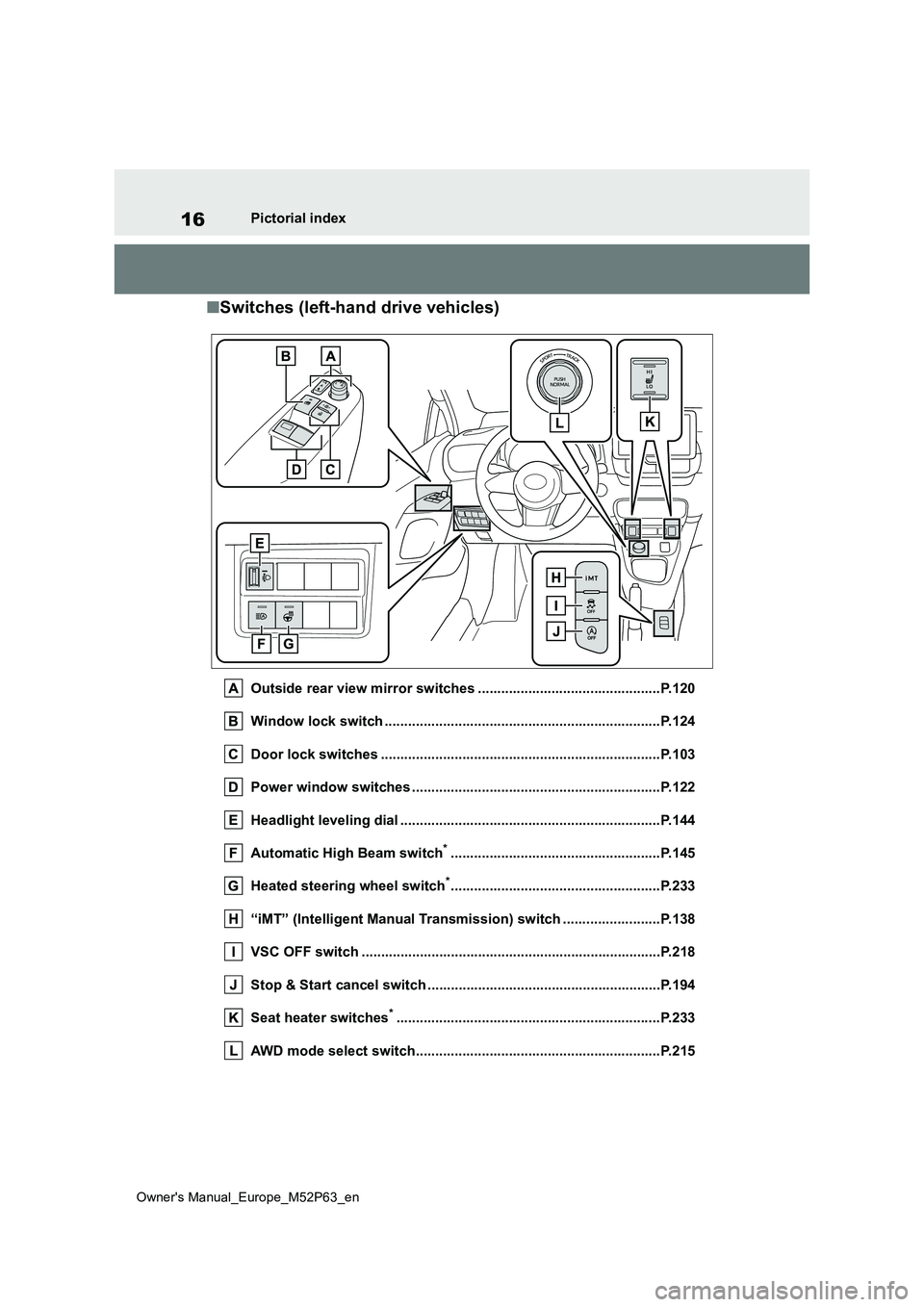
■Switches (left-hand drive vehicles)
Outside rear view mirror switches ...............................................P.120
Window lock switch ............................................. ..........................P.124
Door lock switches ............................................. ...........................P.103
Power window switches .......................................... ......................P.122
Headlight leveling dial ........................................ ...........................P.144
Automatic High Beam switch*......................................................P.145
Heated steering wheel switch*......................................................P.233
“iMT” (Intelligent Manual Transmission) switch ................. ........P.138
VSC OFF switch ................................................. ............................P.218
Stop & Start cancel switch ..................................... .......................P.194
Seat heater switches*............................................................... .....P.233
AWD mode select switch......................................... ......................P.215
Page 24 of 470
22
Owner's Manual_Europe_M52P63_en
Pictorial index
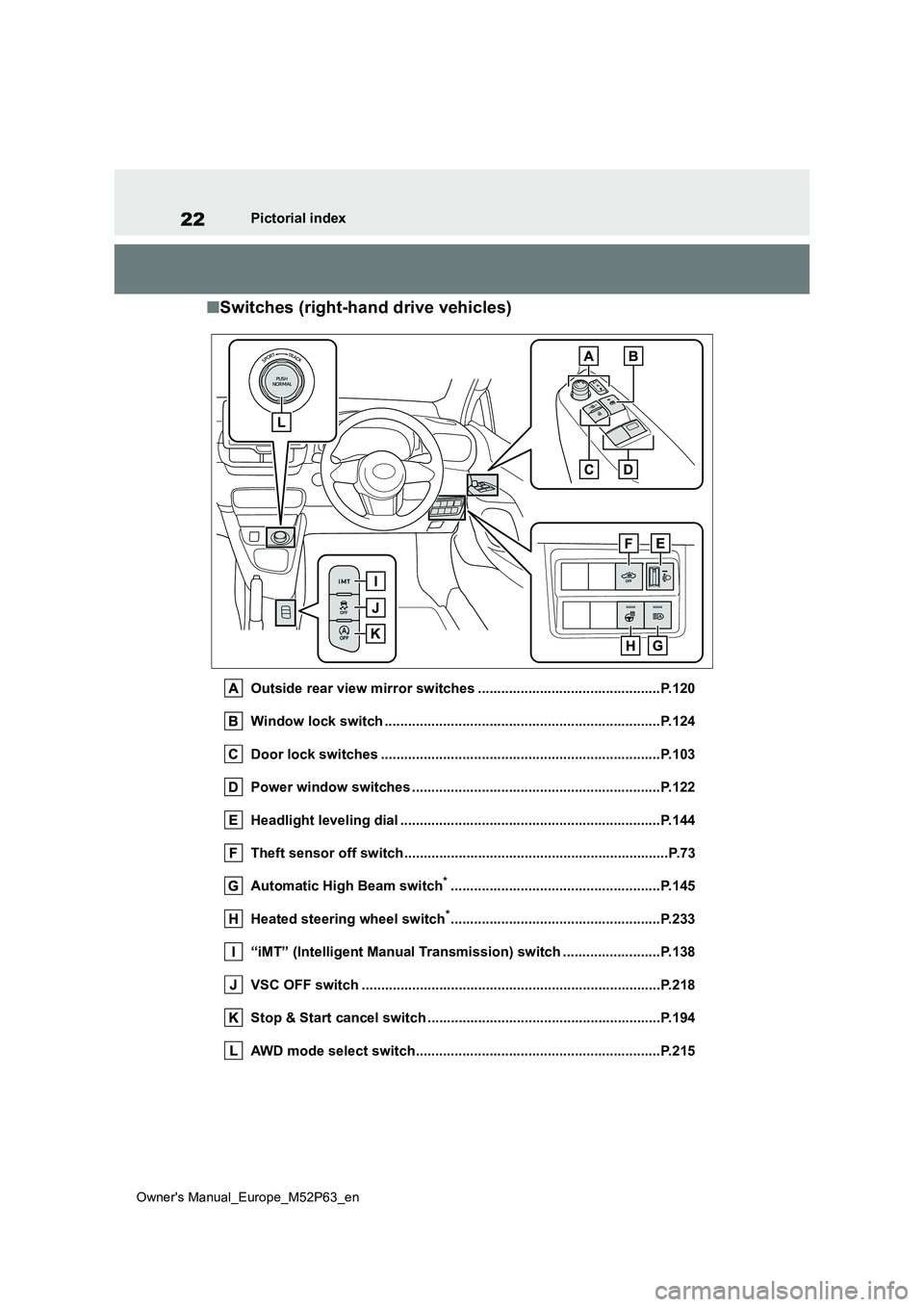
■Switches (right-hand drive vehicles)
Outside rear view mirror switches ...............................................P.120
Window lock switch ............................................. ..........................P.124
Door lock switches ............................................. ...........................P.103
Power window switches .......................................... ......................P.122
Headlight leveling dial ........................................ ...........................P.144
Theft sensor off switch........................................ ............................P.73
Automatic High Beam switch*......................................................P.145
Heated steering wheel switch*......................................................P.233
“iMT” (Intelligent Manual Transmission) switch ................. ........P.138
VSC OFF switch ................................................. ............................P.218
Stop & Start cancel switch ..................................... .......................P.194
AWD mode select switch......................................... ......................P.215
Page 80 of 470
78
Owner's Manual_Europe_M52P63_en
2-1. Instrument cluster
2-1.In strument clu ste r
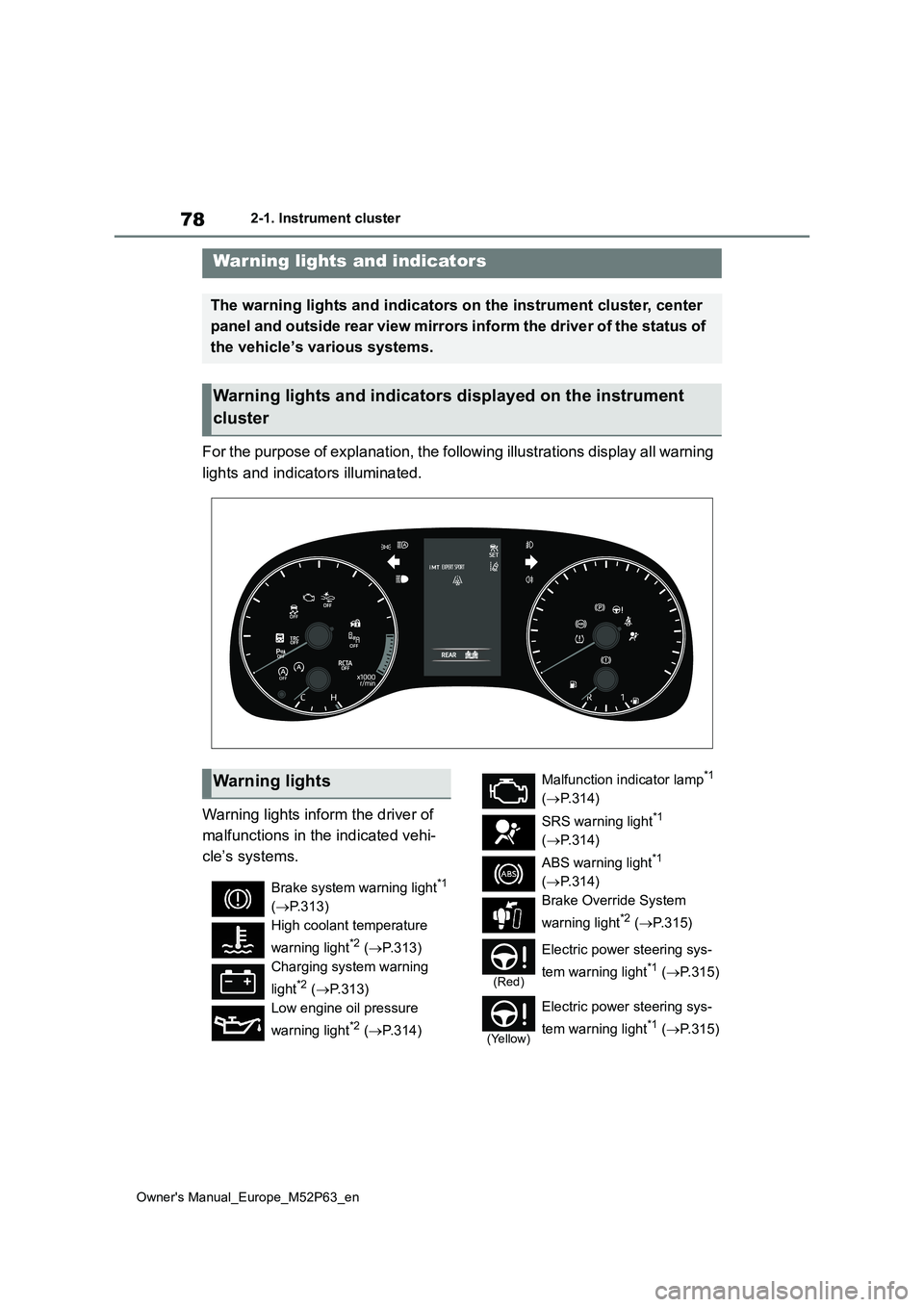
For the purpose of explanation, the following illustrations display all warning
lights and indicators illuminated.
Warning lights inform the driver of
malfunctions in the indicated vehi-
cle’s systems.
Warning lights and indicators
The warning lights and indicators on the instrument cluster, center
panel and outside rear view mirrors inform the driver of the st atus of
the vehicle’s various systems.
Warning lights and indicators displayed on the instrument
cluster
Warning lights
Brake system warning light*1
( P.313)
High coolant temperature
warning light*2 ( P.313)
Charging system warning
light*2 ( P.313)
Low engine oil pressure
warning light*2 ( P.314)
Malfunction indicator lamp*1
( P.314)
SRS warning light*1
( P.314)
ABS warning light*1
( P.314)
Brake Override System
warning light*2 ( P. 3 1 5 )
(Red)
Electric power steering sys-
tem warning light*1 ( P.315)
(Yellow)
Electric power steering sys-
tem warning light*1 ( P.315)
Page 99 of 470
3
97
Owner's Manual_Europe_M52P63_en
3
Before driving
Before driving
3-1. Key information
Keys.................................... 98
3-2. Opening, closing and locking
the doors
Side doors ........................ 101
Back door ......................... 104
Smart entry & start system 107
3-3. Adjusting the seats
Front seats........................ 112
Rear seats ........................ 114
Head restraints ................. 115
3-4. Adjusting the steering wheel
and mirrors
Steering wheel .................. 118
Inside rear view mirror ...... 119
Outside rear view mirrors . 120
3-5. Opening and closing the win-
dows
Power windows................. 122
Page 130 of 470
128
Owner's Manual_Europe_M52P63_en
4-1. Before driving
WARNING
●Do not drive the vehicle over or stop the vehicle near flammable
materials. The exhaust system and exhaust gases can be extremely hot. These
hot parts may cause a fire if there is any flammable material nearby.
●During normal driving, do not turn off the engine. Turning the engine off while driving will not cause loss
of steering or braking control, but the power assist to these systems will be lost. This will make it more
difficult to steer and brake, so you should pull over and stop the vehi-cle as soon as it is safe to do so.
However, in the event of an emer- gency, such as if it becomes impos-sible to stop the vehicle in the
normal way: P. 3 0 4
●Use engine braking (downshift) to
maintain a safe speed when driving down a steep hill.Using the brakes continuously may
cause the brakes to overheat and lose effectiveness. ( P.137)
●Do not adjust the positions of the steering wheel, the seat, or the inside or outside rear view mirrors
while driving. Doing so may result in a loss of vehicle control.
●Always check that all passengers’ arms, heads or other parts of their
body are not outside the vehicle.
●Do not drive the vehicle off-road.
This is not an AWD vehicle designed for off-road driving. Pro-ceed with all due caution if it
becomes unavoidable to drive off- road.
●Do not drive across a river or through other bodies of water.This may cause electric/electronic
components to short circuit, dam- age the engine or cause other seri-ous damage to the vehicle.
■When driving on slippery road surfaces
●Sudden braking, acceleration and steering may cause tire slippage and reduce your ability to control
the vehicle.
●Sudden acceleration, engine brak-
ing due to shifting, or changes in engine speed could cause the vehi-cle to skid.
●After driving through a puddle, lightly depress the brake pedal to
make sure that the brakes are func- tioning properly. Wet brake pads may prevent the brakes from func-
tioning properly. If the brakes on only one side are wet and not func-tioning properly, steering control
may be affected.
■When shifting the shift lever
●Do not shift the shift lever to R while the vehicle is moving forward.Doing so can damage the transmis-
sion and may result in a loss of vehicle control.
●Do not shift the shift lever to a driv-ing position while the vehicle is moving backward.
Doing so can damage the transmis- sion and may result in a loss of vehicle control.
●Moving the shift lever to N while the vehicle is moving will disengage the
engine from the transmission. Engine braking is not available when N is selected.
Page 133 of 470
131
4
Owner's Manual_Europe_M52P63_en
4-1. Before driving
Driving
NOTICE
• Do not use the clutch pedal to adjust vehicle speed. When stop-
ping the vehicle with the shift lever in a position other then N, make sure to fully depress the clutch
pedal and stop the vehicle using the brake.Doing so may damage the clutch.
• When stopping the vehicle with the shift lever in a position other than N,
make sure to fully depress the clutch pedal and stop the vehicle using the brakes.
●Do not shift the shift lever to R with-out the vehicle completely stopped.
Doing so may damage the clutch, transmission and gears.
■Avoiding damage to vehicle parts
●Do not turn the steering wheel fully in either direction and hold it there
for an extended period of time. Doing so may damage the power steering motor.
●When driving over bumps in the road, drive as slowly as possible to
avoid damaging the wheels, under- side of the vehicle, etc.
●Make sure to idle the engine imme-diately after high-load driving. Stop the engine only after the turbo-
charger has cooled down. Failure to do so may cause damage to the turbocharger.
■If you get a flat tire while driving
A flat or damaged tire may cause the
following situations. Hold the steering wheel firmly and gradually depress the brake pedal to slow down the
vehicle.
●It may be difficult to control your vehicle.
●The vehicle will make abnormal sounds or vibrations.
●The vehicle will lean abnormally.
Information on what to do in case of a
flat tire ( P.323)
■When encountering flooded
roads
Do not drive on a road that has flooded after heavy rain, etc. Doing so
may cause the following serious dam- age to the vehicle:
●Engine stalling
●Short in electrical components
●Engine damage caused by water immersion
In the event that you drive on a flooded road and the vehicle becomes flooded or stuck in mud or
sand, be sure to have any authorized Toyota retailer or Toyota authorized repairer, or any reliable repairer check
the following:
●Brake function
●Changes in quantity and quality of oil and fluid used for the engine,
transmission, transfer, differential, etc.
●Lubricant condition for the propel-ler shaft, bearings and suspension joints (where possible), and the
function of all joints, bearings, etc.
Page 138 of 470
136
Owner's Manual_Europe_M52P63_en
4-2. Driving procedures
3Shift the shift lever to N.
( P.137)
4 Press the engine switch.
The engine will stop, and the meter dis- play will be extinguished.
5 Release the brake pedal and
check that “ACCESSORY” or
“IGNITION ON” is not shown on
the multi-information display.
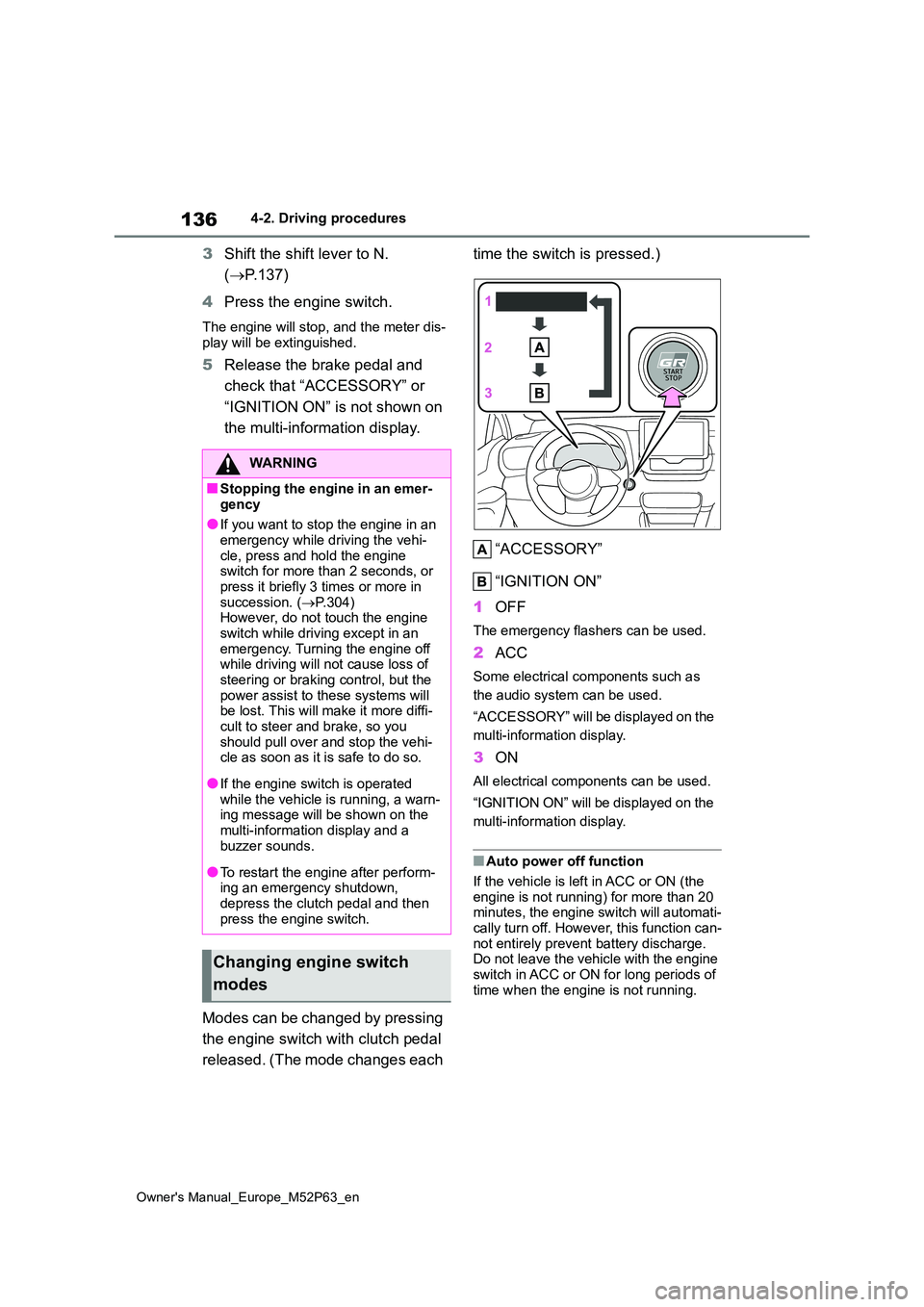
Modes can be changed by pressing
the engine switch with clutch pedal
released. (The mode changes each
time the switch is pressed.)
“ACCESSORY”
“IGNITION ON”
1 OFF
The emergency flashers can be used.
2ACC
Some electrical components such as
the audio system can be used.
“ACCESSORY” will be displayed on the
multi-information display.
3 ON
All electrical components can be used.
“IGNITION ON” will be displayed on the
multi-information display.
■Auto power off function
If the vehicle is left in ACC or ON (the
engine is not running) for more than 20 minutes, the engine switch will automati-cally turn off. However, this function can-
not entirely prevent battery discharge. Do not leave the vehicle with the engine switch in ACC or ON for long periods of
time when the engine is not running.
WARNING
■Stopping the engine in an emer-
gency
●If you want to stop the engine in an emergency while driving the vehi-
cle, press and hold the engine switch for more than 2 seconds, or press it briefly 3 times or more in
succession. ( P.304) However, do not touch the engine switch while driving except in an
emergency. Turning the engine off while driving will not cause loss of steering or braking control, but the
power assist to these systems will be lost. This will make it more diffi-cult to steer and brake, so you
should pull over and stop the vehi- cle as soon as it is safe to do so.
●If the engine switch is operated while the vehicle is running, a warn-ing message will be shown on the
multi-information display and a buzzer sounds.
●To restart the engine after perform-ing an emergency shutdown, depress the clutch pedal and then
press the engine switch.
Changing engine switch
modes
Page 169 of 470

167
4
Owner's Manual_Europe_M52P63_en
4-5. Using the driving support systems
Driving
reflects radio waves, such as a large
truck or guardrail • When driving near a TV tower, broad-casting station, electric power plant,
radar equipped vehicles, etc., or other location where strong radio waves or electrical noise may be present
• When there are many things which can reflect the radio waves of the radar in the vicinity (tunnels, truss
bridges, gravel roads, snow covered road that have tracks, etc.)• For region A: While making a right/left
turn, when an oncoming vehicle or a crossing pedestrian has already exited the path of your vehicle
• For region A: While making a right/left turn, closely in front of an oncoming vehicle or a crossing pedestrian.
• For region A: While making a right/left turn, when an oncoming vehicle or a crossing pedestrian stops before
entering the path of your vehicle • For region A: While making a right/left turn, when an oncoming vehicle turns
right/left in front of your vehicle
• For region A: While steering into the
direction of oncoming traffic
■Situations in which the system may not operate properly
●In some situations such as the follow-ing, an object may not be detected by the radar sensor and front camera,
preventing the system from operating properly:• When a detectable object is
approaching your vehicle • When your vehicle or a detectable object is wobbling
• If a detectable object makes an abrupt maneuver (such as sudden swerving, acceleration or deceleration)
• When your vehicle approaches a
detectable object rapidly • When a detectable object is not directly in front of your vehicle
• When a detectable object is near a wall, fence, guardrail, manhole cover,
vehicle, steel plate on the road, etc. • When a detectable object is under a structure
• When part of a detectable object is hidden by an object, such as large baggage, an umbrella, or guardrail
• When there are many things which can reflect the radio waves of the radar in the vicinity (tunnels, truss
bridges, gravel roads, snow covered road that have tracks, etc.)• When there is an effect on the radio
waves to the radar that is installed on another vehicle• When multiple detectable objects are
close together • If the sun or other light is shining directly on a detectable object
• When a detectable object is a shade of white and looks extremely bright• When a detectable object appears to
be nearly the same color or brightness as its surroundings• If a detectable object cuts or suddenly
emerges in front of your vehicle • When the front of your vehicle is hit by water, snow, dust, etc.
• When a very bright light ahead, such as the sun or the headlights of oncom-ing traffic, shines directly into the front
camera • When approaching the side or front of a vehicle ahead
• If a vehicle ahead is a motorcycle • If a vehicle ahead is narrow, such as a personal mobility vehicle
• If a preceding vehicle has a small rear
Page 220 of 470
218
Owner's Manual_Europe_M52P63_en
4-5. Using the driving support systems
■TRC (Traction Control)
Helps to maintain drive power and
prevent the drive wheels from spin-
ning when starting the vehicle or
accelerating on slippery roads
■Hill-start assist control
Helps to reduce the backward
movement of the vehicle when
starting on an uphill
■EPS (Electric Power Steering)
Employs an electric motor to
reduce the amount of effort needed
to turn the steering wheel.
■Active Torque Split AWD sys-
tem
Automatically switches from front-
wheel drive to all-wheel drive
(AWD) according to the driving con-
ditions, helping to ensure reliable
handling and stability. Examples of
conditions where the system will
switch to AWD are when cornering,
going uphill, starting off or acceler-
ating, and when the road surface is
slippery due to snow, rain, etc.
■Emergency brake signal
When the brakes are applied sud-
denly, the emergency flashers auto-
matically flash to alert the vehicle
behind.
■The secondary Collision Brake
(if equipped)
When the SRS airbag sensor
detects a collision and the system
operates, the brakes and brake
lights are automatically controlled
to reduce the vehicle speed and
help reduce the possibility of further
damage due to a secondary colli-
sion.
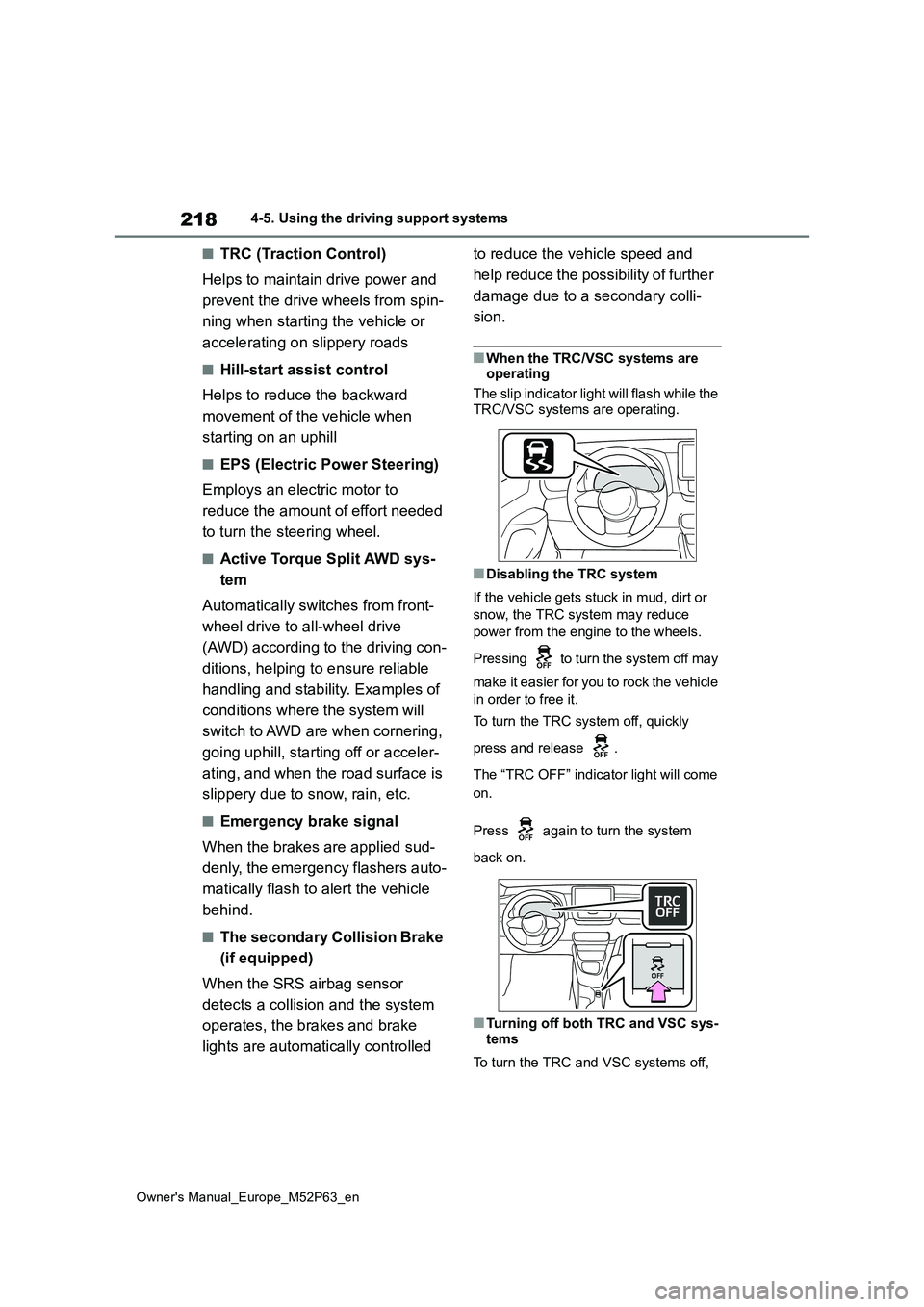
■When the TRC/VSC systems are operating
The slip indicator light will flash while the
TRC/VSC systems are operating.
■Disabling the TRC system
If the vehicle gets stuck in mud, dirt or
snow, the TRC system may reduce
power from the engine to the wheels.
Pressing to turn the system off may
make it easier for you to rock the vehicle
in order to free it.
To turn the TRC system off, quickly
press and release .
The “TRC OFF” indicator light will come
on.
Press again to turn the system
back on.
■Turning off both TRC and VSC sys-
tems
To turn the TRC and VSC systems off,