instrument panel TOYOTA GR86 2022 Owners Manual (in English)
[x] Cancel search | Manufacturer: TOYOTA, Model Year: 2022, Model line: GR86, Model: TOYOTA GR86 2022Pages: 582, PDF Size: 86.38 MB
Page 15 of 582
13Pictorial index
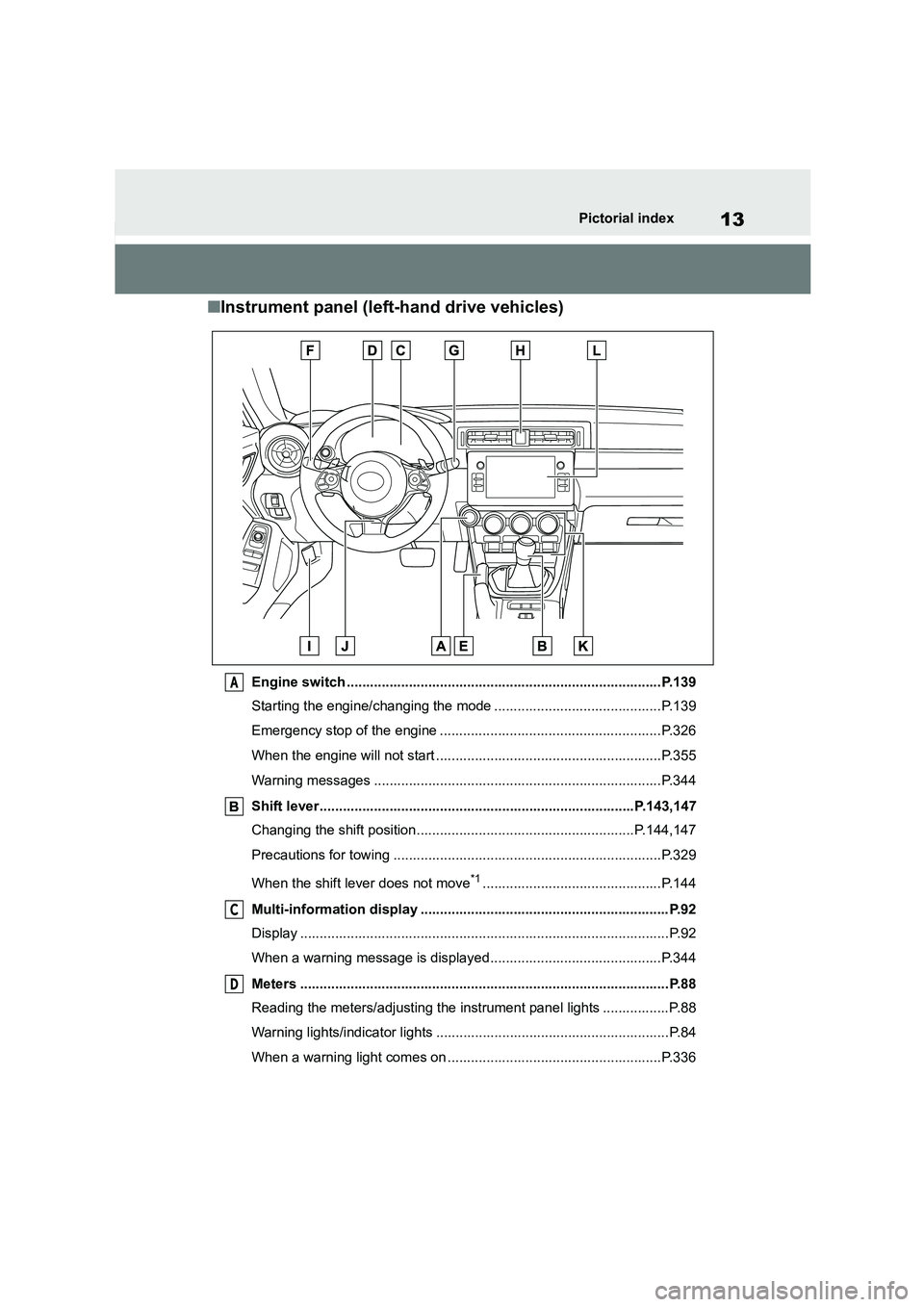
■Instrument panel (left-hand drive vehicles)
Engine switch .................................................................................P.139
Starting the engine/changing the mode ...........................................P.139
Emergency stop of the engine .........................................................P.326
When the engine will not start ..........................................................P.355
Warning messages ..........................................................................P.344
Shift lever.................................................................................P.143,147
Changing the shift position........................................................P.144,147
Precautions for towing .....................................................................P.329
When the shift lever does not move*1..............................................P.144
Multi-information display ................................................................P.92
Display ...............................................................................................P.92
When a warning message is displayed............................................P.344
Meters ...............................................................................................P.88
Reading the meters/adjusting the instrument panel lights .................P.88
Warning lights/indicator lights ............................................................P.84
When a warning light comes on .......................................................P.336
A
C
D
Page 17 of 582
15Pictorial index
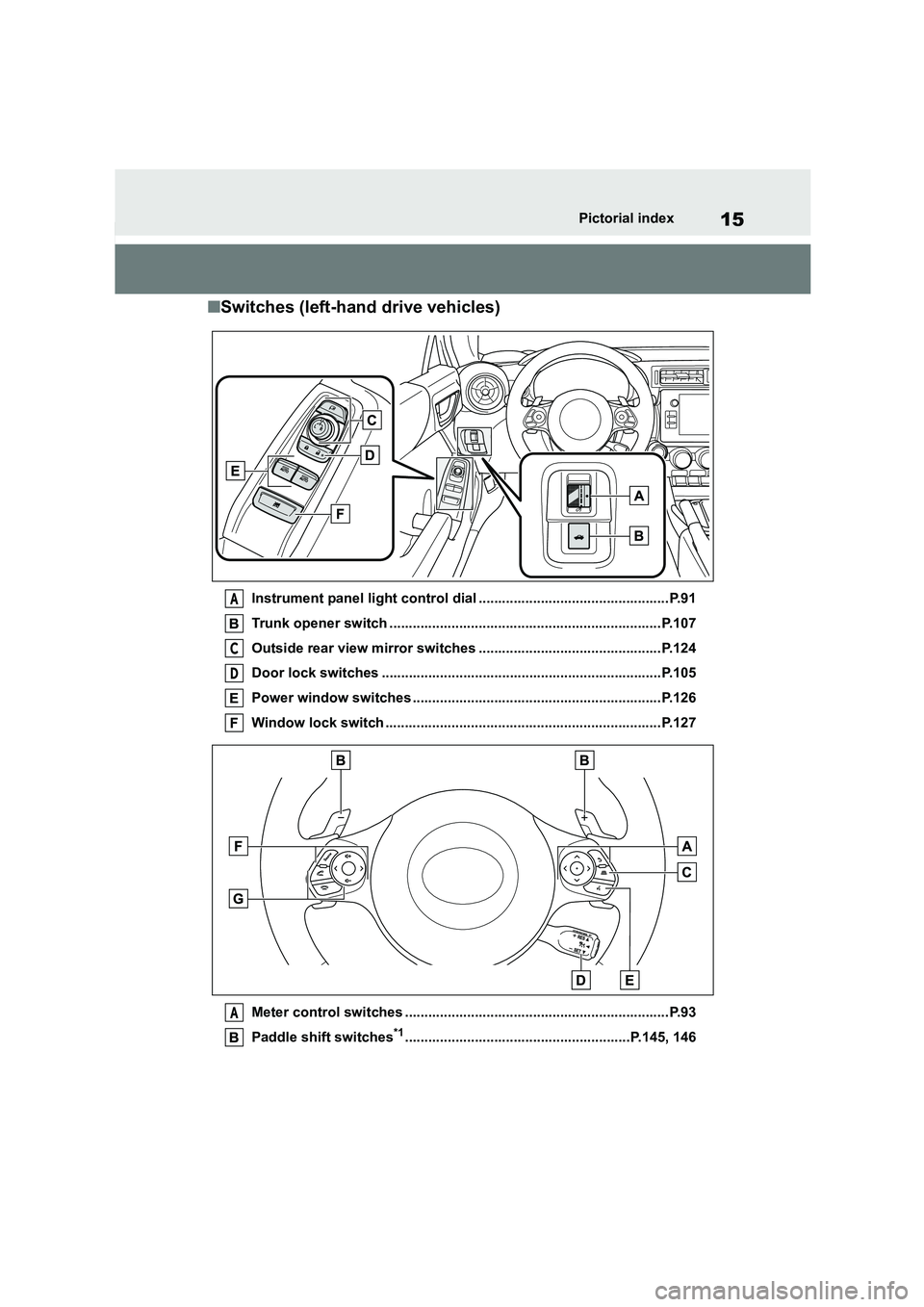
■Switches (left-hand drive vehicles)
Instrument panel light control dial .................................................P.91
Trunk opener switch ......................................................................P.107
Outside rear view mirror switches ...............................................P.124
Door lock switches ........................................................................P.105
Power window switches ................................................................P.126
Window lock switch .......................................................................P.127
Meter control switches ....................................................................P.93
Paddle shift switches*1..........................................................P.145, 146
A
C
D
A
Page 21 of 582
19Pictorial index
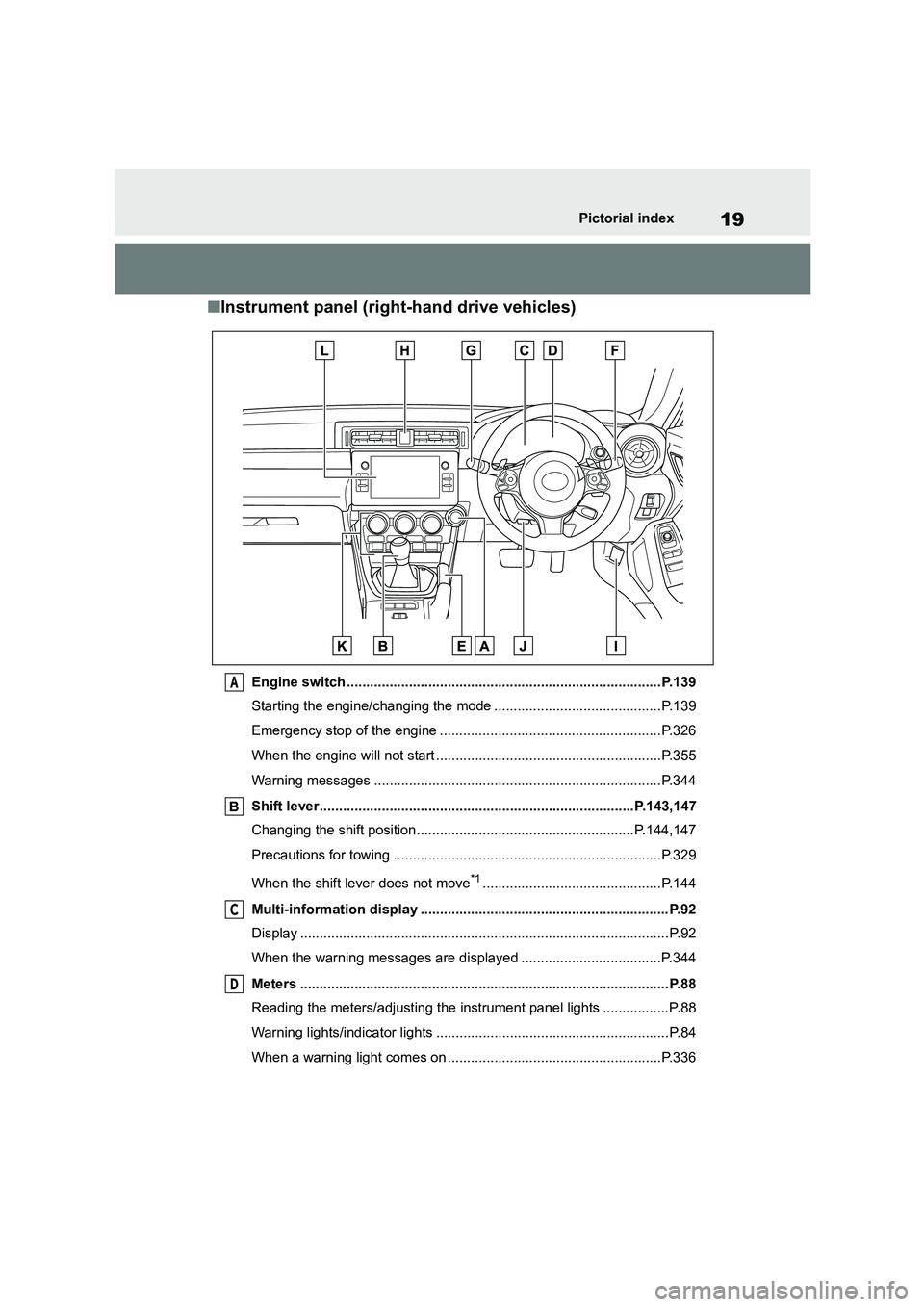
■Instrument panel (right-hand drive vehicles)
Engine switch .................................................................................P.139
Starting the engine/changing the mode ...........................................P.139
Emergency stop of the engine .........................................................P.326
When the engine will not start ..........................................................P.355
Warning messages ..........................................................................P.344
Shift lever.................................................................................P.143,147
Changing the shift position........................................................P.144,147
Precautions for towing .....................................................................P.329
When the shift lever does not move*1..............................................P.144
Multi-information display ................................................................P.92
Display ...............................................................................................P.92
When the warning messages are displayed ....................................P.344
Meters ...............................................................................................P.88
Reading the meters/adjusting the instrument panel lights .................P.88
Warning lights/indicator lights ............................................................P.84
When a warning light comes on .......................................................P.336
A
C
D
Page 23 of 582
21Pictorial index
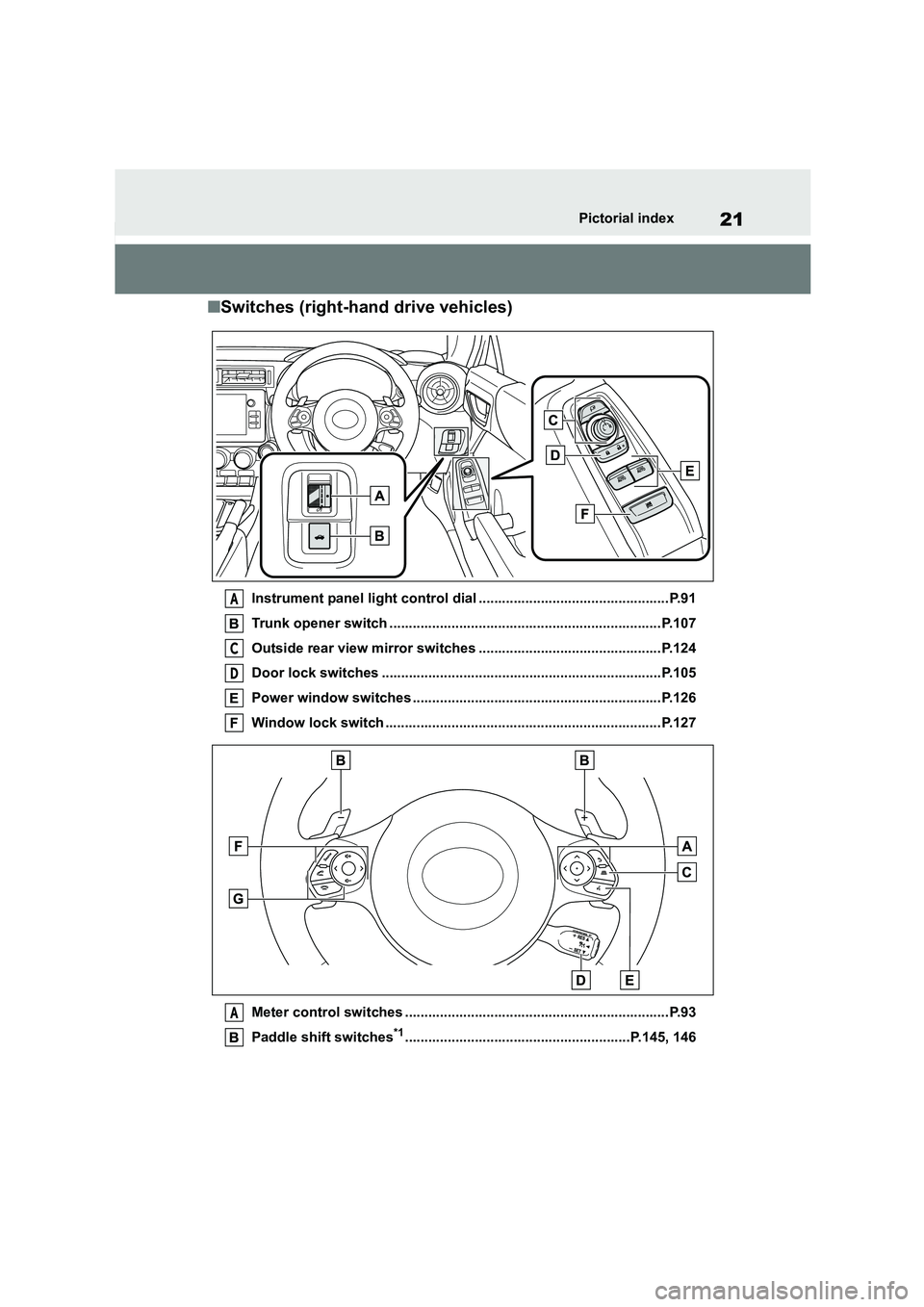
■Switches (right-hand drive vehicles)
Instrument panel light control dial .................................................P.91
Trunk opener switch ......................................................................P.107
Outside rear view mirror switches ...............................................P.124
Door lock switches ........................................................................P.105
Power window switches ................................................................P.126
Window lock switch .......................................................................P.127
Meter control switches ....................................................................P.93
Paddle shift switches*1..........................................................P.145, 146
A
C
D
A
Page 39 of 582
37
1
1-1. For safe use
For safety and security
WA R N I N G
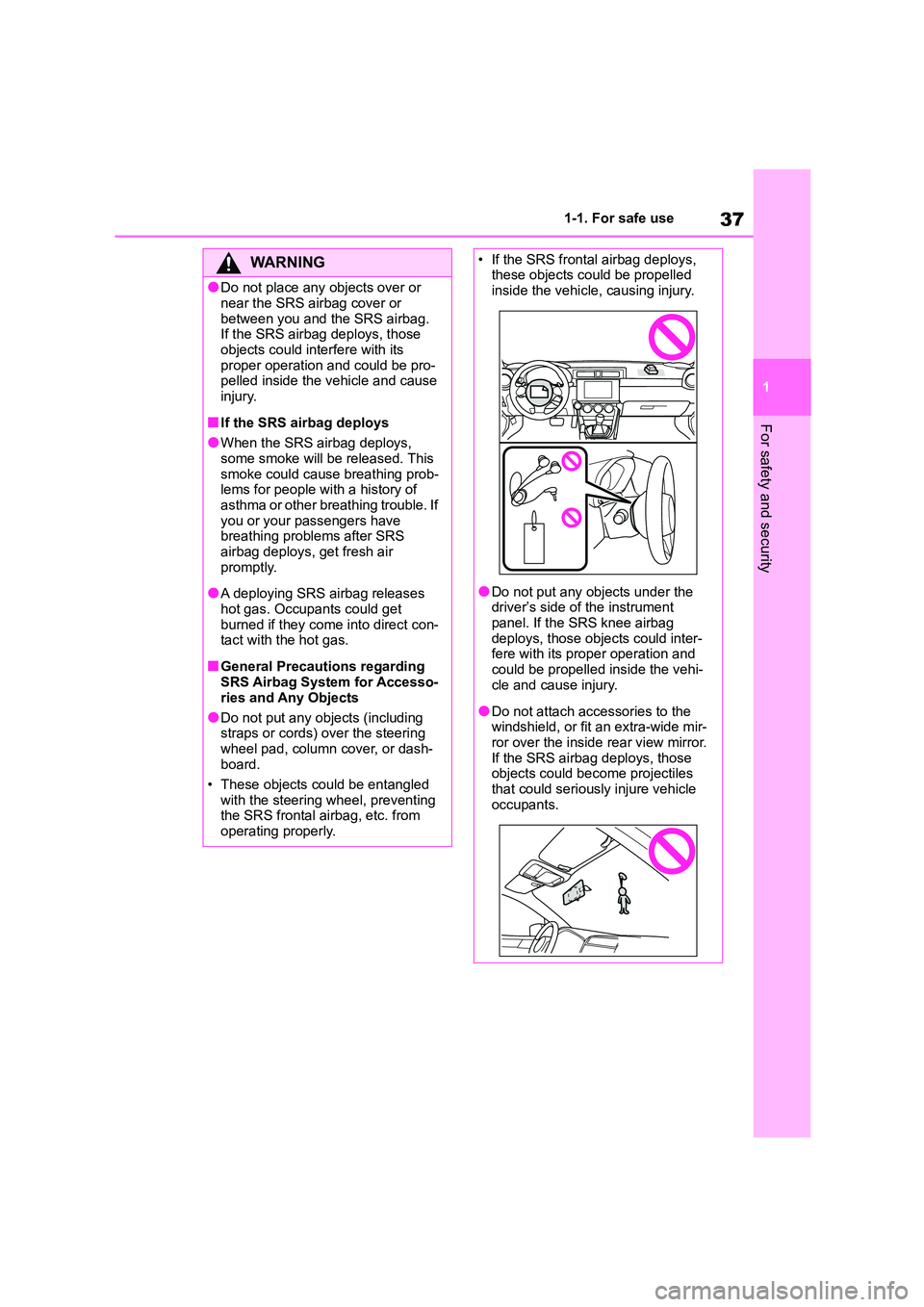
●Do not place any objects over or
near the SRS airbag cover or
between you and the SRS airbag. If the SRS airbag deploys, those
objects could interfere with its
proper operation and could be pro- pelled inside the vehicle and cause
injury.
■If the SRS airbag deploys
●When the SRS airbag deploys,
some smoke will be released. This
smoke could cause breathing prob- lems for people with a history of
asthma or other breathing trouble. If
you or your passengers have breathing problems after SRS
airbag deploys, get fresh air
promptly.
●A deploying SRS airbag releases
hot gas. Occupants could get burned if they come into direct con-
tact with the hot gas.
■General Precautions regarding
SRS Airbag System for Accesso-
ries and Any Objects
●Do not put any objects (including
straps or cords) over the steering
wheel pad, column cover, or dash- board.
• These objects could be entangled
with the steering wheel, preventing the SRS frontal airbag, etc. from
operating properly.
• If the SRS frontal airbag deploys, these objects could be propelled
inside the vehicle, causing injury.
●Do not put any objects under the driver’s side of the instrument
panel. If the SRS knee airbag
deploys, those objects could inter- fere with its proper operation and
could be propelled inside the vehi-
cle and cause injury.
●Do not attach accessories to the
windshield, or fit an extra-wide mir- ror over the inside rear view mirror.
If the SRS airbag deploys, those
objects could become projectiles that could seriously injure vehicle
occupants.
Page 43 of 582
41
1
1-1. For safe use
For safety and security
For the locations of the SRS
airbags, refer to P.32.
In a moderate to severe frontal col-
lision, the following components
deploy.
SRS frontal airbag for driver
SRS frontal airbag for front pas-
senger
SRS curtain shield airbag*
SRS knee airbag for driver
*: When an offset frontal collision that is
severe enough to deploy the front
airbag occurs.
These components supplement the
seatbelts by reducin g the impact to
the occupant’s head, chest and
knees.
WA R N I N G
• Attachment of any equipment (bush
bar, bullbar, winches, snow plow,
skid/sump plate, etc.) to the front end other than genuine Toyota
accessory parts or parts that match
the quality of genuine Toyota accessory parts.
• Modification of the suspension sys-
tem or front end structure.
• Installation of a tire of different size
and construction from the tires specified on the vehicle placard
attached to the driver’s door pillar or
specified for individual vehicle mod- els in this Owner’s Manual.
• Attachment of any equipment (side steps or side sill protectors, etc.)
other than genuine Toyota acces-
sory parts to the side body.
We recommend that you always con-
sult your Toyota dealer if you want to install any accessory parts on your
vehicle.
NOTICE
■SRS Airbag System Servicing
●When discarding an airbag module or scrapping the entire vehicle dam-
aged by a collision, we recommend
that you consult your Toyota dealer.
●If you need service or repair in
areas indicated in the following list, we recommend that you have the
work performed by an authorized
Toyota dealer. The SRS airbag con- trol module, impact sensors and
airbag modules are stored in the
following areas.
• Under the center of the instrument
panel
• On both the right and left sides at
the front of the vehicle
• Steering wheel and column and nearby areas
• Bottom of the steering column and nearby areas
• Top of the dashboard on front pas- senger’s side and nearby areas
• Each front seat and nearby area
• Inside each center pillar
• Inside each door
• In each roof side (from the front pil- lar to a point over the rear seat)
• Between the rear seat cushion and rear wheel house on each side
In the event that the SRS airbag sys- tem is deployed, we recommend that
you have the system replaced with
genuine Toyota parts at an authorized Toyota dealer.
SRS airbag
Page 51 of 582
49
1
1-1. For safe use
For safety and security
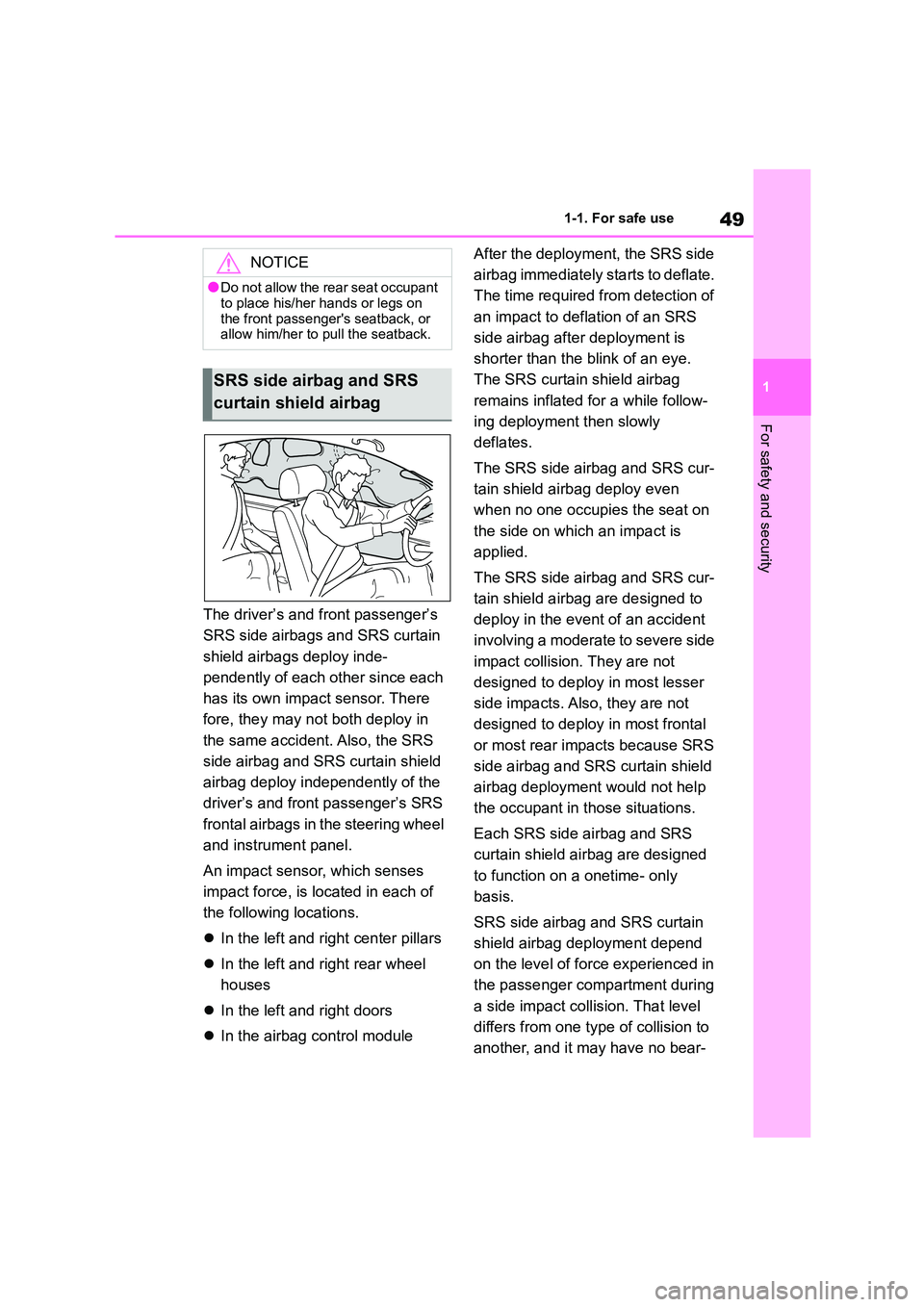
The driver’s and front passenger’s
SRS side airbags and SRS curtain
shield airbags deploy inde-
pendently of each other since each
has its own impact sensor. There
fore, they may not both deploy in
the same accident. Also, the SRS
side airbag and SRS curtain shield
airbag deploy independently of the
driver’s and front passenger’s SRS
frontal airbags in the steering wheel
and instrument panel.
An impact sensor, which senses
impact force, is located in each of
the following locations.
In the left and right center pillars
In the left and right rear wheel
houses
In the left and right doors
In the airbag control module
After the deployment, the SRS side
airbag immediately starts to deflate.
The time required from detection of
an impact to deflation of an SRS
side airbag after deployment is
shorter than the blink of an eye.
The SRS curtain shield airbag
remains inflated for a while follow-
ing deployment then slowly
deflates.
The SRS side airbag and SRS cur-
tain shield airbag deploy even
when no one occupies the seat on
the side on which an impact is
applied.
The SRS side airbag and SRS cur-
tain shield airbag are designed to
deploy in the event of an accident
involving a moderate to severe side
impact collision. They are not
designed to deploy in most lesser
side impacts. Also, they are not
designed to deploy in most frontal
or most rear impacts because SRS
side airbag and SRS curtain shield
airbag deployment would not help
the occupant in those situations.
Each SRS side airbag and SRS
curtain shield airbag are designed
to function on a onetime- only
basis.
SRS side airbag and SRS curtain
shield airbag deployment depend
on the level of force experienced in
the passenger compartment during
a side impact collision. That level
differs from one type of collision to
another, and it may have no bear-
NOTICE
●Do not allow the rear seat occupant
to place his/her hands or legs on
the front passenger's seatback, or allow him/her to pull the seatback.
SRS side airbag and SRS
curtain shield airbag
Page 93 of 582
91
2
2-1. Instrument cluster
Vehicle status information and indicators
■Display items
Odometer
Displays the total distance the vehicle
has been driven.
Trip meter A/Trip meter B
Displays the distance the vehicle has
been driven since the meter was last
reset. Trip meters A and B can be used
to record and display different distances
independently.
To reset, display th e desired trip meter
and press and hold the display change
button.
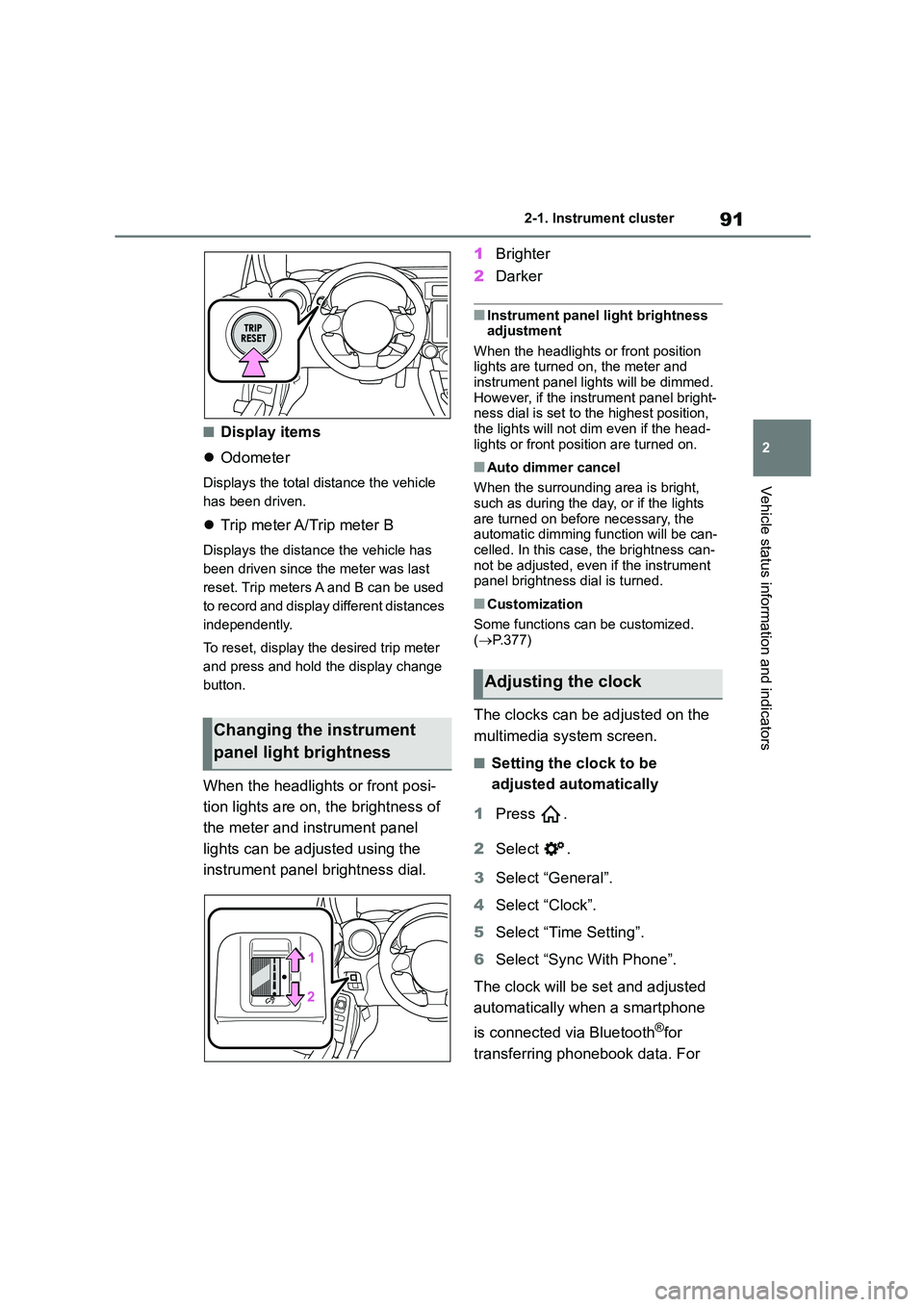
When the headlights or front posi-
tion lights are on, the brightness of
the meter and instrument panel
lights can be adjusted using the
instrument panel brightness dial.
1 Brighter
2 Darker
■Instrument panel light brightness adjustment
When the headlights or front position
lights are turned on, the meter and instrument panel lights will be dimmed.
However, if the instrument panel bright-
ness dial is set to the highest position, the lights will not dim even if the head-
lights or front position are turned on.
■Auto dimmer cancel
When the surrounding area is bright, such as during the day, or if the lights
are turned on before necessary, the
automatic dimming function will be can- celled. In this case, the brightness can-
not be adjusted, even if the instrument
panel brightness dial is turned.
■Customization
Some functions can be customized.
( P.377)
The clocks can be adjusted on the
multimedia system screen.
■Setting the clock to be
adjusted automatically
1 Press .
2 Select .
3 Select “General”.
4 Select “Clock”.
5 Select “Time Setting”.
6 Select “Sync With Phone”.
The clock will be set and adjusted
automatically when a smartphone
is connected via Bluetooth®for
transferring phonebook data. For
Changing the instrument
panel light brightness
Adjusting the clock
Page 114 of 582
1123-2. Opening, closing and locking the doors and trunk
switch modes are changed.
●Do not leave the electronic key on top
of the instrument panel or near the
door pockets when exiting the vehicle. Depending on the radio wave recep-
tion conditions, it may be detected by
the antenna outside the cabin and the doors will become lockable from the
outside, possibly trapping the elec-
tronic key inside the vehicle.
●As long as the electronic key is within
the effective range, the doors may be locked or unlocked by anyone. How-
ever, only the doors detecting the
electronic key can be used to unlock the vehicle.
●Even if the electronic key is not inside the vehicle, it may be possible to start
the engine if the electronic key is near
the window.
●The doors may unlock or lock if a
large amount of water splashes on the door handle, such as in the rain or in a
car wash, when the electronic key is
within the effective range. (The doors will automatically be locked after
approximately 30 seconds if the doors
are not opened and closed.)
●If the wireless remote control is used
to lock the doors when the electronic key is near the vehicle, there is a pos-
sibility that the door may not be
unlocked by the entry function. (Use the wireless remote control to unlock
the doors.)
●Touching the door lock or unlock sen-
sor while wearing gloves may prevent
lock or unlock operation.
●Vehicles without a double locking sys-
tem: When the lock operation is per-
formed using the lock sensor, recognition signals will be shown up to
three consecutive times. After this, no
recognition signals will be given.
●If the door handle becomes wet while
the electronic key is within the effec- tive range, the door may lock and
unlock repeatedly. In this case, follow
the following correction procedures to
wash the vehicle:
• Place the electronic key in a location 2 m (6 ft.) or more away from the vehi-
cle. (Take care to ensure that the key
is not stolen.) • Set the electronic key to battery-sav-
ing mode to disable the smart entry &
start system. ( P. 1 1 1 )
●If the electronic key is inside the vehi-
cle and a door handle becomes wet during a car wash, a message may be
shown on the multi-information dis-
play and a buzzer will sound outside the vehicle. To turn off the alarm, lock
both side doors.
●The lock sensor may not work prop-
erly if it comes into contact with ice,
snow, mud, etc. Clean the lock sensor and attempt to operate it again.
●A sudden handle operation or a han-dle operation immediately after enter-
ing the effective range may prevent
the doors from being unlocked. Touch the door unlock sensor and check that
the doors are unlocked before pulling
the door handle again.
●Unlocking the vehicle may take more
time if another electronic key is within the effective range.
■When the vehicle is not driven for
extended periods
●To prevent theft of the vehicle, do not
leave the electronic key within 2 m (6
ft.) of the vehicle.
●The smart entry & start system can be
deactivated in advance. ( P. 1 1 3 )
●Setting the electronic key to bat-
tery-saving mode helps to reduce key battery depletion. ( P. 1 1 1 )
■To operate the system properly
●Make sure to carry the electronic key
when operating th e system. Do not get the electronic key too close to the
vehicle when operating the system
from the outside of the vehicle.
Depending on the position and holding
condition of the electronic key, the key may not be detected correctly and the
Page 136 of 582
1344-1. Before driving
WA R N I N G
●Vehicles with an automatic trans-
mission: Be careful not to shift the
shift lever with the accelerator pedal depressed. Shifting the shift
lever to a gear other than P or N
may lead to unexpected rapid acceleration of the vehicle that may
cause an accident and result in
death or serious injury.
●Do not place items in the shift
lever's surrounding area. It may
cause incorrect operation.
●If the shift boot is pulled out during
cleaning, return it to its previous position. If the shift boot is left
pulled out, the shift lever may
become difficult to operate.
■If you hear a squealing or scrap-
ing noise (brake pad wear indica- tors)
Have the brake pads checked and
replaced by any authorized Toyota retailer or Toyota authorized repairer,
or any reliable repairer as soon as
possible. Rotor damage may result if the pads are not replaced when
needed.
It is dangerous to drive the vehicle when the wear limits of the brake
pads and/or those of the brake discs
are exceeded.
■When the vehicle is stopped
●Do not race the engine. If the vehicle is in any gear other
than P (automatic transmission) or
N, the vehicle may accelerate sud- denly and unexpectedly, causing an
accident.
●Vehicles with an automatic trans-
mission: In order to prevent acci-
dents due to the vehicle rolling away, always keep depressing the
brake pedal while the engine is run-
ning, and apply the parking brake as necessary.
●If the vehicle is stopped on an incline, in order to prevent acci-
dents caused by the vehicle rolling
forward or backward, always depress the brake pedal and
securely apply the parking brake as
needed.
●Avoid revving or racing the engine.
Running the engine at high speed while the vehicle is stopped may
cause the exhaust system to over-
heat, which could result in a fire if combustible material is nearby.
■When the vehicle is parked
●Do not leave glasses, cigarette
lighters, spray cans, or soft drink
cans in the vehicle when it is in the sun.
Doing so may result in the follow-
ing:
• Gas may leak from a cigarette
lighter or spray can, and may lead
to a fire.
• The temperature inside the vehicle
may cause the plastic lenses and plastic material of glasses to
deform or crack.
• Soft drink cans may fracture, caus-
ing the contents to spray over the
interior of the vehicle, and may also cause a short circuit in the vehicle’s
electrical components.
●Do not leave cigarette lighters in the
vehicle. If a cigarette lighter is in a
place such as the glove box or on the floor, it may be lit accidentally
when luggage is loaded or the seat
is adjusted, causing a fire.
●Do not attach adh esive discs to the
windshield or windows. Do not
place containers such as air fresh- eners on the instrument panel or
dashboard. Adhesive discs or con-
tainers may act as lenses, causing a fire in the vehicle.