Elect TOYOTA GT86 2017 1.G Owner's Manual
[x] Cancel search | Manufacturer: TOYOTA, Model Year: 2017, Model line: GT86, Model: TOYOTA GT86 2017 1.GPages: 428, PDF Size: 7.83 MB
Page 150 of 428
150 2-1. Driving procedures
■Automatic gear selection when the vehicle is stopped
When the vehicle is idling at high rpm in order to warm up, and the vehicle is
on a slippery road, the transmission may automatically shift to 2
nd gear for
stopping and starting off.
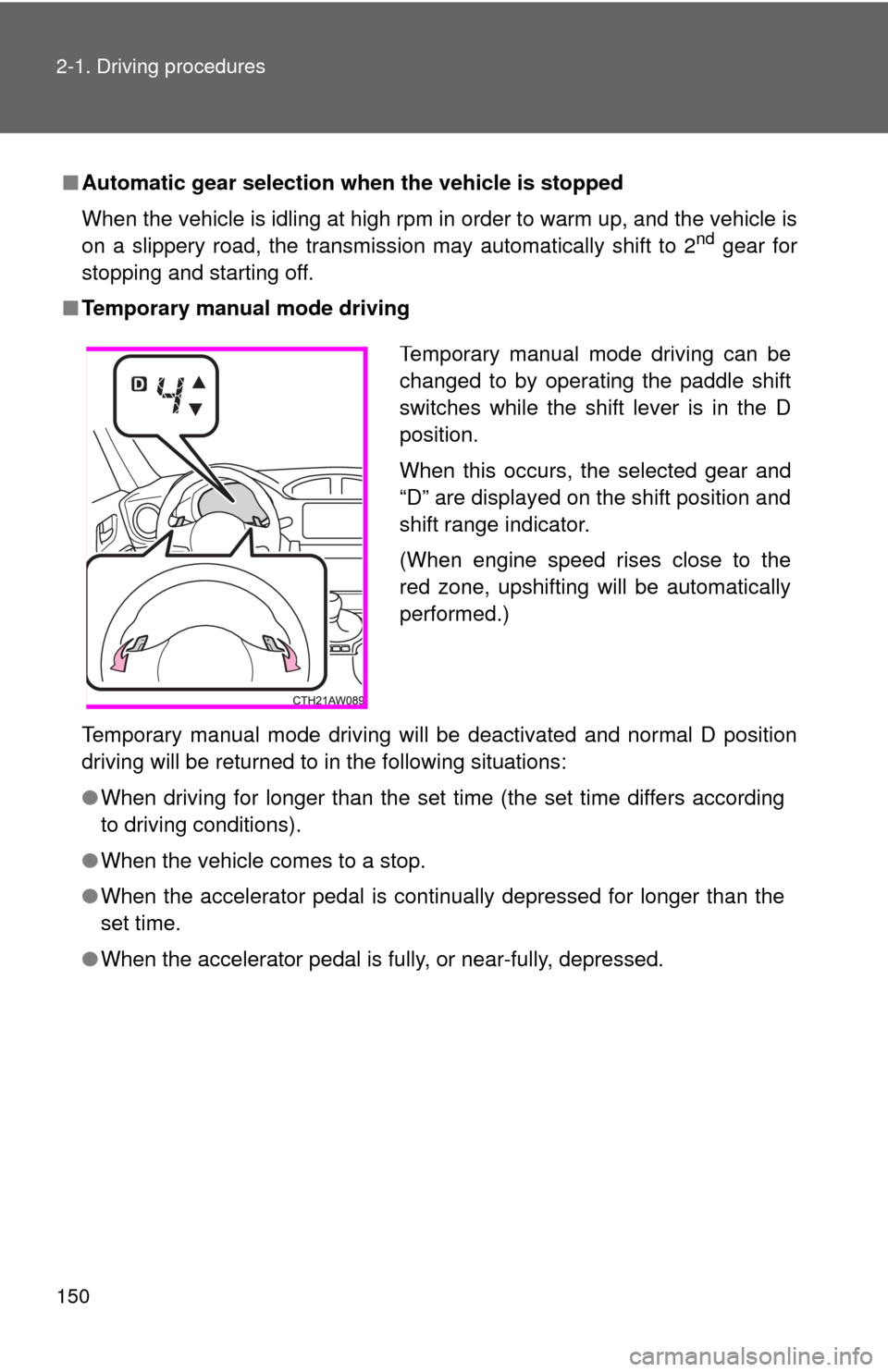
■ Temporary manual mode driving
Temporary manual mode driving will be deactivated and normal D position
driving will be returned to in the following situations:
●When driving for longer than the set time (the set time differs according
to driving conditions).
● When the vehicle comes to a stop.
● When the accelerator pedal is continually depressed for longer than the
set time.
● When the accelerator pedal is fully, or near-fully, depressed.
Temporary manual mode driving can be
changed to by operating the paddle shift
switches while the shift lever is in the D
position.
When this occurs, the selected gear and
“D” are displayed on the shift position and
shift range indicator.
(When engine speed rises close to the
red zone, upshifting will be automatically
performed.)
Page 153 of 428
153
2-1. Driving procedures
2
When driving
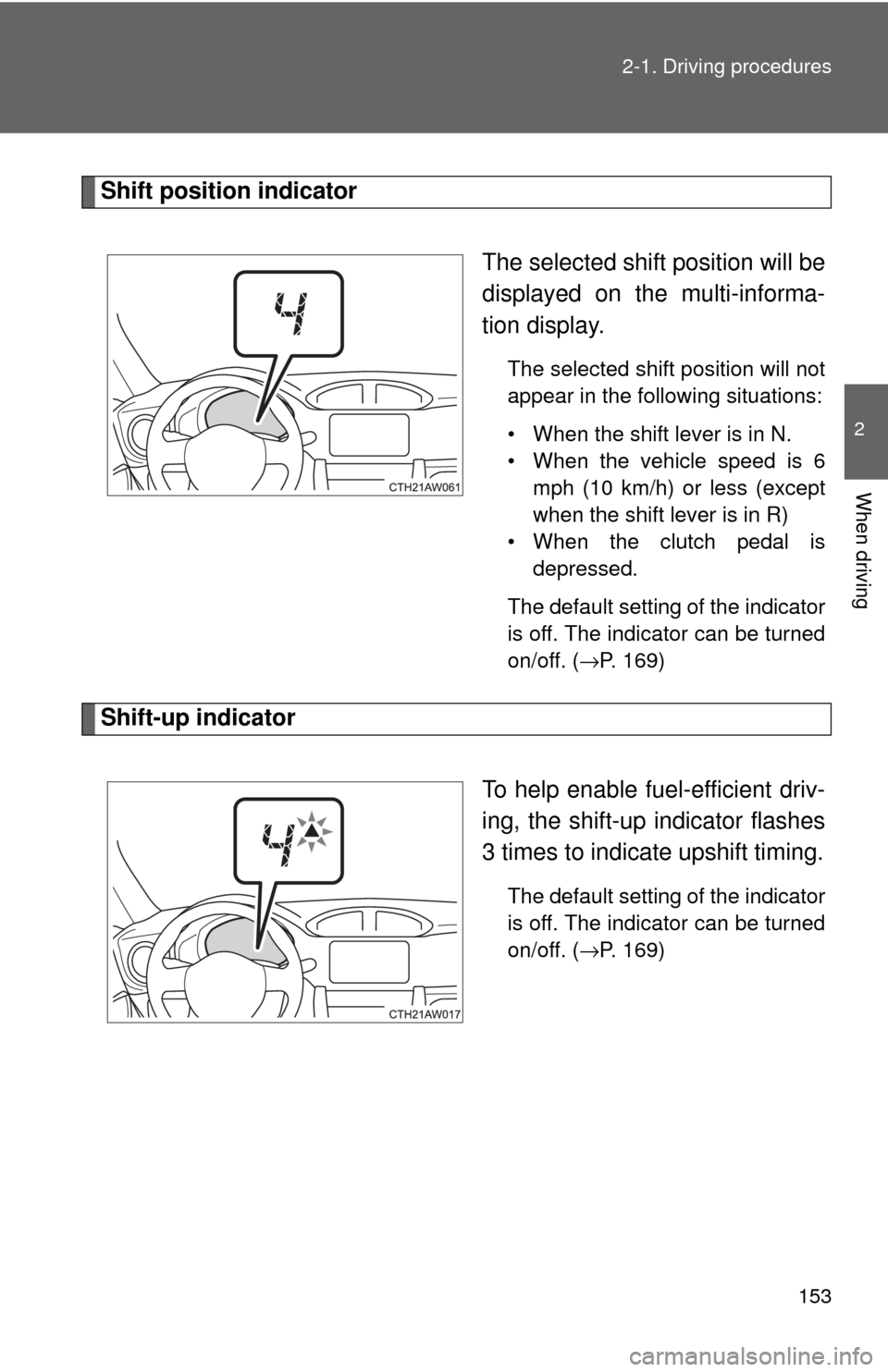
Shift position indicator
The selected shift position will be
displayed on the multi-informa-
tion display.
The selected shift position will not
appear in the following situations:
• When the shift lever is in N.
• When the vehicle speed is 6mph (10 km/h) or less (except
when the shift lever is in R)
• When the clutch pedal is depressed.
The default setting of the indicator
is off. The indicator can be turned
on/off. (
→P. 169)
Shift-up indicator
To help enable fuel-efficient driv-
ing, the shift-up indicator flashes
3 times to indicate upshift timing.
The default setting of the indicator
is off. The indicator can be turned
on/off. (
→P. 169)
Page 173 of 428
173
2-3. Operating the lights and windshield wipers
2
When driving
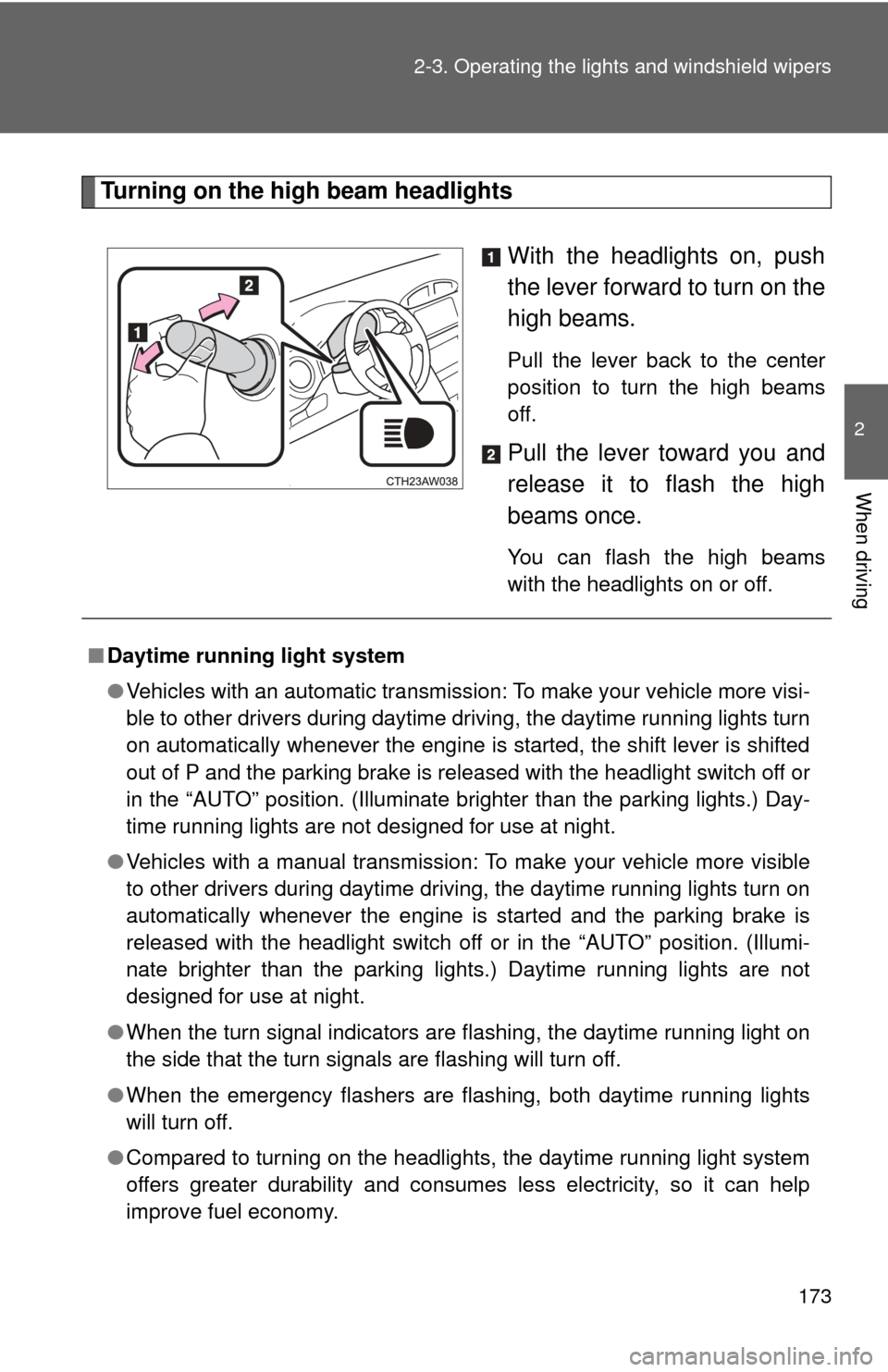
Turning on the high beam headlights
With the headlights on, push
the lever forward to turn on the
high beams.
Pull the lever back to the center
position to turn the high beams
off.
Pull the lever toward you and
release it to flash the high
beams once.
You can flash the high beams
with the headlights on or off.
■Daytime running light system
●Vehicles with an automatic transmission: To make your vehicle more visi-
ble to other drivers during daytime driving, the daytime running lights turn
on automatically whenever the engine is started, the shift lever is shifted
out of P and the parking brake is released with the headlight switch off or
in the “AUTO” position. (Illuminate brighter than the parking lights.) Day-
time running lights are not designed for use at night.
● Vehicles with a manual transmission: To make your vehicle more visible
to other drivers during daytime driving, the daytime running lights turn on
automatically whenever the engine is started and the parking brake is
released with the headlight switch off or in the “AUTO” position. (Illumi-
nate brighter than the parking lights.) Daytime running lights are not
designed for use at night.
● When the turn signal indicators are flashing, the daytime running light on
the side that the turn signals are flashing will turn off.
● When the emergency flashers are flashing, both daytime running lights
will turn off.
● Compared to turning on the headlights, the daytime running light system
offers greater durability and consumes less electricity, so it can help
improve fuel economy.
Page 176 of 428
176
2-3. Operating the lights and windshield wipers
Windshield wipers and washer
When intermittent windshield wiper operation is selected, the wiper
interval can be adjusted.
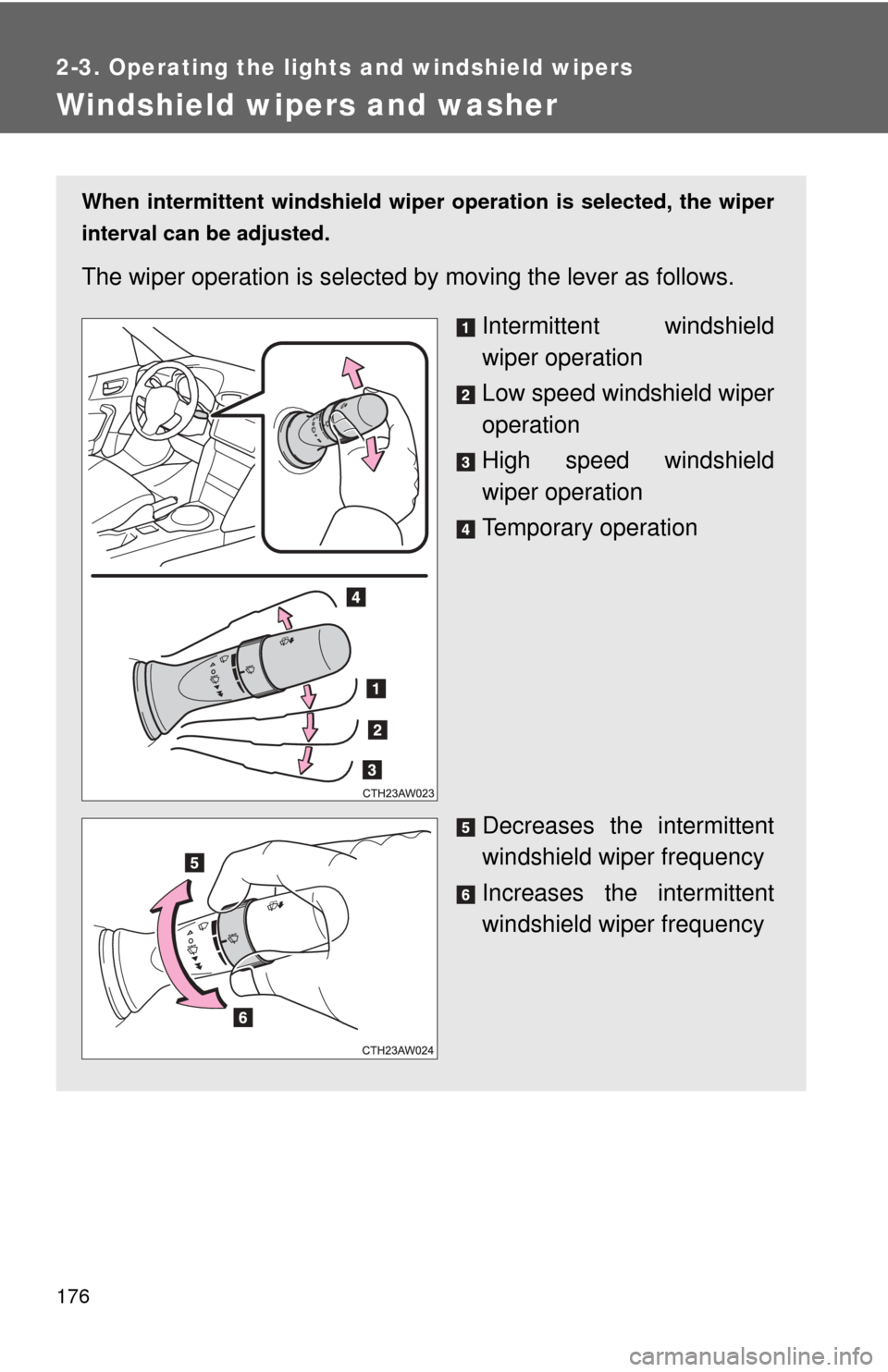
The wiper operation is selected by moving the lever as follows.
Intermittent windshield
wiper operation
Low speed windshield wiper
operation
High speed windshield
wiper operation
Temporary operation
Decreases the intermittent
windshield wiper frequency
Increases the intermittent
windshield wiper frequency
Page 184 of 428
184
2-4. Using other driving systems
Driving assist systems
To help enhance driving safety and performance, the following sys-
tems operate automatically in res ponse to various driving situations.
Be aware, however, that these systems are supplementary and
should not be relied upon too h eavily when operating the vehicle.
■ABS (Anti-lock Brake System)
Helps to prevent wheel lock when the brakes are applied suddenly, or if
the brakes are applied while driving on a slippery road surface
■Brake assist
Generates an increased level of braking force after the brake pedal is
depressed when the system detects a panic stop situation
■VSC (Vehicle Stability Control)
Helps the driver to control skidding when swerving suddenly or turning
on slippery road surfaces
■TRAC (Traction Control)
Helps to maintain drive power and prevent the drive wheels from spin-
ning when starting the vehicle or accelerating on slippery roads.
The TRAC system is also equipped with the brake LSD function.
■Hill-start assist control
→
P. 191
■EPS (Electric Power Steering)
Employs an electric motor to reduce the amount of effort needed to turn
the steering wheel
Page 186 of 428
186 2-4. Using other driving systems
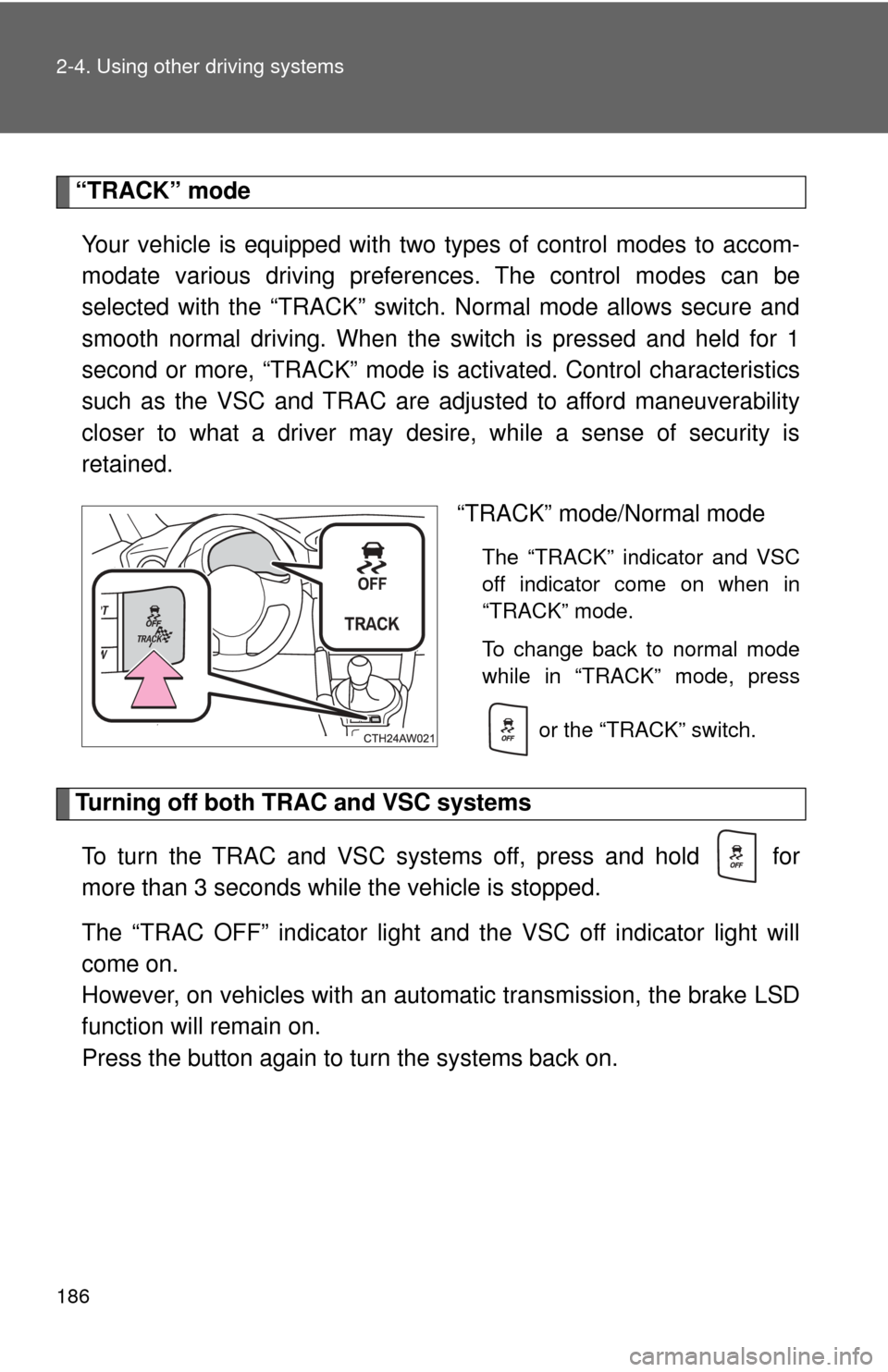
“TRACK” modeYour vehicle is equipped with two types of control modes to accom-
modate various driving prefer ences. The control modes can be
selected with the “TRACK” switch. Normal mode allows secure and
smooth normal driving. When t he switch is pressed and held for 1
second or more, “TRACK” mode is activated. Control characteristics
such as the VSC and TRAC are adjusted to afford maneuverability
closer to what a driver may desire, while a sense of security is
retained.
“TRACK” mode/Normal mode
The “TRACK” indicator and VSC
off indicator come on when in
“TRACK” mode.
To change back to normal mode
while in “TRACK” mode, press
or the “TRACK” switch.
Turning off both TRAC and VSC systemsTo turn the TRAC and VSC systems off, press and hold for
more than 3 seconds while the vehicle is stopped.
The “TRAC OFF” indicator light and the VSC off indicator light will
come on.
However, on vehicles with an aut omatic transmission, the brake LSD
function will remain on.
Press the button again to tu rn the systems back on.
Page 187 of 428
187
2-4. Using other
driving systems
2
When driving
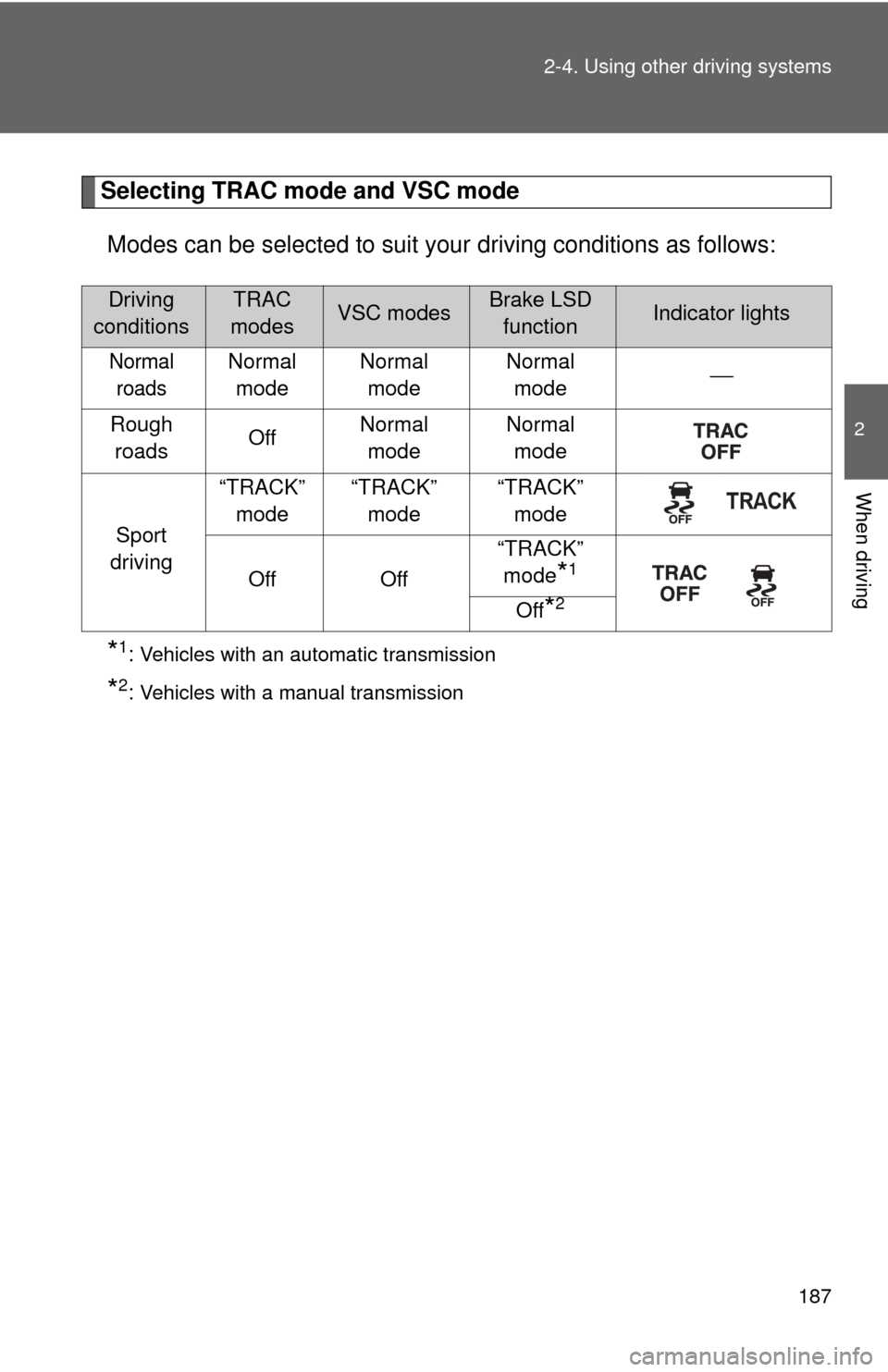
Selecting TRAC mode and VSC mode
Modes can be selected to suit your driving conditions as follows:
*1: Vehicles with an automatic transmission
*2: Vehicles with a manual transmission
Driving
conditionsTRAC
modesVSC modesBrake LSD functionIndicator lights
Normal roadsNormal mode Normal
mode Normal
mode ⎯
Rough roads OffNormal
mode Normal
mode
Sport
driving “TRACK”
mode “TRACK”
mode “TRACK”
mode
Off Off “TRACK”
mode
*1
Off
*2
Page 202 of 428

202 2-5. Driving information
Tire chainsTire chains cannot be used on your vehicle because of the lack of
clearance between the tires and vehicle body.
When tire chains cannot be used, use of another type of traction
device (such as spring chains) may be acceptable if use on your vehi-
cle is recommended by the device manufacturer, taking into account
tire size and road conditions.
Follow the device manufacturer's instructions, especially regarding
maximum vehicle speed.
To help avoid damage to your vehicle, drive slowly, readjust or
remove the device if it is contacti ng your vehicle, and do not spin your
wheels. Damage caused to your vehi cle by use of a traction device is
not covered under warranty.
Make certain that any traction de vice you use is an SAE class “S”
device, and use it on the rear wheels only.
Always use the utmost care when driving with a traction device. Over-
confidence because you are using a tr action device could easily lead
to a serious accident.
Selecting tire chains
We recommend that you consult your Toyota dealer for information
about the chains that you can use.
Page 208 of 428
208
3-1. Using the air conditioning system and defogger
Manual air conditioning system
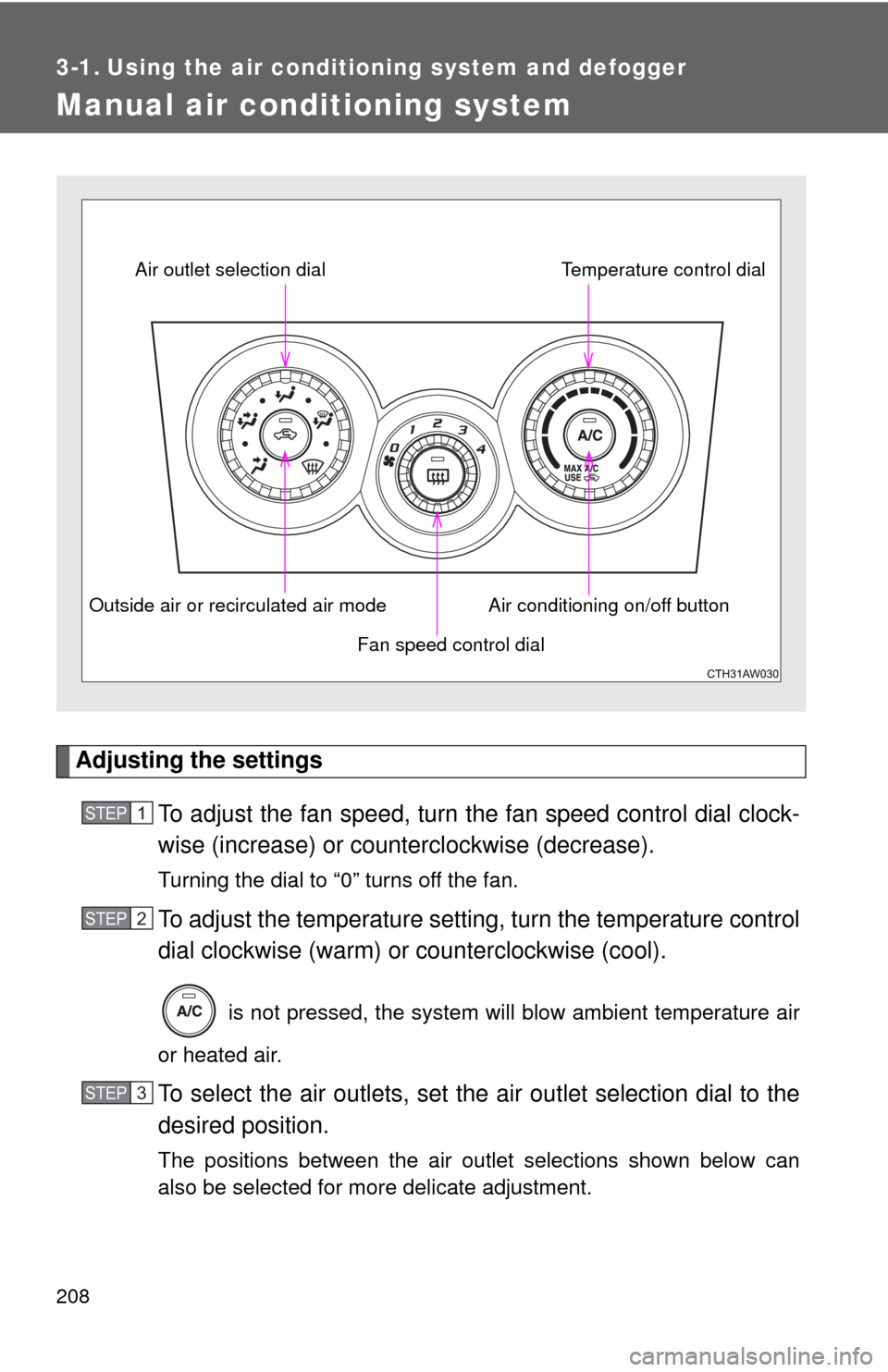
Adjusting the settingsTo adjust the fan speed, turn the fan speed control dial clock-
wise (increase) or count erclockwise (decrease).
Turning the dial to “0” turns off the fan.
To adjust the temperature setting, turn the temperature control
dial clockwise (warm) or counterclockwise (cool).
is not pressed, the system will blow ambient temperature air
or heated air.
To select the air outlets, set the air outlet selection dial to the
desired position.
The positions between the air outlet selections shown below can
also be selected for more delicate adjustment.
Fan speed control dial
Air outlet selection dial
Air conditioning on/off buttonTemperature control dial
Outside air or recirculated air mode
STEP 1
STEP 2
STEP 3
Page 209 of 428
209
3-1. Using the air conditioning system
and defogger
3
Interior features
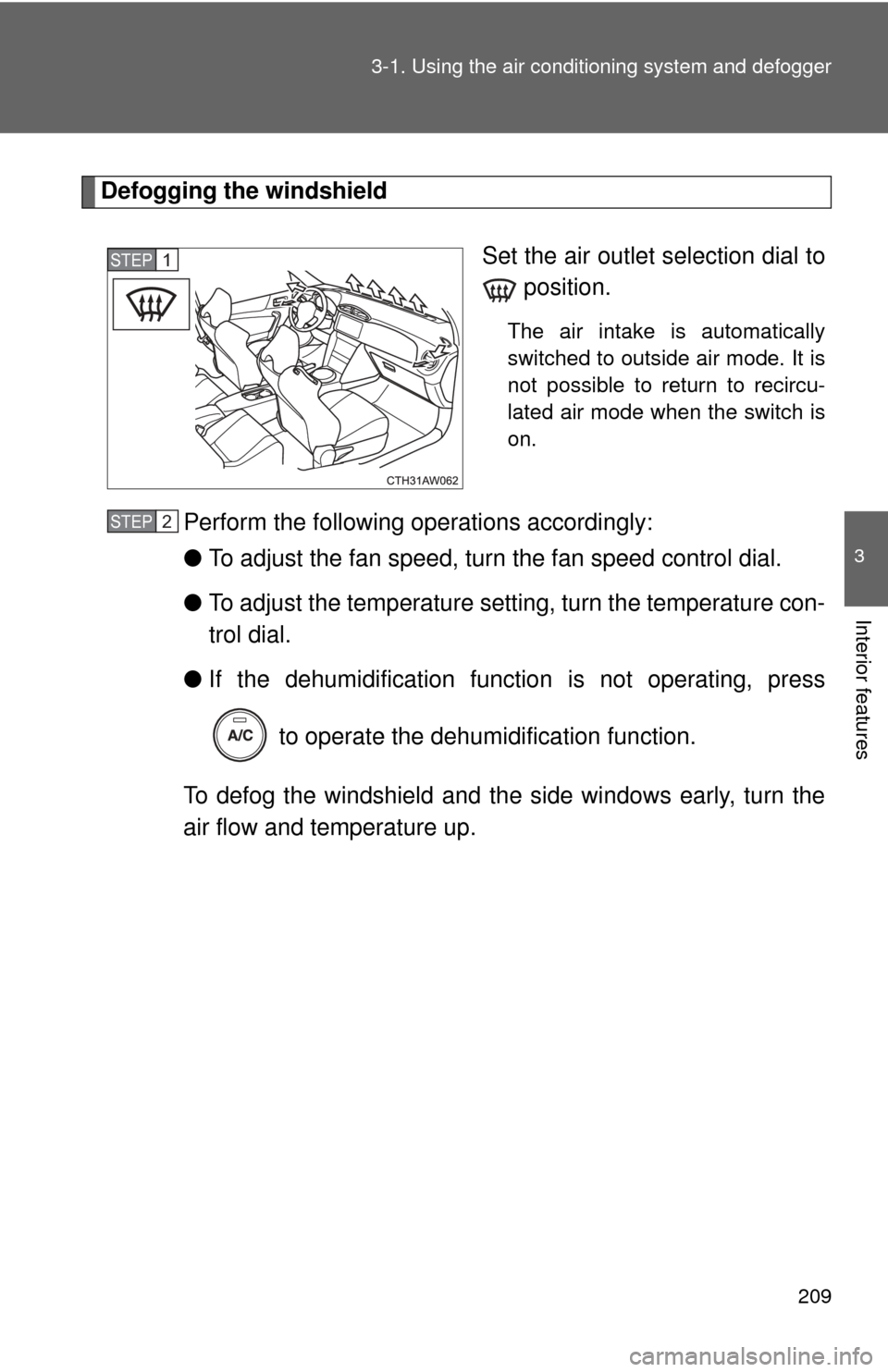
Defogging the windshield
Set the air outlet selection dial to position.
The air intake is automatically
switched to outside air mode. It is
not possible to return to recircu-
lated air mode when the switch is
on.
Perform the following operations accordingly:
●To adjust the fan speed, turn the fan speed control dial.
● To adjust the temperature setting, turn the temperature con-
trol dial.
● If the dehumidificat ion function is not operating, press
to operate the dehumidification function.
To defog the windshield and the side windows early, turn the
air flow and temperature up.
STEP 1
STEP 2