light TOYOTA GT86 2017 1.G Service Manual
[x] Cancel search | Manufacturer: TOYOTA, Model Year: 2017, Model line: GT86, Model: TOYOTA GT86 2017 1.GPages: 428, PDF Size: 7.83 MB
Page 148 of 428
148 2-1. Driving procedures
Manual mode drivingTo enter manual mode, shift the shift lever to the M position.
While the upshift/downshift indicator light is illuminated, gears can be
selected by operating the shift leve r or paddle shift switches, allowing
you to drive in the gear of your choosing.
Even if upshifting operations are performed, if vehicle speed is too low for
the requested gear, the gear will not change.
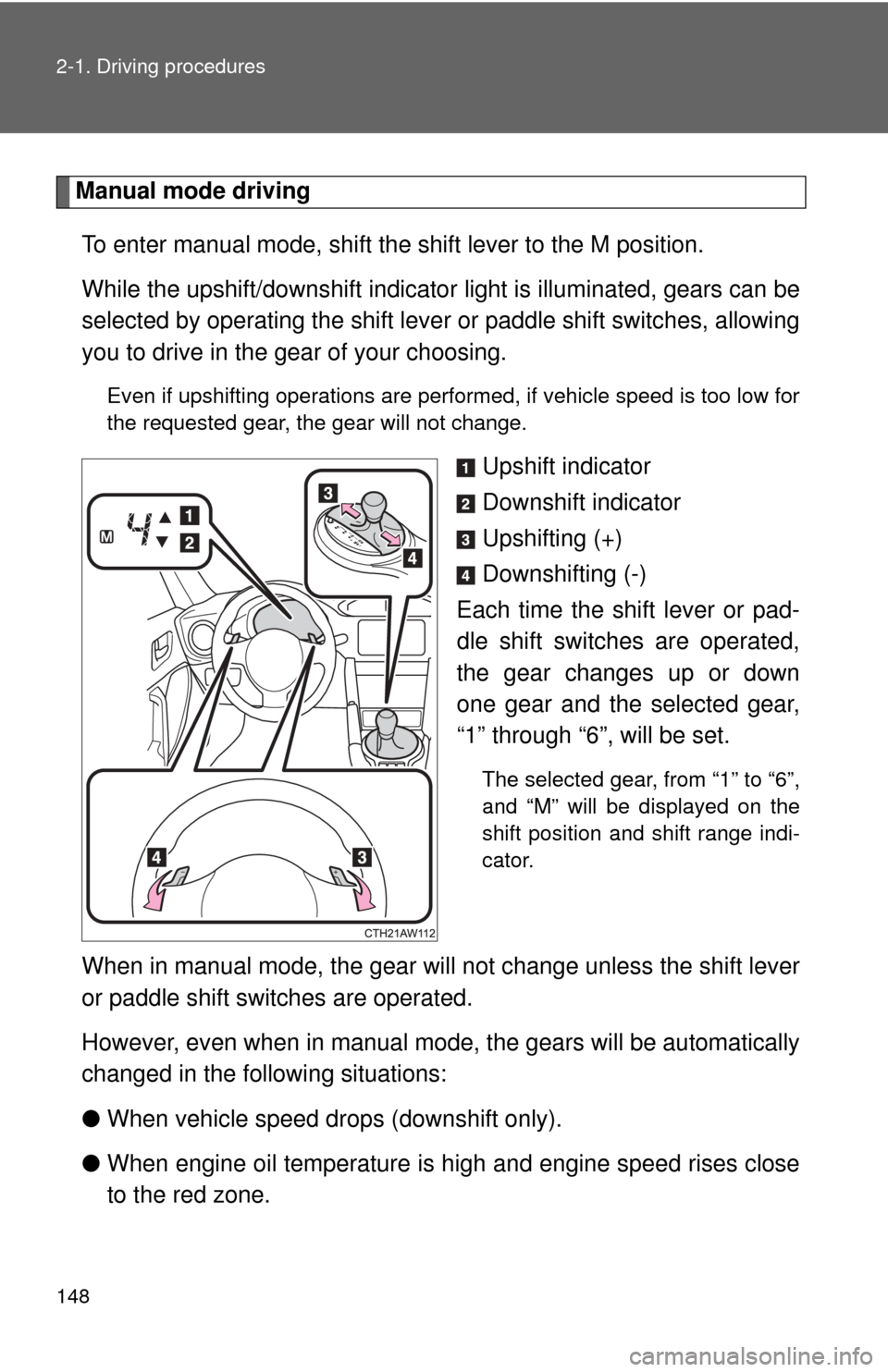
Upshift indicator
Downshift indicator
Upshifting (+)
Downshifting (-)
Each time the shift lever or pad-
dle shift switches are operated,
the gear changes up or down
one gear and the selected gear,
“1” through “6”, will be set.
The selected gear, from “1” to “6”,
and “M” will be displayed on the
shift position and shift range indi-
cator.
When in manual mode, the gear w ill not change unless the shift lever
or paddle shift switches are operated.
However, even when in manual mode, t he gears will be automatically
changed in the following situations:
● When vehicle speed drops (downshift only).
● When engine oil temperature is high and engine speed rises close
to the red zone.
Page 155 of 428
155
2-1. Driving procedures
2
When driving
Turn signal lever
■Turn signals can be operated when
The engine switch is in the “ON” position.
■ If the indicators flash faster than usual
Check that a light bulb in the turn signal lights has not burned out.
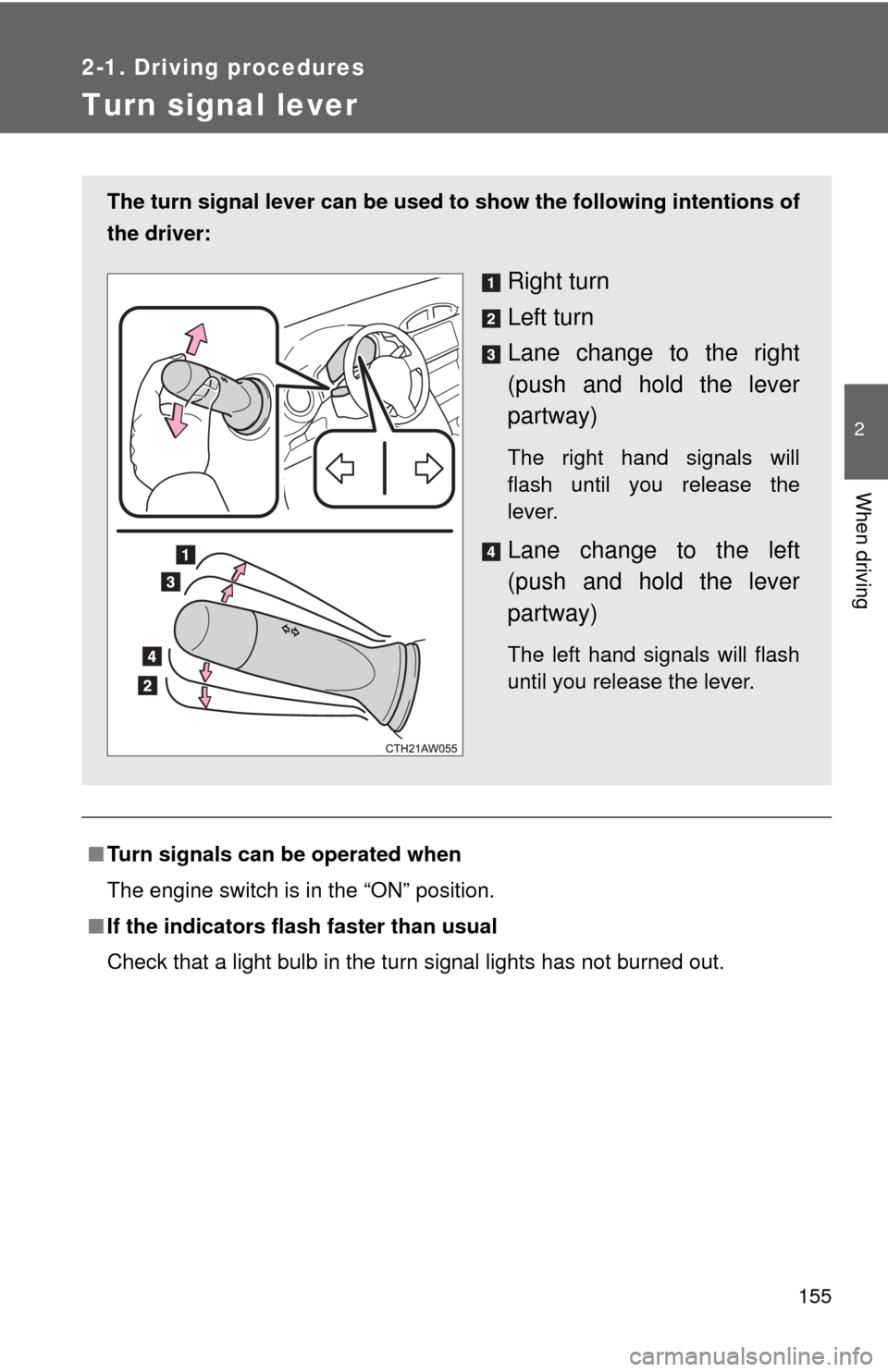
The turn signal lever can be used to show the following intentions of
the driver:
Right turn
Left turn
Lane change to the right
(push and hold the lever
partway)
The right hand signals will
flash until you release the
lever.
Lane change to the left
(push and hold the lever
partway)
The left hand signals will flash
until you release the lever.
Page 159 of 428
159
2-2. Instrument cluster
2
When driving
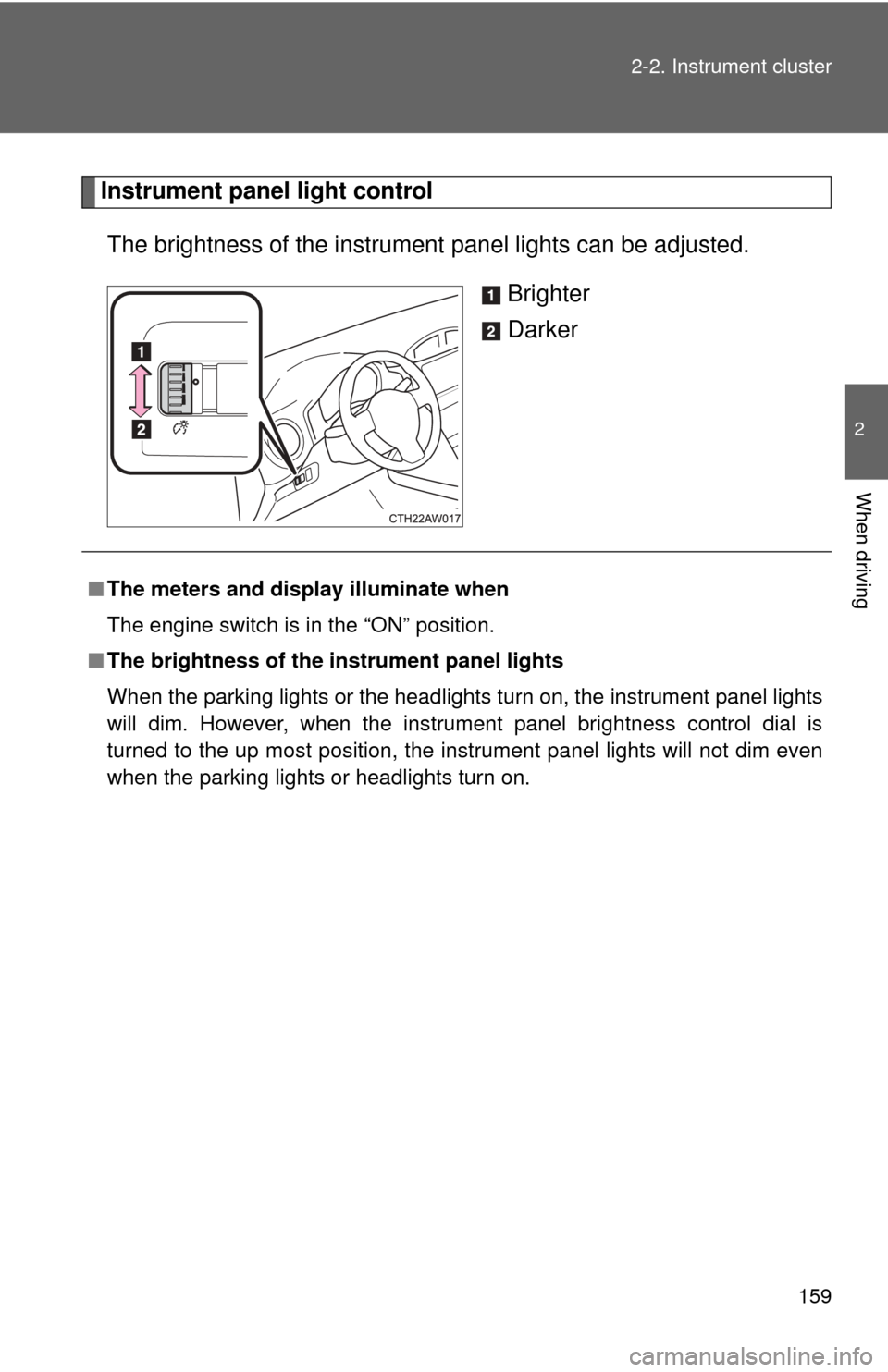
Instrument panel light control
The brightness of the instrument panel lights can be adjusted.
Brighter
Darker
■The meters and display illuminate when
The engine switch is in the “ON” position.
■ The brightness of the instrument panel lights
When the parking lights or the headlights turn on, the instrument panel lights
will dim. However, when the instrument panel brightness control dial is
turned to the up most position, the instrument panel lights will not dim even
when the parking lights or headlights turn on.
Page 161 of 428
161
2-2. Instrument cluster
2
When driving
Indicators and warning lights
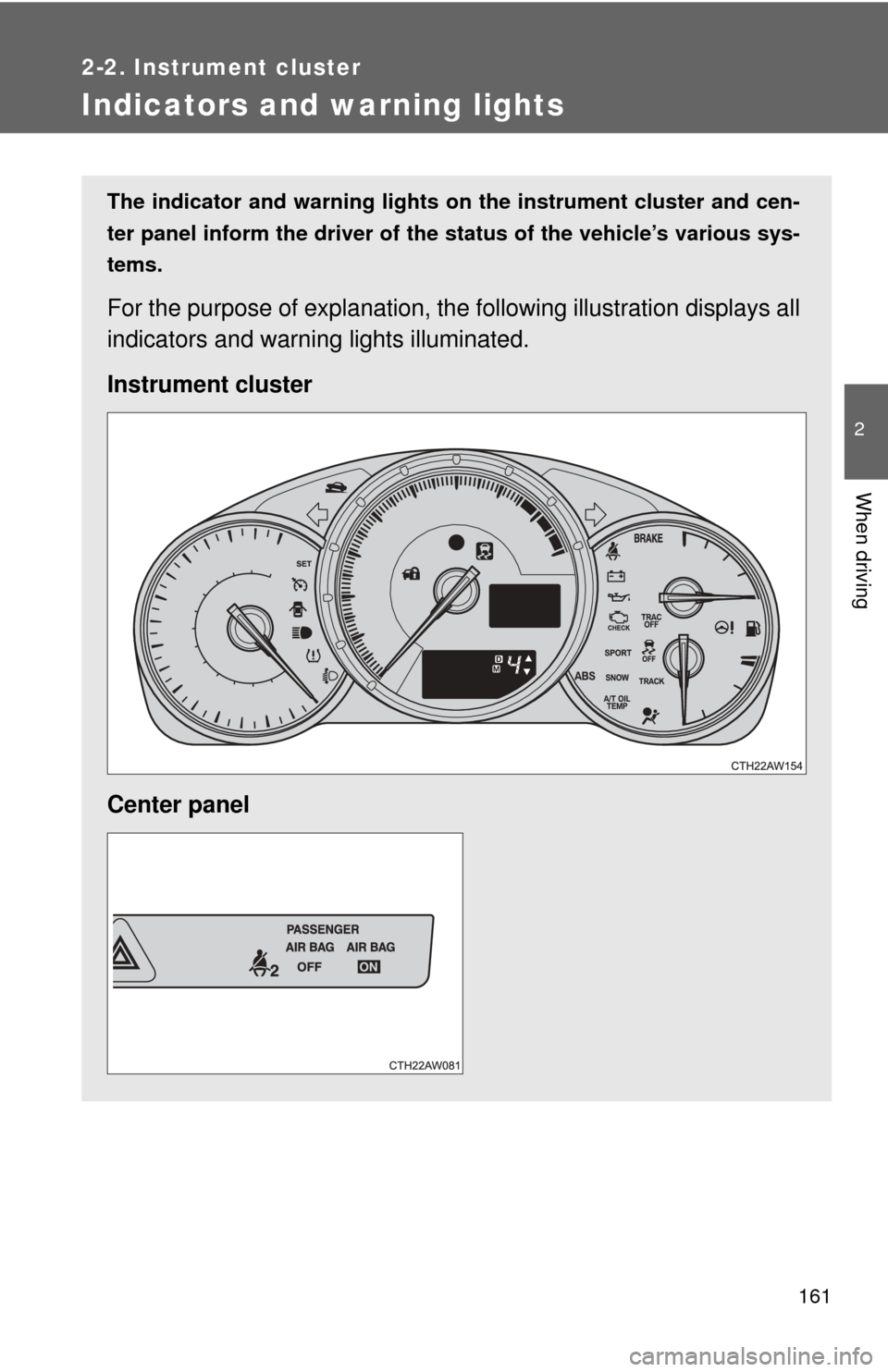
The indicator and warning lights on the instrument cluster and cen-
ter panel inform the driver of the status of the vehicle’s various sys-
tems.
For the purpose of explanation, the following illustration displays all
indicators and warning lights illuminated.
Instrument cluster
Center panel
Page 162 of 428
162 2-2. Instrument cluster
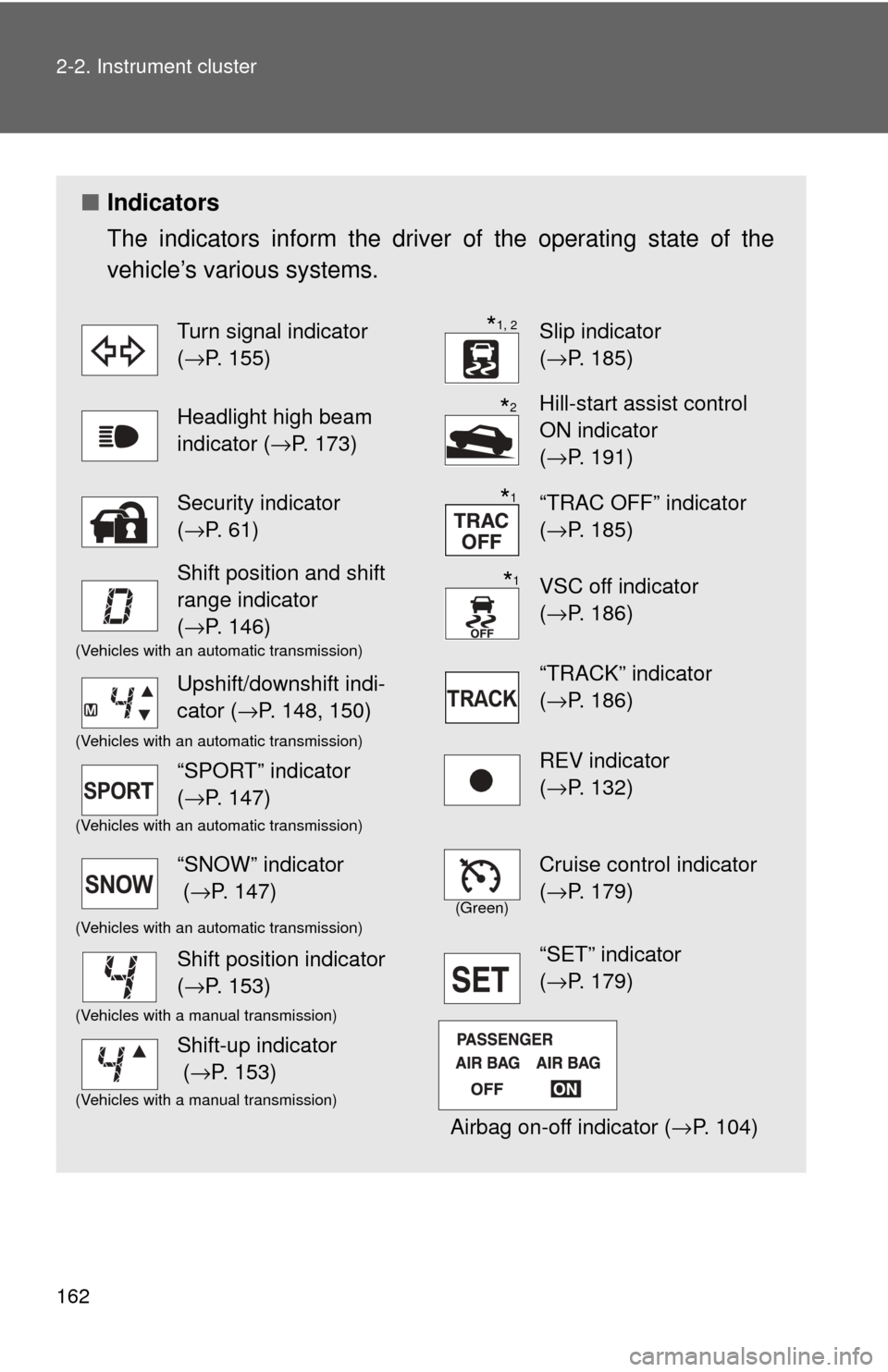
■Indicators
The indicators inform the driver of the operating state of the
vehicle’s various systems.
Turn signal indicator
( →P. 155)Slip indicator
(→P. 185)
Headlight high beam
indicator ( →P. 173)Hill-start assist control
ON indicator
(→P. 191)
Security indicator
(→P. 61)“TRAC OFF” indicator
(→P. 185)
Shift position and shift
range indicator
(→P. 146)VSC off indicator
(→P. 186)
(Vehicles with an automatic transmission)
“TRACK” indicator
(→P. 186)Upshift/downshift indi-
cator ( →P. 148, 150)
(Vehicles with an automatic transmission)REV indicator
(→P. 132)“SPORT” indicator
(→P. 147)
(Vehicles with an automatic transmission)
“SNOW” indicator
( →P. 147)
(Green)
Cruise control indicator
(→P. 179)
(Vehicles with an automatic transmission)
Shift position indicator
(→P. 153)“SET” indicator
(→P. 179)
(Vehicles with a manual transmission)
Airbag on-off indicator ( →P. 104)
Shift-up indicator
(→P. 153)
(Vehicles with a manual transmission)
*1, 2
*2
*1
*1
Page 163 of 428
163
2-2. Instrument cluster
2
When driving
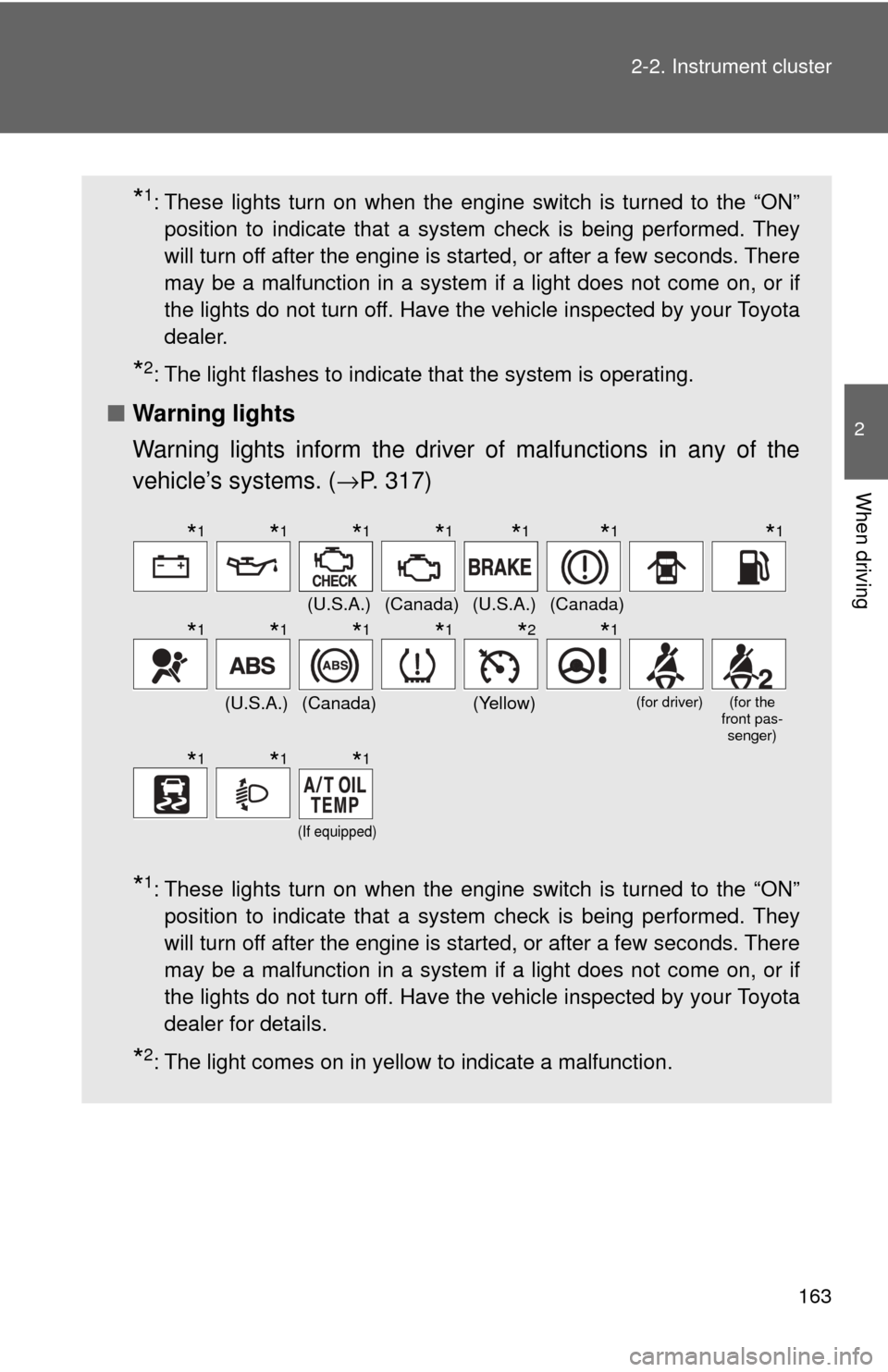
*1: These lights turn on when the engine switch is turned to the “ON”
position to indicate that a system check is being performed. They
will turn off after the engine is started, or after a few seconds. There
may be a malfunction in a system if a light does not come on, or if
the lights do not turn off. Have the vehicle inspected by your Toyota
dealer.
*2: The light flashes to indicate that the system is operating.
■ Warning lights
Warning lights inform the driver of malfunctions in any of the
vehicle’s systems. ( →P. 317)
*1: These lights turn on when the engine switch is turned to the “ON”
position to indicate that a system check is being performed. They
will turn off after the engine is started, or after a few seconds. There
may be a malfunction in a system if a light does not come on, or if
the lights do not turn off. Have the vehicle inspected by your Toyota
dealer for details.
*2: The light comes on in yellow to indicate a malfunction.
(U.S.A.)(Canada)(U.S.A.)(Canada)
(U.S.A.)(Canada)(Yellow)(for driver)(for the
front pas- senger)
(If equipped)
*1*1*1*1*1*1*1
*1*1*1*1*2*1
*1*1*1
Page 164 of 428

164 2-2. Instrument cluster
WARNING
■If a safety system warning light does not come on
Should a safety system light such as the ABS and SRS warning light not
come on when you start the engine, this could mean that these systems are
not available to help protect you in an accident, which could result in death
or serious injury. Have the vehicle inspected by your Toyota dealer immedi-
ately if this occurs.
Page 169 of 428
169
2-2. Instrument cluster
2
When driving
Setting the shift position indi
cator and shift-up indicator
(vehicles with a manual transmission)
Displaying of the shift position indicator and shift-up indicator can be
turned on/off. Press the “ODO/TRIP” switch repeatedly until the setting
screen is displayed. ( →P. 167)
Each time the switch is pressed and held, the display changes
between on/off.
“G-on”: Display on
“G-oFF”: Display off
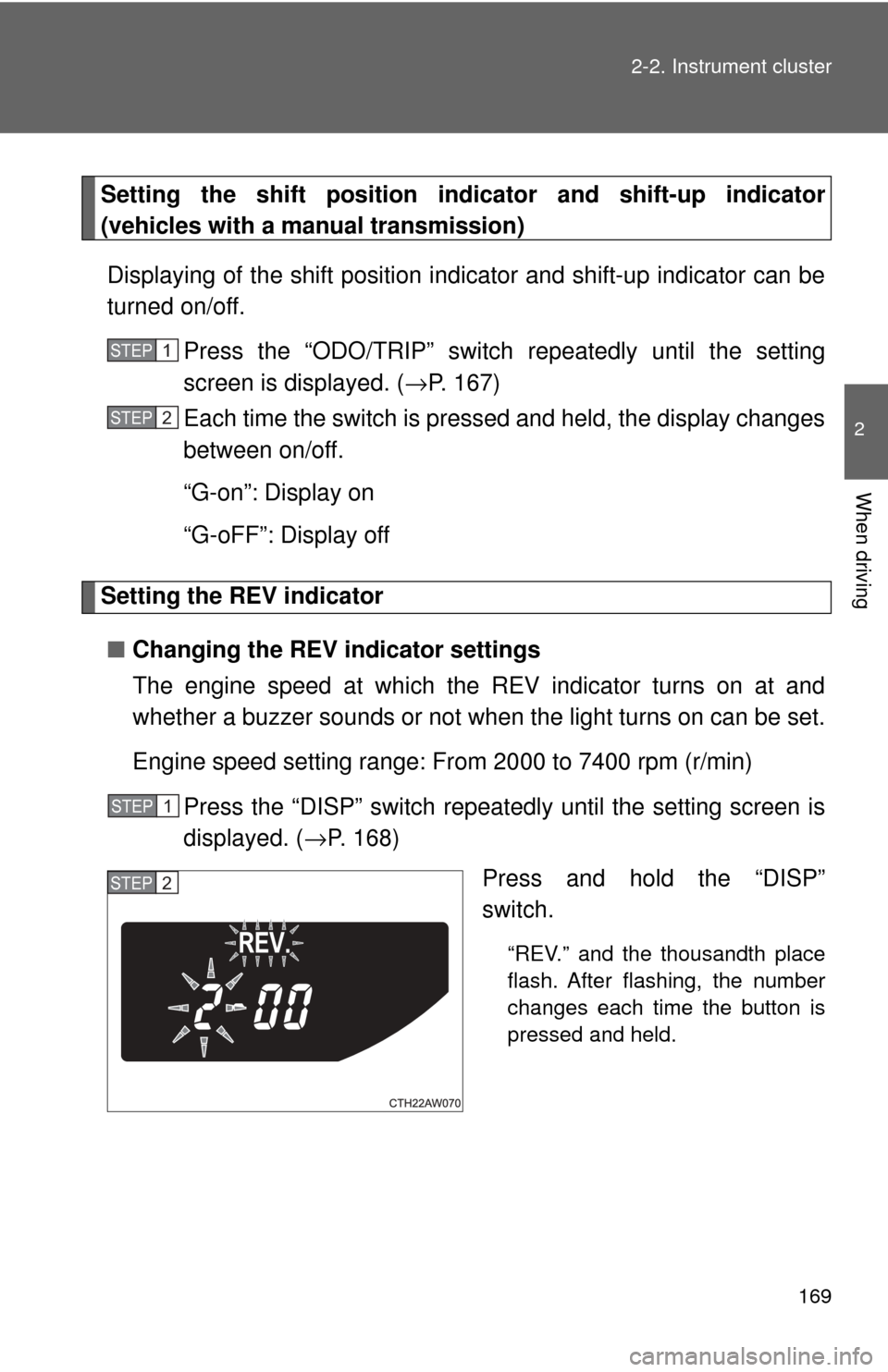
Setting the REV indicator
■ Changing the REV indicator settings
The engine speed at which the REV indicator turns on at and
whether a buzzer sounds or not when the light turns on can be set.
Engine speed setting range: From 2000 to 7400 rpm (r/min)
Press the “DISP” switch repeatedly until the setting screen is
displayed. ( →P. 168)
Press and hold the “DISP”
switch.
“REV.” and the thousandth place
flash. After flashing, the number
changes each time the button is
pressed and held.
STEP 1
STEP 2
STEP 1
STEP 2
Page 172 of 428
172
2-3. Operating the lights and windshield wipers
Headlight switch
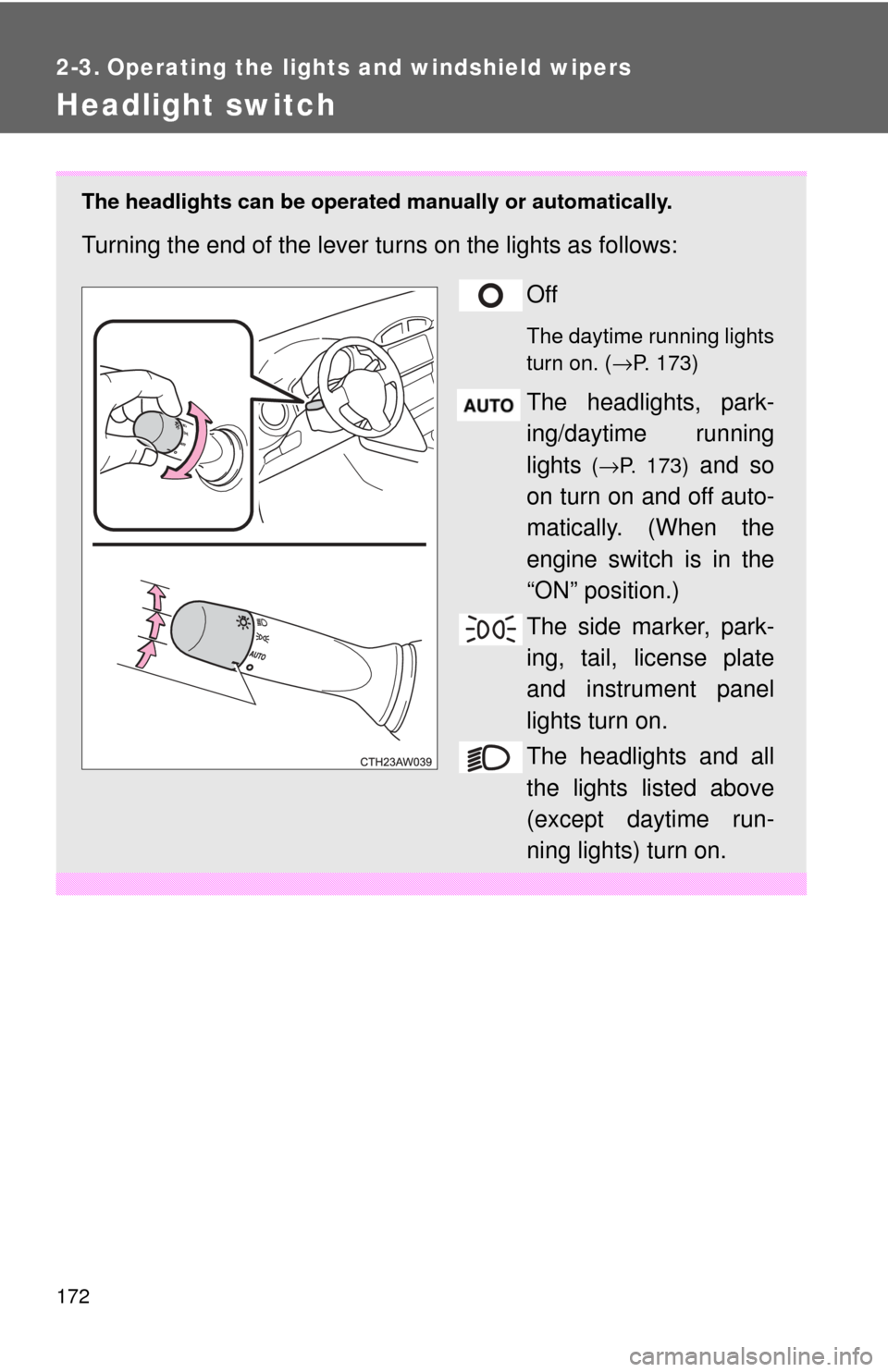
The headlights can be operated manually or automatically.
Turning the end of the lever turns on the lights as follows:
Off
The daytime running lights
turn on. (→P. 173)
The headlights, park-
ing/daytime running
lights
(→P. 173) and so
on turn on and off auto-
matically. (When the
engine switch is in the
“ON” position.)
The side marker, park-
ing, tail, license plate
and instrument panel
lights turn on.
The headlights and all
the lights listed above
(except daytime run-
ning lights) turn on.
Page 173 of 428
173
2-3. Operating the lights and windshield wipers
2
When driving
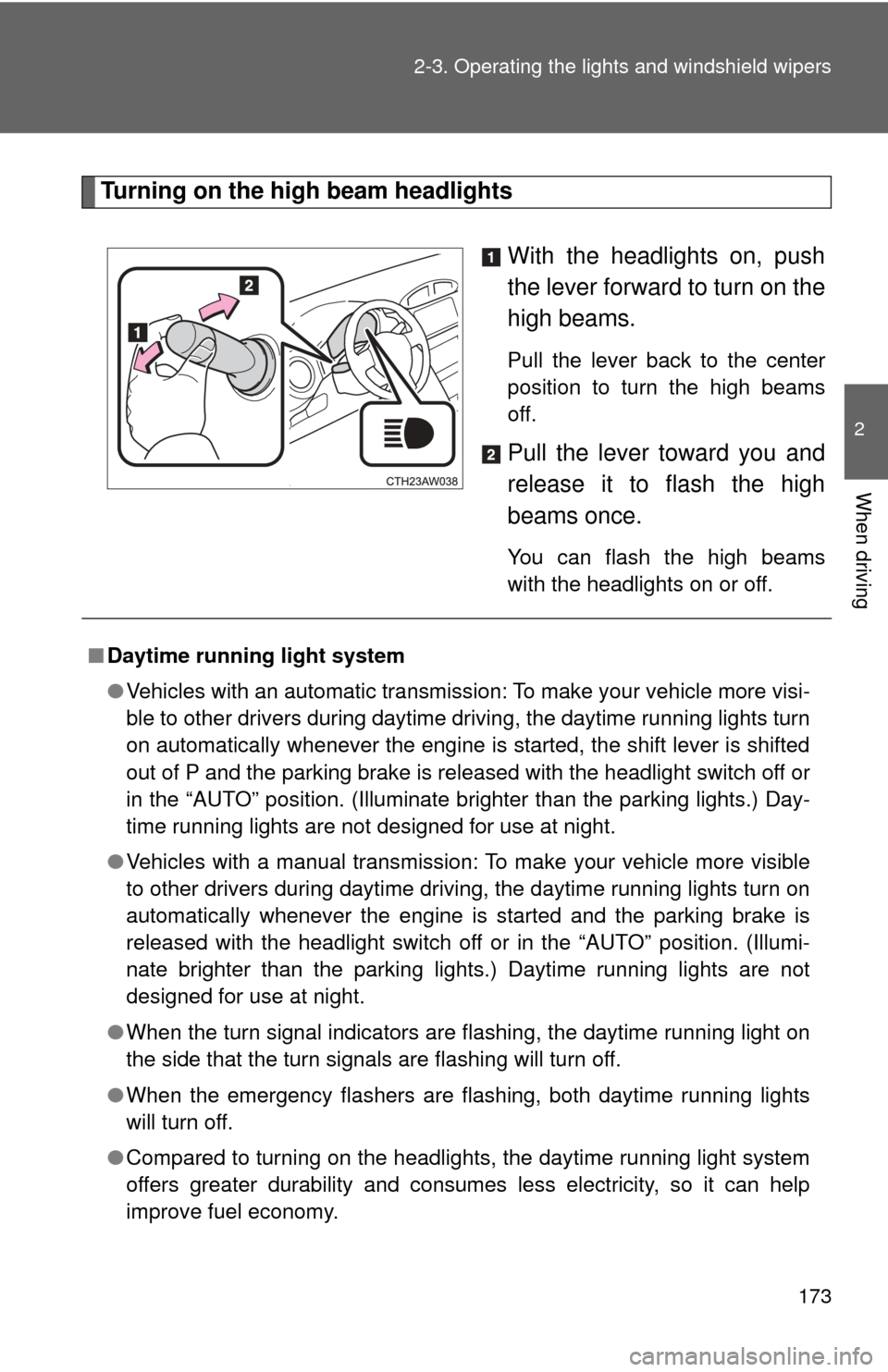
Turning on the high beam headlights
With the headlights on, push
the lever forward to turn on the
high beams.
Pull the lever back to the center
position to turn the high beams
off.
Pull the lever toward you and
release it to flash the high
beams once.
You can flash the high beams
with the headlights on or off.
■Daytime running light system
●Vehicles with an automatic transmission: To make your vehicle more visi-
ble to other drivers during daytime driving, the daytime running lights turn
on automatically whenever the engine is started, the shift lever is shifted
out of P and the parking brake is released with the headlight switch off or
in the “AUTO” position. (Illuminate brighter than the parking lights.) Day-
time running lights are not designed for use at night.
● Vehicles with a manual transmission: To make your vehicle more visible
to other drivers during daytime driving, the daytime running lights turn on
automatically whenever the engine is started and the parking brake is
released with the headlight switch off or in the “AUTO” position. (Illumi-
nate brighter than the parking lights.) Daytime running lights are not
designed for use at night.
● When the turn signal indicators are flashing, the daytime running light on
the side that the turn signals are flashing will turn off.
● When the emergency flashers are flashing, both daytime running lights
will turn off.
● Compared to turning on the headlights, the daytime running light system
offers greater durability and consumes less electricity, so it can help
improve fuel economy.