clock TOYOTA GT86 2017 1.G Owners Manual
[x] Cancel search | Manufacturer: TOYOTA, Model Year: 2017, Model line: GT86, Model: TOYOTA GT86 2017 1.GPages: 428, PDF Size: 7.83 MB
Page 3 of 428
1
2
3
4
5
6
7
3
2-4. Using other driving systems
Cruise control ...................... 179
Driving assist systems ........ 184
Hill-start assist control ......... 191
2-5. Driving information Cargo and luggage ............. 195
Vehicle load limits ............... 199
Winter driving tips ............... 200
Trailer towing ...................... 204
Dinghy towing ..................... 205
3-1. Using the air conditioning system
and defogger
Manual air conditioning system .............................. 208
Rear window and outside rear view mirror
defoggers .......................... 215
3-2. Using the audio system Using the AUX/USB port.................................... 217
Steering wheel audio switches ............................ 218
Using the microphone ......... 219
3-3. Using the interior lights Interior lights list .................. 220
• Interior light ....................... 221 3-4. Using the storage
features
List of storage features ....... 222
• Glove box ......................... 223
• Bottle holders ................... 224
• Cup holders/ console tray ...................... 225
3-5. Other interior features Sun visors........................... 227
Vanity mirrors ..................... 228
Clock .................................. 229
Power outlets...................... 230
Floor mat ............................ 232
4-1. Maintenance and care Cleaning and protecting the vehicle exterior ........... 236
Cleaning and protecting the vehicle interior ............ 240
4-2. Maintenance Maintenance requirements .................... 244
General maintenance ......... 246
Emission inspection and maintenance (I/M)
programs .......................... 249
3Interior features
4Maintenance and care
Page 11 of 428
11
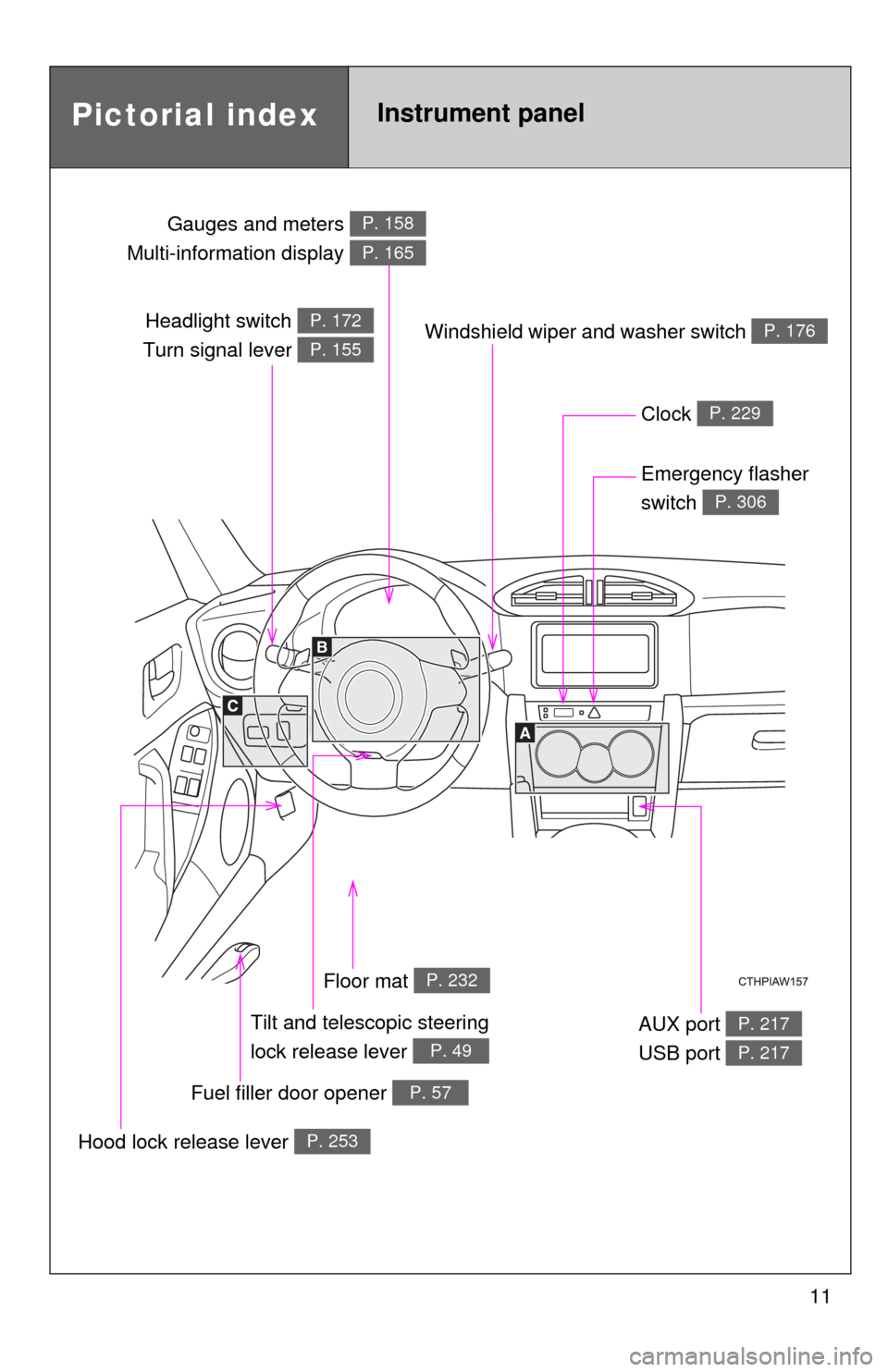
Headlight switch
Turn signal lever P. 172
P. 155
Gauges and meters
Multi-information display P. 158
P. 165
Clock P. 229
Windshield wiper and washer switch P. 176
Emergency flasher
switch
P. 306
Tilt and telescopic steering
lock release lever
P. 49
Floor mat P. 232
Hood lock release lever P. 253
Fuel filler door opener P. 57
AUX port
USB port P. 217
P. 217
Pictorial indexInstrument panel
Page 30 of 428
30
1-2. Opening, closing and locking the doors and trunk
Trunk
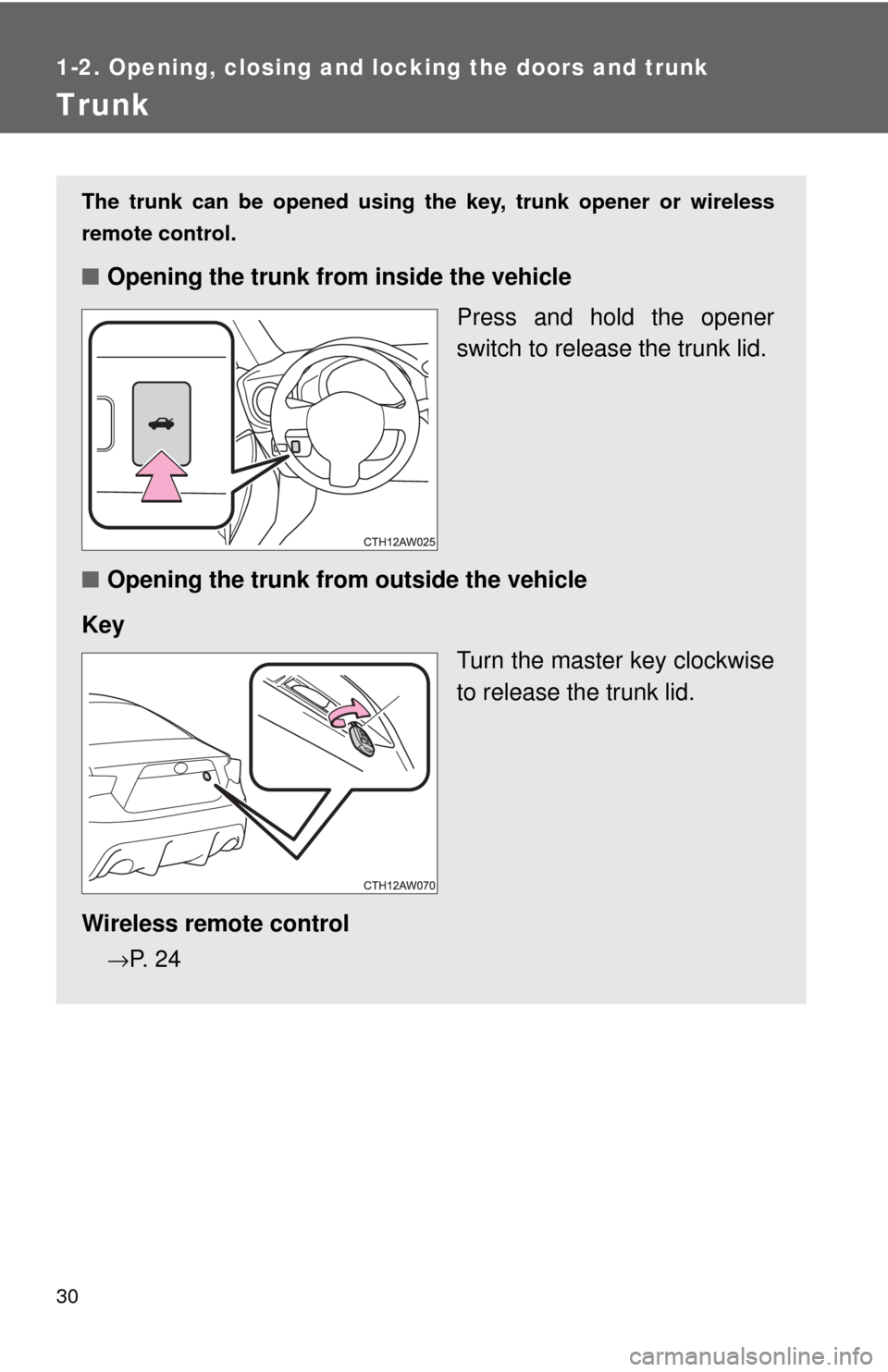
The trunk can be opened using the key, trunk opener or wireless
remote control.
■ Opening the trunk from inside the vehicle
Press and hold the opener
switch to release the trunk lid.
■ Opening the trunk from outside the vehicle
Key Turn the master key clockwise
to release the trunk lid.
Wireless remote control
→P. 2 4
Page 207 of 428
Interior features3
207
3-1. Using the air conditioning system
and defogger
Manual air conditioning system ........................... 208
Rear window and outside rear view
mirror defoggers ............ 215
3-2. Using the audio system Using the AUX/USB port................................. 217
Steering wheel audio switches ......................... 218
Using the microphone ...... 219 3-3. Using the interior lights
Interior lights list ............... 220
• Interior light ..................... 221
3-4. Using the storage features
List of storage features .......................... 222
• Glove box........................ 223
• Bottle holders .................. 224
• Cup holders/ console tray .................... 225
3-5. Other interior features Sun visors ........................ 227
Vanity mirrors ................... 228
Clock ................................ 229
Power outlets ................... 230
Floor mat .......................... 232
Page 208 of 428
208
3-1. Using the air conditioning system and defogger
Manual air conditioning system
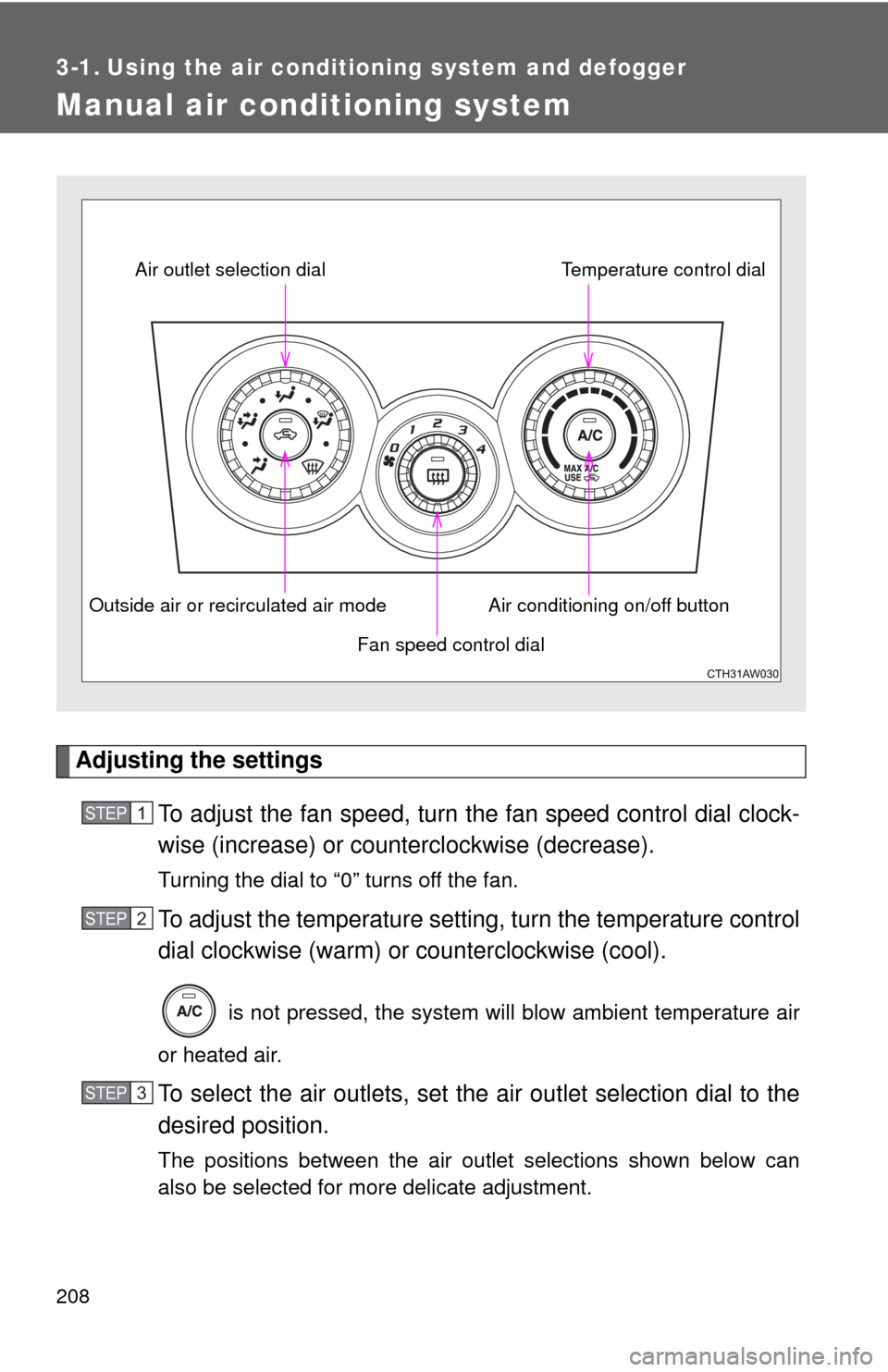
Adjusting the settingsTo adjust the fan speed, turn the fan speed control dial clock-
wise (increase) or count erclockwise (decrease).
Turning the dial to “0” turns off the fan.
To adjust the temperature setting, turn the temperature control
dial clockwise (warm) or counterclockwise (cool).
is not pressed, the system will blow ambient temperature air
or heated air.
To select the air outlets, set the air outlet selection dial to the
desired position.
The positions between the air outlet selections shown below can
also be selected for more delicate adjustment.
Fan speed control dial
Air outlet selection dial
Air conditioning on/off buttonTemperature control dial
Outside air or recirculated air mode
STEP 1
STEP 2
STEP 3
Page 229 of 428
229
3-5. Other interior features
3
Interior features
Clock
■The clock is displayed when
The engine switch is in the “ACC” or “ON” position.
■ When disconnecting and reco nnecting battery terminals
The clock data will be reset.
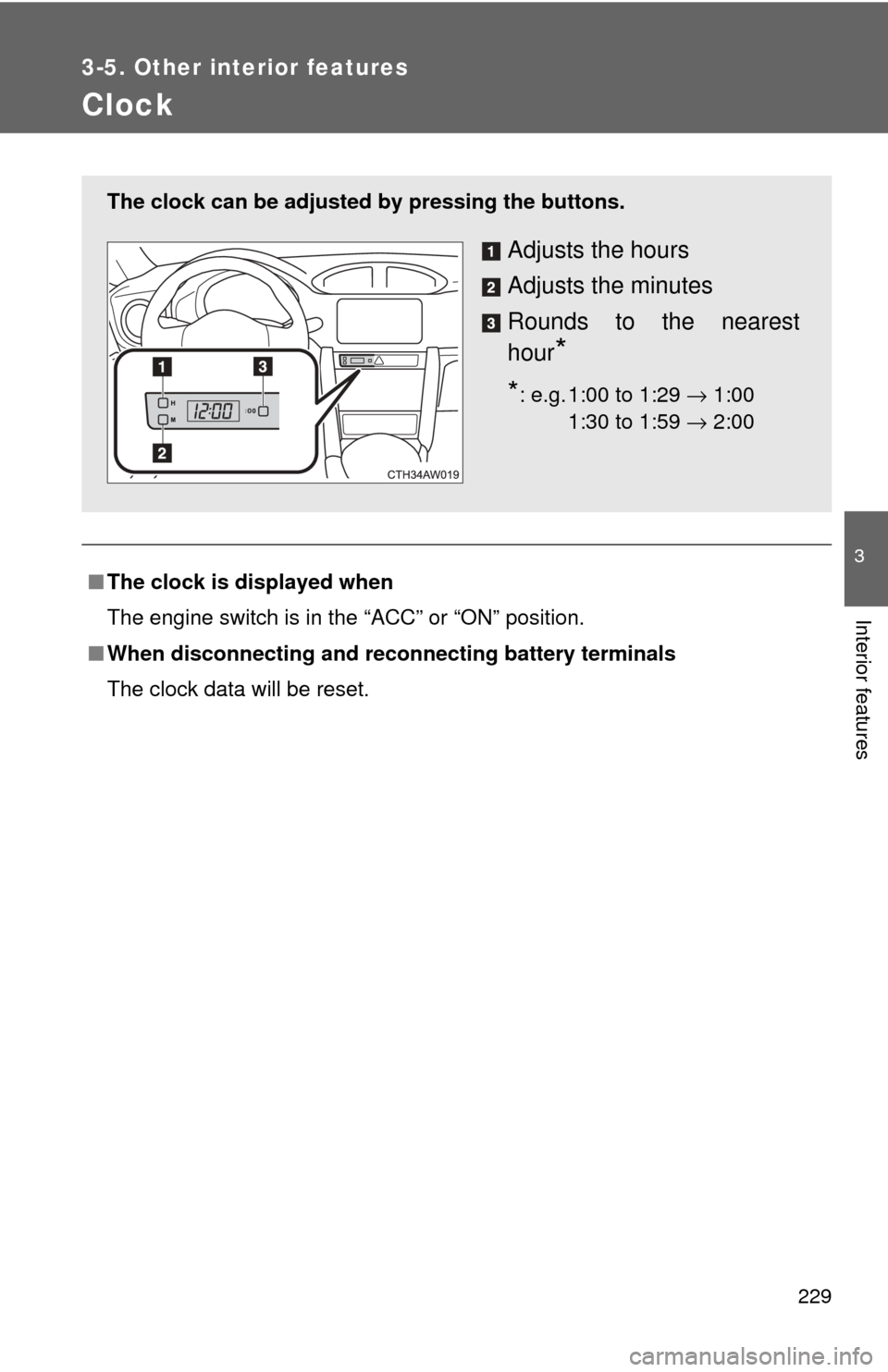
The clock can be adjusted by pressing the buttons.
Adjusts the hours
Adjusts the minutes
Rounds to the nearest
hour
*
*: e.g. 1:00 to 1:29 → 1:00
1:30 to 1:59 → 2:0000
Page 259 of 428
259
4-3. Do-it-yourself maintenance
4
Maintenance and care
■
Adding engine oil
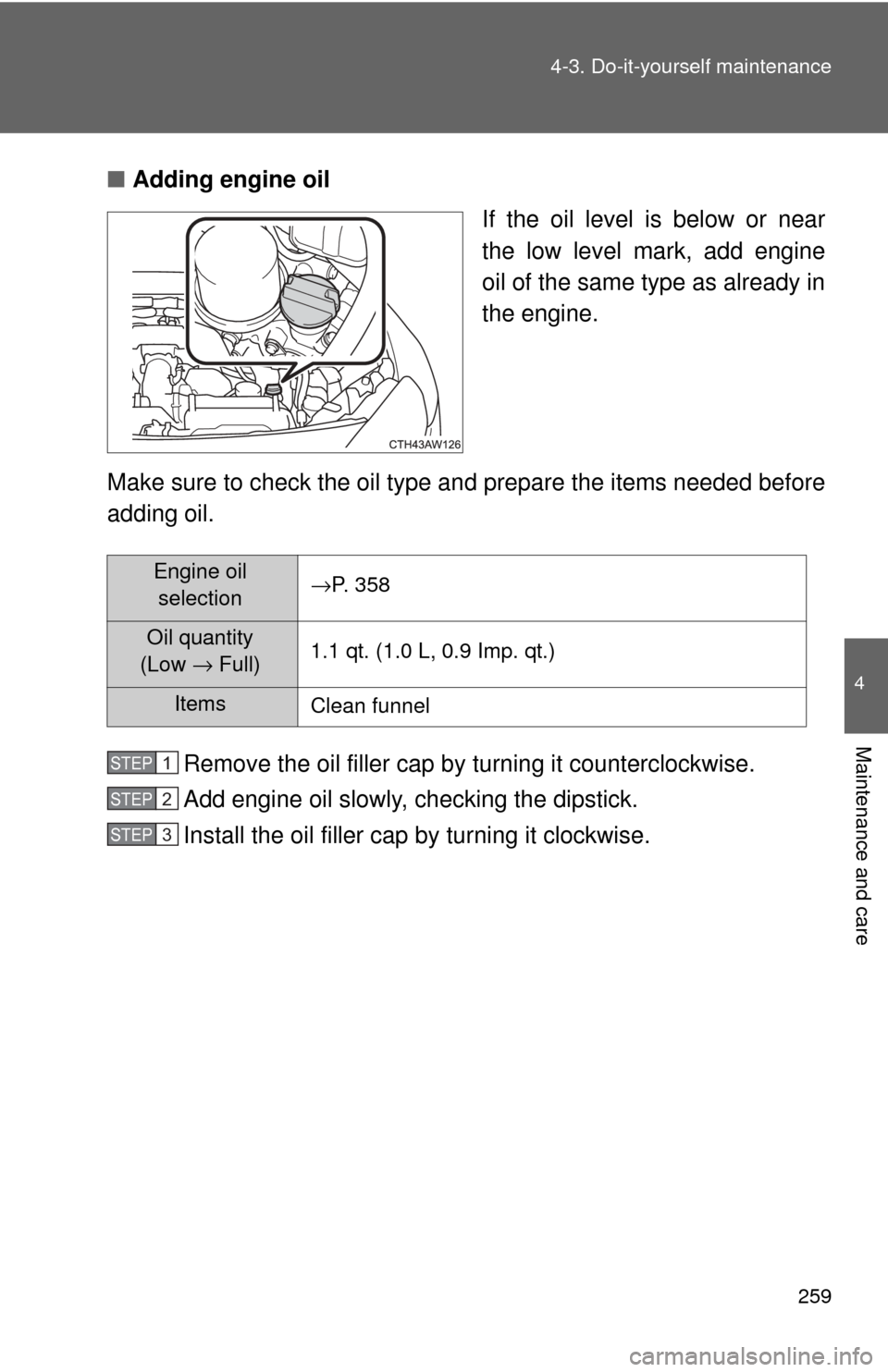
If the oil level is below or near
the low level mark, add engine
oil of the same type as already in
the engine.
Make sure to check the oil type and prepare the items needed before
adding oil.
Remove the oil filler cap by turning it counterclockwise.
Add engine oil slowly, checking the dipstick.
Install the oil filler cap by turning it clockwise.
Engine oil
selection →P. 358
Oil quantity
(Low → Full) 1.1 qt. (1.0 L, 0.9 Imp. qt.)
Items
Clean funnel
STEP 1
STEP 2
STEP 3
Page 300 of 428
300 4-3. Do-it-yourself maintenance
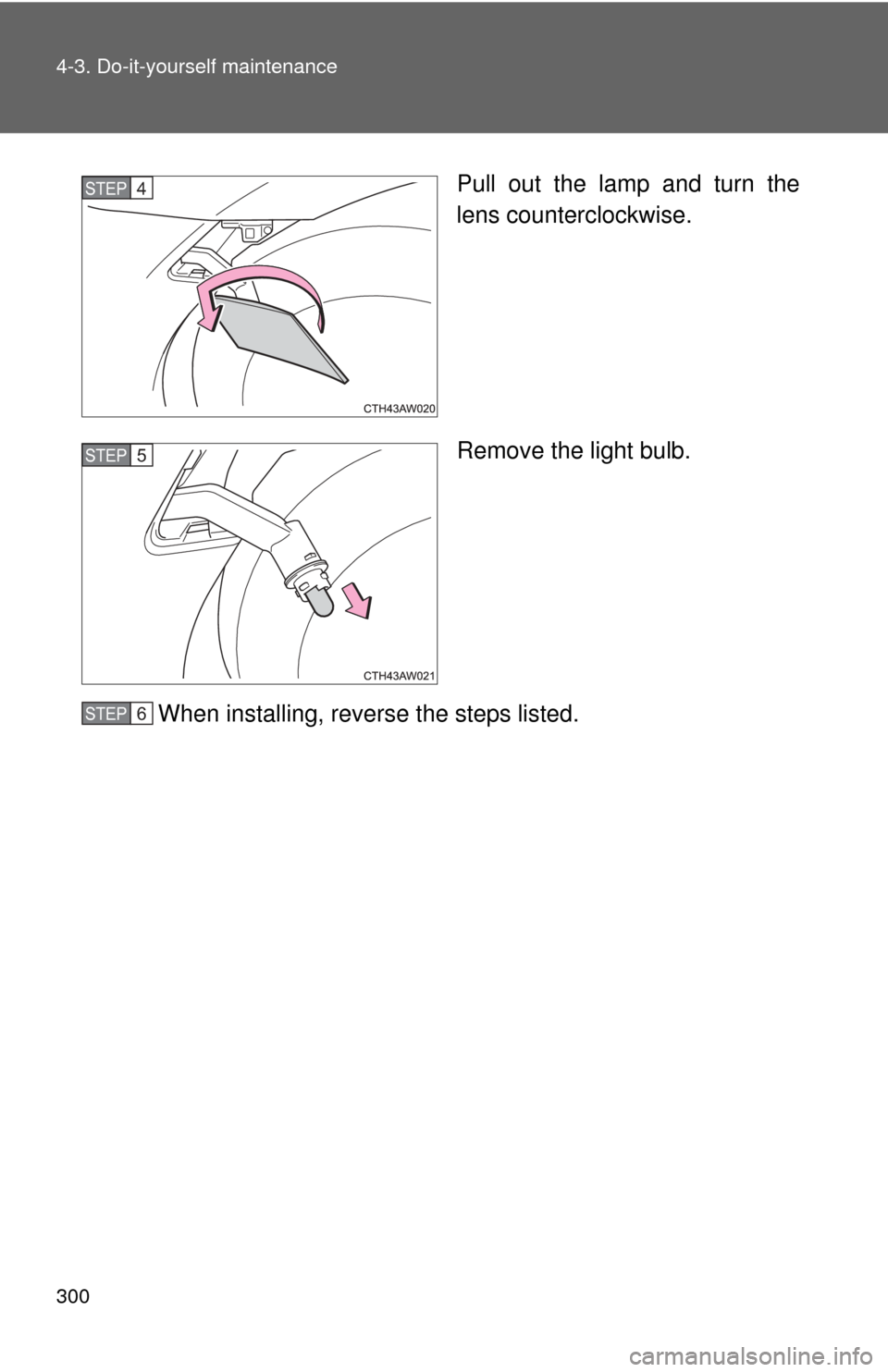
Pull out the lamp and turn the
lens counterclockwise.
Remove the light bulb.
When installing, reverse the steps listed.STEP 4
STEP 5
STEP 6
Page 301 of 428
301
4-3. Do-it-yourself maintenance
4
Maintenance and care
■
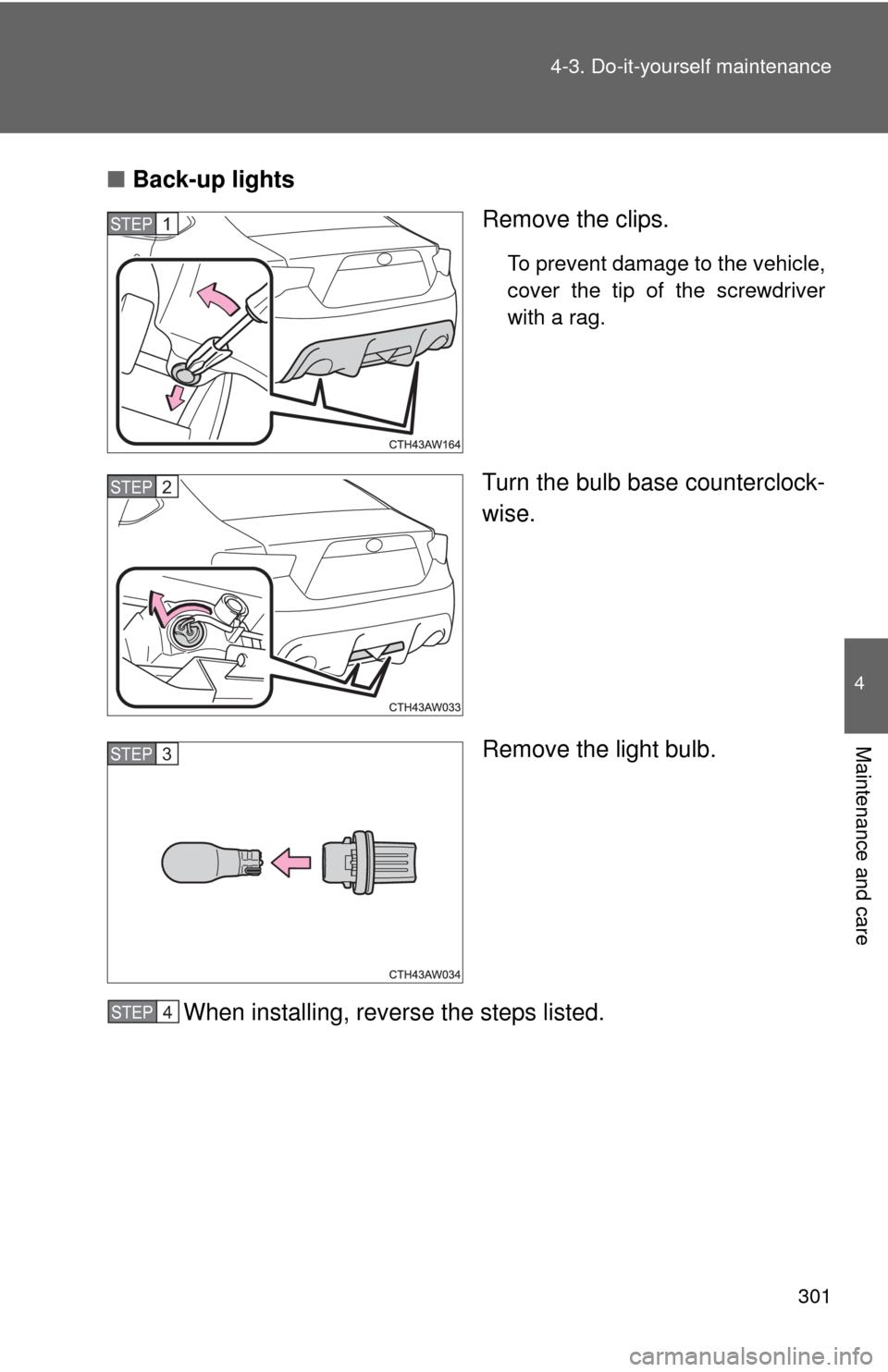
Back-up lights
Remove the clips.
To prevent damage to the vehicle,
cover the tip of the screwdriver
with a rag.
Turn the bulb base counterclock-
wise.
Remove the light bulb.
When installing, reverse the steps listed.
STEP 1
STEP 2
STEP 3
STEP 4
Page 302 of 428
302 4-3. Do-it-yourself maintenance
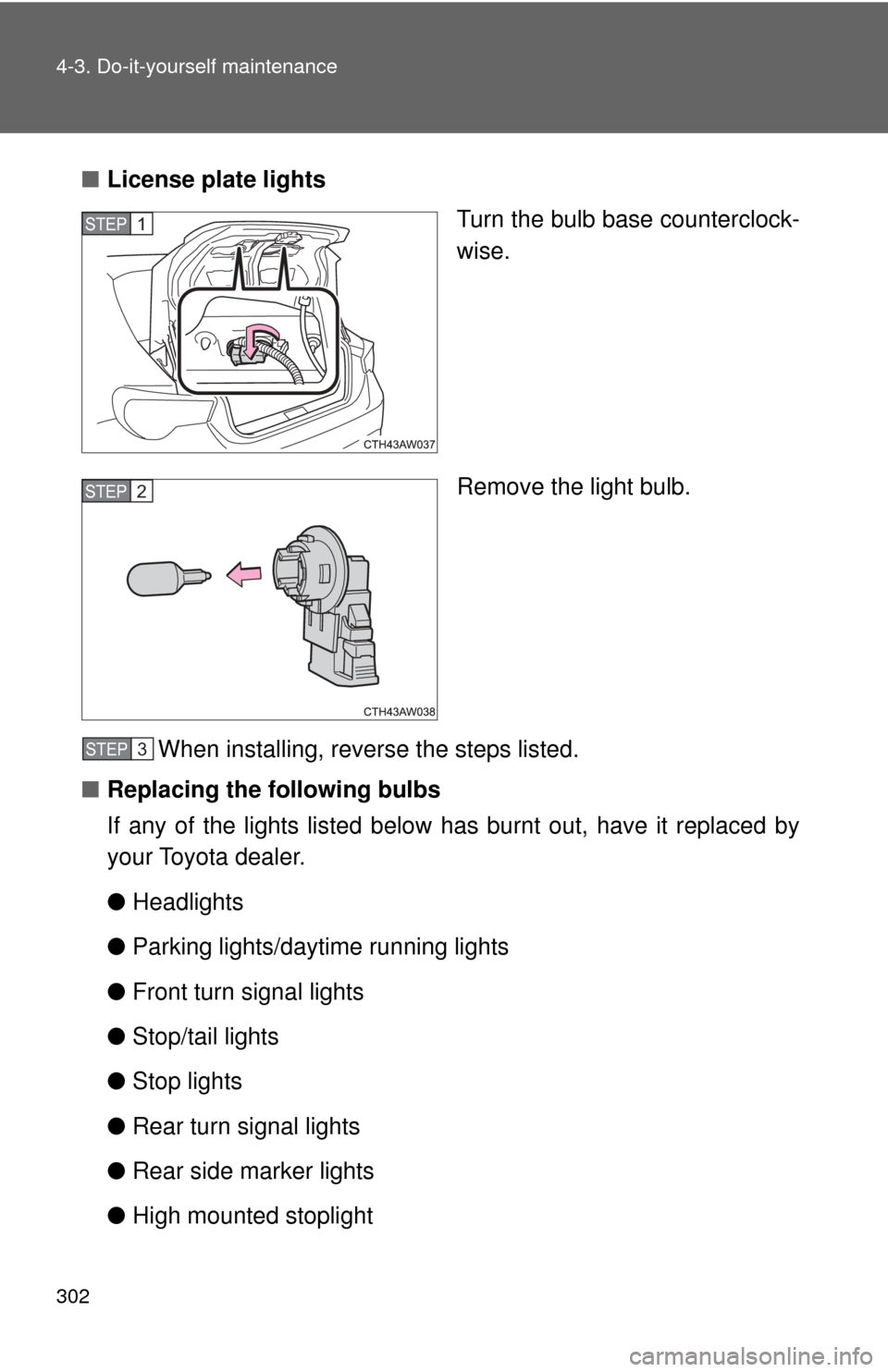
■License plate lights
Turn the bulb base counterclock-
wise.
Remove the light bulb.
When installing, reverse the steps listed.
■ Replacing the following bulbs
If any of the lights listed below has burnt out, have it replaced by
your Toyota dealer.
●Headlights
● Parking lights/daytime running lights
● Front turn signal lights
● Stop/tail lights
● Stop lights
● Rear turn signal lights
● Rear side marker lights
● High mounted stoplight
STEP 1
STEP 2
STEP 3