mirror TOYOTA GT86 2018 Owners Manual (in English)
[x] Cancel search | Manufacturer: TOYOTA, Model Year: 2018, Model line: GT86, Model: TOYOTA GT86 2018Pages: 28, PDF Size: 1.62 MB
Page 5 of 28
3
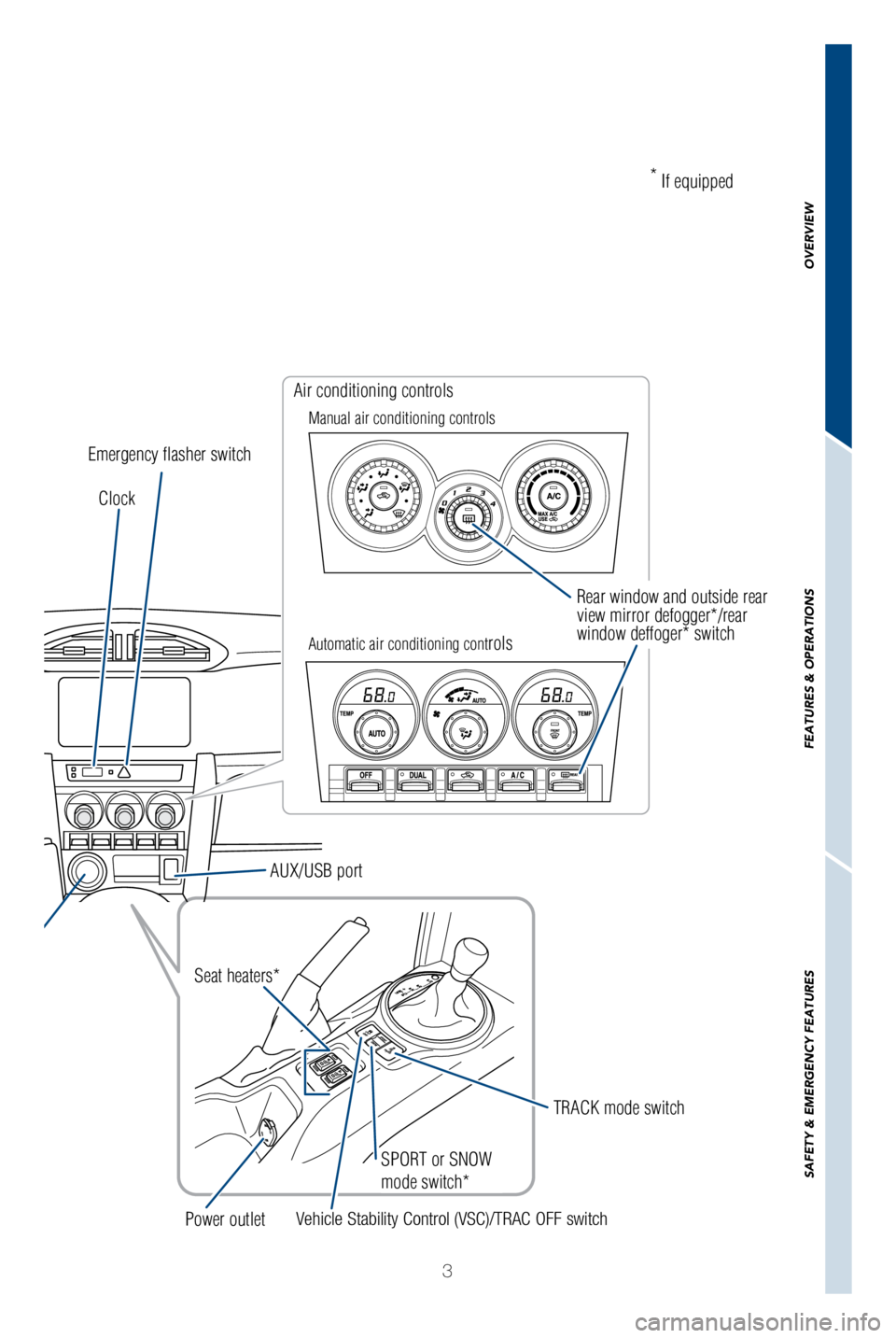
Rear window and outside rear
view mirror defogger*/rear
window deffoger* switch
SPORT or SNOW
mode switch*
Clock
Emergency flasher switch Air conditioning controls
Manual air conditioning controls
Automatic air conditioning cont
rols
Vehicle Stability Control (VSC)/TRAC OFF switch TRACK mode switch
Seat heaters*
Power outlet *
If equipped
AUX/USB port
OVERVIEW
FEATURES & OPERATIONS
SAFETY & EMERGENCY FEATURES
Page 20 of 28

18
FEATURES & OPERATIONSAir conditioning/heating
For more details, refer to the Owner’s Manual.
Airflow vent
“
” and “” mode uses outside air only Rear window defogger
Recirculate cabin air
(outside air when OFF)
Climate control OFF Recirculate cabin air
(outside air when OFF)Rear window and outside
rear view mirror defoggers
Air Conditioning ON/OFF
Windshield airflow
Defogging
windshield
Airflow vent
Temperature selector
(driver side)
Temperature selector
(front passenger side)
Automatic climate control ON
Adjust the temperature setting, and airflow
vents and fan will adjust automatically.
Fan speed/Airflow
vent display
Temperature display
(driver side)
Temperature display
(front passenger side)
“DUAL” button
Indicator ON: Separate temperature
settings for driver and passenger.
Indicator OFF: Synchronize temperature
settings for driver and passenger. Air Conditioning ON/OFF
Fan speed Temperature selector
Manual air conditioning
Automatic air conditioning
Page 21 of 28
19
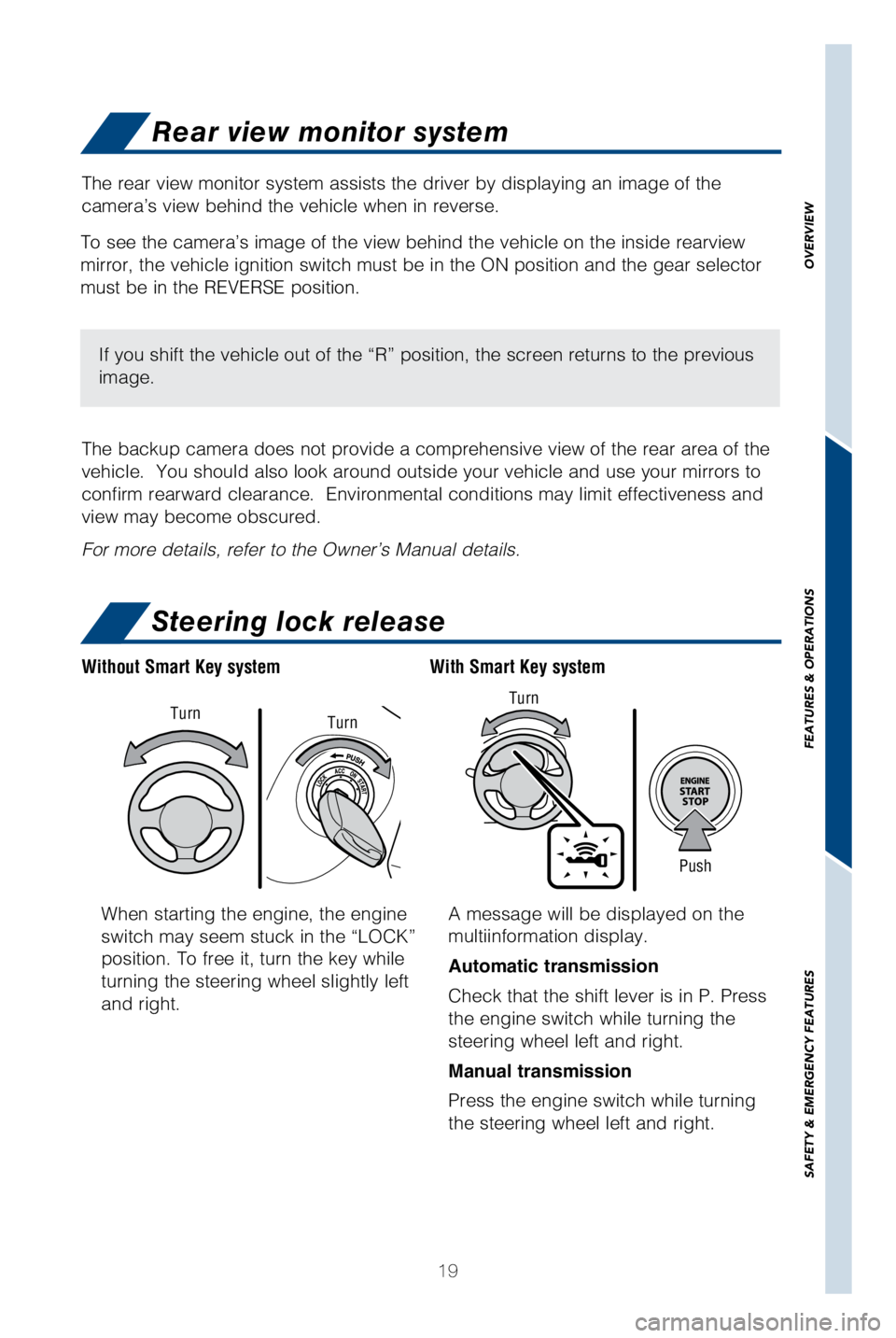
When starting the engine, the engine
switch may seem stuck in the “LOCK”
position. To free it, turn the key while
turning the steering wheel slightly left
and right.A message will be displayed on the
multiinformation display.
Automatic transmission
Check that the shift lever is in P. Press
the engine switch while turning the
steering wheel left and right.
Manual transmission
Press the engine switch while turning
the steering wheel left and right.
With Smart Key system
Without Smart Key system
Push
Turn
Turn
Turn
Rear view monitor system
Steering lock release
The rear view monitor system assists the driver by displaying an image o\
f the
camera’s view behind the vehicle when in reverse.
The backup camera does not provide a comprehensive view of the rear area\
of the
vehicle. You should also look around outside your vehicle and use your \
mirrors to
confirm rearward clearance. Environmental conditions may limit effectiv\
eness and
view may become obscured.
For more details, refer to the Owner’s Manual details.
To see the camera’s image of the view behind the vehicle on the insid\
e rearview
mirror, the vehicle ignition switch must be in the ON position and the g\
ear selector
must be in the REVERSE position.
If you shift the vehicle out of the “R” position, the screen retur\
ns to the previous
image.
OVERVIEW
FEATURES & OPERATIONS
SAFETY & EMERGENCY FEATURES