display TOYOTA GT86 2019 Accessories, Audio & Navigation (in English)
[x] Cancel search | Manufacturer: TOYOTA, Model Year: 2019, Model line: GT86, Model: TOYOTA GT86 2019Pages: 20, PDF Size: 0.91 MB
Page 1 of 20
www.toyota.com/owners
CUSTOMER EXPERIENCE CENTER
1- 8 0 0 - 3 31- 4 3 31
Printed in U.S.A. 6/18
18-MKG -11932
2 0 19
QUICK REFERENCE GUIDE
TOUCH SCREEN DISPL AY AUDIO
AND DISPLAY AUDIO WITH NAVIGATION
86
Page 2 of 20

TABLE OF CONTENTS
BUTTON OVERVIEW 2
SETTINGS 2
VOICE COMMAND 2
POWER/VOLUME 2
TOUCH-SCREEN 2
TUNE/SEEK 2
MEDIA 2
PHONE 2
PAIRING BLUETOOTH
® PHONE FOR THE FIRST TIME 3-4
SWITCHING AUDIO SOURCE - NON-NAVIGATION UNITS 5
VOICE TRAINING 5
SWITCHING AUDIO SOURCE - NAVIGATION UNITS 6
SETTING HOME DESTINATION 6
PRESETTING A STATION 7
EQUALIZER(EQ) 7
AHA
® 8-9
INSTALLING THE AHA® APPLICATION 8
SWITCHING TO AHA® MODE 8
CONNECTING FOR AHA® 9
CONNECTING AN IPHONE® 9
NAVIGATION: DESTINATION INPUT BY ADDRESS 10-11
NAVIGATION: DESTINATION INPUT BY VOICE RECOGNITION 11
NAVIGATION: DESTINATION INPUT – POI BY NAME 12
NAVIGATION: DESTINATION INPUT – POI BY CATEGORY 13-14
NAVIGATION: ROUTE OPTIONS 15
18
45673a0_17-MKG-10927_QRG_Cover_DisplayAudioNav_1_0F_lm.indd 28/15/17 12:01 PM
Page 4 of 20
3
PAIRING BLUETOOTH® PHONE FOR THE FIRST TIME
Touch Screen Display Audio and Display Audio with Navigation1
To use the hands-free system3, it is necessary to pair a Bluetooth®2
phone with the system. Once the phone has been paired, it is possible to
use the hands-free system
3. This operation cannot be performed while
driving. (NOTE: The Bluetooth®2 pairing process for Non-Navigation and
Navigation1 units differ, as noted below).
You can pair up to 4 devices.
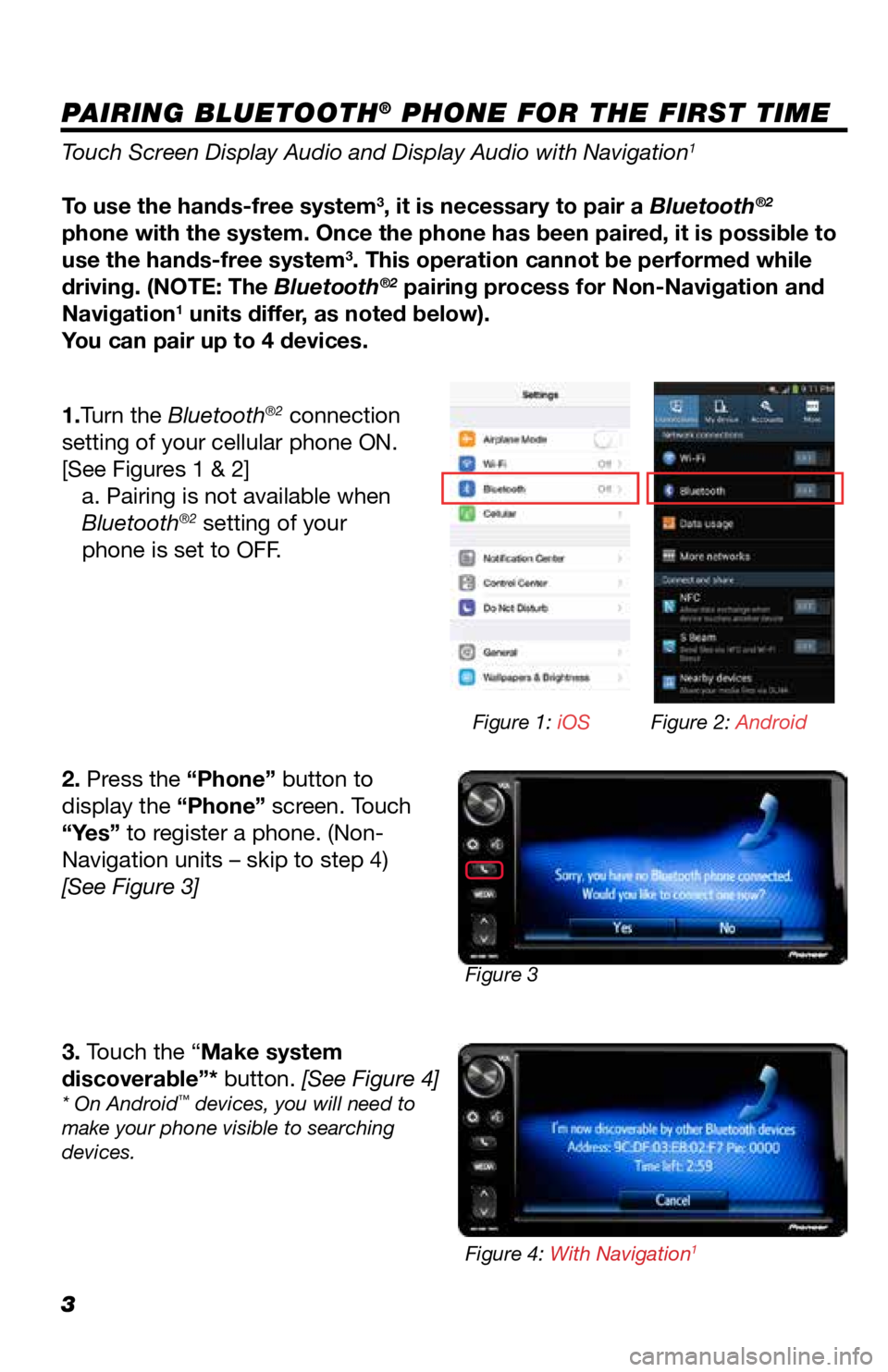
1.Turn the Bluetooth
®2 connection
setting of your cellular phone ON.
[See Figures 1 & 2] a. Pairing is not available when
Bluetooth
®2 setting of your
phone is set to OFF.
2. Press the “Phone” button to
display the “Phone” screen. Touch
“Yes” to register a phone. (Non-
Navigation units – skip to step 4)
[See Figure 3]
3. Touch the “Make system
discoverable”* button. [See Figure 4]
* On Android™ devices, you will need to
make your phone visible to searching
devices.
Figure 3 Figure 1: iOS
Figure 2: Android
Figure 4: With Navigation
1
Page 5 of 20
4
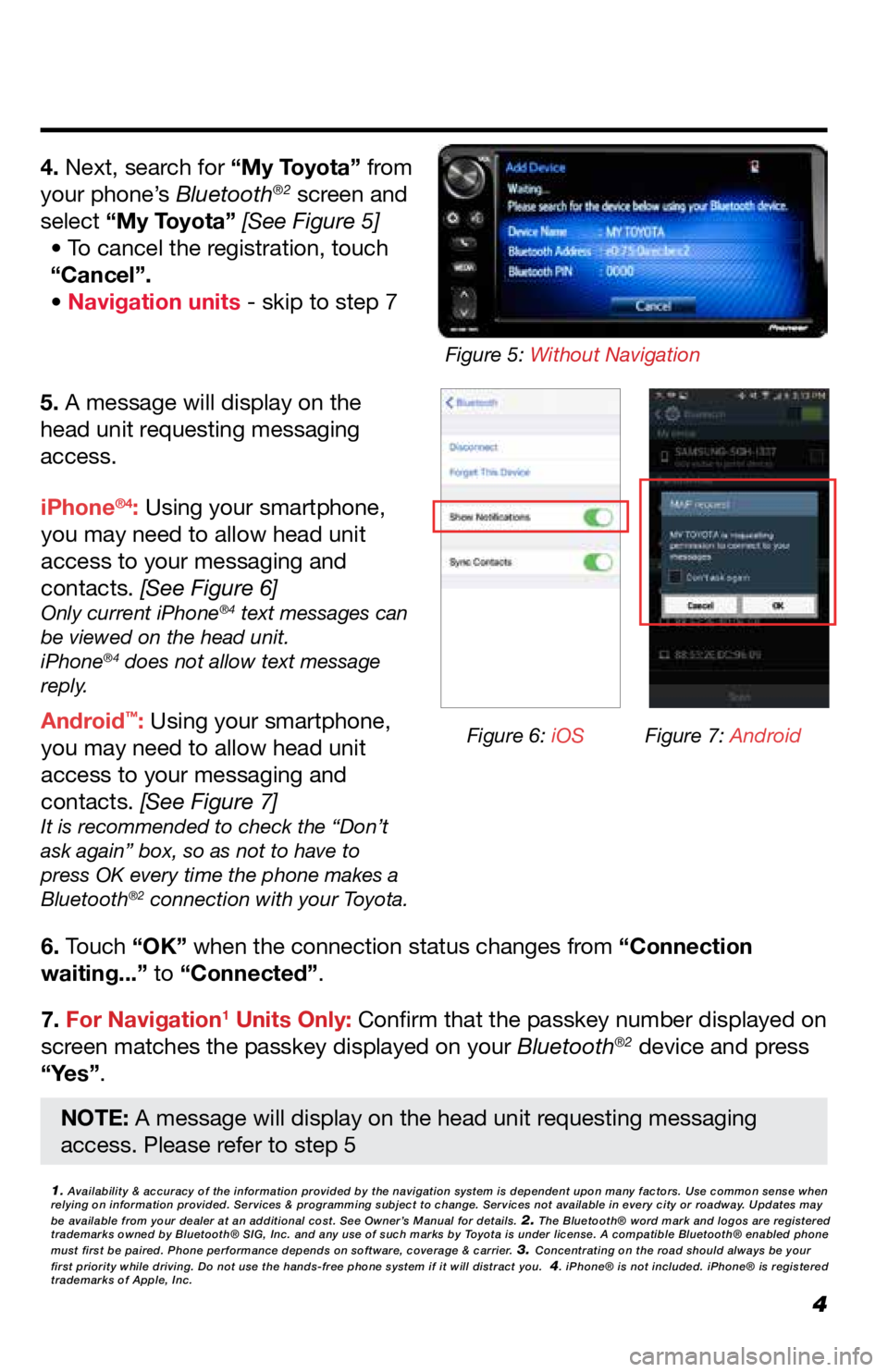
5. A message will display on the
head unit requesting messaging
access.
6. Touch “OK” when the connection status changes from “Connection
waiting...” to “Connected”.
7. For Navigation
1 Units Only: Confirm that the passkey number displayed on
screen matches the passkey displayed on your Bluetooth®2 device and press
“Yes”. iPhone
®4: Using your smartphone,
you may need to allow head unit
access to your messaging and
contacts. [See Figure 6]
Only current iPhone®4 text messages can
be viewed on the head unit.
iPhone
®4 does not allow text message
reply.
Android™: Using your smartphone,
you may need to allow head unit
access to your messaging and
contacts. [See Figure 7]
It is recommended to check the “Don’t
ask again” box, so as not to have to
press OK every time the phone makes a
Bluetooth
®2 connection with your Toyota.
4. Next, search for “My Toyota” from
your phone’s Bluetooth®2 screen and
select “My Toyota” [See Figure 5] • To cancel the registration, touch
“Cancel”.
• Navigation units - skip to step 7
1. Availability & accuracy of the information provided by the navigation sys\
tem is dependent upon many factors. Use common sense when
relying on information provided. Services & programming subject to change. Services not available in every city or roadway. Updates may
be available from your dealer at an additional cost. See Owner’s Manual for details.
2. The Bluetooth® word mark and logos are registered
trademarks owned by Bluetooth® SIG, Inc. and any use of such marks by\
Toyota is under license. A compatible Bluetooth® enabled phone
must first be paired. Phone performance depends on software, coverage & \
carrier.
3. Concentrating on the road should always be your
first priority while driving. Do not use the hands-free phone system if \
it will distract you. 4. iPhone® is not included. iPhone® is registered
trademarks of Apple, Inc.
Figure 6: iOS Figure 7: Android
Figure 5: Without Navigation
NOTE: A message will display on the head unit requesting messaging
access. Please refer to step 5
Page 6 of 20
5
SWITCHING AUDIO SOURCE - NON-NAVIGATION UNITS
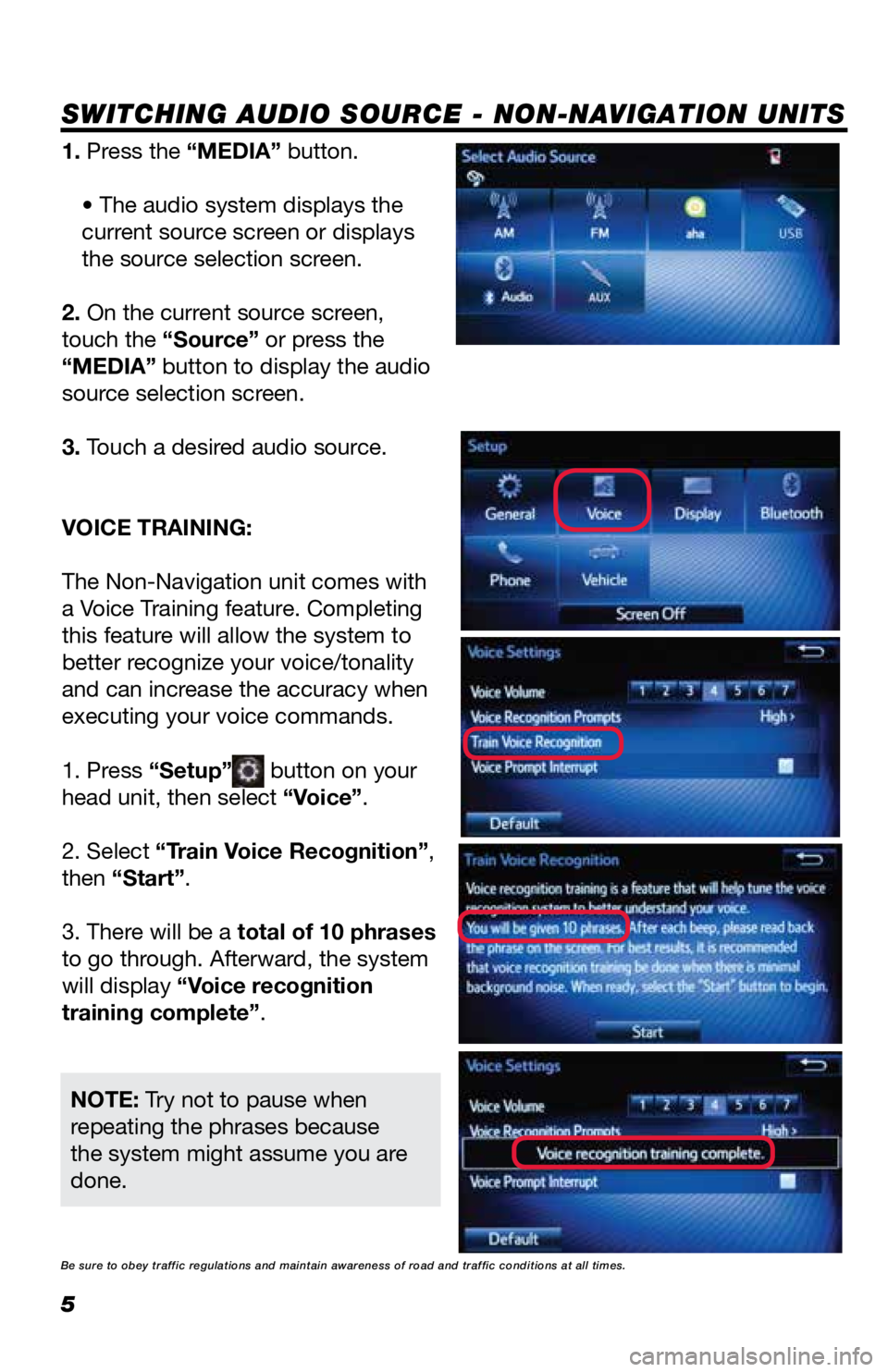
1. Press the “MEDIA” button.• The audio system displays the
current source screen or displays
the source selection screen.
2. On the current source screen,
touch the “Source” or press the
“MEDIA” button to display the audio
source selection screen.
3. Touch a desired audio source.
VOICE TRAINING:
The Non-Navigation unit comes with
a Voice Training feature. Completing
this feature will allow the system to
better recognize your voice/tonality
and can increase the accuracy when
executing your voice commands.
1. Press “Setup”
button on your
head unit, then select “Voice”.
2. Select “Train Voice Recognition”,
then “Start”.
3. There will be a total of 10 phrases
to go through. Afterward, the system
will display “Voice recognition
training complete”.
NOTE: Try not to pause when
repeating the phrases because
the system might assume you are
done.
Be sure to obey traffic regulations and maintain awareness of road and t\
raffic conditions at all times.
Page 9 of 20

8
Aha®1
INSTALLING THE Aha®1 APPLICATION
SWITCHING TO Aha
®1 MODE
Aha®1 offers more than 100,000 stations
of audio content from Internet music,
news, audiobooks, personalized restaurant
recommendations, weather and hotel
searches, Facebook
® and Twitter® newsfeeds
and much more.
1. Download Aha
®1 application onto your smartphone. For an iPhone®, use
iTunes® App Store. For an Android® phone, use Google™ Play.
2. Follow the instructions to set up your Aha
®1 account on your smartphone.
3. Optional: Link your Associated Accounts in the Settings menu to enable
certain personalized stations.
4. Aha
®1 provides content suggestions from a wide range of featured
categories, but you can also add many presets via the smartphone app or the
Aha
®1 website (http://aharadio.com/station).
1. Press the “MEDIA” button. • The audio system displays the current source screen or displays the
source selection screen.
2. On the current source screen, touch the “Source” or press the “MEDIA”
button to display the audio source selection screen.
3. Touch “aha”*.
• It will take time for the “aha” button to be available during the system
startup.
• If both iPhone
® and Android® phone are connected, the iPhone® will be
used for Aha® operation.
• For more information about Aha®1, refer to http://www.aharadio.com.
NOTE: Aha® application is available on both touch-screen display audio and
display audio with navigation system.
1Aha, Aha Radio and the Aha and Aha Radio logos are either the trademarks\
or the registered trademarks of Harman International
Industries, Incorporated.
Be sure to obey traffic regulations and maintain awareness of road and t\
raffic conditions at all times.
INFORMATION
INFORMATION
Page 10 of 20
9
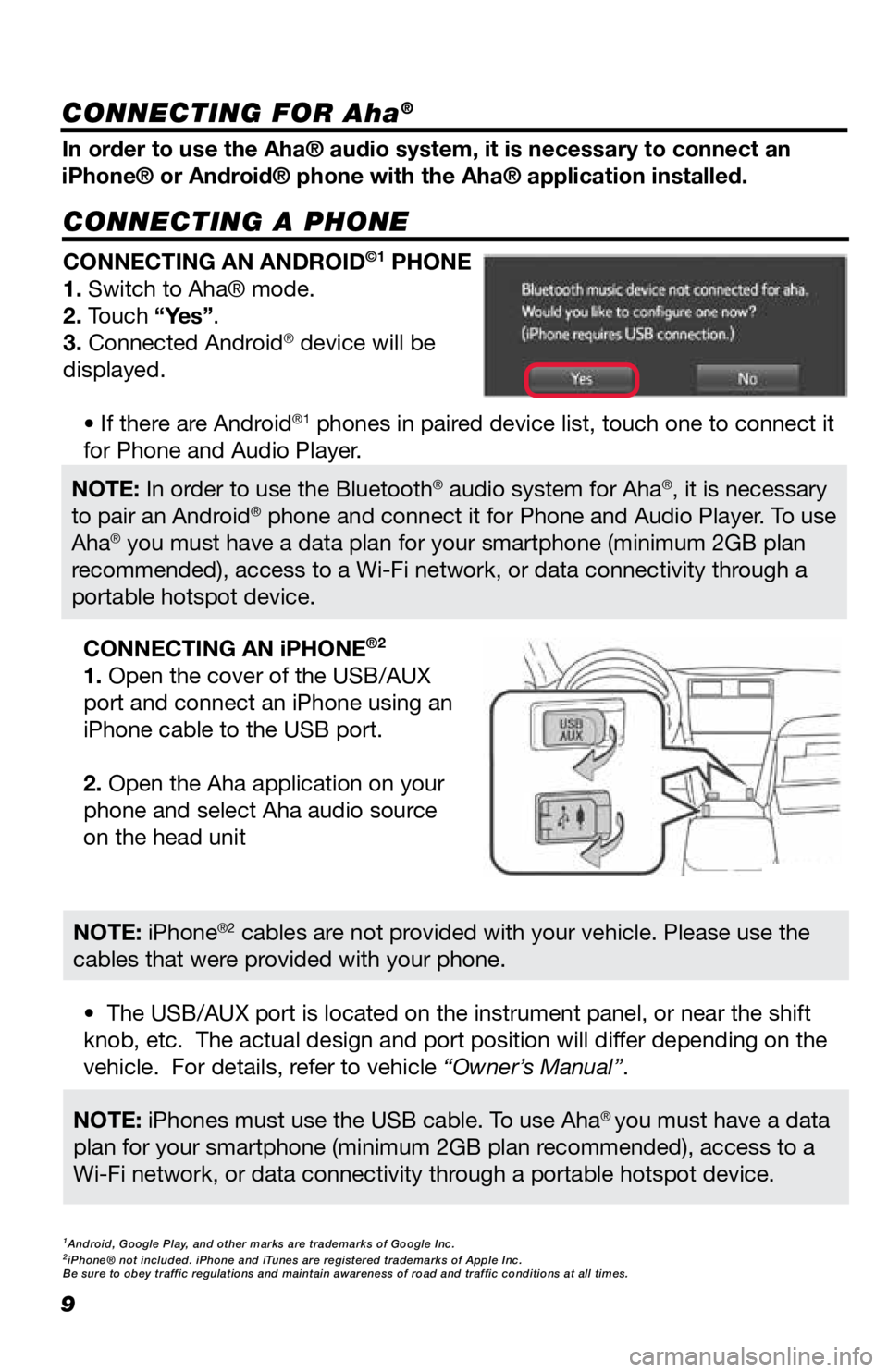
CONNECTING A PHONE
In order to use the Aha® audio system, it is necessary to connect an
iPhone® or Android® phone with the Aha® application installed.CONNECTING AN ANDROID
©1 PHONE
1. Switch to Aha® mode.
2. Touch “Yes”.
3. Connected Android
® device will be
displayed.
• If there are Android
®1 phones in paired device list, touch one to connect it
for Phone and Audio Player.
• The USB/AUX port is located on the instrument panel, or near the shift
knob, etc. The actual design and port position will differ depending on the
vehicle. For details, refer to vehicle “Owner’s Manual”. CONNECTING AN iPHONE
®2
1. Open the cover of the USB/AUX
port and connect an iPhone using an
iPhone cable to the USB port.
2. Open the Aha application on your
phone and select Aha audio source
on the head unit
NOTE: In order to use the Bluetooth® audio system for Aha®, it is necessary
to pair an Android® phone and connect it for Phone and Audio Player. To use
Aha® you must have a data plan for your smartphone (minimum 2GB plan
recommended), access to a Wi-Fi network, or data connectivity through a
portable hotspot device.
NOTE: iPhones must use the USB cable. To use Aha® you must have a data
plan for your smartphone (minimum 2GB plan recommended), access to a
Wi-Fi network, or data connectivity through a portable hotspot device.
NOTE: iPhone®2 cables are not provided with your vehicle. Please use the
cables that were provided with your phone.
1Android, Google Play, and other marks are trademarks of Google Inc.2iPhone® not included. iPhone and iTunes are registered trademarks of Apple Inc.
Be sure to obey traffic regulations and maintain awareness of road and t\
raffic conditions at all times.
CONNECTING FOR Aha®
Page 11 of 20
10
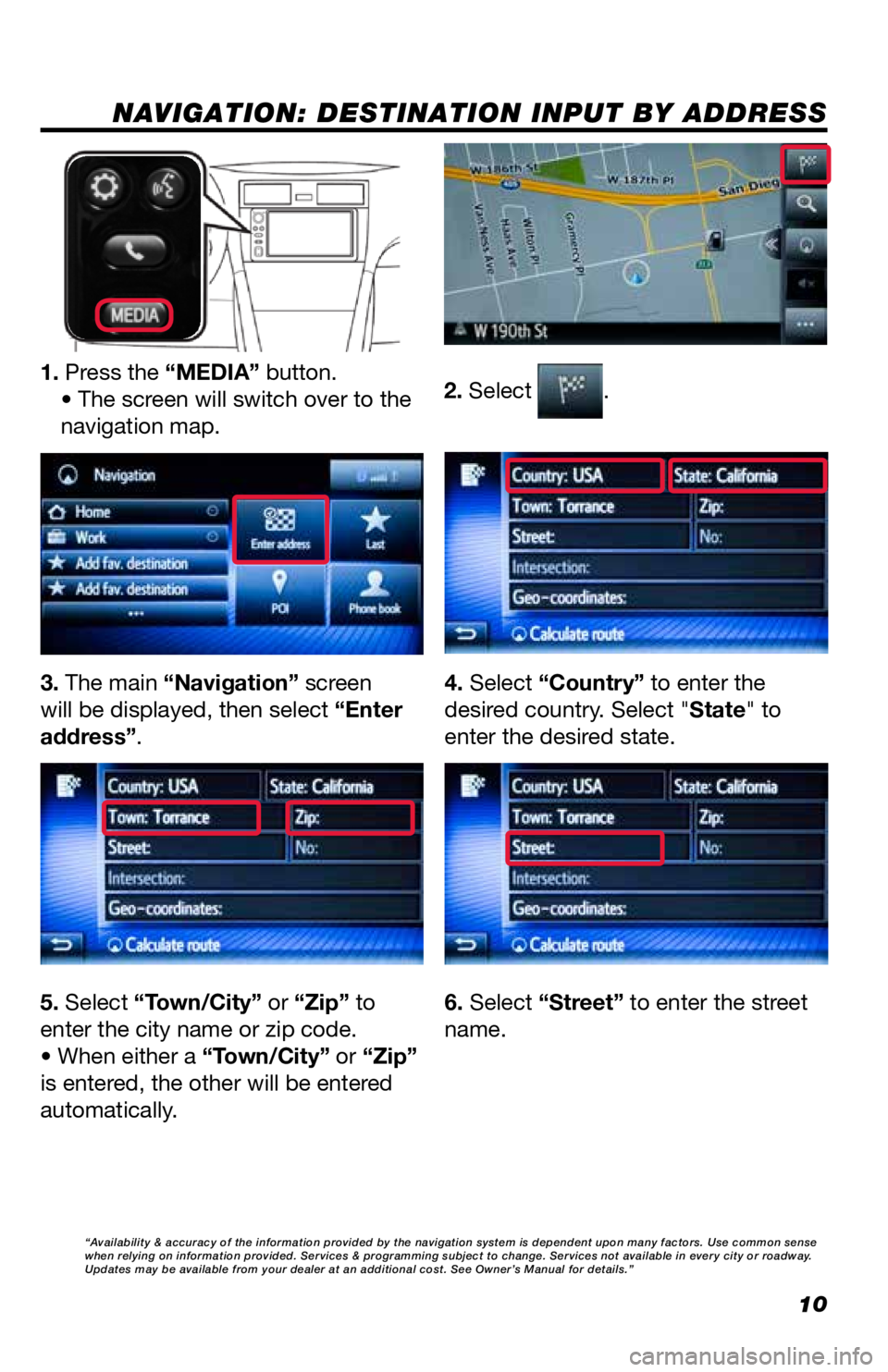
NAVIGATION: DESTINATION INPUT BY ADDRESS
2. Select .1. Press the “MEDIA” button.• The screen will switch over to the
navigation map.
3. The main “Navigation” screen
will be displayed, then select “Enter
address”. 4. Select “Country” to enter the
desired country. Select "State" to
enter the desired state.
5. Select “Town/City” or “Zip” to
enter the city name or zip code.
• When either a “Town/City” or “Zip”
is entered, the other will be entered
automatically. 6. Select “Street” to enter the street
name.
“Availability & accuracy of the information provided by the navigation sys\
tem is dependent upon many factors. Use common sense
when relying on information provided. Services & programming subject to change. Services not available in every city or roadway.
Updates may be available from your dealer at an additional cost. See Own\
er’s Manual for details.”
Page 16 of 20
15
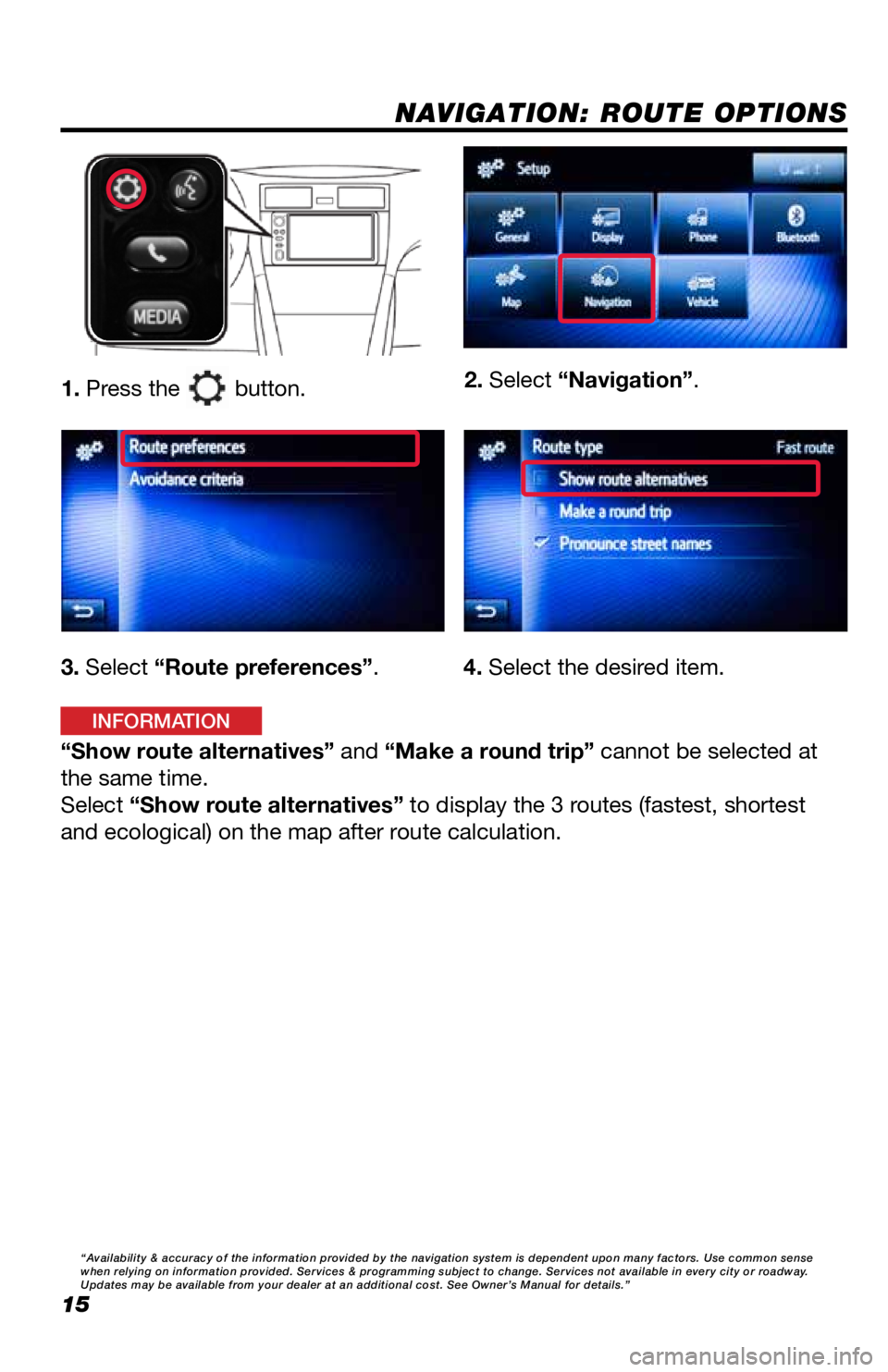
NAVIGATION: ROUTE OPTIONS
1. Press the button.2. Select “Navigation”.
3. Select “Route preferences”.
“Show route alternatives” and “Make a round trip” cannot be selected at
the same time.
Select “Show route alternatives” to display the 3 routes (fastest, shortest
and ecological) on the map after route calculation. 4. Select the desired item.
“Availability & accuracy of the information provided by the navigation sys\
tem is dependent upon many factors. Use common sense
when relying on information provided. Services & programming subject to change. Services not available in every city or roadway.
Updates may be available from your dealer at an additional cost. See Own\
er’s Manual for details.”
INFORMATION
Page 19 of 20

TABLE OF CONTENTS
BUTTON OVERVIEW 2
SETTINGS 2
VOICE COMMAND 2
POWER/VOLUME 2
TOUCH-SCREEN 2
TUNE/SEEK 2
MEDIA 2
PHONE 2
PAIRING BLUETOOTH
® PHONE FOR THE FIRST TIME 3-4
SWITCHING AUDIO SOURCE - NON-NAVIGATION UNITS 5
VOICE TRAINING 5
SWITCHING AUDIO SOURCE - NAVIGATION UNITS 6
SETTING HOME DESTINATION 6
PRESETTING A STATION 7
EQUALIZER(EQ) 7
AHA
® 8-9
INSTALLING THE AHA® APPLICATION 8
SWITCHING TO AHA® MODE 8
CONNECTING FOR AHA® 9
CONNECTING AN IPHONE® 9
NAVIGATION: DESTINATION INPUT BY ADDRESS 10-11
NAVIGATION: DESTINATION INPUT BY VOICE RECOGNITION 11
NAVIGATION: DESTINATION INPUT – POI BY NAME 12
NAVIGATION: DESTINATION INPUT – POI BY CATEGORY 13-14
NAVIGATION: ROUTE OPTIONS 15
18
45673a0_17-MKG-10927_QRG_Cover_DisplayAudioNav_1_0F_lm.indd 28/15/17 12:01 PM