steering TOYOTA GT86 2019 Owners Manual (in English)
[x] Cancel search | Manufacturer: TOYOTA, Model Year: 2019, Model line: GT86, Model: TOYOTA GT86 2019Pages: 32, PDF Size: 2.12 MB
Page 3 of 32
OVERVIEW FEATURES & OPERATIONS SAFETY & EMERGENCY FEATURES
1
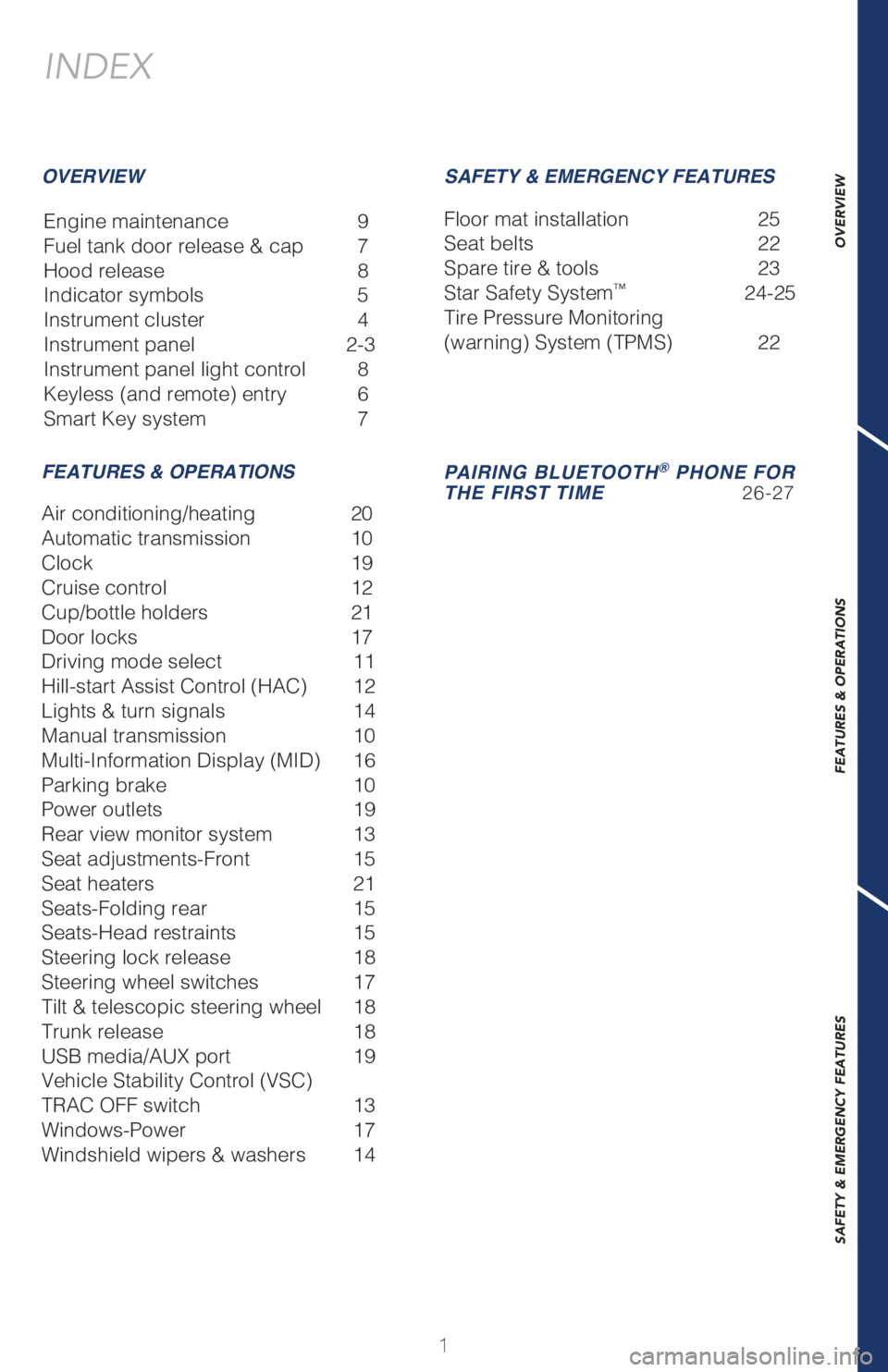
INDEX
Engine maintenance 9
Fuel tank door release & cap 7
Hood release 8
Indicator symbols 5
Instrument cluster 4
Instrument panel 2-3
Instrument panel light control 8
Keyless (and remote) entry 6
Smart Key system 7
OVERVIEW
FEATURES & OPERATIONSSAFETY & EMERGENCY FEATURES
Air conditioning/heating 20
Automatic transmission 10
Clock 19
Cruise control 12
Cup/bottle holders 21
Door locks 17
Driving mode select 11
Hill-start Assist Control (HAC) 12
Lights & turn signals 14
Manual transmission 10
Multi-Information Display (MID) 16
Parking brake 10
Power outlets 19
Rear view monitor system 13
Seat adjustments-Front 15
Seat heaters 21
Seats-Folding rear 15
Seats-Head restraints 15
Steering lock release 18
Steering wheel switches 17
Tilt & telescopic steering wheel 18
Trunk release 18
USB media/AUX port 19
Vehicle Stability Control (VSC)
TRAC OFF switch 13
Windows-Power 17
Windshield wipers & washers 14Floor mat installation 25
Seat belts 22
Spare tire & tools 23
Star Safety System
™ 24-25
Tire Pressure Monitoring
(warning) System (TPMS) 22
PAIRING BLUETOOTH® PHONE FOR
THE FIRST TIME 26-27
Page 4 of 32
2
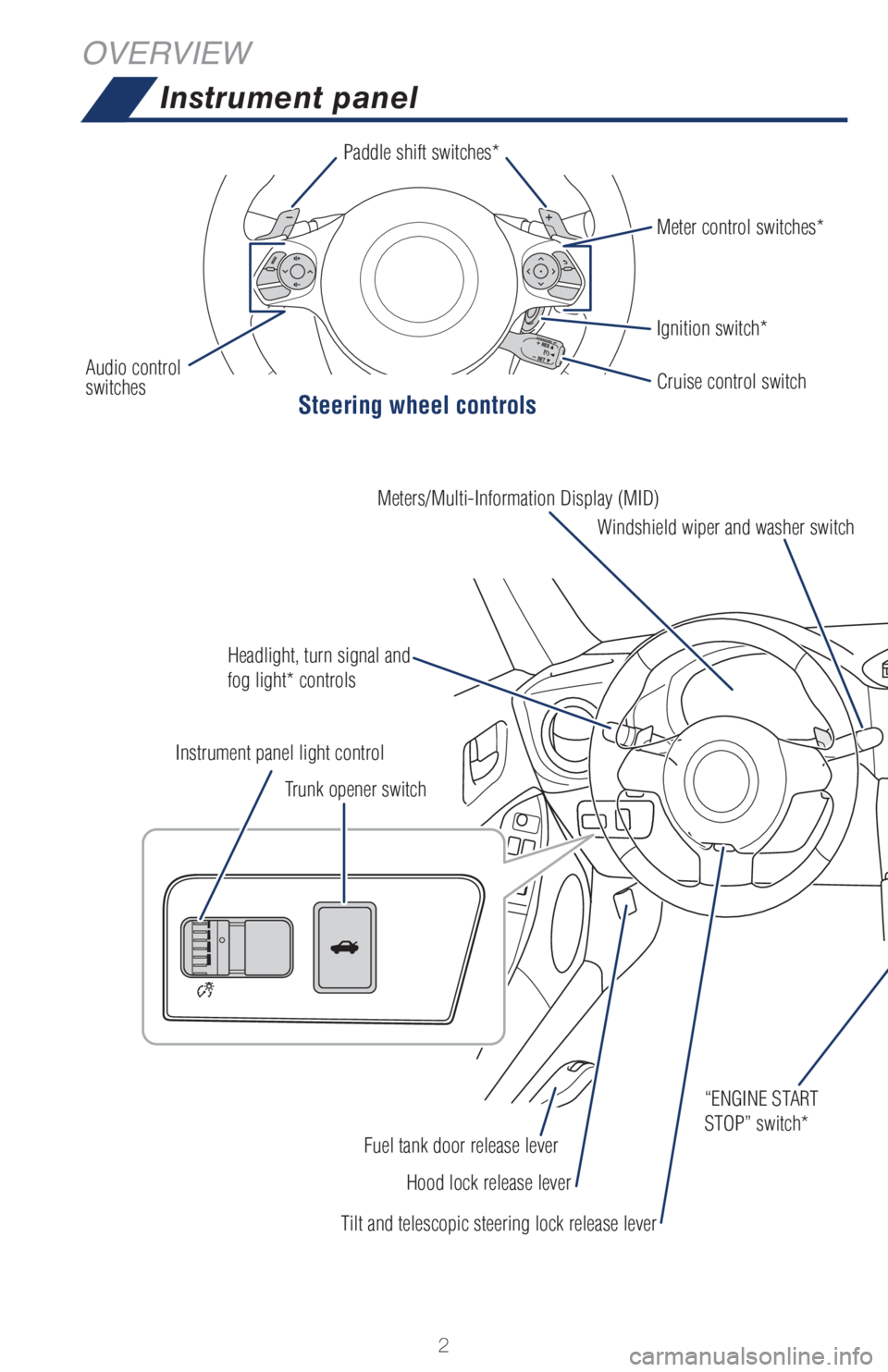
Instrument panel
Steering wheel controls
OVERVIEW
Paddle shift switches*
Audio control
switchesIgnition switch* Meter control switches*
Headlight, turn signal and
fog light* controlsWindshield wiper and washer switch Meters/Multi-Information Display (MID)
Tilt and telescopic steering lock release leverHood lock release lever Fuel tank door release lever“ENGINE START
STOP” switch* Trunk opener switch Instrument panel light controlCruise control switch
Page 7 of 32
OVERVIEW FEATURES & OPERATIONS SAFETY & EMERGENCY FEATURES
5
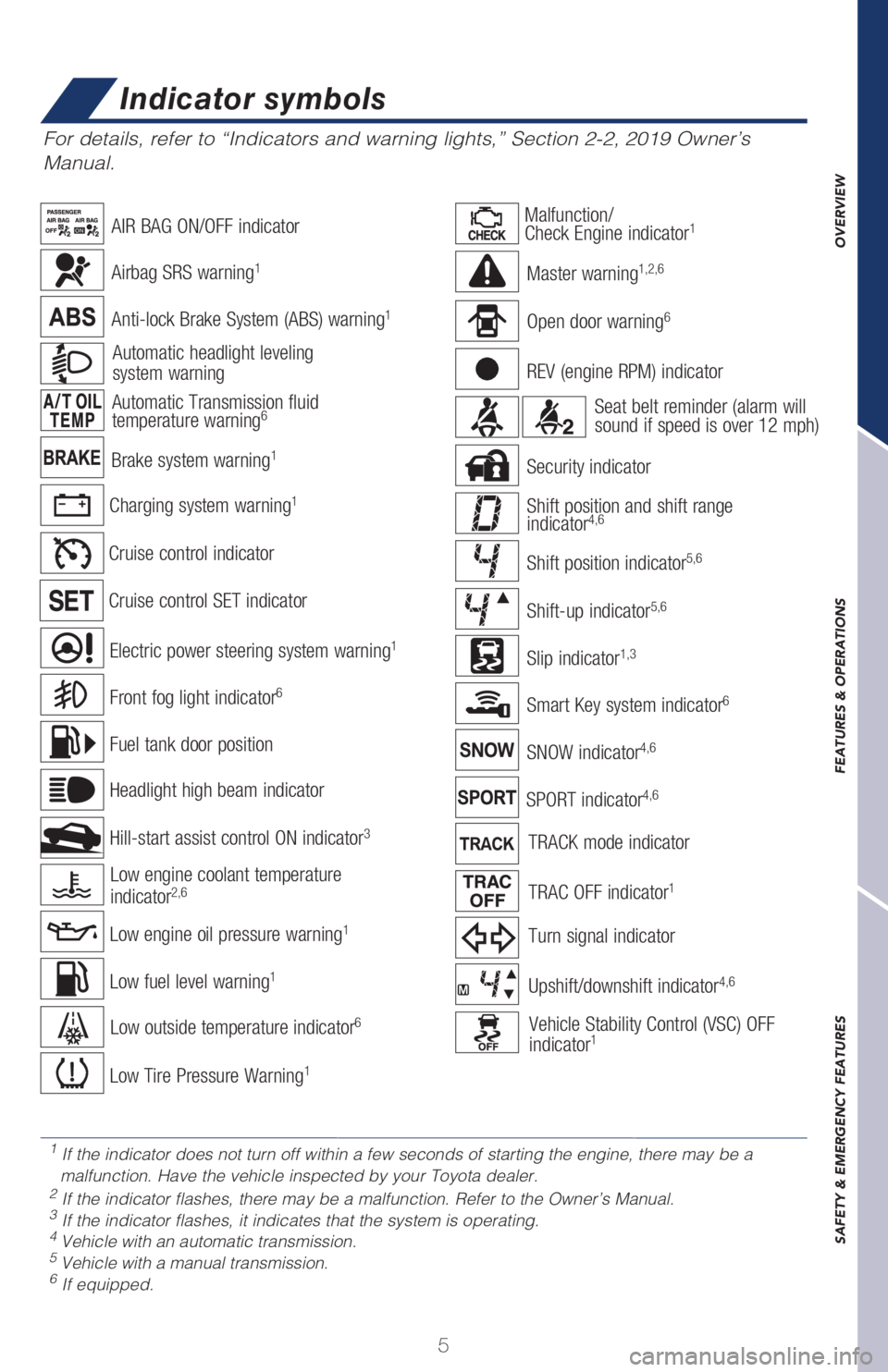
Brake system warning1
Charging system warning1
Automatic headlight leveling
system warning
For details, refer to “Indicators and warning lights,” Section 2-2, 2019 Owner’s
Manual.
Anti-lock Brake System (ABS) warning1
Airbag SRS warning1
Low fuel level warning1
Cruise control indicator
Cruise control SET indicator
Low Tire Pressure Warning1
Slip indicator1,3
Smart Key system indicator6
Automatic Transmission fluid
temperature warning6
TRAC OFF indicator1
SNOW indicator4,6
REV (engine RPM) indicator
Upshift/downshift indicator4,6
Shift position indicator5,6
Shift-up indicator5,6
Shift position and shift range
indicator4,6
Security indicator
SPORT indicator4,6
Turn signal indicator
TRACK mode indicator
Open door warning6
Master warning1,2,6
AIR BAG ON/OFF indicator
Seat belt reminder (alarm will
sound if speed is over 12 mph)
Malfunction/
Check Engine indicator1
Low engine oil pressure warning1
Low engine coolant temperature
indicator2,6
Electric power steering system warning1
Fuel tank door position
Front fog light indicator6
Hill-start assist control ON indicator3
Headlight high beam indicator
Low outside temperature indicator6Vehicle Stability Control (VSC) OFF
indicator1
1
If the indicator does not turn off within a few seconds of starting the engine, there may be a
malfunction. Have the vehicle inspected by your Toyota dealer.
2 If the indicator flashes, there may be a malfunction. Refer to the Owner’s Manual.3 If the indicator flashes, it indicates that the system is operating.4 Vehicle with an automatic transmission.5 Vehicle with a manual transmission.6 If equipped.
Indicator symbols
Page 18 of 32
16
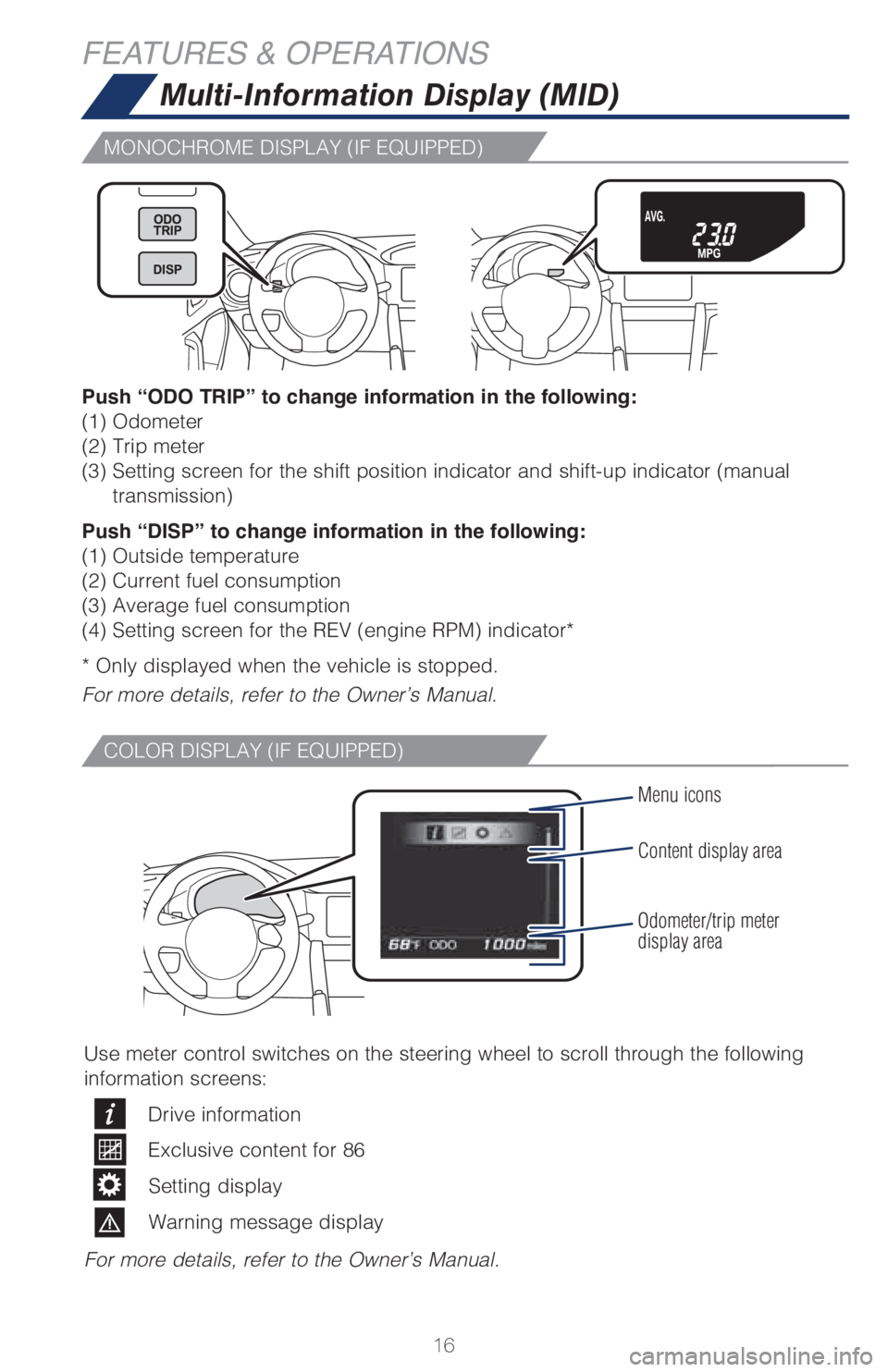
Multi-Information Display (MID)
Push “ODO TRIP” to change information in the following:
(1) Odometer
(2) Trip meter
(3) Setting screen for the shift position indicator and shift-up indicator (manual
transmission)
Push “DISP” to change information in the following:
(1) Outside temperature
(2) Current fuel consumption
(3) Average fuel consumption
(4) Setting screen for the REV (engine RPM) indicator*
* Only displayed when the vehicle is stopped.
For more details, refer to the Owner’s Manual.
Menu icons
Content display area
Odometer/trip meter
display area
Use meter control switches on the steering wheel to scroll through the following
information screens:
Drive information
Exclusive content for 86
Setting display
Warning message display
For more details, refer to the Owner’s Manual.
FEATURES & OPERATIONS
MONOCHROME DISPLAY (IF EQUIPPED)
COLOR DISPLAY (IF EQUIPPED)
Page 19 of 32
OVERVIEW FEATURES & OPERATIONS SAFETY & EMERGENCY FEATURES
17
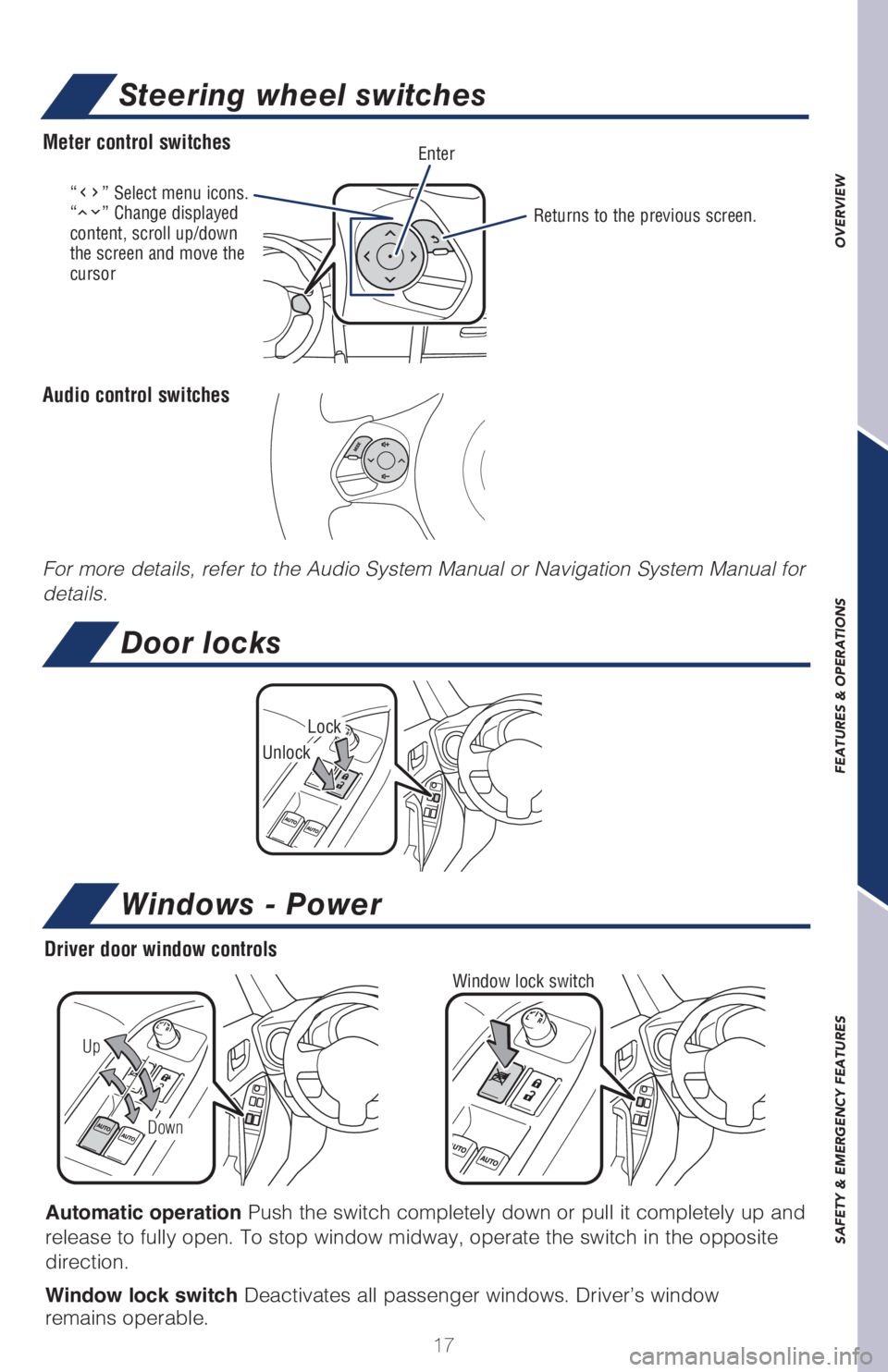
“” Select menu icons.
“” Change displayed
content, scroll up/down
the screen and move the
cursorReturns to the previous screen.
EnterMeter control switches
Audio control switches
Steering wheel switches
For more details, refer to the Audio System Manual or Navigation System Manual for
details.
Door locks
Windows - Power
Automatic operation Push the switch completely down or pull it completely up and
release to fully open. To stop window midway, operate the switch in the opposite
direction.
Window lock switch Deactivates all passenger windows. Driver’s window
remains operable.
Window lock switch
Up
Down
Driver door window controls
Lock
Unlock
Page 20 of 32
18
FEATURES & OPERATIONS
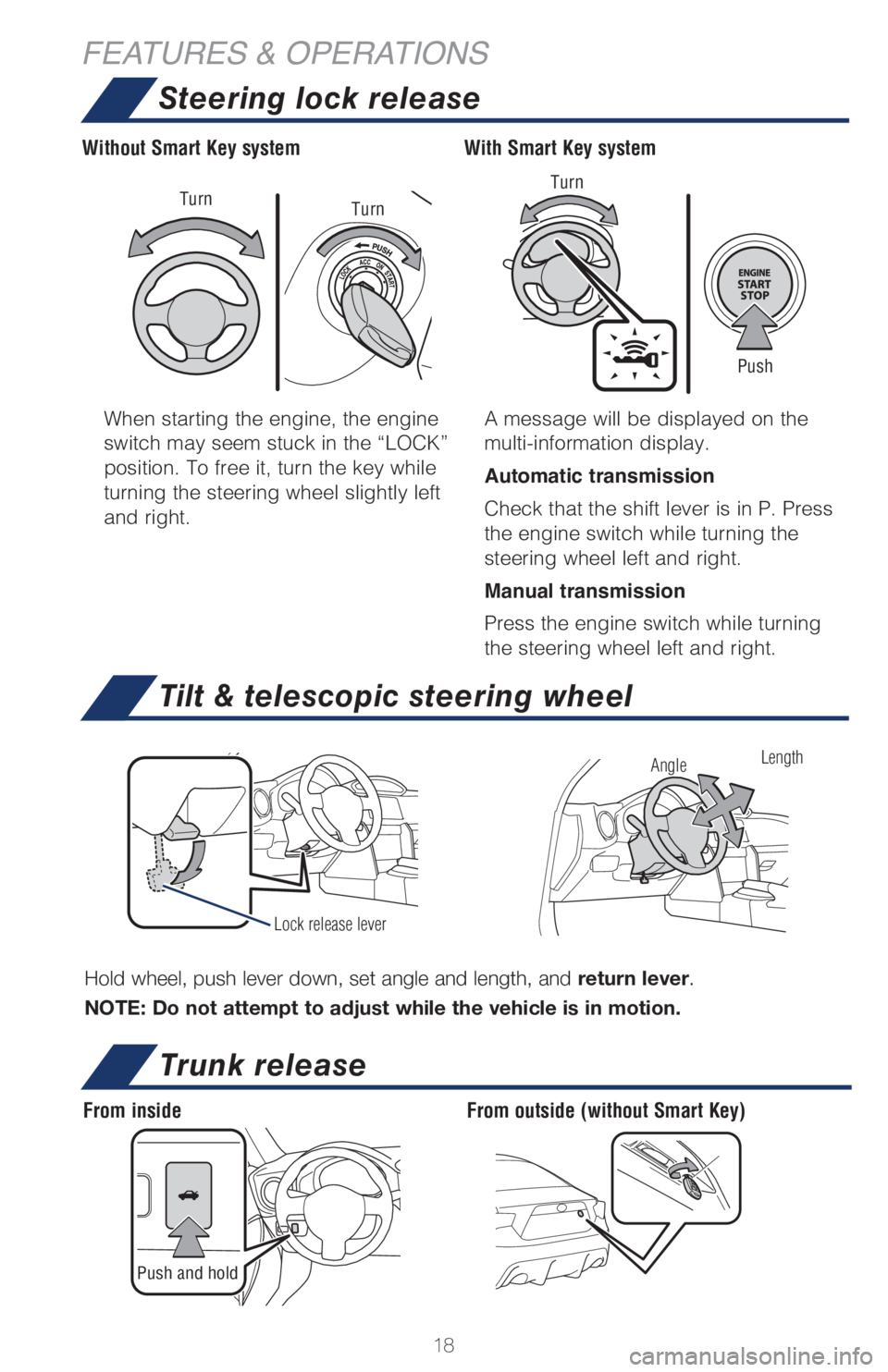
Trunk release
Push and hold
From insideFrom outside (without Smart Key) When starting the engine, the engine
switch may seem stuck in the “LOCK”
position. To free it, turn the key while
turning the steering wheel slightly left
and right.A message will be displayed on the
multi-information display.
Automatic transmission
Check that the shift lever is in P. Press
the engine switch while turning the
steering wheel left and right.
Manual transmission
Press the engine switch while turning
the steering wheel left and right.
With Smart Key system Without Smart Key system
Push Turn
Turn
Turn
Hold wheel, push lever down, set angle and length, and return lever.
NOTE: Do not attempt to adjust while the vehicle is in motion.
Tilt & telescopic steering wheel
Lock release lever
AngleLength
Steering lock release
Page 26 of 32
24
SAFETY & EMERGENCY FEATURES
Star Safety System™
Your vehicle comes standard with the Star Safety SystemTM, which combines Anti-
lock Braking System (ABS), Brake Assist (BA), Electronic Brake-force Distribution
(EBD), Smart Stop Technology (SST), Traction Control (TRAC) and Vehicle Stability
Control (VSC).
Refer to the Owner’s Manual for more details and important information on
limitations to these systems.
Smart Stop Technology automatically reduces engine power when the accelerator
and brake pedals are pressed simultaneously under certain conditions.
SST engages when the accelerator is depressed first and the brakes are applied
firmly for longer than one-half second at speeds greater than five miles per hour.
SST doesn’t engage if the brake pedal is depressed before the accelerator pedal,
allowing vehicles to start on a steep hill and safely accelerate without rolling
backward.
SMART STOP TECHNOLOGY (SST)
VSC helps prevent loss of traction during cornering by reducing engine power and
applying brake force to selected wheels.
Toyota’s VSC monitors steering angle and the direction your vehicle is traveling.
When it senses that the front or rear wheels begin to lose traction, VSC reduces
engine power and applies braking to selected wheels. This helps restore traction
and vehicle control.
VEHICLE STABILITY CONTROL (VSC)
Toyota’s ABS sensors detect which wheels are locking up and limits wheel lockup
by “pulsing” each wheel’s brakes independently. Pulsing releases brake pressure
repeatedly for fractions of a second. This helps the tires attain the traction that
current road conditions will allow, helping you to stay in directional control.
ANTI-LOCK BRAKE SYSTEM (ABS)
Brake Assist is designed to detect sudden or “panic” braking, and then add braking
pressure to help decrease the vehicle’s stopping distance. When there’s only a split
second to react, Brake Assist can add additional brake pressure more quickly than
just the driver alone can.
BRAKE ASSIST (BA)
Toyota’s ABS technology has Electronic Brake-force Distribution (EBD) to help
maintain control and balance when braking. Abrupt stops can cause a vehicle to tilt
forward, reducing the braking power of the rear wheels. EBD responds to sudden
stops by redistributing brake force to enhance the braking effectiveness of all four
wheels.
ELECTRONIC BRAKE FORCE DISTRIBUTION (EBD)