lap time TOYOTA GT86 2019 Owners Manual (in English)
[x] Cancel search | Manufacturer: TOYOTA, Model Year: 2019, Model line: GT86, Model: TOYOTA GT86 2019Pages: 532, PDF Size: 7.98 MB
Page 215 of 532
215
2-2. Instrument cluster
2
When driving
■
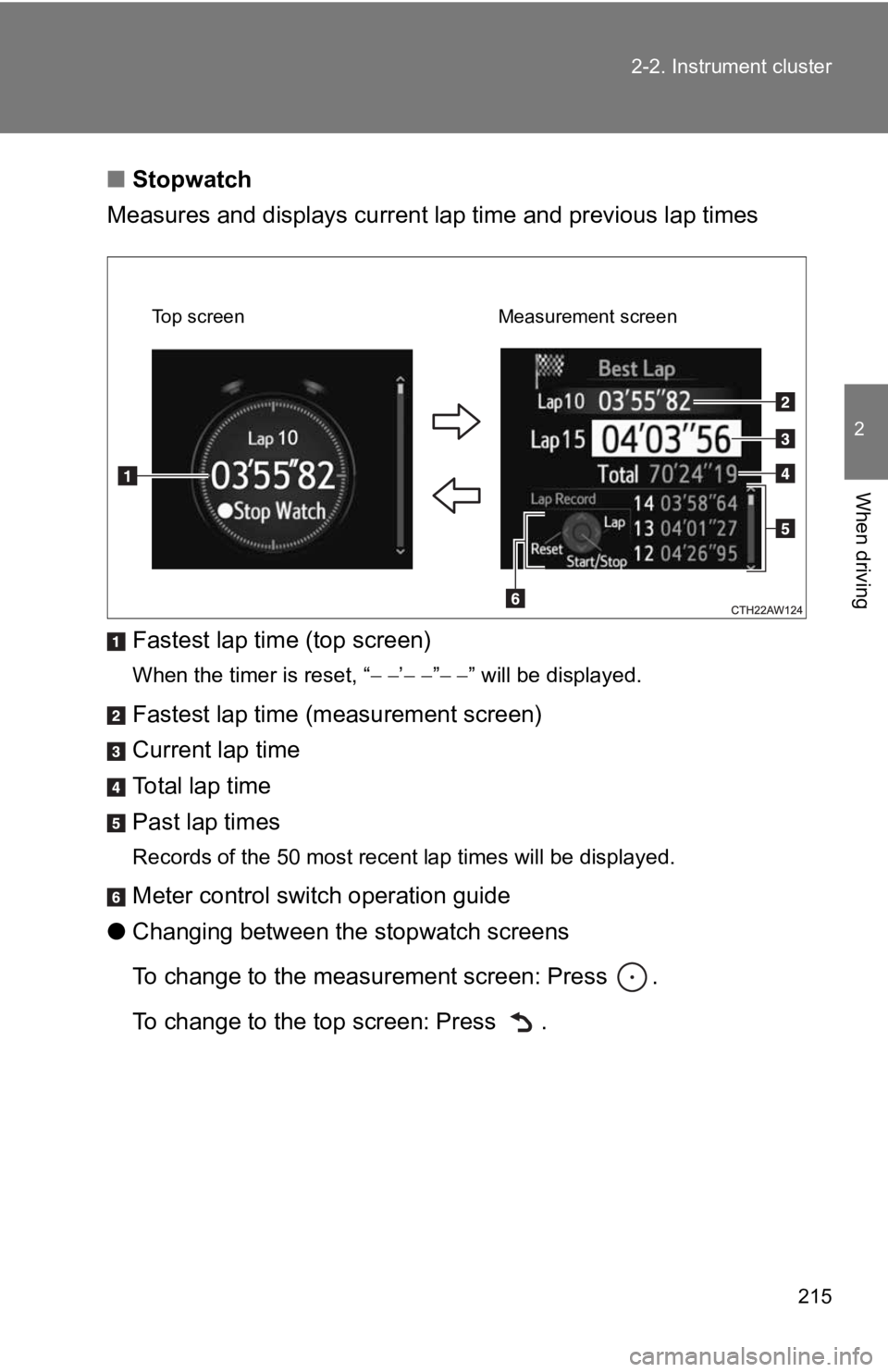
Stopwatch
Measures and displays current l ap time and previous lap times
Fastest lap time (top screen)
When the timer is reset, “ ’ ” ” will be displayed.
Fastest lap time (measurement screen)
Current lap time
To t a l l a p t i m e
Past lap times
Records of the 50 most recent lap times will be displayed.
Meter control swit ch operation guide
● Changing between the stopwatch screens
To change to the measurement screen: Press .
To change to the top screen: Press .
Top screen Measurement screen
Page 216 of 532
216 2-2. Instrument cluster
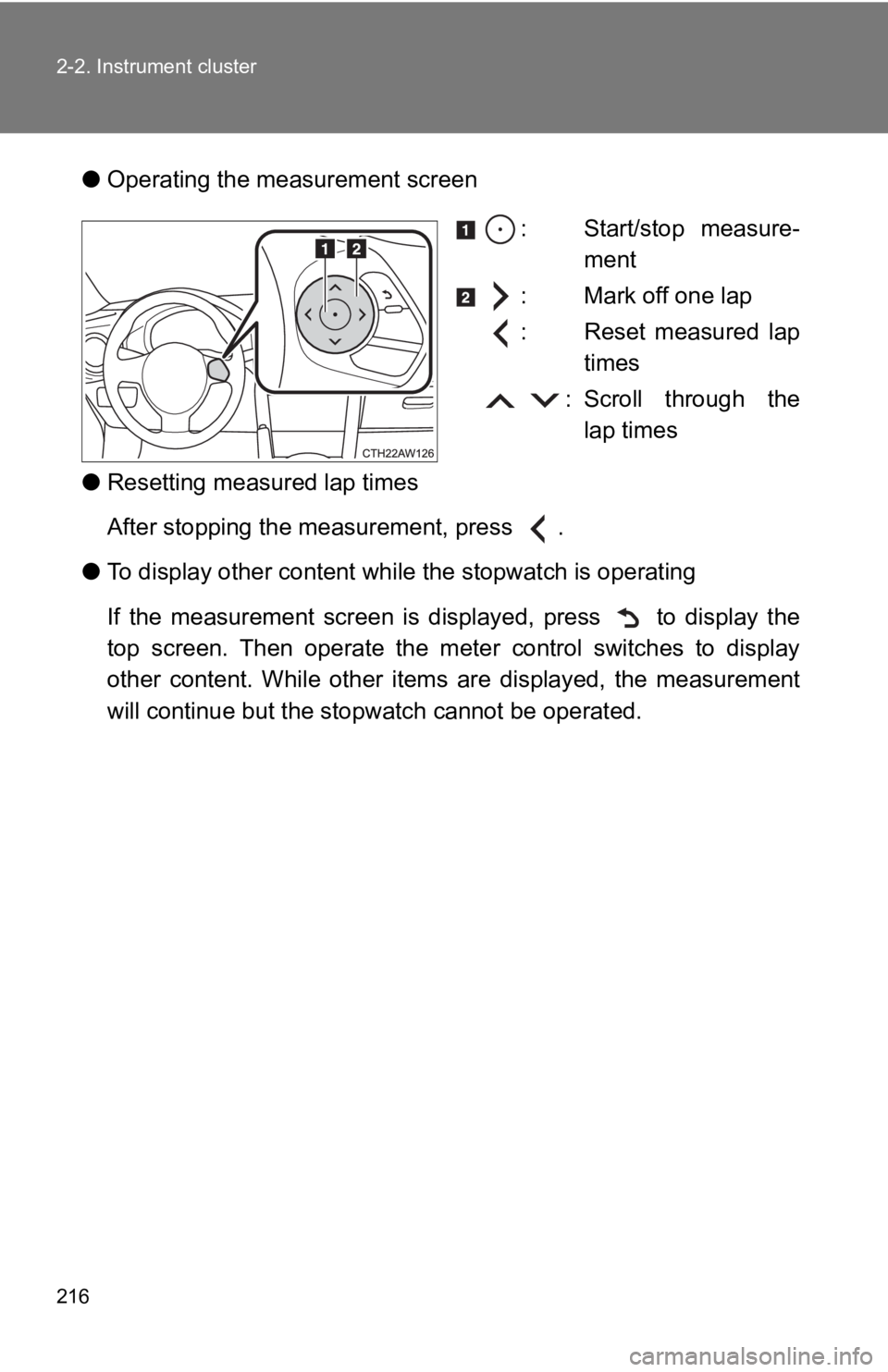
●Operating the me asurement screen
: Start/stop measure-ment
: Mark off one lap
: Reset measured lap times
: Scroll through the lap times
● Resetting measured lap times
After stopping the measurement, press .
● To display other content wh ile the stopwatch is operating
If the measurement screen is displayed, press to display the
top screen. Then operate the meter control switches to display
other content. While other items are displayed, the measurement
will continue but the stopwatch c annot be operated.
Page 290 of 532
290 3-3. Using the interior lights
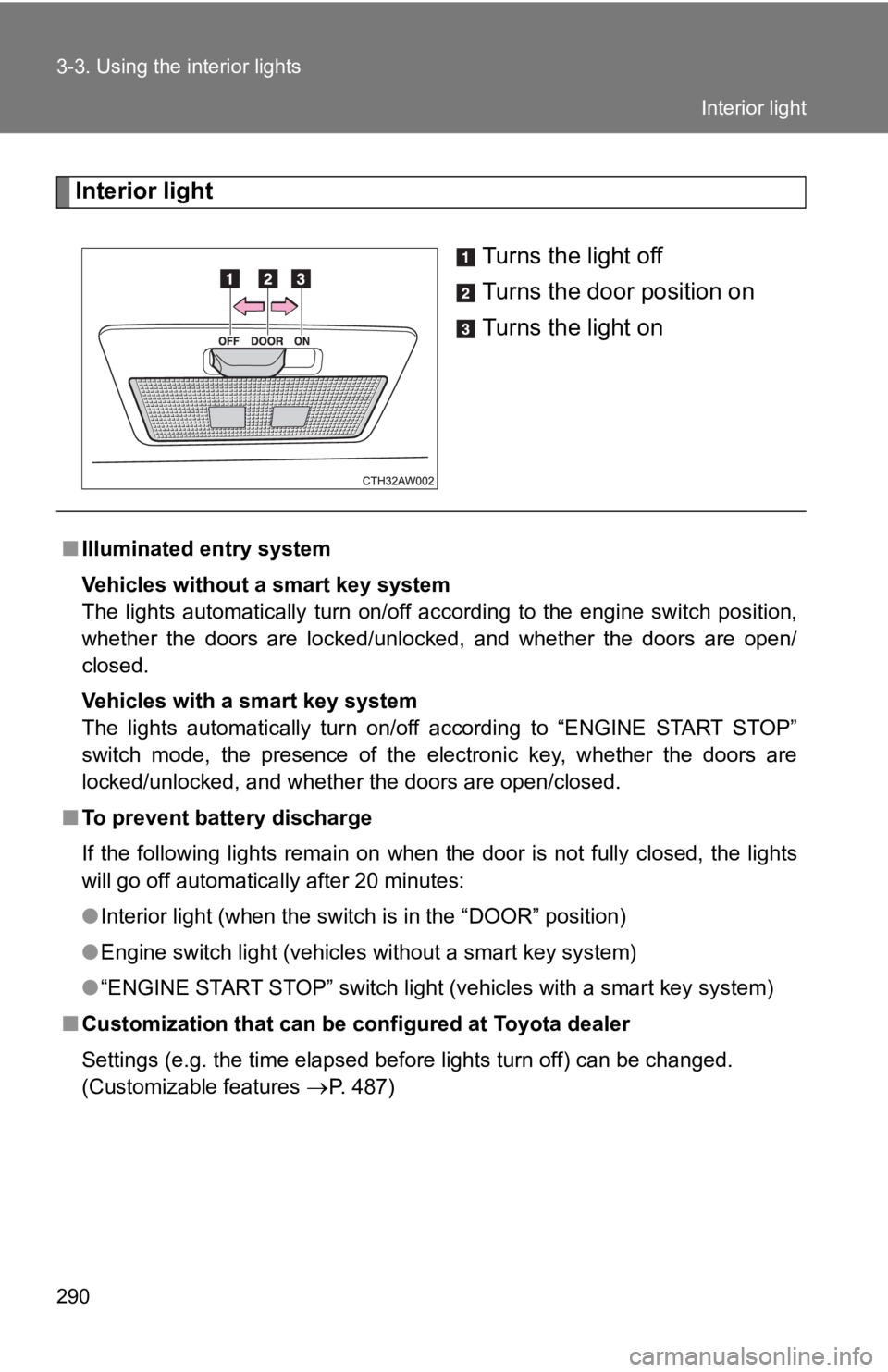
Interior lightTurns the light off
Turns the door position on
Turns the light on
■Illuminated entry system
Vehicles without a smart key system
The lights automatically turn on/off according to the engine sw itch position,
whether the doors are locked/unlocked, and whether the doors ar e open/
closed.
Vehicles with a smart key system
The lights automatically turn on/off according to “ENGINE START STOP”
switch mode, the presence of the electronic key, whether the do ors are
locked/unlocked, and whether the doors are open/closed.
■ To prevent battery discharge
If the following lights remain on when the door is not fully cl osed, the lights
will go off automatically after 20 minutes:
● Interior light (when the switch is in the “DOOR” position)
● Engine switch light (vehicles without a smart key system)
● “ENGINE START STOP” switch light (vehicles with a smart key sys tem)
■ Customization that can be configured at Toyota dealer
Settings (e.g. the time elapsed before lights turn off) can be changed.
(Customizable features
P. 487)
Interior light
Page 488 of 532
488 6-2. Customization
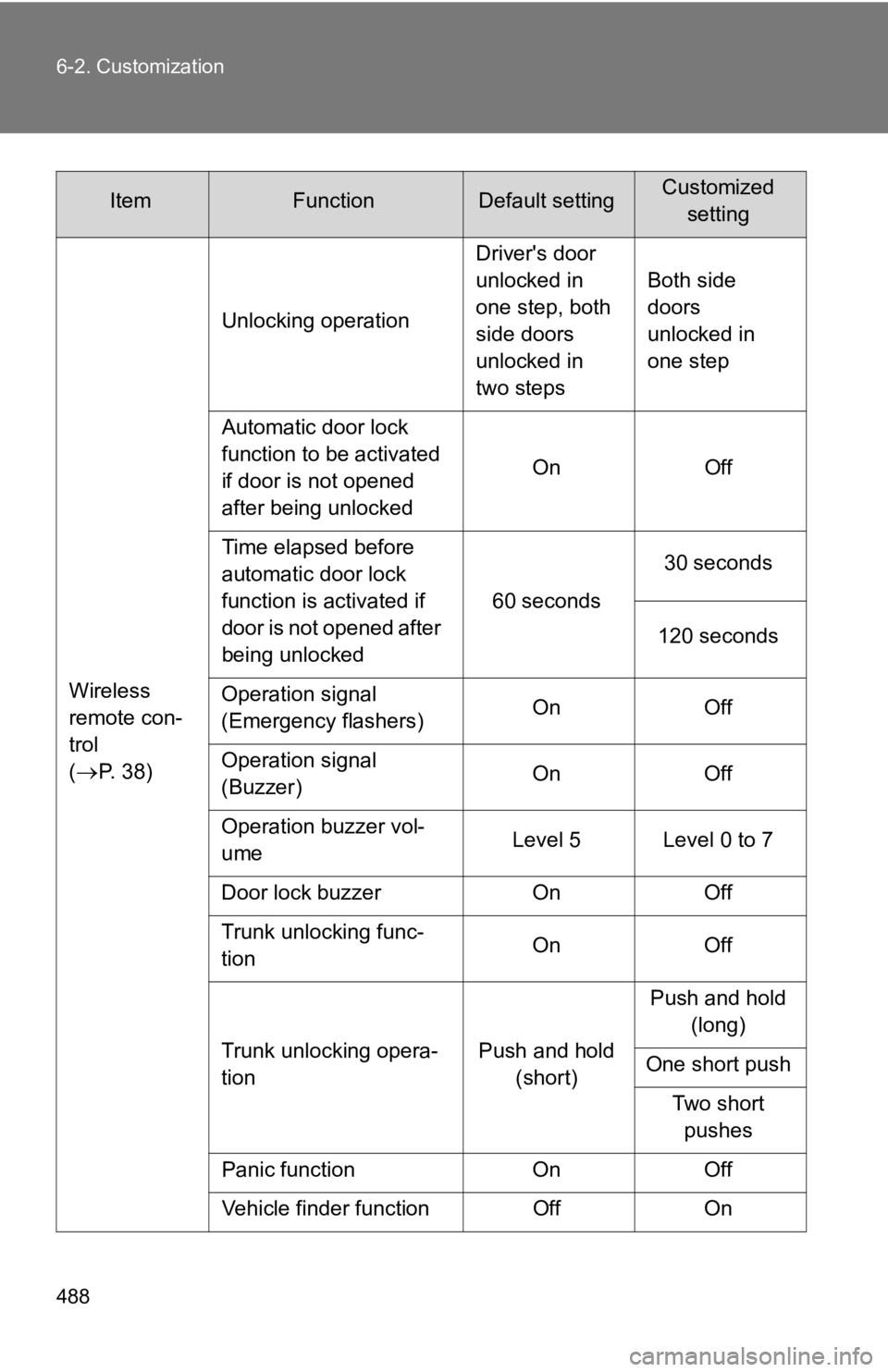
Wireless
remote con-
trol
(
P. 38)Unlocking operation
Driver's door
unlocked in
one step, both
side doors
unlocked in
two stepsBoth side
doors
unlocked in
one step
Automatic door lock
function to be activated
if door is not opened
after being unlocked On Off
Time elapsed before
automatic door lock
function is activated if
door is not opened after
being unlocked 60 seconds
30 seconds
120 seconds
Operation signal
(Emergency flashers) On Off
Operation signal
(Buzzer) On Off
Operation buzzer vol-
ume Level 5 Level 0 to 7
Door lock buzzer On Off
Trunk unlocking func-
tion On Off
Trunk unlocking opera-
tion Push and hold
(short) Push and hold
(long)
One short push
Two short pushes
Panic function On Off
Vehicle finder function Off On
ItemFunctionDefault settingCustomized setting
Page 489 of 532
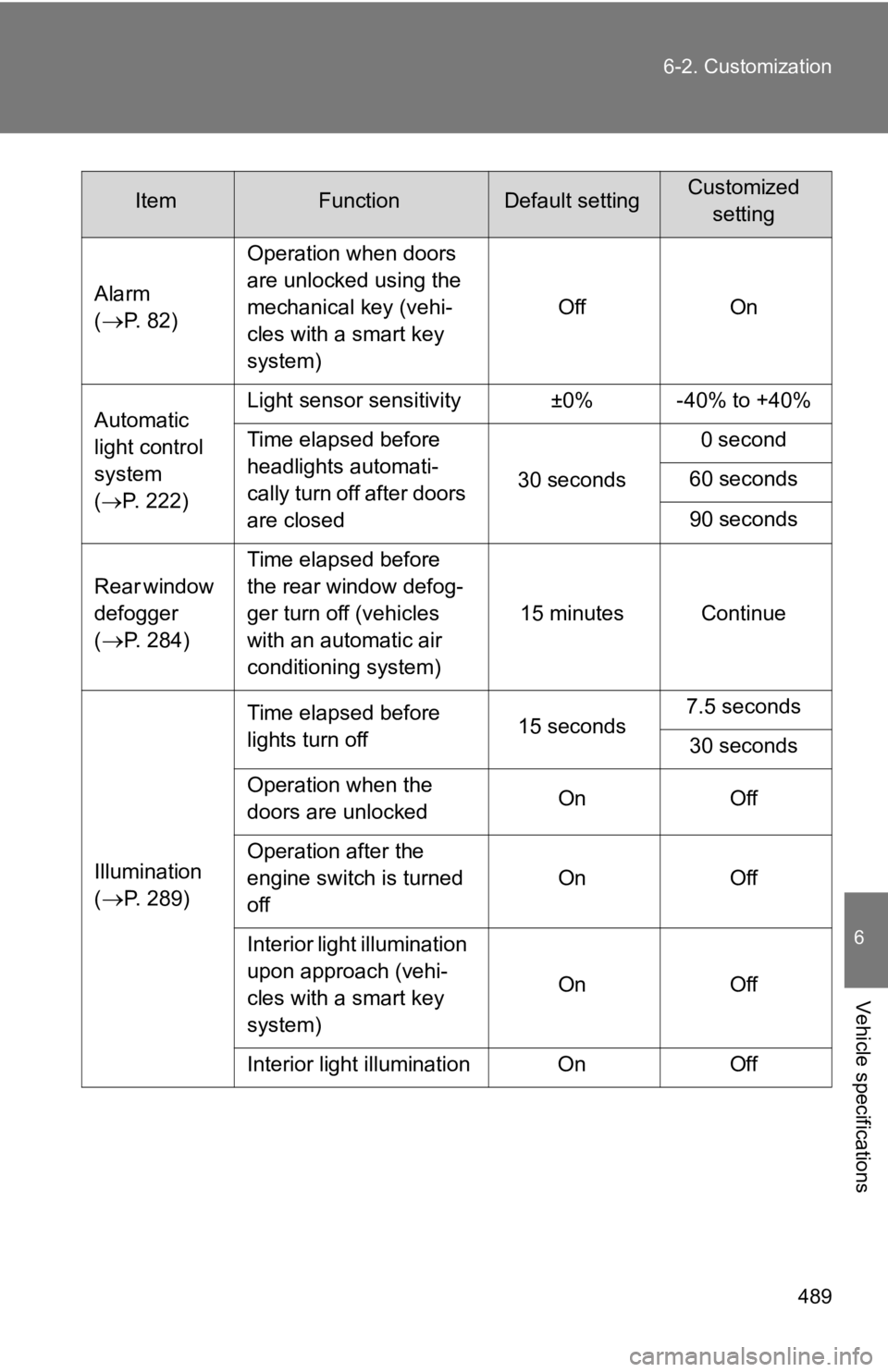
489
6-2. Customization
6
Vehicle specifications
Alarm
(
P. 82)
Operation when doors
are unlocked using the
mechanical key (vehi-
cles with a smart key
system)
Off On
Automatic
light control
system
( P. 222) Light sensor sensitivity ±0% -40% to +40%
Time elapsed before
headlights automati-
cally turn off after doors
are closed
30 seconds0 second
60 seconds
90 seconds
Rear window
defogger
(
P. 284) Time elapsed before
the rear window defog-
ger turn off (vehicles
with an automatic air
conditioning system)
15 minutes Continue
Illumination
(
P. 289) Time elapsed before
lights turn off
15 seconds7.5 seconds
30 seconds
Operation when the
doors are unlocked On Off
Operation after the
engine switch is turned
off On Off
Interior light illumination
upon approach (vehi-
cles with a smart key
system) On Off
Interior light illumination On Off
ItemFunctionDefault settingCustomized setting