brake TOYOTA HIGHLANDER 2008 XU40 / 2.G User Guide
[x] Cancel search | Manufacturer: TOYOTA, Model Year: 2008, Model line: HIGHLANDER, Model: TOYOTA HIGHLANDER 2008 XU40 / 2.GPages: 577, PDF Size: 11.46 MB
Page 162 of 577

162 2-1. Driving procedures
CAUTION
●If the power brake assist function does not operate, do not follow other
vehicles closely and avoid downhills or sharp turns that require braking.
In this case, braking is still possible, but it will require more force on the
pedal than usual. Braking distance may also increase.
● Do not pump the brake pedal if the engine stalls.
Each push on the brake pedal uses up the reserve for the power-assisted
brakes.
● The brake system consists of 2 individual hydraulic systems: If one of the
systems fails, the other will still operate. In this case, the brake pedal
should be depressed more firmly than usual and braking distance
becomes longer.
Do not drive your vehicle with only a single brake system. Have your
brakes fixed immediately.
■ If the vehicle becomes stu ck or bogged (4WD models)
Do not spin the wheels recklessly when any of the tires is up in the air, or
stuck in sand or mud etc. This may damage the drive system components or
propel the vehicle forward (or in another direction) and cause an accident.
■ If you hear a squealing or scrapin g noise (brake pad wear limit indica-
tors)
Have the brake pads checked and replaced by your Toyota dealer as soon
as possible.
The rotor damage can result if the pads are not replaced when needed.
It is dangerous to drive the vehicle when the wear limits of the brake pads
and/or that of the brake discs are exceeded.
■ If you get a flat tire while driving
A flat or damaged tire may cause the following situations. Hold the steering
wheel firmly and gradually press the brake pedal to slow down the vehicle.
●It may be difficult to control your vehicle.
● The vehicle will make abnormal sounds.
● The vehicle will behave abnormally.
Replace a flat tire with a new one. ( P. 503)
Page 163 of 577

163
2-1. Driving procedures
2
When driving
NOTICE
■
When driving the vehicle
Do not use the accelerator pedal or depress accelerator and brake pedals
together to hold the vehicle on a hill.
■ When parking the vehicle
Always put the shift lever in P. Failure to do so may cause the vehicle to
move or the vehicle may accelerate suddenly if the accelerator pedal is acci-
dentally depressed.
■ Avoiding damage to vehicle parts
●Do not turn the steering wheel fully in either direction and hold it there for a
long time.
Doing so may damage the power steering motor.
● When driving over bumps in the road, drive as slowly as possible to avoid
damaging the wheels, underside of the vehicle, etc.
■ When encountering flooded roads
Do not drive on a road that has flooded after heavy rain etc. Doing so may
cause the following serious damage to the vehicle.
●Engine stalling
● Short in electrical components
● Engine damage caused by water immersion
In the event that you drive on a flooded road and the vehicle is flooded, be
sure to have your Toyota dealer check the following.
● Brake function
● Changes in quantity and quality of oil and fluid used for the engine, tran-
saxle, transfer (4WD models), differential, etc.
● Lubricant condition for the propeller shaft (4WD models), bearings and
suspension joints (where possible) and the function of all joints, bearings,
etc.
Page 165 of 577
165
2-1. Driving procedures
2
When driving
■
Starting the engine
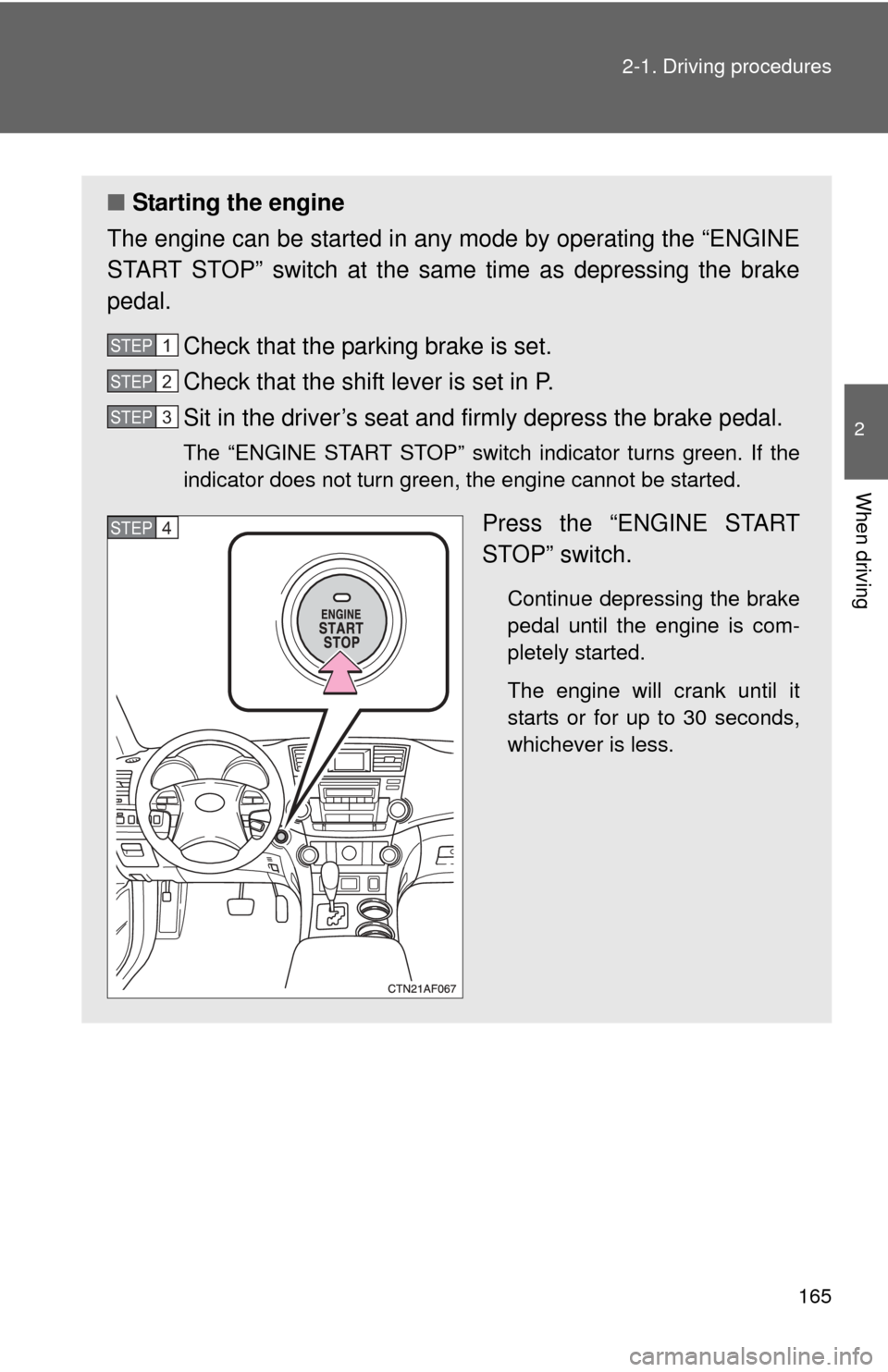
The engine can be started in any mode by operating the “ENGINE
START STOP” switch at the same time as depressing the brake
pedal.
Check that the parking brake is set.
Check that the shift lever is set in P.
Sit in the driver’s seat and firmly depress the brake pedal.
The “ENGINE START STOP” switch indicator turns green. If the
indicator does not turn green, the engine cannot be started.
Press the “ENGINE START
STOP” switch.
Continue depressing the brake
pedal until the engine is com-
pletely started.
The engine will crank until it
starts or for up to 30 seconds,
whichever is less.
STEP1
STEP2
STEP3
STEP4
Page 168 of 577
168
2-1. Driving procedures
Engine (ignition) switch (vehicles without smart key system)
■Starting the engine
Check that the parking brake is set.
Check that the shift lever is set in P.
Sit in the driver’s seat and firmly depress the brake pedal.
Turn the engine switch to the “START” position and start
the engine.
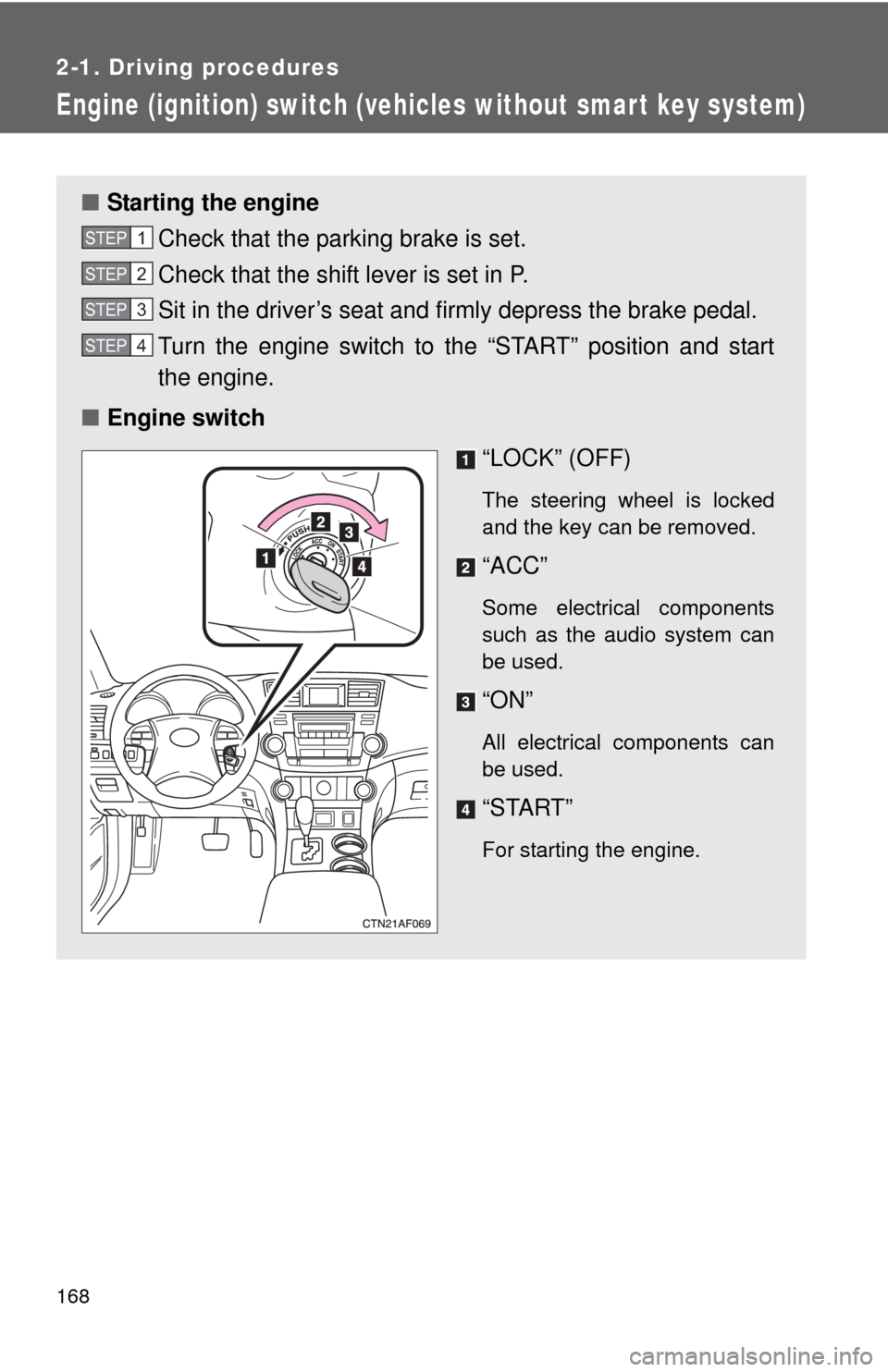
■ Engine switch
“LOCK” (OFF)
The steering wheel is locked
and the key can be removed.
“ACC”
Some electrical components
such as the audio system can
be used.
“ON”
All electrical components can
be used.
“START”
For starting the engine.
STEP1
STEP2
STEP3
STEP4
Page 171 of 577
171
2-1. Driving procedures
2
When driving
Automatic Transmission
Select a shift position appropriate for the driving conditions.
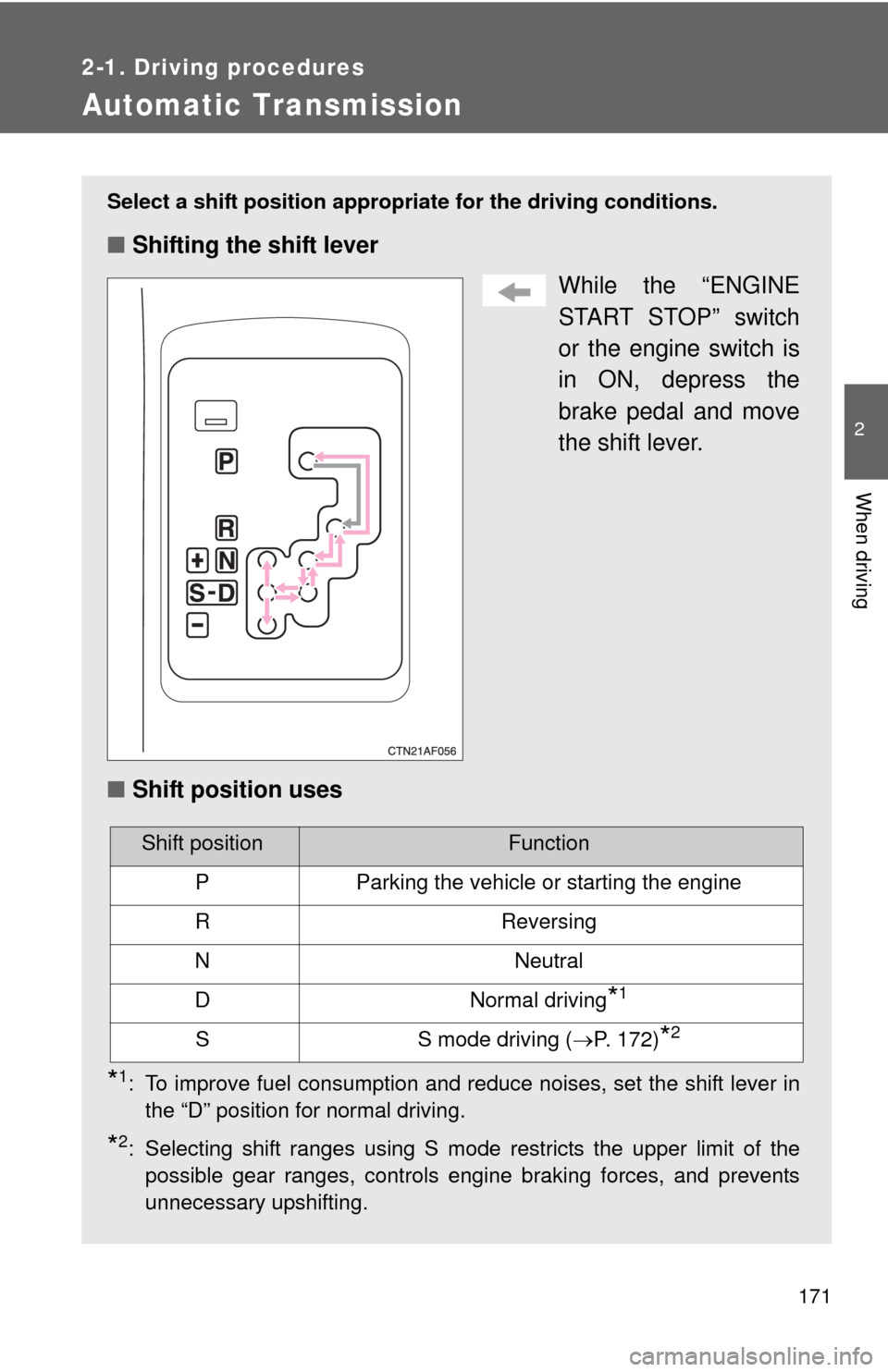
■Shifting the shift lever
While the “ENGINE
START STOP” switch
or the engine switch is
in ON, depress the
brake pedal and move
the shift lever.
■ Shift position uses
*1: To improve fuel consumption and reduce noises, set the shift lever in
the “D” position for normal driving.
*2: Selecting shift ranges using S mode restricts the upper limit of thepossible gear ranges, controls engine braking forces, and prevents
unnecessary upshifting.
Shift positionFunction
PParking the vehicle or starting the engine
RReversing
NNeutral
DNormal driving*1
SS mode driving ( P. 172)*2
Page 173 of 577
173
2-1. Driving procedures
2
When driving
■
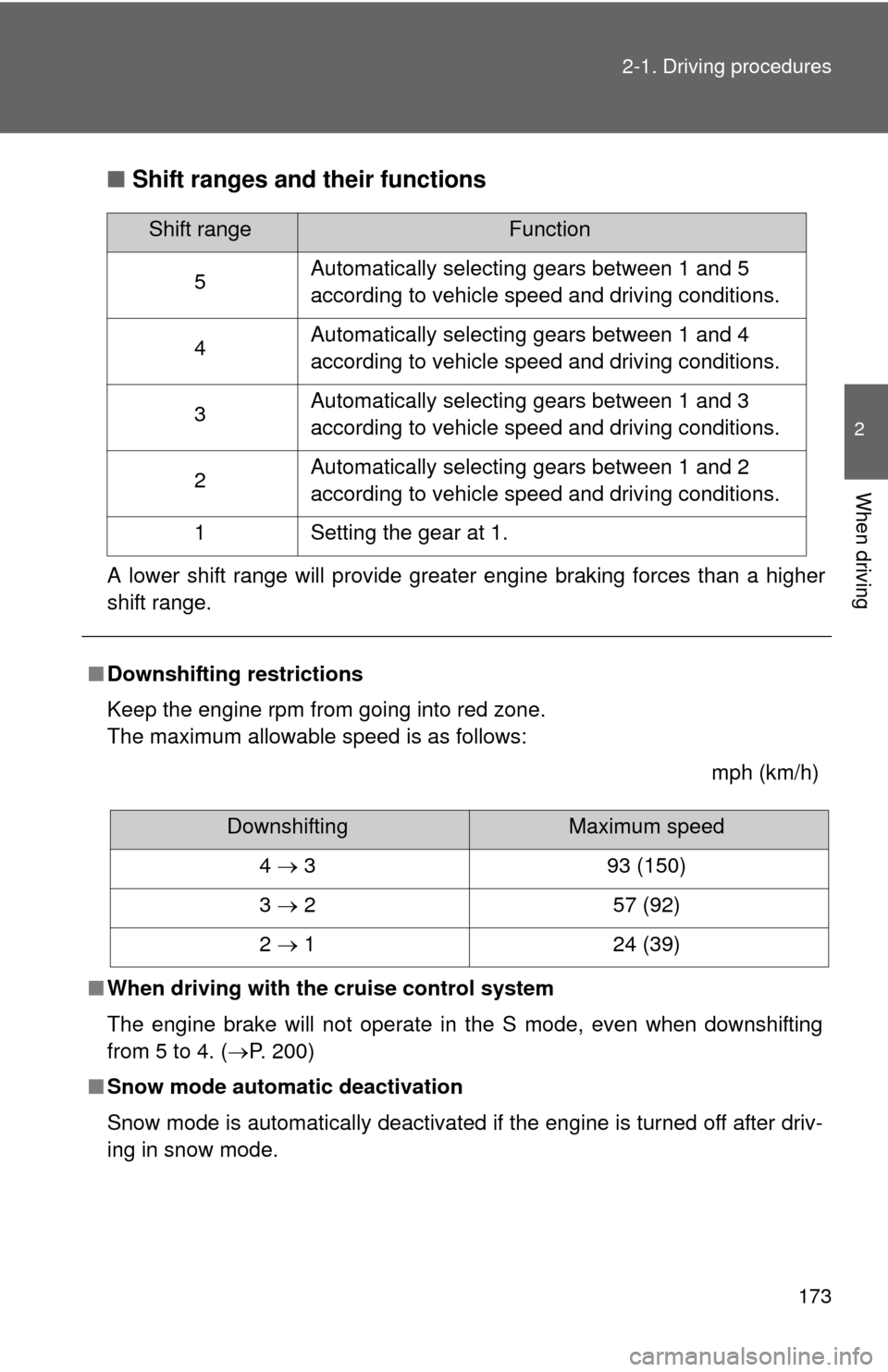
Shift ranges and their functions
A lower shift range will provide greater engine braking forces than a higher
shift range.
■Downshifting restrictions
Keep the engine rpm from going into red zone.
The maximum allowable speed is as follows:
mph (km/h)
■ When driving with the cruise control system
The engine brake will not operate in the S mode, even when downshifting
from 5 to 4. ( P. 200)
■ Snow mode automatic deactivation
Snow mode is automatically deactivated if the engine is turned off after driv-
ing in snow mode.
Shift rangeFunction
5 Automatically selecting gears between 1 and 5
according to vehicle speed and driving conditions.
4 Automatically selecting gears between 1 and 4
according to vehicle speed and driving conditions.
3 Automatically selecting gears between 1 and 3
according to vehicle speed and driving conditions.
2 Automatically selecting gears between 1 and 2
according to vehicle speed and driving conditions.
1 Setting the gear at 1.
DownshiftingMaximum speed
4 3 93 (150)
3 2 57 (92)
2 1 24 (39)
Page 176 of 577
176
2-1. Driving procedures
Parking brake
NOTICE
■Before driving
Fully release the parking brake.
Driving the vehicle with the parking brake set will lead to brake components
overheating, which may affect braking performance and increase brake
wear.
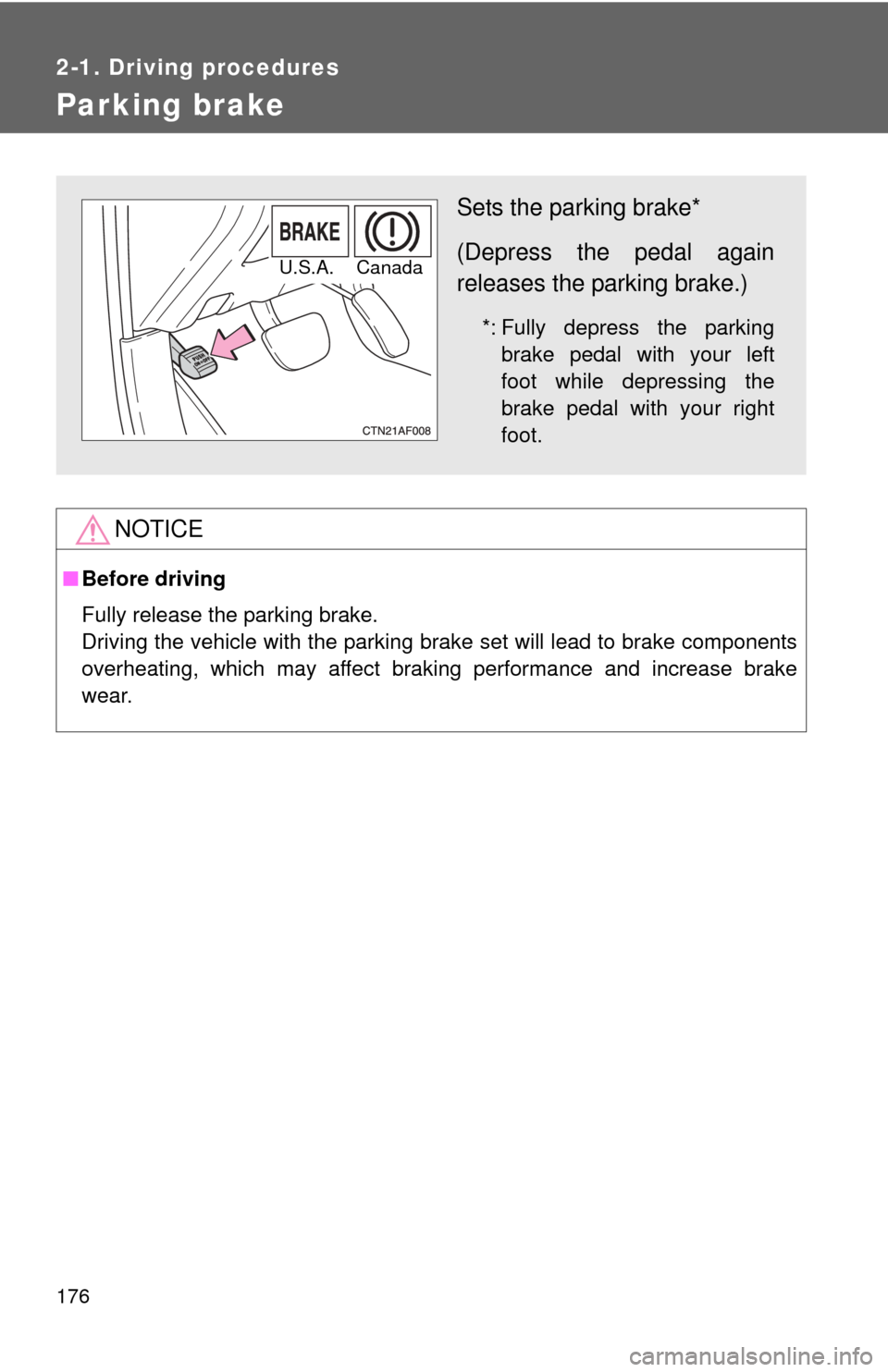
Sets the parking brake*
(Depress the pedal again
releases the parking brake.)
*: Fully depress the parking
brake pedal with your left
foot while depressing the
brake pedal with your right
foot.
U.S.A. Canada
Page 194 of 577
194 2-3. Operating the lights and wipers
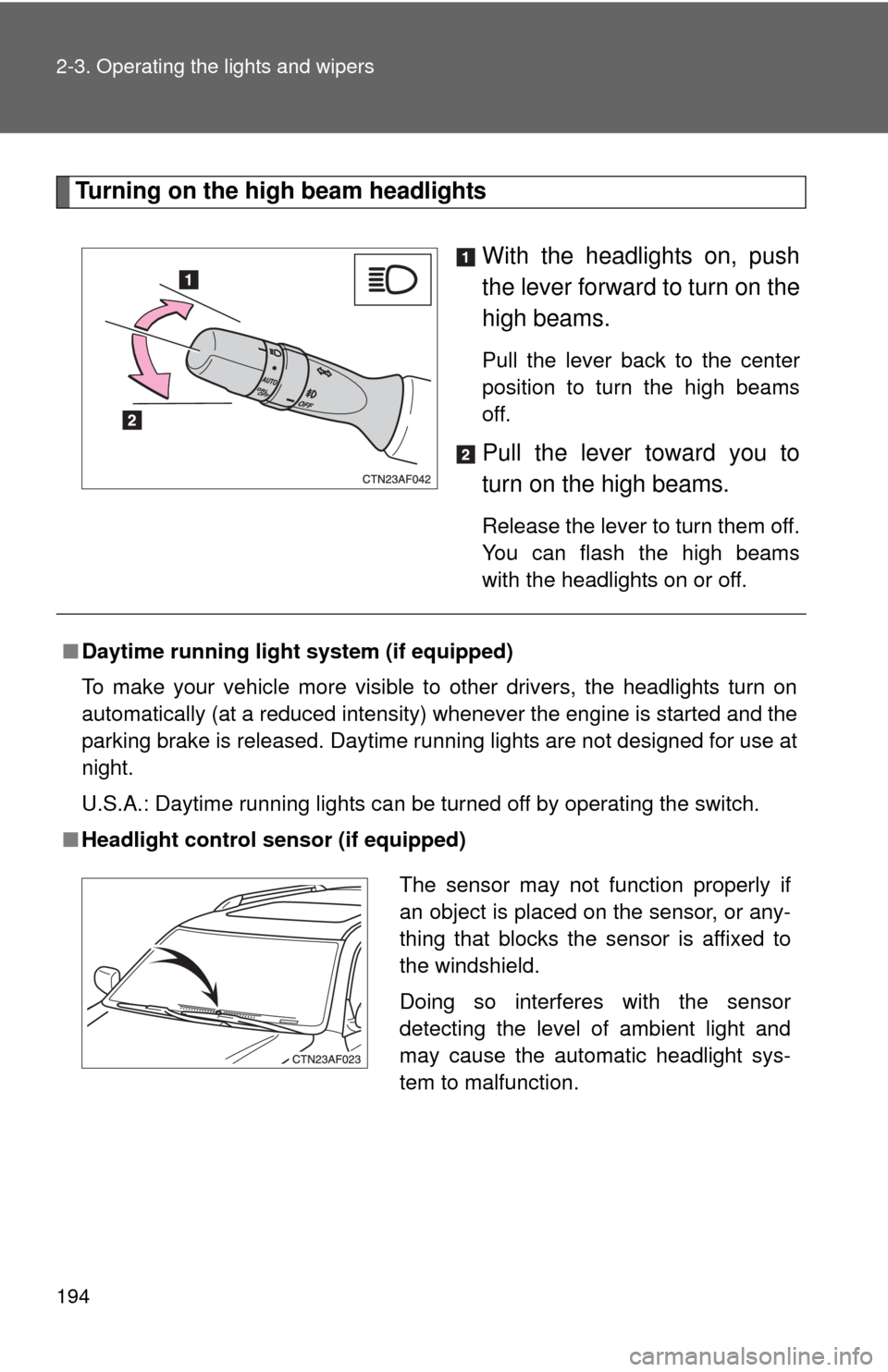
Turning on the high beam headlightsWith the headlights on, push
the lever forward to turn on the
high beams.
Pull the lever back to the center
position to turn the high beams
off.
Pull the lever toward you to
turn on the high beams.
Release the lever to turn them off.
You can flash the high beams
with the headlights on or off.
■Daytime running light system (if equipped)
To make your vehicle more visible to other drivers, the headlights turn on
automatically (at a reduced intensity) whenever the engine is started and the
parking brake is released. Daytime running lights are not designed for use at
night.
U.S.A.: Daytime running lights can be turned off by operating the switch.
■ Headlight control sensor (if equipped)
The sensor may not function properly if
an object is placed on the sensor, or any-
thing that blocks the sensor is affixed to
the windshield.
Doing so interferes with the sensor
detecting the level of ambient light and
may cause the automatic headlight sys-
tem to malfunction.
Page 201 of 577
201
2-4. Using other
driving systems
2
When driving
■Cruise control can be set when
●The shift lever is in D, 4 or 5 range of S.
● Vehicle speed is above approximately 25 mph (40 km/h). Within the limits
of the engine’s capabilities, cruising speed can be maintained up or down
grades.
■ Accelerating
The vehicle can be accelerated normally.
■ Automatic cruise control cancellation
The set speed is automatically cancelled in any of the following situations.
●Actual vehicle speed falls more than 10 mph (16 km/h) below the preset
vehicle speed.
At this time, the memorized set speed is not retained.
● Actual vehicle speed is below 25 mph (40 km/h).
● VSC is activated.
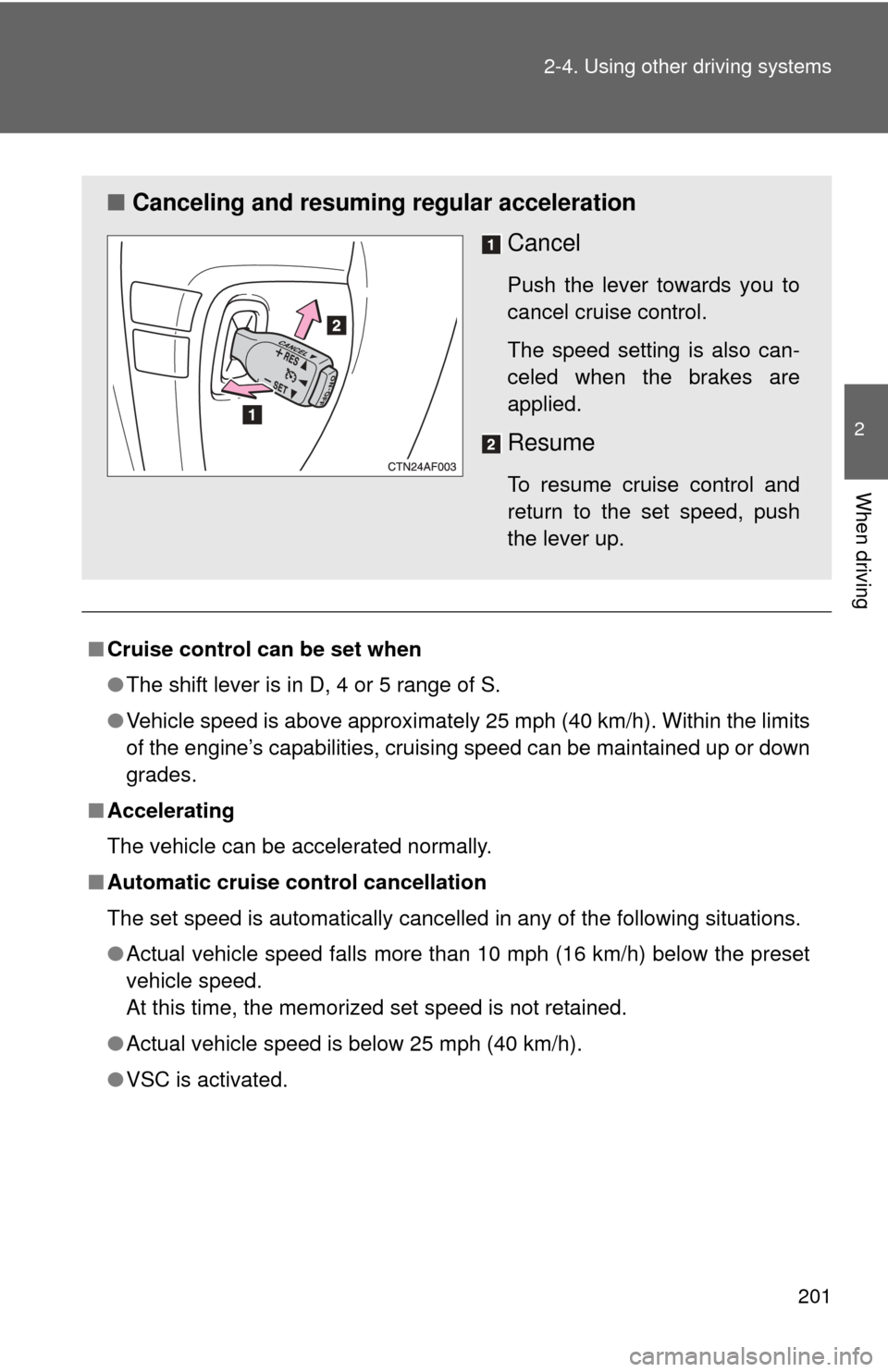
■ Canceling and resuming regular acceleration
Cancel
Push the lever towards you to
cancel cruise control.
The speed setting is also can-
celed when the brakes are
applied.
Resume
To resume cruise control and
return to the set speed, push
the lever up.
Page 207 of 577
207
2-4. Using other driving systems
2
When driving
Driving assist systems
To help enhance driving safety and performance, the following sys-
tems operate automatically in res ponse to various driving situations.
Be aware, however, that these systems are supplementary and
should not be relied upon too heavi ly when operating the vehicle.
■ABS (Anti-lock Brake System)
Helps to prevent wheel lock when the brakes are applied suddenly, or if
the brakes are applied while driving on a slippery road surface.
■BA (Brake Assist)
Generates an increased level of braking force after the brake pedal is
depressed, when the system detects a panic stop situation.
■Enhanced VSC (Enhanced Vehicle Stability Control)
Helps the driver to control skidding when swerving suddenly or turning
on slippery road surfaces.
■TRAC (Traction Control)
Maintains drive power and prevents the front wheels (2WD models) or
four wheels (4WD models) from sp inning when starting the vehicle or
accelerating on slippery roads.
■ Hill-start assist control
→ P. 212
■Downhill assist control system (4WD models only)
→ P. 213
■EPS (Electric Power Steering)
Employs an electric motor to reduce the amount of effort needed to turn
the steering wheel.