turn signal TOYOTA HIGHLANDER 2008 XU40 / 2.G User Guide
[x] Cancel search | Manufacturer: TOYOTA, Model Year: 2008, Model line: HIGHLANDER, Model: TOYOTA HIGHLANDER 2008 XU40 / 2.GPages: 577, PDF Size: 11.46 MB
Page 392 of 577
391
3-7. Other interior features
3
Interior features
Test the operation of the HomeLink by pressing the newly
programmed button. Check to see if the gate/device operates
correctly.
Repeat the steps above to program another device for each of
the remaining HomeLink
buttons.
■ Programming other devices
To program other devices such as home security systems, home
door locks or lighting, contact your authorized Toyota dealer for
assistance.
■ Reprogramming a button
The individual HomeLink
buttons cannot be erased but can be
reprogrammed. To reprogram a button, follow the programming
instructions.
Operating the HomeLink
Press the appropriate HomeLink button. The HomeLink indicator
light on the HomeLink transceiver should turn on.
The HomeLink continues to send a signal for up to 20 seconds as long
as the button is pressed.
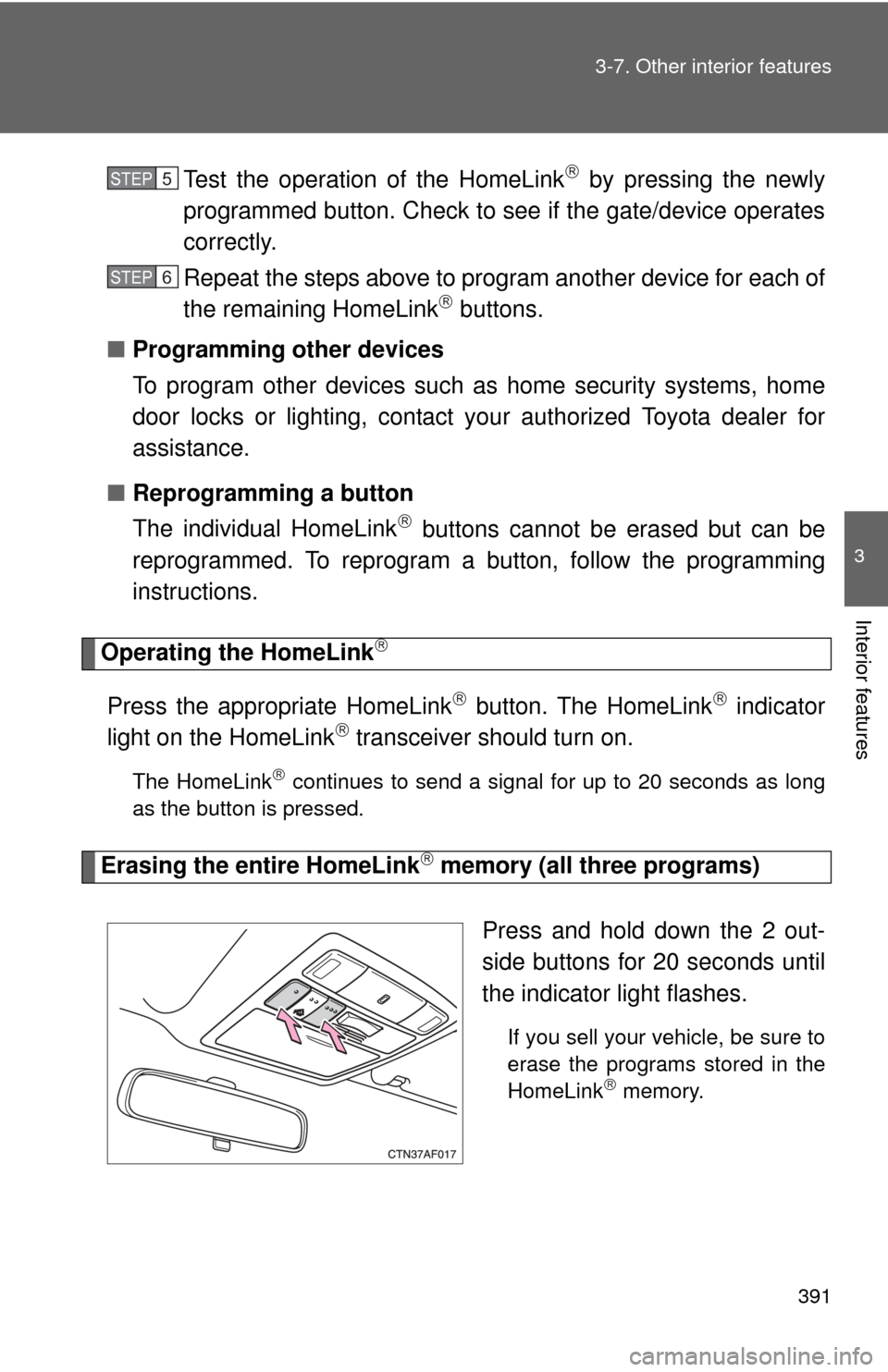
Erasing the entire HomeLink memory (all three programs)
Press and hold down the 2 out-
side buttons for 20 seconds until
the indicator light flashes.
If you sell your vehicle, be sure to
erase the programs stored in the
HomeLink
memory.
STEP5
STEP6
Page 461 of 577
460 4-3. Do-it-yourself maintenance
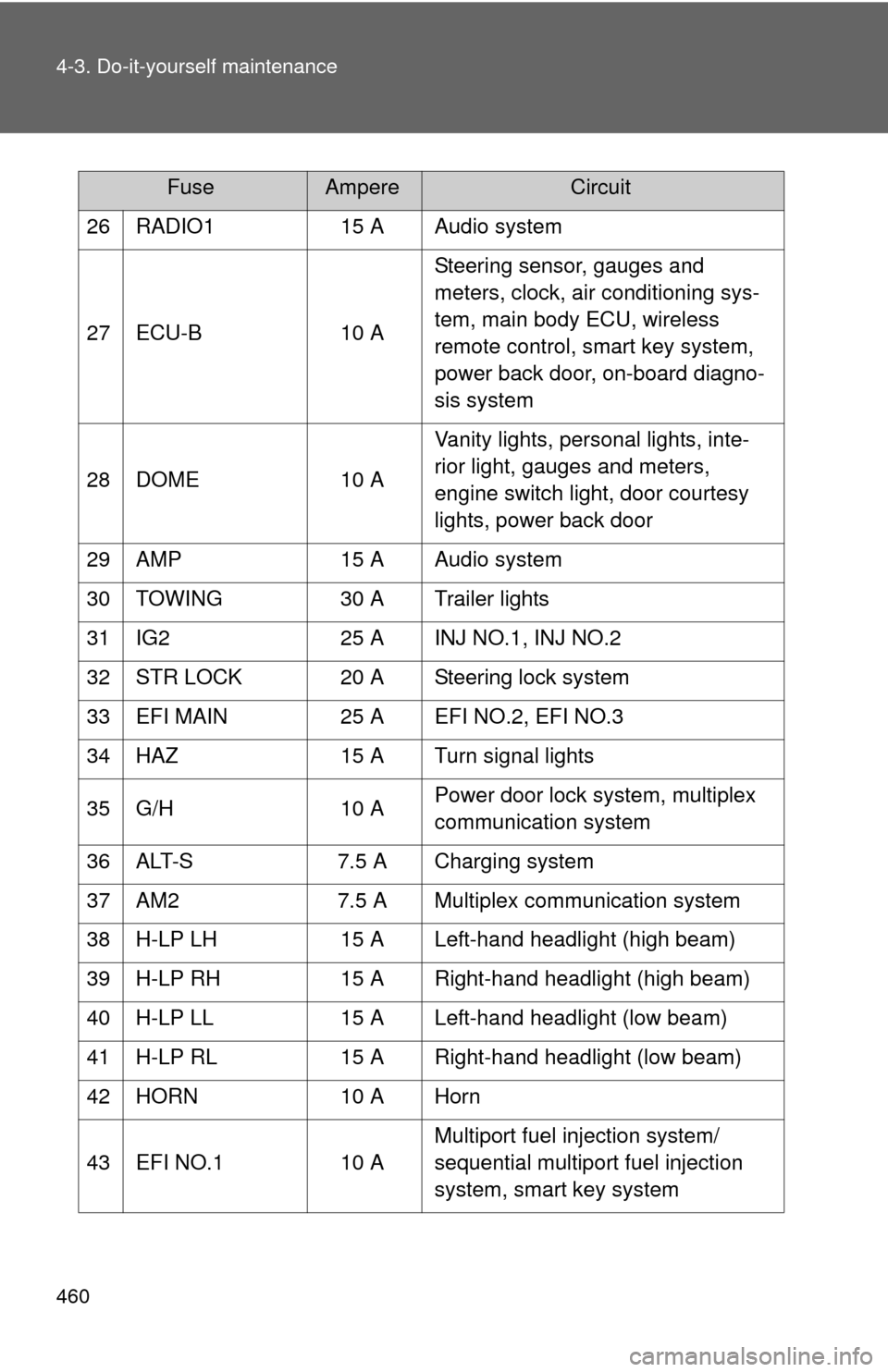
26 RADIO115 A Audio system
27 ECU-B 10 ASteering sensor, gauges and
meters, clock, air conditioning sys-
tem, main body ECU, wireless
remote control, smart key system,
power back door, on-board diagno-
sis system
28 DOME 10 AVanity lights, personal lights, inte-
rior light, gauges and meters,
engine switch light, door courtesy
lights, power back door
29 AMP 15 A Audio system
30 TOWING 30 A Trailer lights
31 IG2 25 A INJ NO.1, INJ NO.2
32 STR LOCK 20 A Steering lock system
33 EFI MAIN 25 A EFI NO.2, EFI NO.3
34 HAZ 15 A Turn signal lights
35 G/H 10 APower door lock system, multiplex
communication system
36 ALT-S 7.5 A Charging system
37 AM2 7.5 A Multiplex communication system
38 H-LP LH 15 A Left-hand headlight (high beam)
39 H-LP RH 15 A Right-hand headlight (high beam)
40 H-LP LL 15 A Left-hand headlight (low beam)
41 H-LP RL 15 A Right-hand headlight (low beam)
42 HORN 10 A Horn
43 EFI NO.1 10 AMultiport fuel injection system/
sequential multiport fuel injection
system, smart key system
FuseAmpereCircuit
Page 467 of 577
466
4-3. Do-it-yourself maintenance
Light bulbs
You may replace the following bulbs yourself. The difficulty level of
replacement varies depending on the bulb. If necessary bulb
replacement seems difficult to perfor m, contact your Toyota dealer.
For more information about replacing other light bulbs, contact your
Toyota dealer.
■ Prepare a replacement light bulb.
Check the wattage of the light bulb being replaced. ( P. 538)
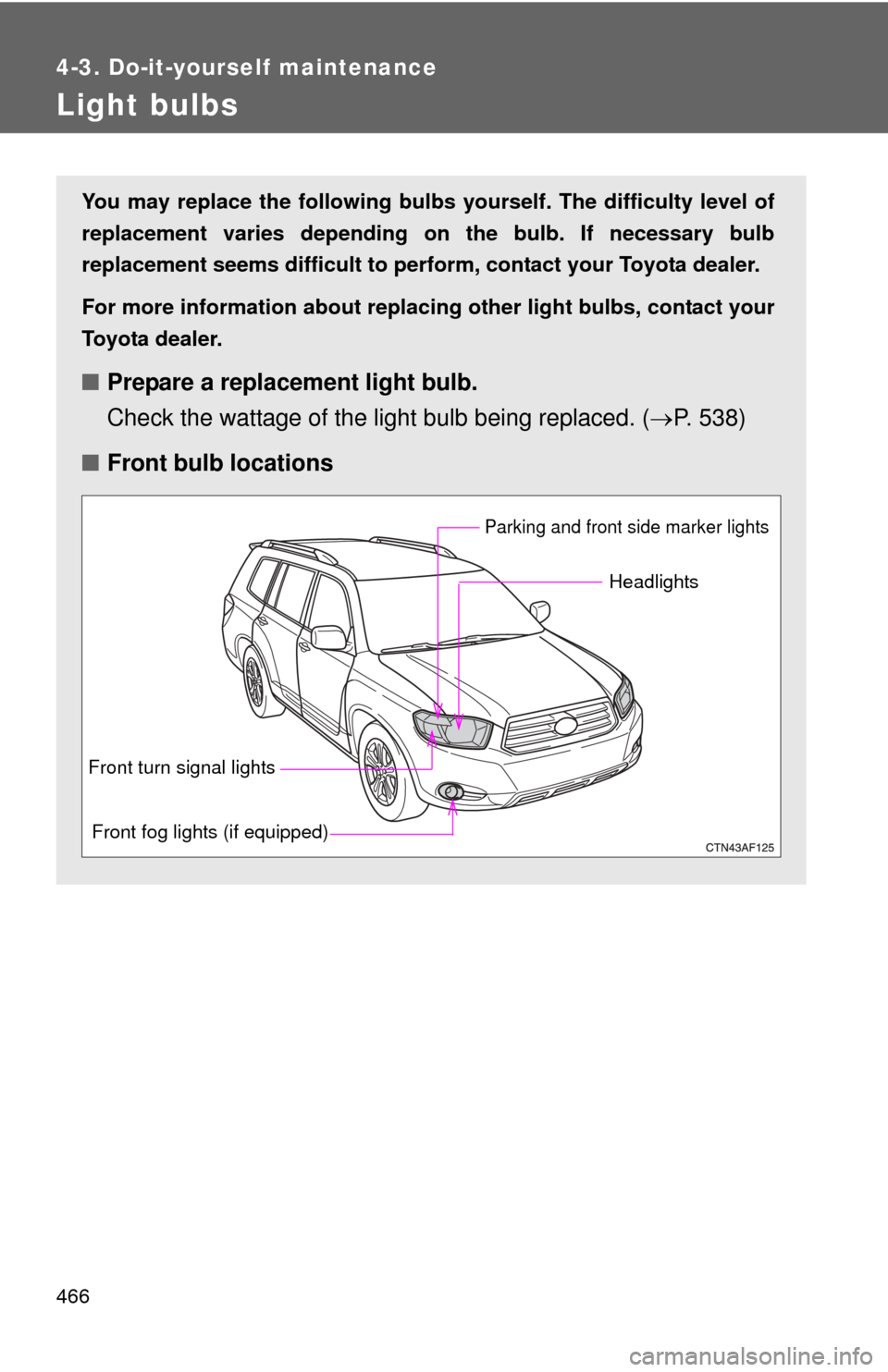
■ Front bulb locations
Headlights
Parking and front side marker lights
Front fog lights (if equipped)
Front turn signal lights
Page 468 of 577
467
4-3. Do-it-yourself maintenance
4
Maintenance and care
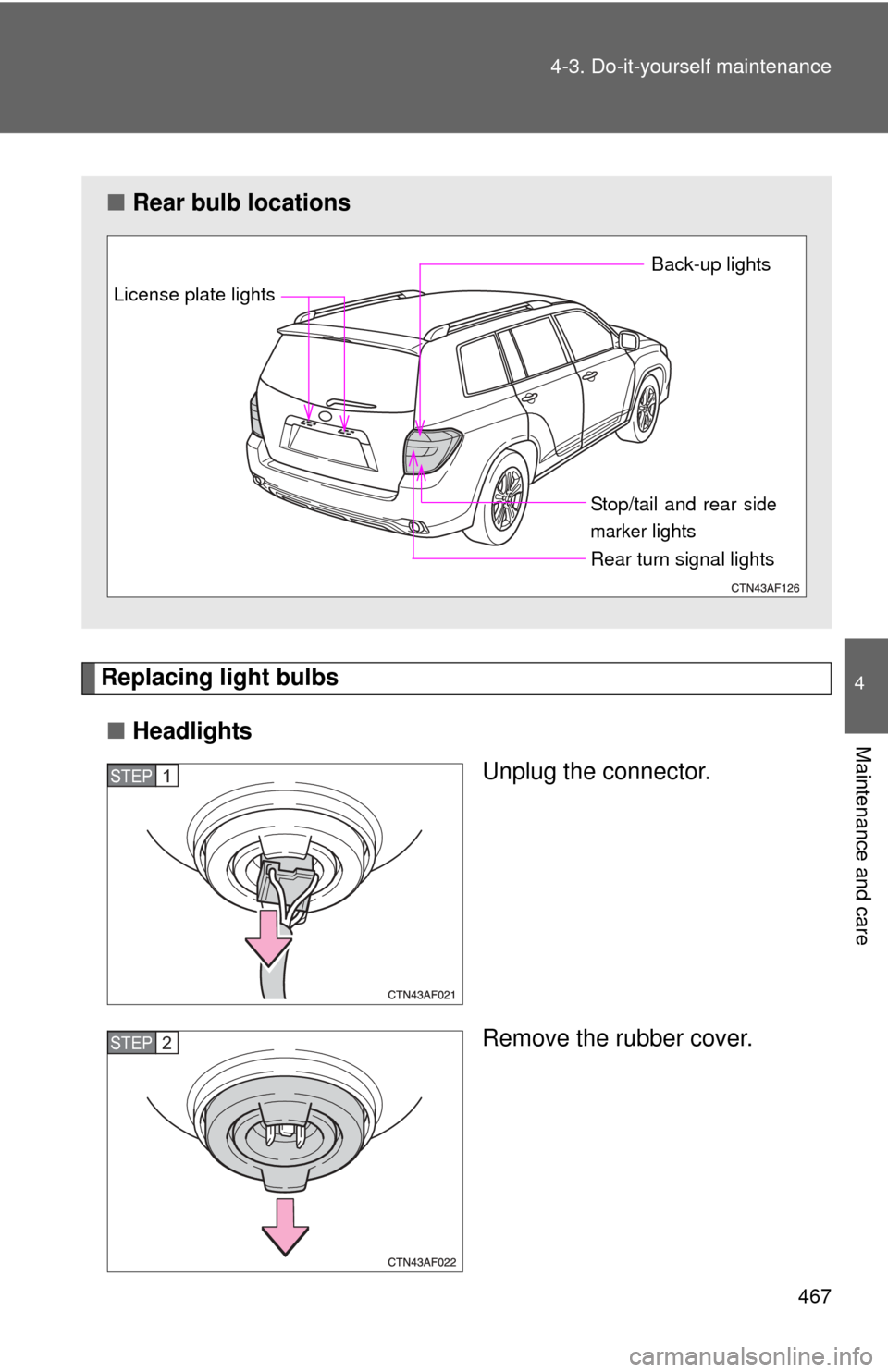
Replacing light bulbs
■ Headlights
Unplug the connector.
Remove the rubber cover.
■Rear bulb locations
Back-up lights
Rear turn signal lights Stop/tail and rear
side
marker
lights
License plate lights
STEP1
STEP2
Page 473 of 577
472 4-3. Do-it-yourself maintenance
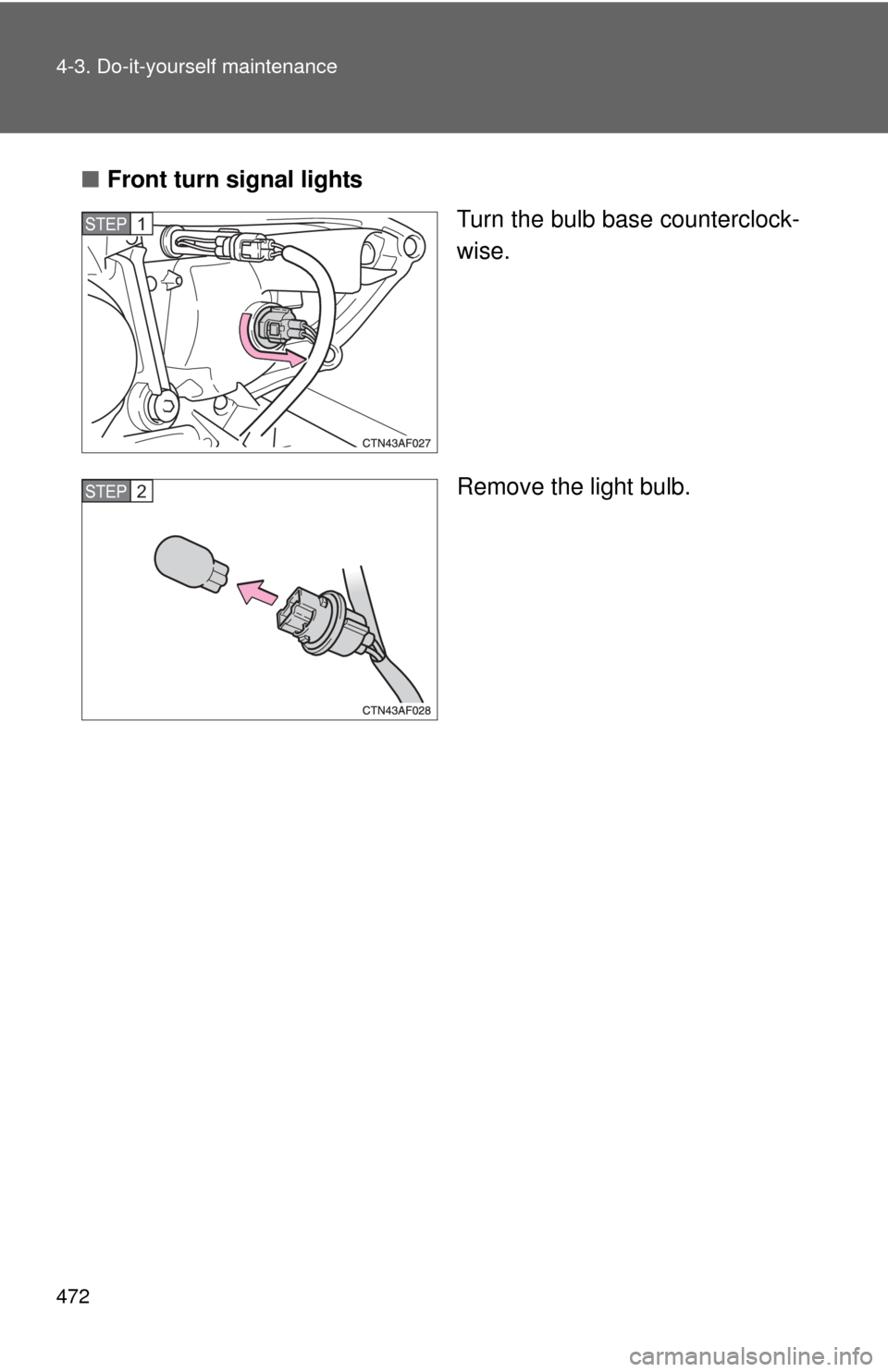
■Front turn signal lights
Turn the bulb base counterclock-
wise.
Remove the light bulb.
STEP1
STEP2
Page 474 of 577
473
4-3. Do-it-yourself maintenance
4
Maintenance and care
■
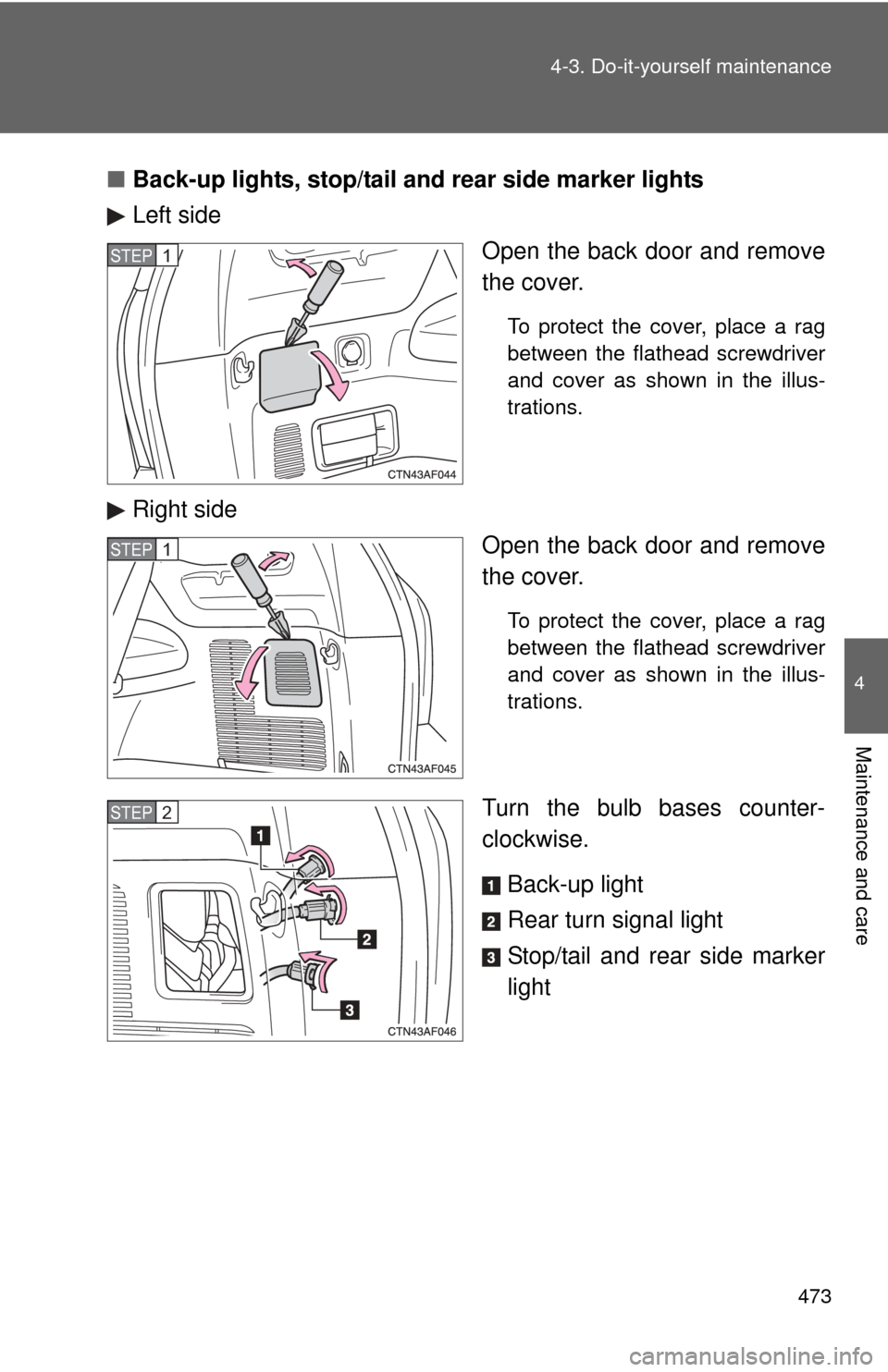
Back-up lights, stop/tail and rear side marker lights
Left side
Open the back door and remove
the cover.
To protect the cover, place a rag
between the flathead screwdriver
and cover as shown in the illus-
trations.
Right sideOpen the back door and remove
the cover.
To protect the cover, place a rag
between the flathead screwdriver
and cover as shown in the illus-
trations.
Turn the bulb bases counter-
clockwise.
Back-up light
Rear turn signal light
Stop/tail and rear side marker
light
STEP1
STEP1
STEP2
Page 475 of 577
474 4-3. Do-it-yourself maintenance
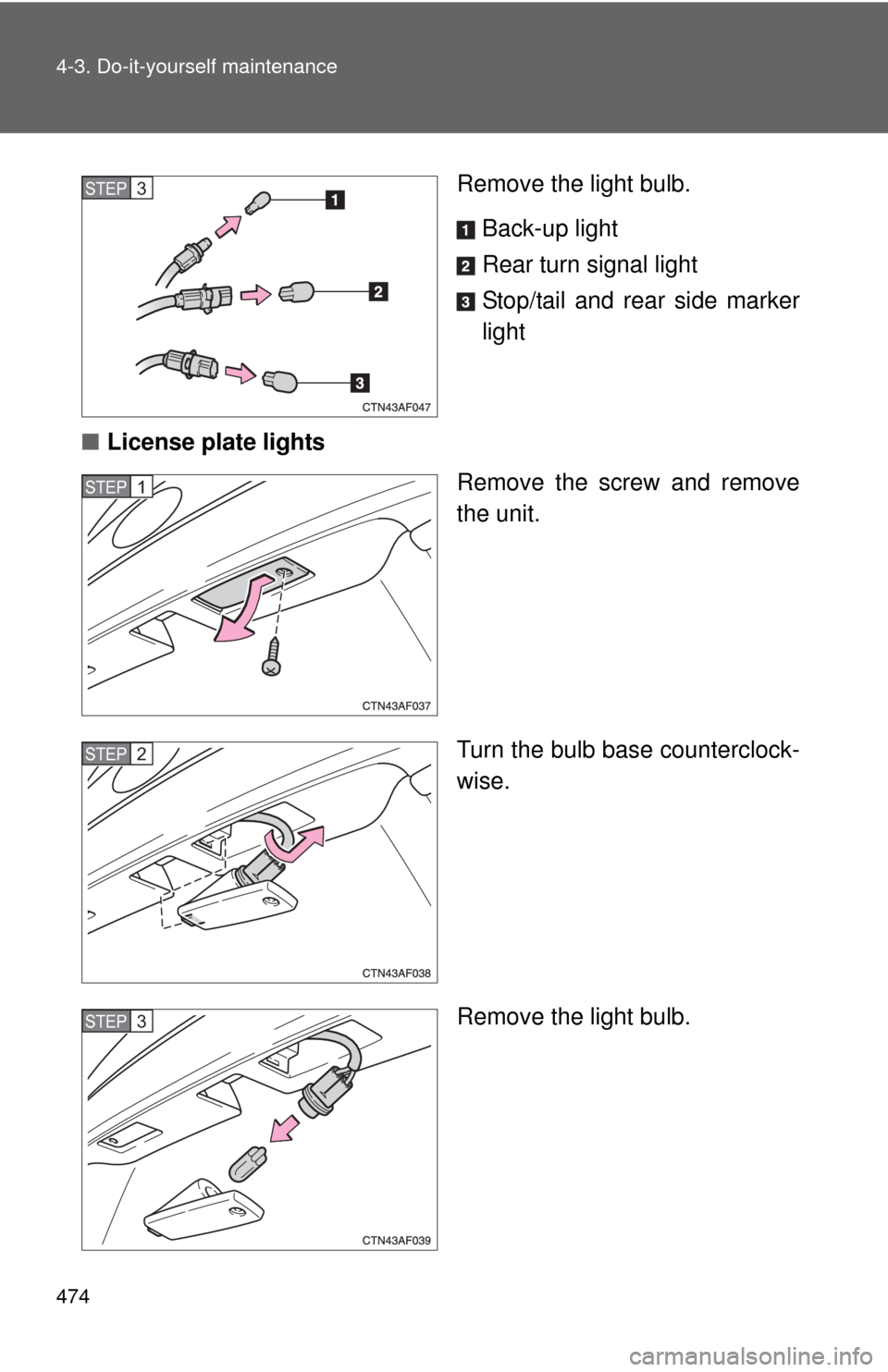
Remove the light bulb.Back-up light
Rear turn signal light
Stop/tail and rear side marker
light
■ License plate lights
Remove the screw and remove
the unit.
Turn the bulb base counterclock-
wise.
Remove the light bulb.STEP3
STEP1
STEP2
STEP3
Page 496 of 577
5
When trouble arises
495
5-2. Steps to take in an emergency
■If the tire pressure warning system is inoperative
The tire pressure warning system may become inoperative in the follow-
ing conditions:
(When the condition be
comes normal, the system will work properly.)
●If tires not equipped with tire pressure warning valves and transmit-
ters are used.
●If the ID code on the tire pressure warning valves and transmitters is
not registered.
●If electronic devices or facilities using similar radio wave frequencies
are nearby.
●If a large metallic object which can interfere with signal reception is
put in the trunk.
●If a radio set at similar frequencies is in use in the vehicle.
●If a window tint that affects the radio wave signals is installed.
●If there is a lot of snow or ice on the vehicle, in particular around the
wheels or wheel housings.
●If non-genuine Toyota wheels are used.
●If tire chains are used.
●If the spare tire (except compact spare tire) is in a location subject to
poor radio wave signal reception.
●If the tire inflation pressure is 73 psi (500 kPa, 5.1 kgf/cm2 or bar) or
higher.
■If the tire pressure warning light comes on after blinking for 1
minute frequently
If the tire pressure warning light comes on after blinking for 1 minute fre-
quently when the “ENGINE START STOP” switch or the engine switch is
set at ON, have it checked by your Toyota dealer.
Even if you use genuine wheels, the tire pressure warning system may
not work properly with some types of tires.
Pushing the tire pressure reset switch should not turn off the tire pres-
sure warning light.
Page 539 of 577
538 6-1. Specifications
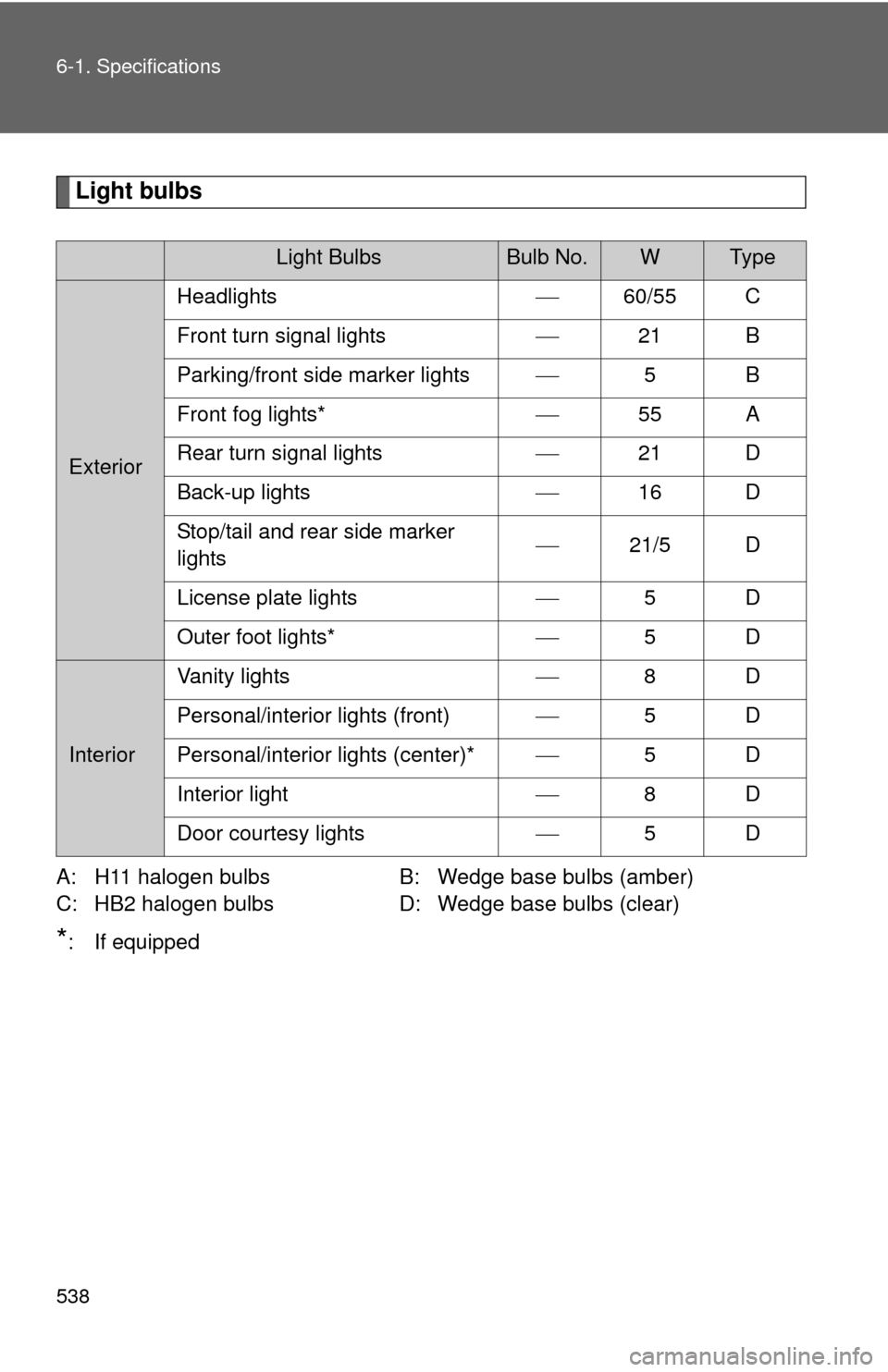
Light bulbs
A: H11 halogen bulbsB: Wedge base bulbs (amber)
C: HB2 halogen bulbs D: Wedge base bulbs (clear)
*: If equipped
Light BulbsBulb No.WTy p e
ExteriorHeadlights
60/55 C
Front turn signal lights 21 B
Parking/front side marker lights 5B
Front fog lights* 55 A
Rear turn signal lights 21 D
Back-up lights 16 D
Stop/tail and rear side marker
lights
21/5 D
License plate lights 5D
Outer foot lights* 5D
Interior Vanity lights
8D
Personal/interior lights (front) 5D
Personal/interior lights (center)* 5D
Interior light 8D
Door courtesy lights 5D
Page 556 of 577
555
6-2. Customization
6
Vehicle specifications
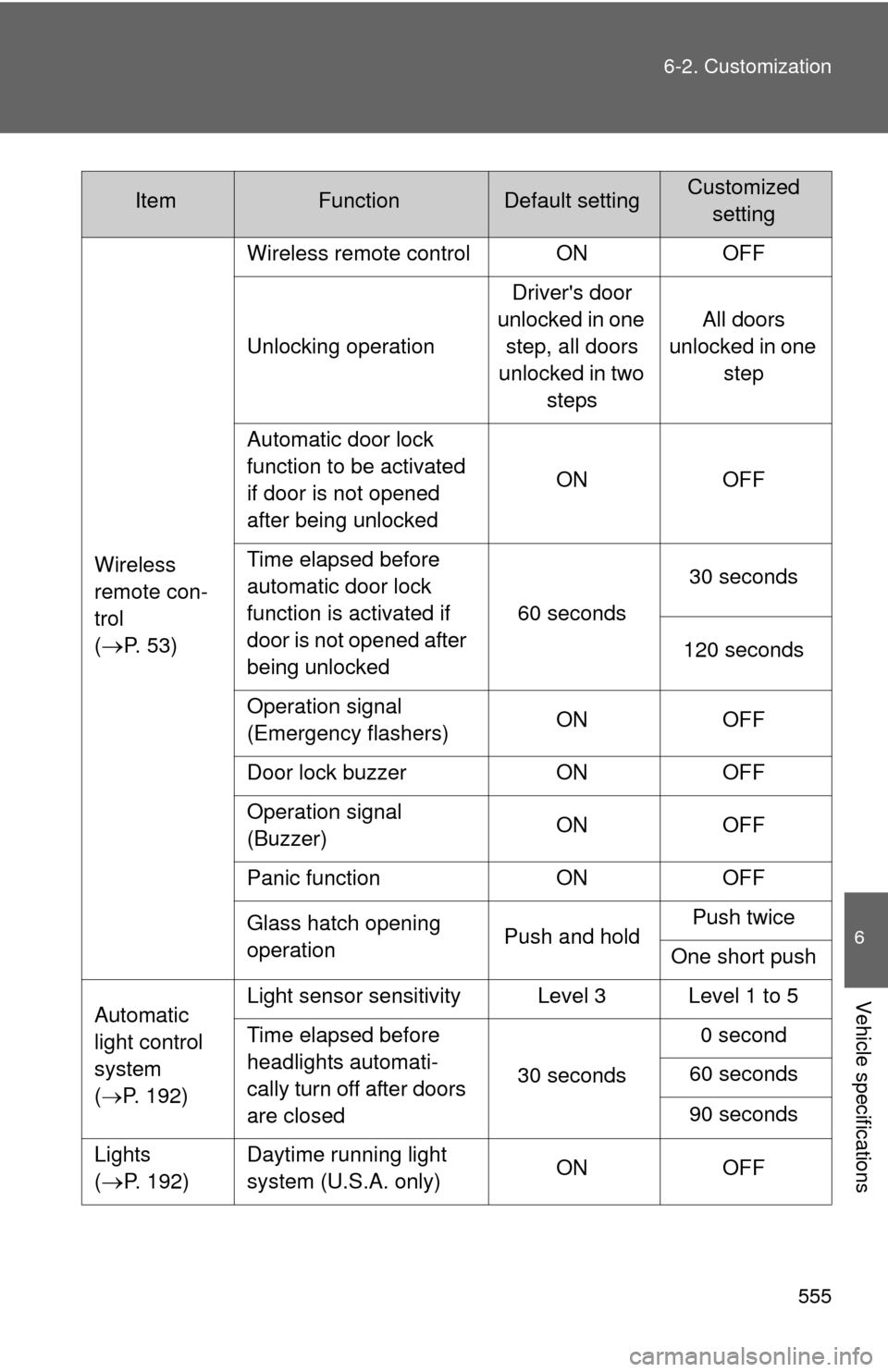
Wireless
remote con-
trol
(
P. 5 3 )
Wireless remote control ON OFF
Unlocking operation
Driver's door
unlocked in one step, all doors
unlocked in two steps All doors
unlocked in one step
Automatic door lock
function to be activated
if door is not opened
after being unlocked ON OFF
Time elapsed before
automatic door lock
function is activated if
door is not opened after
being unlocked 60 seconds
30 seconds
120 seconds
Operation signal
(Emergency flashers) ON OFF
Door lock buzzer ON OFF
Operation signal
(Buzzer) ON OFF
Panic function ON OFF
Glass hatch opening
operation Push and holdPush twice
One short push
Automatic
light control
system
( P. 192) Light sensor sensitivity Level 3 Level 1 to 5
Time elapsed before
headlights automati-
cally turn off after doors
are closed
30 seconds0 second
60 seconds
90 seconds
Lights
(
P. 192) Daytime running light
system (U.S.A. only)
ON OFF
ItemFunctionDefault settingCustomized
setting