turn signal TOYOTA HIGHLANDER 2008 XU40 / 2.G Owners Manual
[x] Cancel search | Manufacturer: TOYOTA, Model Year: 2008, Model line: HIGHLANDER, Model: TOYOTA HIGHLANDER 2008 XU40 / 2.GPages: 577, PDF Size: 11.46 MB
Page 2 of 577

TABLE OF CONTENTSIndex
2
1-1. Key information .................. 30Keys ..................................... 30
1-2. Opening, closing and locking the doors ............. 32
Smart key system................. 32
Wireless remote control ....... 53
Side doors ............................ 64
Back door ............................. 68
Glass hatch .......................... 73
1-3. Adjustable components (seats, mirrors,
steering wheel) ................. 75
Front seats ........................... 75
Rear seats ............................ 78
Head restraints ..................... 87
Seat belts ............................. 90
Steering wheel ..................... 96
Anti-glare inside rear view mirror .................................. 97
Outside rear view mirrors ..... 99
1-4. Opening and closing the windows and
moon roof ....................... 101
Power windows .................. 101
Moon roof ........................... 103
1-5. Refueling ........................... 106 Opening the fuel tank cap ................................... 106 1-6. Theft deterrent
system ............................. 110
Engine immobilizer system .............................. 110
Alarm .................................. 116
Theft prevention labels (U.S.A.)............................. 119
1-7. Safety information ............ 120 Correct driving posture ....... 120
SRS airbags ....................... 122
Front passenger occupant classification system ......... 134
Child restraint systems ....... 140
Installing child restraints ..... 144
2-1. Driving procedures........... 156 Driving the vehicle .............. 156
Engine (ignition) switch (vehicles with smart key
system) ............................. 164
Engine (ignition) switch (vehicles without smart
key system) ...................... 168
Automatic Transmission ..... 171
Turn signal lever ................. 175
Parking brake ..................... 176
2-2. Instrument cluster ............ 177 Gauges and meters ............ 177
Indicators and warning lights ................................. 179
Multi-information display ..... 183
1Before driving
2When driving
Page 8 of 577
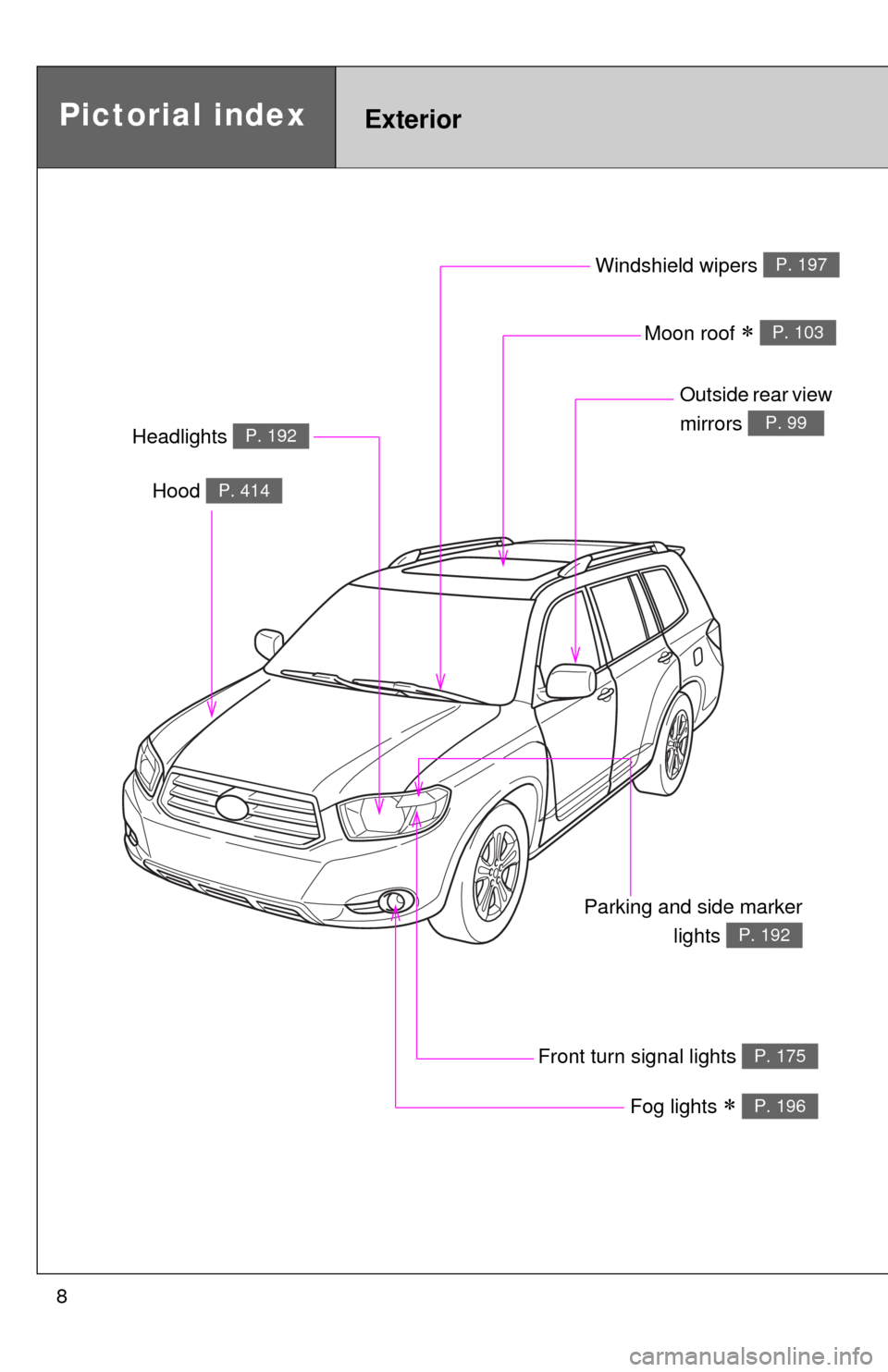
8
Headlights P. 192
Pictorial indexExterior
Fog lights P. 196
Parking and side markerlights
P. 192
Hood P. 414
Windshield wipers P. 197
Moon roof P. 103
Outside rear view
mirrors
P. 99
Front turn signal lights P. 175
Page 9 of 577
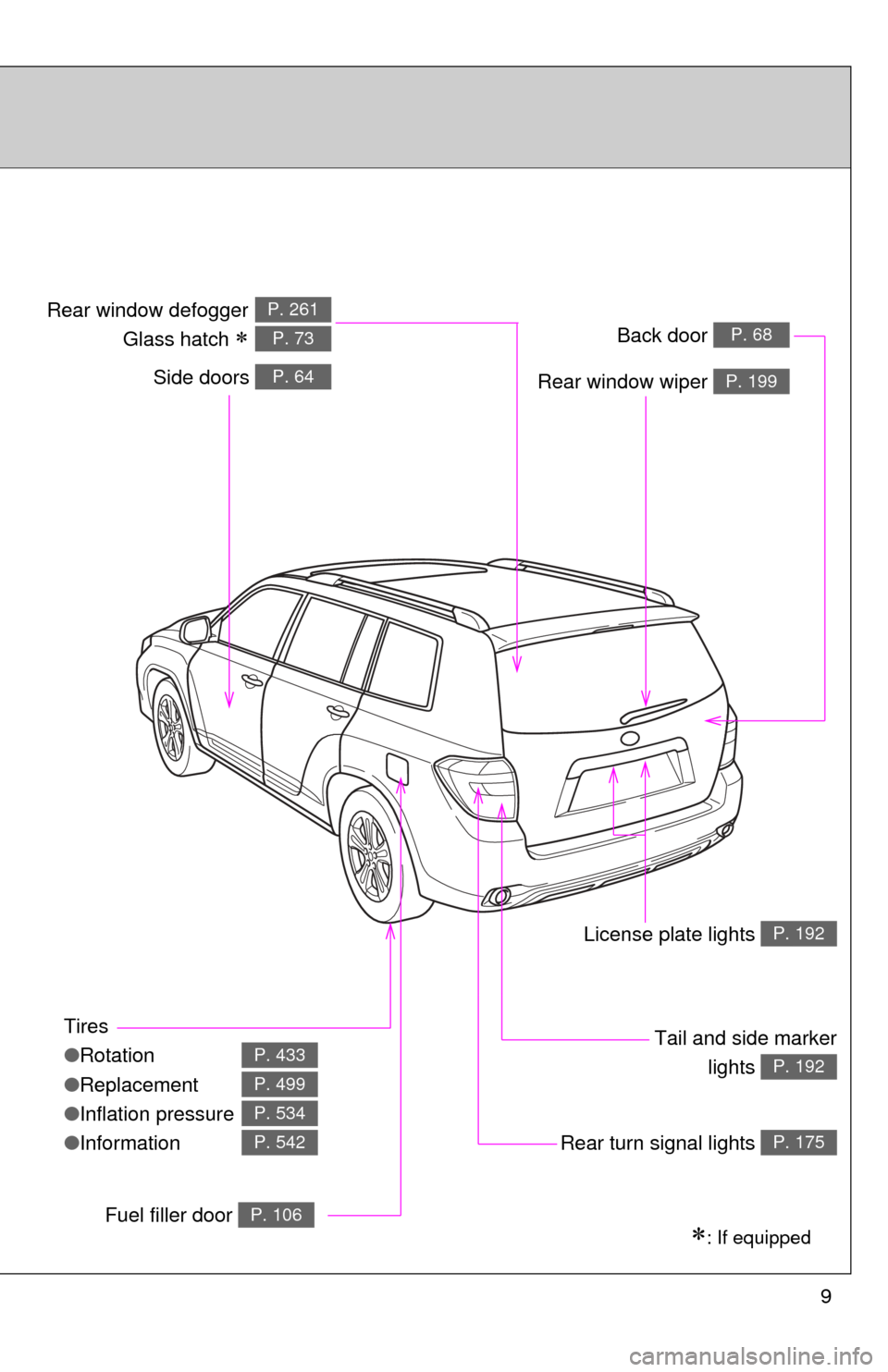
9
Tires
●Rotation
● Replacement
● Inflation pressure
● Information
P. 433
P. 499
P. 534
P. 542
: If equipped
Back door P. 68
Side doors P. 64
Tail and side marker
lights
P. 192
Rear window wiper P. 199
Rear window defogger
Glass hatch
P. 261
P. 73
License plate lights P. 192
Rear turn signal lights P. 175
Fuel filler door P. 106
Page 16 of 577
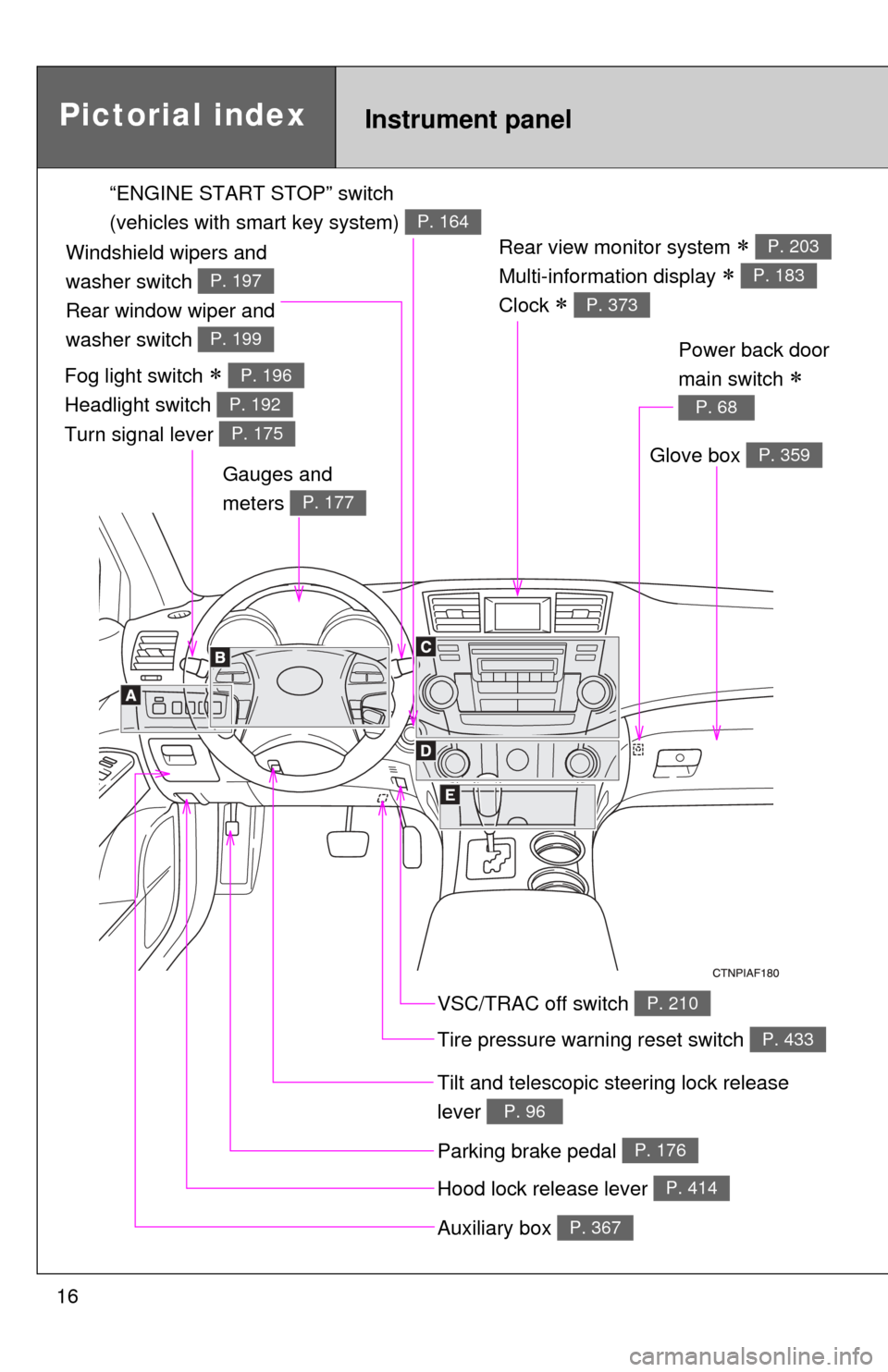
16
Rear view monitor system
Multi-information display
Clock
P. 203
P. 183
P. 373
Gauges and
meters
P. 177
Tilt and telescopic steering lock release
lever
P. 96
Glove box P. 359
Pictorial indexInstrument panel
Power back door
main switch
P. 68
VSC/TRAC off switch P. 210
Tire pressure warning reset switch P. 433
Parking brake pedal P. 176
Hood lock release lever P. 414
Auxiliary box P. 367
“ENGINE START STOP” switch
(vehicles with smart key system)
P. 164
Fog light switch
Headlight switch
Turn signal lever P. 196
P. 192
P. 175
Windshield wipers and
washer switch
Rear window wiper and
washer switch
P. 197
P. 199
Page 37 of 577
37
1-2. Opening, closing and locking the doors
1
Before driving
■
Operation signals
A buzzer sounds and the emergency flashers flash to indicate that the doors
have been locked/unlocked. (Locked: Once; Unlocked: Twice)
■ Conditions affecting operation
The smart key system uses weak radio waves. In the following situations,
the communication between the electronic key and the vehicle may be
affected, preventing the smart key system and wireless remote control from
operating properly. (Ways of coping: P. 514)
● When the electronic key battery is depleted
● Near a TV tower, electronic power plant, gas station, radio station, large
display, airport or other facility that generates strong radio waves or elec-
trical noise
● When carrying a portable radio, ce llular phone, cordless phone or other
wireless communication devices
● When the electronic key has come into contact with, or is covered by a
metallic object
● When multiple electronic keys are in the vicinity
● When carrying or using the electronic key together with the following
devices that emit radio waves
• Another vehicle’s electronic key
• A wireless key that emits radio waves
• Personal computer
● If window tint with a metallic content or metallic objects are attached to
the rear window
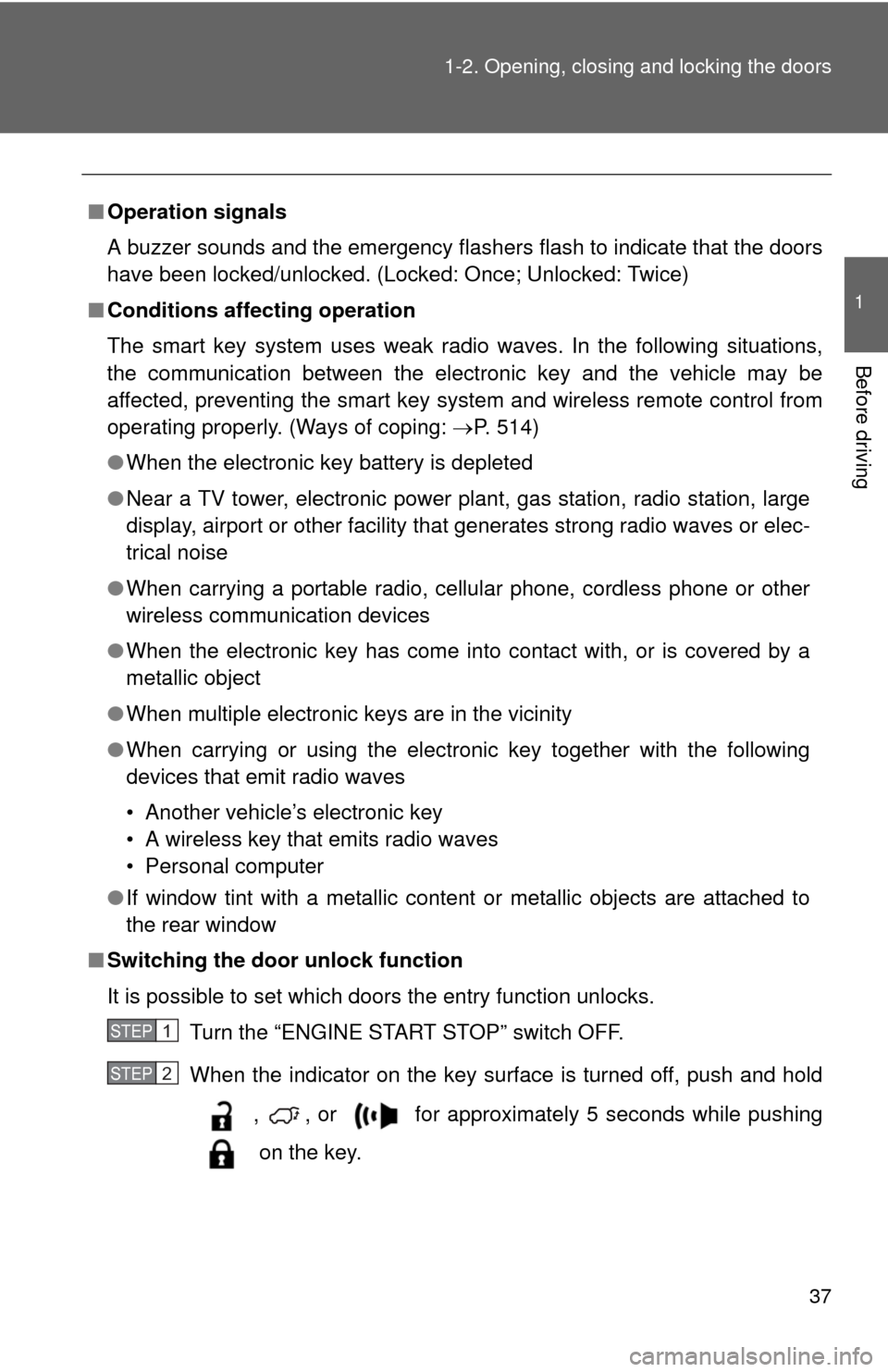
■ Switching the door unlock function
It is possible to set which doors the entry function unlocks.
Turn the “ENGINE START STOP” switch OFF.
When the indicator on the key surface is turned off, push and hold
, , or for approximately 5 seconds while pushing
on the key.
STEP1
STEP2
Page 155 of 577
When driving2
155
2-1. Driving procedures ........ 156Driving the vehicle............ 156
Engine (ignition) switch (vehicles with smart
key system).................... 164
Engine (ignition) switch (vehicles without smart
key system).................... 168
Automatic Transmission... 171
Turn signal lever .............. 175
Parking brake ................... 176
2-2. Instrument cluster.......... 177 Gauges and meters ......... 177
Indicators and warning lights .............................. 179
Multi-information display............................ 183
2-3. Operating the lights and wipers ........................... 192
Headlight switch ............... 192
Fog light switch ................ 196
Windshield wipers and washer ........................... 197
Rear window wiper and washer ........................... 199 2-4. Using other driving
systems ........................ 200
Cruise control ................... 200
Rear view monitor system (vehicles with
multi-information
display) .......................... 203
Downhill Assist Control system
(4WD models only) ........ 207
Driving assist systems ..... 209
2-5. Driving information ........ 214 Off-road precautions ........ 214
Cargo and luggage .......... 219
Vehicle load limits ............ 223
Winter driving tips ............ 224
Trailer towing ................... 228
Dinghy towing .................. 238
Page 175 of 577
175
2-1. Driving procedures
2
When driving
Tur n signal lever
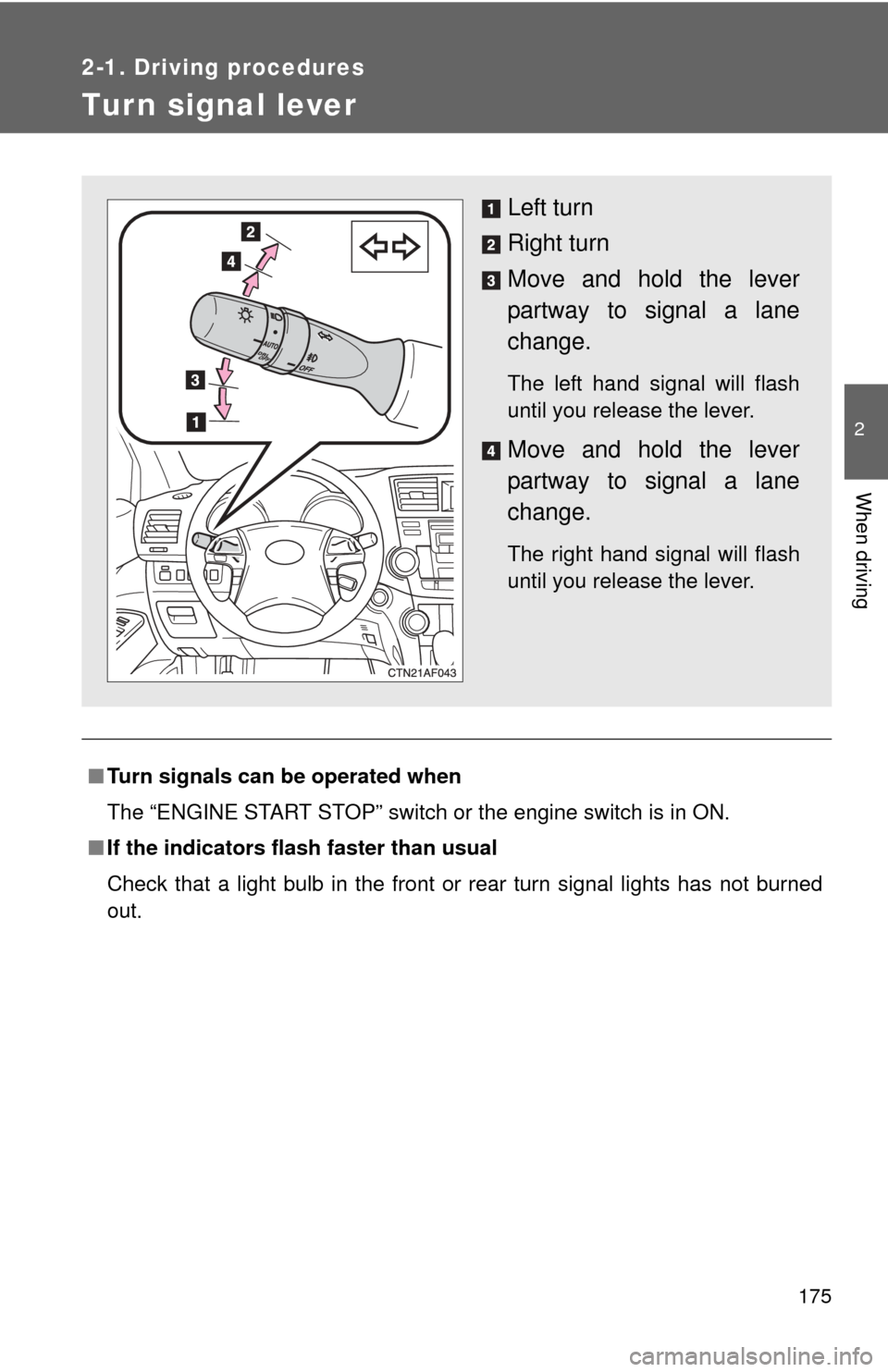
■Turn signals can be operated when
The “ENGINE START STOP” switch or the engine switch is in ON.
■ If the indicators flash faster than usual
Check that a light bulb in the front or rear turn signal lights has not burned
out.
Left turn
Right turn
Move and hold the lever
partway to signal a lane
change.
The left hand signal will flash
until you release the lever.
Move and hold the lever
partway to signal a lane
change.
The right hand signal will flash
until you release the lever.
Page 180 of 577
180 2-2. Instrument cluster
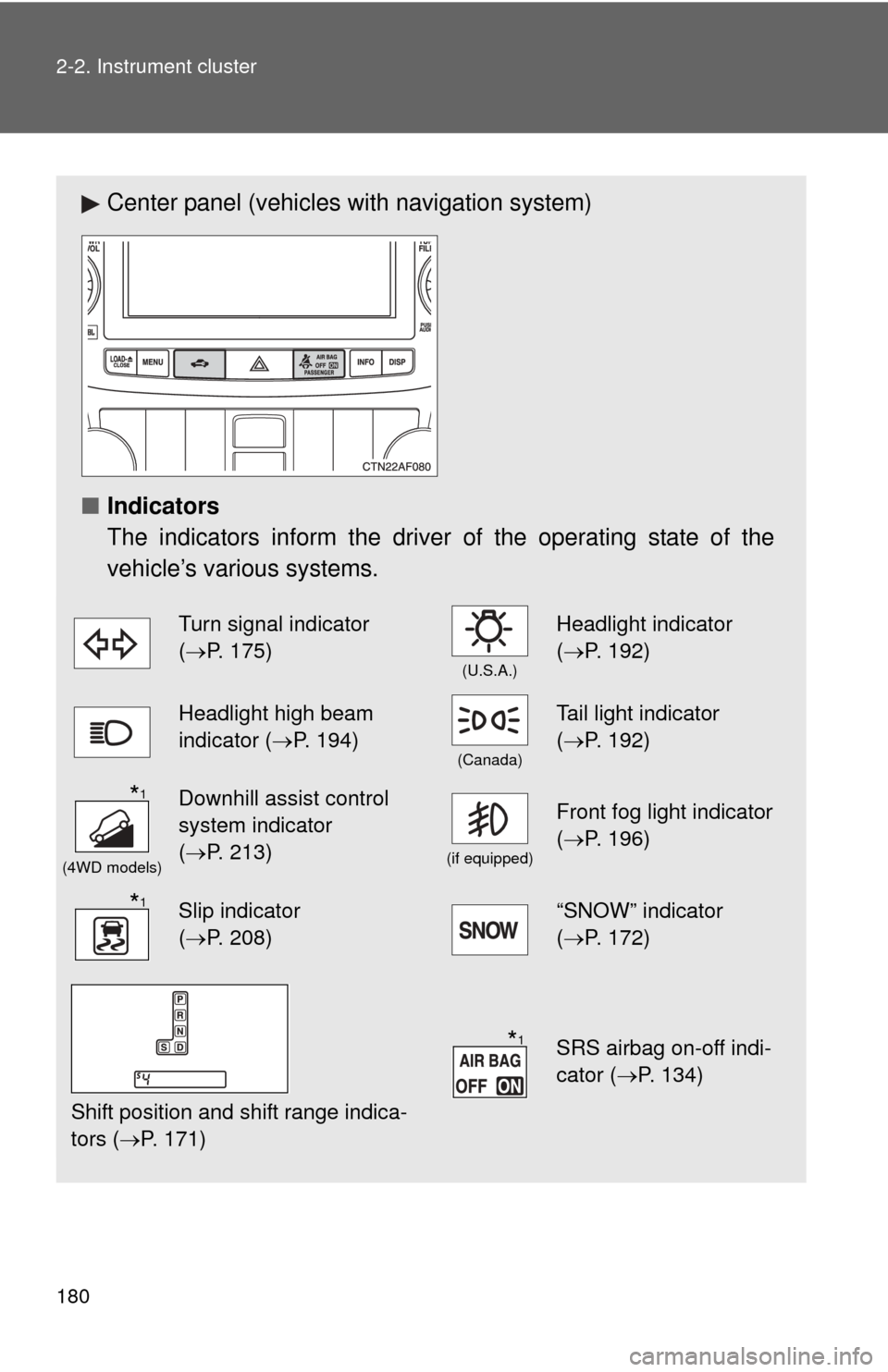
Center panel (vehicles with navigation system)
■ Indicators
The indicators inform the driver of the operating state of the
vehicle’s various systems.
Turn signal indicator
(P. 175)
(U.S.A.)
Headlight indicator
( P. 192)
Headlight high beam
indicator ( P. 194)
(Canada)
Tail light indicator
(P. 192)
(4WD models)
Downhill assist control
system indicator
(P. 213)
(if equipped)
Front fog light indicator
( P. 196)
Slip indicator
(P. 208)“SNOW” indicator
( P. 172)
Shift position and shift range indica-
tors ( P. 171)
SRS airbag on-off indi-
cator (P. 134)
*1
*1
*1
Page 272 of 577
271
3-2. Using the audio system
3
Interior features
■
When the battery is disconnected
Stations presets are erased.
■ Reception sensitivity
●Maintaining perfect radio reception at all times is difficult due to the con-
tinually changing position of the antenna, differences in signal strength
and surrounding objects, such as trains, transmitters, etc.
● Mast type antenna The radio antenna is mounted on the right-side
front fender. The antenna can be removed from the base by turning it.
● Print type antenna The radio antenna is mounted inside the left-side
rear quarter window. To maintain clear radio reception, do not attach
metallic window tinting or other metallic objects to the antenna wire
mounted inside the left-side rear quarter window.
■ XM
® Satellite Radio (type B and C)
The optional Toyota genuine satellite radio tuner and antenna allows you to
receive and play XM
® Satellite Radio broadcasts. (Subscription is required.
Not available in Hawaii and Alaska.)
*
● XM® subscriptions
For detailed information about XM® Satellite Radio or to subscribe, visit
XM® on the web at www.xmradio.com or call 1-800-967-2346.
● Radio ID
You will need the radio ID when activating XM
® service or reporting a
problem. Select “CH000” using , and the receiver's 8-character ID
number will appear.
● Satellite tuner
The tuner supports only Audio Services (Music and Talk) and the accom-
panying Text Information of XM
® Satellite Radio.
*: Terms and services provided by XM® Satellite Radio are subject to change
without notice.
Page 273 of 577
272 3-2. Using the audio system
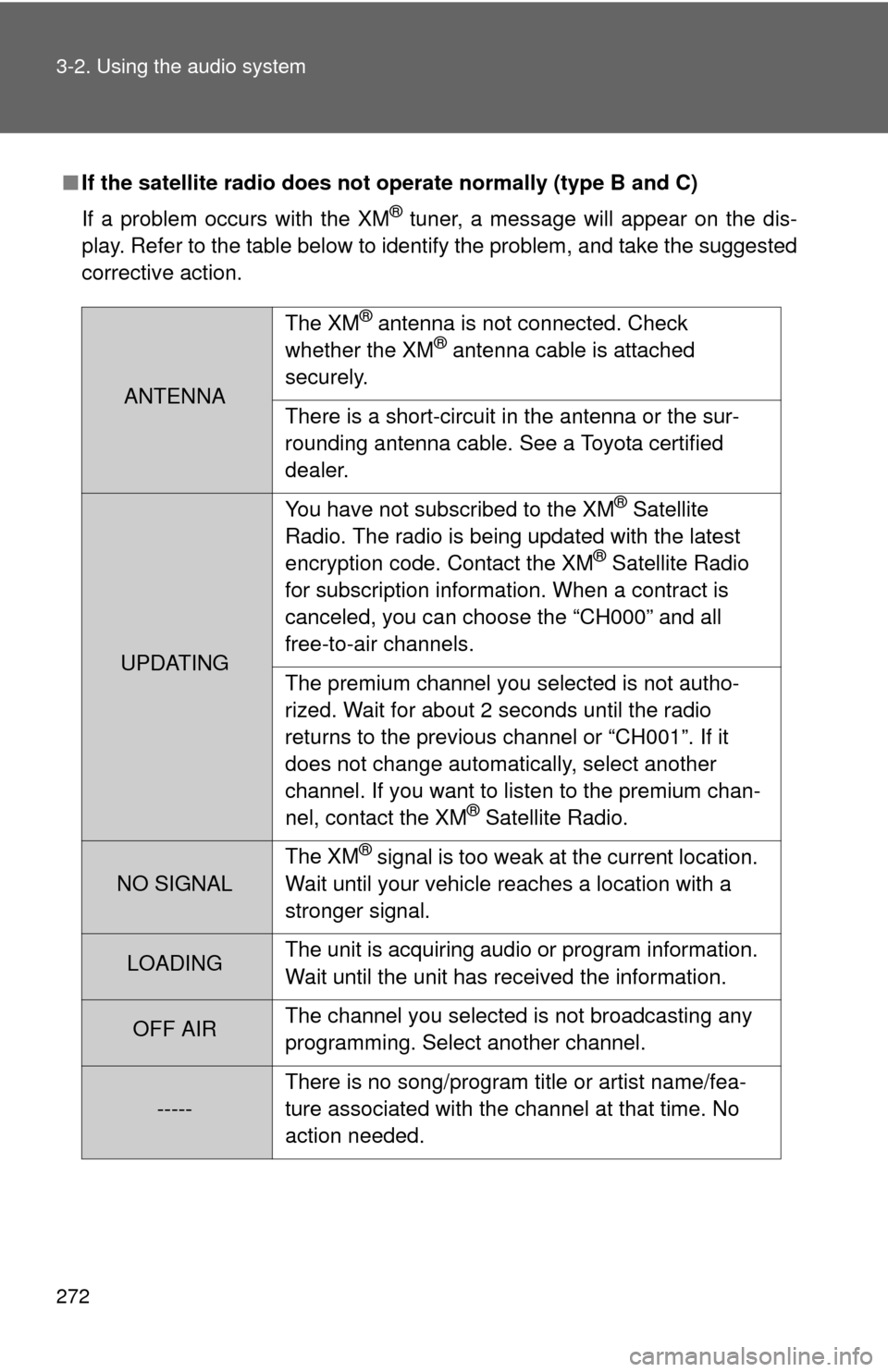
■If the satellite radio does not operate normally (type B and C)
If a problem occurs with the XM
® tuner, a message will appear on the dis-
play. Refer to the table below to identify the problem, and take the suggested
corrective action.
ANTENNA The XM
® antenna is not connected. Check
whether the XM® antenna cable is attached
securely.
There is a short-circuit in the antenna or the sur-
rounding antenna cable. See a Toyota certified
dealer.
UPDATING You have not subscribed to the XM
® Satellite
Radio. The radio is being updated with the latest
encryption code. Contact the XM
® Satellite Radio
for subscription information. When a contract is
canceled, you can choose the “CH000” and all
free-to-air channels.
The premium channel you selected is not autho-
rized. Wait for about 2 seconds until the radio
returns to the previous channel or “CH001”. If it
does not change automatically, select another
channel. If you want to listen to the premium chan-
nel, contact the XM
® Satellite Radio.
NO SIGNAL The XM
® signal is too weak at the current location.
Wait until your vehicle reaches a location with a
stronger signal.
LOADING The unit is acquiring audio or program information.
Wait until the unit has received the information.
OFF AIRThe channel you selected is not broadcasting any
programming. Select another channel.
-----There is no song/program title or artist name/fea-
ture associated with the channel at that time. No
action needed.