battery TOYOTA HIGHLANDER 2014 XU50 / 3.G User Guide
[x] Cancel search | Manufacturer: TOYOTA, Model Year: 2014, Model line: HIGHLANDER, Model: TOYOTA HIGHLANDER 2014 XU50 / 3.GPages: 712, PDF Size: 11.43 MB
Page 138 of 712

1383-2. Opening, closing and locking the doors
HIGHLANDER_U (OM48A12U)
WARNING
■Power back door (if equipped)
Observe the following precautions when operating the power back door.
Failure to do so may cause death or serious injury.
●Check the safety of the surrounding area to make sure there are no obsta-
cles or anything that could cause any of your belongings to get caught.
● If anyone is in the vicinity, make sure they are safe and let them know that
the back door is about to open or close.
● If the power back door system is turned off with the main switch while the
back door is operating automatically, the automatic operation is stopped.
The back door then has to be operated manually. Take extra care when on
an incline, as the back door may open or close unexpectedly.
● If the operating conditions of the power back door are no longer met, a
buzzer may sound and the back door may stop opening or closing. The
back door then has to be operated manually. Take extra care when on an
incline, as the back door may open or close abruptly.
● On an incline, the back door may suddenly shut after it opens. Make sure
the back door is fully open and secure.
● In the following situations, the power back door may detect an abnormality
and automatic operation may be stopped. In this case, the back door has
to be operated manually. Take extra care when on an incline, as the back
door may open or close abruptly.
• When the back door contacts an obstacle
• When the battery voltage suddenly drops, such as when the engine
switch is turned to the “ON” position (vehicles without a smart key sys-
tem) or IGNITION ON mode (vehicles with a smart key system) or the
engine is started during automatic operation
● If a bicycle carrier or similar object is attached to the back door, the power
back door may not operate, causing itself to malfunction, or the back door
may move in the closing directi on after being opened, causing someone’s
hands, head or neck to be caught and injured. When installing an acces-
sory part to the back door, ask your Toyota dealer for details.
Page 149 of 712
1493-2. Opening, closing and locking the doors
3
Operation of each component
HIGHLANDER_U (OM48A12U)■
Battery-saving function
The battery-saving function will be activa ted in order to prevent the electronic
key battery and the vehicle battery from being discharged while the vehicle is
not in operation for a long time.
● In the following situations, the smart key system may take some time to
unlock the doors.
• The electronic key has been left in an area of approximately 6 ft. (2 m) of
the outside of the vehicle for 10 minutes or longer.
• The smart key system has not been used for 5 days or longer.
● If the smart key system has not been used for 14 days or longer, the doors
cannot be unlocked at any doors except the driver’s door. In this case, take
hold of the driver’s door handle, or use the wireless remote control or the
mechanical key, to unlock the doors.
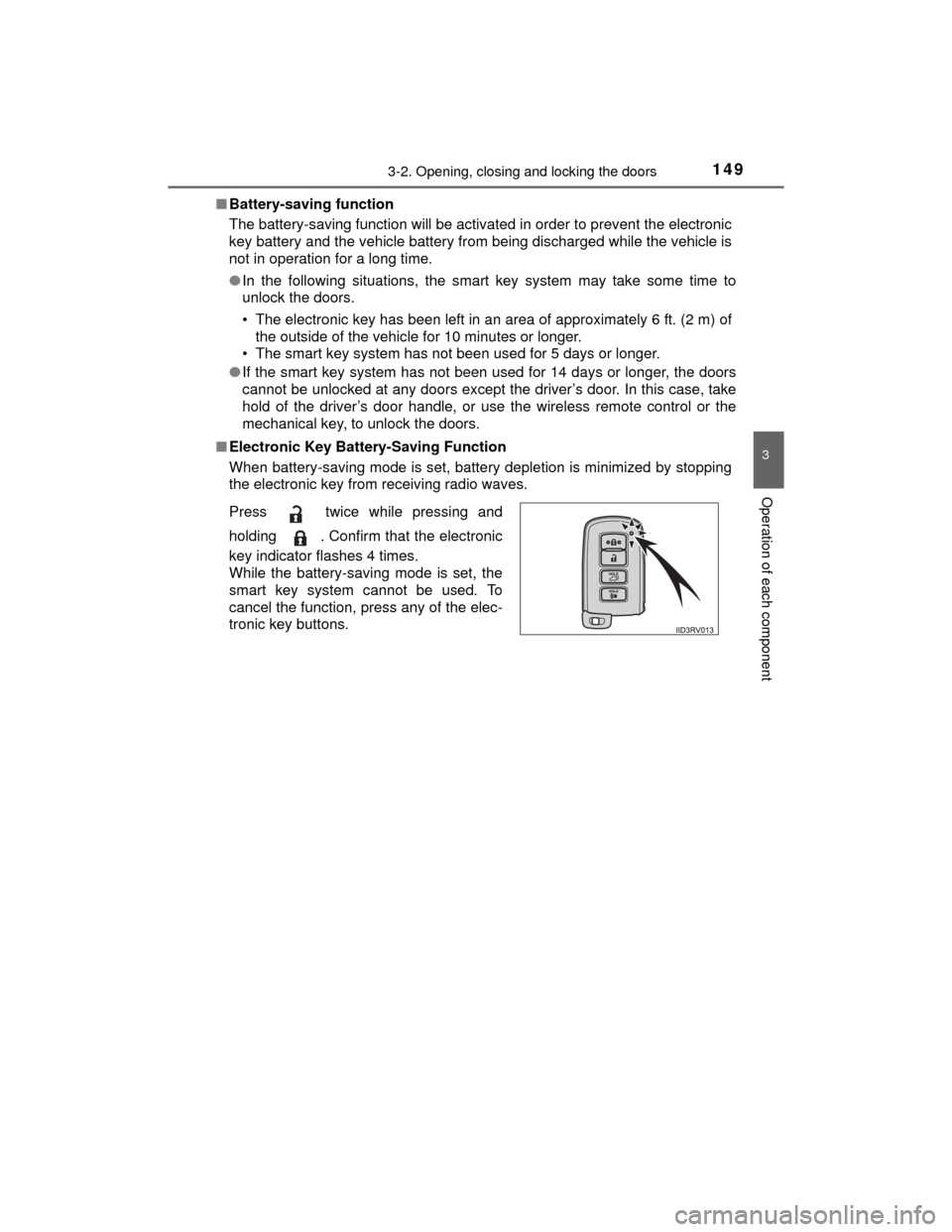
■ Electronic Key Battery-Saving Function
When battery-saving mode is set, batte ry depletion is minimized by stopping
the electronic key from receiving radio waves.
Press twice while pressing and
holding . Confirm that the electronic
key indicator flashes 4 times.
While the battery-saving mode is set, the
smart key system cannot be used. To
cancel the function, press any of the elec-
tronic key buttons.
Page 150 of 712

1503-2. Opening, closing and locking the doors
HIGHLANDER_U (OM48A12U)■
Conditions affecting operation
The smart key system uses weak radio waves. In the following situations, the
communication between the electronic key and the vehicle may be affected,
preventing the smart key system, wireless remote control and engine immobi-
lizer system from operating properly. (Ways of coping: P. 618)
● When the electronic key battery is depleted
● Near a TV tower, electric power plant, gas station, radio station, large dis-
play, airport or other fac ility that generates strong radio waves or electrical
noise
● When carrying a portable radio, cellular phone, cordless phone or other
wireless communication device
● When the electronic key is in contact with, or is covered by the following
metallic objects
• Cards to which aluminum foil is attached
• Cigarette boxes that have aluminum foil inside
• Metallic wallets or bags
• Coins
• Hand warmers made of metal
• Media such as CDs and DVDs
● When other wireless keys (that emit radio waves) are being used nearby
● When carrying the electronic key together with the following devices that
emit radio waves
• Another vehicle’s electronic key or a wireless key that emits radio waves
• Personal computers or personal digital assistants (PDAs)
• Digital audio players
• Portable game systems
● If window tint with a metallic content or metallic objects are attached to the
rear window
● When the electronic key is placed near a battery charger or electronic
devices
Page 151 of 712

1513-2. Opening, closing and locking the doors
3
Operation of each component
HIGHLANDER_U (OM48A12U)■
Note for the entry function
●Even when the electronic key is within the effective range (detection areas),
the system may not operate properly in the following cases:
• The electronic key is too close to the window or outside door handle, near
the ground, or in a high place when the doors are locked or unlocked.
• The electronic key is near the ground or in a high place, or too close to
the rear bumper center when the back door is opened.
• The electronic key is on the instrument panel or floor, or in the auxiliary box of the driver's side instrument panel, door pockets or glove box when
the engine is started or engine switch modes are changed.
● Do not leave the electronic key on top of the instrument panel or near the
door pockets when exiting the vehicle. Depending on the radio wave recep-
tion conditions, it may be detected by the antenna outside the cabin and the
door will become lockable from the out side, possibly trapping the electronic
key inside the vehicle.
● As long as the electronic key is within the effective range, the doors may be
locked or unlocked by anyone. However, only the doors detecting the elec-
tronic key can be used to unlock the vehicle.
● Even if the electronic key is not inside the vehicle, it may be possible to start
the engine if the electronic key is near the window.
● The doors may unlock or lock if a large amount of water splashes on the
door handle, such as in the rain or in a car wash when the electronic key is
within the effective range. (The doors will automatically be locked after
approximately 60 seconds if the doors are not opened and closed.)
● If the wireless remote control is used to lock the doors when the electronic
key is near the vehicle, there is a possibility that the door may not be
unlocked by the entry function. (Use the wireless remote control to unlock
the doors.)
● Touching the door lock or unlock sensor while wearing gloves may prevent
lock or unlock operation. Remove the gloves and touch the lock or unlock
sensor again.
● When the lock operation is performed using the lock sensor, recognition sig-
nals will be shown up to two consecutive times. After this, no recognition
signals will be given.
● If the door handle becomes wet while the electronic key is within the effec-
tive range, the door may lock and unlock repeatedly. In that case, follow the
following correction procedures to wash the vehicle:
• Place the electronic key in a location 6 ft. (2 m) or more away from the
vehicle. (Take care to ensure that the key is not stolen.)
• Set the electronic key to battery-saving mode to disable the smart key system. ( P. 149)
Page 227 of 712
2274-2. Driving procedures
4
Driving
HIGHLANDER_U (OM48A12U)
NOTICE
■To prevent battery discharge
Do not leave the engine switch in the “ACC” or “ON” position for long peri-
ods of time without the engine running.
■ When starting the engine
●Do not crank the engine for more than 30 seconds at a time. This may
overheat the starter and wiring system.
● Do not race a cold engine.
● If the engine becomes difficult to start or stalls frequently, have your vehi-
cle checked by your Toyota dealer immediately.
Page 230 of 712

2304-2. Driving procedures
HIGHLANDER_U (OM48A12U)
If the engine is stopped with the shift lever in a position other than P,
the engine switch will not be turned off but instead be turned to
ACCESSORY mode. Perform the following procedure to turn the
switch off:Check that the parking brake is set.
Shift the shift lever to P.
Check that “Turn Power OFF” is displayed on the multi-information
display and then press the engine switch once.
Check that “Turn Power OFF” on the multi-information display is off.
■Message displays
Message illustrations used in this section are intended as examples, and may
differ from the image that is actually displayed on the multi-information dis-
play.
■ Auto power off function
If the vehicle is left in ACCESSORY mode for more than 20 minutes or IGNI-
TION ON mode (the engine is not running) for more than an hour with the
shift lever in P, the engine switch will automatically turn off. However, this
function cannot entirely prevent battery discharge. Do not leave the vehicle
with the engine switch in ACCESSORY or IGNITION ON mode for long peri-
ods of time when the engine is not running.
■ Electronic key battery depletion
P. 1 1 8
■ Conditions affecting operation
P. 150
■ Note for the entry function
P. 151
■ If the engine does not start
●The engine immobilizer system may not have been deactivated. ( P. 80)
Contact your Toyota dealer.
● Check that the shift lever is securely set in P. The engine may not start if the
shift lever is displaced out of P.
When stopping the engine with the shift lever in a position other
than P
1
2
3
4
Page 231 of 712
2314-2. Driving procedures
4
Driving
HIGHLANDER_U (OM48A12U)■
Steering lock
After turning the engine switch off and opening and closing the doors, the
steering wheel will be locked due to the steering lock function. Operating the
engine switch again automatically cancels the steering lock.
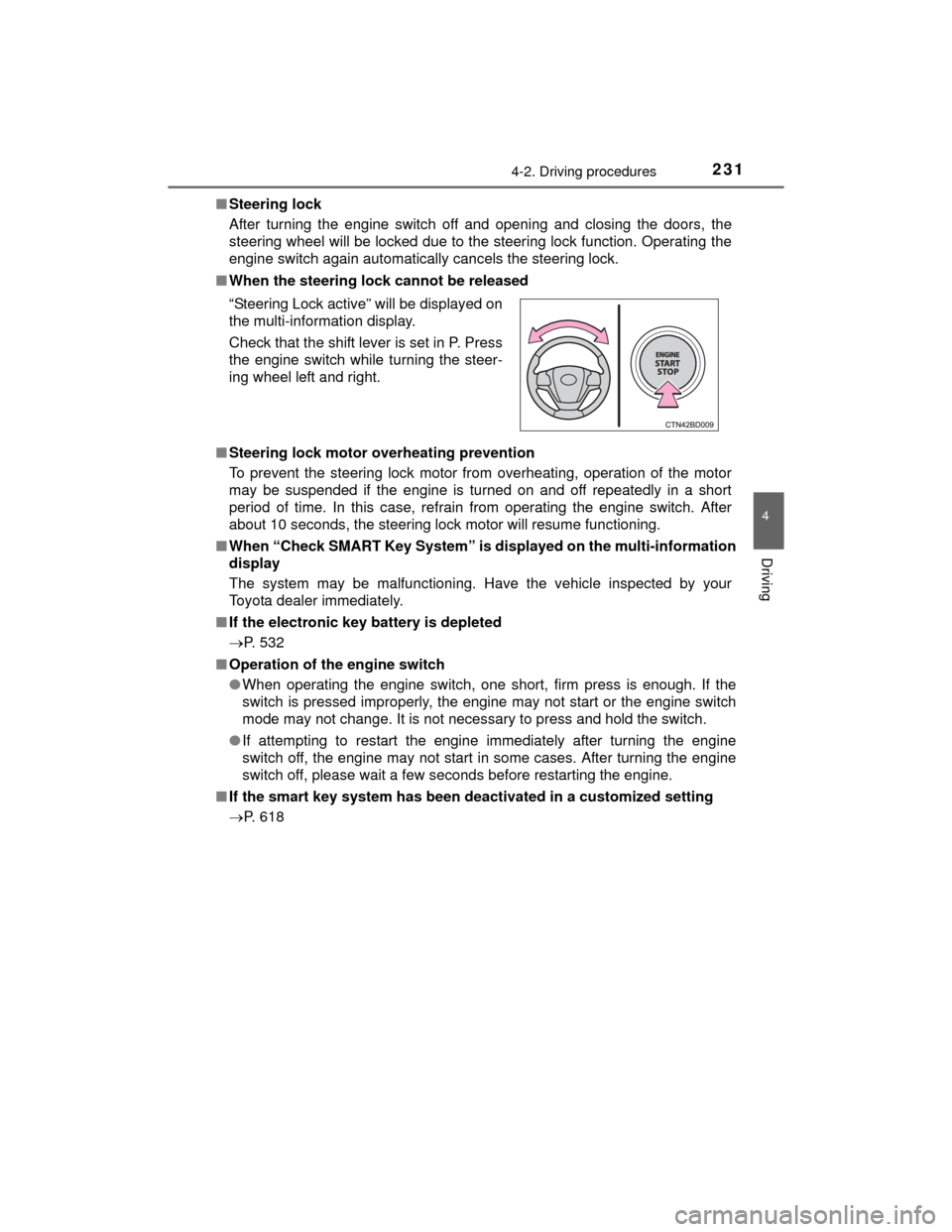
■ When the steering lock cannot be released
■ Steering lock motor overheating prevention
To prevent the steering lock motor from overheating, operation of the motor
may be suspended if the engine is turned on and off repeatedly in a short
period of time. In this case, refrain from operating the engine switch. After
about 10 seconds, the steering lock motor will resume functioning.
■ When “Check SMART Key System” is di splayed on the multi-information
display
The system may be malfunctioning. Have the vehicle inspected by your
Toyota dealer immediately.
■ If the electronic key battery is depleted
P. 532
■ Operation of the engine switch
●When operating the engine switch, one short, firm press is enough. If the
switch is pressed improperly, the engine may not start or the engine switch
mode may not change. It is not necessary to press and hold the switch.
● If attempting to restart the engine immediately after turning the engine
switch off, the engine may not start in some cases. After turning the engine
switch off, please wait a few seconds before restarting the engine.
■ If the smart key system has been d eactivated in a customized setting
P. 618 “Steering Lock active” will be displayed on
the multi-information display.
Check that the shift lever is set in P. Press
the engine switch while turning the steer-
ing wheel left and right.
Page 233 of 712
2334-2. Driving procedures
4
Driving
HIGHLANDER_U (OM48A12U)
NOTICE
■To prevent battery discharge
●Do not leave the engine switch in ACCESSORY or IGNITION ON mode
for long periods of time without the engine running.
● If “ACCESSORY” or “IGNITION ON” is displayed on the multi-information
display while the engine is not running, the engine switch is not off. Exit the
vehicle after turning the engine switch off.
● Do not stop the engine when the shift lever is in a position other than P. If
the engine is stopped in another shift lever position, the engine switch will
not be turned off but instead be turned to ACCESSORY mode. If the vehi-
cle is left in ACCESSORY mode, battery discharge may occur.
■ When starting the engine
●Do not race a cold engine.
● If the engine becomes difficult to start or stalls frequently, have your vehi-
cle checked by your Toyota dealer immediately.
■ Symptoms indicating a malfunction with the engine switch
If the engine switch seems to be operating somewhat differently than usual,
such as the switch sticking slightly, there may be a malfunction. Contact
your Toyota dealer immediately.
Page 244 of 712

2444-3. Operating the lights and wipers
HIGHLANDER_U (OM48A12U)■
Light reminder buzzer
Vehicles without a smart key system
A buzzer sounds when the engine switch is turned to the “LOCK” or “ACC”
position and the driver’s door is opened while the lights are turned on.
Vehicles with a smart key system
A buzzer sounds when the engine switch is turned off or turned to ACCES-
SORY mode and the driver’s door is opened while the lights are turned on.
■ Battery-saving function
In the following conditions, the remaining lights will go off automatically after
20 minutes in order to prevent the vehicle battery from being discharged:
●The headlights and/or tail lights are on.
● Vehicles without a smart key system:
The engine switch is turned to the “ACC” or “LOCK” position.
Vehicles with a smart key system:
The engine switch is turned to ACCESSORY mode or turned off.
This function will be canceled in any of the following situations:
● Vehicles without a smart key system:
When the engine switch is turned to the “ON” position.
Vehicles with a smart key system:
When the engine switch is turned to IGNITION ON mode.
● When the light switch is operated.
● When any of the doors is opened or closed.
Page 245 of 712

2454-3. Operating the lights and wipers
4
Driving
HIGHLANDER_U (OM48A12U)■
Customization
Settings (e.g. light sensor sensitivity) can be changed.
(Customizable features: P. 669)
NOTICE
■To prevent battery discharge
Do not leave the lights on longer than necessary when the engine is not
running.