remote control TOYOTA HIGHLANDER 2014 XU50 / 3.G Owner's Manual
[x] Cancel search | Manufacturer: TOYOTA, Model Year: 2014, Model line: HIGHLANDER, Model: TOYOTA HIGHLANDER 2014 XU50 / 3.GPages: 712, PDF Size: 11.43 MB
Page 150 of 712

1503-2. Opening, closing and locking the doors
HIGHLANDER_U (OM48A12U)■
Conditions affecting operation
The smart key system uses weak radio waves. In the following situations, the
communication between the electronic key and the vehicle may be affected,
preventing the smart key system, wireless remote control and engine immobi-
lizer system from operating properly. (Ways of coping: P. 618)
● When the electronic key battery is depleted
● Near a TV tower, electric power plant, gas station, radio station, large dis-
play, airport or other fac ility that generates strong radio waves or electrical
noise
● When carrying a portable radio, cellular phone, cordless phone or other
wireless communication device
● When the electronic key is in contact with, or is covered by the following
metallic objects
• Cards to which aluminum foil is attached
• Cigarette boxes that have aluminum foil inside
• Metallic wallets or bags
• Coins
• Hand warmers made of metal
• Media such as CDs and DVDs
● When other wireless keys (that emit radio waves) are being used nearby
● When carrying the electronic key together with the following devices that
emit radio waves
• Another vehicle’s electronic key or a wireless key that emits radio waves
• Personal computers or personal digital assistants (PDAs)
• Digital audio players
• Portable game systems
● If window tint with a metallic content or metallic objects are attached to the
rear window
● When the electronic key is placed near a battery charger or electronic
devices
Page 151 of 712
1513-2. Opening, closing and locking the doors
3
Operation of each component
HIGHLANDER_U (OM48A12U)■
Note for the entry function
●Even when the electronic key is within the effective range (detection areas),
the system may not operate properly in the following cases:
• The electronic key is too close to the window or outside door handle, near
the ground, or in a high place when the doors are locked or unlocked.
• The electronic key is near the ground or in a high place, or too close to
the rear bumper center when the back door is opened.
• The electronic key is on the instrument panel or floor, or in the auxiliary box of the driver's side instrument panel, door pockets or glove box when
the engine is started or engine switch modes are changed.
● Do not leave the electronic key on top of the instrument panel or near the
door pockets when exiting the vehicle. Depending on the radio wave recep-
tion conditions, it may be detected by the antenna outside the cabin and the
door will become lockable from the out side, possibly trapping the electronic
key inside the vehicle.
● As long as the electronic key is within the effective range, the doors may be
locked or unlocked by anyone. However, only the doors detecting the elec-
tronic key can be used to unlock the vehicle.
● Even if the electronic key is not inside the vehicle, it may be possible to start
the engine if the electronic key is near the window.
● The doors may unlock or lock if a large amount of water splashes on the
door handle, such as in the rain or in a car wash when the electronic key is
within the effective range. (The doors will automatically be locked after
approximately 60 seconds if the doors are not opened and closed.)
● If the wireless remote control is used to lock the doors when the electronic
key is near the vehicle, there is a possibility that the door may not be
unlocked by the entry function. (Use the wireless remote control to unlock
the doors.)
● Touching the door lock or unlock sensor while wearing gloves may prevent
lock or unlock operation. Remove the gloves and touch the lock or unlock
sensor again.
● When the lock operation is performed using the lock sensor, recognition sig-
nals will be shown up to two consecutive times. After this, no recognition
signals will be given.
● If the door handle becomes wet while the electronic key is within the effec-
tive range, the door may lock and unlock repeatedly. In that case, follow the
following correction procedures to wash the vehicle:
• Place the electronic key in a location 6 ft. (2 m) or more away from the
vehicle. (Take care to ensure that the key is not stolen.)
• Set the electronic key to battery-saving mode to disable the smart key system. ( P. 149)
Page 152 of 712

1523-2. Opening, closing and locking the doors
HIGHLANDER_U (OM48A12U)●
If the electronic key is inside the vehicle and a door handle becomes wet
during a car wash, a message may be shown on the multi-information dis-
play and a buzzer will sound outside the vehicle. To turn off the alarm, lock
all the doors.
● The lock sensor may not work properly if it comes into contact with ice,
snow, mud, etc. Clean the lock sensor and attempt to operate it again, or
use the lock sensor on the lower part of the door handle.
● A sudden handle operation or a handle oper ation immediately after entering
the effective range may prevent the doors from being unlocked. Touch the
door unlock sensor and check that the doors are unlocked before pulling the
door handle again.
● Unlocking the vehicle may take more time if another electronic key is within
the effective range.
■ When the vehicle is not driven for extended periods
●To prevent theft of the vehicle, do not leave the electronic key within 6 ft. (2
m) of the vehicle.
● The smart key system can be deactivated in advance. ( P. 662)
■ To operate the system properly
Make sure to carry the electronic key when operating the system. Do not get
the electronic key too close to the vehicle when operating the system from the
outside of the vehicle.
Depending on the position and holding condition of the electronic key, the key
may not be detected correctly and the system may not operate properly. (The
alarm may go off accidentally, or the door lock prevention function may not
operate.)
■ If the smart key system does not operate properly
●Locking and unlocking the doors: Use the mechanical key. (P. 618)
● Starting the engine: P. 619
■ Customization
Settings (e. g. smart key system) can be changed.
(Customizable features: P. 662)
■ If the smart key system has been d eactivated in a customized setting
● Locking and unlocking the doors:
Use the wireless remote control or mechanical key. ( P. 122, 618)
● Starting the engine and changing engine switch modes: P. 619
● Stopping the engine: P. 229
Page 166 of 712
1663-3. Adjusting the seats
HIGHLANDER_U (OM48A12U)
Each electronic key can be registered to recall your preferred driving
position.
■Registering procedure
Record your driving position to button “1” or “2” before performing
the following:
Carry only the key you want to register, and then close the driver’s
door.
If 2 or more keys are in the vehicle, the driving position cannot be
recorded properly. Check that the shift lever is in P.
Turn the engine switch to IGNITION ON mode.
Recall the driving position that you want to record.
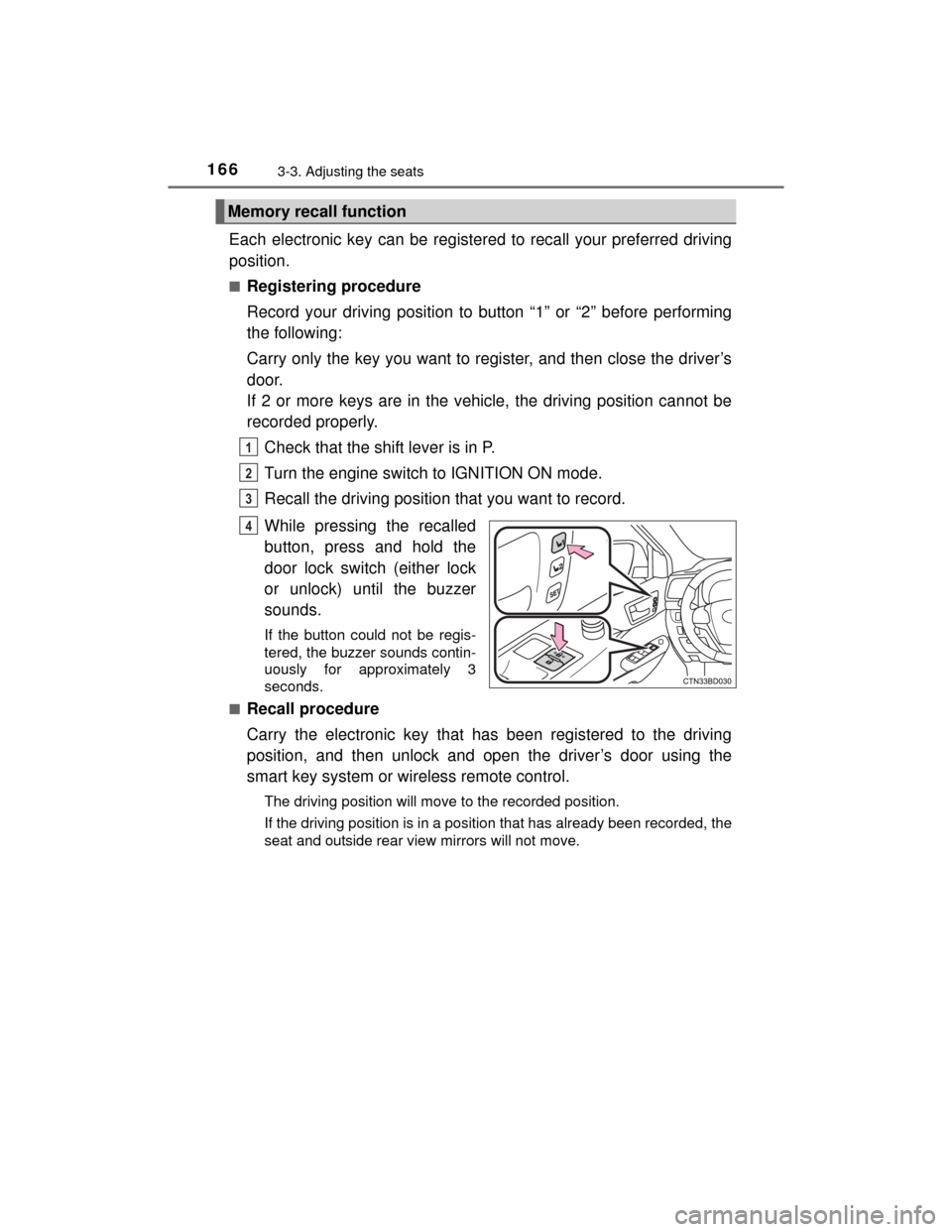
While pressing the recalled
button, press and hold the
door lock switch (either lock
or unlock) until the buzzer
sounds.
If the button could not be regis-
tered, the buzzer sounds contin-
uously for approximately 3
seconds.
■
Recall procedure
Carry the electronic key that has been registered to the driving
position, and then unlock and open the driver’s door using the
smart key system or wireless remote control.
The driving position will move to the recorded position.
If the driving position is in a position that has already been recorded, the
seat and outside rear view mirrors will not move.
Memory recall function
1
2
3
4
Page 180 of 712

1803-5. Opening and closing the windows
HIGHLANDER_U (OM48A12U)■
When the power window does not close normally (windows with one-
touch closing function only)
If the jam protection function is operating abnormally and a window cannot be
closed, perform the following operations using the power window switch on
the relevant door.
●Vehicles without a smart key system: After stopping the vehicle, the window
can be closed by holding the power window switch in the one-touch closing
position while the engine switch is turned to the “ON” position.
Vehicles with a smart key system: After stopping the vehicle, the window
can be closed by holding the power window switch in the one-touch closing
position while the engine switch is turned to IGNITION ON mode.
● If the window still cannot be closed even by carrying out the operation
explained above, initialize the function by performing the following proce-
dure.
Hold the power window switch in the one-touch closing position. Continue
holding the switch for a further 6 seconds after the window has closed.
Hold the power window switch in the one-touch opening position. Con-
tinue holding the switch for a further 2 seconds after the window has
opened completely.
Hold the power window switch in the one-touch closing position once
again. Continue holding the switch for a further 2 seconds after the win-
dow has closed.
If you release the switch while the window is moving, start again from the
beginning.
If the window continues to close but then re-open slightly even after perform-
ing the above procedure correctly, have the vehicle inspected by your Toyota
dealer.
■ Door lock linked window operation (windows with one-touch closing
function only)
●The power windows can be opened and closed using the key or mechanical
key.
* (P. 123, 618)
● The power windows can be opened using the wireless remote control.
*
(P. 122)
*: These settings must be customized at your Toyota dealer.
■ Customization
Settings (e.g. linked door lock operation) can be changed.
(Customizable features: P. 662)
1
2
3
Page 183 of 712
1833-5. Opening and closing the windows
3
Operation of each component
HIGHLANDER_U (OM48A12U)
■The moon roof can be operated when
Vehicles without a smart key system
The engine switch is in the “ON” position.
Vehicles with a smart key system
The engine switch is in IGNITION ON mode.
■ Operating the moon roof after turning the engine off
Vehicles without a smart key system
The moon roof can be operated for approximately 45 seconds after the
engine switch is turned to the “ACC” or “LOCK” position. It cannot, however,
be operated once either front door is opened.
Vehicles with a smart key system
The moon roof can be operated for approximately 45 seconds after the
engine switch is turned to ACCESSORY mode or turned off. It cannot, how-
ever, be operated once either front door is opened.
■ Jam protection function
If an object is detected between the moon roof and the frame while the moon
roof is closing or tilting down, travel is stopped and the moon roof opens
slightly.
■ Sunshade
The sunshade can be opened and closed manually. However, the sunshade
will open automatically when the moon roof is opened.
■ Door lock linked moon roof operation
●The moon roof can be opened and closed using the key or mechanical key.
*
(P. 123, 618)
● The moon roof can be opened using the wireless remote control.
*
( P. 122)
*: These settings must be customized at your Toyota dealer.
Page 414 of 712

4145-10. Bluetooth®
HIGHLANDER_U (OM48A12U)■
Compatible models
The Bluetooth
® audio system supports portable audio players with the follow-
ing specifications
● Bluetooth
® specifications:
Ver. 2.0, or higher (Recommended: Ver. 3.0+EDR or higher)
● Profiles:
• A2DP (Advanced Audio Distribution Profile) Ver. 1.0, or higher
(Recommended: Ver. 1.2 or higher)
This is a profile to transmit stereo audio or high quality sound to the audio
system.
• AVRCP (Audio/Video Remote Control Profile) Ver. 1.0 or higher (Recommended: Ver. 1.4 or higher)
This is a profile to allow remote control the A/V equipment.
However, please note that some functions may be limited depending on the
type of portable audio player connected.
The hands-free system supports cellular phones with the following specifica-
tions.
● Bluetooth
® specification:
Ver. 2.0 or higher (Recommended: Ver. 3.0+EDR or higher)
● Profiles:
• HFP (Hands Free Profile) Ver. 1.0 or higher (Recommended: Ver. 1.6 or
higher)
This is a profile to allow hands-free phone calls using a cellular phone or
head set. It has outgoing and incoming call functions.
• OPP (Object Push Profile) Ver. 1. 1 or higher (Recommended: Ver. 1.2)
This is a profile to transfer contact data. When a Bluetooth
® compatible
cellular phone has both PBAP and OPP, OPP cannot be used.
• PBAP (Phone Book Access Profile) Ver. 1.0 or higher (Recommended:
Ver. 1.1)
This is a profile to transfer contact data.
• MAP (Message Access Profile) Ver.1.0 or higher
This is a profile to using phone message.
If the cellular phone does not support HFP, you cannot register it with the
hands-free system. OPP, PBAP or MAP services must be selected individu-
ally.
Page 466 of 712
4666-4. Using the other interior features
HIGHLANDER_U (OM48A12U)
The garage door opener (HomeLink Universal Transceiver) is manu-
factured under license from HomeLink.
The HomeLink
® compatible transceiver in your vehicle has 3 buttons
which can be programmed to operate 3 different devices. Refer to the
programming method below appropriate for the device.
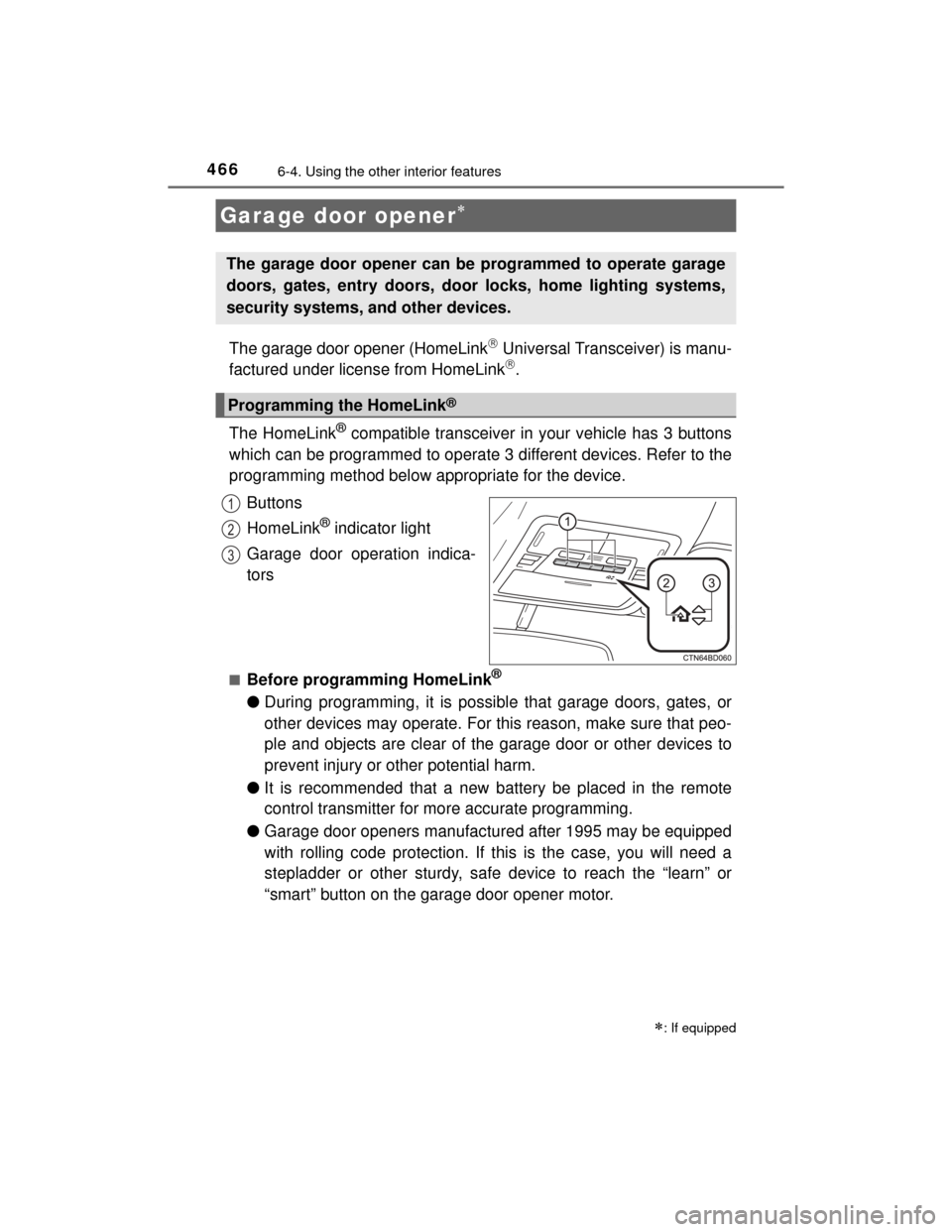
Buttons
HomeLink
® indicator light
Garage door operation indica-
tors
■Before programming HomeLink®
● During programming, it is possible that garage doors, gates, or
other devices may operate. For this reason, make sure that peo-
ple and objects are clear of the garage door or other devices to
prevent injury or other potential harm.
● It is recommended that a new battery be placed in the remote
control transmitter for more accurate programming.
● Garage door openers manufactured after 1995 may be equipped
with rolling code protection. If this is the case, you will need a
stepladder or other sturdy, safe device to reach the “learn” or
“smart” button on the garage door opener motor.
Garage door opener
: If equipped
The garage door opener can be programmed to operate garage
doors, gates, entry doors, door locks, home lighting systems,
security systems, and other devices.
Programming the HomeLink®
1
2
3
Page 467 of 712
4676-4. Using the other interior features
6
Interior features
HIGHLANDER_U (OM48A12U)■
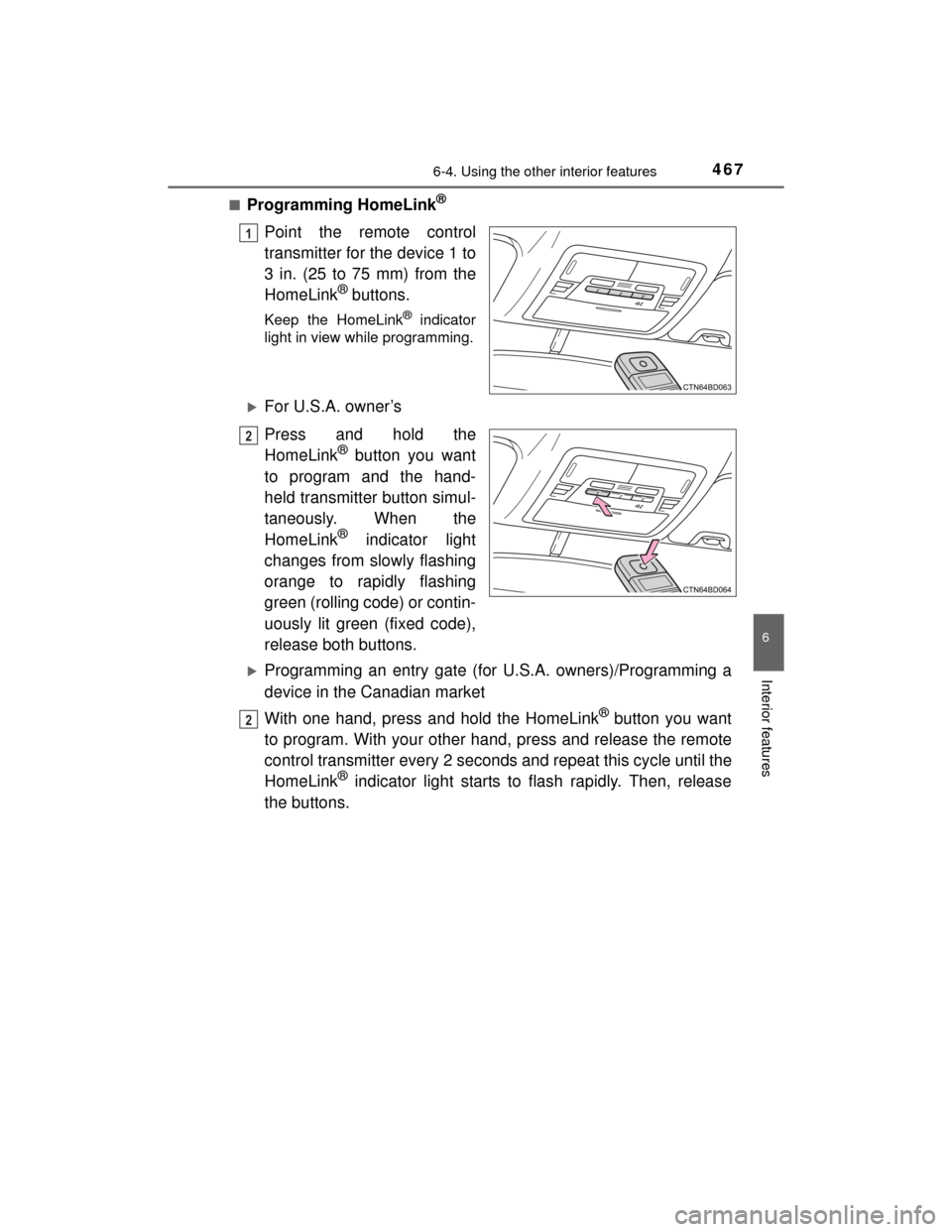
Programming HomeLink®
Point the remote control
transmitter for the device 1 to
3 in. (25 to 75 mm) from the
HomeLink
® buttons.
Keep the HomeLink® indicator
light in view while programming.
For U.S.A. owner’s
Press and hold the
HomeLink
® button you want
to program and the hand-
held transmitter button simul-
taneously. When the
HomeLink
® indicator light
changes from slowly flashing
orange to rapidly flashing
green (rolling code) or contin-
uously lit green (fixed code),
release both buttons.
Programming an entry gate (for U.S.A. owners)/Programming a
device in the Canadian market
With one hand, press and hold the HomeLink
® button you want
to program. With your other hand, press and release the remote
control transmitter every 2 seconds and repeat this cycle until the
HomeLink
® indicator light starts to flash rapidly. Then, release
the buttons.
1
2
2
Page 472 of 712

4726-4. Using the other interior features
HIGHLANDER_U (OM48A12U)Cet appareil est conforme aux normes FCC partie 15 et Industry Canada
RSS-210.
Son fonctionnement est soumis aux deux conditions suivantes: (1) Cet appa-
reil ne doit pas causer d’interférences nuisibles et (2) Cet appareil doit accep-
ter toute interférence qui peuvent être reçues y compris les interférences
pouvant provoquer un fonctionnement indésirable.
AVERTISSEMENT:
L’émetteur a été testé et est conforme aux régles de la FCC et IC. Les chan-
gements ou modifications non expressément approuvés par la partie respon-
sable de la conformité pourrait annuler l’autorité de l’utilisateur de faire
fonctionner le dispositif.
Le terme “IC:” devant le numéro de certification / enregistrement signifie seu-
lement que les spécifications techniques d’Industry Canada ont été respec-
tées.
IC: 279B-440AHL5 MODEL/FCC ID: CB2440AHL5
■ For additional programming assistance with your HomeLink
® Universal
Transceiver
Visit on the web at www.homelink.com
or call 1-800-355-3515.
WARNING
■ When programming a garage door or other remote control device
The garage door may operate, so ensur e people and objects are out of dan-
ger to prevent potential harm.
■ Conforming to federal safety standards
Do not use the HomeLink
Compatible Transceiver with any garage door
opener or device that lacks safety stop and reverse features as required by
federal safety standards.
This includes any garage door that cannot detect an obstruction object. A
door or device without these features increases the risk of death or serious
injury.
■ When operating or programming HomeLink
®
Never allow a child to operate or play with the HomeLink® buttons.