sensor TOYOTA HIGHLANDER 2017 XU50 / 3.G Service Manual
[x] Cancel search | Manufacturer: TOYOTA, Model Year: 2017, Model line: HIGHLANDER, Model: TOYOTA HIGHLANDER 2017 XU50 / 3.GPages: 732, PDF Size: 12.34 MB
Page 324 of 732
3244-5. Using the driving support systems
HIGHLANDER_U (OM0E017U)
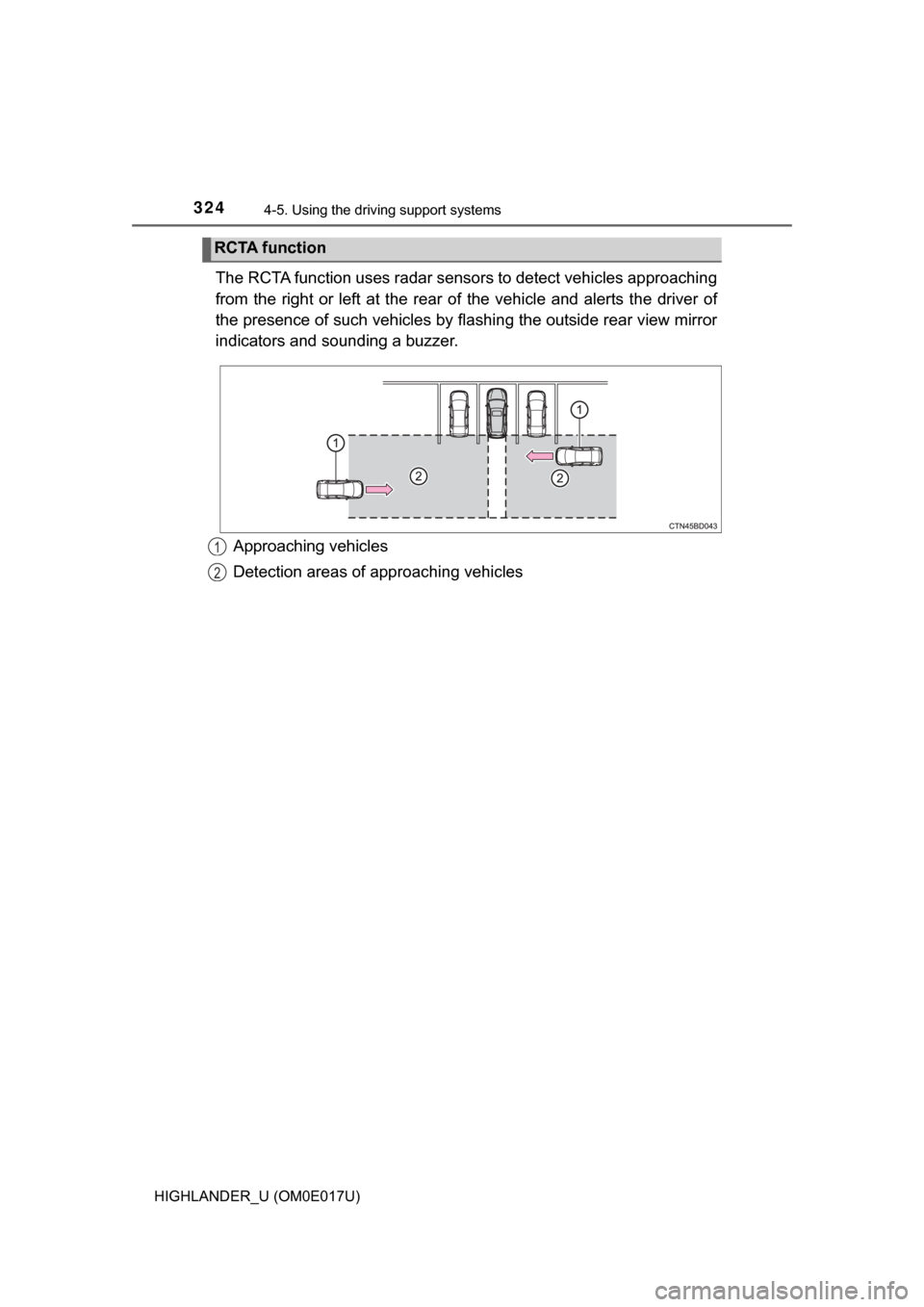
The RCTA function uses radar sensors to detect vehicles approaching
from the right or left at the rear of the vehicle and alerts the driver of
the presence of such vehicles by fl ashing the outside rear view mirror
indicators and sounding a buzzer.
Approaching vehicles
Detection areas of approaching vehicles
RCTA function
1
2
Page 327 of 732
3274-5. Using the driving support systems
4
Driving
HIGHLANDER_U (OM0E017U)■
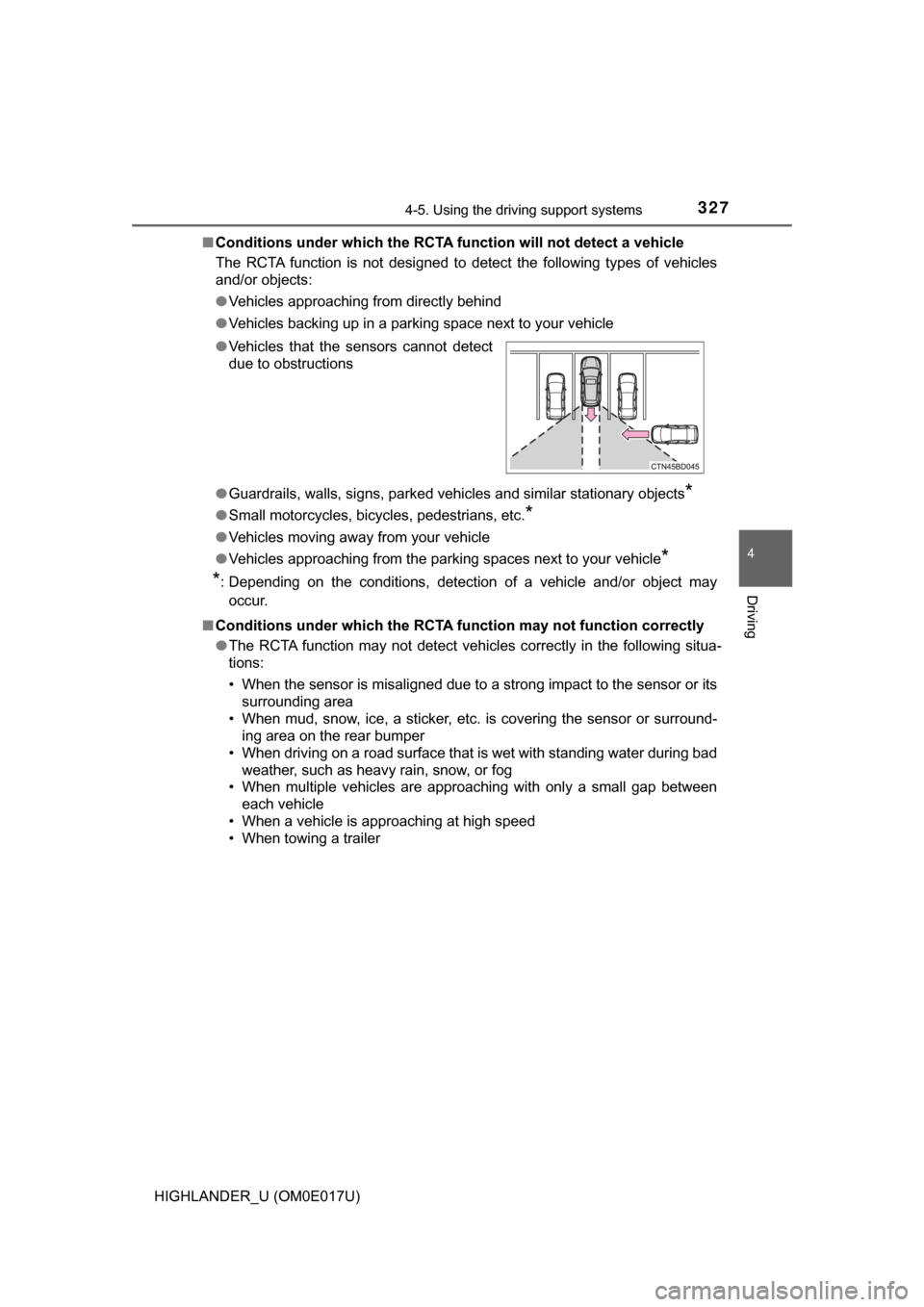
Conditions under which the RCTA fu nction will not detect a vehicle
The RCTA function is not designed to detect the following types of vehicles
and/or objects:
● Vehicles approaching from directly behind
● Vehicles backing up in a parking space next to your vehicle
● Guardrails, walls, signs, parked vehi cles and similar stationary objects
*
●Small motorcycles, bicycles, pedestrians, etc.*
●Vehicles moving away from your vehicle
● Vehicles approaching from the parking spaces next to your vehicle
*
*
: Depending on the conditions, detection of a vehicle and/or object may
occur.
■ Conditions under which the RCTA function may not function correctly
●The RCTA function may not detect vehicles correctly in the following situa-
tions:
• When the sensor is misaligned due to a strong impact to the sensor or its
surrounding area
• When mud, snow, ice, a sticker, etc. is covering the sensor or surround- ing area on the rear bumper
• When driving on a road surface that is wet with standing water during bad weather, such as heavy rain, snow, or fog
• When multiple vehicles are approaching with only a small gap between
each vehicle
• When a vehicle is approaching at high speed
• When towing a trailer
●
Vehicles that the sensors cannot detect
due to obstructions
Page 328 of 732
3284-5. Using the driving support systems
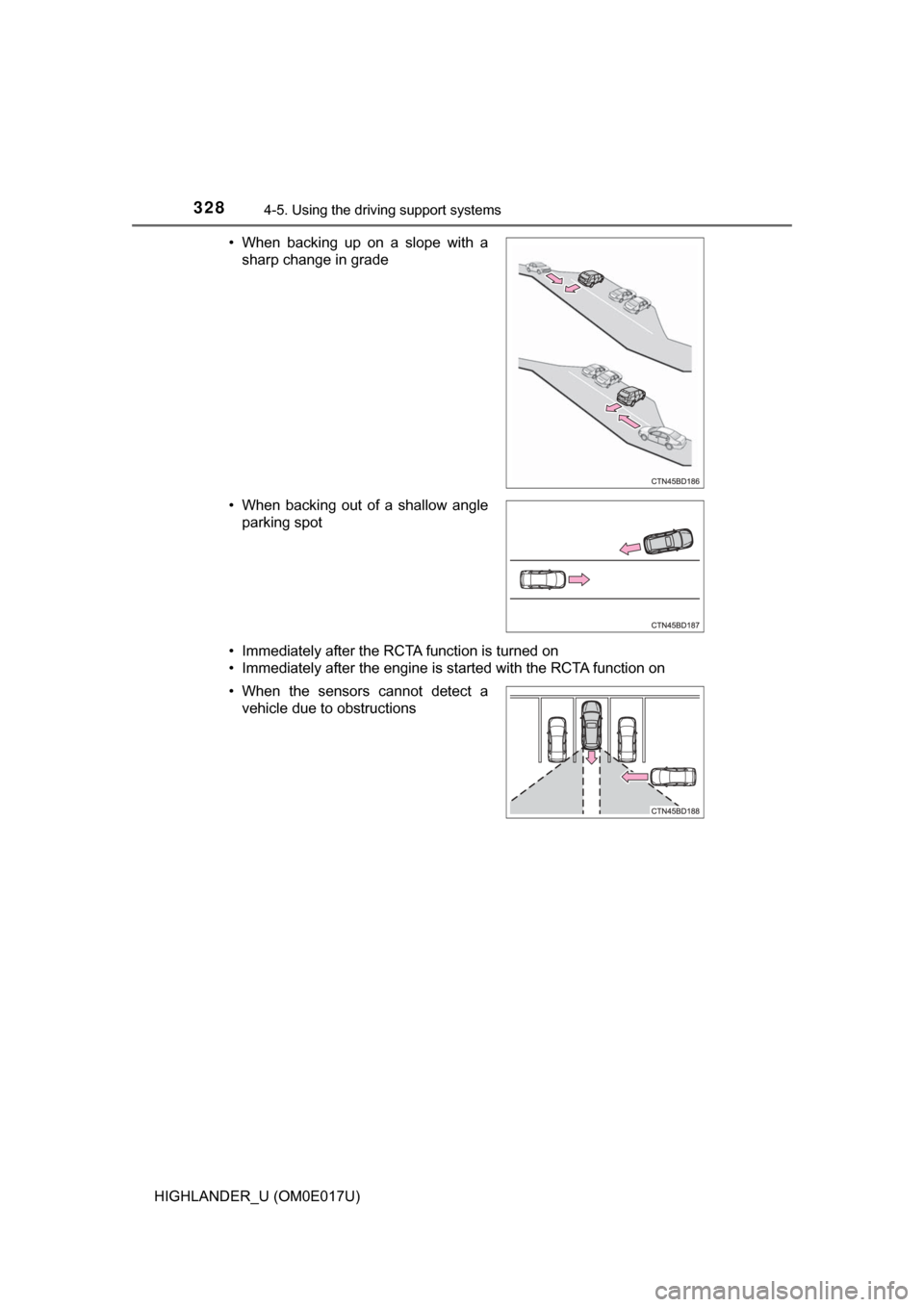
HIGHLANDER_U (OM0E017U)• Immediately after the RCTA function is turned on
• Immediately after the engine is started with the RCTA function on • When backing up on a slope with a
sharp change in grade
• When backing out of a shallow angle parking spot
• When the sensors cannot detect a vehicle due to obstructions
Page 352 of 732

3525-1. Basic Operations
HIGHLANDER_U (OM0E017U)
By touching the screen with your finger, you can control Entune Audio,
etc.
■Drag*
Touch the screen with your finger, and move the screen to the
desired position.
● Scrolling the lists
■Flick*
Touch the screen with your finger and quickly move the screen by
flicking your finger.
●Scrolling the main screen page
*: The above operations may not be performed on all screens.
■Capacitive touch switches
The control panel uses capacitive touch sensors.
●In the following cases, incorrect operation or non-response may occur.
• If the operating section is dirty or has liquid attached to it, incorrect opera-
tion or non-response may occur.
• If the operating section receives electromagnetic waves, incorrect opera-
tion or non-response may occur.
• If wearing gloves during operation, non-response may occur.
• If fingernails are used to operate the system, non-response may occur.
• If a touch pen is used to operate the system, non-response may occur.
• If the palm of your hand touches the operating section during operation, incorrect operation may occur.
• If the palm of your hand touches the operating section, incorrect opera- tion may occur.
• If operations are performed quickly, non-response may occur.
● Please do not reach your hand to the part of button when Entune Audio turn
on. Because the button may become unresponsive for a while. But it will be
back to normal for a given time even if Entune Audio turned on under the
condition.
Operating the touch screen
Page 359 of 732
3595-2. Setup
5
Audio system
HIGHLANDER_U (OM0E017U)
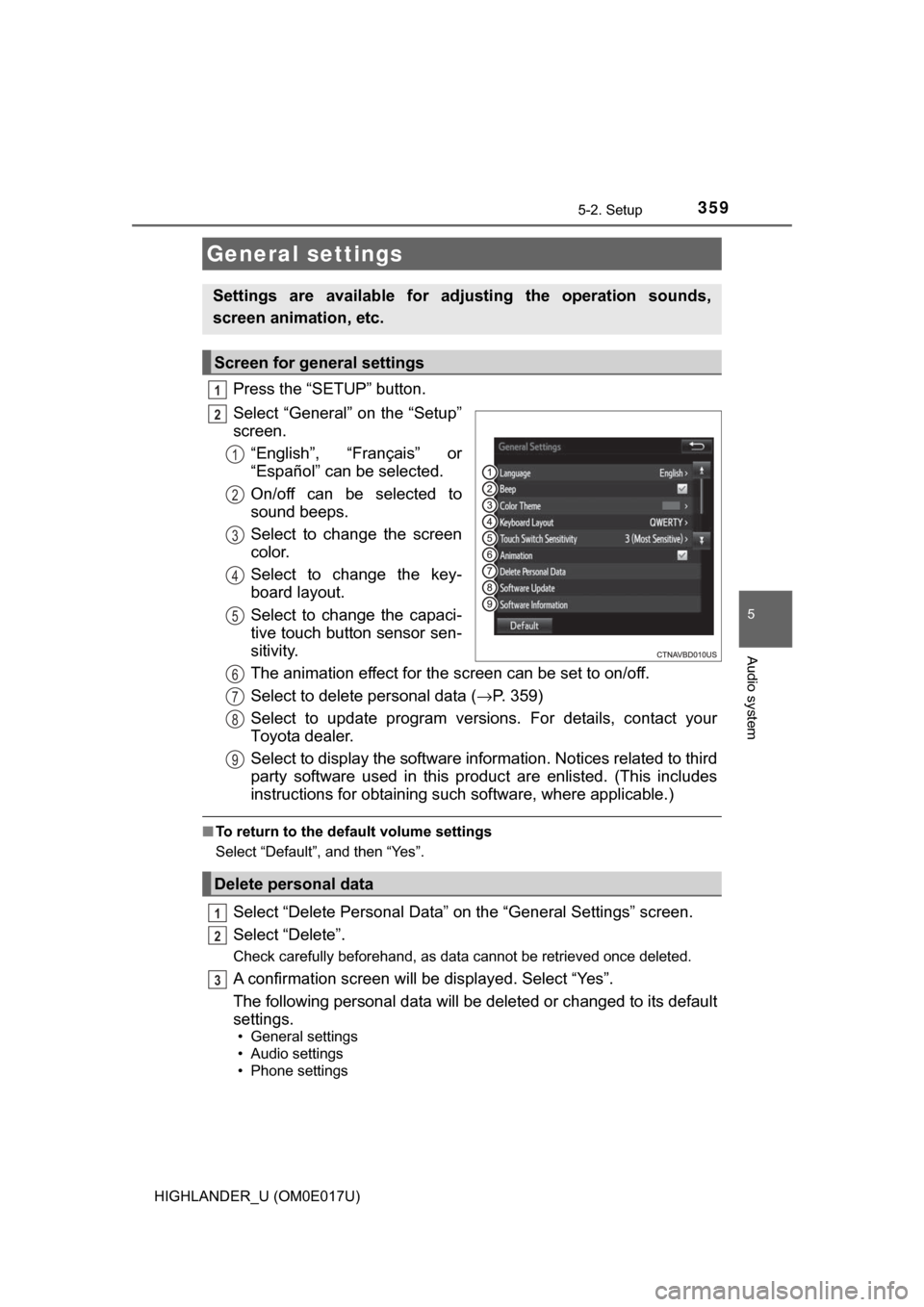
Press the “SETUP” button.
Select “General” on the “Setup”
screen.“English”, “Français” or
“Español” can be selected.
On/off can be selected to
sound beeps.
Select to change the screen
color.
Select to change the key-
board layout.
Select to change the capaci-
tive touch button sensor sen-
sitivity.
The animation effect for the screen can be set to on/off.
Select to delete personal data ( →P. 359)
Select to update program versions. For details, contact your
Toyota dealer.
Select to display the software info rmation. Notices related to third
party software used in this produc t are enlisted. (This includes
instructions for obta ining such software, where applicable.)
■To return to the default volume settings
Select “Default”, and then “Yes”.
Select “Delete Personal Data” on the “General Settings” screen.
Select “Delete”.
Check carefully beforehand, as data cannot be retrieved once deleted.
A confirmation screen will be displayed. Select “Yes”.
The following personal data will be deleted or changed to its default
settings.
• General settings
• Audio settings
• Phone settings
General settings
Settings are available for adjusting the operation sounds,
screen animation, etc.
Screen for general settings
1
2
1
2
3
4
5
Delete personal data
6
7
8
9
1
2
3
Page 497 of 732
4976-4. Using the other interior features
6
Interior features
HIGHLANDER_U (OM0E017U)
■Conditions unfavorable to correct operation
The compass may not show the correct direction in the following conditions:
●The vehicle is stopped immediately after turning.
● The vehicle is on an inclined surface.
● The vehicle is in a place where the earth's magnetic field is subject to inter-
ference by artificial magnetic fields (underground car park/parking lot, under
a steel tower, between buildings, roof car park/parking lot, near an intersec-
tion, near a large vehicle, etc.).
● The vehicle has become magnetized.
(There is a magnet or metal object near the inside rear view mirror.)
● The battery has been disconnected.
● A door is open.
WARNING
■While driving the vehicle
Do not adjust the display. Adjust the display only when the vehicle is
stopped.
■ When doing the circling calibration
Secure a wide space, and watch out for people and vehicles in the neigh-
borhood. Do not violate any local traffic rules while performing circling cali-
bration.
NOTICE
■To avoid compass malfunctions
Do not place magnets or any metal objec ts near the inside rear view mirror.
Doing this may cause the compass sensor to malfunction.
■ To ensure normal op eration of the compass
● Do not perform circling calibration of the compass in a place where the
earth's magnetic field is subject to inte rference by artificial magnetic fields.
● During calibration, do not operate electric systems (moon roof, power win-
dows, etc.) as they may interfere with the calibration.
Page 502 of 732
5027-1. Maintenance and care
HIGHLANDER_U (OM0E017U)
WARNING
■When washing the vehicle
Do not apply water to the inside of the engine compartment. Doing so may
cause the electrical components etc. to catch fire.
■ When cleaning the windshield (veh icles with rain-sensing windshield
wipers)
● When the upper part of the windshield where the raindrop sensor is
located is touched by hand
● When a wet rag or similar is held close to the raindrop sensor
● If something bumps against the windshield
● If you directly touch the raindrop sensor body or if something bumps into
the raindrop sensor
■ Precautions regarding the exhaust pipe
Exhaust gasses cause the exhaust pipe to become quite hot.
When washing the vehicle, be careful not to touch the pipe until it has
cooled sufficiently, as touching a hot exhaust pipe can cause burns.
■ Precaution regarding the rear bumper with Blind Spot Monitor (if
equipped)
If the paint of the rear bumper is chipped or scratched, the system may mal-
function. If this occurs, consult your Toyota dealer.
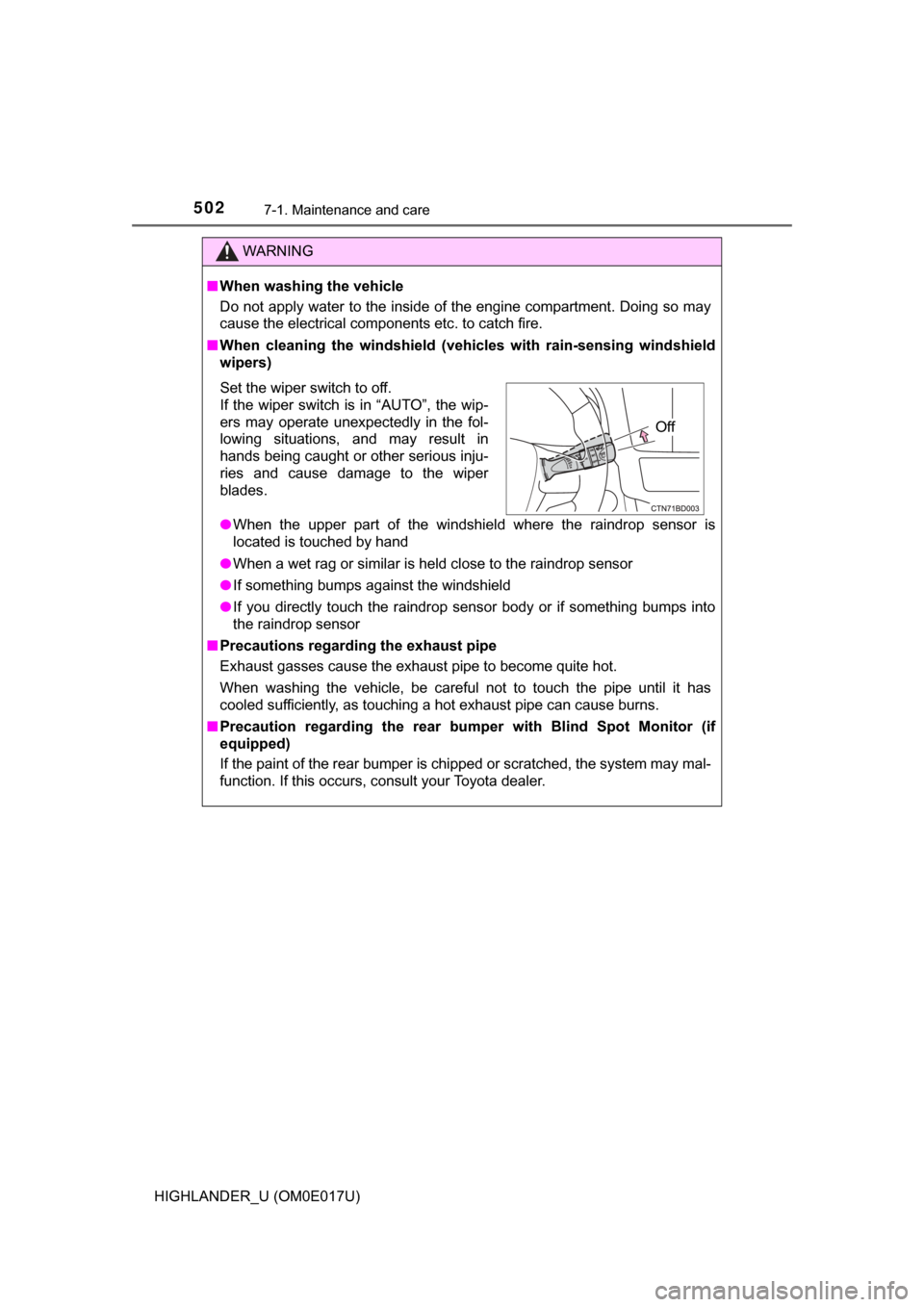
Set the wiper switch to off.
If the wiper switch is in “AUTO”, the wip-
ers may operate unexpectedly in the fol-
lowing situations, and may result in
hands being caught or other serious inju-
ries and cause damage to the wiper
blades.
Off
Page 539 of 732

5397-3. Do-it-yourself maintenance
7
Maintenance and care
HIGHLANDER_U (OM0E017U)■
Tire pressure warning system certification
TRW Automotive
Tire Pressure Monitoring Sensor
FCC ID: GQ4-51T
This device complies with
Part 15 of the FCC Rules.
Operation is subject to the following two conditions:
(1) This device may not cause harmful interference, and
(2) This device must accept any interference received, including interfer- ence that may cause undesired operation of this device.
WARNING: Changes or modifications not expressly approved by TRW
Automotive U.S. LLC could void the user’s authority to operate the
equipment.
TRW Automotive
Tire Pressure Monitoring Sensor
Model: 228408
IC: 1470A-32T
MADE IN U.S.A
This device complies with Indust ry Canada license-exempt RSS
standard(s). Operation is subject to the following two conditions:
(1) This device may not cause harmful interference, and
(2) This device must accept any interference received, including interfer- ence that may cause undesired operation of this device.
Le présent appareil est conforme aux CNR d’lndustrie Canada
applicables aux appareils radio exempts de licence. L’exploitation est
autorisée aux deux conditions suivantes :
1. L’appareil ne doit pas produire de brouillage.
2. L’utilisateur de l’appareil doit acce pter tout brouillage radioélectrique
subi, même si le brouillage est susceptible d’en compromettre le
fonctionnement.
WARNING: Changes or modifications not expressly approved by TRW
Automotive U.S. LLC could void the user’s authority to operate the
equipment.
FCC ID: PAXPMVC010
NOTE:
This device complies with part 15 of the FCC Rules. Operation is subject
to the following two conditions:
(1) This device may not cause harmful interference, and (2) this device
must accept any interference received, including interference that may
cause undesired operation.
FCC WARNING:
Changes or modifications not ex pressly approved by the party
responsible for compliance could void the user’s authority to operate the
equipment.
Page 583 of 732
5838-2. Steps to take in an emergency
8
When trouble arises
HIGHLANDER_U (OM0E017U)
PCS (Pre-Collision System) warning light When the warning light flashes (and a buzzer sounds):
Indicates a malfunction in the PCS (Pre-Collision system)
→ Have the vehicle inspected by your Toyota dealer
immediately.
When the warning light flashes (and a buzzer does not
sound):
Indicates that the PCS (Pre-Collision system) is temporar-
ily unavailable, possibly due to either of the following:
• An area around the radar sensor or camera sensor being dirty or covered with condensation, ice, stickers,
etc.
→ Clear the dirt, condensation, ice, stickers, etc.
(→P. 256)
• Radar sensor or camera sensor operational conditions
(such as temperature etc.) being not met
→ Driving is possible in th is case. The PCS (Pre-Colli-
sion System) will be enabled if the operational condi-
tions (such as temperature etc.) are met again.
When the warning light is illuminated:
Either the VSC (Vehicle Stability Control) system or PCS
(Pre-Collision system) is disabled or both are disabled.
→ To enable the PCS, enable both the VSC system and
PCS. ( →P. 265, 334)
(Amber)
LDA (Lane Departure Alert wit h steering control) indica-
tor The indicator comes on and a warning message is dis-
played to indicate that the LDA (Lane Departure Alert with
steering control) system is not available temporarily or has
detected a malfunction.
→ P. 592
(Flashes)
Stop & Start cancel indicator*3
Indicates a malfunction in the Stop & Start system
(The Stop & Start cancel indicator will come on when the
system is canceled.: →P. 298)
→ Have the vehicle inspected by your Toyota dealer
immediately.
Warning lightWarning light/Details/Actions
Page 586 of 732
5868-2. Steps to take in an emergency
HIGHLANDER_U (OM0E017U)■
SRS warning light
This warning light system monitors the airbag sensor assembly, front impact
sensors, side impact sensors (front door), side impact sensors (rear), driver’s
seat position sensor, driver’s seat belt buckle switch, front passenger occu-
pant classification system (ECU and sens ors), “AIR BAG ON” indicator light,
“AIR BAG OFF” indicator light, front passenger’s seat belt buckle switch,
driver’s seat belt pretensioner, front passenger’s seat belt pretensioner and
force limiter, airbags, interconnecting wiring and power sources. ( →P. 42)
■ Front passenger detection sensor, seat belt reminder and warning
buzzer
If luggage is placed on the front passenger seat, the front passenger detec-
tion sensor may cause the warning light to flash and the warning buzzer to
sound even if a passenger is not sitting in the seat.
■ If the malfunction indicator la mp comes on while driving
First check the following:
● Is the fuel tank empty?
If it is, fill the fuel tank immediately.
● Is the fuel tank cap loose?
If it is, tighten it securely.
The light will go off after several driving trips.
If the light does not go off even after several trips, contact your Toyota dealer
as soon as possible.
■ Electric power steering system warning light (warning buzzer)
When the battery charge becomes insufficient or the voltage temporarily
drops, the electric power steering system warning light may come on and \
the
warning buzzer may sound.
■
When the tire pressure warning light comes on
Check the tire inflation pressure and adjust to the appropriate level. Push-
ing the tire pressure warning reset switch will not turn off the tire pressure
warning light.
■The tire pressure warning light may come on due to natural causes
The tire pressure warning light may come on due to natural causes such
as natural air leaks and tire inflat ion pressure changes caused by tem-
perature. In this case, adjusting the ti re inflation pressure will turn off the
warning light (afte r a few minutes).