snow TOYOTA HIGHLANDER 2018 Owners Manual (in English)
[x] Cancel search | Manufacturer: TOYOTA, Model Year: 2018, Model line: HIGHLANDER, Model: TOYOTA HIGHLANDER 2018Pages: 56, PDF Size: 2.19 MB
Page 3 of 56
 1
INDEX
1 Visit your Toyota dealer for information on customizing this feature.2 Programmable by customer. Refer to the Owner’s Manual for instructio\
ns and more information.3 HomeLink® is a regis")
1
INDEX
1 Visit your Toyota dealer for information on customizing this feature.2 Programmable by customer. Refer to the Owner’s Manual for instructio\
ns and more information.3 HomeLink® is a registered trademark of Gentex Corporation.
HIGHLANDER 2018
This Quick Reference Guide is a summary of basic vehicle
operations. It contains brief descriptions of fundamental
operations so you can locate and use the vehicle’s main
equipment quickly and easily.
The Quick Reference Guide is not intended as a substitute for
the Owner’s Manual located in your vehicle’s glove box. We
strongly encourage you to review the Owner’s Manual and
supplementary manuals so you will have a better understanding
of your vehicle’s capabilities and limitations.
Your dealership and the entire staff of Toyota Motor North
America, Inc. wish you many years of satisfied driving in your
new Highlander.
A word about safe vehicle operations
This Quick Reference Guide is not a full description of Highlander operations.
Every Highlander owner should review the Owner’s Manual that accompanies
this vehicle.
Pay special attention to the boxed information highlighted in color throughout
the Owner’s Manual. Each box contains safe operating instructions to \
help you
avoid injury or equipment malfunction.
All information in this Quick Reference Guide is current at the time of \
printing.
Toyota reserves the right to make changes at any time without notice.
Engine maintenance 9
Fuel tank door release & cap
8
Hood release
8
Indicator symbols
4-5
Instrument cluster
4
Instrument panel
2-3
Instrument panel light control
8
Keyless entry
1,2 6-7
Smart Key system1,2 7
OVERVIEW
FEATURES & OPERATIONS FEATURES & OPERATIONS (continued)
SAFETY & EMERGENCY FEATURES TOYOTA SAFETY SENSE™ P (TSS-P)
Air conditioning1,2/heating 24-25
All-wheel drive lock switch
27
Audio
23
Auto lock/unlock1 10
Automatic transmission
10
Clock
10
Door locks
1,2 11
Downhill Assist Control system (DAC)
2
7
Driver Easy Speak
22
Garage door opener (HomeLink®)3 11
Lights1,2 & turn signals1 18
Moonroof1 12
Multi-Information Display (MID)2 19
Panoramic moonroof
12
Parking brake
11
Power Liftgate (back door)1,2 13
Power outlets-
12V DC/120V AC/USB 2.1A 17
Rear seat entertainment system
22
Seat adjustments-Front
14
Seat adjustments-Rear
15
Seat heaters/ventilators
26
Seats-Head restraints
15
Seats-Stowing &
returning 3rd row seats
15
Snow mode button
27
Steering lock release
11
Steering wheel switches &
telephone controls (Bluetooth
®) 20 Stop & Start Engine System
21
Tilt & telescopic steering wheel
14
USB 2.0/AUX port
22
Vehicle Stability Control (VSC)/
TRAC OFF switch
26
Windows-Power1 19
Windshield wipers & washers1 16
Automatic High Beams (AHB)
37-38
Dynamic Radar
Cruise Control (DRCC)
34-37
Lane Departure Alert with Steering
Assist function (LDA w/SA)
31-34
Pre-Collision System with Pedestrian
Detection function (PCS w/PD)
29-31
Quick overview-
Toyota Safety Sense™ P (TSS-P)
28
Sensors
28
BLUETOOTH® DEVICE
PAIRING SECTION 44-53
Floor mat installation
43
Rear door child safety locks
40
Seat belt reminder indicator
39
Seat belts
39
Seat belts-3rd row center
39
Seat belts-Shoulder belt anchor
39
Spare tire & tools
41
Star Safety SystemTM 42-43
Tire Pressure Monitoring
(warning) System (TPMS)
40
THIS PAGE ON COVER DOC
140258_HighlanderQRG_GUTS.indd 19/18/17 2:19 PM
OVERVIEW
FEATURES & OPERATIONS
TOYOTA SAFETY SENSE
SAFETY & EMERGENCY FEATURES
Page 5 of 56
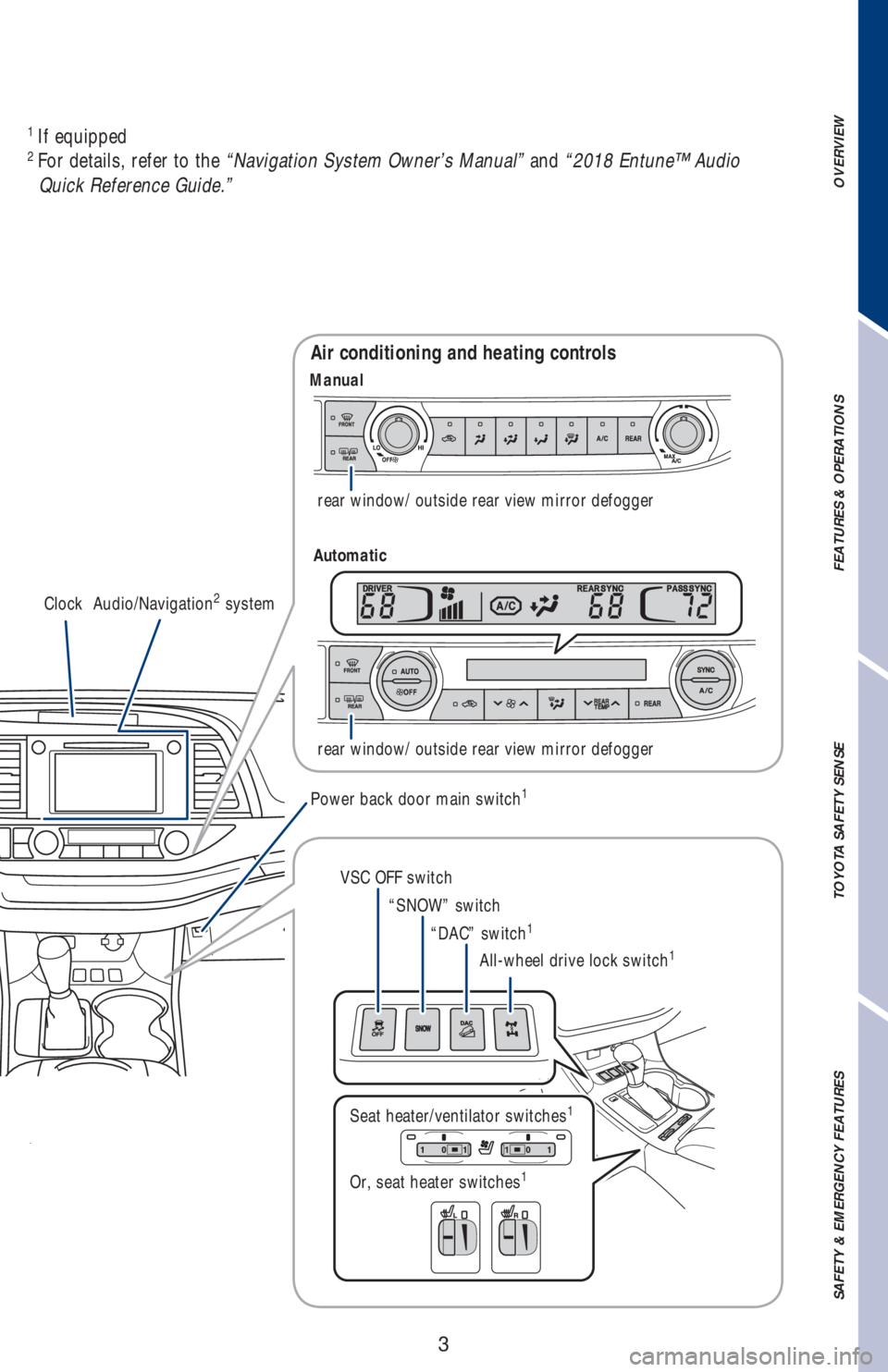
3
OVERVIEW FEATURES & OPERATIONS TOYOTA SAFETY SENSE SAFETY & EMERGENCY FEATURES
Clock Audio/Navigation2 systemrear window/ outside rear view mirror defogger
rear window/ outside rear view mirror defogger
Air conditioning and heating controls
Power back door main switch1
VSC OFF switch
“SNOW” switch
“DAC” switch
1
All-wheel drive lock switch1
Seat heater/ventilator switches1
Or, seat heater switches1 1
If equipped2
For details, refer to the “Navigation System Owner’s Manual” and “2018 Entune™ Audio
Quick Reference Guide.”
Manual
Automatic
Page 7 of 56
5
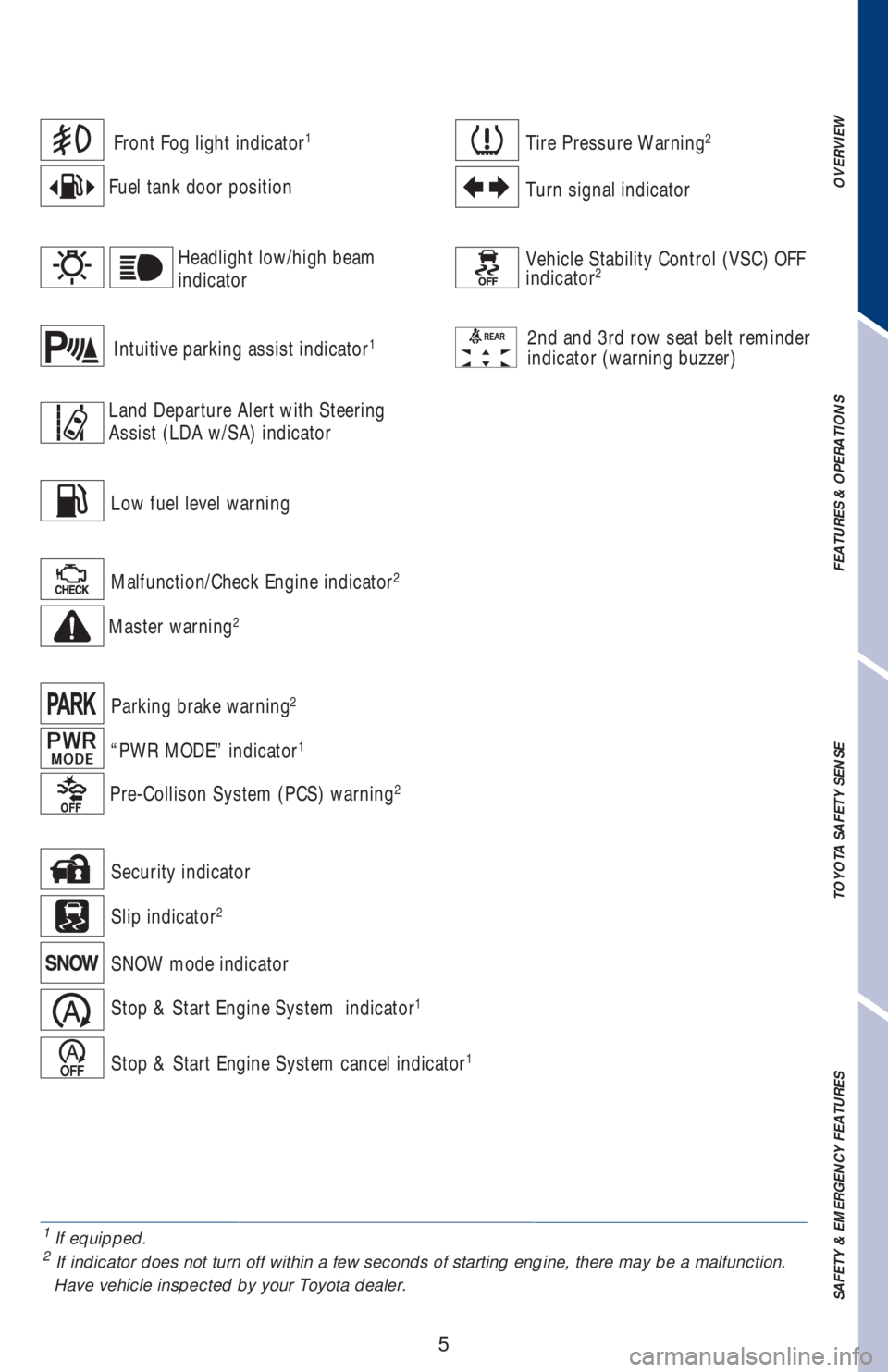
1 If equipped.2
If indicator does not turn off within a few seconds of starting engine, there may be a malfunction.
Have vehicle inspected by your Toyota dealer.
Front Fog light indicator1
Fuel tank door position
Vehicle Stability Control (VSC) OFF
indicator2
2nd and 3rd row seat belt reminder
indicator (warning buzzer)
Malfunction/Check Engine indicator2
Master warning2
Tire Pressure Warning2
Turn signal indicator
Intuitive parking assist indicator1
Slip indicator2
SNOW mode indicator
Stop & Start Engine System indicator1
Stop & Start Engine System cancel indicator1
Security indicator
Headlight low/high beam
indicator
Low fuel level warning
Parking brake warning
2
“PWR MODE” indicator1
Land Departure Alert with Steering
Assist (LDA w/SA) indicator
Pre-Collison System (PCS) warning2
OVERVIEW FEATURES & OPERATIONS TOYOTA SAFETY SENSE SAFETY & EMERGENCY FEATURES
Page 28 of 56
26
FEATURES & OPERATIONS
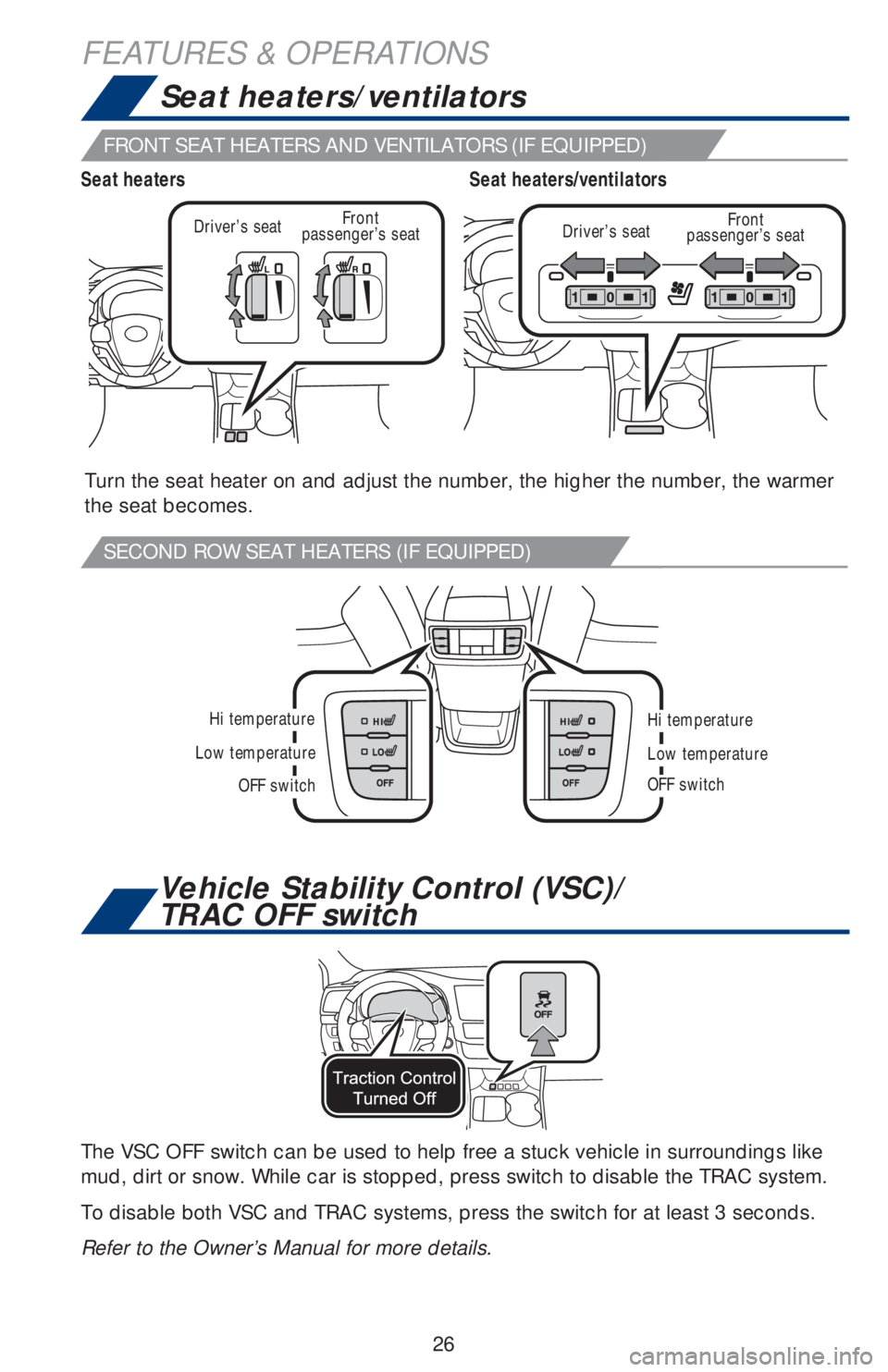
Seat heaters/ventilators
Vehicle Stability Control (VSC)/
TRAC OFF switch
Hi temperature
OFF switch
Low temperature
Hi temperature
OFF switch
Low temperature
Turn the seat heater on and adjust the number, the higher the number, the warmer
the seat becomes.
The VSC OFF switch can be used to help free a stuck vehicle in surroundings like
mud, dirt or snow. While car is stopped, press switch to disable the TRAC system.
To disable both VSC and TRAC systems, press the switch for at least 3 seconds.
Refer to the Owner’s Manual for more details.
Driver’s seatDriver’s seatFront
passenger’s seat Front
passenger’s seat
Seat heaters/ventilators Seat heaters
FRONT SEAT HEATERS AND VENTILATORS (IF EQUIPPED)
SECOND ROW SEAT HEATERS (IF EQUIPPED)
Page 29 of 56
27
OVERVIEW FEATURES & OPERATIONS TOYOTA SAFETY SENSE SAFETY & EMERGENCY FEATURES
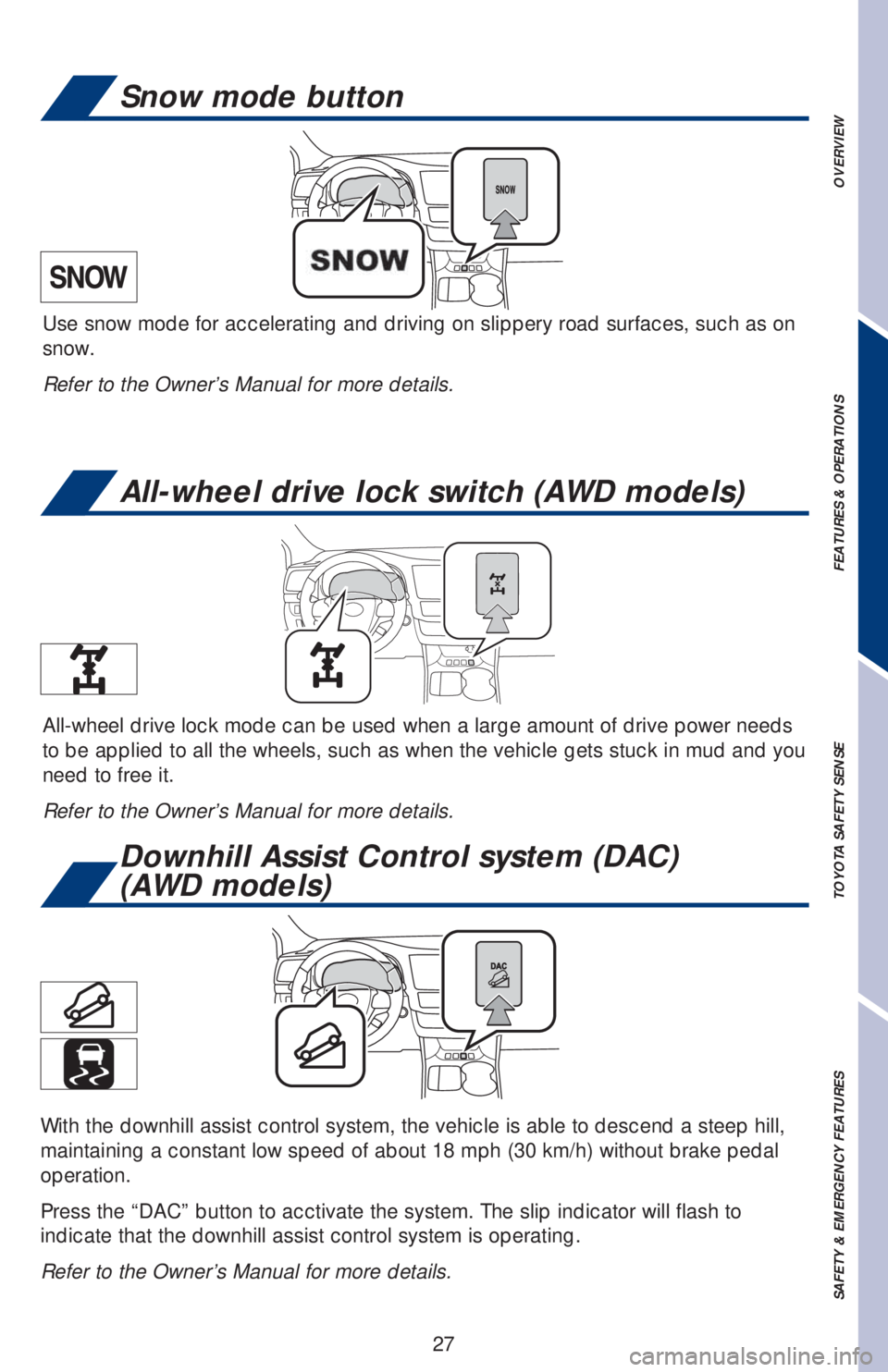
Downhill Assist Control system (DAC)
(AWD models)
All-wheel drive lock switch (AWD models)
Snow mode button
With the downhill assist control system, the vehicle is able to descend a steep hill,
maintaining a constant low speed of about 18 mph (30 km/h) without brake pedal
operation.
Press the “DAC” button to acctivate the system. The slip indicator will flash to
indicate that the downhill assist control system is operating.
Refer to the Owner’s Manual for more details.
Use snow mode for accelerating and driving on slippery road surfaces, such as on
snow.
Refer to the Owner’s Manual for more details.
All-wheel drive lock mode can be used when a large amount of drive power needs
to be applied to all the wheels, such as when the vehicle gets stuck in mud and you
need to free it.
Refer to the Owner’s Manual for more details.
Page 31 of 56
29
OVERVIEW FEATURES & OPERATIONS TOYOTA SAFETY SENSE SAFETY & EMERGENCY FEATURES
The Pre-Collision System uses a radar sensor and camera sensor to help detect a
vehicle or pedestrian in front of your vehicle.
As there is a limit to the degree of recognition accuracy and control performance
that this system can provide, do not overly rely on this system. This system will not
prevent collisions or lessen collision damage or injury in every situation. Do not use
PCS instead of normal braking operations under any circumstances. Do not attempt
to test the operation of the pre-collision system yourself, as the system may not
operate or engage, possibly leading to an accident. In some situations, such as
when driving in inclement weather such as heavy rain, fog, snow or a sandstorm or
while driving on a curve and for a few seconds after driving on a curve, a vehicle
may not be detected by the radar and camera sensors, preventing the system from
operating or engaging properly.
Refer to a Toyota Owner’s Manual for a list of additional situations in which the
system may not operate properly.
Refer to a Toyota Owner’s Manual for additional information on PCS w/PD operation,
settings adjustments, limitations, and precautions before attempting to use it. Pre-Collision Warning
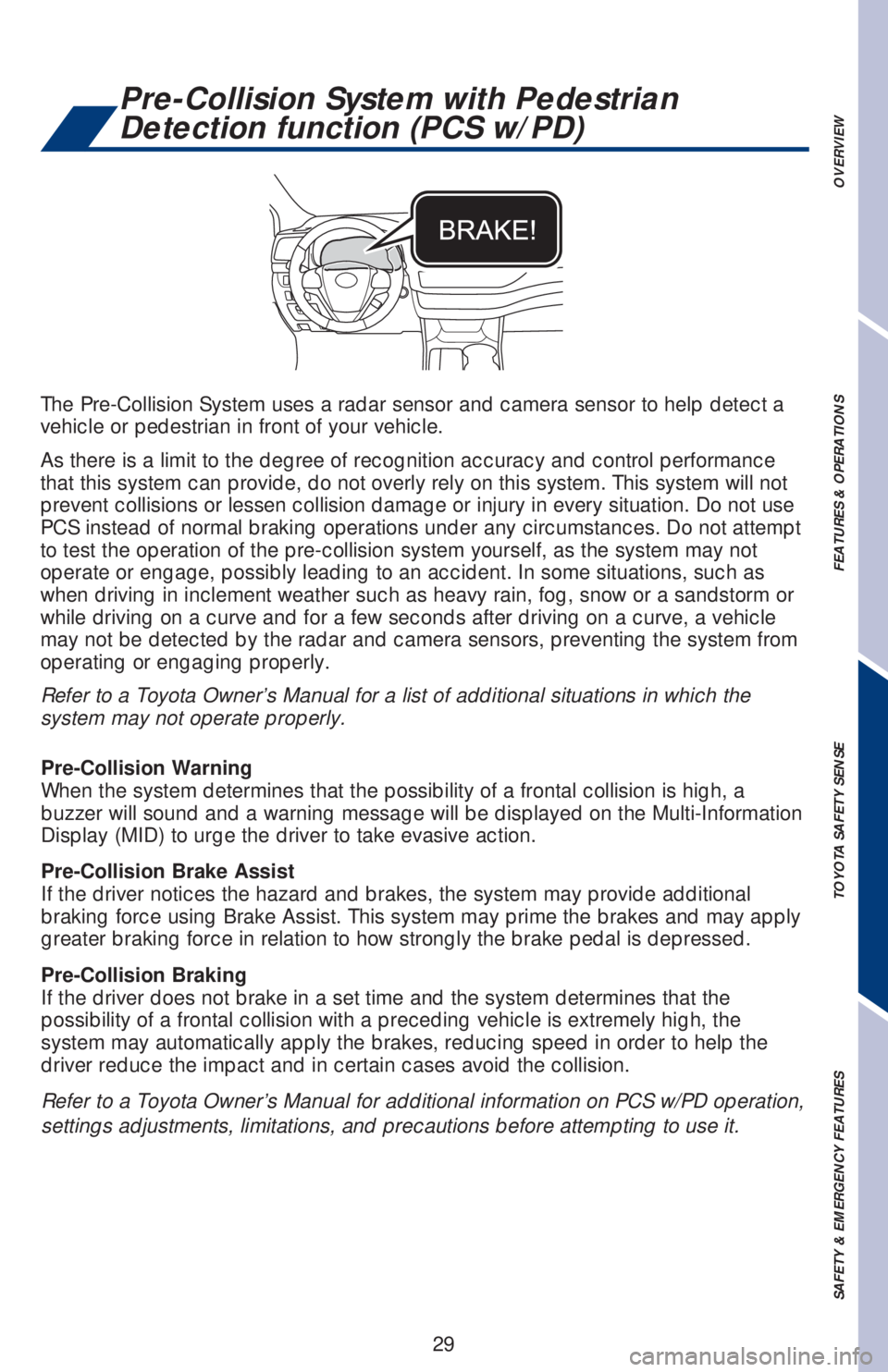
When the system determines that the possibility of a frontal collision is high, a
buzzer will sound and a warning message will be displayed on the Multi-Information
Display (MID) to urge the driver to take evasive action.
Pre-Collision Brake Assist
If the driver notices the hazard and brakes, the system may provide additional
braking force using Brake Assist. This system may prime the brakes and may apply
greater braking force in relation to how strongly the brake pedal is depressed.
Pre-Collision Braking
If the driver does not brake in a set time and the system determines that the
possibility of a frontal collision with a preceding vehicle is extremely high, the
system may automatically apply the brakes, reducing speed in order to help the
driver reduce the impact and in certain cases avoid the collision.
Pre-Collision System with Pedestrian
Detection function (PCS w/PD)