bluetooth TOYOTA HIGHLANDER 2018 (in English) User Guide
[x] Cancel search | Manufacturer: TOYOTA, Model Year: 2018, Model line: HIGHLANDER, Model: TOYOTA HIGHLANDER 2018Pages: 732, PDF Size: 14.5 MB
Page 387 of 732
3875-7. Connecting Bluetooth®
5
Audio system
HIGHLANDER_U (OM0E031U)
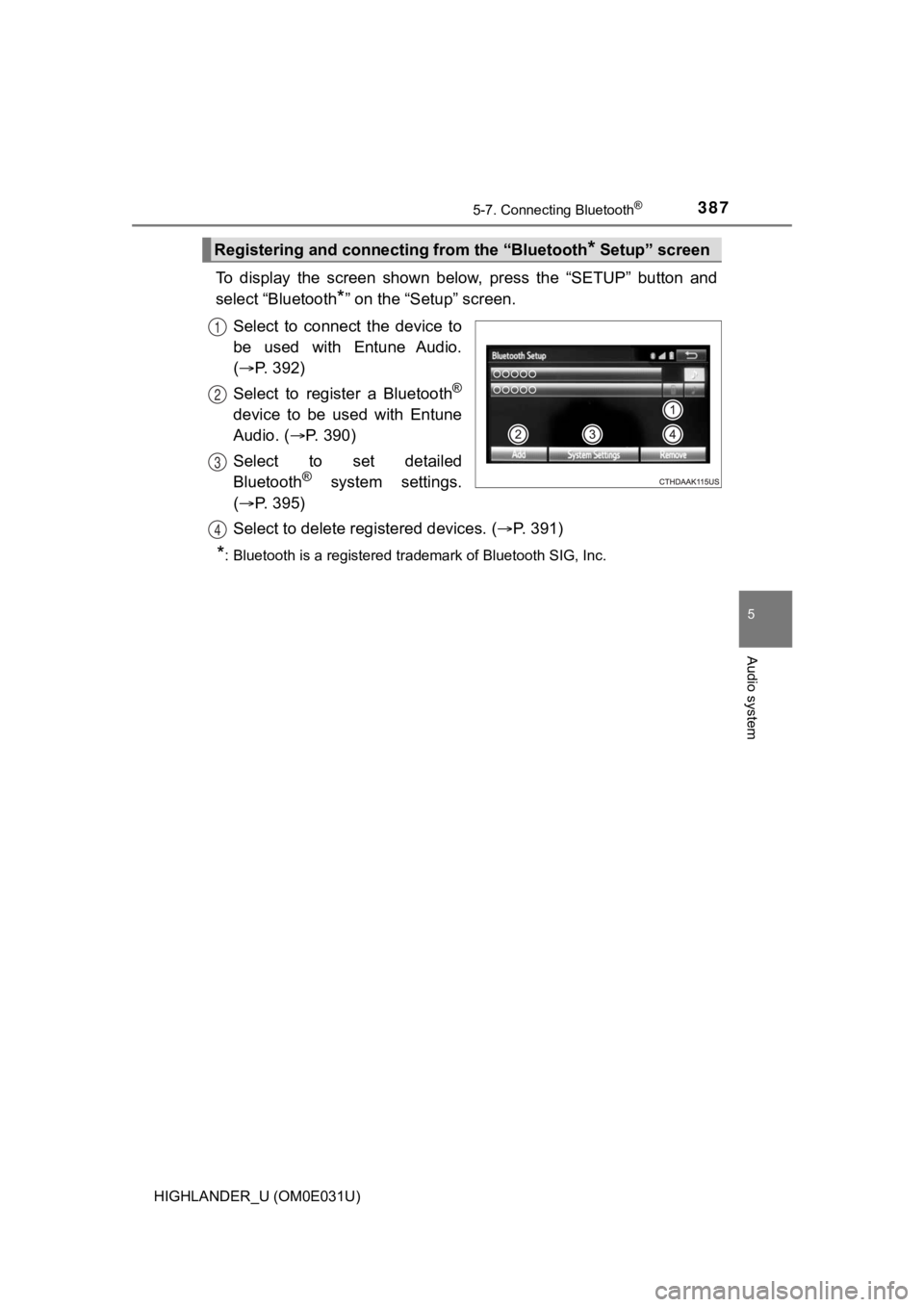
To display the screen shown below, press the “SETUP” button and
select “Bluetooth
*” on the “Setup” screen.
Select to connect the device to
be used with Entune Audio.
( P. 392)
Select to register a Bluetooth
®
device to be used with Entune
Audio. ( P. 390)
Select to set detailed
Bluetooth
® system settings.
( P. 395)
Select to delete regi stered devices. (P. 391)
*: Bluetooth is a registered trademark of Bluetooth SIG, Inc.
Registering and connecti ng from the “Bluetooth* Setup” screen
1
2
3
4
Page 388 of 732
3885-7. Connecting Bluetooth®
HIGHLANDER_U (OM0E031U)
Turn the Bluetooth® connection setting of your audio player on.
Press the “AUDIO” button.
Select “ Audio”.
Select “Select Device”.
Follow the steps in “How to registering a Bluetooth
® device” from
step . ( P. 390)
Registering a Bluetooth® audio player for
the first time
To use the Bluetooth® Audio, it is necessary t o register an audio
player with the system.
Once the player has been registered, it is possible to use the
Bluetooth
® Audio.
For details about regis tering a Bluetooth
® device (P. 390)
1
2
3
4
5
2
Page 389 of 732
3895-7. Connecting Bluetooth®
5
Audio system
HIGHLANDER_U (OM0E031U)
Turn the Bluetooth® connection setting of your cellular phone on.
Press the “ ” button.
Select “OK” to register a phone.
Follow the steps in “How to registering a Bluetooth
® device” from
step . ( P. 390)
Registering a Bluetooth® phone for the first
time
To use the hands-free system, it is necessary to register a
Bluetooth® phone with the system.
Once the phone has been registe red, it is possible to use the
hands-free system.
For details about regis tering a Bluetooth
® device (P. 390)
1
2
3
4
3
Page 390 of 732
3905-7. Connecting Bluetooth®
HIGHLANDER_U (OM0E031U)
Display the “Bluetooth* Setup” screen. (P. 387)
Select “Add”.
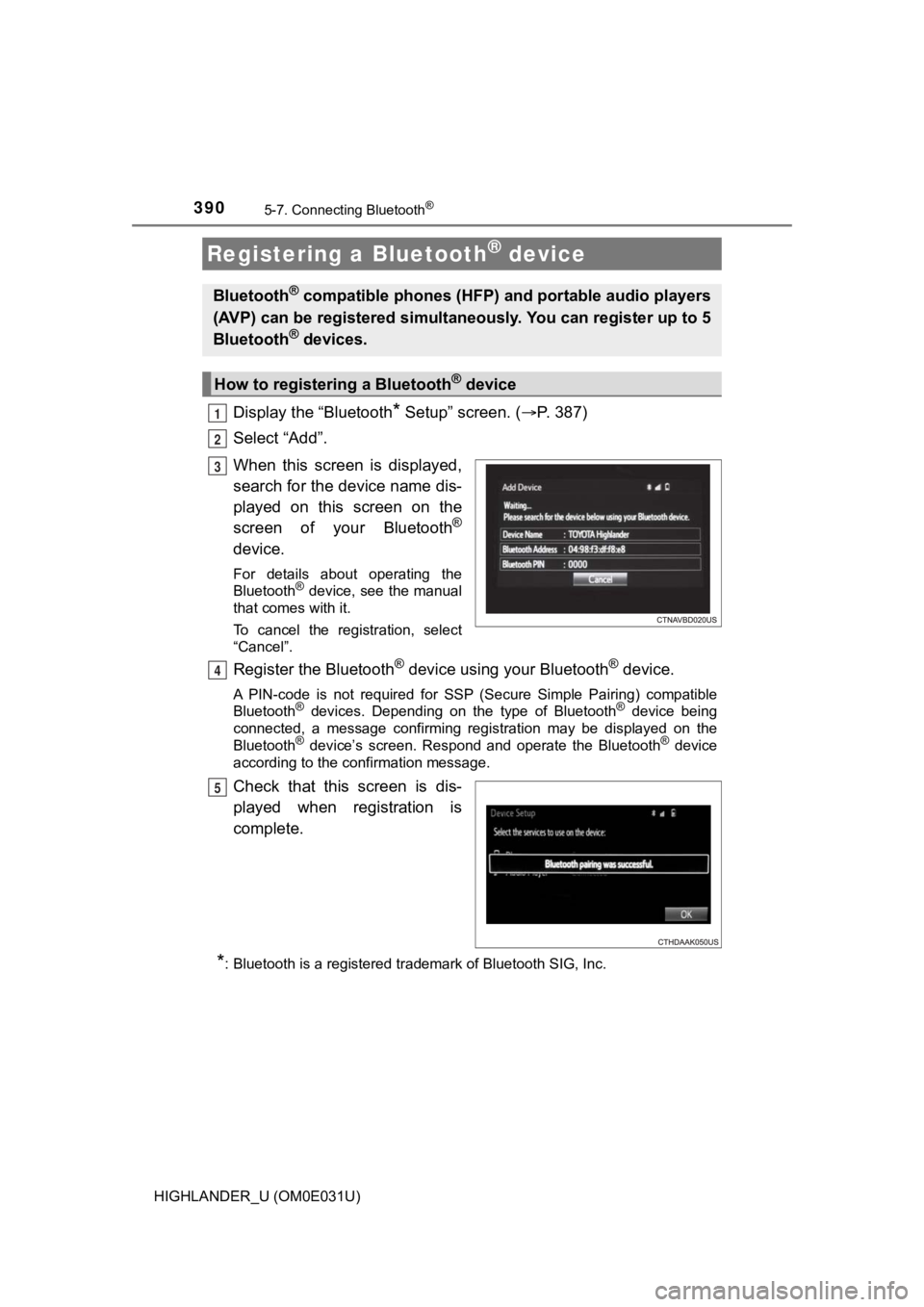
When this screen is displayed,
search for the device name dis-
played on this screen on the
screen of your Bluetooth
®
device.
For details about operating the
Bluetooth® device, see the manual
that comes with it.
To cancel the registration, select
“Cancel”.
Register the Bluetooth® device using your Bluetooth® device.
A PIN-code is not required for SS P (Secure Simple Pairing) compatible
Bluetooth® devices. Depending on the type of Bluetooth® device being
connected, a message confirming registration may be displayed o n the
Bluetooth
® device’s screen. Respond and operate the Bluetooth® device
according to the confirmation message.
Check that this screen is dis-
played when registration is
complete.
*: Bluetooth is a registered trademark of Bluetooth SIG, Inc.
Registering a Bluetooth® device
Bluetooth® compatible phones (HFP) a nd portable audio players
(AVP) can be registered simulta neously. You can register up to 5
Bluetooth
® devices.
How to registering a Bluetooth® device
1
2
3
4
5
Page 391 of 732
3915-7. Connecting Bluetooth®
5
Audio system
HIGHLANDER_U (OM0E031U)
Select “OK” when the connection status changes from “Connect-
ing...” to “Connected”.
If an error message is displayed, follow the guidance on the screen to try
again.
Registration can be performed from screens other than the
“Bluetooth
* Setup” screen.
■When registering from the “Bluetooth* Audio” screen
Display the “Bluetooth
* Audio” screen. ( P. 3 6 3 )
Select “Select Device”.
Follow the steps in “How to registering a Bluetooth
® device” from
step . ( P. 390)
*: Bluetooth is a registered trademark of Bluetooth SIG, Inc.
Display the “Bluetooth* Setup” screen. ( P. 387)
Select “Remove”.
Select the desired device.
A confirmation message will be di splayed, select “Yes” to delete the
device.
Check that a confirmation screen is displayed when the operation is
complete.
*: Bluetooth is a registered trademark of Bluetooth SIG, Inc.
Deleting a Bluetooth® device
6
1
2
3
2
1
2
3
4
5
Page 392 of 732
3925-7. Connecting Bluetooth®
HIGHLANDER_U (OM0E031U)
Press the “SETUP” button.
Select “Bluetooth
*”.
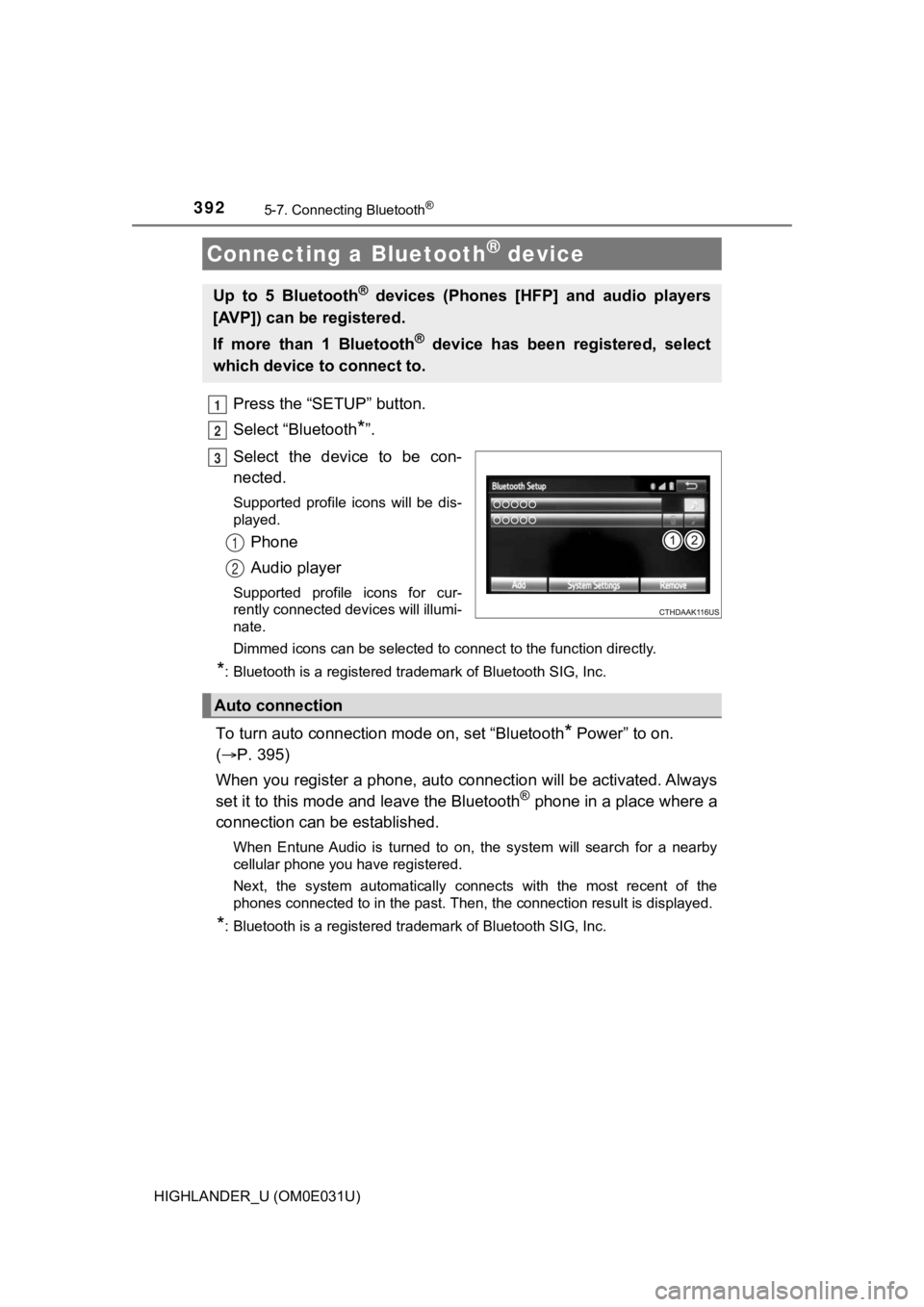
Select the device to be con-
nected.
Supported profile icons will be dis-
played.
Phone
Audio player
Supported profile icons for cur-
rently connected devices will illumi-
nate.
Dimmed icons can be selected to connect to the function directl y.
*: Bluetooth is a registered trademark of Bluetooth SIG, Inc.
To turn auto connection mode on, set “Bluetooth* Power” to on.
( P. 395)
When you register a phone, auto connection will be activated. Always
set it to this mode and leave the Bluetooth
® phone in a place where a
connection can be established.
When Entune Audio is turned to on, the system will search for a nearby
cellular phone you have registered.
Next, the system automatically connects with the most recent of the
phones connected to in the past. Then, the connection result is displayed.
*: Bluetooth is a registered trademark of Bluetooth SIG, Inc.
Connecting a Bluetooth® device
Up to 5 Bluetooth® devices (Phones [HFP] and audio players
[AVP]) can be registered.
If more than 1 Bluetooth
® device has been registered, select
which device to connect to.
1
2
3
1
2
Auto connection
Page 393 of 732
3935-7. Connecting Bluetooth®
5
Audio system
HIGHLANDER_U (OM0E031U)
When auto connection has failed or “Bluetooth* Power” is turned off,
you must connect the Bluetooth® device manually.
Follow the steps in “C onnecting a Bluetooth
® device” from step .
( P. 392)
*: Bluetooth is a registered trademark of Bluetooth SIG, Inc.
Registering an additional device
Select “Select Devic e” on the Bluetooth
® audio control screen.
For more information: P. 3 9 0
Selecting a registered device
Select “Select Devic e” on the Bluetooth
® audio control screen.
For more information: P. 3 9 2
■Reconnecting a Bluetooth® phone
If the system cannot connect due to poor signal strength, the s ystem will
automatically attempt to reconnect.
If the system is attempting to connect to a Bluetooth
® phone and the
Bluetooth® phone is turned off and then back on, the system will attempt to
reconnect.
Manual connection
Connecting a Bluetooth® audio player
11
1
2
1
2
Page 394 of 732
3945-7. Connecting Bluetooth®
HIGHLANDER_U (OM0E031U)
Display the “Bluetooth* Setup” screen. (P. 387)
Select the device.
Select “Device Info”.
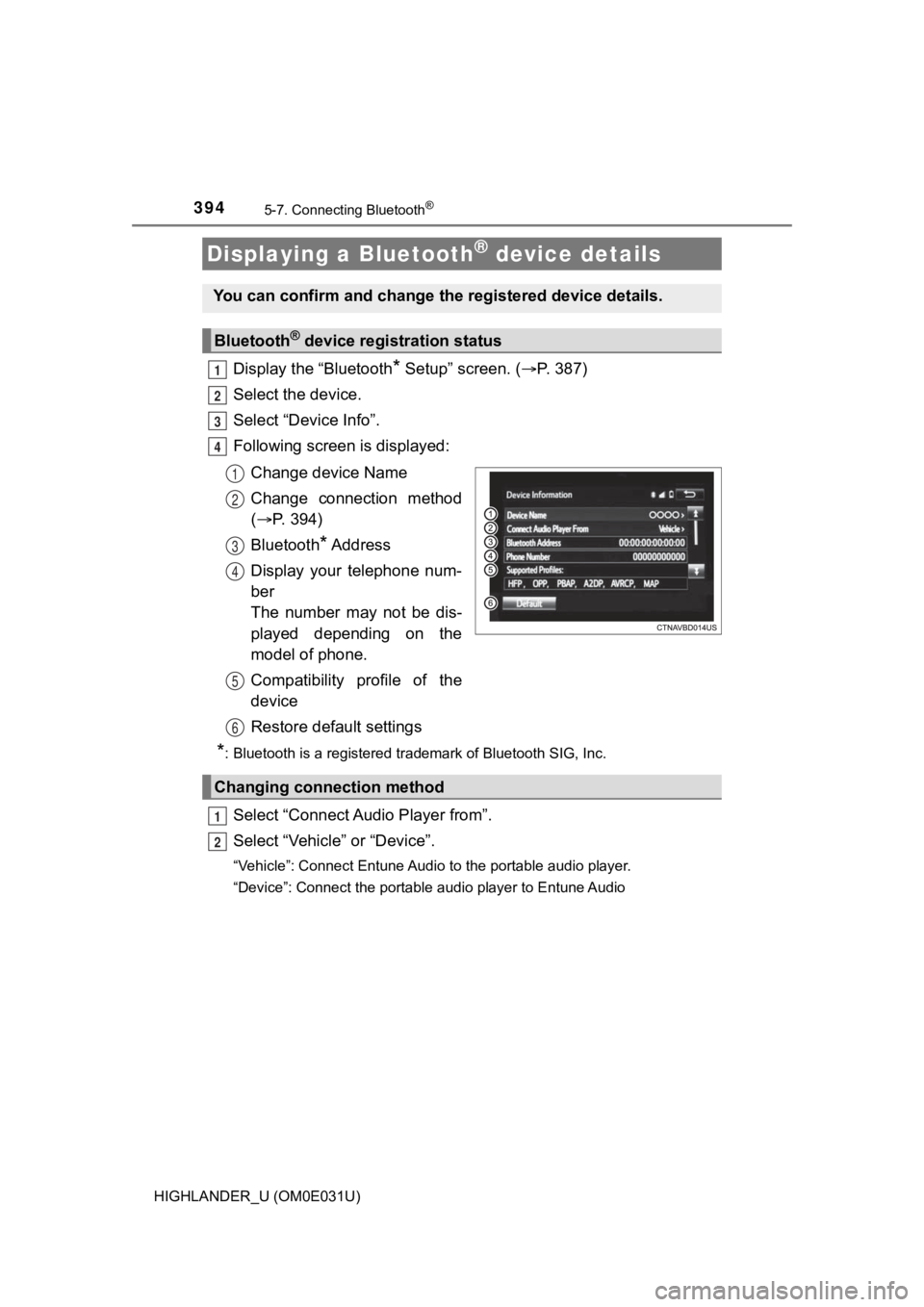
Following screen is displayed:
Change device Name
Change connection method
( P. 394)
Bluetooth
* A d d r e s s
Display your telephone num-
ber
The number may not be dis-
played depending on the
model of phone.
Compatibility profile of the
device
Restore default settings
*: Bluetooth is a registered trademark of Bluetooth SIG, Inc.
Select “Connect Audio Player from”.
Select “Vehicle” or “Device”.
“Vehicle”: Connect Entune Audio to the portable audio player.
“Device”: Connect the portable audio player to Entune Audio
Displaying a Bluetooth® device details
You can confirm and change the registered device details.
Bluetooth® device registration status
1
2
3
4
1
2
3
4
5
6
Changing connection method
1
2
Page 395 of 732
3955-7. Connecting Bluetooth®
5
Audio system
HIGHLANDER_U (OM0E031U)
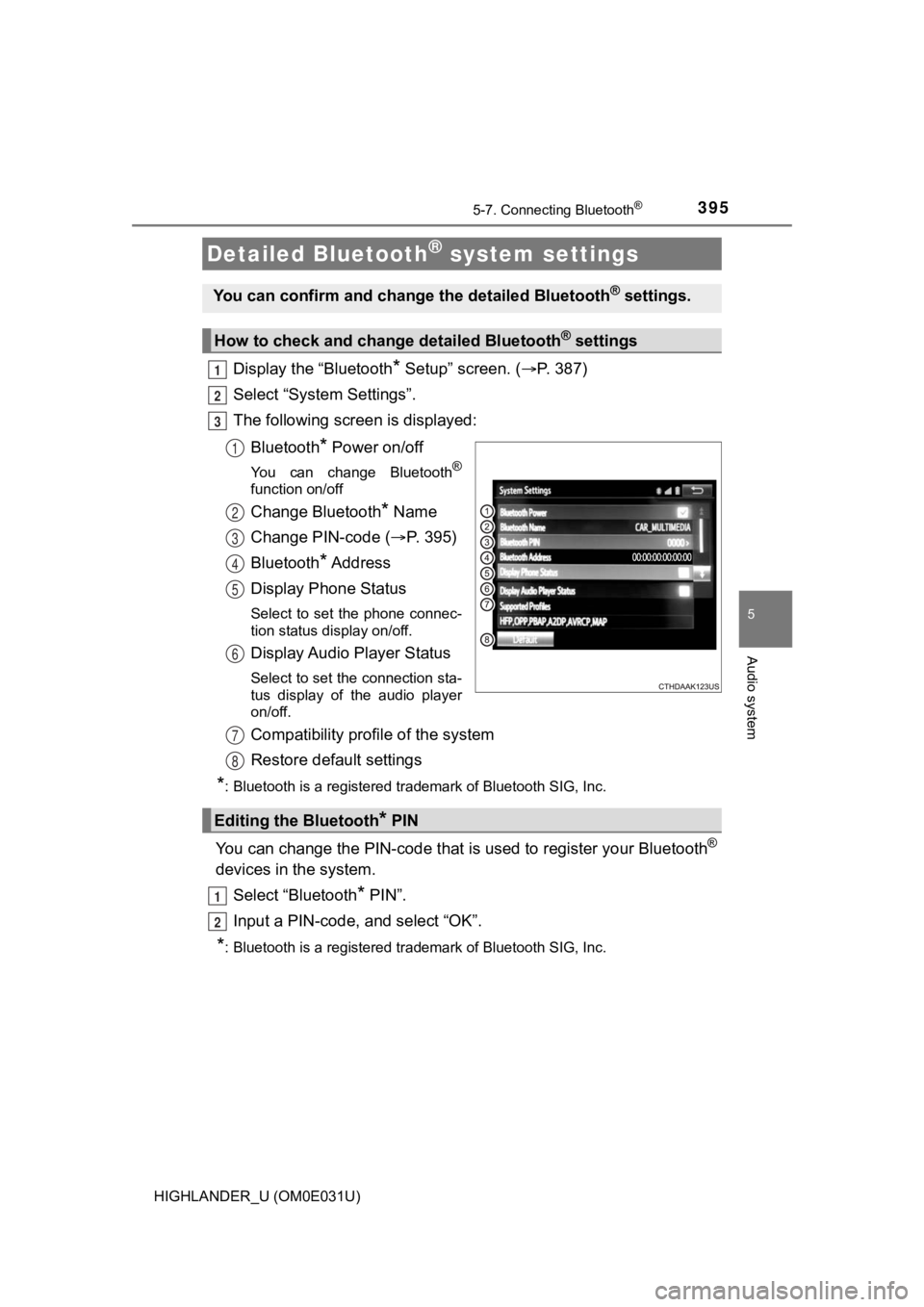
Display the “Bluetooth* Setup” screen. (P. 387)
Select “System Settings”.
The following screen is displayed:
Bluetooth
* Power on/off
You can change Bluetooth®
function on/off
Change Bluetooth* Name
Change PIN-code ( P. 395)
Bluetooth
* A d d r e s s
Display Phone Status
Select to set the phone connec-
tion status display on/off.
Display Audio Player Status
Select to set the connection sta-
tus display of the audio player
on/off.
Compatibility profile of the system
Restore default settings
*: Bluetooth is a registered trademark of Bluetooth SIG, Inc.
You can change the PIN-code that is used to register your Bluet ooth®
devices in the system.
Select “Bluetooth
* PIN”.
Input a PIN-code, and select “OK”.
*: Bluetooth is a registered trademark of Bluetooth SIG, Inc.
Detailed Bluetooth® system settings
You can confirm and change the detailed Bluetooth® settings.
How to check and change detailed Bluetooth® settings
1
2
3
1
2
3
4
5
6
Editing the Bluetooth* PIN
7
8
1
2
Page 396 of 732
396
HIGHLANDER_U (OM0E031U)
5-8. Bluetooth® Audio
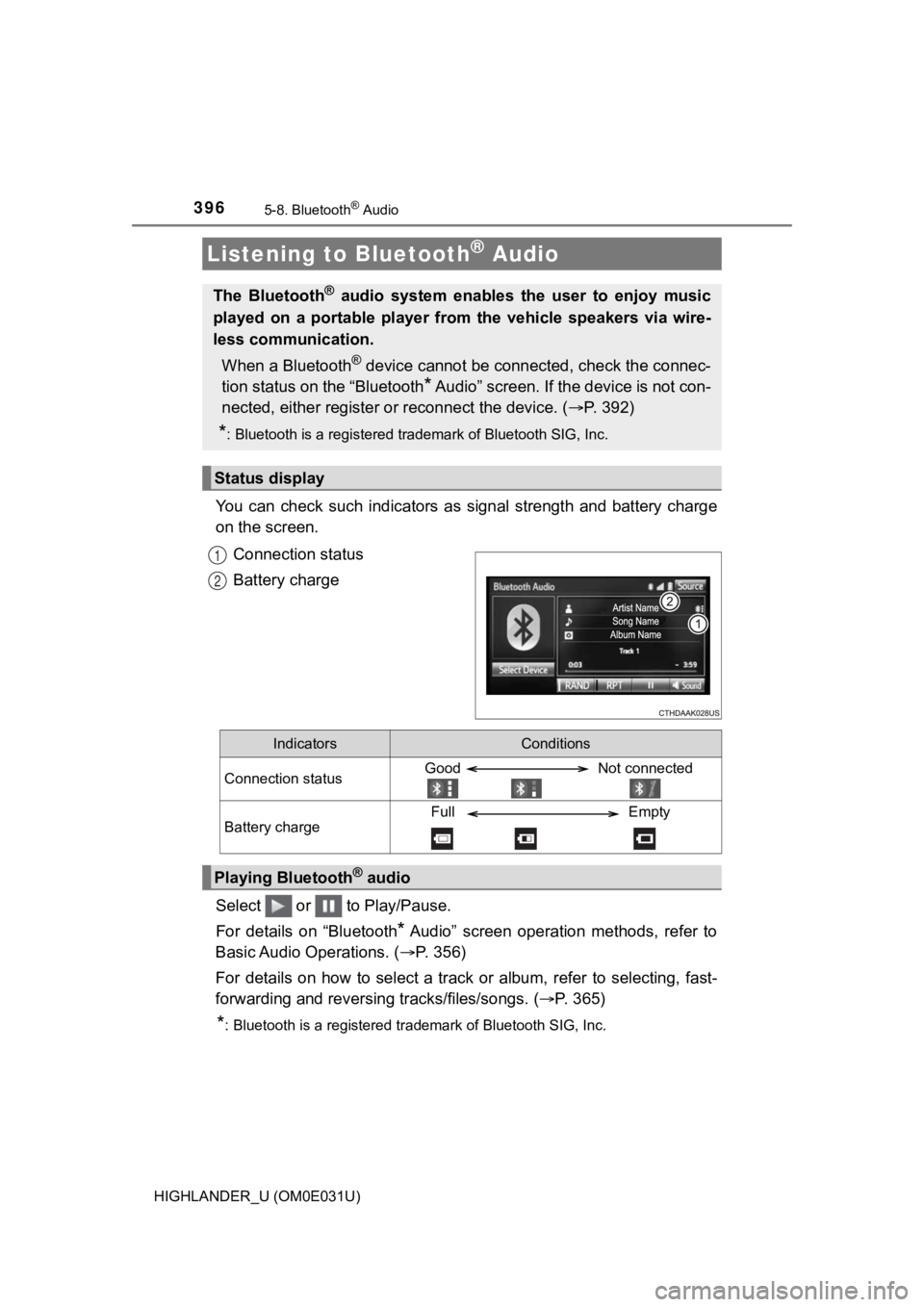
You can check such indicators as signal strength and battery charge
on the screen.
Connection status
Battery charge
Select or to Play/Pause.
For details on “Bluetooth
* Audio” screen operation methods, refer to
Basic Audio Operations. ( P. 356)
For details on how to select a tra ck or album, refer to selecting, fast-
forwarding and reversing tracks/files/songs. ( P. 365)
*: Bluetooth is a registered trademark of Bluetooth SIG, Inc.
Listening to Bluetooth® Audio
The Bluetooth® audio system enables the user to enjoy music
played on a portable player from the vehicle speakers via wire-
less communication.
When a Bluetooth
® device cannot be connected, check the connec-
tion status on the “Bluetooth
* Audio” screen. If the device is not con-
nected, either register o r reconnect the device. ( P. 3 9 2 )
*: Bluetooth is a registered trademark of Bluetooth SIG, Inc.
Status display
1
2
IndicatorsConditions
Connection statusGood Not connected
Battery chargeFull Empty
Playing Bluetooth® audio