ECO mode TOYOTA HIGHLANDER 2018 (in English) Owner's Manual
[x] Cancel search | Manufacturer: TOYOTA, Model Year: 2018, Model line: HIGHLANDER, Model: TOYOTA HIGHLANDER 2018Pages: 732, PDF Size: 14.5 MB
Page 174 of 732

1743-5. Opening and closing the windows
HIGHLANDER_U (OM0E031U)■
When the power window does not close normally (windows with one -
touch closing function only)
If the jam protection function is operating abnormally and a wi ndow cannot be
closed, perform the following operations using the power window switch on
the relevant door.
● Vehicles without a smart key system: After stopping the vehicle, the window
can be closed by holding the power window switch in the one-tou ch closing
position while the engine switch is turned to the “ON” position .
Vehicles with a smart key system: After stopping the vehicle, the window
can be closed by holding the power window switch in the one-tou ch closing
position while the engine switch is turned to IGNITION ON mode.
● If the window still cannot be closed even by carrying out the operation
explained above, initialize the function by performing the foll owing proce-
dure.
Hold the power window switch in the one-touch closing position. Continue
holding the switch for a further 6 seconds after the window has closed.
Hold the power window switch in the one-touch opening position. Con-
tinue holding the switch for a further 2 seconds after the window has
opened completely.
Hold the power window switch in the one-touch closing position once
again. Continue holding the switch for a further 2 seconds afte r the win-
dow has closed.
If you release the switch while the window is moving, start aga in from the
beginning.
If the window continues to close but then re-open slightly even after perform-
ing the above procedure correctly, have the vehicle inspected b y your Toyota
dealer.
■ Door lock linked window operatio n (windows with one-touch closing
function only)
● The power windows can be opened and closed using the key or mechanical
key.
* ( P. 117, 635)
● The power windows can be opened using the wireless remote control.
*
(P. 116)
*: These settings must be customized at your Toyota dealer.
■ Customization
Settings (e.g. linked door lock operation) can be changed.
(Customizable features: P. 680)
1
2
3
Page 177 of 732

1773-5. Opening and closing the windows
3
Operation of each component
HIGHLANDER_U (OM0E031U)
■The moon roof can be operated when
Vehicles without a smart key system
The engine switch is in the “ON” position.
Vehicles with a smart key system
The engine switch is in IGNITION ON mode.
■ Operating the moon roof after turning the engine off
Vehicles without a smart key system
The moon roof can be operated for approximately 45 seconds afte r the
engine switch is turned to the “ACC” or “LOCK” position. It cannot, however,
be operated once either front door is opened.
Vehicles with a smart key system
The moon roof can be operated for approximately 45 seconds afte r the
engine switch is turned to ACCESSORY mode or turned off. It can not, how-
ever, be operated once either front door is opened.
■ Jam protection function
If an object is detected between the moon roof and the frame wh ile the moon
roof is closing or tilting down, travel is stopped and the moon roof opens
slightly.
■ Sunshade
The sunshade can be opened and closed manually. However, the su nshade
will open automatically when the moon roof is opened.
■ Door lock linked moon roof operation
●The moon roof can be opened and closed using the key or mechani cal key.
*
(P. 117, 635)
● The moon roof can be opened using the wireless remote control.
*
( P. 116)
*: These settings must be customized at your Toyota dealer.
Page 181 of 732
1813-5. Opening and closing the windows
3
Operation of each component
HIGHLANDER_U (OM0E031U)■
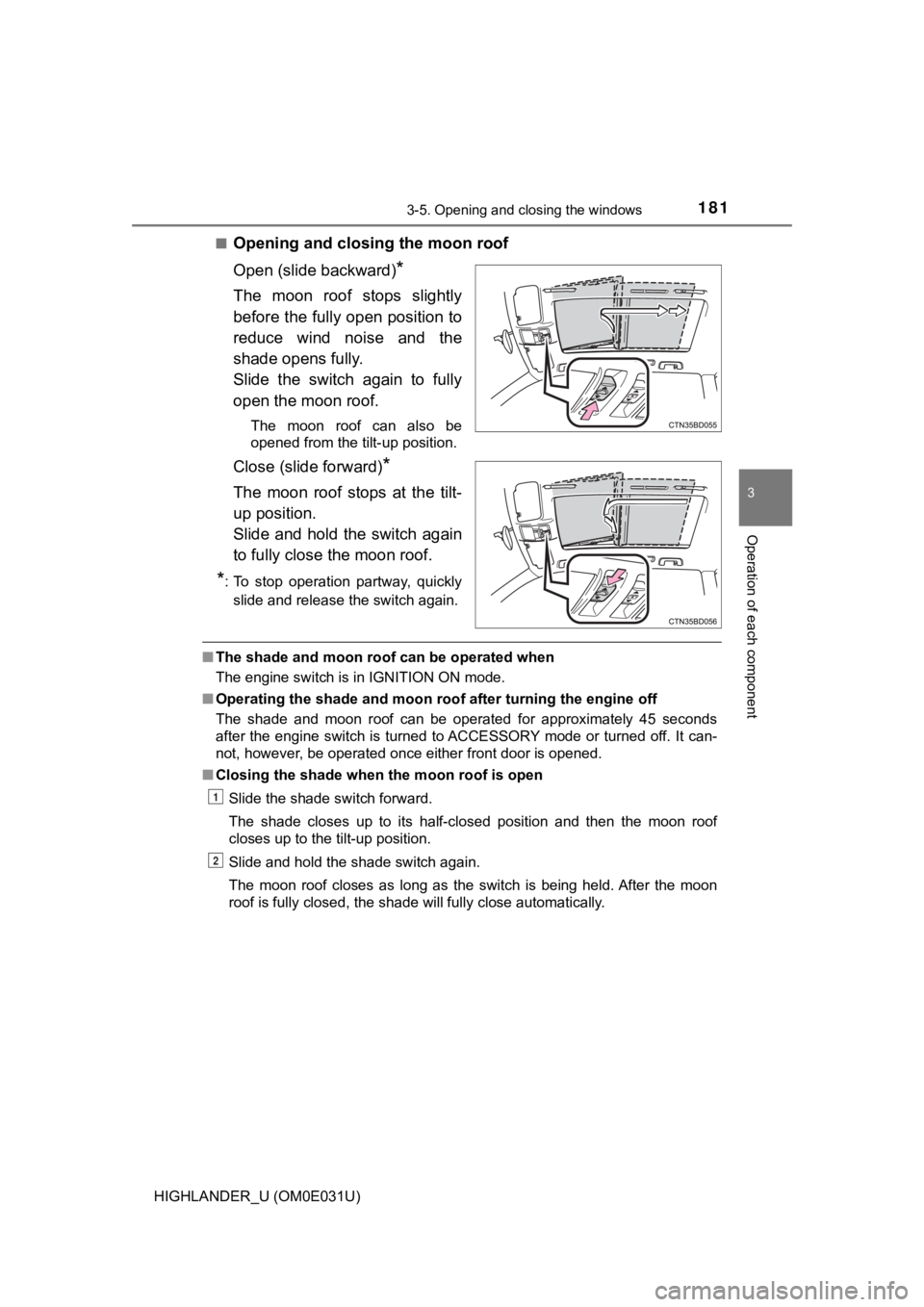
Opening and clos
ing the moon roof
Open (slide backward)
*
The moon roof stops slightly
before the fully open position to
reduce wind noise and the
shade opens fully.
Slide the switch again to fully
open the moon roof.
The moon roof can also be
opened from the tilt-up position.
Close (slide forward)*
The moon roof stops at the tilt-
up position.
Slide and hold the switch again
to fully close the moon roof.
*: To stop operation partway, quickly slide and release the switch again.
■ The shade and moon roof can be operated when
The engine switch is in IGNITION ON mode.
■ Operating the shade and moon ro of after turning the engine off
The shade and moon roof can be operated for approximately 45 seconds
after the engine switch is turned to ACCESSORY mode or turned off. It can-
not, however, be operated once either front door is opened.
■ Closing the shade when the moon roof is open
Slide the shade switch forward.
The shade closes up to its half-closed position and then the mo on roof
closes up to the tilt-up position.
Slide and hold the shade switch again.
The moon roof closes as long as the switch is being held. After the moon
roof is fully closed, the shade will fully close automatically.
1
2
Page 193 of 732
1934-1. Before driving
4
Driving
HIGHLANDER_U (OM0E031U)
WARNING
Observe the following precautions.
Failure to do so may result in death or serious injury.
■When braking
● When the brakes are wet, drive more cautiously.
Braking distance increases when the brakes are wet, and this ma y cause
one side of the vehicle to brake differently than the other sid e. Also, the
parking brake may not securely hold the vehicle.
● If the power brake assist function does not operate, do not fol low other
vehicles closely and avoid hills or sharp turns that require br aking.
In this case, braking is still possible, but the brake pedal sh ould be
depressed more firmly than usual. Also, the braking distance wi ll increase.
Have your brakes fixed immediately.
● Do not pump the brake pedal if the engine stalls.
Each push on the brake pedal uses up the reserve for the power-assisted
brakes.
● The brake system consists of 2 individual hydraulic systems; if one of the
systems fails, the other will still operate. In this case, the brake pedal
should be depressed more firmly than usual and the braking dist ance will
increase.
Have your brakes fixed immediately.
■ If the vehicle becomes stuck (AWD models)
Do not spin the wheels excessively when any of the tires is up in the air, or
the vehicle is stuck in sand, mud, etc. This may damage the driveline com-
ponents or propel the vehicle forward or backward, causing an a ccident.
NOTICE
■When driving the vehicle
● Do not depress the accelerator and brake pedals at the same tim e during
driving, as this may restrain driving torque.
● Do not use the accelerator pedal or depress the accelerator and brake
pedals at the same time to hold the vehicle on a hill.
Page 221 of 732
2214-2. Driving procedures
4
Driving
HIGHLANDER_U (OM0E031U)
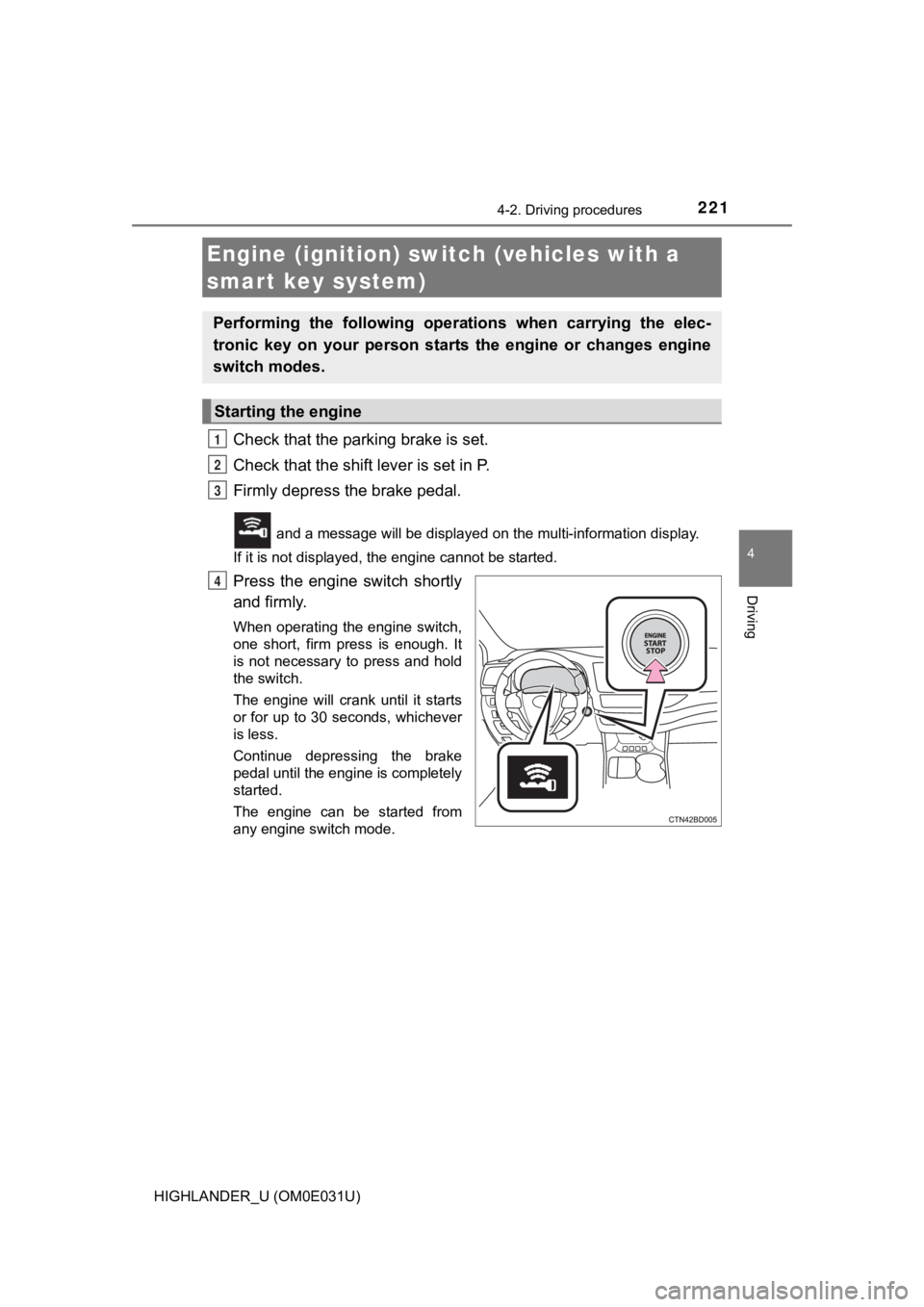
Check that the parking brake is set.
Check that the shift lever is set in P.
Firmly depress the brake pedal.
and a message will be displayed on the multi-information displ ay.
If it is not displayed, the engine cannot be started.
Press the engine switch shortly
and firmly.
When operating the engine switch,
one short, firm press is enough. It
is not necessary to press and hold
the switch.
The engine will crank until it starts
or for up to 30 seconds, whichever
is less.
Continue depressing the brake
pedal until the engine is completely
started.
The engine can be started from
any engine switch mode.
Engine (ignition) switch (vehicles with a
smart key system)
Performing the following opera tions when carrying the elec-
tronic key on your person starts the engine or changes engine
switch modes.
Starting the engine
1
2
3
4
Page 224 of 732
2244-2. Driving procedures
HIGHLANDER_U (OM0E031U)■
Steering lock
After turning the engine switch off and opening and closing the doors, the
steering wheel will be locked due to the steering lock function. Operating the
engine switch again automatically cancels the steering lock.
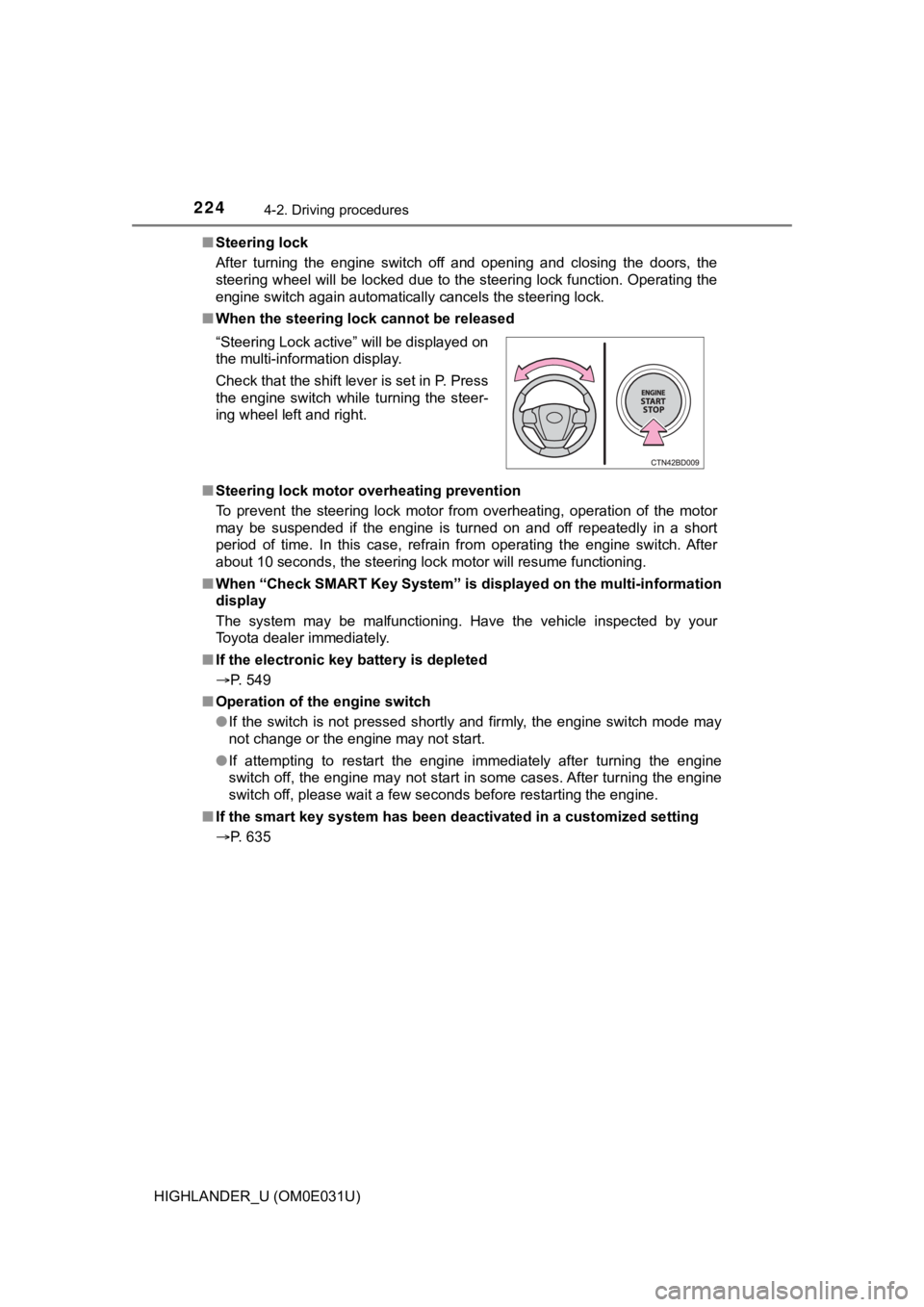
■ When the steering lock cannot be released
■ Steering lock motor overheating prevention
To prevent the steering lock motor from overheating, operation of the motor
may be suspended if the engine is turned on and off repeatedly in a short
period of time. In this case, refrain from operating the engine switch. After
about 10 seconds, the steering lock motor will resume functioni ng.
■ When “Check SMART Key System” is displayed on the multi-informa tion
display
The system may be malfunctioning. Have the vehicle inspected by your
Toyota dealer immediately.
■ If the electronic key battery is depleted
P. 549
■ Operation of the engine switch
●If the switch is not pressed shortly and firmly, the engine swi tch mode may
not change or the engine may not start.
● If attempting to restart the engine immediately after turning t he engine
switch off, the engine may not start in some cases. After turni ng the engine
switch off, please wait a few seconds before restarting the eng ine.
■ If the smart key system has been d eactivated in a customized setting
P. 635 “Steering Lock active” will be displayed on
the multi-information display.
Check that the shift lever is set in P. Press
the engine switch while turning the steer-
ing wheel left and right.
Page 226 of 732
2264-2. Driving procedures
HIGHLANDER_U (OM0E031U)
NOTICE
■To prevent battery discharge
● Do not leave the engine switch in ACCESSORY or IGNITION ON mode
for long periods of time without the engine running.
● If “ACCESSORY” or “IGNITION ON” is displayed on the multi-infor mation
display while the engine is not running, the engine switch is n ot off. Exit the
vehicle after turning the engine switch off.
● Do not stop the engine when the shift lever is in a position ot her than P. If
the engine is stopped in another shift lever position, the engi ne switch will
not be turned off but instead be turned to ACCESSORY mode. If t he vehi-
cle is left in ACCESSORY mode, battery discharge may occur.
■ When starting the engine
● Do not race a cold engine.
● If the engine becomes difficult to start or stalls frequently, have your vehi-
cle checked by your Toyota dealer immediately.
■ Symptoms indicating a malf unction with the engine switch
If the engine switch seems to be operating somewhat differently than usual,
such as the switch sticking slightly, there may be a malfunctio n. Contact
your Toyota dealer immediately.
Page 228 of 732
2284-2. Driving procedures
HIGHLANDER_U (OM0E031U)
*1: Shifting the shift lever to D allows the system to select a gear suitable for
the driving conditions.
Setting the shift lever to D is recommended for normal driving.
*2: Selecting shift ranges using S mode restricts the upper limit of the possible
gear ranges, controls engine braking force, and prevents unnece ssary
upshifting.
■
Snow mode
Use snow mode for accelerating and driving on slippery road sur -
faces, such as on snow.
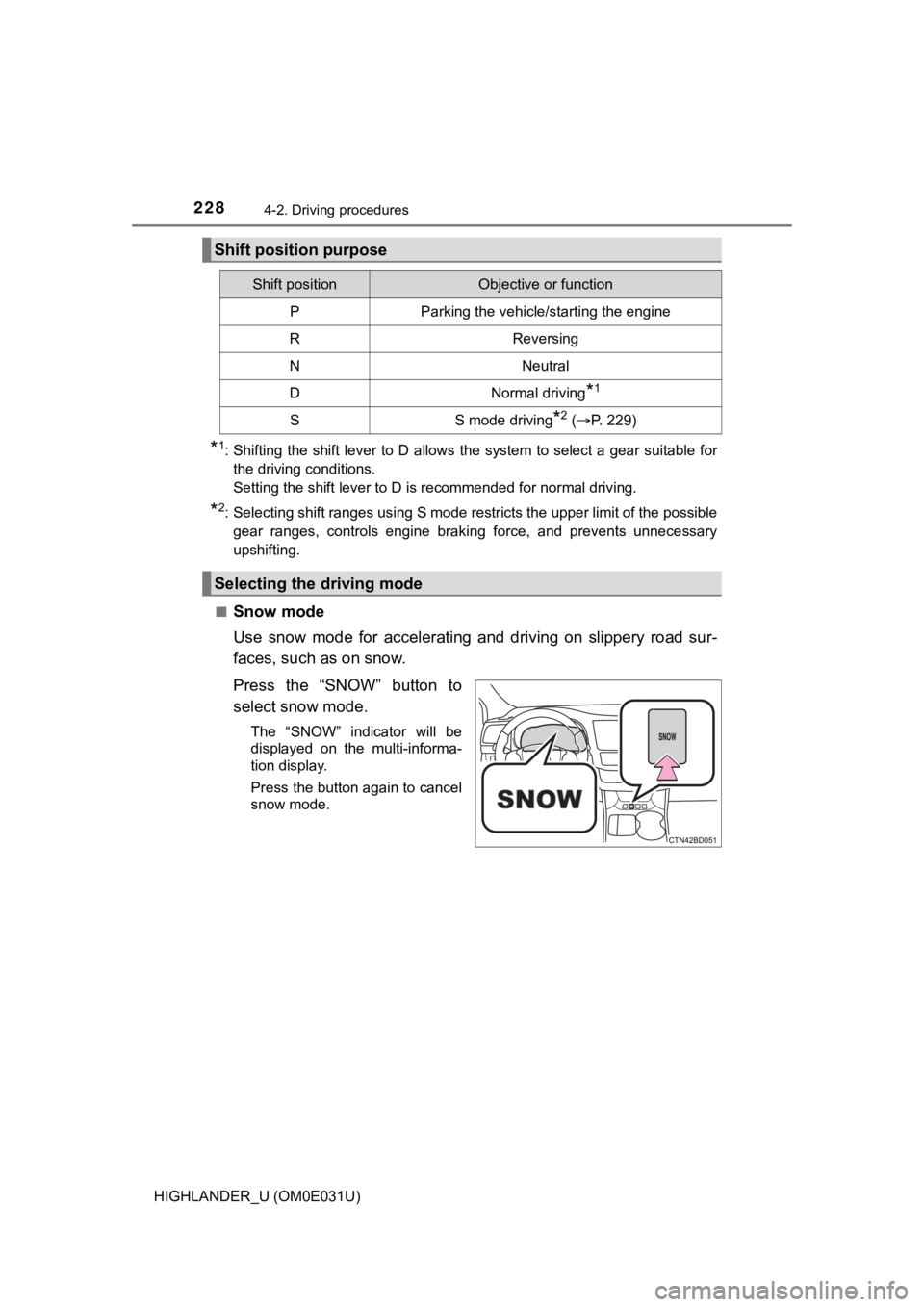
Press the “SNOW” button to
select snow mode.
The “SNOW” indicator will be
displayed on the multi-informa-
tion display.
Press the button again to cancel
snow mode.
Shift position purpose
Shift positionObjective or function
PParking the vehicle/starting the engine
RReversing
NNeutral
DNormal driving*1
SS mode driving*2 ( P. 229)
Selecting the driving mode
Page 230 of 732
2304-2. Driving procedures
HIGHLANDER_U (OM0E031U)■
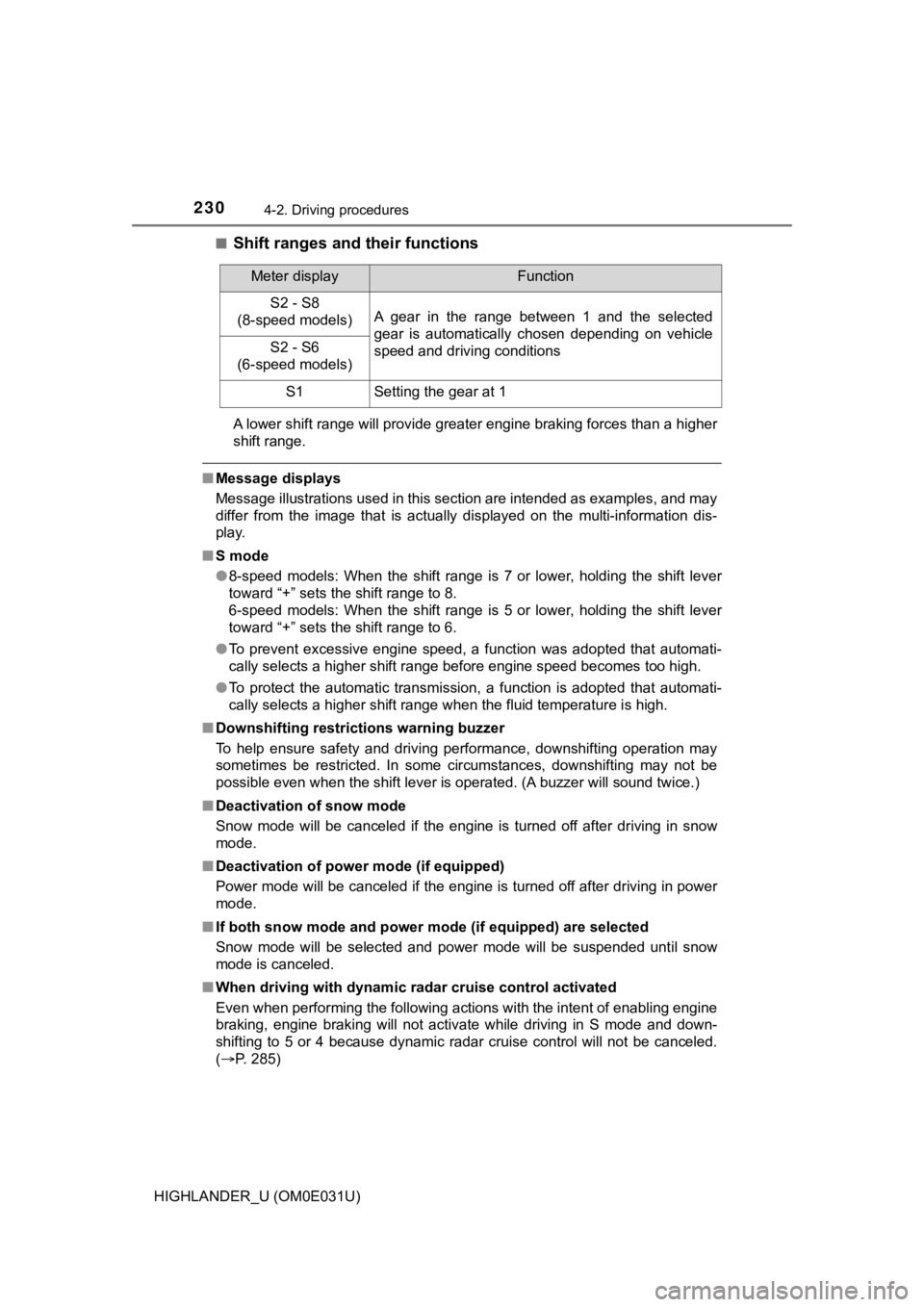
Shift ranges and their functions
A lower shift range will provide greater engine braking forces
than a higher
shift range.
■ Message displays
Message illustrations used in this section are intended as exam ples, and may
differ from the image that is actually displayed on the multi-information dis-
play.
■ S mode
●8-speed models: When the shift range is 7 or lower, holding the shift lever
toward “+” sets the shift range to 8.
6-speed models: When the shift range is 5 or lower, holding the shift lever
toward “+” sets the shift range to 6.
● To prevent excessive engine speed, a function was adopted that automati-
cally selects a higher shift range before engine speed becomes too high.
● To protect the automatic transmission, a function is adopted that automati-
cally selects a higher shift range when the fluid temperature i s high.
■ Downshifting restrictions warning buzzer
To help ensure safety and driving performance, downshifting ope ration may
sometimes be restricted. In some circumstances, downshifting ma y not be
possible even when the shift lever is operated. (A buzzer will sound twice.)
■ Deactivation of snow mode
Snow mode will be canceled if the engine is turned off after dr iving in snow
mode.
■ Deactivation of power mode (if equipped)
Power mode will be canceled if the engine is turned off after d riving in power
mode.
■ If both snow mode and power m ode (if equipped) are selected
Snow mode will be selected and power mode will be suspended unt il snow
mode is canceled.
■ When driving with dynamic radar cruise control activated
Even when performing the following actions with the intent of e nabling engine
braking, engine braking will not activate while driving in S mo de and down-
shifting to 5 or 4 because dynamic radar cruise control will no t be canceled.
( P. 285)
Meter displayFunction
S2 - S8
(8-speed models)A gear in the range between 1 and the selected
gear is automatically chosen depending on vehicle
speed and driving conditions
S2 - S6
(6-speed models)
S1Setting the gear at 1
Page 242 of 732
2424-3. Operating the lights and wipers
HIGHLANDER_U (OM0E031U)• When driving in inclement weather (heavy rain, snow, fog, sand
storms,
etc.)
• When the windshield is obscured by fog, mist, ice, dirt, etc.
• When the windshield is cracked or damaged
• When the camera sensor is deformed or dirty
• When the temperature of the camera sensor is extremely high
• When the surrounding brightness level is equal to that of head lights, tail
lights or fog lights
• When headlights or tail lights of vehicles ahead are turned off, dirty, changing color, or not aimed properly
• When the vehicle is hit by water, snow, dust, etc. from a prec eding vehi-
cle
• When driving through an area of intermittently changing brightness and
darkness
• When frequently and repeatedly driving ascending/descending roads, or roads with rough, bumpy or uneven surfaces (such as stone-paved
roads, gravel roads, etc.)
• When frequently and repeatedly taking curves or driving on a w inding
road
• When there is a highly reflective object ahead of the vehicle, such as a sign or mirror
• When the back of a preceding vehicle is highly reflective, suc h as a con-
tainer on a truck
• When the vehicle's headlights are damaged or dirty, or are not aimed
properly
• When the vehicle is listing or titling due to a flat tire, a trailer being towed, etc.
• When the headlights are changed between the high beams and low beams repeatedly in an abnormal manner
• When the driver believes that the high beams may be flashing or dazzling
pedestrians or other drivers
■ Temporarily lowering sensor sensitivity
The sensitivity of the sensor can be temporarily lowered.
Turn the engine switch off while the following conditions are m et.
• The headlight switch is in or .
• The headlight switch lever is in the high beam position.
• Automatic High Beam switch is on.
Turn the engine switch to the “ON” position (vehicles without a smart key
system) or IGNITION ON mode (vehicles with a smart key system).
Within 30 seconds after , repeat pulling the headlight switch l ever to the
original position then pushing it to the high beam position qui ckly 10 times,
then leave the lever in the high beam position.
If the sensitivity is changed, the Automatic High Beam indicato r will turn on
and off 3 times.
Automatic High Beam (headlights) may turn on even when the vehicle is
stopped.
1
2
32
4