adjust TOYOTA HIGHLANDER 2018 (in English) Workshop Manual
[x] Cancel search | Manufacturer: TOYOTA, Model Year: 2018, Model line: HIGHLANDER, Model: TOYOTA HIGHLANDER 2018Pages: 732, PDF Size: 14.5 MB
Page 207 of 732
2074-1. Before driving
4
Driving
HIGHLANDER_U (OM0E031U)
●A recommended tongue weight varies in accordance with the types
of trailers or towing as described below.
● To ensure the recommended values shown below, the trailer must
be loaded by referring to t he following instructions.
• Tongue Weight
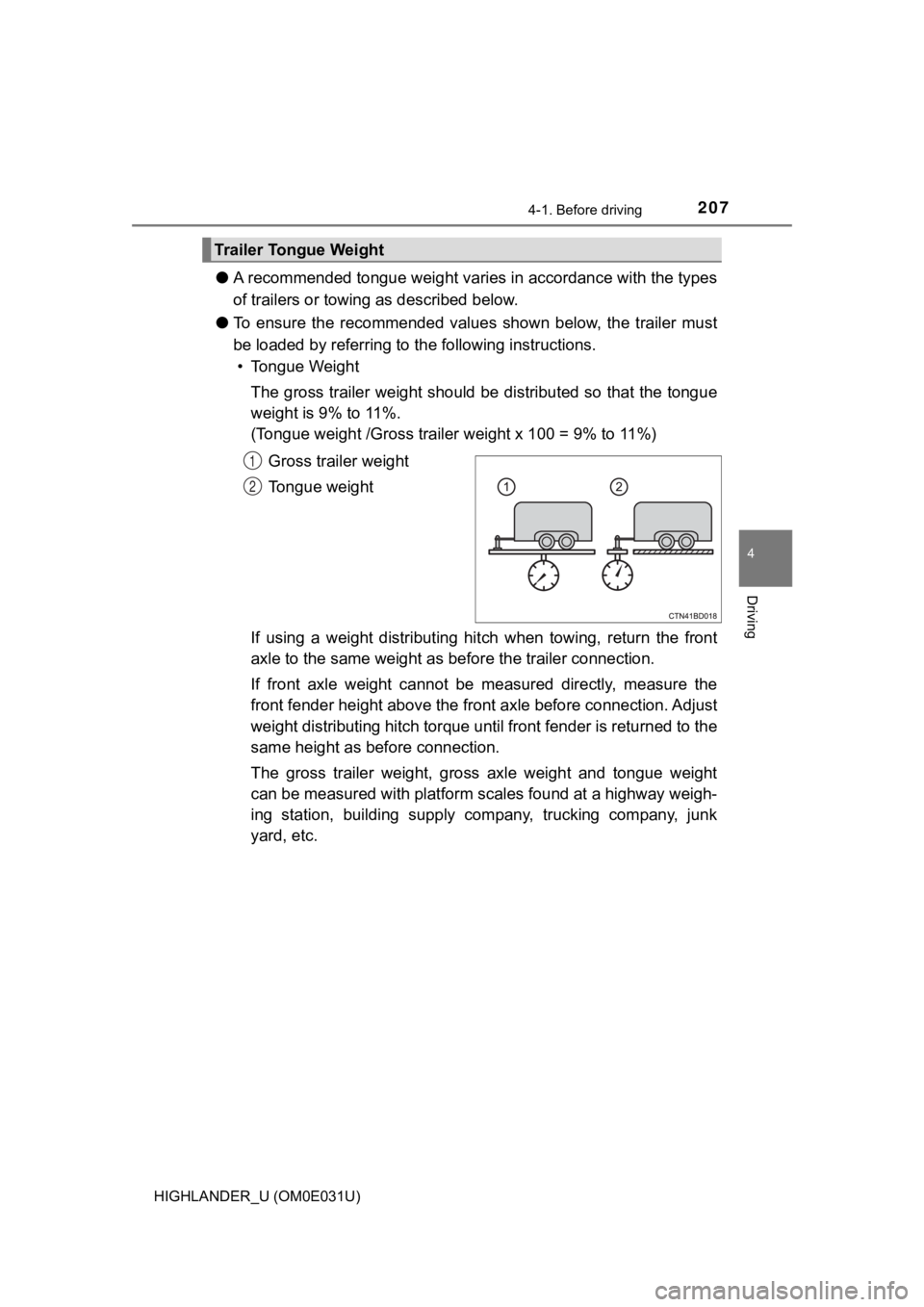
The gross trailer weight should be distributed so that the tong ue
weight is 9% to 11%.
(Tongue weight /Gross trailer weight x 100 = 9% to 11%)
Gross trailer weight
Tongue weight
If using a weight distributing hi tch when towing, return the front
axle to the same weight as b efore the trailer connection.
If front axle weight cannot be measured directly, measure the
front fender height above the front axle before connection. Adjust
weight distributing hitch torque until front fender is returned to the
same height as b efore connection.
The gross trailer weight, gross axle weight and tongue weight
can be measured with platform sca les found at a highway weigh-
ing station, building supply company, trucking company, junk
yard, etc.
Trailer Tongue Weight
1
2
Page 215 of 732
2154-1. Before driving
4
Driving
HIGHLANDER_U (OM0E031U)
WARNING
■Trailer towing precautions
To tow a trailer safely, use extreme care and drive the vehicle in accordance
with the trailer’s characteristics and operating conditions. Failure to do so
could cause an accident resulting in death or serious injury. V ehicle stability
and braking performance are affected by trailer stability, brak e setting and
performance, and the hitch. Your vehicle will handle differently when towing
a trailer.
■ To avoid accident or injury
● Do not exceed the TWR, unbraked TWR, GCWR, GVWR or GAWR.
● If the gross trailer weight is over 2000 lb. (900 kg), a sway control device
with sufficient capacity is required.
● If the gross trailer weight is over 5000 lb. (2200 kg), a weigh t distributing
hitch with sufficient capacity is required.
● Adjust the tongue weight within the appropriate range. Place he avier loads
as close to the trailer axle as possible.
● Do not exceed 65 mph (104 km/h), the posted towing speed limit or the
speed limit for your trailer as set forth in your trailer owner ’s manual,
whichever is lowest. Slow down sufficiently before making a tur n, in cross
winds, on wet or slippery surface, etc. to help avoid an accident. If you
experience a vehicle-trailer instability from reducing a certai n speed, slow
down and make sure you keep your vehicle speed under the speed of
which you experience the instability.
● Do not make jerky, abrupt or sharp turns.
● Do not apply the brakes suddenly as you may skid, resulting in jackknifing
and loss of vehicle control. This is especially true on wet or slippery sur-
faces.
● Do not exceed the trailer hitch assembly weight, gross vehicle weight,
gross axle weight and trailer tongue weight capacities.
● Do not use dynamic radar cruise control when towing.
● Slow down and downshift before descending steep or long downhill
grades. Do not make sudden downshifts while descending steep or long
downhill grades.
Page 244 of 732
2444-3. Operating the lights and wipers
HIGHLANDER_U (OM0E031U)
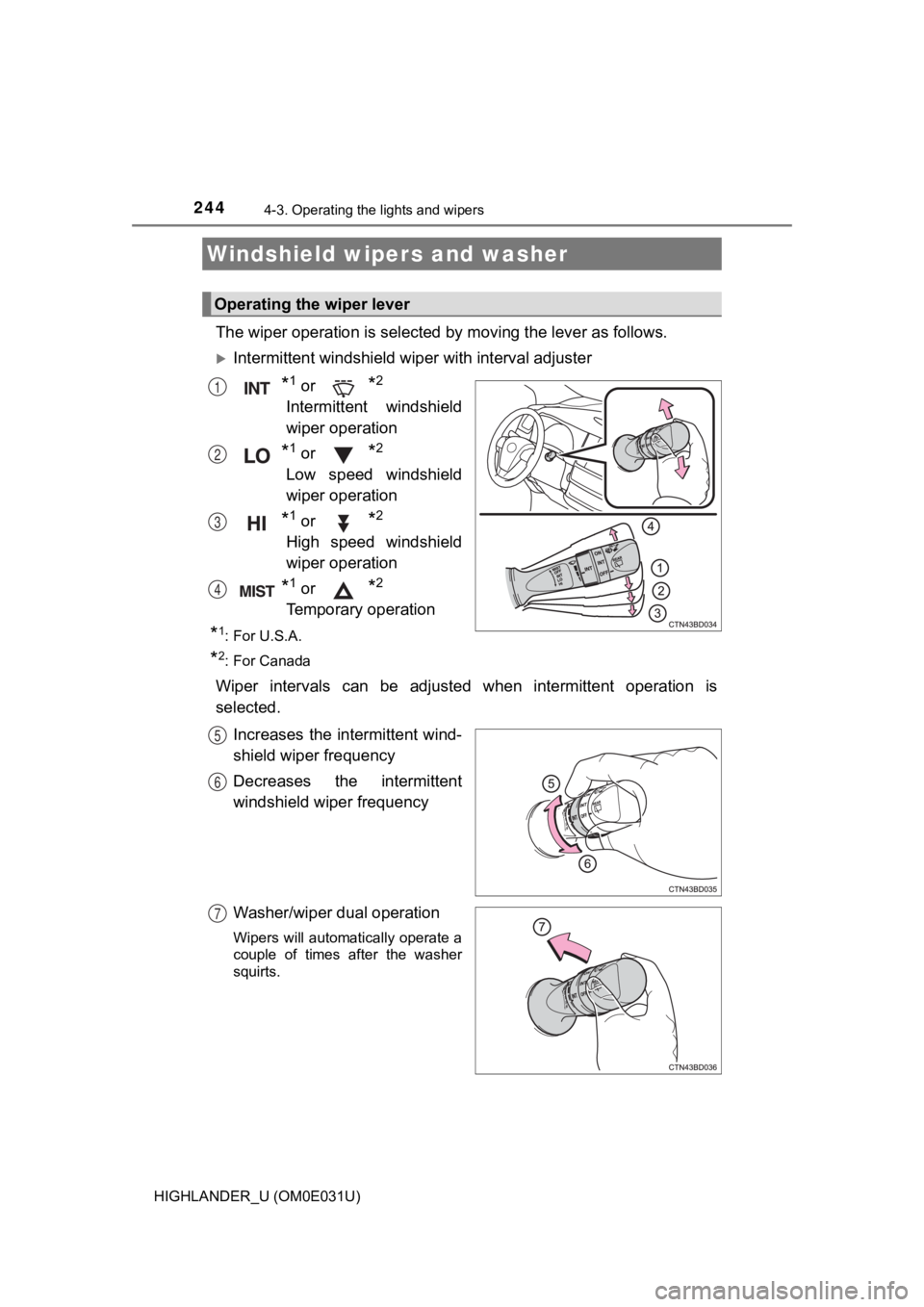
The wiper operation is selected by moving the lever as follows.
Intermittent windshield wiper with interval adjuster
*1 or *2
Intermittent windshield
wiper operation
*1 or *2
Low speed windshield
wiper operation
*1 or *2
High speed windshield
wiper operation
*1 or *2
Temporary operation
*1: For U.S.A.
*2: For Canada
Wiper intervals can be adjusted when intermittent operation is
selected.
Increases the intermittent wind-
shield wiper frequency
Decreases the intermittent
windshield wiper frequency
Washer/wiper dual operation
Wipers will automatically operate a
couple of times after the washer
squirts.
Windshield wipers and washer
Operating the wiper lever
1
2
3
4
5
6
7
Page 245 of 732
2454-3. Operating the lights and wipers
4
Driving
HIGHLANDER_U (OM0E031U)
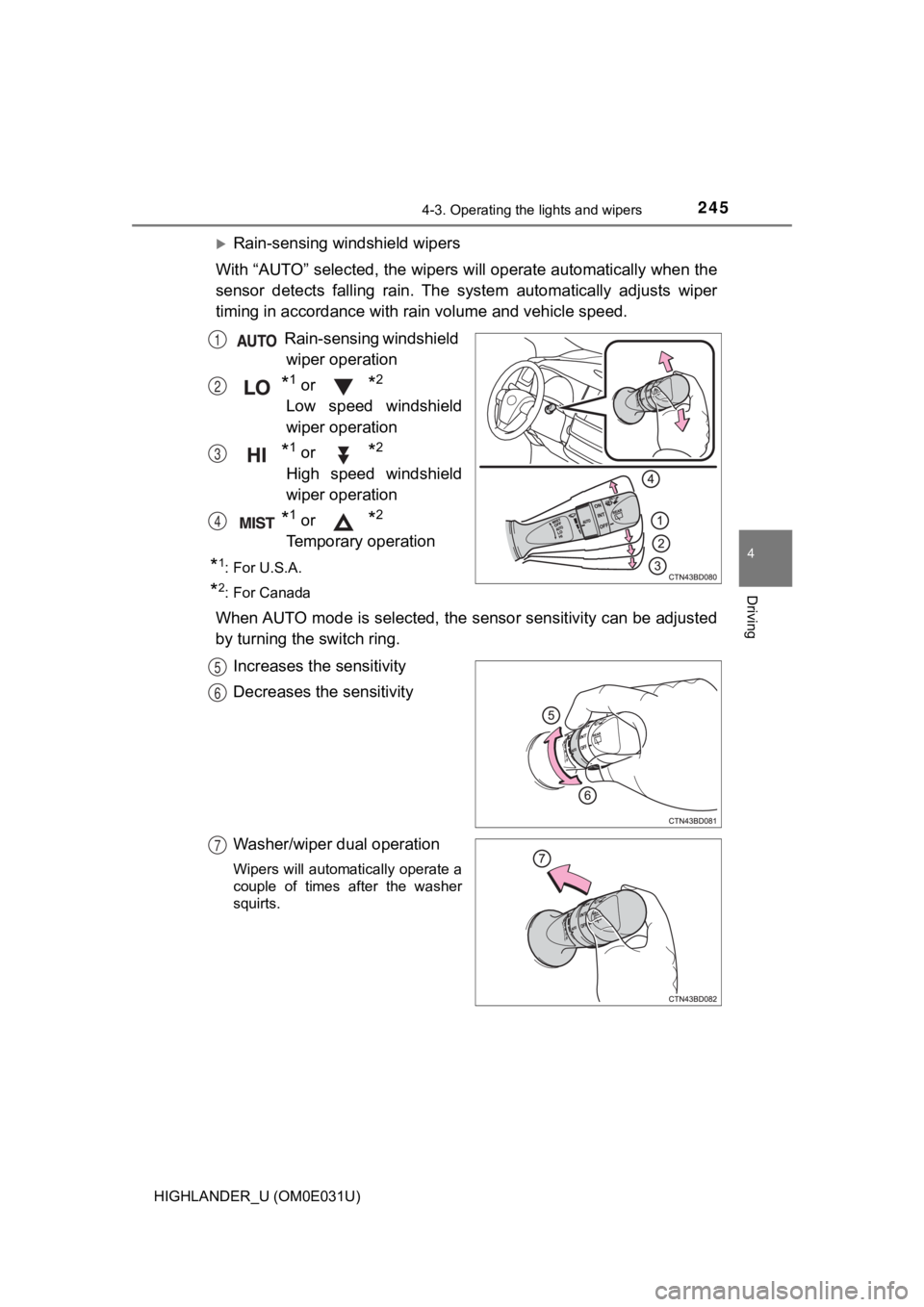
Rain-sensing windshield wipers
With “AUTO” selected, the wipers will operate automatically whe n the
sensor detects falling rain. The system automatically adjusts w iper
timing in accordance with ra in volume and vehicle speed.
Rain-sensing windshield wiper operation
*1 or *2
Low speed windshield
wiper operation
*1 or *2
High speed windshield
wiper operation
*1 or *2
Temporary operation
*1: For U.S.A.
*2: For Canada
When AUTO mode is selected, the s ensor sensitivity can be adjusted
by turning the switch ring.
Increases the sensitivity
Decreases the sensitivity
Washer/wiper dual operation
Wipers will automatically operate a
couple of times after the washer
squirts.
1
2
3
4
5
6
7
Page 290 of 732
2904-5. Using the driving support systems
HIGHLANDER_U (OM0E031U)
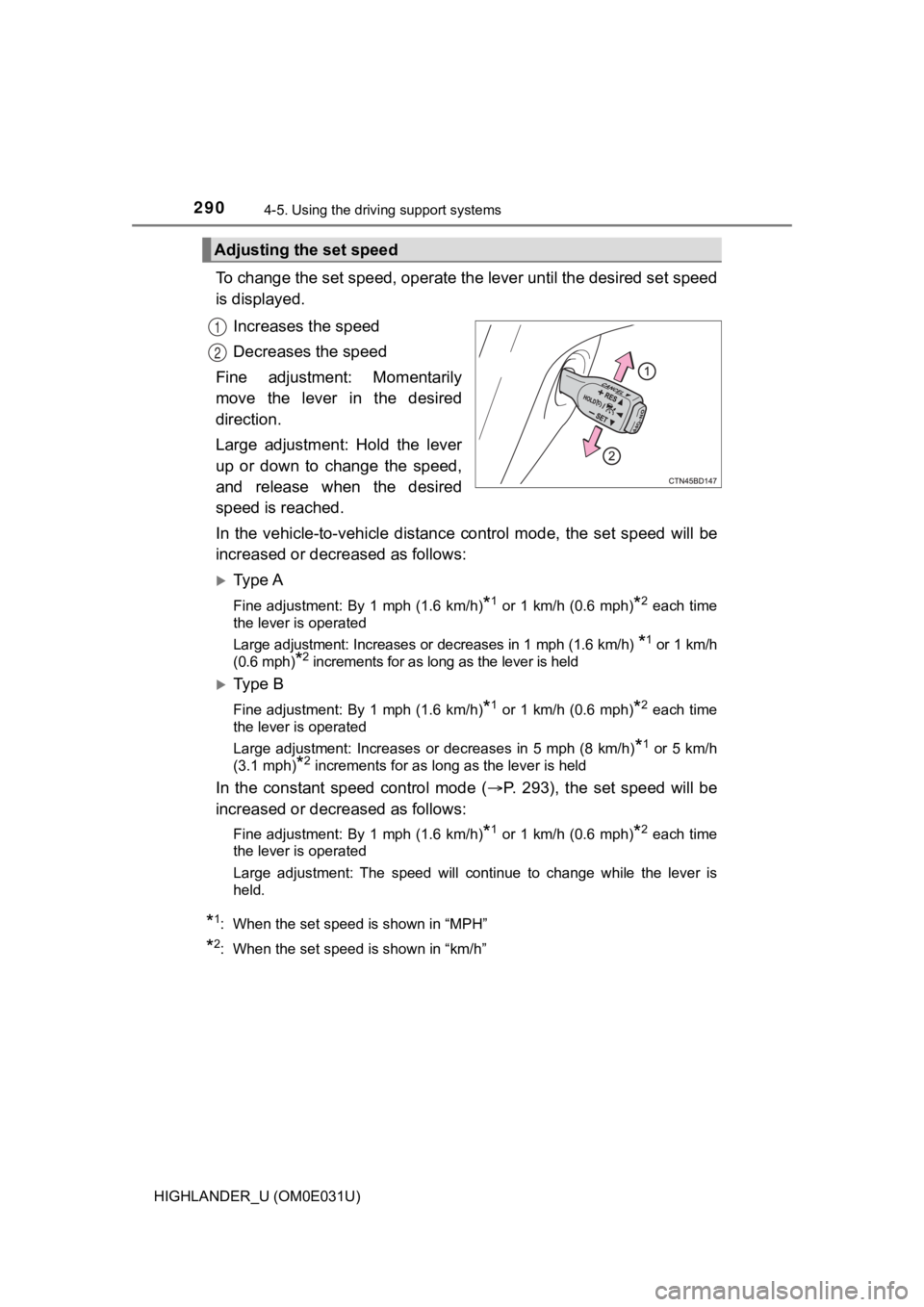
To change the set speed, operate the lever until the desired se t speed
is displayed.
Increases the speed
Decreases the speed
Fine adjustment: Momentarily
move the lever in the desired
direction.
Large adjustment: Hold the lever
up or down to change the speed,
and release when the desired
speed is reached.
In the vehicle-to-vehicle distance control mode, the set speed will be
increased or decreased as follows:
Ty p e A
Fine adjustment: By 1 mph (1.6 km/h)*1 or 1 km/h (0.6 mph)*2 each time
the lever is operated
Large adjustment: Increases or decreases in 1 mph (1.6 km/h)
*1 or 1 km/h
(0.6 mph)
*2 increments for as long as the lever is held
Ty p e B
Fine adjustment: By 1 mph (1.6 km/h)*1 or 1 km/h (0.6 mph)*2 each time
the lever is operated
Large adjustment: Increases or decreases in 5 mph (8 km/h)
*1 or 5 km/h
(3.1 mph)
*2 increments for as long as the lever is held
In the constant speed control mode ( P. 293), the set speed will be
increased or decreased as follows:
Fine adjustment: By 1 mph (1.6 km/h)*1 or 1 km/h (0.6 mph)*2 each time
the lever is operated
Large adjustment: The speed will continue to change while the l ever is
held.
*1: When the set speed is shown in “MPH”
*2: When the set speed is shown in “km/h”
Adjusting the set speed
1
2
Page 293 of 732
2934-5. Using the driving support systems
4
Driving
HIGHLANDER_U (OM0E031U)
When constant speed control mode is selected, your vehicle will main-
tain a set speed without controllin g the vehicle-to-vehicle distance.
Select this mode only when vehic le-to-vehicle distance control mode
does not function correctly due to a dirty radar sensor, etc.
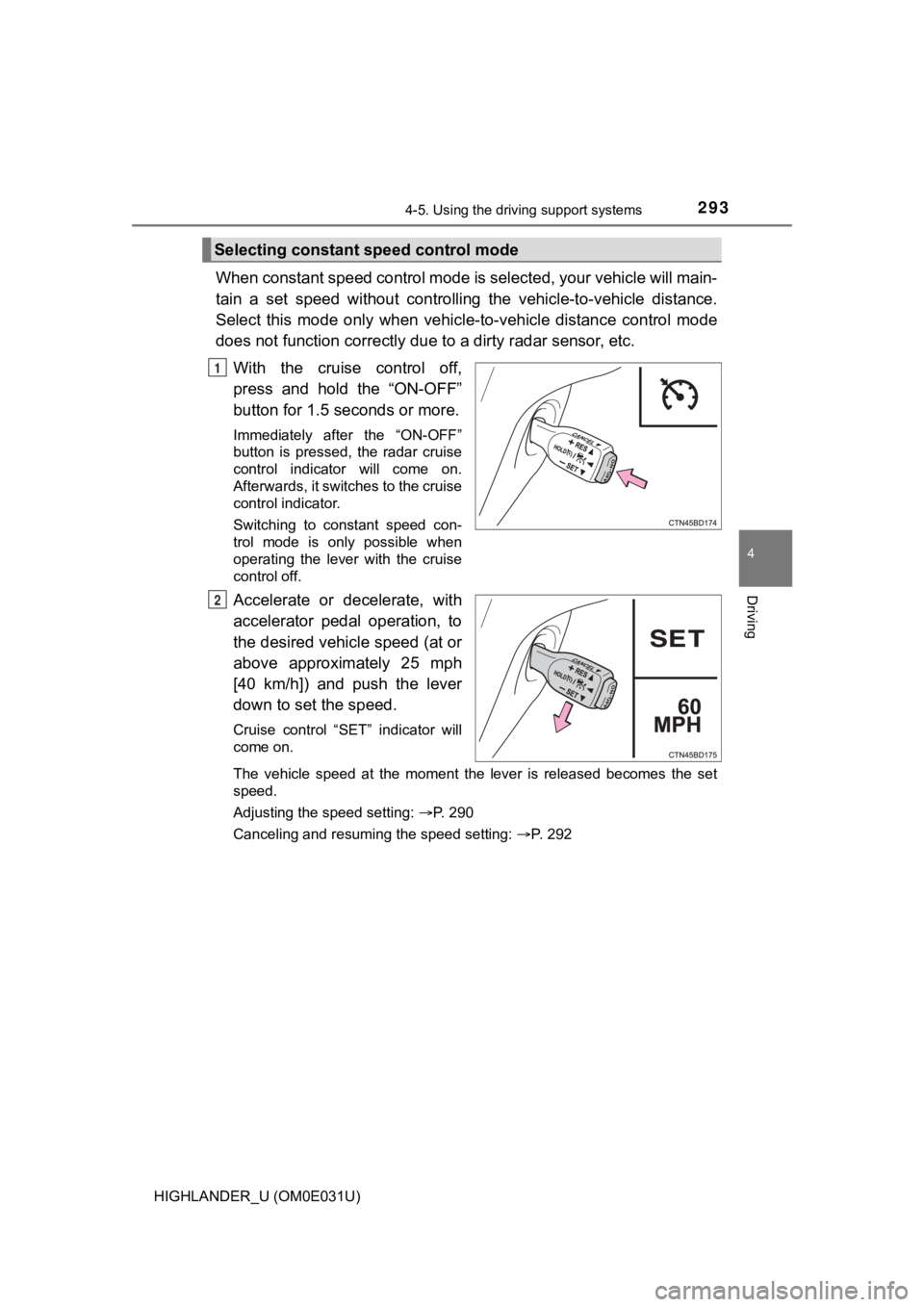
With the cruise control off,
press and hold the “ON-OFF”
button for 1.5 seconds or more.
Immediately after the “ON-OFF”
button is pressed, the radar cruise
control indicator will come on.
Afterwards, it switches to the cruise
control indicator.
Switching to constant speed con-
trol mode is only possible when
operating the lever with the cruise
control off.
Accelerate or decelerate, with
accelerator pedal operation, to
the desired vehicle speed (at or
above approximately 25 mph
[40 km/h]) and push the lever
down to set the speed.
Cruise control “SET” indicator will
come on.
The vehicle speed at the moment the lever is released becomes the set
speed.
Adjusting the speed setting: P. 290
Canceling and resuming the speed setting: P. 292
Selecting constant speed control mode
1
2
Page 309 of 732
3094-5. Using the driving support systems
4
Driving
HIGHLANDER_U (OM0E031U)■
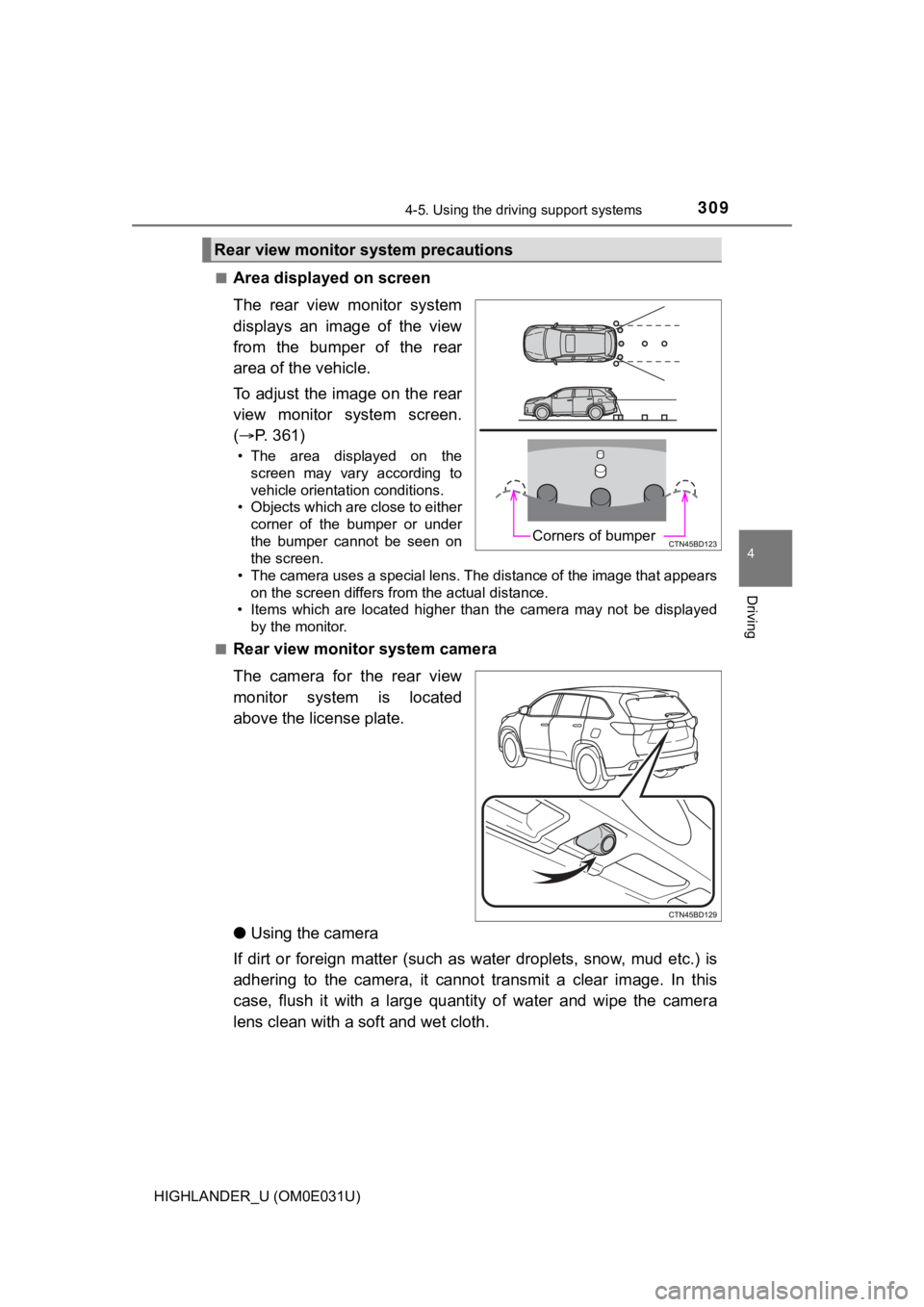
Area displayed on screen
The rear view monitor system
displays an image of the view
from the bumper of the rear
area of the vehicle.
To adjust the image on the rear
view monitor system screen.
(
P. 361)
• The area displayed on the
screen may vary according to
vehicle orientation conditions.
• Objects which are close to either corner of the bumper or under
the bumper cannot be seen on
the screen.
• The camera uses a special lens. The distance of the image that appears
on the screen differs from the actual distance.
• Items which are located higher than the camera may not be disp layed
by the monitor.
■
Rear view monitor system camera
The camera for the rear view
monitor system is located
above the license plate.
● Using the camera
If dirt or foreign matter (such as water droplets, snow, mud et c.) is
adhering to the camera, it cannot transmit a clear image. In th is
case, flush it with a large quantity of water and wipe the came ra
lens clean with a soft and wet cloth.
Rear view monitor system precautions
Corners of bumper
Page 313 of 732
3134-5. Using the driving support systems
4
Driving
HIGHLANDER_U (OM0E031U)■
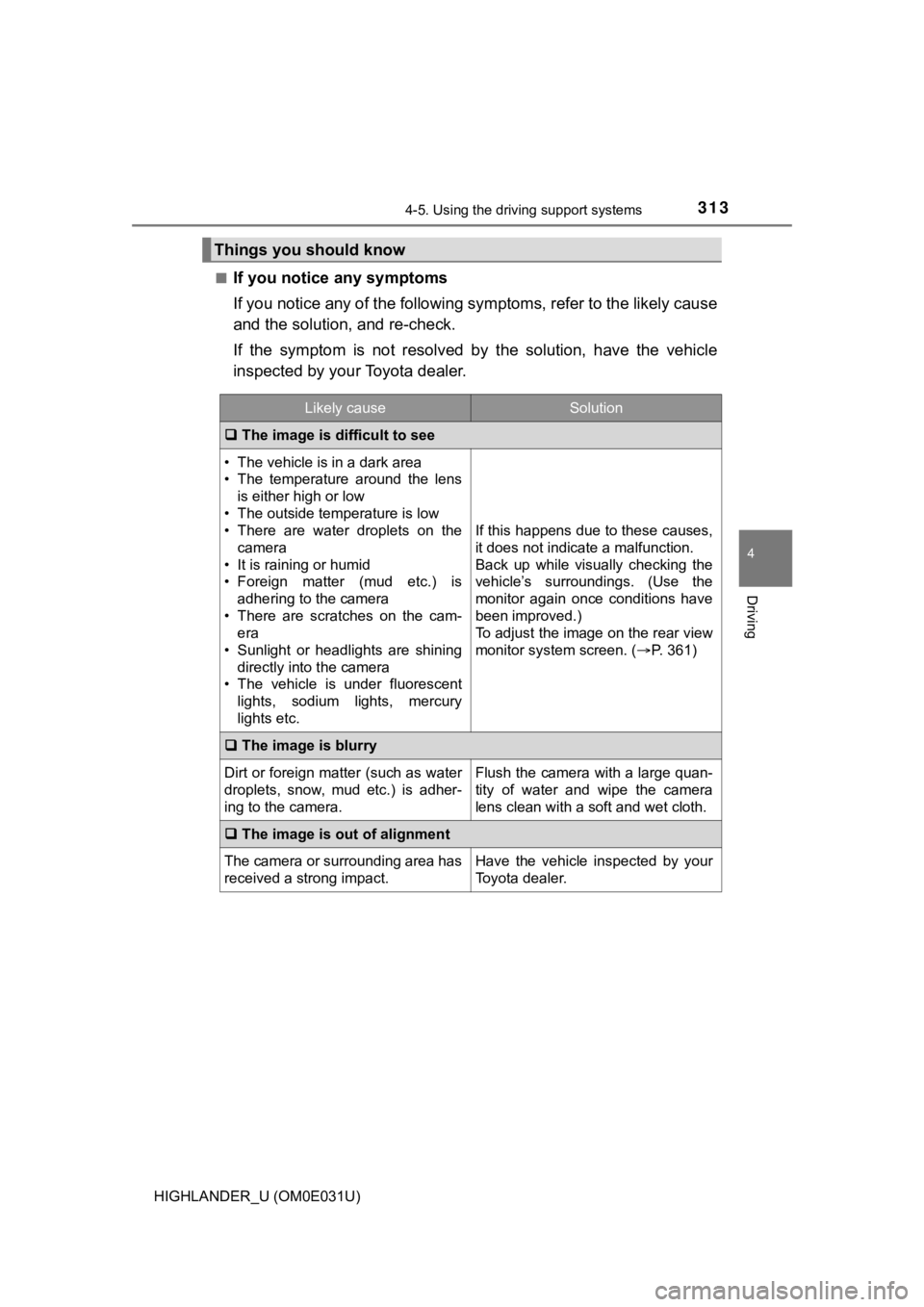
If you notice any symptoms
If you notice any of the followi
ng symptoms, refer to the likel y cause
and the solution, and re-check.
If the symptom is not resolved by the solution, have the vehicl e
inspected by your Toyota dealer.
Things you should know
Likely causeSolution
The image is difficult to see
• The vehicle is in a dark area
• The temperature around the lens
is either high or low
• The outside temperature is low
• There are water droplets on the camera
• It is raining or humid
• Foreign matter (mud etc.) is adhering to the camera
• There are scratches on the cam- era
• Sunlight or headlights are shining
directly into the camera
• The vehicle is under fluorescent
lights, sodium lights, mercury
lights etc.
If this happens due to these causes,
it does not indicate a malfunction.
Back up while visually checking the
vehicle’s surroundings. (Use the
monitor again once conditions have
been improved.)
To adjust the image on the rear view
monitor system screen. ( P. 361)
The image is blurry
Dirt or foreign matter (such as water
droplets, snow, mud etc.) is adher-
ing to the camera.Flush the camera with a large quan-
tity of water and wipe the camera
lens clean with a soft and wet cloth.
The image is out of alignment
The camera or surrounding area has
received a strong impact.Have the vehicle inspected by your
Toyota dealer.
Page 353 of 732
3535-1. Basic Operations
5
Audio system
HIGHLANDER_U (OM0E031U)■
When using the touch screen
●If the screen is cold, the display may be dark, or the system may seem to be
operating slightly slower than normal.
● The screen may seem dark and hard to see when viewed through su n-
glasses. Change your angle of viewing, adjust the display on th e “Display
Settings” screen ( P. 361) or remove your sunglasses.
● Flick operations may not be performed smoothly in high altitude s.
NOTICE
■To avoid damaging the touch screen
● To prevent damaging the screen, lightly touch the screen button s with your
finger.
● Do not use objects other than your finger to touch the screen.
● Wipe off fingerprints using a glass cleaning cloth. Do not use chemical
cleaners to clean the screen, as they may damage the touch scre en.
Page 356 of 732
3565-1. Basic Operations
HIGHLANDER_U (OM0E031U)
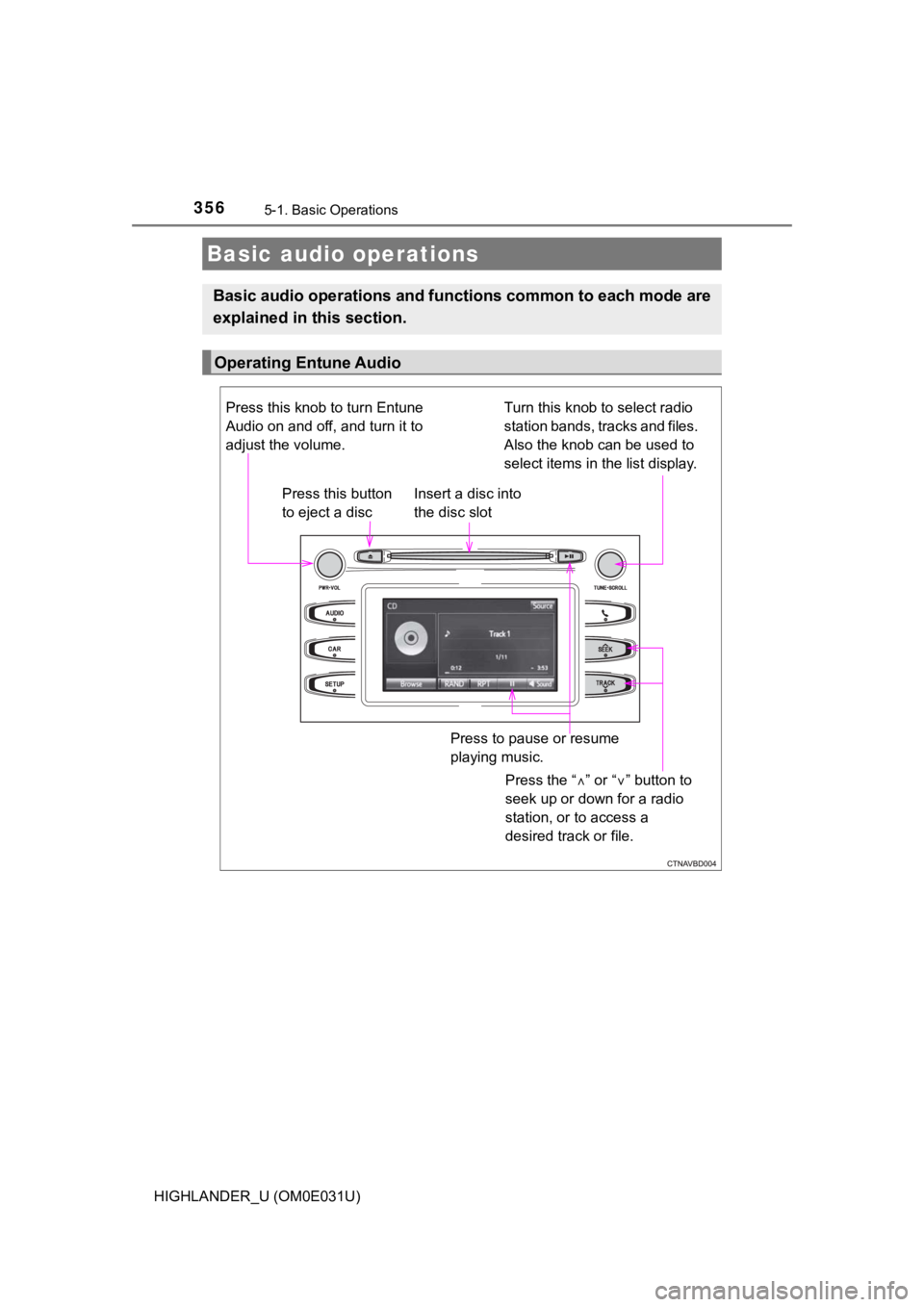
Basic audio operations
Basic audio operations and functions common to each mode are
explained in this section.
Operating Entune Audio
Press the “ ” or “ ” button to
seek up or down for a radio
station, or to access a
desired track or file.
Press this knob to turn Entune
Audio on and off, and turn it to
adjust the volume.
Press this button
to eject a disc
Press to pause or resume
playing music.
Insert a disc into
the disc slot
Turn this knob to select radio
station bands, tracks and files.
Also the knob can be used to
select items in the list display.