USB port TOYOTA HIGHLANDER 2018 Owners Manual (in English)
[x] Cancel search | Manufacturer: TOYOTA, Model Year: 2018, Model line: HIGHLANDER, Model: TOYOTA HIGHLANDER 2018Pages: 732, PDF Size: 14.5 MB
Page 4 of 732

TABLE OF CONTENTS4
HIGHLANDER_U (OM0E031U)5-1. Basic Operations
Audio system types ........... 350
Entune Audio..................... 351
Steering wheel audio switches .......................... 354
AUX Port/USB Port ........... 355
Basic audio operations ....................... 356
5-2. Setup Setup menu ....................... 358
General settings ................ 359
Audio settings.................... 360
Display settings ................. 361
Voice settings .................... 362
5-3. Using Entune Audio Selecting the audio source ............................. 363
List screen operation ......... 364
Optimal use of Entune Audio ............................... 366
5-4. Using the radio Radio operation ................. 367 5-5. Playing an audio CD and
MP3/WMA/AAC discs
CD player operation........... 369
5-6. Using an external device Listening to an iPod ........... 375
Listening to a USB memory device ................ 379
Using the AUX port ............ 383
5-7. Connecting Bluetooth
®
Preparations to use wireless
communication ................ 384
Registering a Bluetooth
®
audio player for the
first time ........................... 388
Registering a Bluetooth
®
phone for the
first time ........................... 389
Registering a Bluetooth
®
device .............................. 390
Connecting a Bluetooth
®
device .............................. 392
Displaying a Bluetooth
®
device details................... 394
Detailed Bluetooth
®
system settings................ 395
5-8. Bluetooth
® Audio
Listening to Bluetooth®
Audio ............................... 396
5Audio system
Page 6 of 732

TABLE OF CONTENTS6
HIGHLANDER_U (OM0E031U)6-4. Using the other interior
features
Other interior features ....... 472
• Sun visors ..................... 472
• Vanity mirrors................ 472
• Conversation mirror ...... 473
• Clock ............................. 473
• Outside temperature display........................... 474
• Power outlets ................ 475
• USB charging ports....... 477
• Rear sunshades............ 479
• Armrest ......................... 480
• Coat hooks.................... 481
• Assist grips ................... 481
• Side table ...................... 482
Garage door opener .......... 483
Safety Connect.................. 490
Compass ........................... 495
7-1. Maintenance and care Cleaning and protecting the vehicle exterior .......... 500
Cleaning and protecting the vehicle interior ........... 504 7-2. Maintenance
Maintenance requirements ................... 507
General maintenance .................... 510
Emission inspection and maintenance (I/M)
programs ......................... 513
7-3. Do-it-yourself maintenance
Do-it-yourself service precautions ...................... 514
Hood .................................. 516
Positioning a floor jack .......................... 518
Engine compartment ......... 519
Tires................................... 531
Tire inflation pressure ........ 542
Wheels............................... 545
Air conditioning filter .......... 547
Wireless remote control/electronic key
battery ............................. 549
Checking and replacing fuses ................................ 552
Light bulbs ......................... 556
7Maintenance and care
Page 348 of 732
348
HIGHLANDER_U (OM0E031U)5-1. Basic Operations
Audio system types ........... 350
Entune Audio .................... 351
Steering wheel audio switches .......................... 354
AUX Port/USB Port ........... 355
Basic audio operations ....................... 356
5-2. Setup Setup menu....................... 358
General settings ................ 359
Audio settings ................... 360
Display settings ................. 361
Voice settings.................... 362
5-3. Using Entune Audio Selecting the audio source ............................. 363
List screen operation......... 364
Optimal use of Entune Audio............................... 366
5-4. Using the radio Radio operation................. 367
5-5. Playing an audio CD and MP3/WMA/AAC discs
CD player operation .......... 369
5Audio system
Page 349 of 732
349
5Audio system
HIGHLANDER_U (OM0E031U)5-6. Using an external device
Listening to an iPod .......... 375
Listening to a USB memory device................ 379
Using the AUX port ........... 383
5-7. Connecting Bluetooth
®
Preparations to use wireless
communication ................ 384
Registering a Bluetooth
®
audio player for the
first time .......................... 388
Registering a Bluetooth
®
phone for the
first time .......................... 389
Registering a Bluetooth
®
device.............................. 390
Connecting a Bluetooth
®
device.............................. 392
Displaying a Bluetooth
®
device details .................. 394
Detailed Bluetooth
®
system settings ............... 395
5-8. Bluetooth
® Audio
Listening to Bluetooth®
Audio ............................... 396 5-9. Bluetooth
® phone
Using a Bluetooth®
Phone ............................. 397
Making a call ..................... 399
Receiving a call ................. 402
Speaking on the phone .............................. 403
Bluetooth
® phone
message function ............ 406
Using the steering wheel switches ................ 410
Bluetooth
® phone
settings ........................... 411
Contact/Call History Settings ........................... 412
What to do if... (Troubleshooting) ............ 421
5-10. Bluetooth
®
Bluetooth®......................... 425
5-11. Using the voice command system
Voice command system ............................ 429
Page 355 of 732
3555-1. Basic Operations
5
Audio system
HIGHLANDER_U (OM0E031U)■
iPod
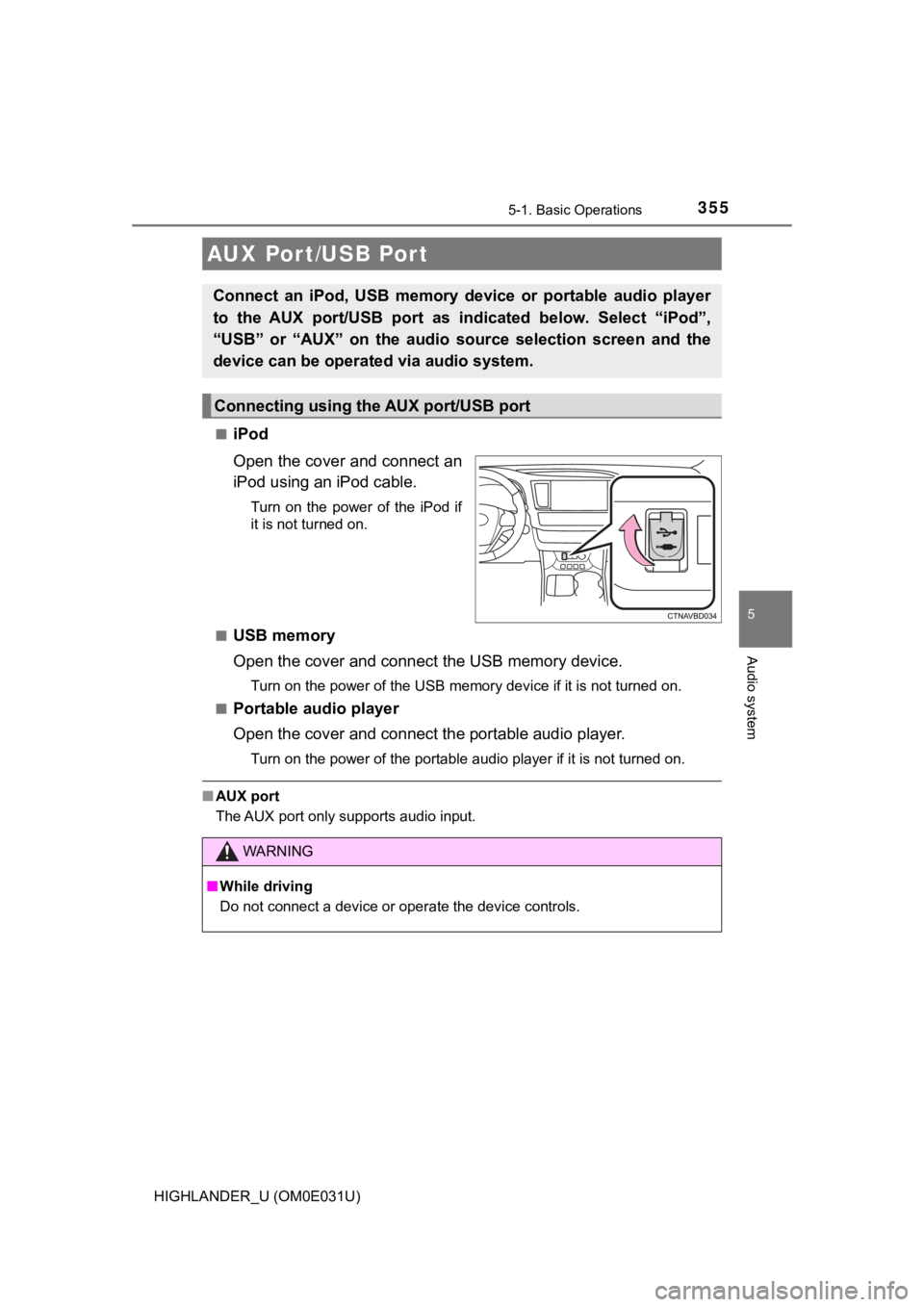
Open the cover and connect an
iPod using an iPod cable.
Turn on the power of the iPod if
it is not turned on.
■
USB memory
Open the cover and connec t the USB memory device.
Turn on the power of the USB memory device if it is not turned on.
■
Portable audio player
Open the cover and connect the portable audio player.
Turn on the power of the portable audio player if it is not tur ned on.
■AUX port
The AUX port only supports audio input.
AUX Por t/USB Por t
Connect an iPod, USB memory device or portable audio player
to the AUX port/USB port as indi cated below. Select “iPod”,
“USB” or “AUX” on th e audio source selection screen and the
device can be operated via audio system.
Connecting using the AUX port/USB port
WARNING
■ While driving
Do not connect a device or operate the device controls.
Page 382 of 732

3825-6. Using an external device
HIGHLANDER_U (OM0E031U)●
MP3, WMA and AAC playback
• When a device containing MP3, WMA and AAC files is connected, all
files in the USB memory device are checked. Once the file check is fin-
ished, the first MP3, WMA and AAC file is played. To make the file check
finish more quickly, we recommend that you do not include any f iles other
than MP3, WMA and AAC files or create any unnecessary folders.
• When a USB memory device is connected and the audio source is
changed to USB memory mode, the USB memory device will start pl ay-
ing the first file in the first folder. If the same device is r emoved and
reconnected (and the con- tents have not been changed), the USB mem-
ory device will resume play from the same point in which it was last used.
● Extensions
If the file extensions .mp3, .wma and .m4a are used for files other than
MP3, WMA and AAC files, they will be skipped (not played).
● Playback
• To play MP3 files with steady sound quality, we recommend a fi xed bit
rate of at least 128 kbps and a sampling frequency of 44.1 kHz.
• There is a wide variety of freeware and other encoding software for MP3, WMA and AAC files on the market, and depending on the status of the
encoding and the file format, poor sound quality or noise at th e start of
playback may result. In some cases, playback may not be possible at all.
• Microsoft, Windows, and Windows Media are the registered trade marks
of Microsoft Corporation in the U.S.A. and other countries.
WARNING
■ While driving
Do not connect a USB memory device or operate the device contro ls.
NOTICE
■To prevent damage to the USB memory device or its terminals
● Do not leave the USB memory device in the vehicle. The temperat ure
inside the vehicle may become high, resulting in damage to the USB
memory device.
● Do not push down on or apply unnecessary pressure to the USB me mory
device while it is connected.
● Do not insert foreign objects into the port.
Page 435 of 732
435
6Interior features
HIGHLANDER_U (OM0E031U)6-1. Using the air conditioning
system and defogger
Front manual air conditioning system ........ 436
Front automatic air conditioning system ........ 442
Rear manual air conditioning system ........ 449
Rear automatic air conditioning system ........ 452
Heated steering wheel/ seat heaters/seat
ventilators........................ 455
6-2. Using the interior lights Interior lights list ................ 458
• Interior lights ................. 458
• Personal lights .............. 459
6-3. Using the storage features
List of storage features ..... 460
• Glove box...................... 461
• Console box .................. 461
• Bottle holders ................ 462
• Cup holders .................. 463
• Auxiliary boxes.............. 465
• Open tray ...................... 466
Luggage compartment features ........................... 467 6-4. Using the other interior
features
Other interior features ........................... 472
• Sun visors ..................... 472
• Vanity mirrors................ 472
• Conversation mirror ............................ 473
• Clock ............................. 473
• Outside temperature display........................... 474
• Power outlets ................ 475
• USB charging ports .............................. 477
• Rear sunshades............ 479
• Armrest ......................... 480
• Coat hooks.................... 481
• Assist grips ................... 481
• Side table ...................... 482
Garage door opener.......... 483
Safety Connect ................. 490
Compass ........................... 495
Page 466 of 732
4666-3. Using the storage features
HIGHLANDER_U (OM0E031U)
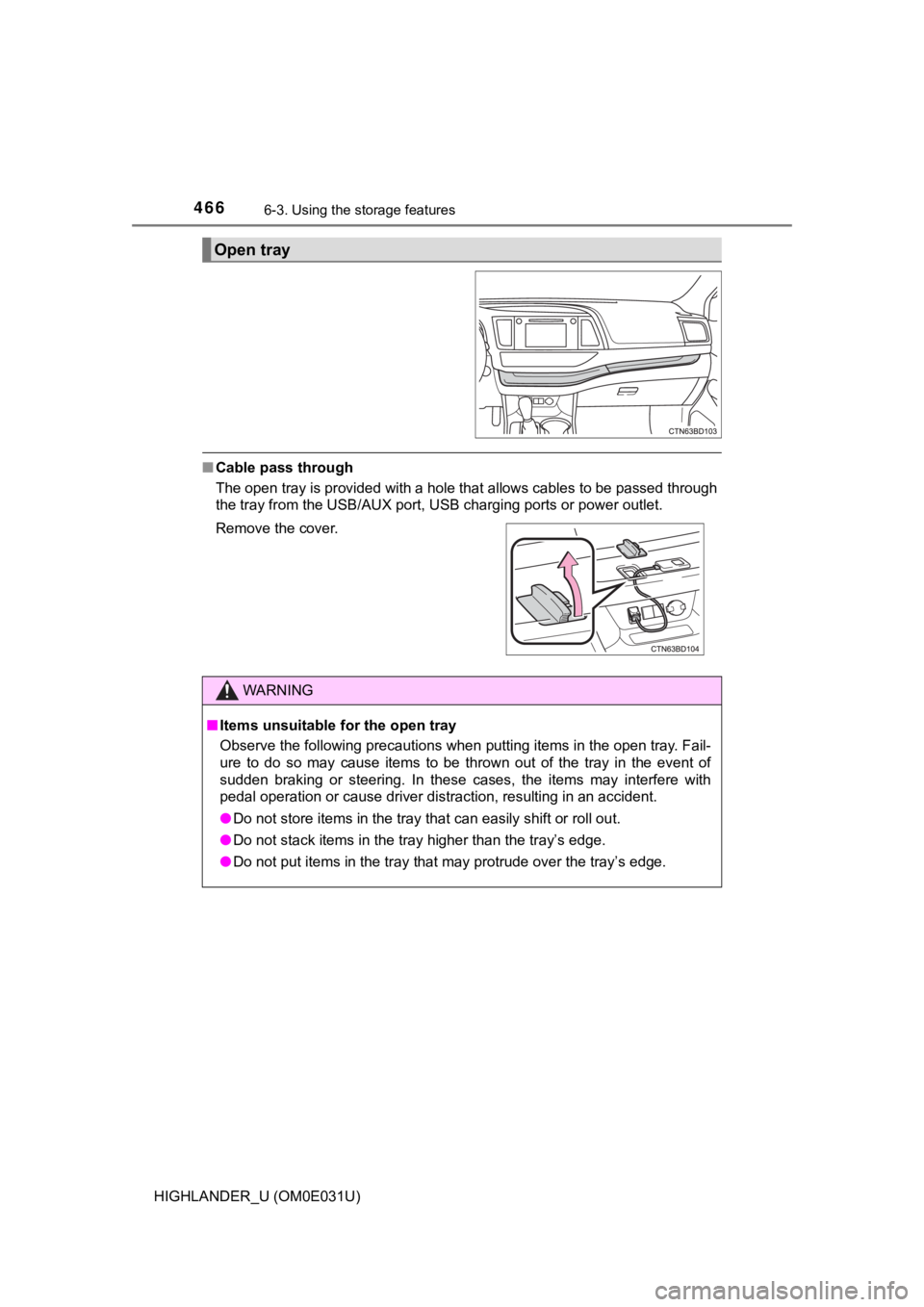
■Cable pass through
The open tray is provided with a hole that allows cables to be passed through
the tray from the USB/AUX port, USB charging ports or power out let.
Open tray
Remove the cover.
WARNING
■Items unsuitable for the open tray
Observe the following precautions when putting items in the ope n tray. Fail-
ure to do so may cause items to be thrown out of the tray in the event of
sudden braking or steering. In these cases, the items may interfere with
pedal operation or cause driver distraction, resulting in an ac cident.
● Do not store items in the tray that can easily shift or roll ou t.
● Do not stack items in the tray higher than the tray’s edge.
● Do not put items in the tray that may protrude over the tray’s edge.
Page 477 of 732
4776-4. Using the other interior features
6
Interior features
HIGHLANDER_U (OM0E031U)
The USB charging ports are used to supply 2.1 A of electricity at 5 V
to external devices.
The USB charging ports are for charging only. They are not desi gned
for data transfer or other purposes.
Depending on the external device, it may not charge properly. R efer to
the manual included with the dev ice before using a USB charging
port.
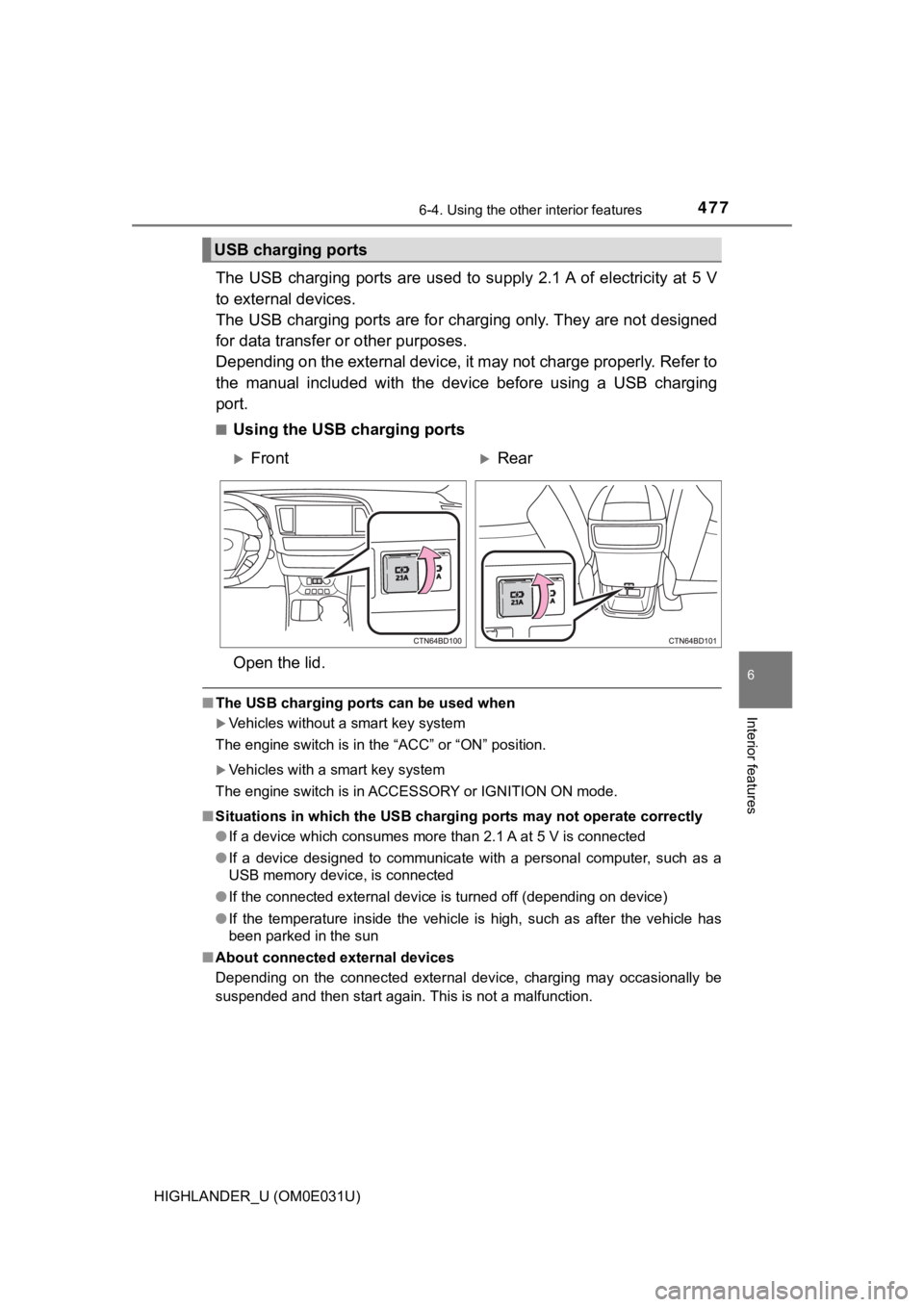
■Using the USB charging ports
Open the lid.
■ The USB charging ports can be used when
Vehicles without a smart key system
The engine switch is in the “ACC” or “ON” position.
Vehicles with a smart key system
The engine switch is in ACCESSORY or IGNITION ON mode.
■ Situations in which the USB charg ing ports may not operate correctly
● If a device which consumes more than 2.1 A at 5 V is connected
● If a device designed to communicate with a personal computer, s uch as a
USB memory device, is connected
● If the connected external device is turned off (depending on de vice)
● If the temperature inside the vehicle is high, such as after the vehicle has
been parked in the sun
■ About connected external devices
Depending on the connected external device, charging may occasi onally be
suspended and then start again. This is not a malfunction.
USB charging ports
FrontRear
Page 478 of 732
4786-4. Using the other interior features
HIGHLANDER_U (OM0E031U)
NOTICE
■To prevent damage to the USB charging ports
● Do not insert foreign objects into the ports.
● Do not spill water or other liquids into the ports.
● When the USB charging ports are not in use, close the lids. If a foreign
object or liquid enters a port may cause a short circuit.
● Do not apply excessive force to or impact the USB charging port s.
● Do not disassemble or modify the USB charging ports.
■ To prevent damage to external devices
● Do not leave external devices in the vehicle. The temperature i nside the
vehicle may become high, resulting in damage to an external dev ice.
● Do not push down on or apply unnecessary force to an external device or
the cable of an external device while it is connected.
■ To prevent battery discharge
Do not use the USB charging ports for a long period of time wit h the engine
stopped.