navigation system TOYOTA HIGHLANDER 2018 Owners Manual (in English)
[x] Cancel search | Manufacturer: TOYOTA, Model Year: 2018, Model line: HIGHLANDER, Model: TOYOTA HIGHLANDER 2018Pages: 732, PDF Size: 14.5 MB
Page 17 of 732
17Pictorial index
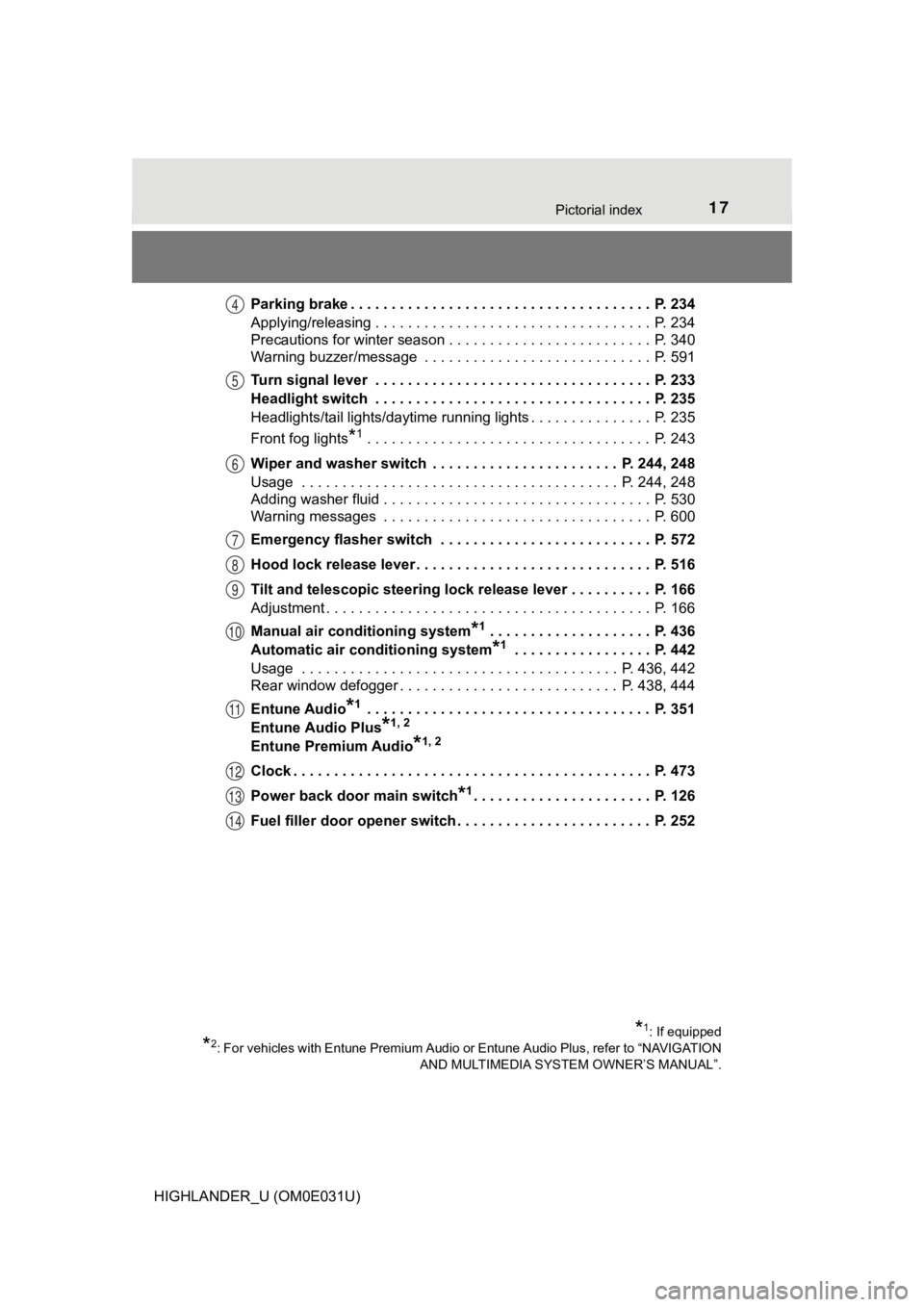
HIGHLANDER_U (OM0E031U)Parking brake . . . . . . . . . . . . . . . . . . . . . . . . . . . . . . . . . . . . . P. 234
Applying/releasing . . . . . . . . . . . . . . . . . . . . . . . . . . . . . . . . . . P. 234
Precautions for winter season . . . . . . . . . . . . . . . . . . . . . . . . . P. 340
Warning buzzer/message . . . . . . . . . . . . . . . . . . . . . . . . . . . . P. 591
Turn signal lever . . . . . . . . . . . . . . . . . . . . . . . . . . . . . . . . . . P. 233
Headlight switch . . . . . . . . . . . . . . . . . . . . . . . . . . . . . . . . . . P. 235
Headlights/tail lights/daytime running lights . . . . . . . . .
. . . . . . P. 235
Front fog lights
*1 . . . . . . . . . . . . . . . . . . . . . . . . . . . . . . . . . . . P. 243
Wiper and washer switch . . . . . . . . . . . . . . . . . . . . . . . P. 244, 248
Usage . . . . . . . . . . . . . . . . . . . . . . . . . . . . . . . . . . . . . . . P. 244, 248
Adding washer fluid . . . . . . . . . . . . . . . . . . . . . . . . . . . . . . . . . P. 530
Warning messages . . . . . . . . . . . . . . . . . . . . . . . . . . . . . . . . . P. 600
Emergency flasher switch . . . . . . . . . . . . . . . . . . . . . . . . . . P. 572
Hood lock release lever. . . . . . . . . . . . . . . . . . . . . . . . . . . . . P. 516
Tilt and telescopic steering lock release lever . . . . . . . . . . P. 166
Adjustment . . . . . . . . . . . . . . . . . . . . . . . . . . . . . . . . . . . . . . . . P. 166
Manual air conditioning system
*1 . . . . . . . . . . . . . . . . . . . . P. 436
Automatic air conditioning system
*1 . . . . . . . . . . . . . . . . . P. 442
Usage . . . . . . . . . . . . . . . . . . . . . . . . . . . . . . . . . . . . . . . P. 436, 442
Rear window defogger . . . . . . . . . . . . . . . . . . . . . . . . . . . P. 438, 444
Entune Audio
*1 . . . . . . . . . . . . . . . . . . . . . . . . . . . . . . . . . . . P. 351
Entune Audio Plus
*1, 2
Entune Premium Audio*1, 2
Clock . . . . . . . . . . . . . . . . . . . . . . . . . . . . . . . . . . . . . . . . . . . . P. 473
Power back door main switch
*1. . . . . . . . . . . . . . . . . . . . . . P. 126
Fuel filler door opener switch . . . . . . . . . . . . . . . . . . . . . . . . P. 252
*1: If equipped
*2: For vehicles with Entune Premium Audio or Entune Audio Plus, refer to “NAVIGATION AND MULTIMEDIA SYSTEM OWNER’S MANUAL”.
4
5
6
7
8
9
10
11
12
13
14
Page 19 of 732
19Pictorial index
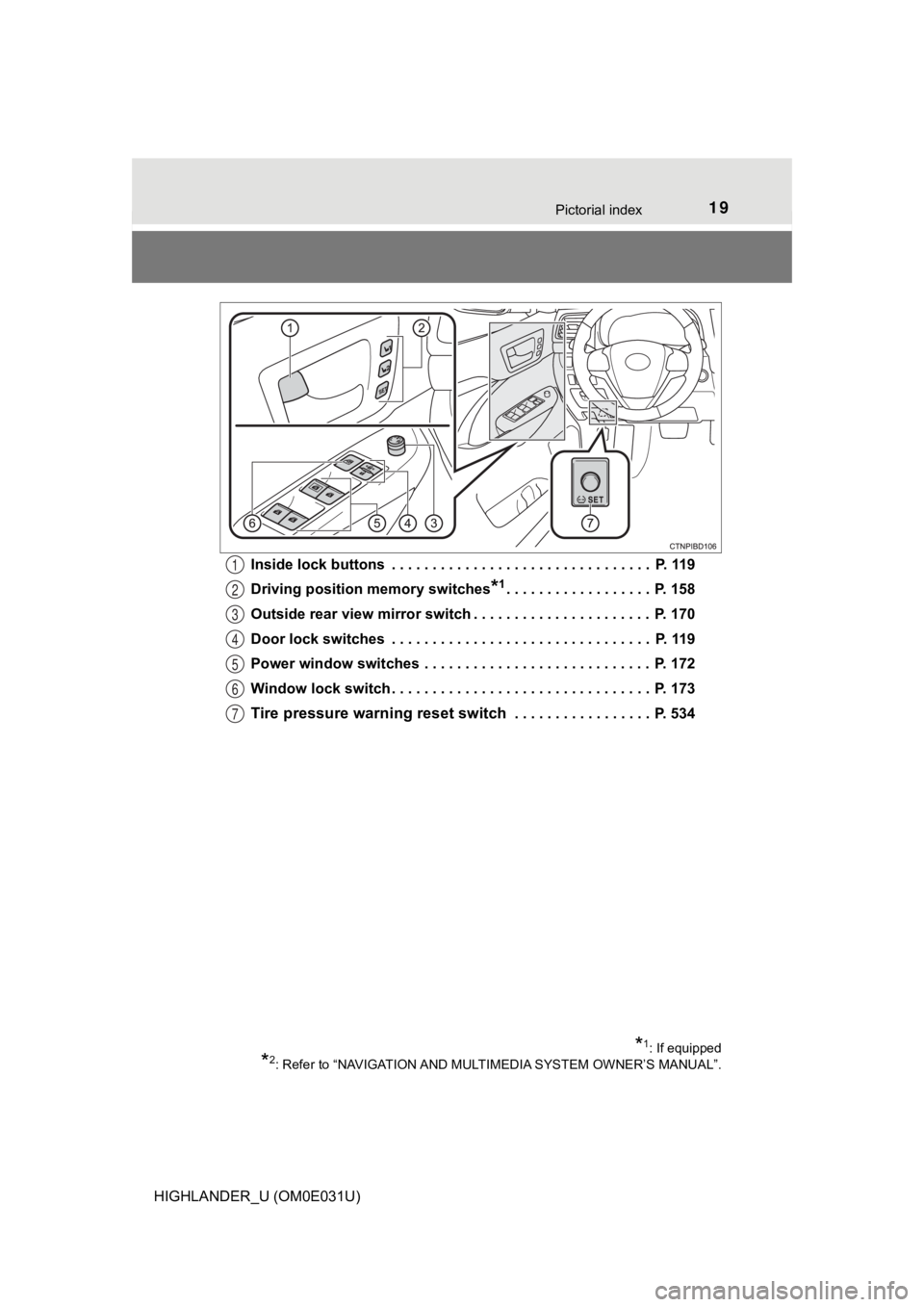
HIGHLANDER_U (OM0E031U)Inside lock buttons . . . . . . . . . . . . . . . . . . . . . . . . . . . . . . . . P. 119
Driving position
memory switches
*1. . . . . . . . . . . . . . . . . . P. 158
Outside rear view mirror switch . . . . . . . . . . . . . . . . . . . . . . P. 170
Door lock switches . . . . . . . . . . . . . . . . . . . . . . . . . . . . . . . . P. 119
Power window switches . . . . . . . . . . . . . . . . . . . . . . . . . . . . P. 172
Window lock switch . . . . . . . . . . . . . . . . . . . . . . . . . . . . . . . . P. 173
Tire pressure warn ing reset switch . . . . . . . . . . . . . . . . . P. 534
*1: If equipped
*2: Refer to “NAVIGATION AND MULT IMEDIA SYSTEM OWNER’S MANUAL”.
1
2
3
4
5
6
7
Page 21 of 732
21Pictorial index
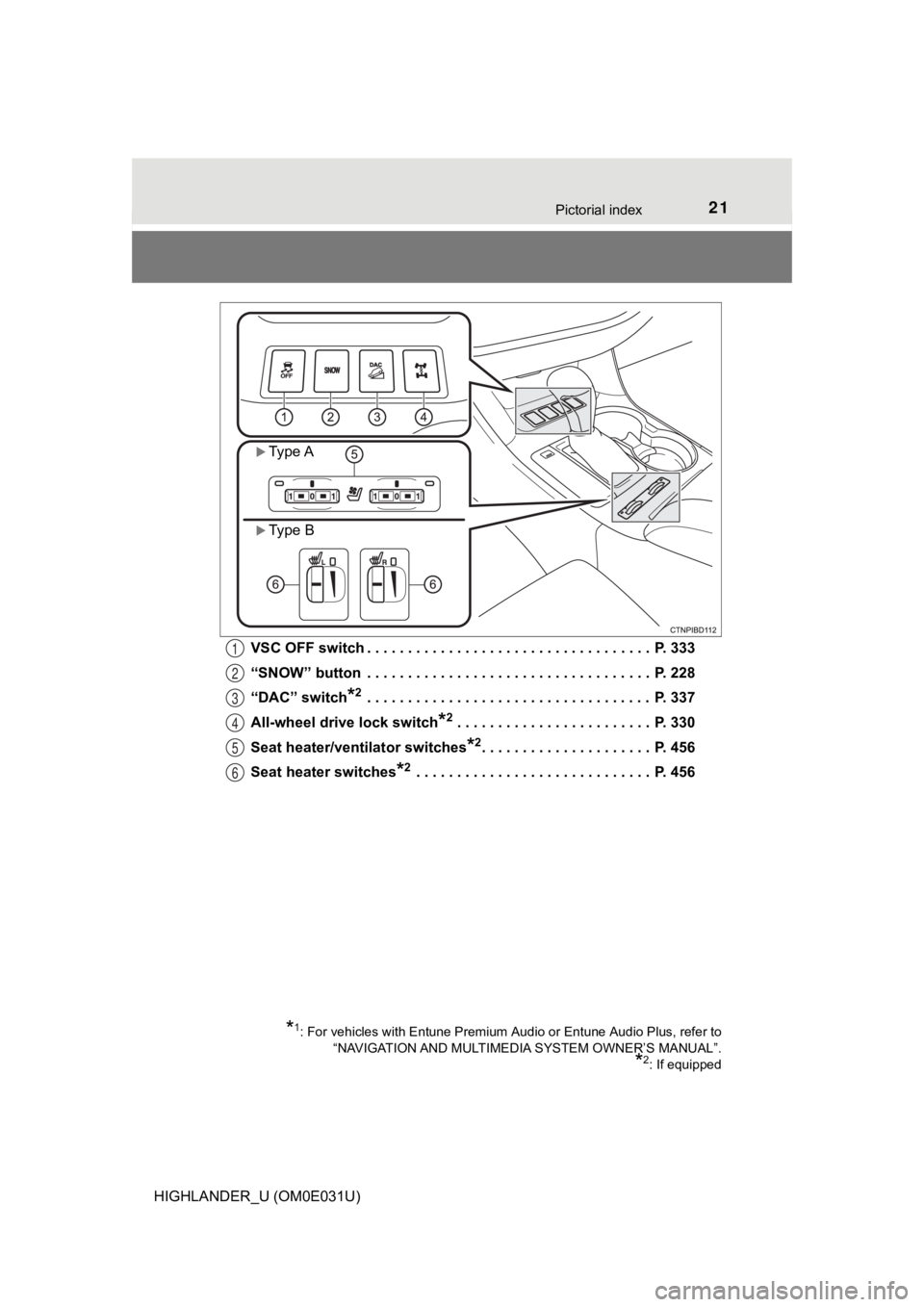
HIGHLANDER_U (OM0E031U)VSC OFF switch . . . . . . . . . . . . . . . . . . . . . . . . . . . . . . . . . . . P. 333
“SNOW” button . . . . . . . . . . . . . . . . . . . . . . . . . . . . . . . . . . . P. 228
“DAC” switch
*2 . . . . . . . . . . . . . . . . . . . . . . . . . . . . . . . . . . . P. 337
All-wheel drive lock switch
*2 . . . . . . . . . . . . . . . . . . . . . . . . P. 330
Seat heater/ventilator switches
*2. . . . . . . . . . . . . . . . . . . . . P. 456
Seat heater switches
*2 . . . . . . . . . . . . . . . . . . . . . . . . . . . . . P. 4 56
*1: For vehicles with Entune Premium Audio or Entune Audio Plus, refer to
“NAVIGATION AND MULTIMEDIA SYSTEM OWNER’S MANUAL”.
*2: If equipped
Type A
Type B
1
2
3
4
5
6
Page 23 of 732
23Pictorial index
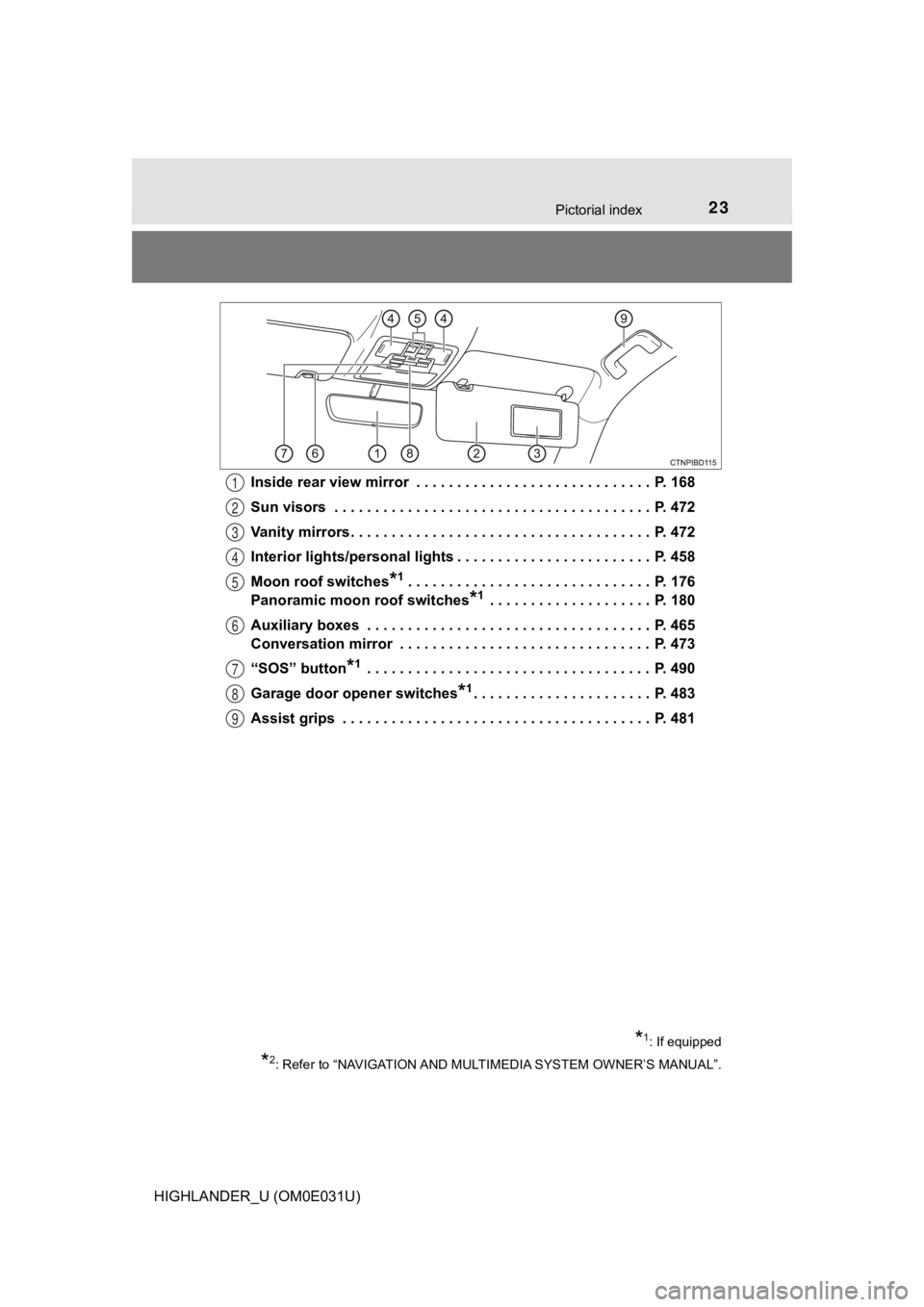
HIGHLANDER_U (OM0E031U)Inside rear view mirror . . . . . . . . . . . . . . . . . . . . . . . . . . . . . P. 168
Sun visors . . . . . . . . . . . . . . . . . . . . . . . . . . . . . . . . . . . . . . . P. 472
Vanity mirrors . . . . . . . . . . . . . . . . . . . . . . . . . . . . . . . . . . . . . P. 472
Interior lights/personal lights . . . . . . . . . . . . . . . . . . . . . . . . P. 458
Moon roof switches
*1 . . . . . . . . . . . . . . . . . . . . . . . . . . . . . . P.
176
Panoramic moon roof switches
*1 . . . . . . . . . . . . . . . . . . . . P. 180
Auxiliary boxes . . . . . . . . . . . . . . . . . . . . . . . . . . . . . . . . . . . P. 465
Conversation mirror . . . . . . . . . . . . . . . . . . . . . . . . . . . . . . . P. 473
“SOS” button
*1 . . . . . . . . . . . . . . . . . . . . . . . . . . . . . . . . . . . P. 490
Garage door opener switches
*1. . . . . . . . . . . . . . . . . . . . . . P. 483
Assist grips . . . . . . . . . . . . . . . . . . . . . . . . . . . . . . . . . . . . . . P. 481
*1: If equipped
*2: Refer to “NAVIGATION AND MULT IMEDIA SYSTEM OWNER’S MANUAL”.
1
2
3
4
5
6
7
8
9
Page 90 of 732
902. Instrument cluster
HIGHLANDER_U (OM0E031U)
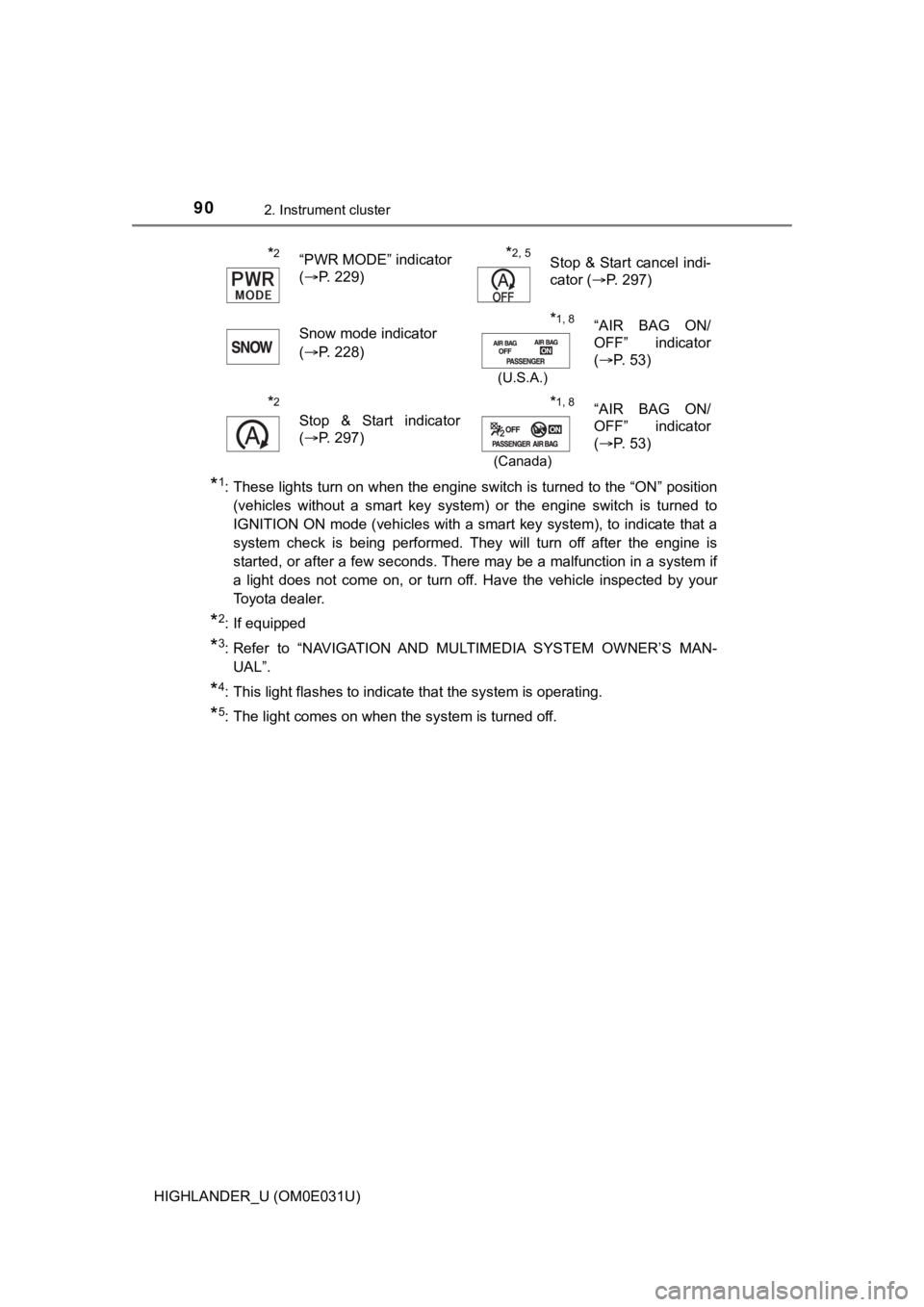
*1: These lights turn on when the engine switch is turned to the “ON” position
(vehicles without a smart key system) or the engine switch is turned to
IGNITION ON mode (vehicles with a smart key system), to indicat e that a
system check is being performed. They will turn off after the engine is
started, or after a few seconds. There may be a malfunction in a system if
a light does not come on, or turn off. Have the vehicle inspected by your
Toyota dealer.
*2: If equipped
*3: Refer to “NAVIGATION AND MULTIMEDIA SYSTEM OWNER’S MAN- UAL”.
*4: This light flashes to indicate that the system is operating.
*5: The light comes on when the system is turned off.
*2“PWR MODE” indicator
(P. 229)*2, 5Stop & Start cancel indi-
cator ( P. 297)
Snow mode indicator
( P. 228)
*1, 8
(U.S.A.)
“AIR BAG ON/
OFF” indicator
(P. 53)
*2
Stop & Start indicator
(P. 297)
*1, 8
(Canada)
“AIR BAG ON/
OFF” indicator
(P. 53)
Page 95 of 732
952. Instrument cluster
2
Instrument cluster
HIGHLANDER_U (OM0E031U)
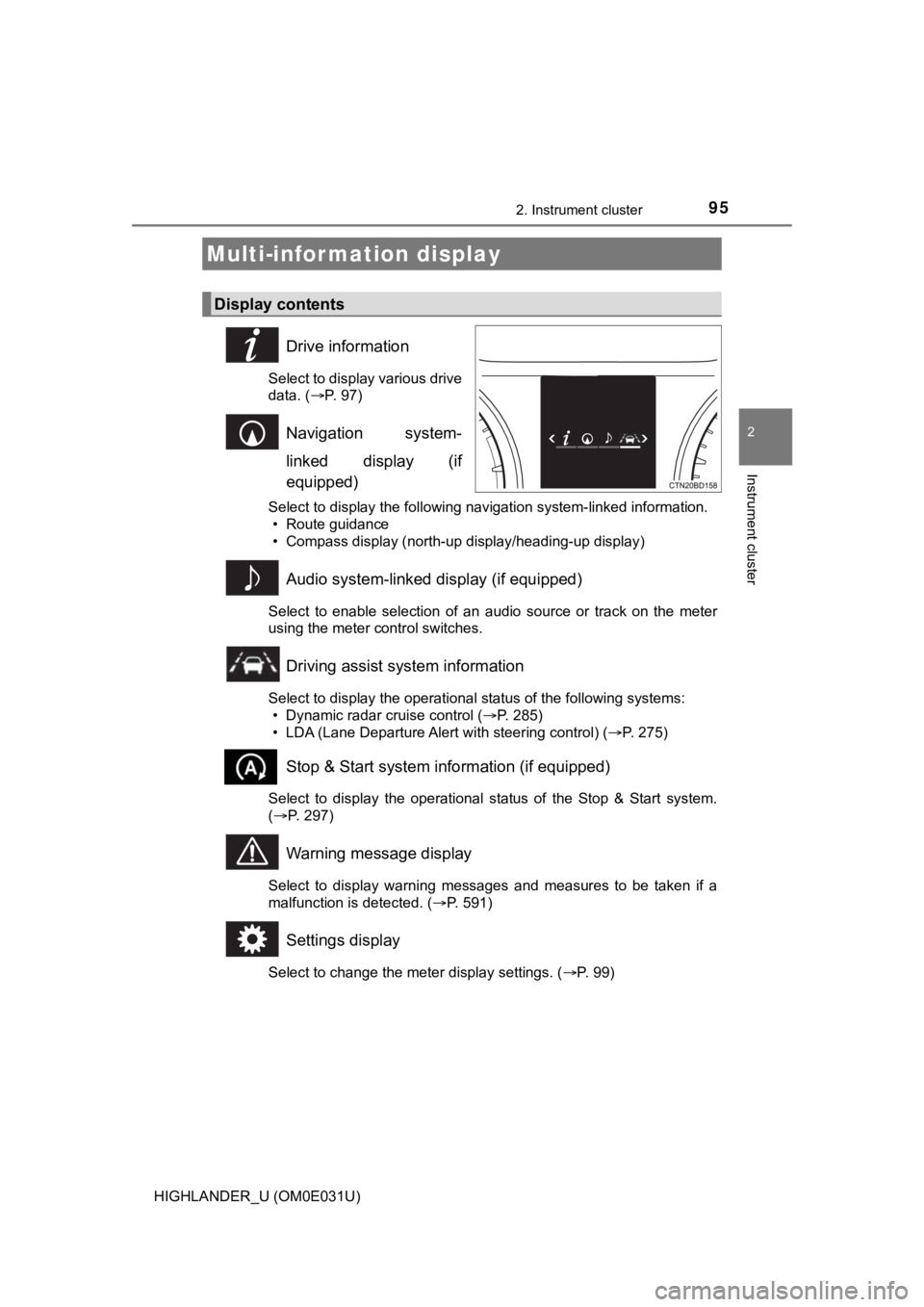
Drive information
Select to display various drive
data. (P. 97)
Navigation system-
linked display (if
equipped)
Select to display the following navigation system-linked information.
• Route guidance
• Compass display (north-up display/heading-up display)
Audio system-linked display (if equipped)
Select to enable selection of an audio source or track on the m eter
using the meter control switches.
Driving assist system information
Select to display the operational status of the following syste ms:
• Dynamic radar cruise control ( P. 285)
• LDA (Lane Departure Alert with steering control) ( P. 275)
Stop & Start system information (if equipped)
Select to display the operational status of the Stop & Start sy stem.
( P. 297)
Warning message display
Select to display warning messages and measures to be taken if a
malfunction is detected. ( P. 591)
Settings display
Select to change the meter display settings. ( P. 99)
Multi-infor mation display
Display contents
Page 100 of 732

1002. Instrument cluster
HIGHLANDER_U (OM0E031U)
●Pop-up display
Select to set the following pop-up displays, which may appear i n
some situations, on/off. • Route guidance display of the navigation system-linked sys-
tem (if equipped)
• Incoming call disp lay of the hands-free phone system
• Stop & Start system duration (if equipped)
• Stop & Start system status (if equipped)
• Instrument panel bright ness adjustment display
● Accent color
Select to change the accent colors on the screen, such as the
cursor color.
● Speed limit display
* (if equipped)
Select to set the display of speed limit information stored in the
navigation system to on with the speed limit caution indicator
(yellow) enabled, on with the sp eed limit caution not enabled, or
off. If enabled, the speed limit caution indicator will come on if the
vehicle speed exceeds th e displayed speed limit.
● Initialization
Registered or changed meter settings will be deleted or returne d
to their default setting.
*: Speed limit display may not be available for some regions.
Page 307 of 732
3074-5. Using the driving support systems
4
Driving
HIGHLANDER_U (OM0E031U)
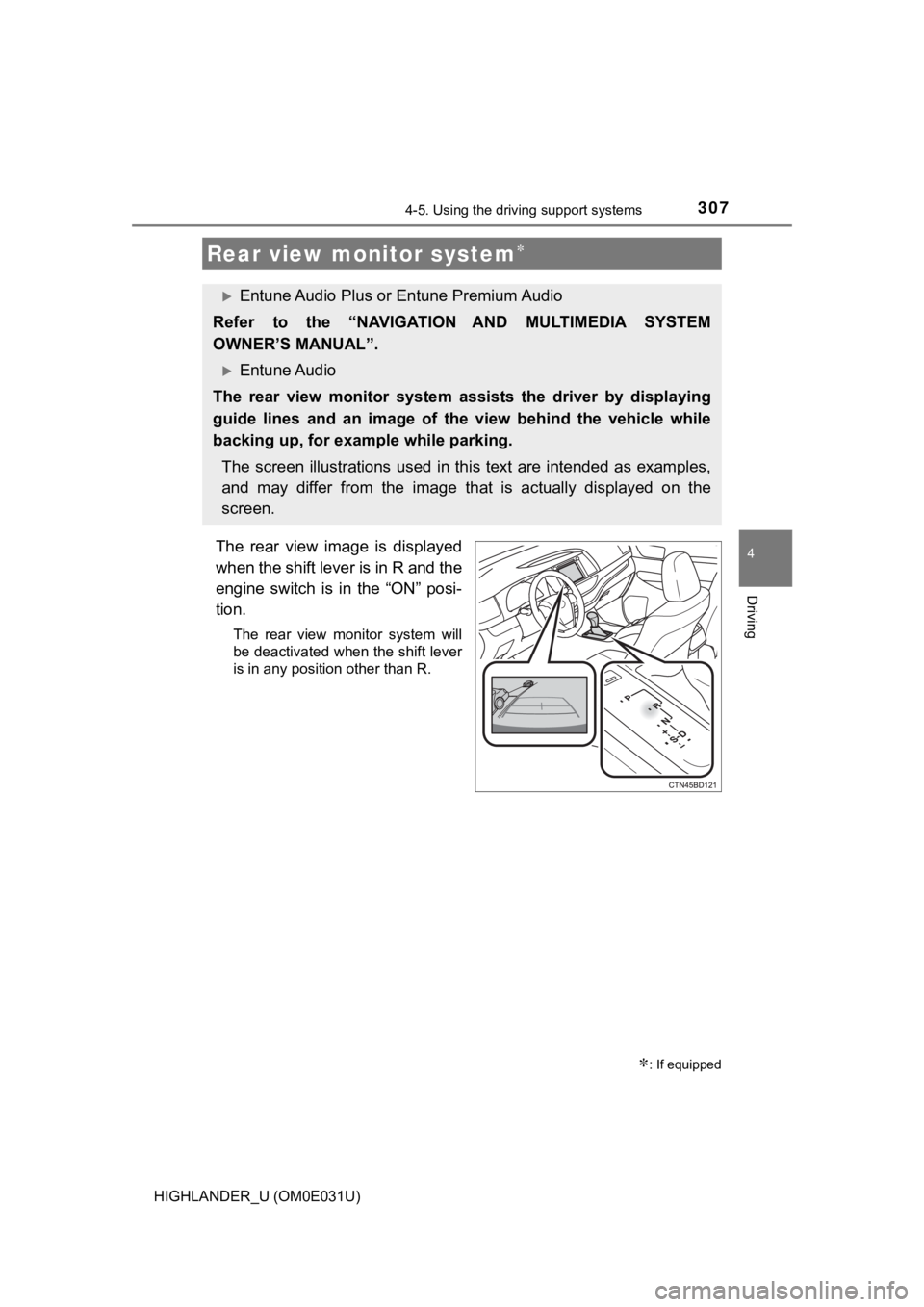
The rear view image is displayed
when the shift lever is in R and the
engine switch is in the “ON” posi-
tion.
The rear view monitor system will
be deactivated when the shift lever
is in any position other than R.
Rear view monitor system
: If equipped
Entune Audio Plus or Entune Premium Audio
Refer to the “NAVIGATION AND MULTIMEDIA SYSTEM
OWNER’S MANUAL”.
Entune Audio
The rear view monitor system assi sts the driver by displaying
guide lines and an image of the view behind the vehicle while
backing up, for exampl e while parking.
The screen illustrations used in this text are intended as exam ples,
and may differ from the image th at is actually displayed on the
screen.
Page 350 of 732
350
HIGHLANDER_U (OM0E031U)
5-1. Basic Operations
Entune Audio
P. 3 5 1
Entune Audio Plus/Entune Premium Audio
For vehicles with Entune Premium Audio or Entune Audio Plus, re fer
to the “NAVIGATION AND MULTIMEDIA SYSTEM OWNER’S MAN-
UAL”.
■ Using cellular phones
Interference may be heard through the audio system's speakers if a cellular
phone is being used inside or close to the vehicle while the au dio system is
operating.
■ About Bluetooth
®
The Bluetooth wordmark and logo are owned by Bluetooth SIG. and permis-
sion has been granted to use the trademark of the licensee Pana sonic
Corporation. Other trademarks and trade names are owned by various differ-
ent owners.
Audio system types
NOTICE
■ To prevent battery discharge
Do not leave the audio system on longer than necessary when the engine is
off.
■ To avoid damaging the audio system
Take care not to spill drinks or other fluids on the audio system.
Page 354 of 732
3545-1. Basic Operations
HIGHLANDER_U (OM0E031U)
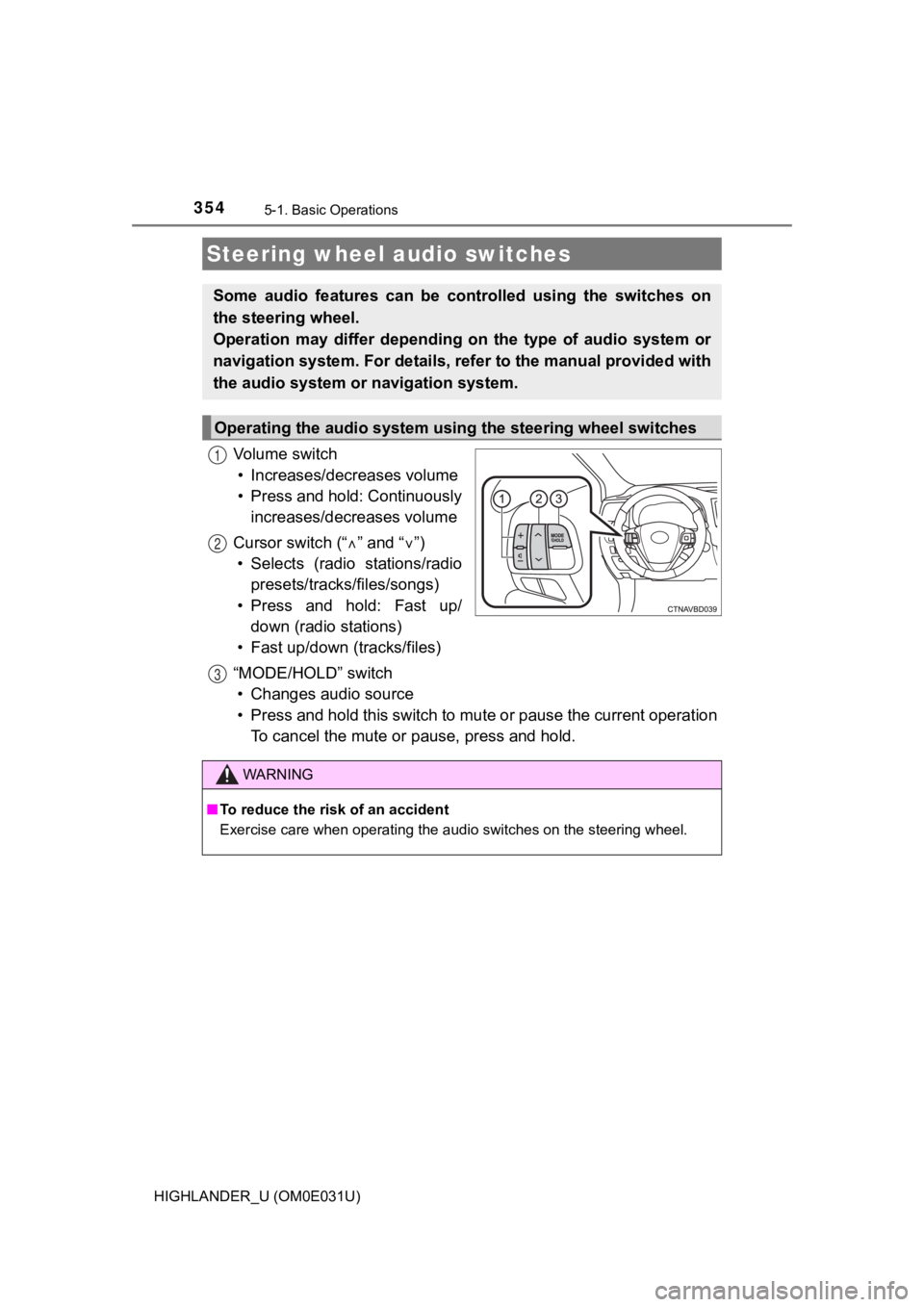
Vo l u m e s w i t c h• Increases/dec reases volume
• Press and hold: Continuously increases/decreases volume
Cursor switch (“ ” and “ ”)
• Selects (radio stations/radio presets/tracks/files/songs)
• Press and hold: Fast up/ down (radio stations)
• Fast up/down (tracks/files)
“MODE/HOLD” switch • Changes audio source
• Press and hold this switch to mute or pause the current operat ion
To cancel the mute or pause, press and hold.
Steering wheel audio switches
Some audio features can be cont rolled using the switches on
the steering wheel.
Operation may differ depending on the type of audio system or
navigation system. For details, refer to the manual provided with
the audio system or navigation system.
Operating the audio system usi ng the steering wheel switches
1
12
3
WARNING
■To reduce the risk of an accident
Exercise care when operating the audio switches on the steering wheel.