radio antenna TOYOTA HIGHLANDER 2020 Accessories, Audio & Navigation (in English)
[x] Cancel search | Manufacturer: TOYOTA, Model Year: 2020, Model line: HIGHLANDER, Model: TOYOTA HIGHLANDER 2020Pages: 402, PDF Size: 18.72 MB
Page 57 of 402
572-2. Connectivity settings
HIGHLANDER_HIGHLANDER
HV_NAVI_(U)
2
Basic function
●If a connected devi ce is taken out
of the Wi-Fi® connection area, the
connection will be severed.
●If the vehicle is driven out of the
cellular communication coverage
area, connecting to the internet
via the Wi-Fi
® hotspot will not be
possible.
●If a Bluetooth® device is used
while a device is connected using
the Wi-Fi
® hotspot function, the
communication speed may
decrease.
●If the vehicle is near a radio
antenna, radio station or other
source of strong radio waves and
electrical noise, communication
may be slow or impossible.The condition of Wi-Fi® connec-
tion appears on the right upper
side of the screen. ( P.17)
Communication standards
IEEE 802.11b
IEEE 802.11g
IEEE 802.11n (2.4GHz)
Security
WPA™
WPA2™
• WPA™ and WPA2™ are trade-
marks of Wi-Fi Alliance
®.
Wi-Fi® function operating
hints
WA R N I N G
●Use Wi-Fi® devices only when
safe and legal to do so.
●Your audio unit is fitted with
Wi-Fi® antennas. People with
implantable cardiac pacemak-
ers, cardiac resynchronization
therapy-pacemakers or implant-
able cardioverter defibrillators
should maintain a reasonable
distance between themselves
and the Wi-Fi
® antennas.
The radio waves may affect the
operation of such devices.
●Before using Wi-Fi® devices,
users of any electrical medical
device other than implantable
cardiac pacemakers, cardiac
resynchronization ther-
apy-pacemakers or implantable
cardioverter defibrillators should
consult the manufacturer of the
device for information about its
operation under the influence of
radio waves.
Radio waves could have unex-
pected effects on the operation
of such medical devices.
Conditions displayed with
Wi-Fi
® icon
Specifications
Page 149 of 402
1494-2. Radio operation
HIGHLANDER_HIGHLANDER
HV_NAVI_(U)
4
Audio/visual system
When problems occur with the SiriusXM tuner, a message will
appear on the screen. Referring to the table below to identify the
problem, take the suggested corrective action.
Refer to the table below to identify the problem and take
the suggested corrective action
MessageExplanation
“Check
Antenna”
The SiriusXM antenna is not c onnected. Check whether the
SiriusXM antenna cable is at tached securely. Contact your
Toyota dealer for assistance.
A short circuit occurs in the antenna or the surrounding
antenna cable. Contact your T oyota dealer for assistance.
“No Signal”The SiriusXM signal is too weak at the current location. Wait
until your vehicle reaches a location with a stronger signal.
“Chan
Unavailable”The channel you selected is not broadcasting any program-
ming. Select another channel.
“Ch Unsub-
scribed”
The channel you selected is no longer available. Wait for
about 2 seconds until the radio returns to the previous chan-
nel or “Ch 001”. If i t does not change automatically, select
another channel.
Page 159 of 402
1594-3. Media operation
HIGHLANDER_HIGHLANDER
HV_NAVI_(U)
4
Audio/visual system
To use the Bluetooth® audio
system, it is necessary to regis-
ter a Bluetooth
® device with the
system.
Registering an additional
device
1 Display the Bluetooth
® audio
control screen. ( P.156)
2 Select “Connect”.
3 Select “Add Device”.
When another Bluetooth
®
device is connected, a confir-
mation screen will be dis-
played. To disconnect the
Bluetooth
® device, select
“Yes”.
4 Follow the steps in “Register-
ing a Bluetooth
® phone for
the first time” from step 5.
( P.40)
Selecting a registered device
1 Display the Bluetooth
® audio
control screen. ( P.156)
2 Select “Connect”.
3 Select the desired device to
be connected.
4 Check that a confirmation
screen is displayed when the
connection is complete.
If an error message is dis-
played, follow the guidance
on the screen to try again.
WA R N I N G
●Your audio unit is fitted with
Bluetooth® antennas. People
with implantable cardiac pace-
makers, cardiac resynchroniza-
tion therapy-pacemakers or
implantable cardioverter defibril-
lators should maintain a reason-
able distance between
themselves and the Bluetooth
®
antennas. The radio waves may
affect the operation of such
devices.
●Before using Bluetooth®
devices, users of any electrical
medical device other than
implantable cardiac pacemak-
ers, cardiac resynchronization
therapy-pacemakers or implant-
able cardioverter defibrillators
should consult the manufacturer
of the device for information
about its operation under the
influence of radio waves. Radio
waves could have unexpected
effects on the operation of such
medical devices.
NOTICE
●Do not leave your portable
player in the vehicle. In particu-
lar, high temperatures inside the
vehicle may damage the porta-
ble player.
Registering/Connecting a
Bluetooth® device
Page 165 of 402
1654-6. Tips for operating the audio/visual system
HIGHLANDER_HIGHLANDER
HV_NAVI_(U)
4
Audio/visual system
4-6.Tips for operating the audio/visual system
●The use of a cellular phone inside
or near the vehicle may cause a
noise from the sp eakers of the
audio/visual system which you are
listening to. However, this does
not indicate a malfunction.
Usually, a problem with radio
reception does not mean there
is a problem with the radio it
is just the normal result of condi-
tions outside the vehicle.
For example, nearby buildings
and terrain can interfere with FM
reception. Power lines or phone
wires can interfere with AM sig-
nals. And of course, radio sig-
nals have a limited range. The
farther the vehicle is from a sta-
tion, the weaker i ts signal will
be. In addition, reception condi-
tions change constantly as the
vehicle moves.
Here, some common reception
problems that probably do not
indicate a problem with the radio
are described.
■FM
Fading and drifting stations:
Generally, the effective range of FM is about 25 miles (40 km).
Once outside this range, you
may notice fading and drifting,
which increase with the distance
from the radio transmitter. They
are often accompanied by dis-
tortion.
Multi-path: FM signals are
reflective, making it possible for
2 signals to reach the vehicle’s
antenna at the same time. If this
happens, the signals will cancel
each other out, causing a
momentary flutter or loss of
reception.
Static and fluttering: These
occur when signals are blocked
by buildings, trees or other large
objects. Increasing the bass
level may reduce static and flut-
tering.
Station swapping: If the FM sig-
nal being listened to is inter-
rupted or weakened, and there
is another strong station nearby
on the FM band, the radio may
tune in the second station until
the original signal can be picked
up again.
■AM
Fading: AM broadcasts are
reflected by the upper atmo-
sphere especially at night.
These reflected signals can
interfere with those received
directly from the radio station,
causing the radio station to
sound alternately strong and
weak.
Operating infor mation
NOTICE
●To avoid damage to the
audio/visual system:
• Be careful not to spill beverages
over the audio/visual system.
Radio
Page 204 of 402
2044-8. Rear seat entertainment system operation
HIGHLANDER_HIGHLANDER
HV_NAVI_(U)
●Wi-Fi® is a registered trademark
of Wi-Fi Alliance®.
●The Wi-Fi® networks serve bestef-
fort traffic.
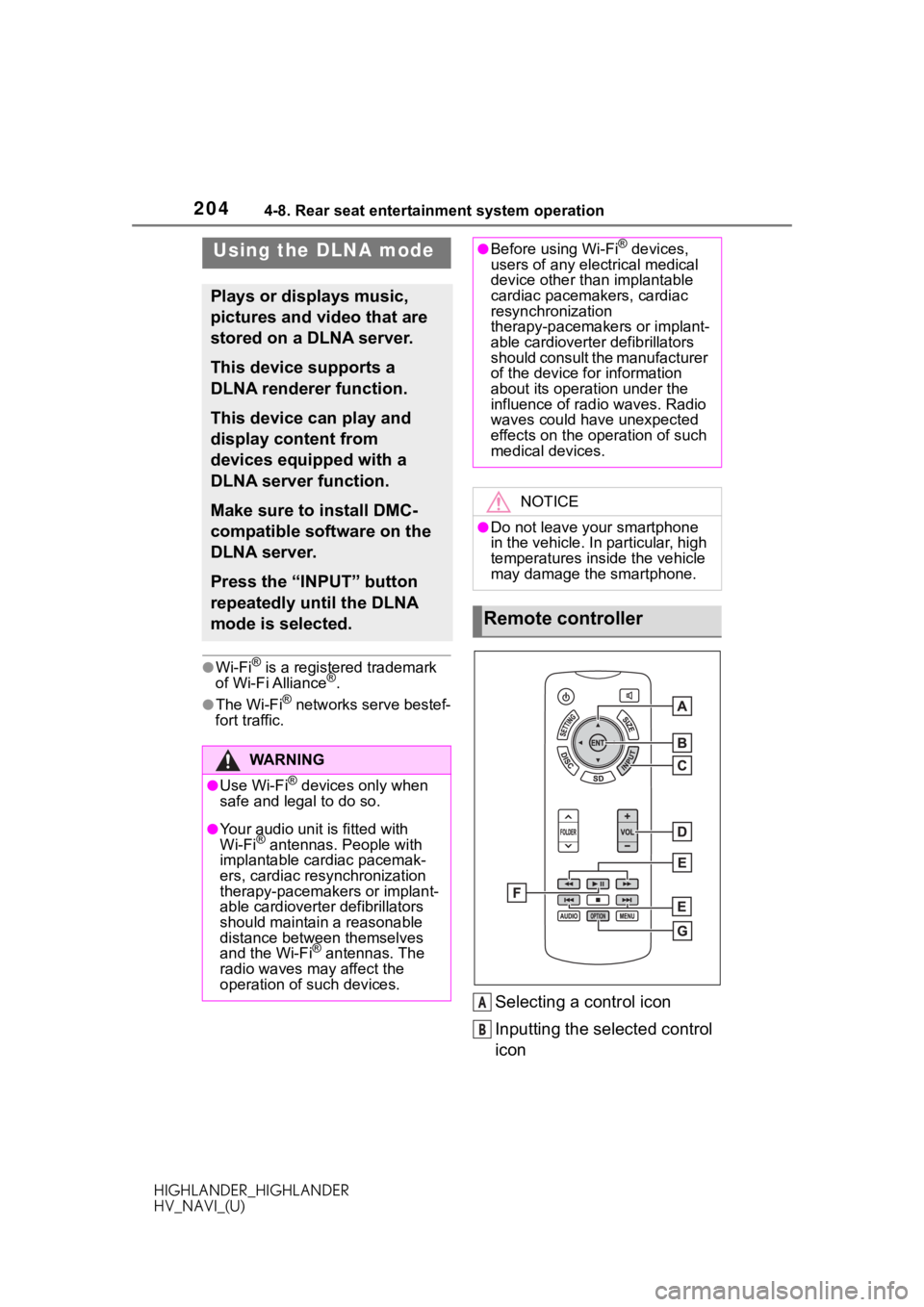
Selecting a control icon
Inputting the selected control
icon
Using the DLNA mode
Plays or displays music,
pictures and video that are
stored on a DLNA server.
This device supports a
DLNA renderer function.
This device can play and
display content from
devices equipped with a
DLNA server function.
Make sure to install DMC-
compatible software on the
DLNA server.
Press the “INPUT” button
repeatedly until the DLNA
mode is selected.
WA R N I N G
●Use Wi-Fi® devices only when
safe and legal to do so.
●Your audio unit is fitted with
Wi-Fi® antennas. People with
implantable cardiac pacemak-
ers, cardiac resynchronization
therapy-pacemakers or implant-
able cardioverter defibrillators
should maintain a reasonable
distance between themselves
and the Wi-Fi
® antennas. The
radio waves may affect the
operation of such devices.
●Before using Wi-Fi® devices,
users of any electrical medical
device other than implantable
cardiac pacemakers, cardiac
resynchronization
therapy-pacemakers or implant-
able cardioverter defibrillators
should consult the manufacturer
of the device for information
about its operation under the
influence of radio waves. Radio
waves could have unexpected
effects on the operation of such
medical devices.
NOTICE
●Do not leave your smartphone
in the vehicle. In particular, high
temperatures inside the vehicle
may damage the smartphone.
Remote controller
A
B
Page 209 of 402
2094-8. Rear seat entertainment system operation
HIGHLANDER_HIGHLANDER
HV_NAVI_(U)
4
Audio/visual system
●Miracast® is a registered trade-
mark of Wi-Fi Alliance®.
●Wi-Fi® is a registered trademark
of Wi-Fi Alliance®.
●The Wi-Fi® networks serve bestef-
fort traffic.
●If a connected devi ce is taken out
of the Wi-Fi® connection area, the
connection will be severed.
●Depending on the environment in
which the access point is used,
the communication speed may be
low or communication may not be
possible.
●When a device is connected to the
rear seat entertainment system
via Wi-Fi
®, the device may not be
able to be connected to the inter-
net via mobile network (3G or 4G).
Using the Miracast®
mode
The screen of a Miracast®
compatible device (with
Android OS version 4.4 or
later) can be displayed on
the rear seat entertainment
system display.
This function is not avail-
able if the smartphone is
not certified by Wi-Fi
Alliance
® as Miracast®
device.
Refer to the instruction
manual and other documen-
tation included with the
external device to determine
whether it supports Mira-
cast
®.
Press the “INPUT” button
repeatedly until the Mira-
cast
® mode is selected.
WA R N I N G
●Use Wi-Fi® devices only when
safe and legal to do so.
●Your audio unit is fitted with
Wi-Fi® antennas. People with
implantable cardiac pacemak-
ers, cardiac resynchronization
therapy-pacemakers or implant-
able cardioverter defibrillators
should maintain a reasonable
distance between themselves
and the Wi-Fi
® antennas. The
radio waves may affect the
operation of such devices.
●Before using Wi-Fi® devices,
users of any electrical medical
device other than implantable
cardiac pacemakers, cardiac
resynchronization
therapy-pacemakers or implant-
able cardioverter defibrillators
should consult the manufacturer
of the device for information
about its operation under the
influence of radio waves. Radio
waves could have unexpected
effects on the operation of such
medical devices.
NOTICE
●Do not leave your smartphone
in the vehicle. In particular, high
temperatures inside the vehicle
may damage the smartphone.
Page 330 of 402
3308-1. Phone operation (Hands-free system for cellular phones)
HIGHLANDER_HIGHLANDER
HV_NAVI_(U)
To use the hands-free system
for cellular phones, it is neces-
sary to register a cellular phone
with the system. (P.40)
■Connecting a Bluetooth®
device
Registering an additional
device
1 Display the phone top
screen. ( P.328)
2 Select “Select Device”.
3 Select “Add Device”.
When another Bluetooth
®
device is connected, a confir-
mation screen will be dis-
played. To disconnect the
Bluetooth
® device, select
“Yes”.
Up to 5 Bluetooth
® devices
can be registered to the sys-
tem. If the maximum number
of devices are registered, reg-
istration cannot be performed
from the phone top screen.
4 Follow the steps in “Register-
ing a Bluetooth
® phone for
the first time” from step 5.
( P.40)
WA R N I N G
●Your audio unit is fitted with
Bluetooth® antennas. People
with implantable cardiac pace-
makers, cardiac resynchroniza-
tion therapy-pacemakers or
implantable cardioverter defibril-
lators should maintain a reason-
able distance between
themselves and the Bluetooth
®
antennas. The radio waves may
affect the operation of such
devices.
●Before using Bluetooth®
devices, users of any electrical
medical device other than
implantable cardiac pacemak-
ers, cardiac resynchronization
therapy-pacemakers or implant-
able cardioverter defibrillators
should consult the manufacturer
of the device for information
about its operation under the
influence of radio waves. Radio
waves could have unexpected
effects on the operation of such
medical devices.
NOTICE
●Do not leave your cellular phone
in the vehicle. In particular, high
temperatures inside the vehicle
may damage the cellular phone.
Registering/Connecting a
Bluetooth® phone