fuel TOYOTA HIGHLANDER 2022 User Guide
[x] Cancel search | Manufacturer: TOYOTA, Model Year: 2022, Model line: HIGHLANDER, Model: TOYOTA HIGHLANDER 2022Pages: 568, PDF Size: 13.73 MB
Page 75 of 568
75
2
2
Vehicle status information and indicators
Vehicle status informationand indicators
.2-1. Instrument cluster
Warning lights and indica-tors ............................... 76
Gauges and meters ....... 81
Multi-information display (4.2-inch display) .......... 84
Multi-information display (7-inch display) ............. 93
Head-up display .......... 103
Fuel consumption informa- tion ............................ 108
Page 77 of 568
772-1. Instrument cluster
2
Vehicle status information and indicators
7-inch display
The units used on the meters and some indicators may differ
depending on the target region.
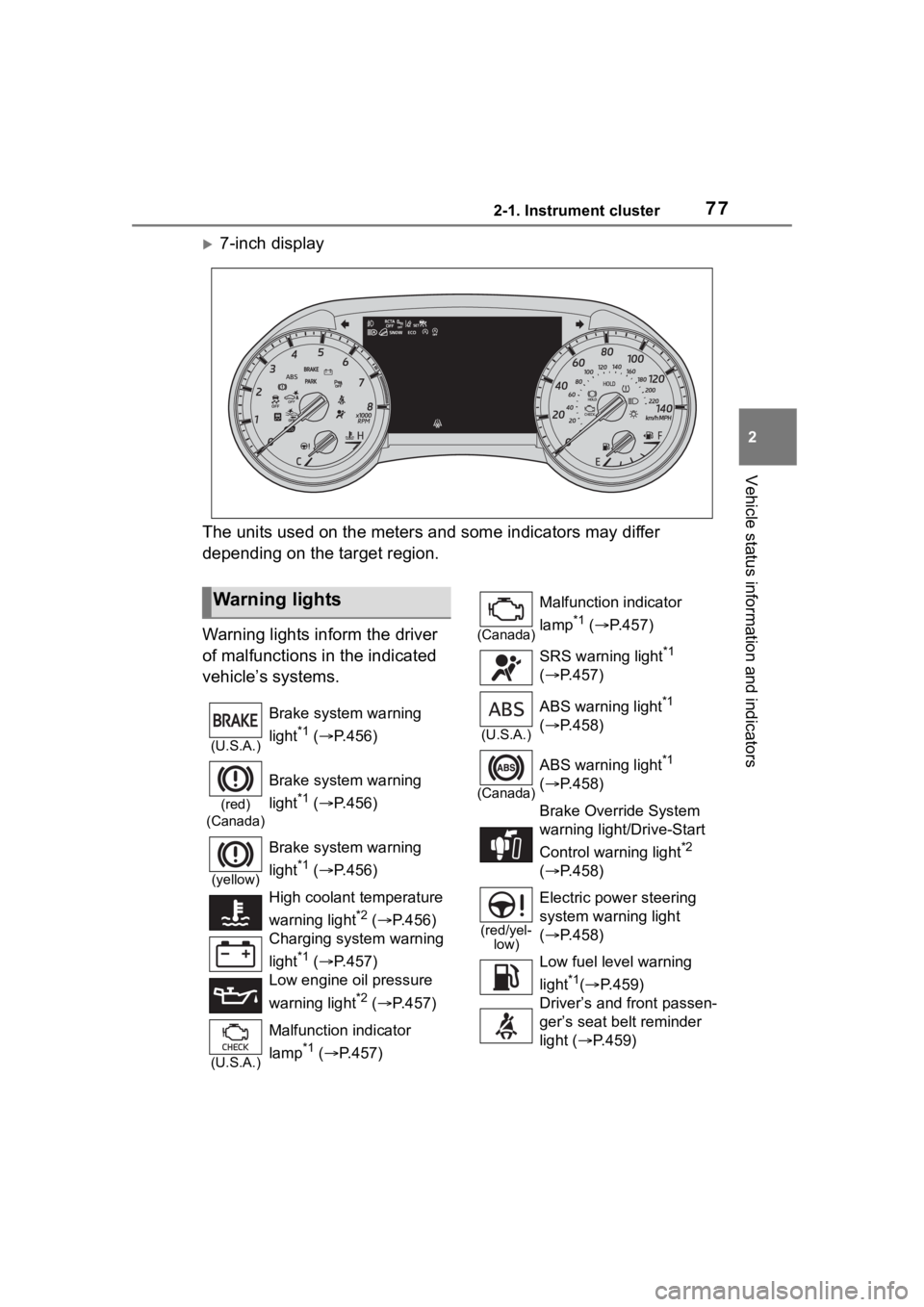
Warning lights inform the driver
of malfunctions in the indicated
vehicle’s systems.
Warning lights
(U.S.A.)
Brake system warning
light
*1 ( P.456)
(red)
(Canada)
Brake system warning
light
*1 ( P.456)
(yellow)
Brake system warning
light
*1 ( P.456)
High coolant temperature
warning light
*2 ( P.456)
Charging system warning
light
*1 ( P.457)
Low engine oil pressure
warning light
*2 ( P.457)
(U.S.A.)
Malfunction indicator
lamp
*1 ( P.457)
(Canada)
Malfunction indicator
lamp
*1 ( P.457)
SRS warning light
*1
( P.457)
(U.S.A.)
ABS warning light*1
( P.458)
(Canada)
ABS warning light*1
( P.458)
Brake Overri de System
warning light/Drive-Start
Control warning light
*2
( P.458)
(red/yel-
low)
Electric power steering
system warning light
( P.458)
Low fuel leve l warning
light
*1( P.459)
Driver’s and front passen-
ger’s seat belt reminder
light ( P.459)
Page 82 of 568
822-1. Instrument cluster
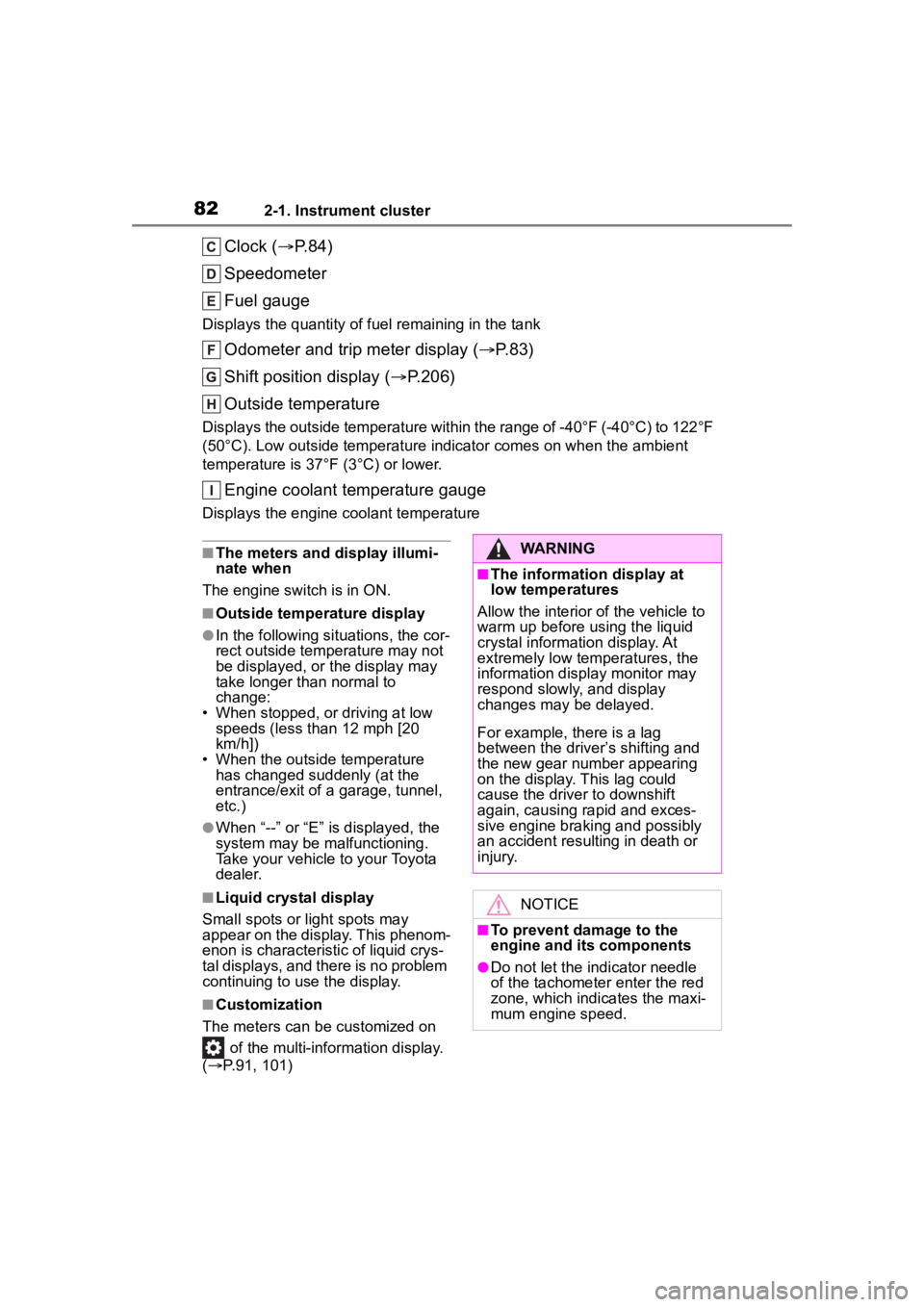
Clock (P.84)
Speedometer
Fuel gauge
Displays the quantity of fu el remaining in the tank
Odometer and trip meter display ( P.83)
Shift position display ( P.206)
Outside temperature
Displays the outside temperature within the range of -40°F (-40°C) to 122°F
(50°C). Low outside temperature indicator comes on when the ambient
temperature is 37°F (3°C) or lower.
Engine coolant temperature gauge
Displays the engine c oolant temperature
■The meters and display illumi-
nate when
The engine switch is in ON.
■Outside temperature display
●In the following si tuations, the cor-
rect outside tempe rature may not
be displayed, or the display may
take longer than normal to
change:
• When stopped, or driving at low
speeds (less than 12 mph [20
km/h])
• When the outside temperature
has changed suddenly (at the
entrance/exit of a garage, tunnel,
etc.)
●When “--” or “E” is displayed, the
system may be malfunctioning.
Take your vehicle to your Toyota
dealer.
■Liquid crystal display
Small spots or light spots may
appear on the display. This phenom-
enon is characteristi c of liquid crys-
tal displays, and there is no problem
continuing to use the display.
■Customization
The meters can be customized on of the multi-information display.
( P.91, 101)
WARNING
■The information display at
low temperatures
Allow the interior of the vehicle to
warm up before using the liquid
crystal information display. At
extremely low temperatures, the
information disp lay monitor may
respond slowly, and display
changes may be delayed.
For example, there is a lag
between the driver’s shifting and
the new gear number appearing
on the display. This lag could
cause the driver to downshift
again, causing rapid and exces-
sive engine braking and possibly
an accident resulting in death or
injury.
NOTICE
■To prevent damage to the
engine and its components
●Do not let the indicator needle
of the tachometer enter the red
zone, which indicates the maxi-
mum engine speed.
Page 85 of 568
852-1. Instrument cluster
2
Vehicle status information and indicators
■Liquid crystal display
Small spots or light spots may
appear on the display. This phenom-
enon is characteristi c of liquid crys-
tal displays, and there is no problem
continuing to use the display.
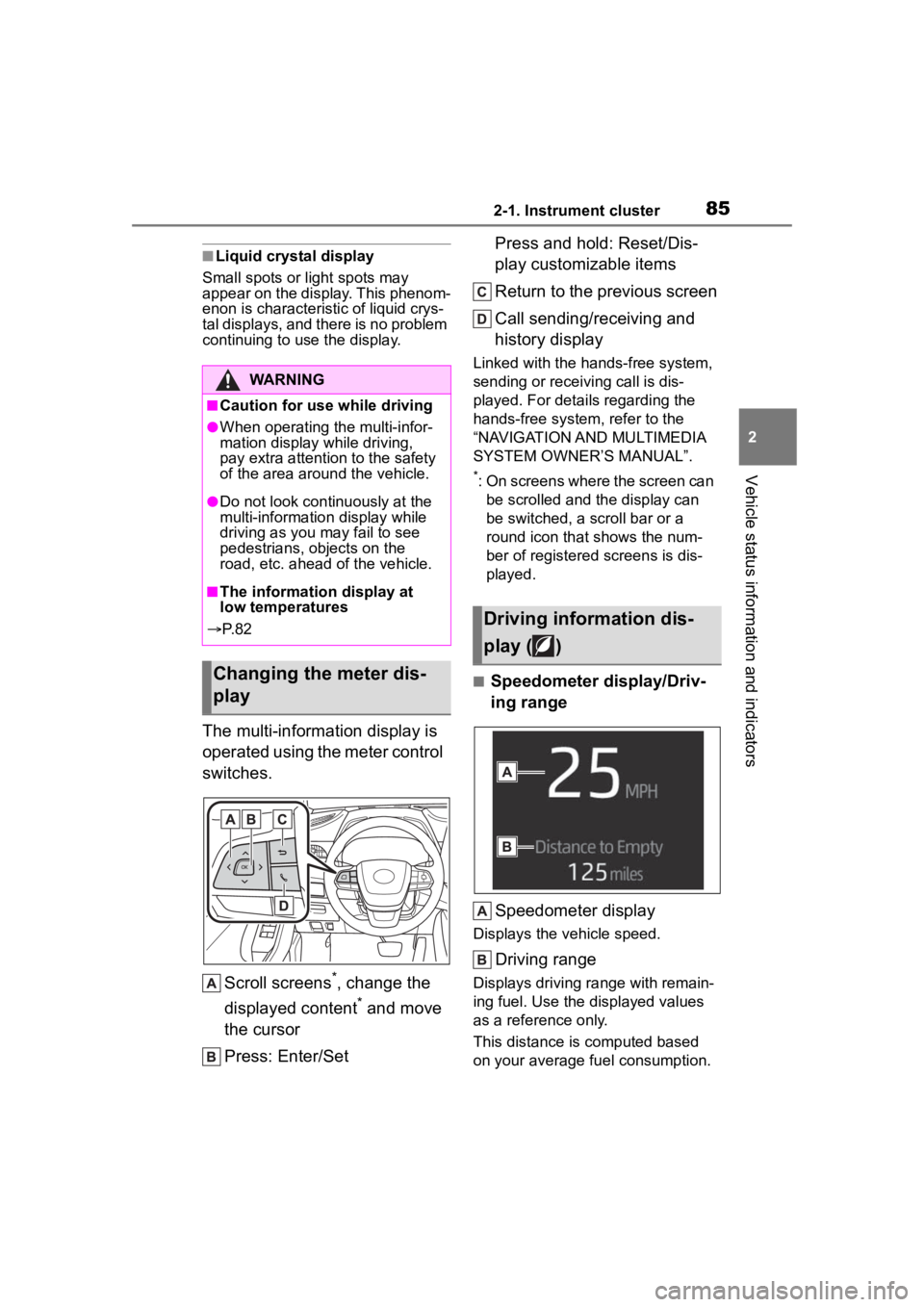
The multi-information display is
operated using the meter control
switches.
Scroll screens
*, change the
displayed content
* and move
the cursor
Press: Enter/Set Press and hold: Reset/Dis-
play customizable items
Return to the previous screen
Call sending/receiving and
history display
Linked with the hands-free system,
sending or receiving call is dis-
played. For details regarding the
hands-free system, refer to the
“NAVIGATION AND MULTIMEDIA
SYSTEM OWNER’S MANUAL”.
*: On screens where the screen can
be scrolled and the display can
be switched, a scroll bar or a
round icon that shows the num-
ber of registered screens is dis-
played.
■Speedometer display/Driv-
ing range
Speedometer display
Displays the vehicle speed.
Driving range
Displays driving ra nge with remain-
ing fuel. Use the displayed values
as a reference only.
This distance is computed based
on your average fuel consumption.
WARNING
■Caution for use while driving
●When operating the multi-infor-
mation display while driving,
pay extra attention to the safety
of the area aroun d the vehicle.
●Do not look continuously at the
multi-information display while
driving as you may fail to see
pedestrians, objects on the
road, etc. ahead o f the vehicle.
■The information display at
low temperatures
P. 8 2
Changing the meter dis-
play
Driving information dis-
play ( )
Page 86 of 568
862-1. Instrument cluster
As a result, the actual distance that
can be driven may differ from that
displayed.
When only a small amount of fuel is
added to the tank, the display may
not be updated.
When refueling, turn the engine
switch off. If the vehicle is refueled
without turning the engine switch
off, the display may not be updated.
When “Refuel” is displayed, the
remaining fuel amount is low and
the distance that can be driven with
the remaining fuel cannot be calcu-
lated.
Refuel immediately.
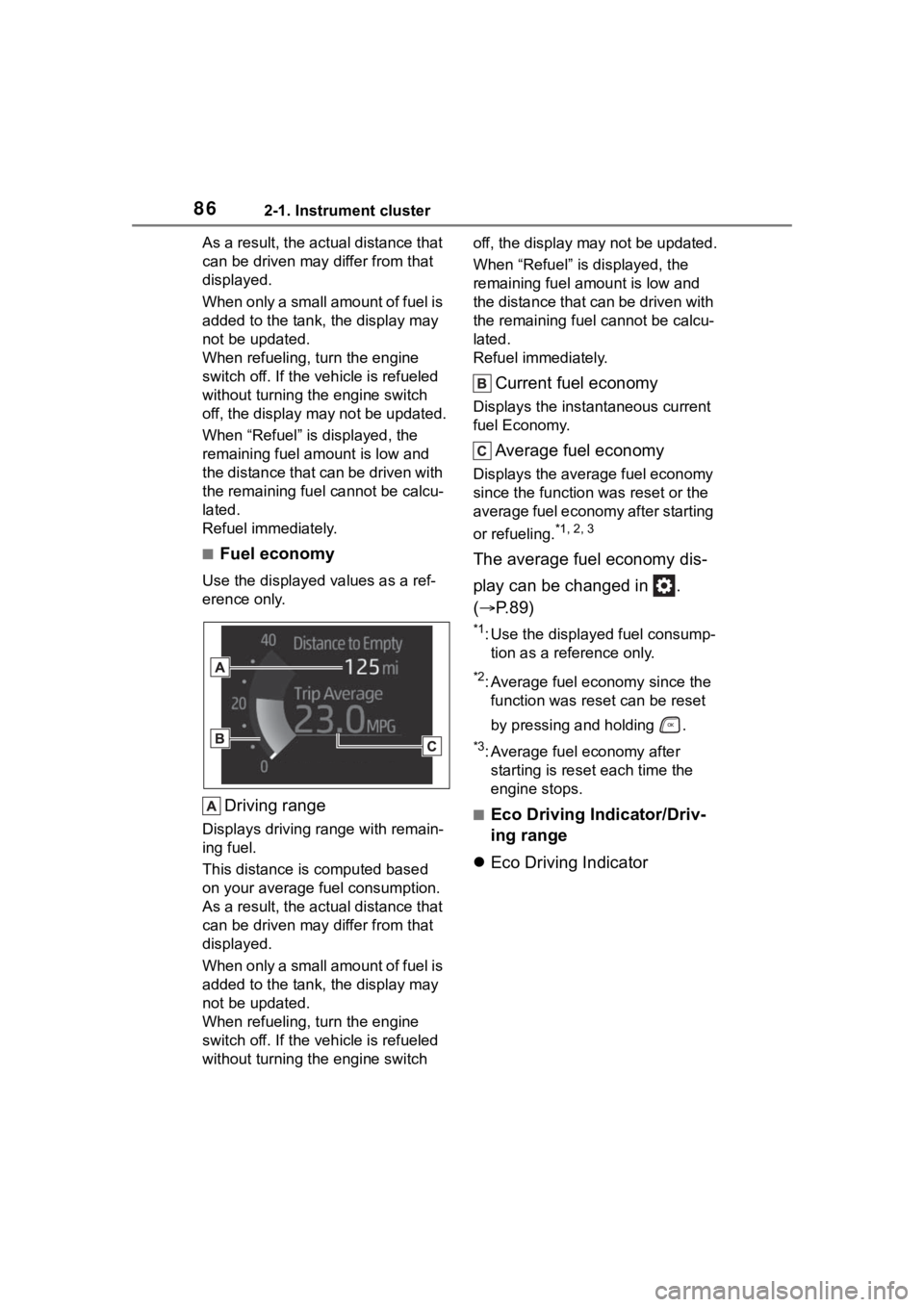
■Fuel economy
Use the displayed values as a ref-
erence only.
Driving range
Displays driving range with remain-
ing fuel.
This distance is computed based
on your average fuel consumption.
As a result, the actual distance that
can be driven may differ from that
displayed.
When only a small amount of fuel is
added to the tank, the display may
not be updated.
When refueling, turn the engine
switch off. If the vehicle is refueled
without turning the engine switch off, the display may not be updated.
When “Refuel” is displayed, the
remaining fuel amount is low and
the distance that can be driven with
the remaining fuel cannot be calcu-
lated.
Refuel immediately.
Current fuel economy
Displays the instantaneous current
fuel Economy.
Average fuel economy
Displays the average fuel economy
since the function
was reset or the
average fuel economy after starting
or refueling.
*1, 2, 3
The average fuel economy dis-
play can be changed in .
( P.89)
*1: Use the displayed fuel consump-
tion as a reference only.
*2: Average fuel economy since the function was res et can be reset
by pressing and holding .
*3: Average fuel economy after starting is reset each time the
engine stops.
■Eco Driving Indicator/Driv-
ing range
Eco Driving Indicator
Page 87 of 568
872-1. Instrument cluster
2
Vehicle status information and indicators
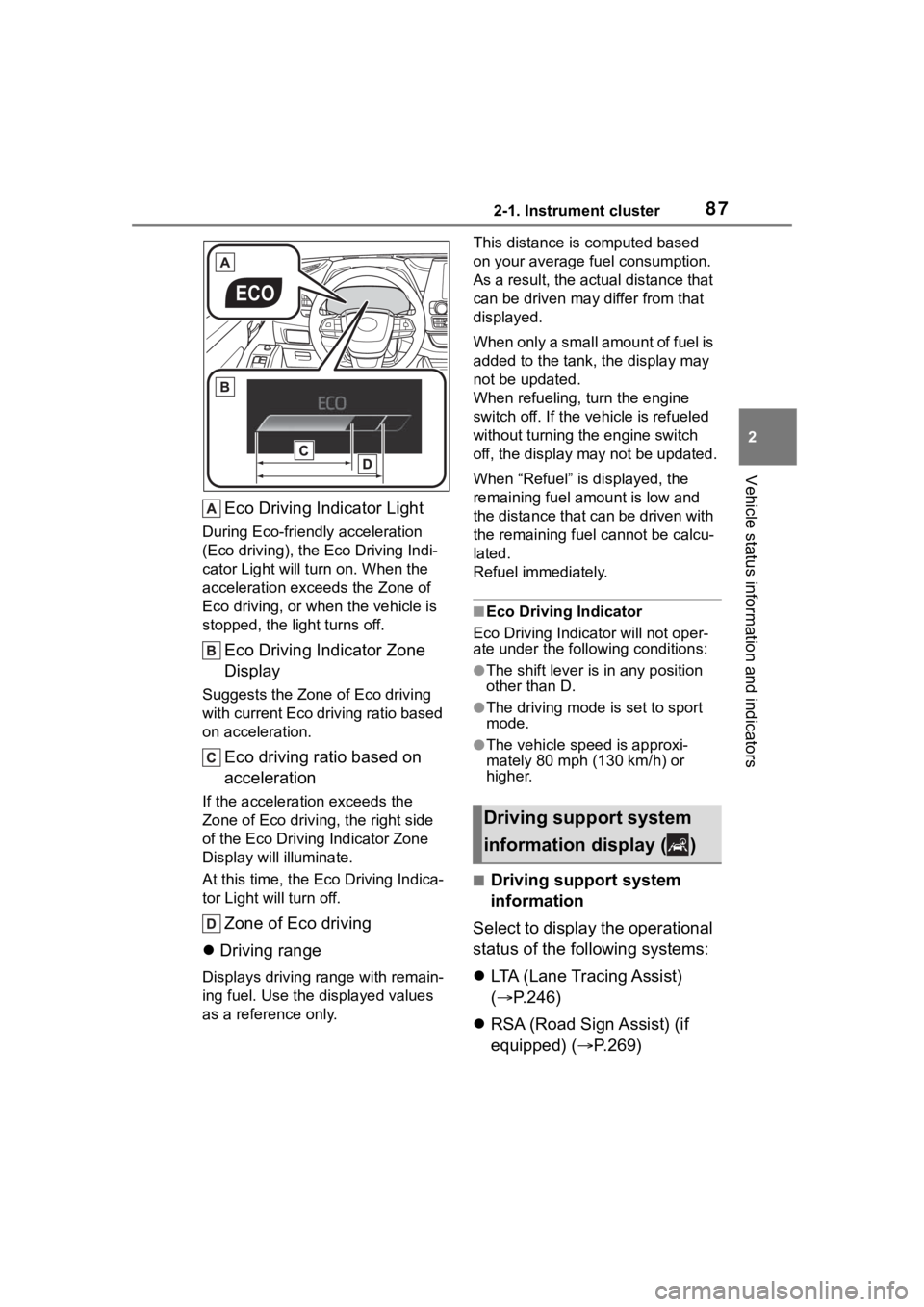
Eco Driving Indicator Light
During Eco-friendly acceleration
(Eco driving), the Eco Driving Indi-
cator Light will turn on. When the
acceleration exceeds the Zone of
Eco driving, or when the vehicle is
stopped, the light turns off.
Eco Driving Indicator Zone
Display
Suggests the Zone of Eco driving
with current Eco driving ratio based
on acceleration.
Eco driving ratio based on
acceleration
If the acceleration exceeds the
Zone of Eco driving, the right side
of the Eco Driving Indicator Zone
Display will illuminate.
At this time, the Eco Driving Indica-
tor Light will turn off.
Zone of Eco driving
Driving range
Displays driving range with remain-
ing fuel. Use the d isplayed values
as a reference only. This distance is computed based
on your average f
uel consumption.
As a result, the actual distance that
can be driven may differ from that
displayed.
When only a small amount of fuel is
added to the tank, the display may
not be updated.
When refueling, turn the engine
switch off. If the ve hicle is refueled
without turning the engine switch
off, the display may not be updated.
When “Refuel” is displayed, the
remaining fuel amount is low and
the distance that can be driven with
the remaining fuel cannot be calcu-
lated.
Refuel immediately.
■Eco Driving Indicator
Eco Driving Indicator will not oper-
ate under the following conditions:
●The shift lever is in any position
other than D.
●The driving mode is set to sport
mode.
●The vehicle spe ed is approxi-
mately 80 mph (130 km/h) or
higher.
■Driving support system
information
Select to display the operational
status of the following systems:
LTA (Lane Tracing Assist)
( P.246)
RSA (Road Sign Assist) (if
equipped) ( P.269)
Driving support system
information display ( )
Page 91 of 568
912-1. Instrument cluster
2
Vehicle status information and indicators
Select the open position when
power back door is fully open.
•“Volume”
Select to set the volume of the
buzzer which sounds when the
power back door system operates.
(Stop & Start) (if
equipped) ( P.272)
Select to set the length of time the
Stop & Start system will operate
when the “A/C” switch of the air
conditioning system is on.
“TPWS” (Tire Pressure Warn-
ing System) ( P.420)
• “Set Pressure” (tire pressure
warning system initialization)
Select to initialize the tire pressure
warning system.
• “Change Wheel” (register tire pressure warning system sensor
ID codes)
Select to register the ID codes of
the tire pressure s ensors to the tire
pressure warning system.
“Rear Seat Reminder”
( P. 1 1 9 )
Select to enable/disable the rear
seat reminder.
“Scheduled Maintenance”
( P.401)
Select to reset the scheduled main-
tenance information (maintenance
required message and distance
until maintenance necessary) after
all maintenance is performed.
“Oil Maintenance” ( P.410)
Select to reset the oil maintenance
information (maintenance required
message and distance until mainte- nance necessary) after an oil
change is performed.
■ Meter settings
Press and hold to change
the settings of the following
items:
Language
Select to change the language dis-
played.
Units
Select to change the units of mea-
sure displayed.
Eco Driving Indicator Light
( P.86)
Select to enable/disable the Eco
Driving Indi cator Light.
Fuel economy display
Select to change the average fuel
consumption display between after
start/after reset. ( P. 8 6 )
Select to displa y/not display the
audio system linked display.
Select to change the displayed con-
tent of the following:
• Display contents
Select to displa y/not display the
AWD control (if equipped). ( P.88)
• Drive information type
Select to change the drive informa-
tion type display between after
start/after reset.
• Drive information items
Page 94 of 568
942-1. Instrument cluster
■Liquid crystal display
Small spots or light spots may
appear on the display. This phenom-
enon is characteristi c of liquid crys-
tal displays, and there is no problem
continuing to use the display.
The multi-information display is
operated using the meter control
switches.
Scroll screens
*, change the
displayed content
* and move
the cursor
Press: Enter/Set Press and hold: Reset/Dis-
play customizable items
Return to the previous screen
Call sending/receiving and
history display
Linked with the hands-free system,
sending or receiving call is dis-
played. For details regarding the
hands-free system, refer to the
“NAVIGATION AND MULTIMEDIA
SYSTEM OWNER’S MANUAL”.
*: On screens where the screen can
be scrolled and the display can
be switched, a scroll bar or a
round icon that shows the num-
ber of registered screens is dis-
played.
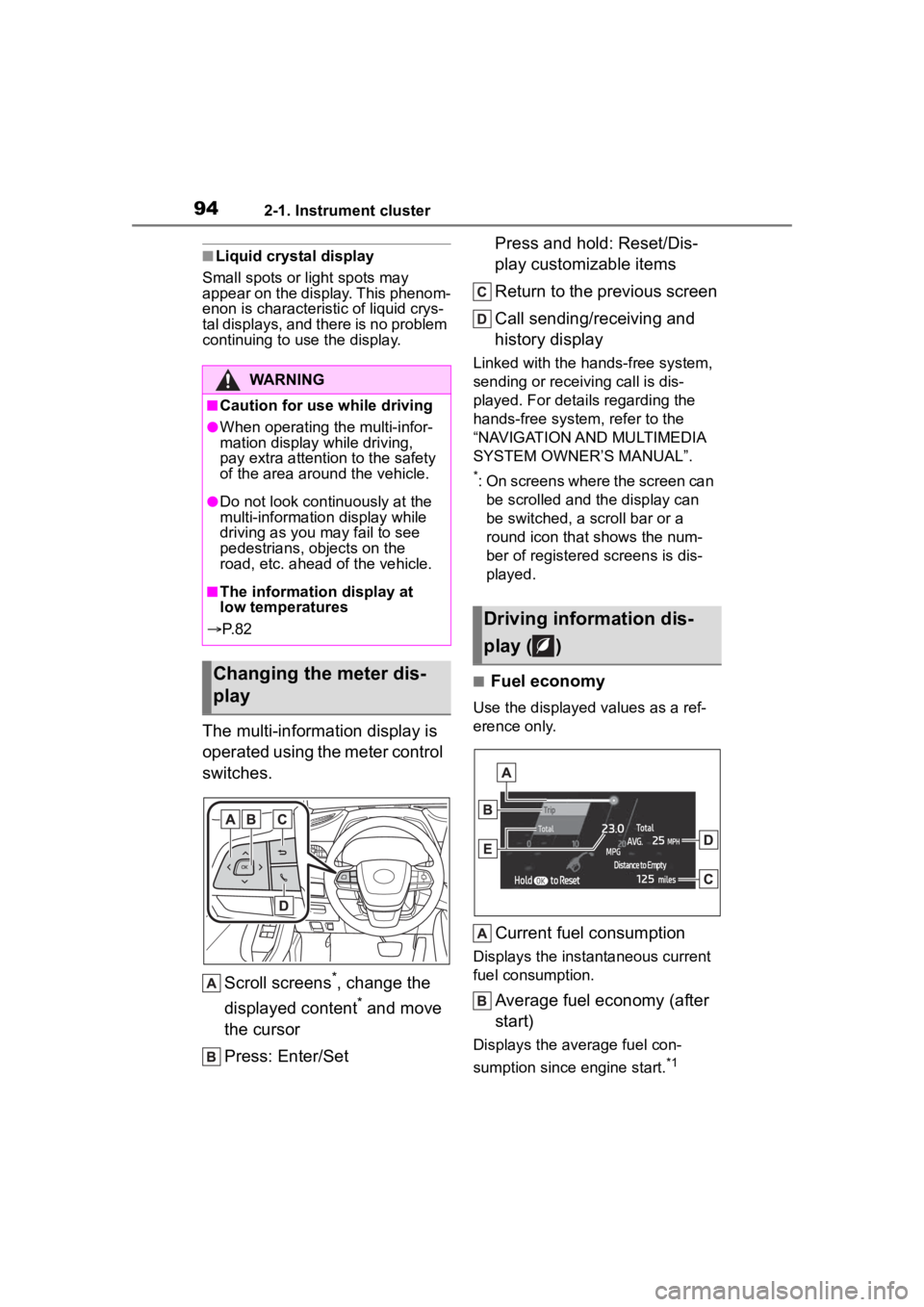
■Fuel economy
Use the displayed values as a ref-
erence only.
Current fuel consumption
Displays the instantaneous current
fuel consumption.
Average fuel economy (after
start)
Displays the average fuel con-
sumption since engine start.
*1
WARNING
■Caution for use while driving
●When operating the multi-infor-
mation display while driving,
pay extra attention to the safety
of the area aroun d the vehicle.
●Do not look continuously at the
multi-information display while
driving as you may fail to see
pedestrians, objects on the
road, etc. ahead o f the vehicle.
■The information display at
low temperatures
P. 8 2
Changing the meter dis-
play
Driving information dis-
play ( )
Page 95 of 568

952-1. Instrument cluster
2
Vehicle status information and indicators
Driving range
Displays the driving range with
remaining fuel.
This distance is computed based
on your average fuel consumption.
As a result, the actual distance that
can be driven may differ from that
displayed.
When only a small amount of fuel is
added to the tank, the display may
not be updated.
When refueling, turn the engine
switch off. If the vehicle is refueled
without turning the engine switch
off, the display may not be updated.
When “Refuel” is displayed, the
remaining fuel amount is low and
the distance that can be driven with
the remaining fuel cannot be calcu-
lated.
Refuel immediately.
Gadget*2
The following ite ms can be dis-
played by changing the settings for
gadget content and fuel economy
type on . ( P. 9 8 )
•Other
Blank: No item
• Average vehicle speed
After start: Displays average vehi-
cle speed since engine start
After reset: Displays average vehi-
cle speed since the display was
reset
*3
• Distance
After start: Displays the distance
driven since vehicle start.
After reset: Displays the distance
driven since the display was reset
*3
• Elapsed time
After start: Displays elapsed time since engine start
After reset: Displays elapsed time
since the display was reset
*3
Average fuel economy
Displayed item (listed below) can
be changed on the fuel economy
type screen of . (
P. 9 8 )
Total (after reset)
Displays the average fuel con-
sumption since t he display was
reset.
*1, 3
Tank (after refuel)
Displays the average fuel con-
sumption since the vehicle was
refueled.
*1
When only a small amount of fuel is
added to the tank, the display may
not be updated.
When refueling, turn the engine
switch off. If the ve hicle is refueled
without turning the engine switch
off, the display may not be updated.
*1: Use the displayed fuel consump- tion as a reference only.
*2: The default setting is no display.
*3: This display can be reset by
pressing and holding while it
is displayed.
■Eco Driving Indicator/Driv-
ing range
Eco Driving Indicator
Page 96 of 568
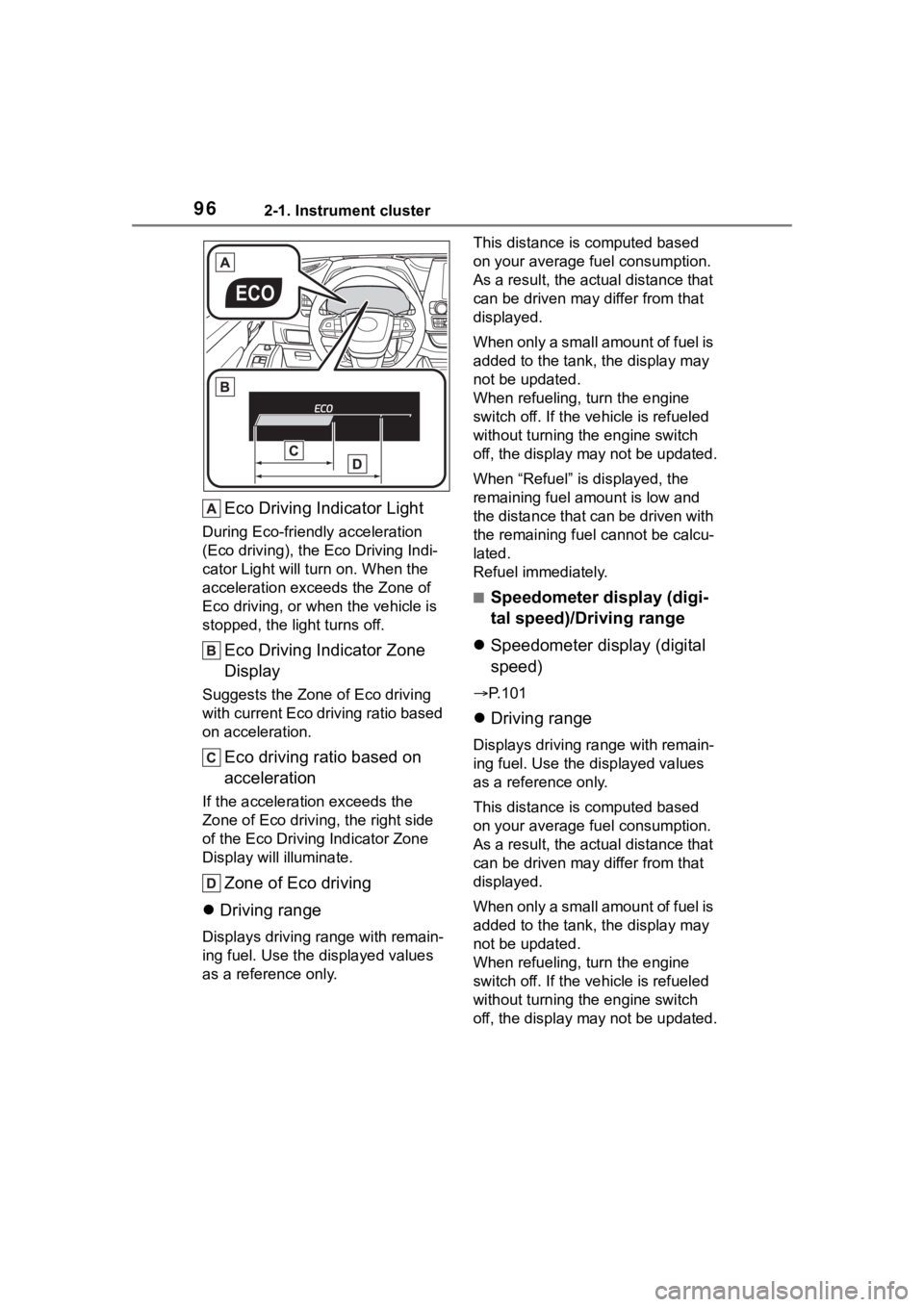
962-1. Instrument cluster
Eco Driving Indicator Light
During Eco-friendly acceleration
(Eco driving), the Eco Driving Indi-
cator Light will turn on. When the
acceleration exceeds the Zone of
Eco driving, or when the vehicle is
stopped, the light turns off.
Eco Driving Indicator Zone
Display
Suggests the Zone of Eco driving
with current Eco driving ratio based
on acceleration.
Eco driving ratio based on
acceleration
If the acceleration exceeds the
Zone of Eco driving, the right side
of the Eco Driving Indicator Zone
Display will illuminate.
Zone of Eco driving
Driving range
Displays driving range with remain-
ing fuel. Use the d isplayed values
as a reference only. This distance is computed based
on your average f
uel consumption.
As a result, the actual distance that
can be driven may differ from that
displayed.
When only a small amount of fuel is
added to the tank, the display may
not be updated.
When refueling, turn the engine
switch off. If the ve hicle is refueled
without turning the engine switch
off, the display may not be updated.
When “Refuel” is displayed, the
remaining fuel amount is low and
the distance that can be driven with
the remaining fuel cannot be calcu-
lated.
Refuel immediately.
■Speedometer display (digi-
tal speed)/Driving range
Speedometer display (digital
speed)
P.101
Driving range
Displays driving ra nge with remain-
ing fuel. Use the displayed values
as a reference only.
This distance is computed based
on your average f uel consumption.
As a result, the actual distance that
can be driven may differ from that
displayed.
When only a small amount of fuel is
added to the tank, the display may
not be updated.
When refueling, turn the engine
switch off. If the ve hicle is refueled
without turning the engine switch
off, the display may not be updated.