reset TOYOTA HIGHLANDER 2022 User Guide
[x] Cancel search | Manufacturer: TOYOTA, Model Year: 2022, Model line: HIGHLANDER, Model: TOYOTA HIGHLANDER 2022Pages: 568, PDF Size: 13.73 MB
Page 101 of 568

1012-1. Instrument cluster
2
Vehicle status information and indicators
• “Change Wheel” (register tire pressure warning system sensor
ID codes)
Select to register the ID codes of
the tire pressure s ensors to the tire
pressure warning system.
“Rear Seat Reminder”
( P. 1 1 9 )
Select to enable/disable the rear
seat reminder.
“Scheduled Maintenance”
( P.401)
Select to reset the scheduled main-
tenance information (maintenance
required message and distance
until maintenance necessary) after
all maintenance is performed.
“Oil Maintenance” ( P.410)
Select to reset the oil maintenance
information (maintenance required
message and distance until mainte-
nance necessary) after an oil
change is performed.
■ Meter settings
Press and hold to change
the settings of the following
items:
Language
Select to change the language dis-
played.
Units
Select to change t he units of mea-
sure displayed.
Eco Driving Indicator Light
( P. 9 5 )
Select to enable/disable the Eco
Driving Indicator Light.
Speedometer display (digital
speed)
Select to enable/disable the speed-
ometer display.
Gadget content
Select to turn the display of a gad-
get.
Fuel economy type
Select to change the average fuel
consumption display and an item to
be displayed as gadget.
Pop-up display
Select to enable/disable pop-up
displays for each relevant system.
Multi-information display off
Displays a blank screen.
Default setting
Select to reset the meter display
settings to the default setting.
■Vehicle functions and set-
tings that can be changed
P.521
■Background color of the indica-
tor/shift position display area
The background color of the indica-
tor/shift position display area is
changed accordi ng to the driving
mode as follows ( P.311):
●Eco drive mode: Blue
●Sport mode: Red
■Suspension of the settings dis-
play
●Some settings cannot be changed
while driving. When changing set-
tings, park the vehicle in a safe
place.
●If a warning message is displayed,
operation of the settings display
will be suspended.
Page 105 of 568
1052-1. Instrument cluster
2
Vehicle status information and indicators
tion display (P.521) and then
.
■Enabling/disabling the
head-up display
Press to enable/disable the
head-up display.
■Changing the head-up dis-
play settings
Press and hold to display the
following settings.
“HUD Brightness/Position”
Select to adjust the brightness and
vertical position of the head-up dis-
play.
“HUD Driving Support”
• Tachometer Settings
Blank/Eco Indicator/Tachometer
Select to change the display to
blank (no display)/Eco Driving Indi-
cator/tachometer.
Select to enable/d isable the follow-
ing items:
• Navigation (if equipped)
• Driving Assist
• Compass (if equipped)
• Audio
“HUD Rotation”
Select to adjust the angle of the
head-up display.
Press the or switch to
adjust the angle of the head-up dis-
play.
■Enabling/disabling of the
head-up display
If the head-up display is disabled, it will remain disabled when the
engine switch is turned off then back
to ON.
■Display brightness
The brightness of the head-up dis-
play can be adjusted on of the
multi-information di splay. Also, it is
automatically adjusted according to
the ambient brightness.
■Automatic adjustment of the
head-up display position (vehi-
cles with driving position mem-
ory)
A desired head-up display position
can be entered to memory and
recalled automatica lly by the driving
position memory system. ( P.147)
■When the battery is discon-
nected
The customize settings of the
head-up display will be reset.
■Customization
Some functions can be customized.
( P.521)
WARNING
■Caution for changing settings
of the head-up display
As the engine needs to be run-
ning while changing the settings
of the head-up display, ensure
that the vehicle is parked in a
place with adequate ventilation. In
a closed area such as a garage,
exhaust gases in cluding harmful
carbon monoxide (CO) may col-
lect and enter the vehicle. This
may lead to death or a serious
health hazard.
Page 109 of 568
1092-1. Instrument cluster
2
Vehicle status information and indicators
Audio Plus (vehicles with
Data Communication Mod-
ule) or Premium Audio
1 Press the “MENU” button.
2 Select “Info” on the “Menu”
screen.
3 Select “ECO” on the “Infor-
mation” screen.
If a screen other than “Trip Informa-
tion” is displayed, select “Trip Infor-
mation”.
12.3-inch display
1 Select Toyota multi-oper-
ation touch ( P.332).
2 Select “TripInfo.”.
The screen position can also be
changed by select a desired infor-
mation in full screen.
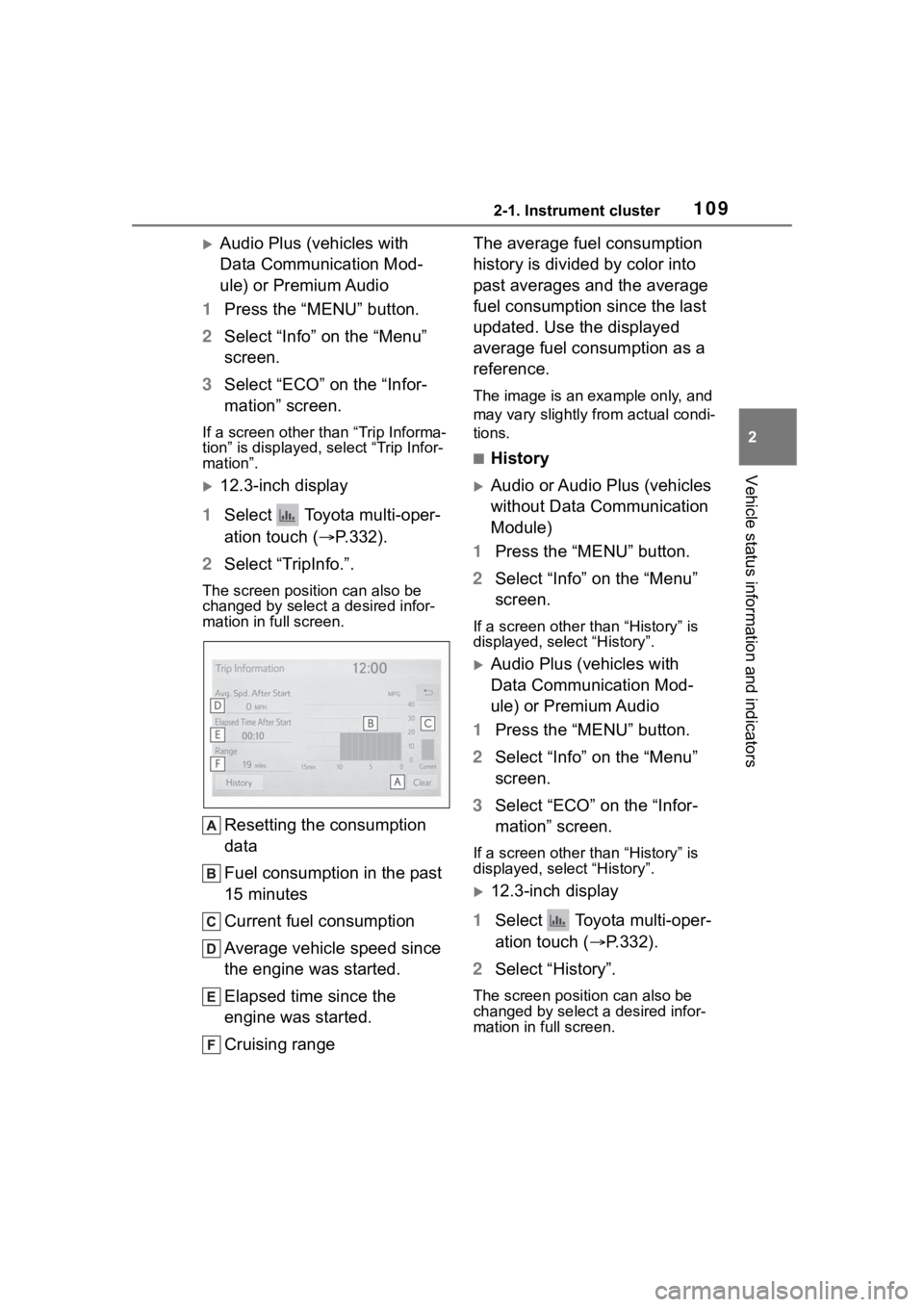
Resetting the consumption
data
Fuel consumption in the past
15 minutes
Current fuel consumption
Average vehicle speed since
the engine was started.
Elapsed time since the
engine was started.
Cruising range The average fuel consumption
history is divided by color into
past averages and the average
fuel consumption since the last
updated. Use the displayed
average fuel consumption as a
reference.
The image is an example only, and
may vary slightly from actual condi-
tions.
■History
Audio or Audio Plus (vehicles
without Data Communication
Module)
1 Press the “MENU” button.
2 Select “Info” on the “Menu”
screen.
If a screen other than “History” is
displayed, select “History”.
Audio Plus (vehicles with
Data Communication Mod-
ule) or Premium Audio
1 Press the “MENU” button.
2 Select “Info” on the “Menu”
screen.
3 Select “ECO” on the “Infor-
mation” screen.
If a screen other than “History” is
displayed, select “History”.
12.3-inch display
1 Select Toyota multi-oper-
ation touch ( P.332).
2 Select “History”.
The screen posit ion can also be
changed by select a desired infor-
mation in full screen.
Page 110 of 568
1102-1. Instrument cluster
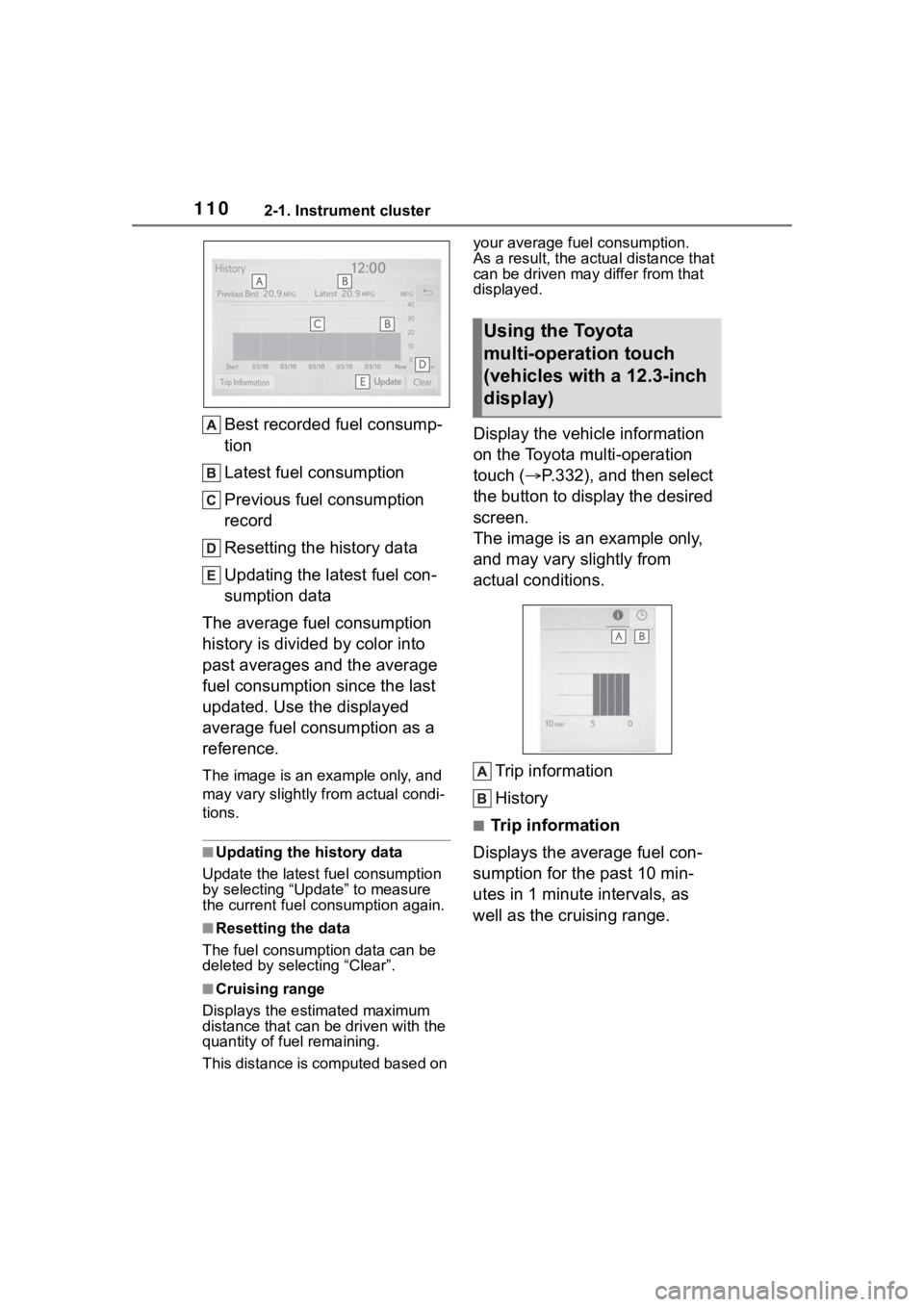
Best recorded fuel consump-
tion
Latest fuel consumption
Previous fuel consumption
record
Resetting the history data
Updating the latest fuel con-
sumption data
The average fuel consumption
history is divided by color into
past averages and the average
fuel consumption since the last
updated. Use the displayed
average fuel consumption as a
reference.
The image is an example only, and
may vary slightly f rom actual condi-
tions.
■Updating the history data
Update the latest fuel consumption
by selecting “Upda te” to measure
the current fuel consumption again.
■Resetting the data
The fuel consumption data can be
deleted by selecting “Clear”.
■Cruising range
Displays the estimated maximum
distance that can be driven with the
quantity of fuel remaining.
This distance is computed based on your average fuel consumption.
As a result, the actual distance that
can be driven may differ from that
displayed.
Display the vehicle information
on the Toyota multi-operation
touch (
P.332), and then select
the button to display the desired
screen.
The image is an example only,
and may vary slightly from
actual conditions.
Trip information
History
■Trip information
Displays the average fuel con-
sumption for the past 10 min-
utes in 1 minute intervals, as
well as the cruising range.
Using the Toyota
multi-operation touch
(vehicles with a 12.3-inch
display)
Page 147 of 568
1473-3. Adjusting the seats
3
Before driving
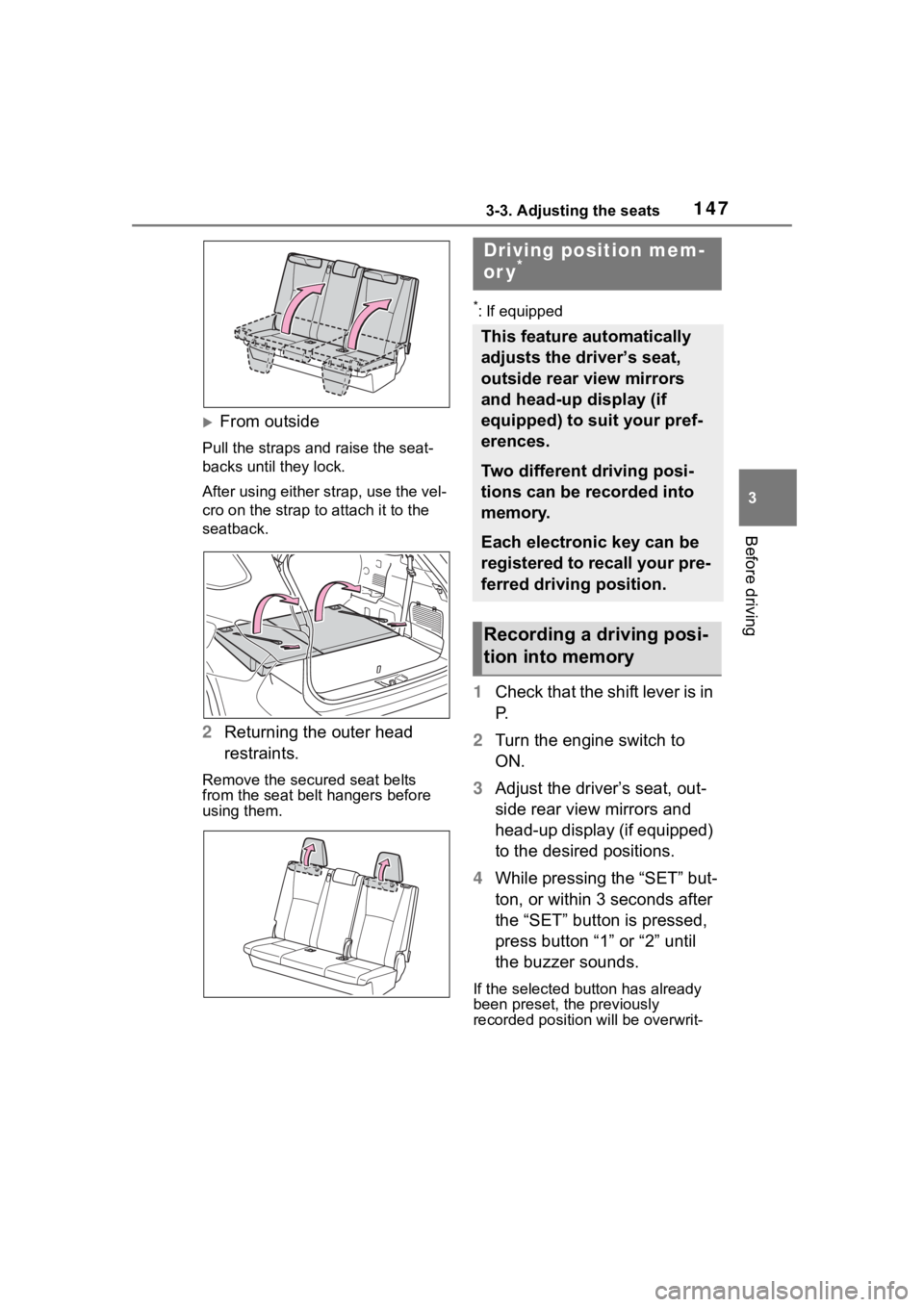
From outside
Pull the straps and raise the seat-
backs until they lock.
After using either strap, use the vel-
cro on the strap to attach it to the
seatback.
2 Returning the outer head
restraints.
Remove the secure d seat belts
from the seat belt hangers before
using them.
*: If equipped
1 Check that the shift lever is in
P.
2 Turn the engine switch to
ON.
3 Adjust the driver’s seat, out-
side rear view mirrors and
head-up display (if equipped)
to the desired positions.
4 While pressing the “SET” but-
ton, or within 3 seconds after
the “SET” button is pressed,
press button “1” or “2” until
the buzzer sounds.
If the selected button has already
been preset, the previously
recorded positio n will be overwrit-
Driving position mem-
or y*
This feature automatically
adjusts the driver’s seat,
outside rear view mirrors
and head-up display (if
equipped) to suit your pref-
erences.
Two different driving posi-
tions can be recorded into
memory.
Each electronic key can be
registered to recall your pre-
ferred driving position.
Recording a driving posi-
tion into memory
Page 198 of 568
1984-1. Before driving
This function is activated when the
rated current of any of the following
trailer light circuit components is
exceeded:
●Tail lights: maximum 4.5 A
●Stop/turn signal light (right): maxi-
mum 7.8 A
●Stop/turn signal light (left): maxi-
mum 4.5 A
■When the auto current cut func-
tion is activated
If a trailer light d oes not come on
due to the activation of the auto cur-
rent cut function , the light system
will need to be reset.
Follow the reset procedure shown
below.
●If a tail light doe s not come on,
turn off the headlight switch.
●If the right-side stop/turn signal
light does not com e on, put the
turn signal in the off position or
remove foot from t he brake pedal.
●If the left-side stop/turn signal light
does not come on, put the turn
signal in the off position or remove
foot from the brake pedal.
If the emergency flashers do not
operate, press the emergency
flasher switch to turn them off.
After the light syst em is reset, oper-
ate the light switches again to see if
the lights operate normally.
If the lights do not operate normally,
have the vehicle inspected by your
Toyota dealer.
Your vehicle will handle differ-
ently when towing a trailer. Help
to avoid an accident, death or
serious injury, keep the following
in mind when towing:
Speed limits for towing a
trailer vary by state or prov-
ince. Do not exceed the
posted towing speed limit.
Toyota recommends that the
vehicle-trailer speed limit is 65
mph (104 km/h) on a flat,
straight, dry road. Do not
exceed this limit, the posted
towing speed limit or the
speed limit for your trailer as
set forth in your trailer owner’s
manual, whichever is lowest.
Instability of the towing vehi-
cle-trailer combination (trailer
sway) increases as speed
increases. Exceeding speed
limits may cause loss of con-
trol.
Before starting out, check the
trailer lights, tires and the
vehicle-trailer connections.
Recheck after driving a short
distance.
Practice turning, stopping and
reversing with the trailer
attached in an area away
from traffic until you become
accustomed to the feel of the
vehicle-trailer combination.
Reversing with a trailer
attached is difficult and
NOTICE
■Do not directly splice trailer
lights
Do not directly splice trailer lights.
Directly splicing trailer lights may
damage your vehicle’s electrical
system and cause a malfunction.
Trailer towing tips
Page 203 of 568
2034-2. Driving procedures
4
Driving
■Customization
If the smart key system has been
deactivated in a customized setting,
refer to P.488.
1 Stop the vehicle completely.
2 Set the parking brake
( P.210), and shift the shift
lever to P.
Check the parking brake indicator
is illuminated.
3 Press the engine switch.
The engine will stop, and the meter
display will be extinguished.
4Release the brake pedal and
check that “ACCESSORY” or
“IGNITION ON” is not shown
on the multi-information dis-
play.
■Automatic engine shut off fea-
ture
●The vehicle is equipped with a
feature that automatically shuts off
the engine when the shift lever is
in P with the engine running for an
extended period.
●The engine will automatically shut
off after approxima tely 1 hour if it
has been left running while the
shift lever is in P.
●The timer for the automatic engine
shut off feature will reset if the
brake pedal is depressed or if the
shift lever is in a position other
than P.
●After the vehicle is parked, if the
door is locked with the door lock
switch ( P.120) from the inside or
the mechanical k ey from the out-
side, the automatic engine shut off
feature will be disab led. The timer
for the automatic engine shut off
feature will be re-enabled if the
driver’s door is opened.
WARNING
■When starting the engine
Always start the e ngine while sit-
ting in the driver’s seat. Do not
depress the accelerator pedal
while starting the engine under
any circumstances.
Doing so may cause an accident
resulting in death or serious injury.
NOTICE
■When starting the engine
●Do not race a cold engine.
●If the engine becomes difficult to
start or stalls frequently, have
your vehicle checked by your
Toyota dealer immediately.
■Symptoms indicating a mal-
function with the engine
switch
If the engine switch seems to be
operating somewh at differently
than usual, such as the switch
sticking slightly, there may be a
malfunction. Contact your Toyota
dealer immediately.
Stopping the engine
Page 401 of 568
4016-2. Maintenance
6
Maintenance and care
■Resetting the message indicat-
ing maintenance is required
After the required maintenance is
preformed according to the mainte-
nance schedule, please reset the
message.To reset t he message, fol-
low the procedures described
below:
4.2-inch display
1 Press or of the meter
control switch to select .
2 Press or of the meter
control switch, select and
then press and hold .
3 Press or of the meter
control switch, se lect “Scheduled
Maintenance” and then press
.
4 Select “Yes” and press .
5 A message will be displayed on
the multi-information display
when the reset procedure has
been completed.
7-inch display
1 Press or of the meter
control switch to select .
2 Press or of the meter
control switch, select and
then press and hold .
3 Press or of the meter
control switch, se lect “Scheduled
Maintenance” and then press
.
4 Select “Yes” and press .
5 A message will be displayed on
the multi-information display
when the reset procedure has
been completed.
You can perform some mainte-
nance procedures by yourself.
Please be aware that do-it-your-
self maintenance may affect
warranty coverage.
The use of Toyota Repair Manuals
is recommended.
For details about warranty cover-
age, refer to the separate “Owner’s
Warranty Informat ion Booklet” or
“Owner’s Manual Supplement”.
Do-it-yourself mainte-
nance
Page 412 of 568
4126-3. Do-it-yourself maintenance
●When the engine is new, for
example directly after purchasing
the vehicle or after replacing the
engine
●If low quality oil or oil of an inap-
propriate viscosity is used
●When driving at high engine
speeds or with a heavy load,
when towing, or when driving
while accelerating o r decelerating
frequently
●When leaving the engine idling for
a long time, or wh en driving fre-
quently through heavy traffic
■If the oil is spilled on the engine
cover
To prevent the engine cover from
being damaged, remove any engine
oil from the engine cover as soon as
possible using a neutral detergent.
Do not use an organic solvent such
as brake cleaner.
■After changing the engine oil
The engine oil maintenance data
should be reset. Perform the follow-
ing procedures:
4.2-inch display
1 Press or of the meter
control switch to select .
2 Press or of the meter
control switch, select and
then press and hold .
3 Press or of the meter
control switch, se lect “Oil Mainte-
nance” and then press .
4 Select “Yes” and press .
5 A message will be displayed on
the multi-information display
when the reset procedure has
been completed.
7-inch display
1 Press or of the meter
control switch to select . 2
Press or of the meter
control switch, select and
then press and hold .
3 Press or of the meter
control switch, select “Oil Mainte-
nance” and then press .
4 Select “Yes” and press .
5 A message will be displayed on
the multi-inform ation display
when the reset procedure has
been completed.
WARNING
■Used engine oil
●Used engine oil contains poten-
tially harmful contaminants
which may cause skin disorders
such as inflammation and skin
cancer, so care should be taken
to avoid prolonged and
repeated contact. To remove
used engine oil from your skin,
wash thoroughly with soap and
water.
●Dispose of used oil and filters
only in a safe and acceptable
manner. Do not dispose of used
oil and filters in h ousehold trash,
in sewers or onto the ground.
Call your Toyota dealer, service
station or auto parts store for
information concerning recy-
cling or disposal.
●Do not leave used engine oil
within the reach of children.
NOTICE
■To prevent serious engine
damage
Check the oil le vel on a regular
basis.
Page 425 of 568
4256-3. Do-it-yourself maintenance
6
Maintenance and care
the tire pressure warning sys-
tem determines the position.
Drive the vehicle at approxi-
mately 25 mph (40 km/h) or
more for approximately 10 to 30
minutes until the inflation pres-
sure of each tire is displayed on
the multi-information display.
When initialization is complete,
the inflation pressure of each
tire will be displayed on the
multi-information display.
Even if the vehicle is not driven
at approximately 25 mph (40
km/h) or more, initialization can
be completed by driving for a
long time. However, if initializa-
tion does not complete after
driving for 1 hour or more, park
the vehicle in a safe place for
approximately 20 minutes and
then drive the vehicle again.
■Initializing the tire pressure
warning system
Initialize the syst em with the tire
inflation pressure adjusted to the
specified level.
■Initialization procedure
●Make sure to carry out initializa-
tion after adjusting the tire inflation
pressure.
Also, make sure the tires are cold
before carrying out initialization or
tire inflation pressure adjustment.
●If you have accidentally turned the
engine switch off during initializa-
tion, it is not necessary to restart
the initialization ag ain as initializa-
tion will restart aut omatically when
the engine switch has been turned
to ON for the next time.
●If you accidentally restart the ini- tialization when initialization is not
necessary, adjust the tire inflation
pressure to the s
pecified level
when the tires are cold, and con-
duct initialization again.
●While the position of each tire is
being determined and the inflation
pressures are not being displayed
on the multi-information display, if
the inflation pressure of a tire
drops, the tire pressure warning
light will come on.
■When initializat ion of the tire
pressure warning system has
failed
Initialization may take longer to
complete if the vehi cle is driven on
an unpaved road. When performing
initialization, drive on a paved road if
possible. Depending on the driving
environment and condition of the
tires, initialization will be completed
in approximately 10 to 30 minutes. If
initialization is not complete after
driving approximately 10 to 30 min-
utes, continue driving for a while.
If the inflation pressure of each tire
is not displayed after driving for
approximately 1 ho ur, perform the
following procedure.
●Park the vehicle in a safe place for
approximately 20 minutes. Then
drive straight (with occasional left
and right turns) at approximately
25 mph (40 km/h) or more for
approximately 10 to 30 minutes.
However, in the following situations,
the tire inflation pr essure will not be
recorded and the system will not
operate properly. Perform initializa-
tion again.
●If the vehicle is reversed during
initialization, the data up to that
point is reset, so p erform the ini-
tialization procedure again from
the beginning.
●When operating the tire pressure
warning reset switch, the tire pres-
sure warning light does not blink 3
times.