Towing TOYOTA HIGHLANDER 2022 Owner's Manual
[x] Cancel search | Manufacturer: TOYOTA, Model Year: 2022, Model line: HIGHLANDER, Model: TOYOTA HIGHLANDER 2022Pages: 568, PDF Size: 13.73 MB
Page 283 of 568

2834-5. Using the driving support systems
4
Driving
tional when all of the following con-
ditions are met:
●The Blind Spot Monitor is on.
●The shift lever is in a position
other than R.
●The vehicle speed is greater than
approximately 10 mph (16 km/h).
■The Blind Spot Monitor will
detect a vehicle when
The Blind Spot Mon itor will detect a
vehicle present in the detection area
in the followin g situations:
●A vehicle in an adjacent lane over-
takes your vehicle.
●You overtake a vehicle in an adja-
cent lane slowly.
●Another vehicle enters the detec-
tion area when it changes lanes.
■Conditions under which the
system will not detect a vehicle
The Blind Spot Monitor is not
designed to detect the following
types of vehicles and/or objects:
●Small motorcycles, bicycles,
pedestrians, etc.*
●Vehicles traveling in the opposite
direction
●Guardrails, walls, signs, parked
vehicles and similar stationary
objects
*
●Following vehicles that are in the
same lane*
●Vehicles traveling 2 lanes away
from your vehicle*
●Vehicles which are being over-
taken rapidly by your vehicle*
*
: Depending on the conditions, detection of a vehicle and/or
object may occur.
■Conditions under which the
system may not function cor-
rectly
●The Blind Spot Monitor may not
detect vehicles correctly in the fol- lowing situations:
• When the sensor is misaligned due to a strong impact to the sen-
sor or its surrounding area
• When mud, snow, ice, a sticker, etc. is covering the sensor or sur-
rounding area on the rear bumper
• When driving on a road surface that is wet with standing water
during bad weather, such as
heavy rain, snow, or fog
• When multiple vehicles are
approaching with only a small gap
between each vehicle
• When the distance between your
vehicle and a following vehicle is
short
• When there is a significant differ-
ence in speed between your vehi-
cle and the vehicle that enters the
detection area
• When the difference in speed between your vehicle and another
vehicle is changing
• When a vehicle enters a detection area traveling at about the same
speed as your vehicle
• As your vehicle starts from a stop, a vehicle remains in the detection
area
• When driving up and down con- secutive steep inclines, such as
hills, dips in the road, etc.
• When driving on r oads with sharp
bends, consecutive curves, or
uneven surfaces
• When vehicle lanes are wide, or when driving on the edge of a
lane, and the vehicle in an adja-
cent lane is far away from your
vehicle
• When towing a trailer
• When an accessory (such as a
bicycle carrier) is installed to the
rear of the vehicle
• When there is a significant differ- ence in height between your vehi-
cle and the vehicle that enters the
detection area
• Immediately after the Blind Spot Monitor is turned on●Instances of the Blind Spot Moni-
tor unnecessarily d etecting a vehi-
cle and/or object m ay increase in
Page 288 of 568
2884-5. Using the driving support systems
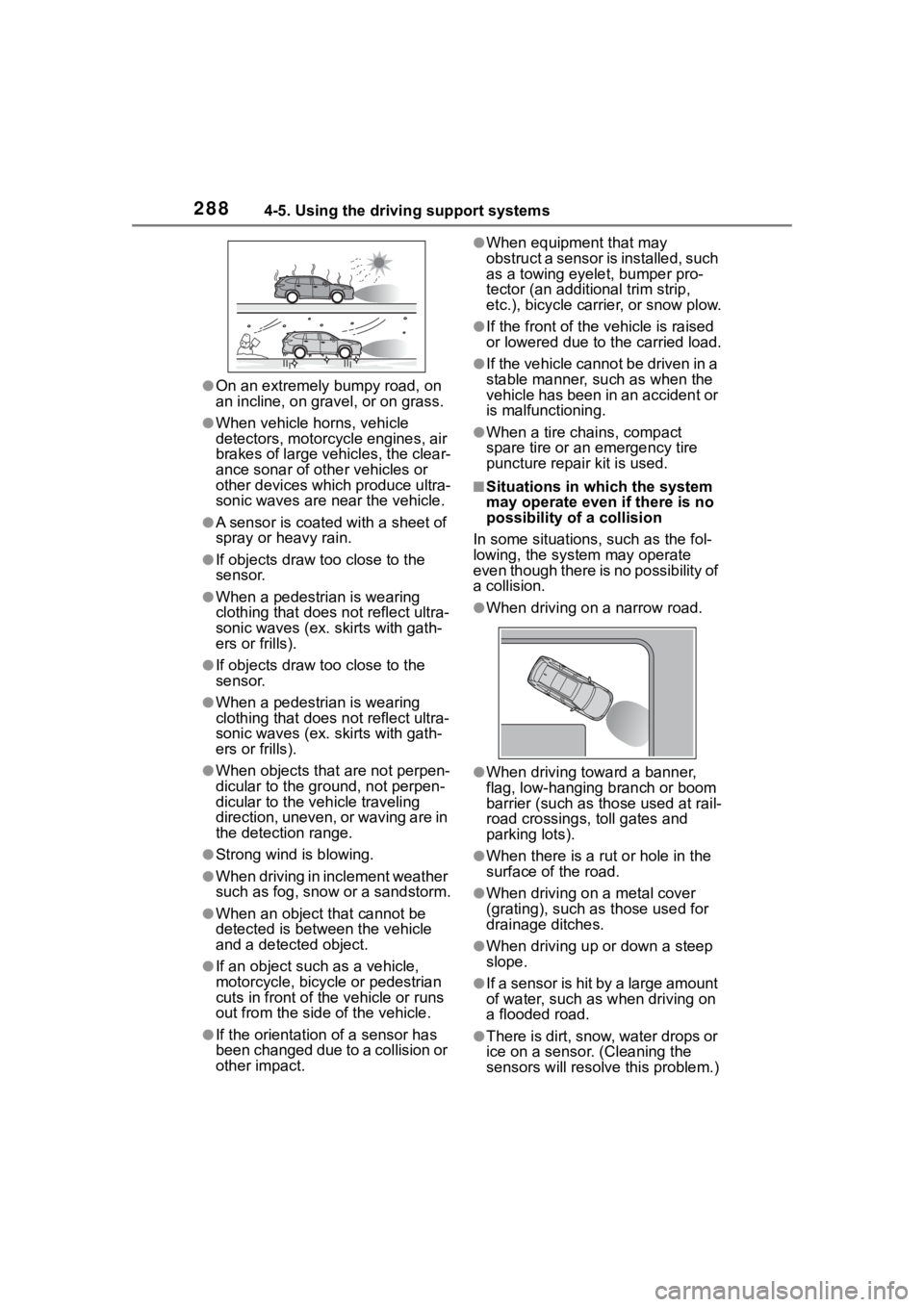
●On an extremely bumpy road, on
an incline, on gravel, or on grass.
●When vehicle horns, vehicle
detectors, motorcycle engines, air
brakes of large vehicles, the clear-
ance sonar of other vehicles or
other devices which produce ultra-
sonic waves are near the vehicle.
●A sensor is coated with a sheet of
spray or heavy rain.
●If objects draw too close to the
sensor.
●When a pedestrian is wearing
clothing that does not reflect ultra-
sonic waves (ex. skirts with gath-
ers or frills).
●If objects draw too close to the
sensor.
●When a pedestrian is wearing
clothing that does not reflect ultra-
sonic waves (ex. skirts with gath-
ers or frills).
●When objects that are not perpen-
dicular to the gr ound, not perpen-
dicular to the v ehicle traveling
direction, uneven, or waving are in
the detection range.
●Strong wind is blowing.
●When driving in inclement weather
such as fog, snow or a sandstorm.
●When an object that cannot be
detected is betw een the vehicle
and a detected object.
●If an object such as a vehicle,
motorcycle, bicycle or pedestrian
cuts in front of the vehicle or runs
out from the side of the vehicle.
●If the orientation of a sensor has
been changed due t o a collision or
other impact.
●When equipment that may
obstruct a sensor is installed, such
as a towing eyelet, bumper pro-
tector (an additional trim strip,
etc.), bicycle carrier, or snow plow.
●If the front of the v ehicle is raised
or lowered due to the carried load.
●If the vehicle cannot be driven in a
stable manner, such as when the
vehicle has been in an accident or
is malfunctioning.
●When a tire chains, compact
spare tire or an emergency tire
puncture repair kit is used.
■Situations in which the system
may operate even if there is no
possibility of a collision
In some situations, such as the fol-
lowing, the system may operate
even though there is no possibility of
a collision.
●When driving on a narrow road.
●When driving towa rd a banner,
flag, low-hanging branch or boom
barrier (such as those used at rail-
road crossings, toll gates and
parking lots).
●When there is a ru t or hole in the
surface of the road.
●When driving on a metal cover
(grating), such as those used for
drainage ditches.
●When driving up or down a steep
slope.
●If a sensor is hit by a large amount
of water, such as when driving on
a flooded road.
●There is dirt, snow, water drops or
ice on a sensor. (Cleaning the
sensors will resolve this problem.)
Page 298 of 568
2984-5. Using the driving support systems
●When mud, snow, ice, a sticker,
etc.,is covering the sensor or sur-
rounding area on the position
above the rear bumper
●When driving on a road surface
that is wet with standing water
during bad weather, such as
heavy rain, snow, or fog
●When multiple vehicles are
approaching with only a small gap
between each vehicle
●When a vehicle is approaching at
high speed
●When equipment that may
obstruct a sensor is installed, such
as a towing eyelet, bumper pro-
tector (an additional trim strip,
etc.), bicycle carrier, or snow plow
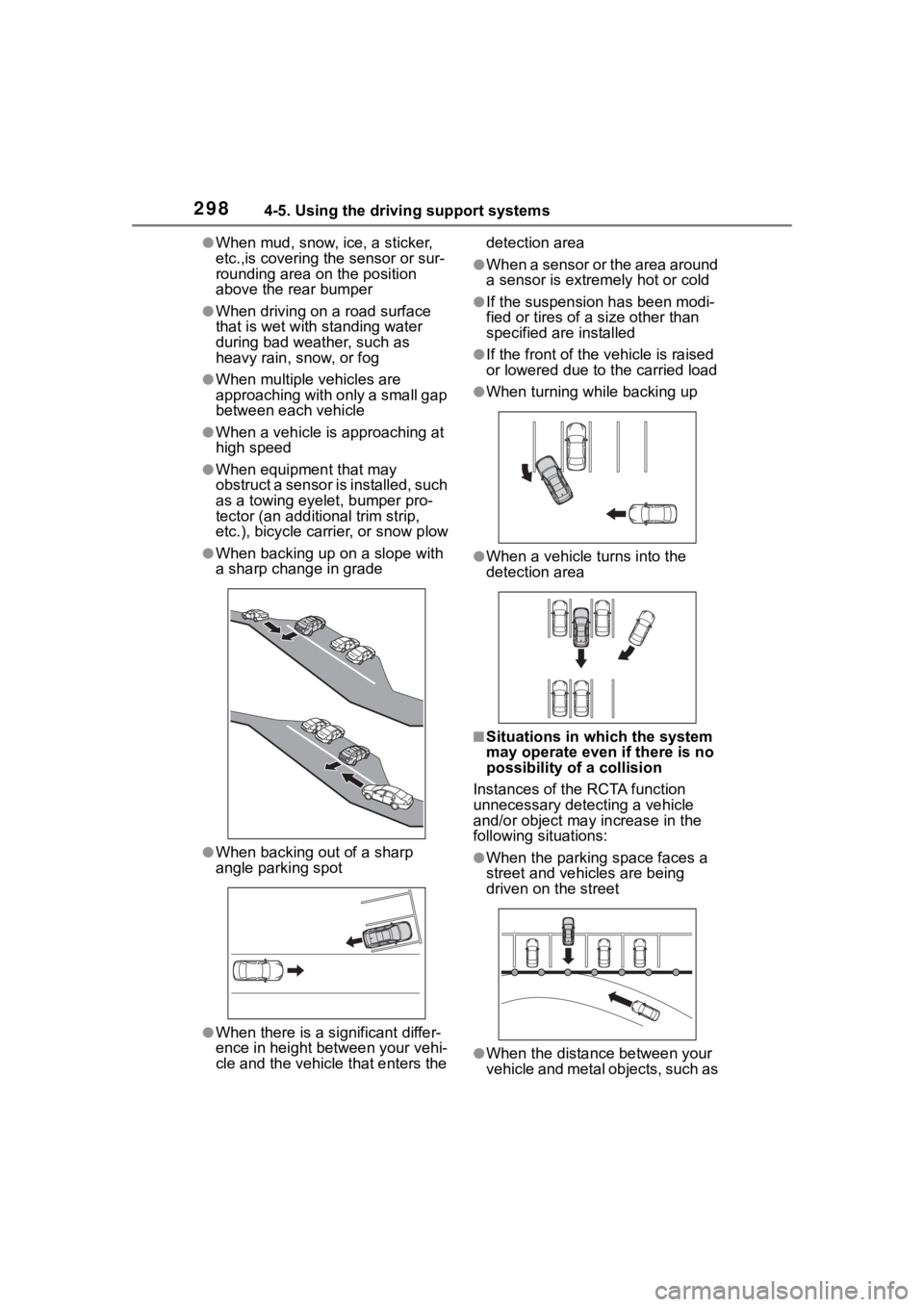
●When backing up on a slope with
a sharp change in grade
●When backing out of a sharp
angle parking spot
●When there is a significant differ-
ence in height between your vehi-
cle and the vehicle that enters the detection area
●When a sensor or the area around
a sensor is extremely hot or cold
●If the suspension has been modi-
fied or tires of a
size other than
specified are installed
●If the front of the v ehicle is raised
or lowered due to the carried load
●When turning while backing up
●When a vehicle tu rns into the
detection area
■Situations in which the system
may operate even if there is no
possibility of a collision
Instances of the RCTA function
unnecessary detec ting a vehicle
and/or object may increase in the
following situations:
●When the parking space faces a
street and vehicles are being
driven on the street
●When the distance between your
vehicle and metal objects, such as
Page 299 of 568
2994-5. Using the driving support systems
4
Driving
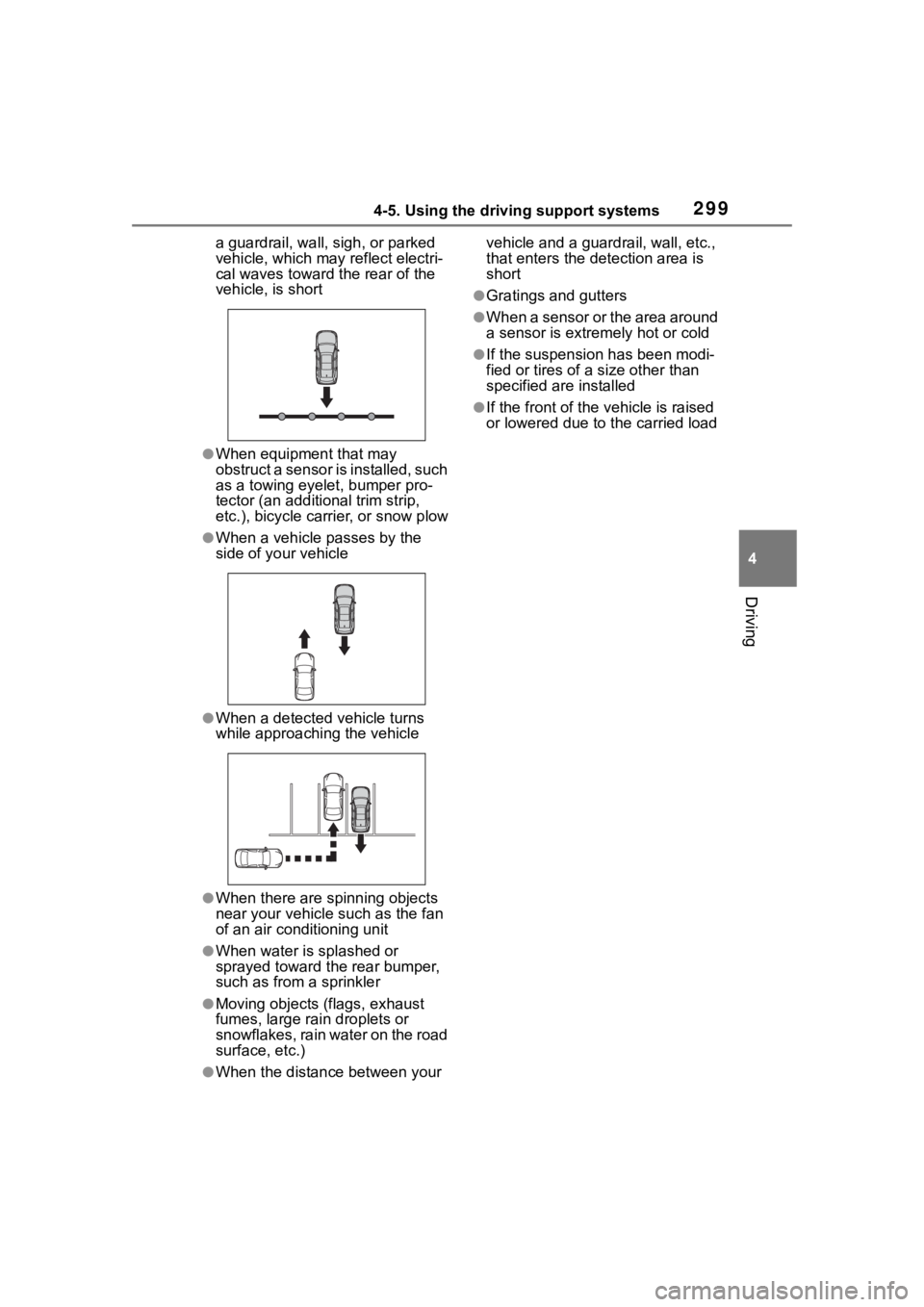
a guardrail, wall, sigh, or parked
vehicle, which may reflect electri-
cal waves toward the rear of the
vehicle, is short
●When equipment that may
obstruct a sensor is installed, such
as a towing eyelet, bumper pro-
tector (an additional trim strip,
etc.), bicycle carrier, or snow plow
●When a vehicle passes by the
side of your vehicle
●When a detected vehicle turns
while approaching the vehicle
●When there are spinning objects
near your vehicle such as the fan
of an air conditioning unit
●When water is splashed or
sprayed toward t he rear bumper,
such as from a sprinkler
●Moving objects (flags, exhaust
fumes, large rain droplets or
snowflakes, rain water on the road
surface, etc.)
●When the distanc e between your vehicle and a guardrail, wall, etc.,
that enters the detection area is
short
●Gratings and gutters
●When a sensor or the area around
a sensor is extremely hot or cold
●If the suspension has been modi-
fied or tires of a
size other than
specified are installed
●If the front of the v ehicle is raised
or lowered due to the carried load
Page 301 of 568
3014-5. Using the driving support systems
4
Driving
The Parking Support Brake can
be enabled/disabled on the
multi-information display. All of
the Parking Support Brake func-
tions (static objects and
rear-crossing vehicles) are
enabled/disabled simultane-
ously.
Use the meter control switches
to enable/disable the parking
support brake. (P.98)
1 Press or to select .
2 Press or to select
and then press .
When the Parking Support Brake is
disabled, the PKSB OFF indicator
( P.78) illuminates on the instru-
WARNING
●It is extremely dangerous to
check the system operations by
intentionally driving the vehicle
into the direction of a wall, etc.
Never attempt such actions.
■When to disable the Parking
Support Brake
In the following situations, disable
the Parking Support Brake as the
system may operate even though
there is no poss ibility of a colli-
sion.
●When inspecting the vehicle
using a chassis roller, chassis
dynamo or free roller
●When loading the vehicle onto a
boat, truck or other transport
vessel
●If the suspension has been
modified or tires of a size other
than specified are installed
●If the front of the vehicle is
raised or lowered due to the
carried load
●When equipment that may
obstruct a sensor is installed,
such as a towing eyelet, bumper
protector (an additional trim
strip, etc.), bicycle carrier, or
snow plow
●When using automatic car
washing devices
●If the vehicle cannot be driven in
a stable manner, such as when
the vehicle has been in an acci-
dent or is malfunctioning
●When the vehicle is driven in a
sporty manner or off-road
●When the tires are not properly
inflated
●When the tires are very worn
●When a tire chains, compact
spare tire or an emergency tire
puncture repair kit is used
NOTICE
■If “PKSB Unavailable” is dis-
played on the multi-informa-
tion display and the PKSB
OFF indicator is flashing
If this message is displayed
immediately after the engine
switch is changed to ON, operate
the vehicle carefully, paying atten-
tion to your surroundings. It may
be necessary to drive the vehicle
for a certain amount of time
before the system returns to nor-
mal. (If the system is not return to
normal after driv ing for a while,
clean the sensors and their sur-
rounding area on the bumpers.)
Enabling/Disabling the
Parking Support Brake
Page 371 of 568
3715-4. Using the storage features
5
Interior features
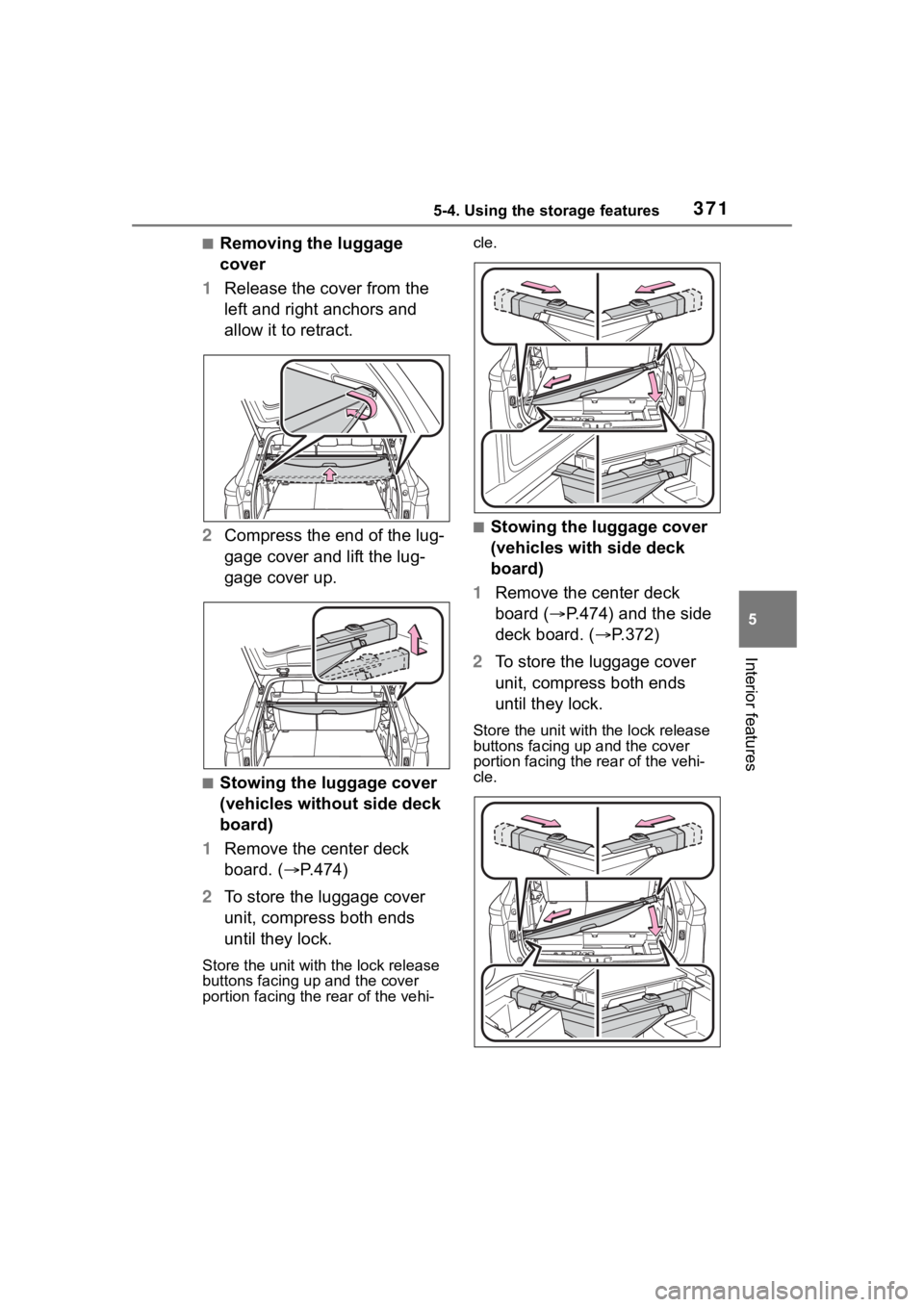
■Removing the luggage
cover
1 Release the cover from the
left and right anchors and
allow it to retract.
2 Compress the end of the lug-
gage cover and lift the lug-
gage cover up.
■Stowing the luggage cover
(vehicles without side deck
board)
1 Remove the center deck
board. ( P.474)
2 To store the luggage cover
unit, compress both ends
until they lock.
Store the unit wit h the lock release
buttons facing up and the cover
portion facing the rear of the vehi- cle.
■Stowing the luggage cover
(vehicles with side deck
board)
1 Remove the center deck
board ( P.474) and the side
deck board. ( P.372)
2 To store the luggage cover
unit, compress both ends
until they lock.
Store the unit with the lock release
buttons facing up and the cover
portion facing the rear of the vehi-
cle.
Page 372 of 568
3725-4. Using the storage features
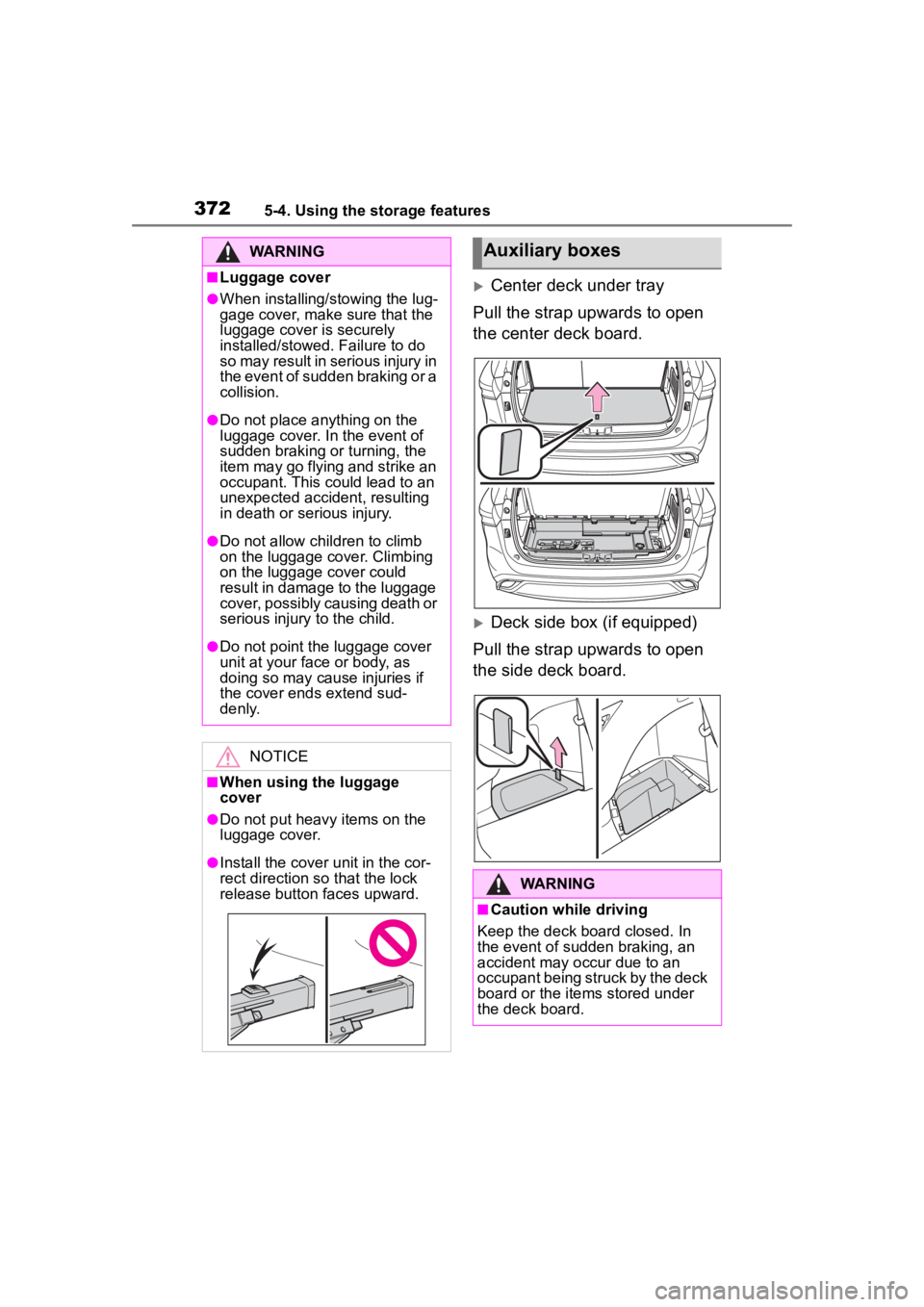
Center deck under tray
Pull the strap upwards to open
the center deck board.
Deck side box (if equipped)
Pull the strap upwards to open
the side deck board.
WARNING
■Luggage cover
●When installing/stowing the lug-
gage cover, make sure that the
luggage cover is securely
installed/stowed. Failure to do
so may result in serious injury in
the event of sudden braking or a
collision.
●Do not place anything on the
luggage cover. In the event of
sudden braking or turning, the
item may go flying and strike an
occupant. This could lead to an
unexpected accident, resulting
in death or serious injury.
●Do not allow ch ildren to climb
on the luggage cover. Climbing
on the luggage cover could
result in damage to the luggage
cover, possibly causing death or
serious injury to the child.
●Do not point the luggage cover
unit at your face or body, as
doing so may cause injuries if
the cover ends extend sud-
denly.
NOTICE
■When using the luggage
cover
●Do not put heavy items on the
luggage cover.
●Install the cover unit in the cor-
rect direction so that the lock
release button faces upward.
Auxiliary boxes
WARNING
■Caution while driving
Keep the deck board closed. In
the event of sudden braking, an
accident may occur due to an
occupant being struck by the deck
board or the items stored under
the deck board.
Page 412 of 568
4126-3. Do-it-yourself maintenance
●When the engine is new, for
example directly after purchasing
the vehicle or after replacing the
engine
●If low quality oil or oil of an inap-
propriate viscosity is used
●When driving at high engine
speeds or with a heavy load,
when towing, or when driving
while accelerating o r decelerating
frequently
●When leaving the engine idling for
a long time, or wh en driving fre-
quently through heavy traffic
■If the oil is spilled on the engine
cover
To prevent the engine cover from
being damaged, remove any engine
oil from the engine cover as soon as
possible using a neutral detergent.
Do not use an organic solvent such
as brake cleaner.
■After changing the engine oil
The engine oil maintenance data
should be reset. Perform the follow-
ing procedures:
4.2-inch display
1 Press or of the meter
control switch to select .
2 Press or of the meter
control switch, select and
then press and hold .
3 Press or of the meter
control switch, se lect “Oil Mainte-
nance” and then press .
4 Select “Yes” and press .
5 A message will be displayed on
the multi-information display
when the reset procedure has
been completed.
7-inch display
1 Press or of the meter
control switch to select . 2
Press or of the meter
control switch, select and
then press and hold .
3 Press or of the meter
control switch, select “Oil Mainte-
nance” and then press .
4 Select “Yes” and press .
5 A message will be displayed on
the multi-inform ation display
when the reset procedure has
been completed.
WARNING
■Used engine oil
●Used engine oil contains poten-
tially harmful contaminants
which may cause skin disorders
such as inflammation and skin
cancer, so care should be taken
to avoid prolonged and
repeated contact. To remove
used engine oil from your skin,
wash thoroughly with soap and
water.
●Dispose of used oil and filters
only in a safe and acceptable
manner. Do not dispose of used
oil and filters in h ousehold trash,
in sewers or onto the ground.
Call your Toyota dealer, service
station or auto parts store for
information concerning recy-
cling or disposal.
●Do not leave used engine oil
within the reach of children.
NOTICE
■To prevent serious engine
damage
Check the oil le vel on a regular
basis.
Page 451 of 568
4517-2. Steps to take in an emergency
7
When trouble arises
7-2.Steps to take in an emergency
If your vehicle needs
to be towed
If towing is necessary, we
recommend having your
vehicle towed by your Toy-
ota dealer or commercial
towing service, using a
wheel-lift type truck or flat-
bed truck.
Use a safety chain system
for all towing, and abide by
all state/provincial and local
laws.
If towing your vehicle with a
wheel-lift type truck from
the front, the vehicle’s rear
wheels and axles must be in
good conditions. ( P.453)
If they are damaged, use a
towing dolly or flatbed
truck.
WARNING
Observe the following precau-
tions.
Failure to do so m ay result in
death or serious injury.
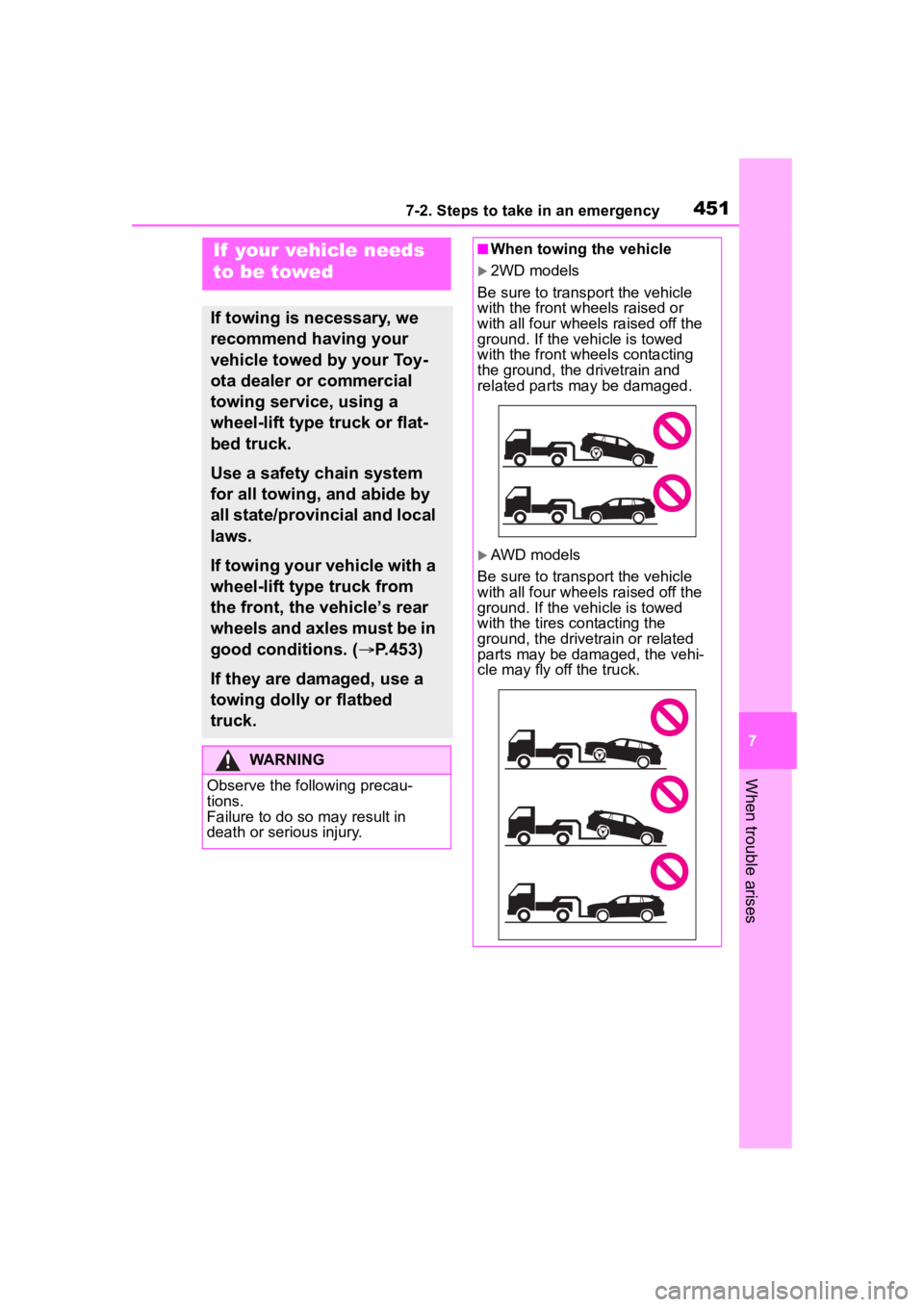
■When towing the vehicle
2WD models
Be sure to transp ort the vehicle
with the front wheels raised or
with all four wheels raised off the
ground. If the vehicle is towed
with the front wheels contacting
the ground, the drivetrain and
related parts may be damaged.
AWD models
Be sure to transp ort the vehicle
with all four wheels raised off the
ground. If the vehicle is towed
with the tires co ntacting the
ground, the drivetrain or related
parts may be damaged, the vehi-
cle may fly off the truck.
Page 452 of 568
4527-2. Steps to take in an emergency
The following may indicate a
problem with your transmission.
Contact your Toyota dealer or
commercial towing service
before towing.
The engine is running but the
vehicle does not move.
The vehicle makes an abnor-
mal sound.
WARNING
■While towing
When towing using cables or
chains, avoid sudden starts, etc.
which place excessive stress on
the towing eyelets, cables or
chains. The towing eyelets,
cables or chains may become
damaged, broken debris may hit
people, and cause serious dam-
age.
NOTICE
■To prevent damage to the
vehicle when towing using a
wheel-lift type truck
When raising the vehicle, ensure
adequate ground clearance for
towing at the opposite end of the
raised vehicle. Without adequate
clearance, the vehicle could be
damaged while being towed.
■To prevent damage to the
vehicle when towing with a
sling-type truck
Do not tow with a sling-type truck,
either from the front or rear.
■To prevent damage to the
vehicle during emergency
towing
Do not secure cables or chains to
the suspension components.
■When towing a vehicle
equipped with a Stop & Start
system (if equipped)
If it is necessary to tow the vehicle
with all 4 wheels on the ground,
perform the following procedure
before towing the vehicle, in order
to protect t he system.
Turn the engine switch off and
then start the engine or turn the
engine switch to ON.
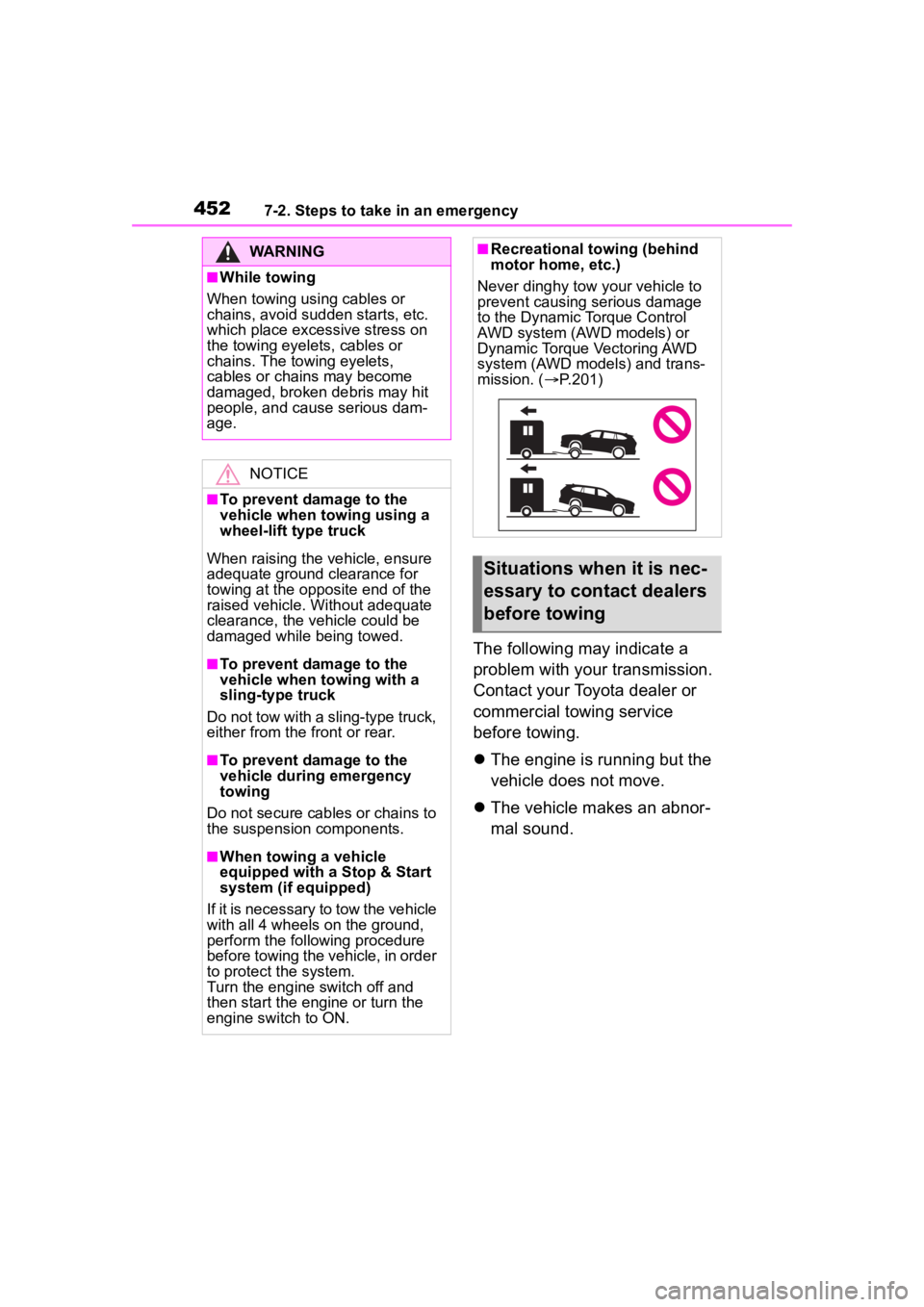
■Recreational towing (behind
motor home, etc.)
Never dinghy tow your vehicle to
prevent causing serious damage
to the Dynamic Torque Control
AWD system (AWD models) or
Dynamic Torque Vectoring AWD
system (AWD models) and trans-
mission. ( P.201)
Situations when it is nec-
essary to contact dealers
before towing