lock TOYOTA HIGHLANDER 2022 Repair Manual
[x] Cancel search | Manufacturer: TOYOTA, Model Year: 2022, Model line: HIGHLANDER, Model: TOYOTA HIGHLANDER 2022Pages: 568, PDF Size: 13.73 MB
Page 179 of 568
1794-1. Before driving
4
Driving
4-1.Before driving
■Starting the engine
P. 2 0 2
■Driving
1 With the brake pedal
depressed, shift the shift
lever to D. ( P.206)
2 Release the parking brake.
( P.210)
If the parking brake is in automatic
mode, the parking brake is
released automatically when shift-
ing the shift lever to any position
other than P. ( P.211)
3 Gradually release the brake
pedal and gently depress the
accelerator pedal to acceler-
ate the vehicle.
■Stopping
1 With the shift lever in D,
depress the brake pedal.
Vehicles with a Stop & Start system:
If the Stop & Start system is
enabled, depressing the brake
pedal will stop the engine.
2If necessary, set the parking
brake. ( P.210)
If the vehicle is to be stopped for an
extended period of time, shift the
shift lever to P or N. ( P.206)
■Parking the vehicle
1 With the shift lever in D,
depress the brake pedal.
2 Set the parking brake
( P.210), and shift the shift
lever to P ( P.206).
3 Press the engine switch to
stop the engine.
4 Lock the door, making sure
that you have the electronic
key on your person.
If parking on a hill, block the wheels
as needed.
■Starting off on a steep
uphill
1 With the brake pedal
depressed, shift the shift
lever to D. ( P.207)
2 Pull the parking brake switch
and parking brake is set man-
ually. ( P.210)
3 Release the brake pedal and
gently depress the accelera-
tor pedal to accelerate the
vehicle.
4 Push the parking brake
switch and parking brake is
released manually.
■When starting off on a uphill
The hill-start assist control will acti-
vate. ( P.318)
■Driving in the rain
●Drive carefully whe n it is raining,
because visibility will be reduced,
the windows may become
fogged-up, and the road will be
slippery.
●Drive carefully whe n it starts to
Driving the vehicle
The following procedures
should be observed to
ensure safe driving:
Driving procedure
Page 187 of 568
1874-1. Before driving
4
Driving
be C lb. (kg) as follows:
B
*2 lb. (kg) - A*1 lb. (kg) = C*3 lb.
(kg)
*1: A =Weight of people
*2: B =Total load capacity
*3: C =Available cargo and luggage load
In this condition, if 3 more passen-
gers with the combined weight of D
lb. (kg) get on, the available cargo
and luggage load will be reduced E
lb. (kg) as follows:
C lb. (kg) - D*4 lb. (kg) = E*5 lb.
(kg)
*4: D =Additional weight of people
*5: E =Available cargo and luggage load
As shown in the example above,
if the number of occupants
increases, the cargo and lug-
gage load will be reduced by an
amount that equals the
increased weight due to the
additional occupants. In other
words, if an increase in the num-
ber of occupants causes an
excess of the total load capacity
(combined weight of occupants
plus cargo and luggage load),
you must reduce the cargo and
luggage on your vehicle.
WARNING
■Things that must not be car-
ried in the luggage compart-
ment
The following things may cause a
fire if loaded in the luggage com-
partment:
●Receptacles containing gaso-
line
●Aerosol cans
■Storage precautions
Observe the following precau-
tions.
Failure to do so may prevent the
pedals from being depressed
properly, may block the driver’s
vision, or may res ult in items hit-
ting the driver or passengers, pos-
sibly causing an accident.
●Stow cargo and luggage in the
luggage compartment when-
ever possible.
●Do not stack cargo and luggage
in the luggage compartment
higher than the seatbacks.
●When you fold down the rear
seats, long items should not be
placed directly behind the front
seats.
●Never allow anyon e to ride in
the luggage compartment. It is
not designed for passengers.
They should ride in their seats
with their seat belts properly
fastened.
●Do not place cargo or luggage
in or on the follo wing locations.
• At the feet of the driver
• On the front passenger or rear seats (when stacking items)
• On the luggage cover
• On the instrument panel
• On the dashboard
●Secure all items in the occupant
compartment.
■Capacity and distribution
●Do not exceed the maximum
axle weight rating or the total
vehicle weight rating.
Page 197 of 568
1974-1. Before driving
4
Driving
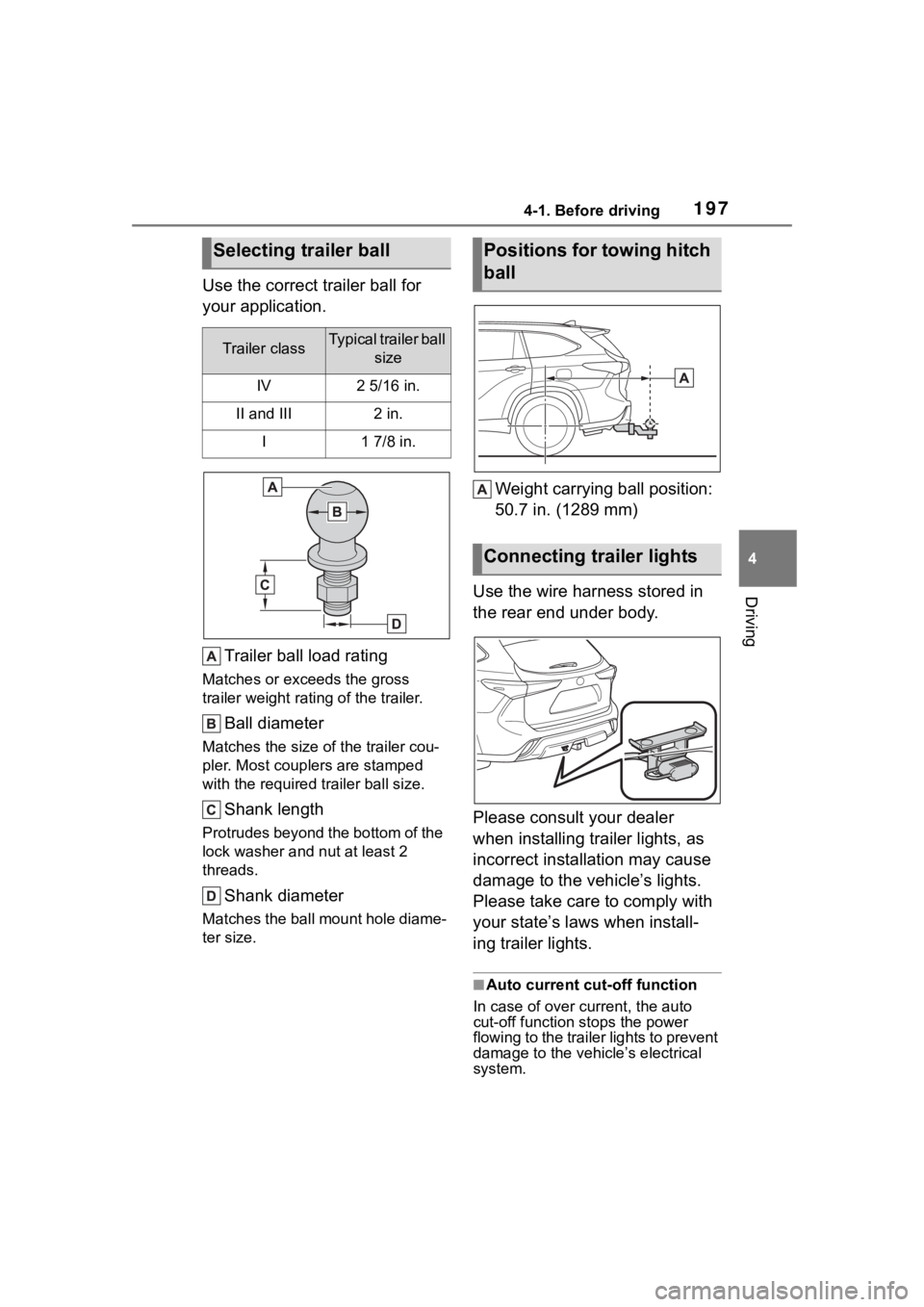
Use the correct trailer ball for
your application.Trailer ball load rating
Matches or exceeds the gross
trailer weight rat ing of the trailer.
Ball diameter
Matches the size of the trailer cou-
pler. Most couplers are stamped
with the required tr ailer ball size.
Shank length
Protrudes beyond the bottom of the
lock washer and nut at least 2
threads.
Shank diameter
Matches the ball mount hole diame-
ter size.
Weight carrying ball position:
50.7 in. (1289 mm)
Use the wire harness stored in
the rear end under body.
Please consult your dealer
when installing trailer lights, as
incorrect installation may cause
damage to the vehicle’s lights.
Please take care to comply with
your state’s laws when install-
ing trailer lights.
■Auto current cut-off function
In case of over current, the auto
cut-off function stops the power
flowing to the trailer lights to prevent
damage to the vehicle’s electrical
system.
Selecting trailer ball
Trailer classTypical trailer ball size
IV2 5/16 in.
II and III2 in.
I1 7/8 in.
Positions for towing hitch
ball
Connecting trailer lights
Page 200 of 568

2004-1. Before driving
or steep grade. If the engine
coolant temperature gauge
indicates overheating, imme-
diately turn off the air condi-
tioning (if in use), pull your
vehicle off the road and stop
in a safe spot. (P.494)
Always place wheel blocks
under both the vehicle’s and
the trailer’s wheels when
parking. Put the transmission
in P and apply the parking
brake. Avoid parking on a
slope, but if unavoidable, do
so only after performing the
following:
1 Apply the brakes and keep
them applied.
2 Have someone place wheel
blocks under both the vehi-
cle’s and trailer’s wheels.
3 When the wheel blocks are in
place, release the brakes
slowly until the blocks absorb
the load.
4 Shift into P and apply the
parking brake.
5 Turn off the engine.
When restarting after parking
on a slope:
1 With the transmission in P,
start the engine. Be sure to
keep the brake pedal
depressed.
2 Shift into a forward gear. If
reversing, shift into R. 3
If the parking brake is in man-
ual mode, release the park-
ing brake. ( P.210)
4 Release the brake pedal, and
slowly pull or back away from
the wheel blocks. Stop and
apply the brakes.
5 Have someone retrieve the
blocks.
Page 203 of 568
2034-2. Driving procedures
4
Driving
■Customization
If the smart key system has been
deactivated in a customized setting,
refer to P.488.
1 Stop the vehicle completely.
2 Set the parking brake
( P.210), and shift the shift
lever to P.
Check the parking brake indicator
is illuminated.
3 Press the engine switch.
The engine will stop, and the meter
display will be extinguished.
4Release the brake pedal and
check that “ACCESSORY” or
“IGNITION ON” is not shown
on the multi-information dis-
play.
■Automatic engine shut off fea-
ture
●The vehicle is equipped with a
feature that automatically shuts off
the engine when the shift lever is
in P with the engine running for an
extended period.
●The engine will automatically shut
off after approxima tely 1 hour if it
has been left running while the
shift lever is in P.
●The timer for the automatic engine
shut off feature will reset if the
brake pedal is depressed or if the
shift lever is in a position other
than P.
●After the vehicle is parked, if the
door is locked with the door lock
switch ( P.120) from the inside or
the mechanical k ey from the out-
side, the automatic engine shut off
feature will be disab led. The timer
for the automatic engine shut off
feature will be re-enabled if the
driver’s door is opened.
WARNING
■When starting the engine
Always start the e ngine while sit-
ting in the driver’s seat. Do not
depress the accelerator pedal
while starting the engine under
any circumstances.
Doing so may cause an accident
resulting in death or serious injury.
NOTICE
■When starting the engine
●Do not race a cold engine.
●If the engine becomes difficult to
start or stalls frequently, have
your vehicle checked by your
Toyota dealer immediately.
■Symptoms indicating a mal-
function with the engine
switch
If the engine switch seems to be
operating somewh at differently
than usual, such as the switch
sticking slightly, there may be a
malfunction. Contact your Toyota
dealer immediately.
Stopping the engine
Page 207 of 568
2074-2. Driving procedures
4
Driving
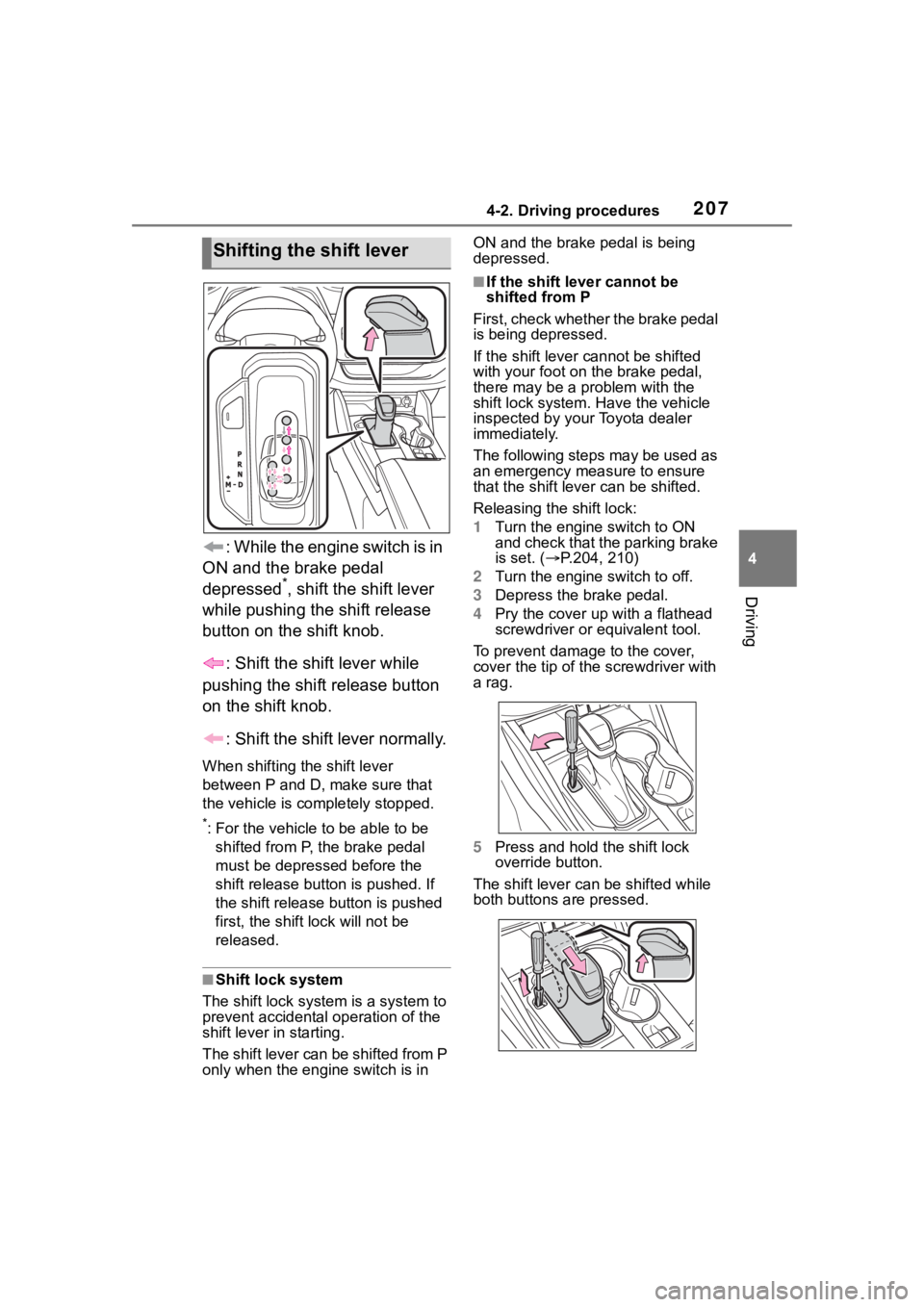
: While the engine switch is in
ON and the brake pedal
depressed
*, shift the shift lever
while pushing the shift release
button on the shift knob.
: Shift the shift lever while
pushing the shift release button
on the shift knob.
: Shift the shift lever normally.
When shifting the shift lever
between P and D, make sure that
the vehicle is completely stopped.
*: For the vehicle to be able to be
shifted from P, the brake pedal
must be depresse d before the
shift release button is pushed. If
the shift release button is pushed
first, the shift lock will not be
released.
■Shift lock system
The shift lock system is a system to
prevent accidental operation of the
shift lever in starting.
The shift lever can be shifted from P
only when the engine switch is in ON and the brake pedal is being
depressed.
■If the shift lever cannot be
shifted from P
First, check whether the brake pedal
is being depressed.
If the shift lever cannot be shifted
with your foot on the brake pedal,
there may be a p roblem with the
shift lock system. Have the vehicle
inspected by your Toyota dealer
immediately.
The following steps may be used as
an emergency measure to ensure
that the shift lev er can be shifted.
Releasing the shift lock:
1 Turn the engine switch to ON
and check that the parking brake
is set. ( P.204, 210)
2 Turn the engine switch to off.
3 Depress the brake pedal.
4 Pry the cover up with a flathead
screwdriver or equivalent tool.
To prevent damag e to the cover,
cover the tip of the screwdriver with
a rag.
5 Press and hold the shift lock
override button.
The shift lever can be shifted while
both buttons are pressed.
Shifting the shift lever
Page 208 of 568
2084-2. Driving procedures
P.311, 315
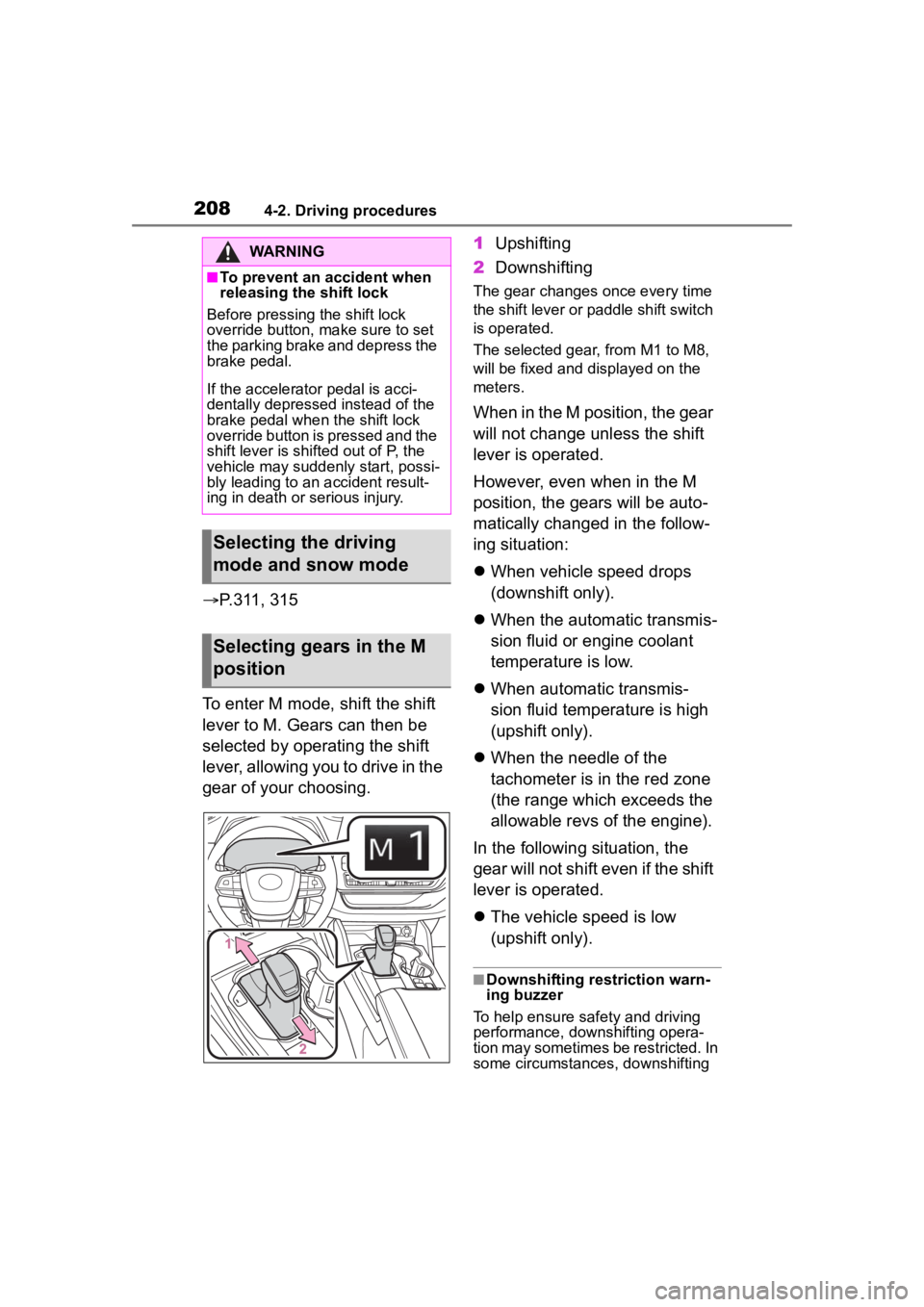
To enter M mode, shift the shift
lever to M. Gears can then be
selected by operating the shift
lever, allowing you to drive in the
gear of your choosing. 1
Upshifting
2 Downshifting
The gear changes once every time
the shift lever or paddle shift switch
is operated.
The selected gear, from M1 to M8,
will be fixed and displayed on the
meters.
When in the M position, the gear
will not change unless the shift
lever is operated.
However, even when in the M
position, the gears will be auto-
matically changed in the follow-
ing situation:
When vehicle speed drops
(downshift only).
When the automatic transmis-
sion fluid or engine coolant
temperature is low.
When automatic transmis-
sion fluid temperature is high
(upshift only).
When the needle of the
tachometer is in the red zone
(the range which exceeds the
allowable revs of the engine).
In the following situation, the
gear will not shift even if the shift
lever is operated.
The vehicle speed is low
(upshift only).
■Downshifting restriction warn-
ing buzzer
To help ensure safety and driving
performance, dow nshifting opera-
tion may sometimes be restricted. In
some circumstances, downshifting
WARNING
■To prevent an accident when
releasing the shift lock
Before pressing the shift lock
override button, make sure to set
the parking brake and depress the
brake pedal.
If the accelerator pedal is acci-
dentally depressed instead of the
brake pedal when the shift lock
override button is pressed and the
shift lever is shifted out of P, the
vehicle may suddenly start, possi-
bly leading to an accident result-
ing in death or serious injury.
Selecting the driving
mode and snow mode
Selecting gears in the M
position
Page 211 of 568
2114-2. Driving procedures
4
Driving
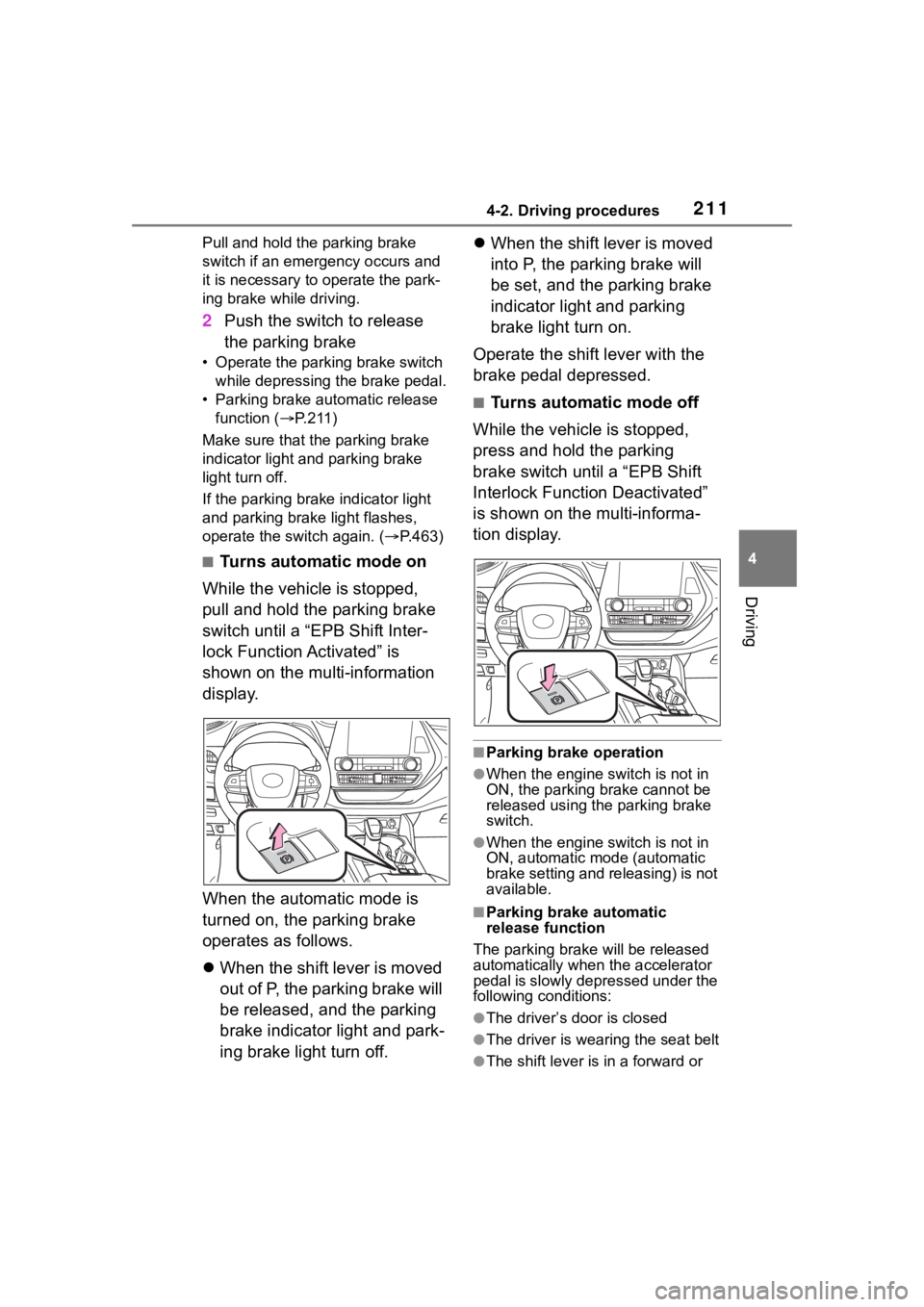
Pull and hold the parking brake
switch if an emergency occurs and
it is necessary to operate the park-
ing brake while driving.
2Push the switch to release
the parking brake
• Operate the parking brake switch
while depressing the brake pedal.
• Parking brake automatic release function ( P.211)
Make sure that t he parking brake
indicator light and parking brake
light turn off.
If the parking brake indicator light
and parking brake light flashes,
operate the switch again. ( P.463)
■Turns automatic mode on
While the vehicle is stopped,
pull and hold the parking brake
switch until a “EPB Shift Inter-
lock Function Activated” is
shown on the multi-information
display.
When the automatic mode is
turned on, the parking brake
operates as follows.
When the shift lever is moved
out of P, the parking brake will
be released, and the parking
brake indicator light and park-
ing brake light turn off.
When the shift lever is moved
into P, the parking brake will
be set, and the parking brake
indicator light and parking
brake light turn on.
Operate the shift lever with the
brake pedal depressed.
■Turns automatic mode off
While the vehicle is stopped,
press and hold the parking
brake switch until a “EPB Shift
Interlock Function Deactivated”
is shown on the multi-informa-
tion display.
■Parking brake operation
●When the engine switch is not in
ON, the parking brake cannot be
released using the parking brake
switch.
●When the engine switch is not in
ON, automatic mode (automatic
brake setting and releasing) is not
available.
■Parking brake automatic
release function
The parking brake will be released
automatically when the accelerator
pedal is slowly depressed under the
following conditions:
●The driver’s door is closed
●The driver is wearing the seat belt
●The shift lever is in a forward or
Page 217 of 568
2174-3. Operating the lights and wipers
4
Driving
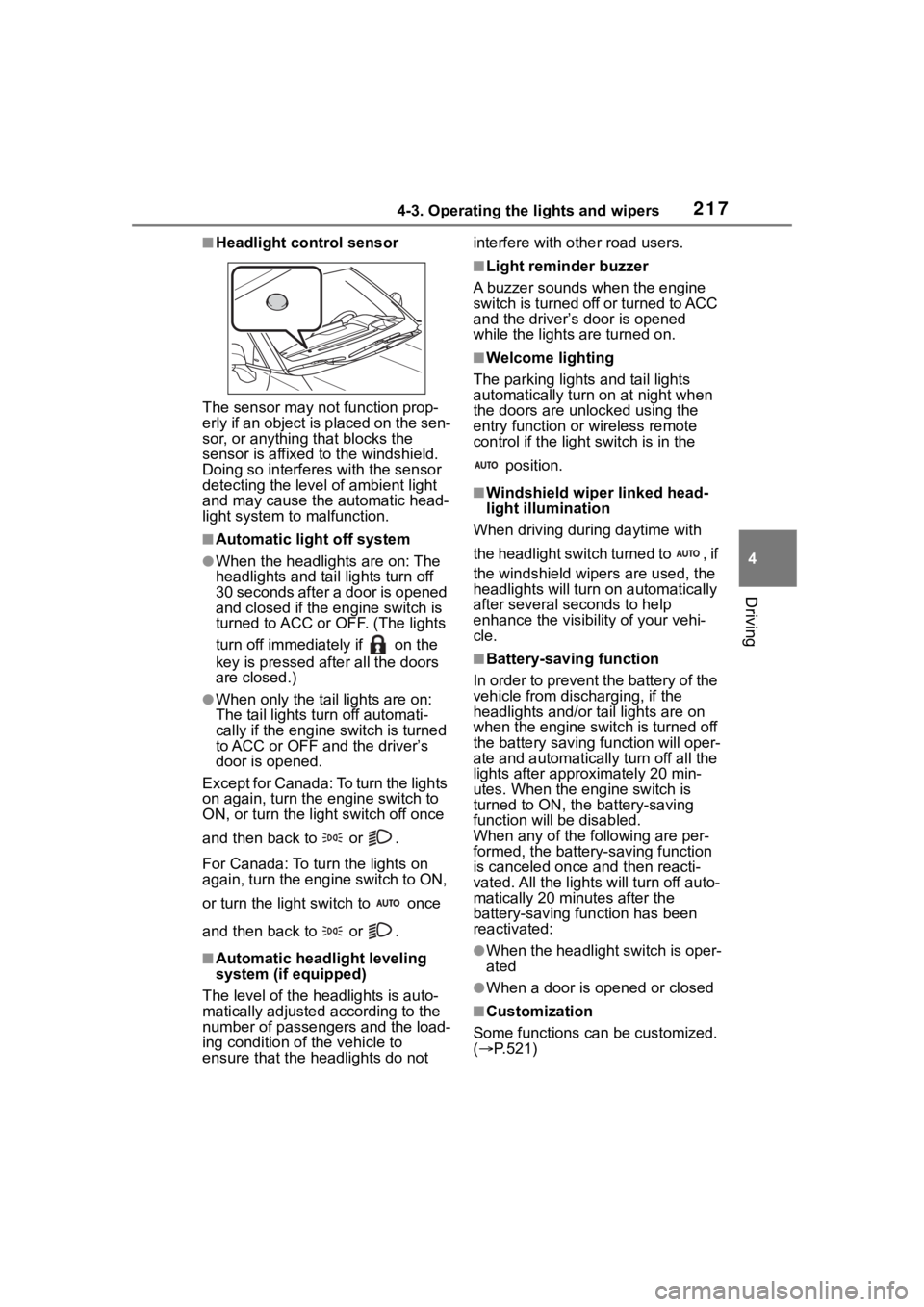
■Headlight control sensor
The sensor may not function prop-
erly if an object is placed on the sen-
sor, or anything that blocks the
sensor is affixed to the windshield.
Doing so interfere s with the sensor
detecting the level of ambient light
and may cause the automatic head-
light system to malfunction.
■Automatic light off system
●When the headlights are on: The
headlights and tail lights turn off
30 seconds after a door is opened
and closed if the engine switch is
turned to ACC or OFF. (The lights
turn off immediately if on the
key is pressed afte r all the doors
are closed.)
●When only the tail lights are on:
The tail lights tu rn off automati-
cally if the engine switch is turned
to ACC or OFF an d the driver’s
door is opened.
Except for Canada: To turn the lights
on again, turn the engine switch to
ON, or turn the light switch off once
and then back to or .
For Canada: To tu rn the lights on
again, turn the engine switch to ON,
or turn the light s witch to once
and then back to or .
■Automatic headlight leveling
system (if equipped)
The level of the headlights is auto-
matically adjusted according to the
number of passengers and the load-
ing condition of the vehicle to
ensure that the headlights do not interfere with o
ther road users.
■Light reminder buzzer
A buzzer sounds when the engine
switch is turned off or turned to ACC
and the driver’s door is opened
while the lights are turned on.
■Welcome lighting
The parking lights and tail lights
automatically turn on at night when
the doors are un locked using the
entry function or wireless remote
control if the light switch is in the
position.
■Windshield wiper linked head-
light illumination
When driving during daytime with
the headlight switch turned to , if
the windshield wipers are used, the
headlights will turn o n automatically
after several se conds to help
enhance the visibility of your vehi-
cle.
■Battery-saving function
In order to prevent the battery of the
vehicle from discharging, if the
headlights and/or tail lights are on
when the engine switch is turned off
the battery saving function will oper-
ate and automatically turn off all the
lights after approximately 20 min-
utes. When the engine switch is
turned to ON, the battery-saving
function will be disabled.
When any of the following are per-
formed, the battery-saving function
is canceled once and then reacti-
vated. All the lights will turn off auto-
matically 20 minutes after the
battery-saving function has been
reactivated:
●When the headlight switch is oper-
ated
●When a door is opened or closed
■Customization
Some functions can be customized.
( P.521)
Page 224 of 568
2244-3. Operating the lights and wipers
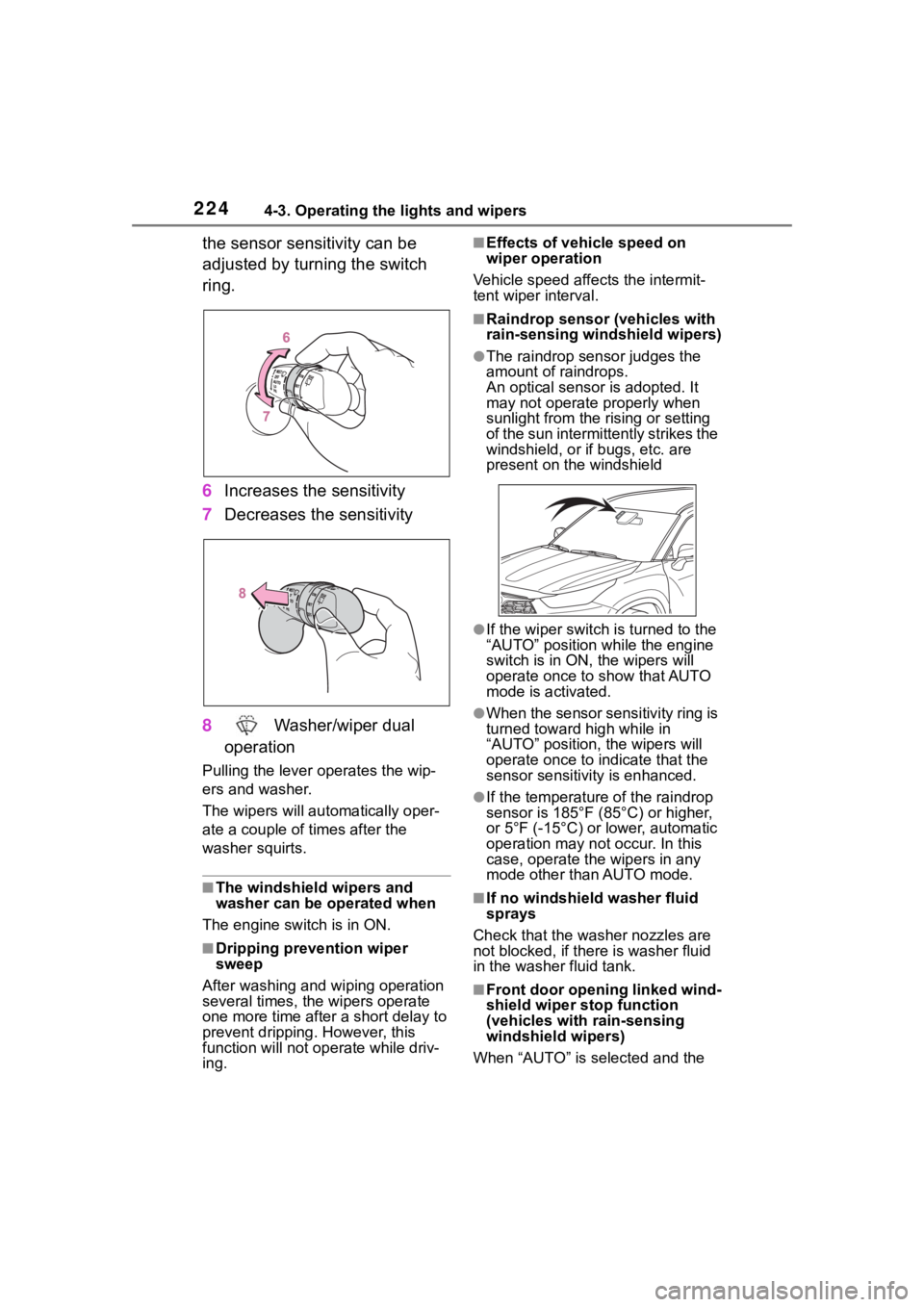
the sensor sensitivity can be
adjusted by turning the switch
ring.
6Increases the sensitivity
7 Decreases the sensitivity
8 Washer/wiper dual
operation
Pulling the lever o perates the wip-
ers and washer.
The wipers will au tomatically oper-
ate a couple of times after the
washer squirts.
■The windshield wipers and
washer can be operated when
The engine switch is in ON.
■Dripping prevention wiper
sweep
After washing and wiping operation
several times, the wipers operate
one more time after a short delay to
prevent dripping. However, this
function will not operate while driv-
ing.
■Effects of vehicle speed on
wiper operation
Vehicle speed affects the intermit-
tent wiper interval.
■Raindrop sensor (vehicles with
rain-sensing windshield wipers)
●The raindrop sensor judges the
amount of raindrops.
An optical sensor is adopted. It
may not operate properly when
sunlight from the rising or setting
of the sun intermittently strikes the
windshield, or if bugs, etc. are
present on the windshield
●If the wiper switch i s turned to the
“AUTO” position while the engine
switch is in ON, the wipers will
operate once to show that AUTO
mode is activated.
●When the sensor sensitivity ring is
turned toward high while in
“AUTO” position, the wipers will
operate once to indicate that the
sensor sensitivity is enhanced.
●If the temperature of the raindrop
sensor is 185°F (85°C) or higher,
or 5°F (-15°C) or lower, automatic
operation may not occur. In this
case, operate the wipers in any
mode other than AUTO mode.
■If no windshield washer fluid
sprays
Check that the washer nozzles are
not blocked, if there is washer fluid
in the washer fluid tank.
■Front door opening linked wind-
shield wiper stop function
(vehicles with rain-sensing
windshield wipers)
When “AUTO” is selected and the