maintenance TOYOTA HIGHLANDER 2022 Repair Manual
[x] Cancel search | Manufacturer: TOYOTA, Model Year: 2022, Model line: HIGHLANDER, Model: TOYOTA HIGHLANDER 2022Pages: 568, PDF Size: 13.73 MB
Page 444 of 568
4446-3. Do-it-yourself maintenance
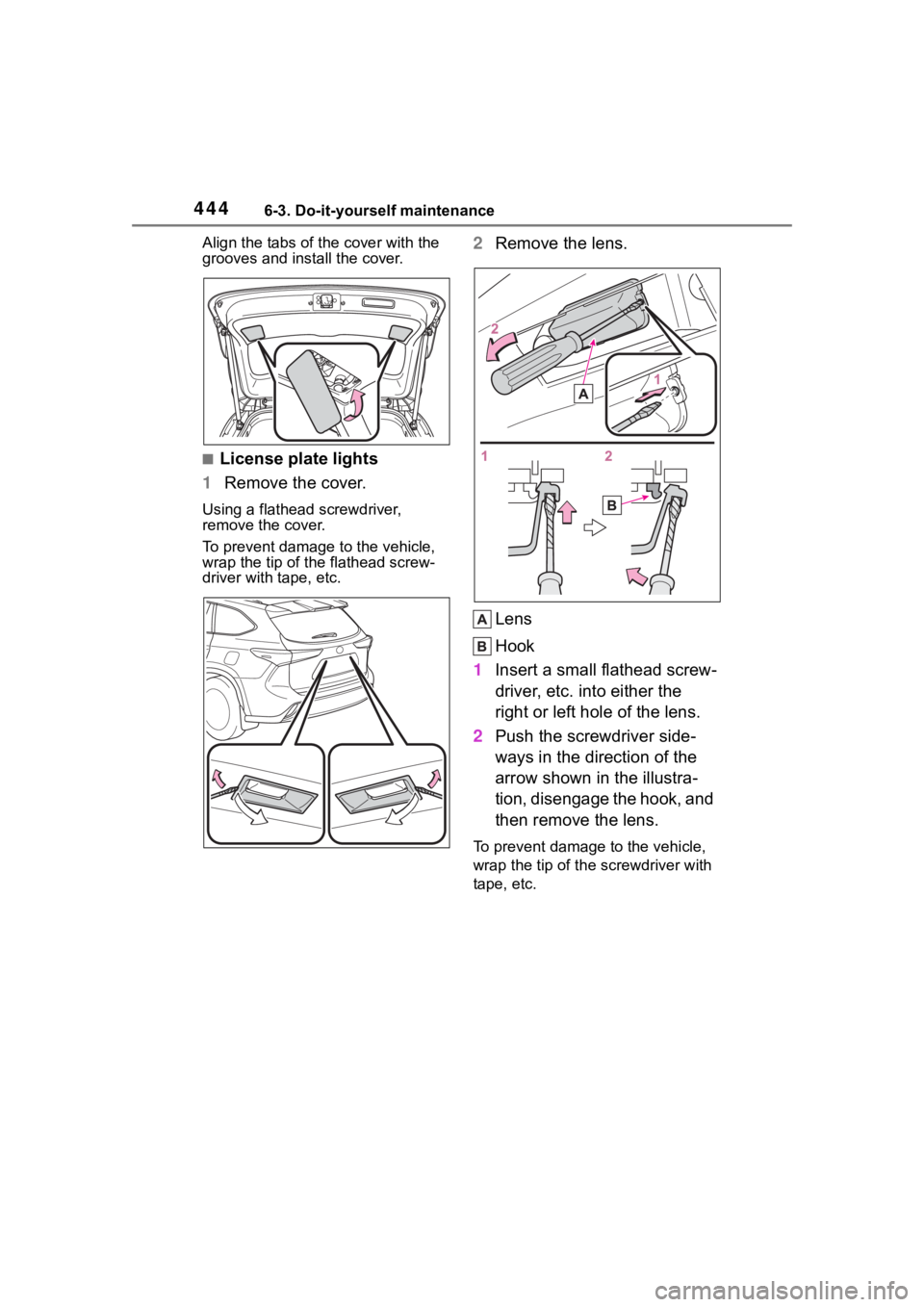
Align the tabs of the cover with the
grooves and install the cover.
■License plate lights
1 Remove the cover.
Using a flathead screwdriver,
remove the cover.
To prevent damage to the vehicle,
wrap the tip of the flathead screw-
driver with tape, etc.
2Remove the lens.
Lens
Hook
1 Insert a small flathead screw-
driver, etc. into either the
right or left hole of the lens.
2 Push the screwdriver side-
ways in the direction of the
arrow shown in the illustra-
tion, disengage the hook, and
then remove the lens.
To prevent damage to the vehicle,
wrap the tip of th e screwdriver with
tape, etc.
Page 445 of 568
4456-3. Do-it-yourself maintenance
6
Maintenance and care
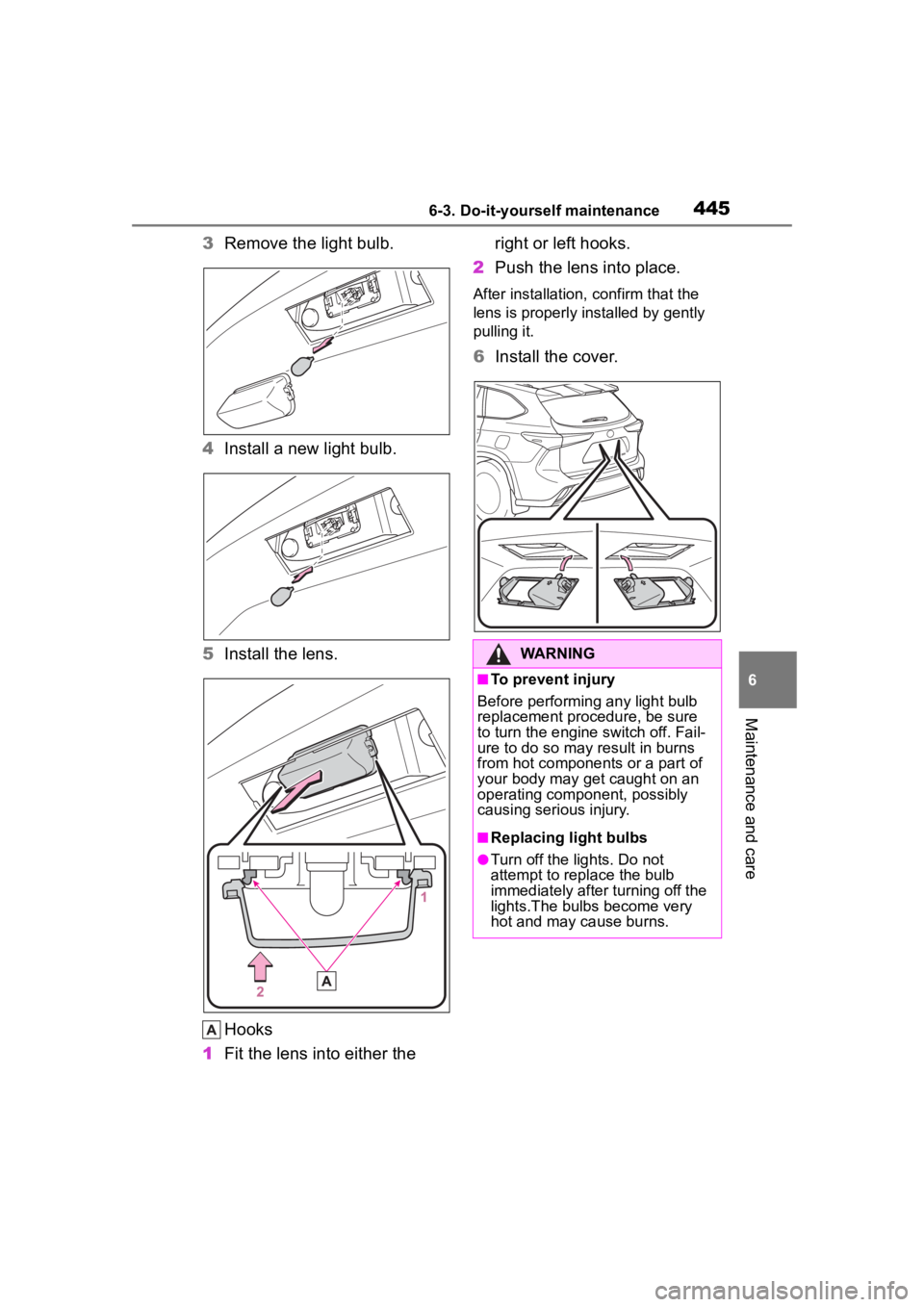
3Remove the light bulb.
4 Install a new light bulb.
5 Install the lens.
Hooks
1 Fit the lens into either the right or left hooks.
2 Push the lens into place.
After installation, confirm that the
lens is properly installed by gently
pulling it.
6Install the cover.
WARNING
■To prevent injury
Before performin g any light bulb
replacement procedure, be sure
to turn the engine switch off. Fail-
ure to do so may result in burns
from hot components or a part of
your body may get caught on an
operating component, possibly
causing serious injury.
■Replacing light bulbs
●Turn off the lights. Do not
attempt to replace the bulb
immediately after turning off the
lights.The bulbs become very
hot and may cause burns.
Page 446 of 568
4466-3. Do-it-yourself maintenance
WARNING
●Do not touch the glass portion
of the light bulb with bare
hands. When it is unavoidable
to hold the glass portion, use
and hold with a clean dry cloth
to avoid getting moisture and
oils on the bulb. Also, if the bulb
is scratched or dropped, it may
blow out or crack.
●Fully install light bulbs and any
parts used to secure them. Fail-
ure to do so may result in heat
damage, fire, or water entering
the light unit. This may damage
the lights or cause condensa-
tion to build up on the lens.
●Do not attempt t o repair or dis-
assemble light bulbs, connec-
tors, electric circuits or
component parts.
Doing so may result in death or
serious injury due to electric
shock.
■To prevent damage or fire
●Make sure bulbs are fully
seated and locked.
●Check the wattage of the bulb
before installing to prevent heat
damage.
Page 465 of 568
4657-2. Steps to take in an emergency
7
When trouble arises
■When the electric power
steering system warning light
comes on
When the light comes on yellow,
the assist to the power steering is
restricted. When the light comes
on red, the assist to the power
steering is lost and handling oper-
ations of the steering wheel
become extremely heavy.
When steering wheel operations
are heavier than usual, grip the
steering wheel firmly and operate
it using more force than usual.
■If the tire pressure warning
light comes on
Be sure to observe the following
precautions.
Failure to do so could cause a
loss of vehicle control and result
in death or serious injury.
●Stop your vehicle in a safe place
as soon as possible. Adjust the
tire inflation pressure immedi-
ately.
●Vehicles with a compact spare
tire: If the tire pr essure warning
light comes on ev en after tire
inflation pressure adjustment, it
is probable that you have a flat
tire. Check the tires. If a tire is
flat, change it with the spare tire
and have the flat tire repaired by
the nearest Toy ota dealer.
●Avoid abrupt maneuvering and
braking.
If the vehicle tires deteriorate,
you could lose control of the
steering wheel or the brakes.
■If a blowout or sudden air
leakage should occur
The tire pressure warning system
may not activate immediately.
■Maintenance of the tires
Each tire, includi ng the spare (if
provided), should be checked
monthly when cold and inflated to
the inflation pressure recom-
mended by the vehicle manufac-
turer on the vehicle placard or tire
inflation pressure label (tire and
load information label). (If your
vehicle has tires of a different size
than the size indicated on the
vehicle placard or tire inflation
pressure label [tire and load infor-
mation label], you should deter-
mine the proper tire inflation
pressure for those tires.)
As an added safety feature, your
vehicle has been equipped with a
tire pressure monitoring system
(TPMS-tire pressure warning sys-
tem) that illuminates a low tire
pressure telltale (tire pressure
warning light) w hen one or more
of your tires is significantly
under-inflated. Accordingly, when
the low tire pressure telltale (tire
pressure warning light) illumi-
nates, you should stop and check
your tires as soon as possible,
and inflate them to the proper
pressure. Driving on a signifi-
cantly under-inflated tire causes
the tire to overhea t and can lead
to tire failure. Under-inflation also
reduces fuel efficiency and tire
tread life, and may affect the vehi-
cle’s handling and stopping ability.
WARNING
Please note that the TPMS (tire
pressure warning system) is not a
substitute for proper tire mainte-
nance, and it is the driver’s
responsibility to m aintain correct
tire pressure, even if under-infla-
tion has not reached the level to
trigger illumination of the TPMS
low tire pressure te lltale (tire pres-
sure warning light).
Page 467 of 568
4677-2. Steps to take in an emergency
7
When trouble arises
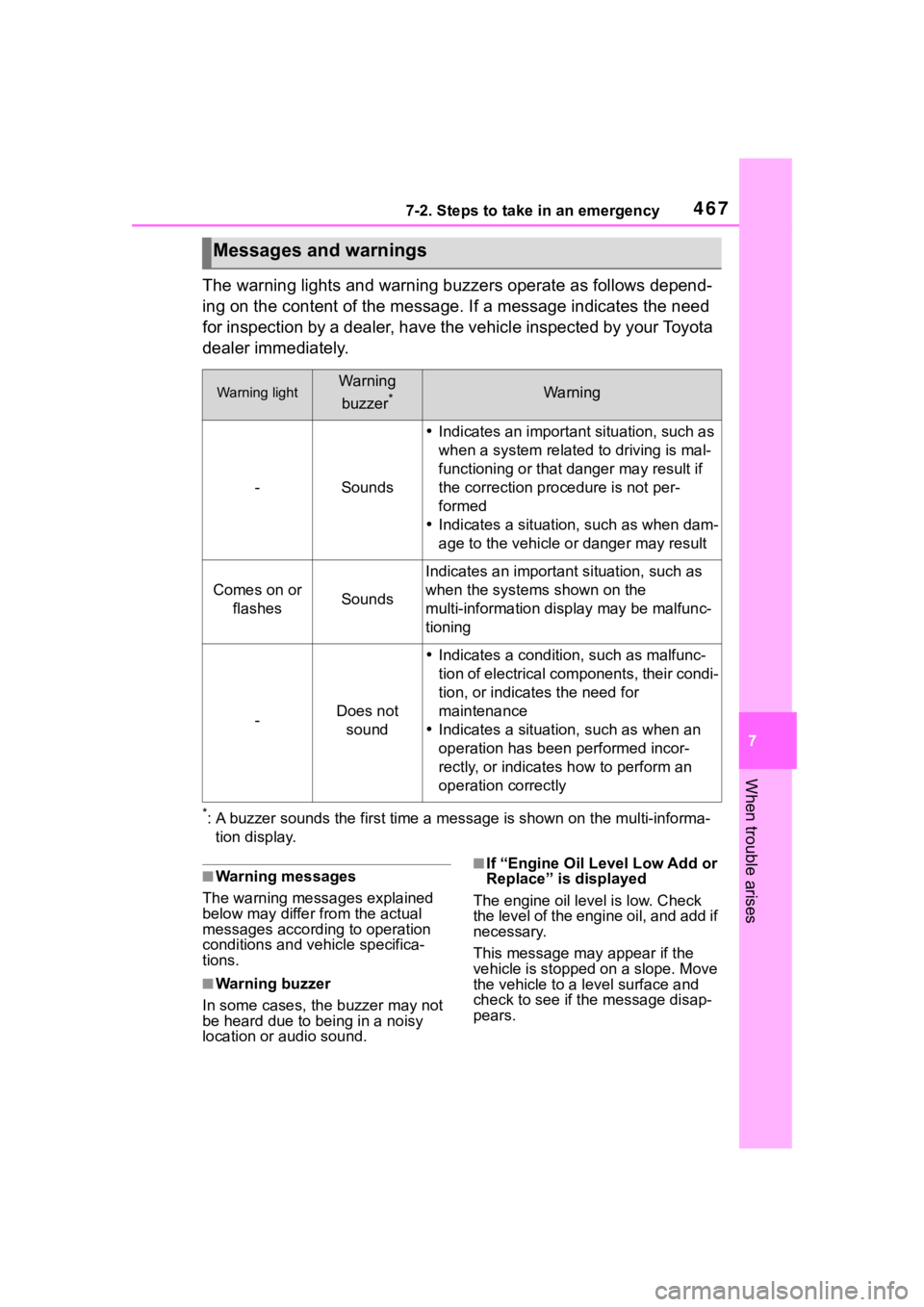
The warning lights and warning buzzers operate as follows depend-
ing on the content of the message. If a message indicates the need
for inspection by a dealer, have the vehicle inspected by your To y o t a
dealer immediately.
*: A buzzer sounds the first time a message is shown on the multi-informa-
tion display.
■Warning messages
The warning messages explained
below may differ from the actual
messages according to operation
conditions and vehicle specifica-
tions.
■Warning buzzer
In some cases, the buzzer may not
be heard due to being in a noisy
location or audio sound.
■If “Engine Oil Level Low Add or
Replace” is displayed
The engine oil level is low. Check
the level of the engine oil, and add if
necessary.
This message may appear if the
vehicle is stopped on a slope. Move
the vehicle to a l evel surface and
check to see if the message disap-
pears.
Messages and warnings
Warning lightWarning
buzzer
*Warning
-Sounds
Indicates an important situation, such as
when a system relate d to driving is mal-
functioning or that danger may result if
the correction procedure is not per-
formed
Indicates a situation, such as when dam-
age to the vehicle or danger may result
Comes on or
flashesSounds
Indicates an importan t situation, such as
when the systems shown on the
multi-information display may be malfunc-
tioning
-Does not sound
Indicates a condition, such as malfunc-
tion of electrical components, their condi-
tion, or indicates the need for
maintenance
Indicates a situatio n, such as when an
operation has been performed incor-
rectly, or indicates how to perform an
operation correctly
Page 469 of 568
4697-2. Steps to take in an emergency
7
When trouble arises
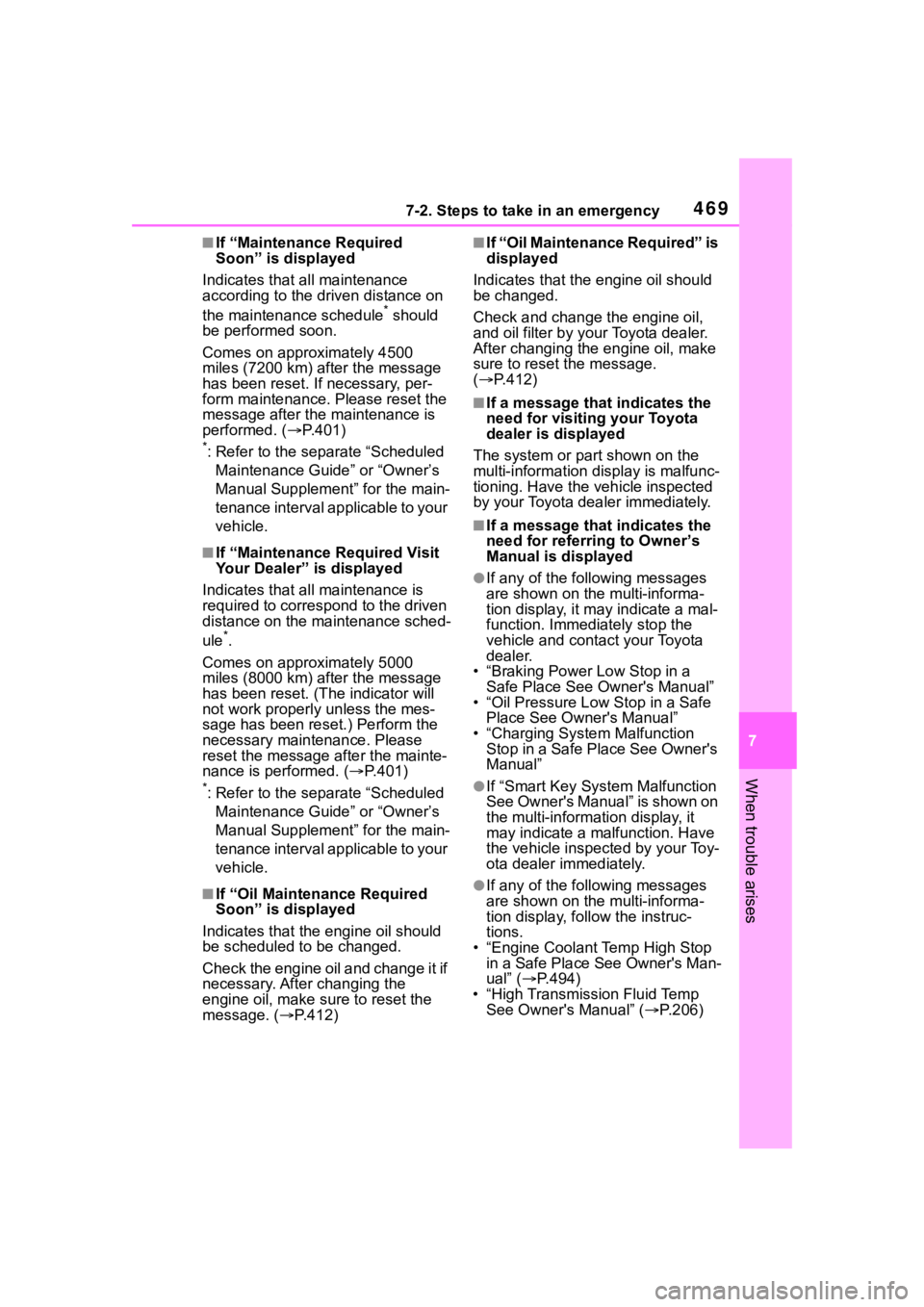
■If “Maintenance Required
Soon” is displayed
Indicates that all maintenance
according to the dr iven distance on
the maintenance schedule
* should
be performed soon.
Comes on approximately 4500
miles (7200 km) after the message
has been reset. If necessary, per-
form maintenance. Please reset the
message after the maintenance is
performed. ( P.401)
*: Refer to the separate “Scheduled
Maintenance Guide” or “Owner’s
Manual Supplement” for the main-
tenance interval applicable to your
vehicle.
■If “Maintenance Required Visit
Your Dealer” is displayed
Indicates that all maintenance is
required to correspond to the driven
distance on the maintenance sched-
ule
*.
Comes on approximately 5000
miles (8000 km) after the message
has been reset. (The indicator will
not work properly unless the mes-
sage has been reset.) Perform the
necessary maintenance. Please
reset the message after the mainte-
nance is performed. ( P.401)
*: Refer to the separate “Scheduled
Maintenance Guide” or “Owner’s
Manual Supplement” for the main-
tenance interval applicable to your
vehicle.
■If “Oil Maintenance Required
Soon” is displayed
Indicates that the engine oil should
be scheduled to be changed.
Check the engine oil and change it if
necessary. After changing the
engine oil, make sure to reset the
message. ( P.412)
■If “Oil Maintenance Required” is
displayed
Indicates that the engine oil should
be changed.
Check and change the engine oil,
and oil filter by your Toyota dealer.
After changing the engine oil, make
sure to reset t he message.
( P.412)
■If a message that indicates the
need for visiting your Toyota
dealer is displayed
The system or part shown on the
multi-information di splay is malfunc-
tioning. Have the vehicle inspected
by your Toyota dealer immediately.
■If a message that indicates the
need for referring to Owner’s
Manual is displayed
●If any of the following messages
are shown on the multi-informa-
tion display, it may indicate a mal-
function. Immediately stop the
vehicle and contact your Toyota
dealer.
• “Braking Power Low Stop in a Safe Place See Owner's Manual”
• “Oil Pressure Low Stop in a Safe
Place See Owner's Manual”
• “Charging System Malfunction Stop in a Safe Place See Owner's
Manual”
●If “Smart Key System Malfunction
See Owner's Manual” is shown on
the multi-information display, it
may indicate a malfunction. Have
the vehicle inspected by your Toy-
ota dealer immediately.
●If any of the following messages
are shown on the multi-informa-
tion display, follow the instruc-
tions.
• “Engine Coolant Temp High Stop in a Safe Place See Owner's Man-
ual” ( P.494)
• “High Transmission Fluid Temp See Owner's Manual” ( P.206)
Page 499 of 568
499
8
8
Vehicle specifications
Vehicle specifications
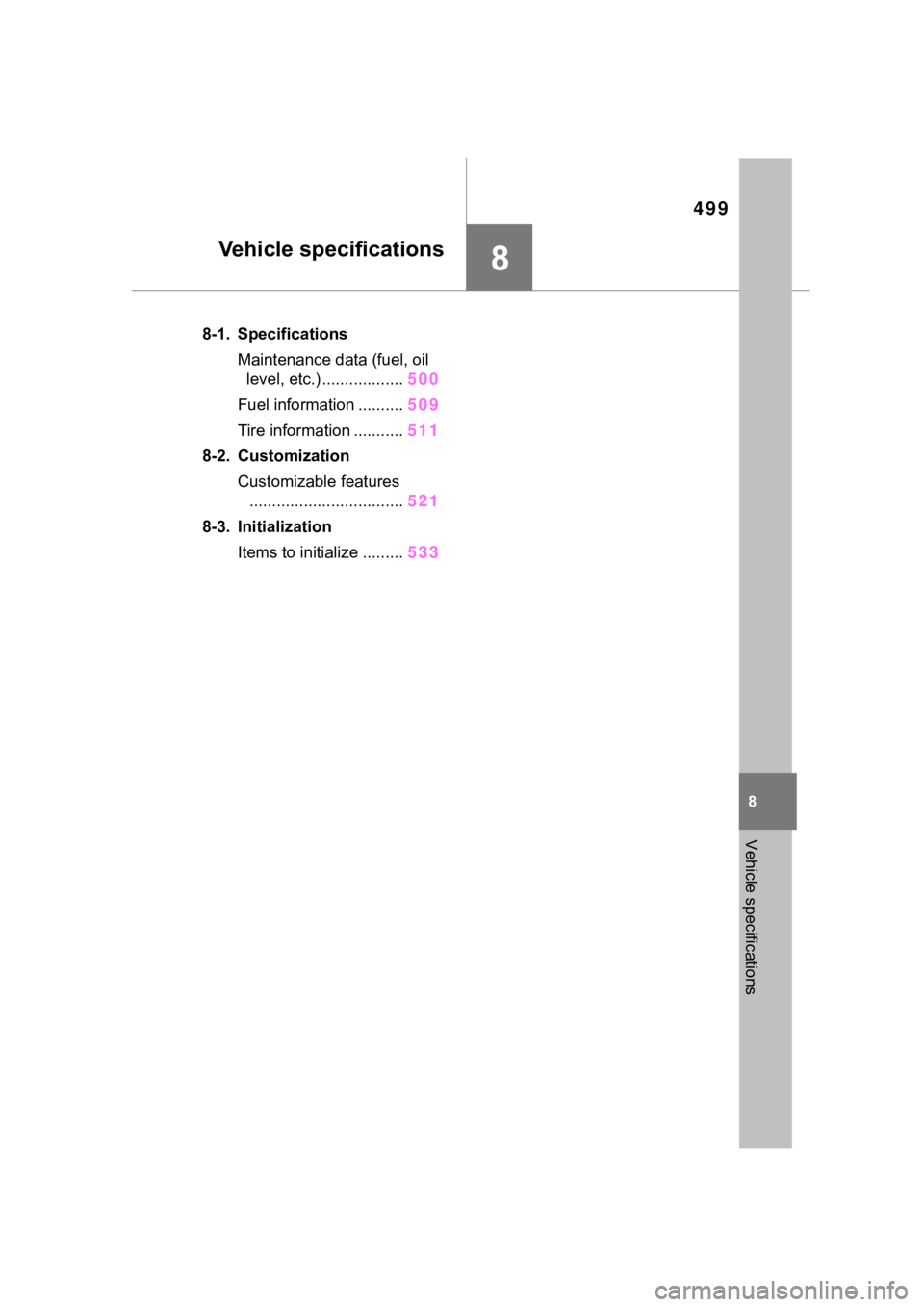
.8-1. SpecificationsMaintenance data (fuel, oil level, etc.) .................. 500
Fuel information .......... 509
Tire information ........... 511
8-2. Customization Customizable features.................................. 521
8-3. Initialization Items to initialize ......... 533
Page 500 of 568
5008-1. Specifications
8-1.Specifications
*1: Unladen vehicle
*2: For GSU70L-ARZSHA, GSU75L-ARZSHA models*7
*3
: For 7-seat models
*4: For 8-seat models
*5: For GSU75L-ARZGHA models*7
*6
: Except for GSU75L-ARZGHA models*7
*7
: The model code is indicated o n the Certification Label. (P.500)
■Vehicle identification num-
ber The vehicle identification num-
ber (VIN) is the legal identifier
for your vehicle. This is the pri-
Maintenance data (fuel, oil level, etc.)
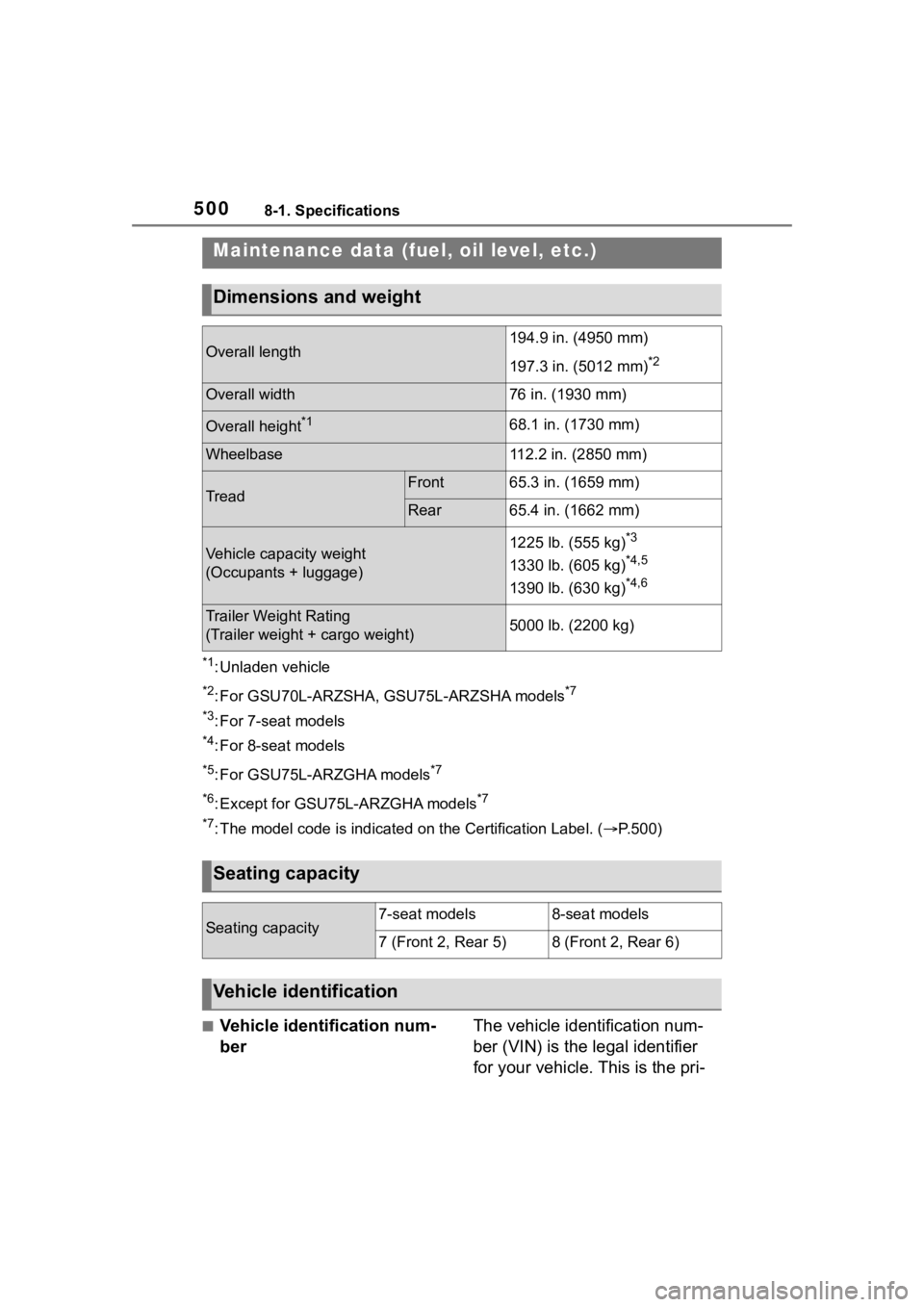
Dimensions and weight
Overall length194.9 in. (4950 mm)
197.3 in. (5012 mm)
*2
Overall width76 in. (1930 mm)
Overall height*168.1 in. (1730 mm)
Wheelbase112.2 in. (2850 mm)
TreadFront65.3 in. (1659 mm)
Rear65.4 in. (1662 mm)
Vehicle capacity weight
(Occupants + luggage)1225 lb. (555 kg)*3
1330 lb. (605 kg)*4,5
1390 lb. (630 kg)*4,6
Trailer Weight Rating
(Trailer weight + cargo weight)5000 lb. (2200 kg)
Seating capacity
Seating capacity7-seat models8-seat models
7 (Front 2, Rear 5)8 (Front 2, Rear 6)
Vehicle identification
Page 533 of 568
5338-3. Initialization
8
Vehicle specifications
8-3.Initialization
*: If equipped
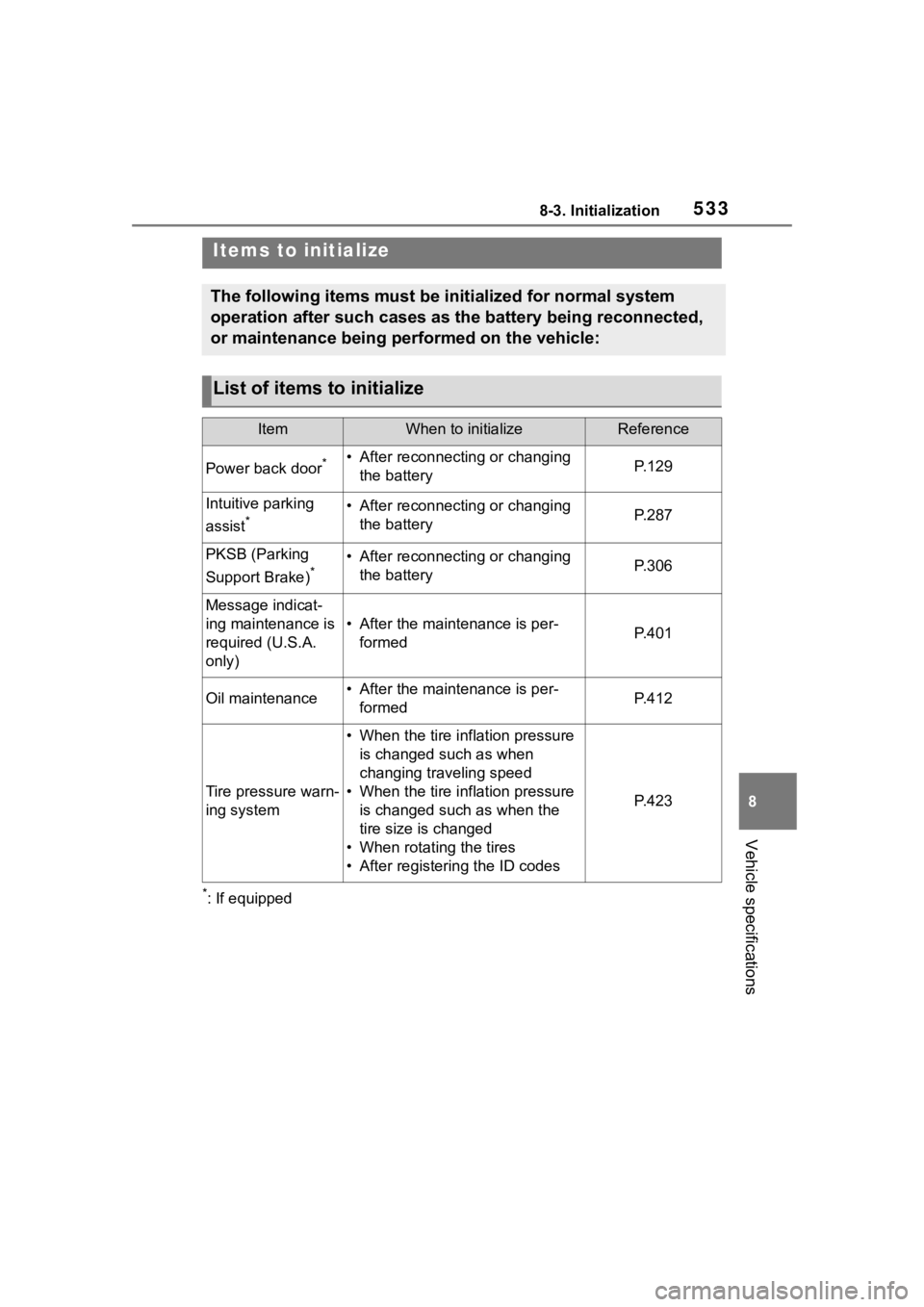
Items to initialize
The following items must be initialized for normal system
operation after such cases as the battery being reconnected,
or maintenance being performed on the vehicle:
List of items to initialize
ItemWhen to initializeReference
Power back door*• After reconnecting or changing the batteryP. 1 2 9
Intuitive parking
assist
*• After reconnecting or changing the batteryP. 2 8 7
PKSB (Parking
Support Brake)
*• After reconnecting or changing the batteryP. 3 0 6
Message indicat-
ing maintenance is
required (U.S.A.
only)
• After the maintenance is per-formedP. 4 0 1
Oil maintenance• After the maintenance is per-formedP. 4 1 2
Tire pressure warn-
ing system
• When the tire inflation pressure is changed such as when
changing traveling speed
• When the tire inflation pressure is changed such as when the
tire size is changed
• When rotating the tires
• After registering the ID codes
P. 4 2 3
Page 553 of 568
553Alphabetical Index
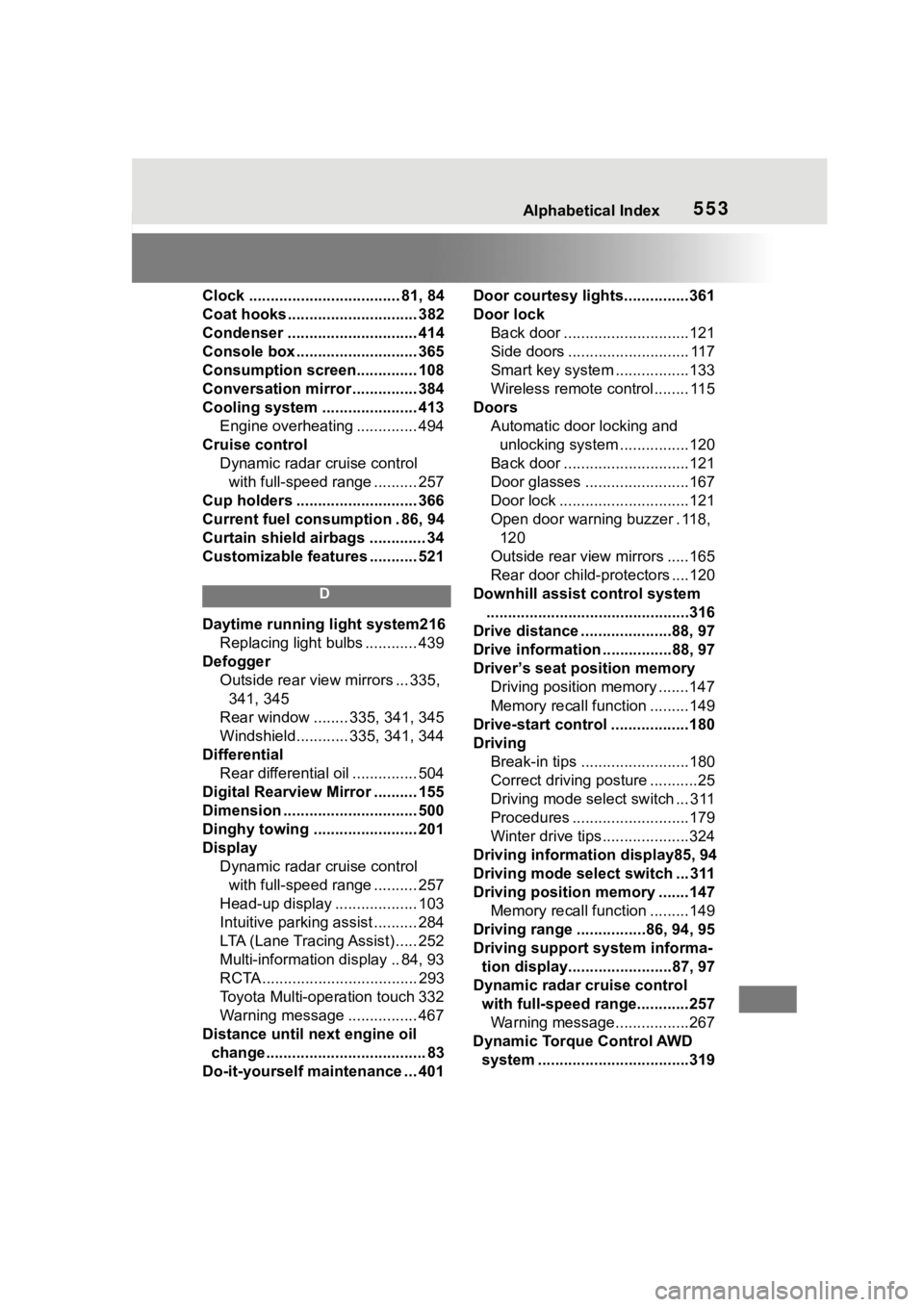
Clock ................................... 81, 84
Coat hooks .............................. 382
Condenser .............................. 414
Console box ............................ 365
Consumption screen.............. 108
Conversation mirror ............... 384
Cooling system ...................... 413Engine overheating .............. 494
Cruise control Dynamic radar cruise control with full-speed range .......... 257
Cup holders ............................ 366
Current fuel consumption . 86, 94
Curtain shield airbags ............. 34
Customizable features ........... 521
D
Daytime running light system216 Replacing light bulbs ............ 439
Defogger Outside rear view mirrors ... 335, 341, 345
Rear window ........ 335, 341, 345
Windshield............ 335, 341, 344
Differential Rear differential oil ............... 504
Digital Rearview Mirror .......... 155
Dimension ............................... 500
Dinghy towing ........................ 201
Display Dynamic radar cruise control with full-speed range .......... 257
Head-up display ................... 103
Intuitive parking assist .......... 284
LTA (Lane Tracing Assist) ..... 252
Multi-information display .. 84, 93
RCTA .................................... 293
Toyota Multi-operation touch 332
Warning message ................ 467
Distance until next engine oil change..................................... 83
Do-it-yourself maintenance ... 401 Door courtesy lights...............361
Door lock
Back door .............................121
Side doors ............................ 117
Smart key system .................133
Wireless remote control........ 115
Doors Automatic door locking and unlocking system ................120
Back door .............................121
Door glasses ........................167
Door lock ..............................121
Open door warning buzzer . 118, 120
Outside rear view mirrors .....165
Rear door child-protectors ....120
Downhill assist control system ...............................................316
Drive distance .....................88, 97
Drive information .. ..............88, 97
Driver’s seat position memory Driving position memory .......147
Memory recall function .........149
Drive-start control ..................180
Driving Break-in tips .........................180
Correct driving posture ...........25
Driving mode select switch ... 311
Procedures ...........................179
Winter drive tips....................324
Driving information display85, 94
Driving mode select switch ... 311
Driving position memory .......147 Memory recall function .........149
Driving range ................86, 94, 95
Driving support system informa- tion display........................87, 97
Dynamic radar cruise control with full-speed range............257Warning message.................267
Dynamic Torque Control AWD system ...................................319