heating TOYOTA HIGHLANDER 2023 User Guide
[x] Cancel search | Manufacturer: TOYOTA, Model Year: 2023, Model line: HIGHLANDER, Model: TOYOTA HIGHLANDER 2023Pages: 552, PDF Size: 13.36 MB
Page 328 of 552
3285-1. Using the air conditioning system and defogger
■Eco air conditioning mode
When Eco drive mode is selected
using the driving mode select
switch, eco air conditioning mode
turns on.
When a drive mode other than Eco
drive mode is sele cted, eco air con-
ditioning mode may turn off.
■Operation of the air condition-
ing system in Eco drive mode
●In Eco drive mode, the air condi-
tioning system is controlled as fol-
lows to prioritize fuel efficiency:
• Engine speed and compressor operation controlled to restrict
heating/cooling capacity
• Fan speed restr icted when auto-
matic mode is selected
●To improve air co nditioning perfor-
mance, perform the following
operations:
• Adjust the fan speed
• Turn off Eco drive mode ( P.300)
• Turn off Eco air conditioning mode
●When the driving mode is set to
Eco driving mode, the air condi-
tioning eco mode will be turned on
automatically. Even in this case,
the air conditioning eco mode can
be turned off by pressing the Eco
air conditioning mode switch.
■When the outside temperature
is low
The dehumidification function may
not operate even when “A/C” is
pressed.
1 Press the automatic mode
switch.
The dehumidification function
begins to operate. Air outlets and
fan speed are automatically
adjusted according to the tempera-
ture setting and humidity.
2 Adjust the temperature set-
ting. 3
To stop the operation, press
the “OFF” switch.
If the fan speed setting or air
flow modes are operated, the
automatic mode indicator goes
off. However, automatic mode
for functions other than that
operated is maintained.
■Using automatic mode
Fan speed is adjusted automati-
cally according to the temperature
setting and the am bient conditions.
Therefore, the fan may stop for a
while until warm or cool air is ready
to flow immediately after the auto-
matic mode switch is pressed.
This function automatically con-
trols the air conditioning airflow
so that priority is given to the
front seats. Unnecessary air
conditioning is suppressed, con-
tributing to increased fuel effi-
ciency.
Front seat concentrated airflow
mode operates in the following
situations.
No passengers are detected
in the rear seats
The windshield defogger is
not operating
While operating, the indicator illumi-
nates on the S-FLOW mode switch.
Using automatic mode
Front seat concentrated
airflow mode (S-FLOW)
Page 336 of 552
3365-1. Using the air conditioning system and defogger
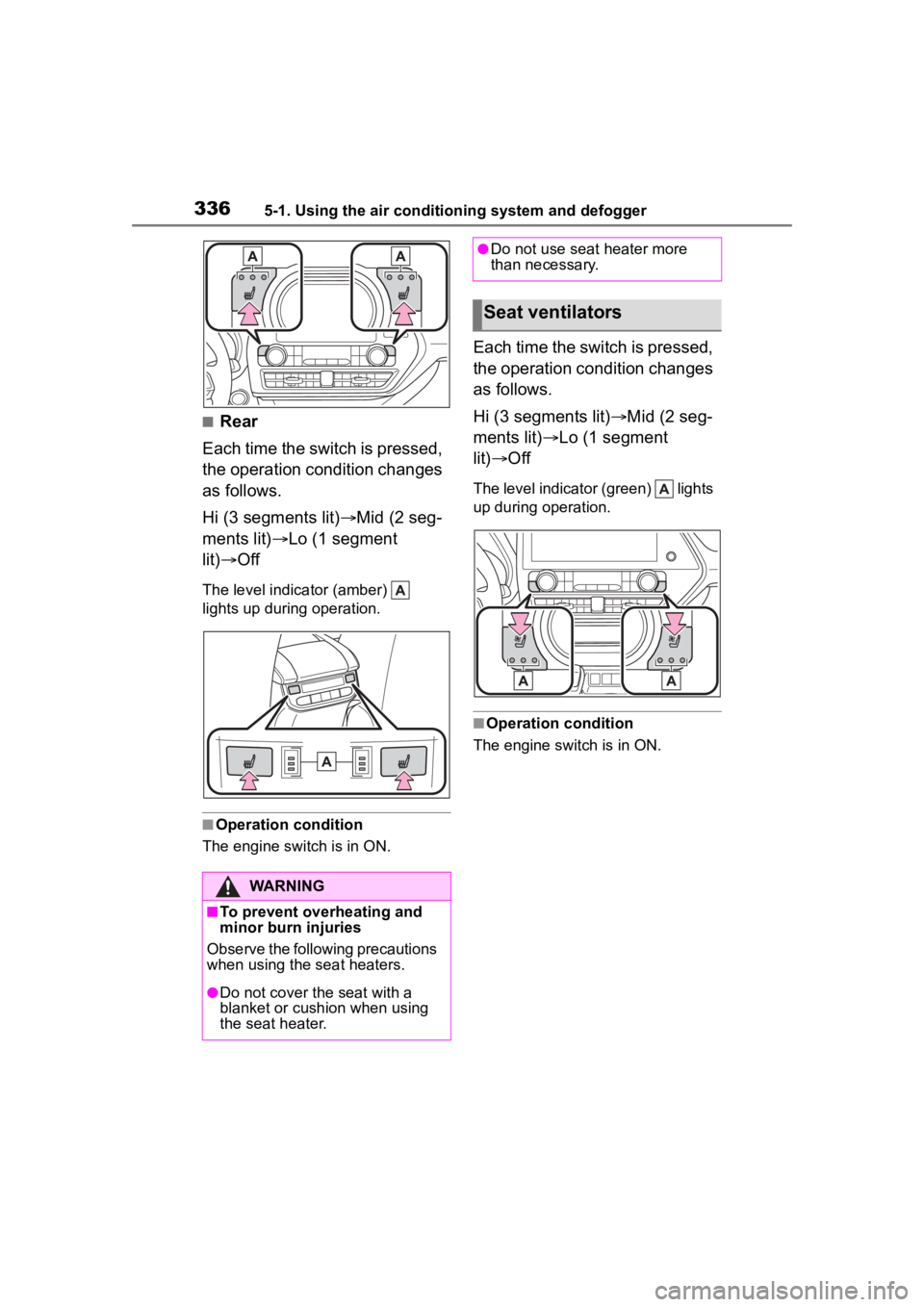
■Rear
Each time the switch is pressed,
the operation condition changes
as follows.
Hi (3 segments lit) Mid (2 seg-
ments lit) Lo (1 segment
lit) Off
The level indica tor (amber)
lights up during operation.
■Operation condition
The engine switch is in ON.
Each time the switch is pressed,
the operation condition changes
as follows.
Hi (3 segments lit) Mid (2 seg-
ments lit) Lo (1 segment
lit) Off
The level indicato r (green) lights
up during operation.
■Operation condition
The engine switch is in ON.
WARNING
■To prevent overheating and
minor burn injuries
Observe the following precautions
when using the seat heaters.
●Do not cover the seat with a
blanket or cushion when using
the seat heater.
●Do not use seat heater more
than necessary.
Seat ventilators
Page 353 of 552
3535-4. Using the other interior features
5
Interior features
■The wireless charger can be
operated when
The engine switch is in ACC or ON.
■Portable devices that can be
charged
●Portable devices compatible with
the Qi wireless charging standard
can be charged by the wireless
charger. However, compatibility
with all devices which meet the Qi
wireless charging standard is not
guaranteed.
●The wireless charger is designed
to supply low power electricity (5
W or less) to a cellular phone,
smartphone, or other portable
device.
●Failure to do so may result in the
possibility of fire, However, porta- ble devices, such as the following,
can be charged with more than 5
W.
• 7.5 W charging compatible iPhones can be charged at 7.5 W
or less.
• Portable devices which conform to WPC Ver 1.2.4 (Extended Power
profile ) can be charged at 10 W or
less.
■If a cover or accessory is
attached to the portable device
Do not charge a portable device if a
cover or accessory w hich is not Qi
compatible is atta ched. Depending
on the type of cover (including for
certain genuine manufacturer parts)
and/or accessory a ttached, it may
not be possible to charge the porta-
ble device. If the portable device is
placed on the charging area and
Orange
(Repeatedly
flashes 3 times
continuously)
Gray
Foreign substance detection:
A metallic foreign substance is in the
charge area, and so the abnormal heat-
ing prevention function of the charging
coil operated
→Remove the foreign substance from
the charge area.
Portable device misaligned:
→The charging coil in the portable
device moved outside of the charge
area, and so the abnormal heating pre-
vention function of the charging coil
operated
Orange
(Repeatedly
flashes 4 times
continuously)
Gray
Safety shutdown resulting when the
temperature within the wireless charger
exceeded the set value
→Stop charging, remove the portable
device from the charging tray, wait for
the temperature to drop, and then start
charging again.
Operation indicator lightSuspected causes/Handling methodCharging trayCenter display
Page 355 of 552
3555-4. Using the other interior features
5
Interior features
WARNING
●Do not use the charging tray as
a small storage space.
●Do not subject to a strong force
or impact.
●Do not disassemble, modify or
remove the wireless charger.
●Do not charge devices other
than specified portable devices.
●Keep away from magnetic
items.
●Do not charge devices if the
charge area is covered in dust.
●Do not cover with a cloth or sim-
ilar material.
NOTICE
■Situations in which the func-
tion may not operate normally
Devices may not be charged nor-
mally in the following situations.
●The portable device is fully
charged
●The portable device is being
charged with a cable connected
●There is foreign matter between
the charge area and portable
device
●Charging has caused the porta-
ble device to heat up
●The temperature around the
charging tray is 95°F (35°C) or
higher, such as in extreme heat
●The portable device is placed
with its charging side facing up
●The portable device is placed in
an area misaligned from the
charge area
●The portable device is larger
than the charging tray
●A foldable and portable device
is placed outside the charge
area
●The camera lens protrudes 0.12
in. (3 mm) or more from the sur-
face of the portal device
●The vehicle is in an area where
strong electrical waves or noise
are emitted, such as near a tele-
vision tower, power plant, gaso-
line station, broadcasting
station, large display, airport,
etc.
●Any of the following objects that
is protrudes 0.08 in. (2 mm) or
thicker is stuck or installed
between the charging side of
the portable device and the
charge area.
• Thick cases or covers
• A case or cover attached with an uneven or tilt ed surface, so
that the charging side is not flat
• Thick decorations
• Accessories, such as finger- rings, straps, etc.
●When the portable device is in
contact with, or is covered by
any of the following metallic
objects:
• A card that has metal on it, such as aluminum foil, etc.
• A pack of cigarettes that includes aluminum foil
• A wallet or bag that is made of metal
• Coins
• A heating pad
• CDs, DVDs or other media
Page 469 of 552
4697-2. Steps to take in an emergency
7
When trouble arises1Stop the vehicle in a safe
place and turn off the air con-
ditioning system, and then
stop the engine.
2 If you see steam:
Carefully lift the hood after
the steam subsides.
If you do not see steam:
Carefully lift the hood.
3 After the engine has cooled
down sufficiently, inspect the
NOTICE
■When handling jumper cables
When connecting the jumper
cables, ensure that they do not
become entangled in the cooling
fan or engine drive belt.
If your vehicle over-
heats
The following may indicate
that your vehicle is over-
heating.
The needle of the engine
coolant temperature gauge
( P.79) enters the red zone
or a loss of engine power is
experienced. (For example,
the vehicle speed does not
increase.)
“Engine Coolant Temp High
Stop in a Safe Place See
Owner’s Manual” is shown
on the multi-information dis-
p l a y.
Steam comes out from
under the hood.
Correction procedures
Page 526 of 552

526Alphabetical Index
AWD Control ............................. 91
B
Back door ................................ 119
Back-up lightsReplacing light bulbs ............ 415
Battery Battery checking................... 391
If the battery is discharged ... 465
Preparing and c hecking before
winter.................................. 314
Replacing ............................. 467
Warning light ........................ 432
Blind Spot Monitor (BSM) ...... 270
Brake Brake hold ............................ 208
Fluid ............................. 390, 479
Parking brake ....................... 205
Warning light ........................ 431
Brake assist ............................ 307
Break-in tips ........ ................... 175
Brightness control Instrument panel light control81, 86
BSM (Blind Spot Monitor) ...... 270
Buzzer Hands off steering wheel warn-ing (LTA) ............................. 248
C
Care Exterior ................................. 370
Interior .................................. 373
Seat belts ............................. 373
Wheels and wheel ornaments........................................... 370
Cargo capacity ....................... 184
Cargo net hooks .. ................... 344
Chains ..................................... 315
Child restraint system Fixed with a LATCH system ... 60 Fixed with a seat belt..............55
Front passenger occupant clas-
sification system ...................43
Points to remember ................50
Riding with children ................49
Types of child restraint system installation method ...............52
Using an anchor bracket ........62
Child safety Airbag precautions .................39
Back door precautions.......... 119
Battery precautions ......392, 468
Child restraint system .............52
Heated steering wheel and seat heater precautio ns..............335
How your child should wear the seat belt ................................28
Moon roof precautions..........166
Panoramic moon roof precau- tions ....................................170
Power window lock switch ....164
Power window precautions...163
Rear door child-protectors .... 118
Seat belt extender precautions .............................................29
Seat belt precautions..............49
Child-protectors...................... 118
Cleaning Exterior .................................370
Interior ..................................373
Radar sensor ........................224
Seat belts .............................373
Wheels and wheel ornaments...........................................370
Clock ................... .....79, 81, 82, 86
Coat hooks ..............................357
Condenser ............. ..................390
Console box ............................341
Consumption screen ..............108
Conversation mirror ...............359
Cooling system .......................389 Engine overheating ..............469
Page 528 of 552

528Alphabetical Index
Electric Power Steering (EPS)............................................... 307Warning light ........................ 433
Electronic key ......................... 112 Battery-saving function......... 132
If the electronic key does not operate properly ................. 463
Replacing the battery ........... 410
Electronic roof sunshade Jam protection function ........ 169
Operation ............................. 168
Emergency flashers ............... 424
Emergency, in case of If a warning buzzer sounds .. 431
If a warning light turns on ..... 431
If a warning message is dis-played................................. 442
If the battery is discharged ... 465
If the electronic key does not operate properly ................. 463
If the engin e will not start ..... 460
If the fuel filler door cannot be opened ............................... 462
If the vehicle is submerged or water on the road is rising .. 425
If you have a flat tire ............. 446
If you lose your keys ............ 461
If you think something is wrong ........................................... 429
If your vehicle becomes stuck ........................................... 471
If your vehicle has to be stopped in an emergency................. 424
If your vehicle needs to be towed ........................................... 427
If your vehicle overheats ...... 469
Engine ACCESSORY mode ............. 199
Compartment ....................... 386
Engine switch ....................... 197
Fuel pump shut off system ... 430
Hood..................................... 384 How to start the engine ........197
Identification number ............475
If the engine will not start......460
If your vehicle has to be stopped
in an emergency .................424
Ignition switch (engine switch) ...........................................197
Overheating ..........................469
Tachometer.......................79, 82
Engine coolant Capacity ...............................477
Checking ..............................389
Preparing and checking before winter ..................................314
Engine coolant temperature gauge .................................79, 82
Engine immobilizer system .....69
Engine oil Capacity ...............................476
Checking ..............................386
Preparing and checking before winter ..................................314
Warning light.........................432
Engine oil maintenance data .388
Engine switch .........................197 Auto power off fun ction .........200
Changing the engine switch modes.................................199
If your vehicle has to be stopped in an emergency .................424
EPS (Electric Po wer Steering)
...............................................307 Warning light.........................433
Event data recorder (EDR) .........7
F
Flat tire Tire pressure w arning system
...........................................396
Vehicles with a spare tire......446
Floor mats .................................24
Page 532 of 552

532Alphabetical Index
N
Navigation system-linked display........................... 90, 98, 100, 106
Noise from under vehicle .......... 5
Normal mode .................. 300, 302
O
“ODO TRIP” switch .................. 81
“ODO” switch ........................... 85
Odometer ............................ 80, 85
Odometer and trip meter display Display items .................... 80, 85
“ODO TRIP” switch ................ 81
“ODO” switch.......................... 85
Pop-up display ................. 81, 86
Oil Engine oil ............................. 476
Rear differential oil ............... 478
Opener Back door ............................. 121
Fuel filler door ...................... 221
Hood..................................... 384
Outer foot lights Replacing light bulbs ............ 415
Outside rear view mirrors Adjustment ........................... 160
BSM (Blind Sport Monitor) ... 270
Folding ................................. 161
Linked mirror function when reversing ............................ 160
Mirror position memory ........ 142
Outside rear view mirror defog- gers .................................... 324
RCTA function ...................... 283
Outside temperature .......... 79, 82
Overheating ............................ 469
P
Panic mode ............................. 114 Panoramic moon roof
Jam protection function ........169
Operation..............................168
Parking assist sens ors (intuitive
parking assist) ......................275
Parking brake Operation..............................205
Parking brake engaged warning buzzer.................................207
Warning light.........................438
Warning message.................207
Parking lights Light switch...........................210
Replacing light bulbs ............415
Parking Support Brake function (for rear-crossing vehicles) .299Function................................299
Parking Support Brake function (static objects) ......................296Function................................296
PCS (Pre-Collision System) Function................................228
PCS OFF switch ...................231
Warning light.........................437
Personal lights ........................337
PKSB (Parking Support Brake) ...............................................289Warning message.................295
Power outlets ..........................357
Power steering (Electric power steering system) ...................307Warning light.........................433
Power windows Door lock linked window opera-tion......................................163
Jam protection function ........162
Operation..............................162
Window lock switch ..............164
Pre-Collision System (PCS) Function................................228
PCS OFF switch ...................231
Warning light.........................437