air condition TOYOTA HIGHLANDER 2023 Owner's Guide
[x] Cancel search | Manufacturer: TOYOTA, Model Year: 2023, Model line: HIGHLANDER, Model: TOYOTA HIGHLANDER 2023Pages: 552, PDF Size: 13.36 MB
Page 327 of 552
3275-1. Using the air conditioning system and defogger
5
Interior features
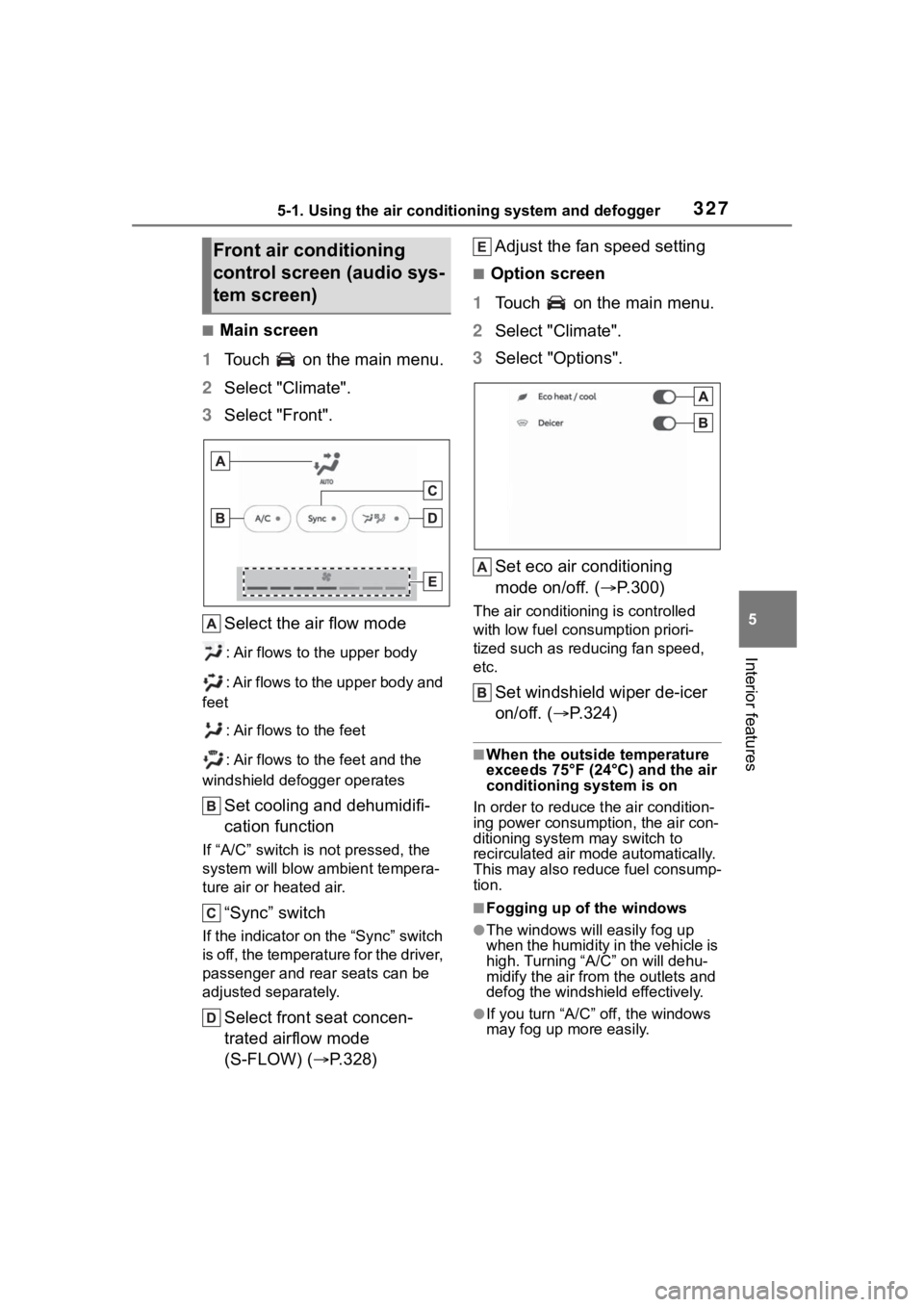
■Main screen
1 Touch on the main menu.
2 Select "Climate".
3 Select "Front".
Select the air flow mode
: Air flows to the upper body
: Air flows to the upper body and
feet
: Air flows to the feet
: Air flows to the feet and the
windshield defogger operates
Set cooling and dehumidifi-
cation function
If “A/C” switch is not pressed, the
system will blow a mbient tempera-
ture air or heated air.
“Sync” switch
If the indicator on the “Sync” switch
is off, the temperature for the driver,
passenger and rear seats can be
adjusted separately.
Select front seat concen-
trated airflow mode
(S-FLOW) ( P.328) Adjust the fan speed setting
■Option screen
1 Touch on the main menu.
2 Select "Climate".
3 Select "Options".
Set eco air conditioning
mode on/off. ( P.300)
The air conditioning is controlled
with low fuel con sumption priori-
tized such as reducing fan speed,
etc.
Set windshield wiper de-icer
on/off. ( P.324)
■When the outside temperature
exceeds 75°F (24°C) and the air
conditioning system is on
In order to reduce t he air condition-
ing power consumption, the air con-
ditioning system may switch to
recirculated air mode automatically.
This may also reduce fuel consump-
tion.
■Fogging up of the windows
●The windows will easily fog up
when the humidity in the vehicle is
high. Turning “A/C” on will dehu-
midify the air from the outlets and
defog the windshield effectively.
●If you turn “A/C” off, the windows
may fog up more easily.
Front air conditioning
control screen (audio sys-
tem screen)
Page 328 of 552
3285-1. Using the air conditioning system and defogger
■Eco air conditioning mode
When Eco drive mode is selected
using the driving mode select
switch, eco air conditioning mode
turns on.
When a drive mode other than Eco
drive mode is sele cted, eco air con-
ditioning mode may turn off.
■Operation of the air condition-
ing system in Eco drive mode
●In Eco drive mode, the air condi-
tioning system is controlled as fol-
lows to prioritize fuel efficiency:
• Engine speed and compressor operation controlled to restrict
heating/cooling capacity
• Fan speed restr icted when auto-
matic mode is selected
●To improve air co nditioning perfor-
mance, perform the following
operations:
• Adjust the fan speed
• Turn off Eco drive mode ( P.300)
• Turn off Eco air conditioning mode
●When the driving mode is set to
Eco driving mode, the air condi-
tioning eco mode will be turned on
automatically. Even in this case,
the air conditioning eco mode can
be turned off by pressing the Eco
air conditioning mode switch.
■When the outside temperature
is low
The dehumidification function may
not operate even when “A/C” is
pressed.
1 Press the automatic mode
switch.
The dehumidification function
begins to operate. Air outlets and
fan speed are automatically
adjusted according to the tempera-
ture setting and humidity.
2 Adjust the temperature set-
ting. 3
To stop the operation, press
the “OFF” switch.
If the fan speed setting or air
flow modes are operated, the
automatic mode indicator goes
off. However, automatic mode
for functions other than that
operated is maintained.
■Using automatic mode
Fan speed is adjusted automati-
cally according to the temperature
setting and the am bient conditions.
Therefore, the fan may stop for a
while until warm or cool air is ready
to flow immediately after the auto-
matic mode switch is pressed.
This function automatically con-
trols the air conditioning airflow
so that priority is given to the
front seats. Unnecessary air
conditioning is suppressed, con-
tributing to increased fuel effi-
ciency.
Front seat concentrated airflow
mode operates in the following
situations.
No passengers are detected
in the rear seats
The windshield defogger is
not operating
While operating, the indicator illumi-
nates on the S-FLOW mode switch.
Using automatic mode
Front seat concentrated
airflow mode (S-FLOW)
Page 329 of 552
3295-1. Using the air conditioning system and defogger
5
Interior features
■Manually turning front seat
concentrated airflow mode
on/off
In front seat concentrated air-
flow mode, directing airflow to
the front seats only and to all
seats can be switched via switch
operation. When the mode has
been switched manually, auto-
matic airflow control stops oper-
ating.
Select on the main con-
trol screen or press the S-FLOW
mode switch on the air condi-
tioning operation panel and
switch the airflow.
Indicator illuminated: Airflow
to the front seats only
Indicator off: Airflow to all the
seats
■Operation of automatic airflow
control
●In order to maintain a comfortable
interior, airflow ma y be directed to
seats without pa ssengers immedi-
ately after the e ngine is started
and at other times depending on
the outside temperature.
●After the engine is started, if pas-
sengers move around inside or
enter/exit the vehicle, the system
cannot accurately detect the pres-
ence of passengers and automatic
airflow control will not operate.
■Operation of manual airflow
control
Even if the function is manually
switched to directi ng airflow to only
the front seats, whe n a rear seat is
occupied, it may automatically direct
airflow to all seats.
■To return to automatic airflow
control
1 With the indicator off, turn the
engine switch off.
2 After 60 minutes or more elapse,
turn the engine switch to ON.
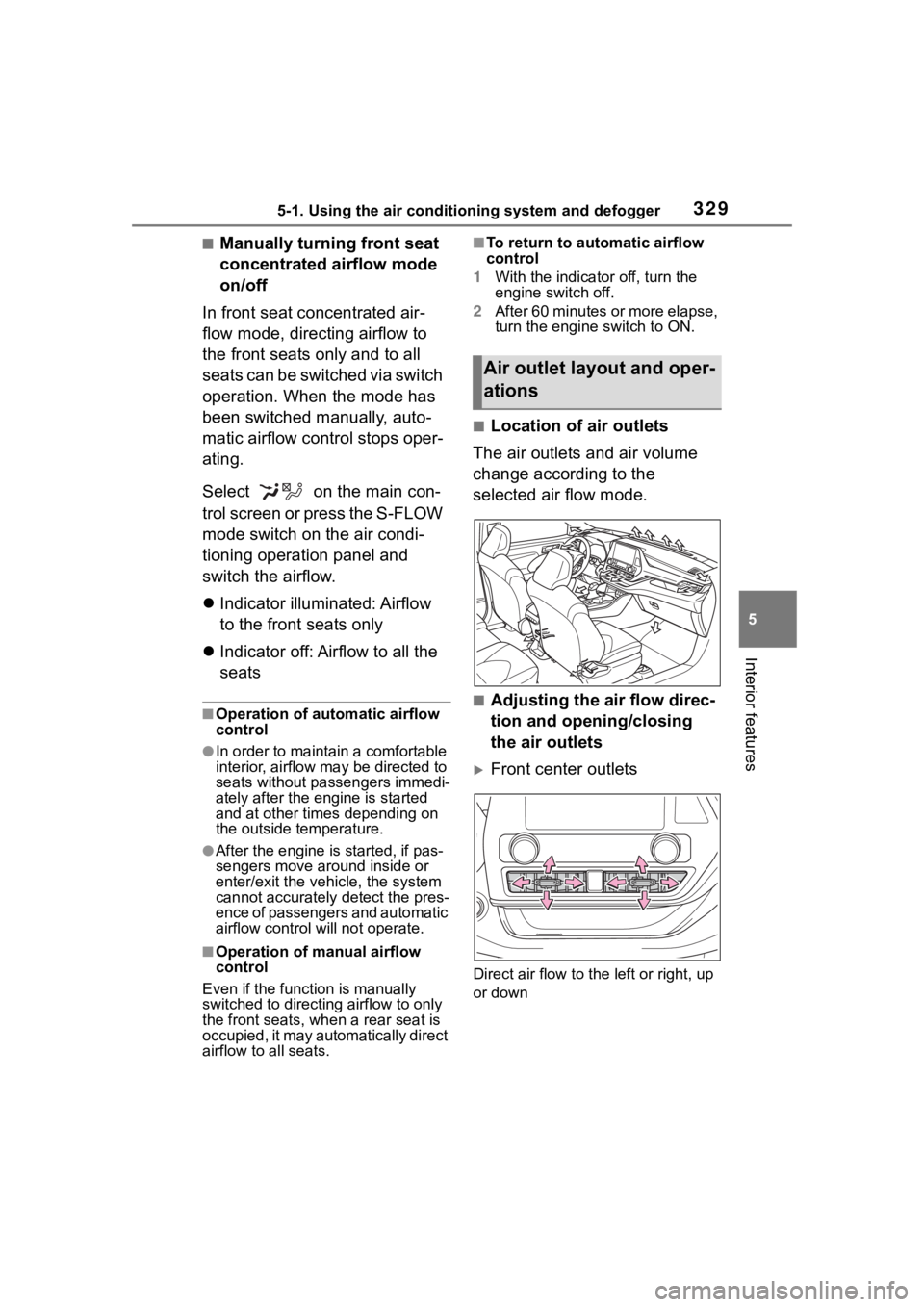
■Location of air outlets
The air outlets and air volume
change according to the
selected air flow mode.
■Adjusting the air flow direc-
tion and opening/closing
the air outlets
Front center outlets
Direct air flow to the left or right, up
or down
Air outlet lay out and oper-
ations
Page 330 of 552
3305-1. Using the air conditioning system and defogger
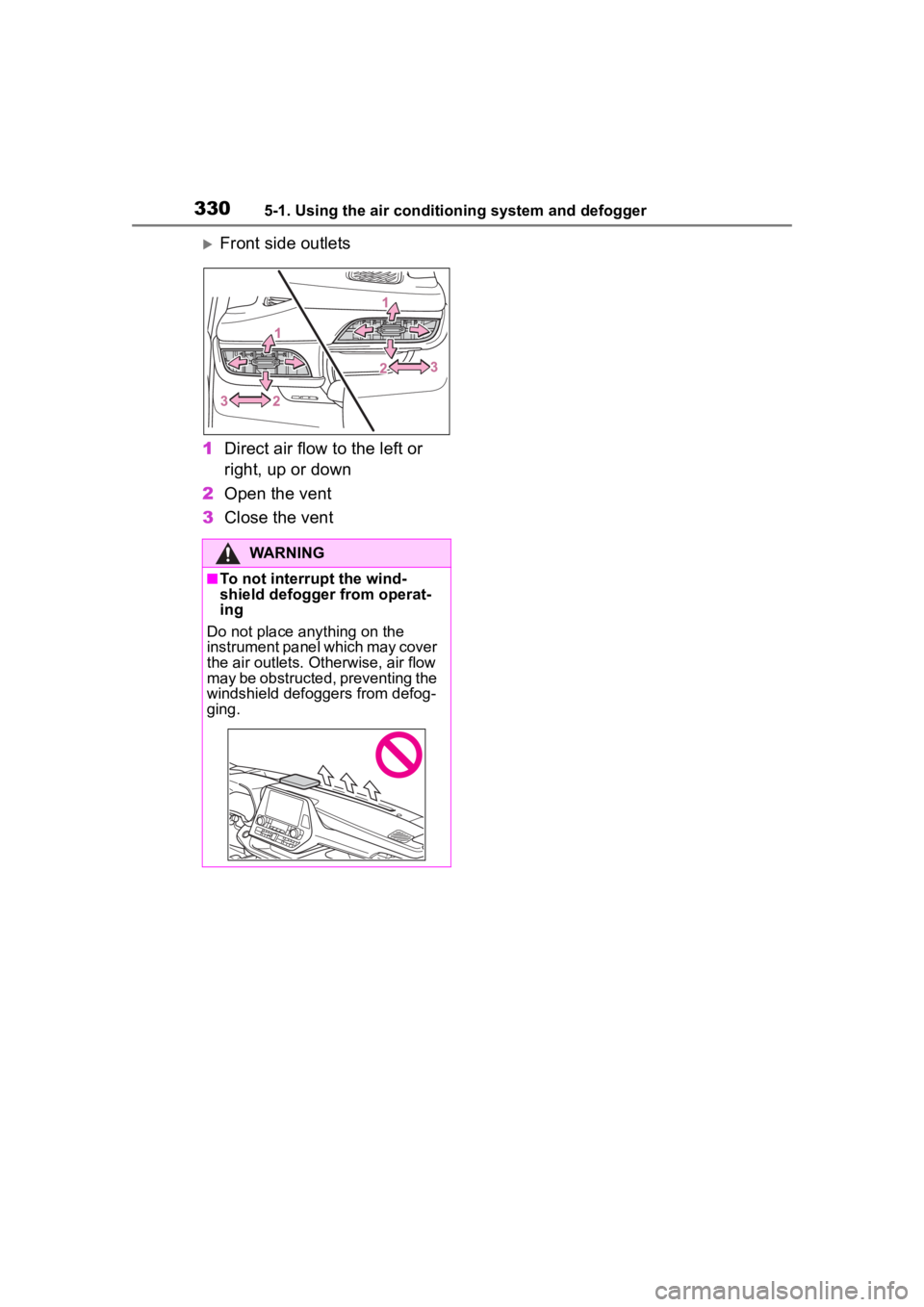
Front side outlets
1 Direct air flow to the left or
right, up or down
2 Open the vent
3 Close the vent
WARNING
■To not interrupt the wind-
shield defogger from operat-
ing
Do not place anything on the
instrument panel which may cover
the air outlets. Otherwise, air flow
may be obstructed, preventing the
windshield defoggers from defog-
ging.
Page 331 of 552
3315-1. Using the air conditioning system and defogger
5
Interior features
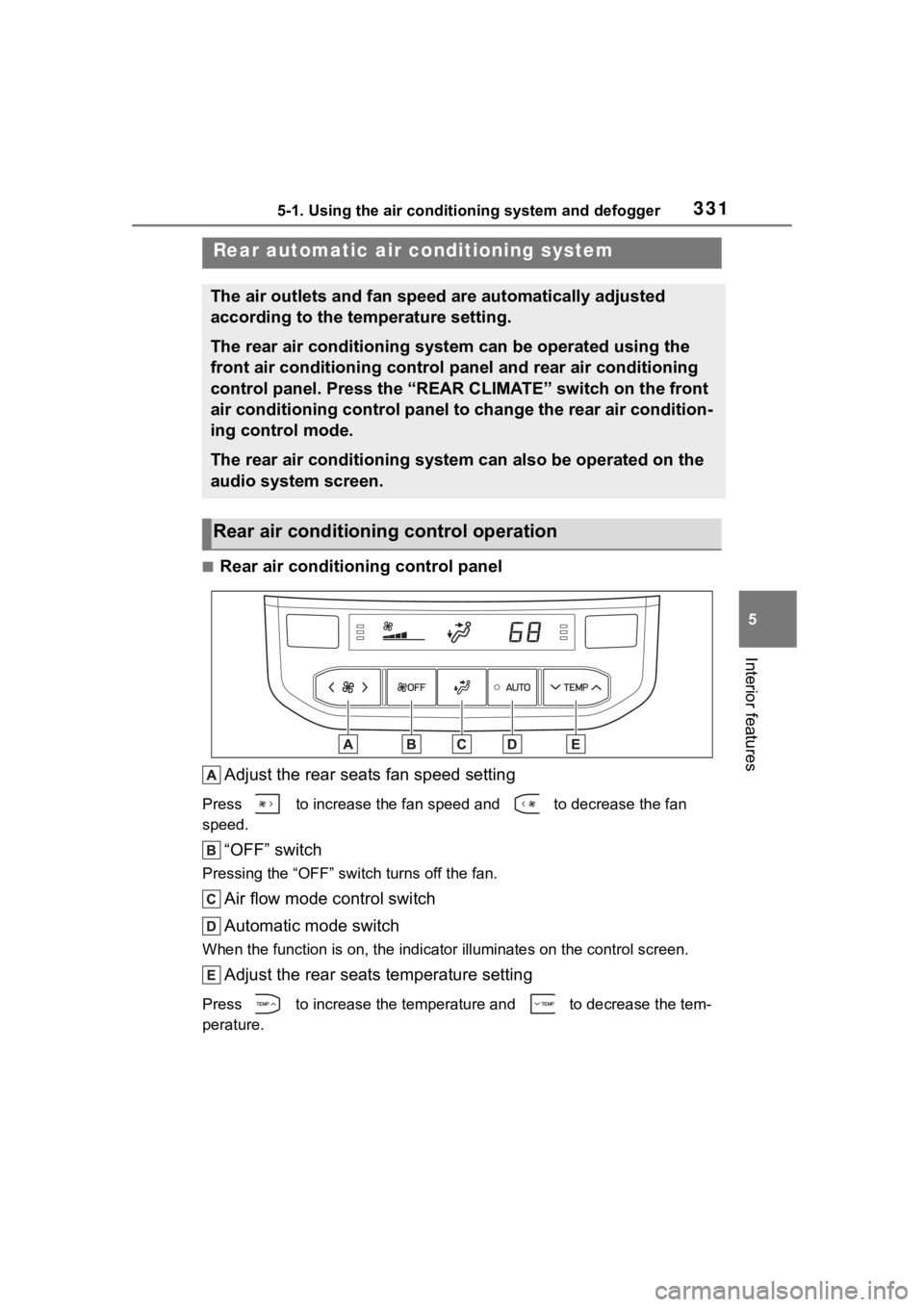
■Rear air conditioning control panelAdjust the rear seats fan speed setting
Press to increase the fan speed and to decrease the fan
speed.
“OFF” switch
Pressing the “OFF” switch turns off the fan.
Air flow mode control switch
Automatic mode switch
When the function is on, the indi cator illuminates on the control screen.
Adjust the rear seats temperature setting
Press to increase the temperature and to decrease the tem-
perature.
Rear automatic air conditioning system
The air outlets and fan speed are automatically adjusted
according to the temperature setting.
The rear air conditioning system can be operated using the
front air conditioning control panel and rear air conditioning
control panel. Press the “REAR CLIMATE” switch on the front
air conditioning control panel to change the rear air condition -
ing control mode.
The rear air conditioning system can also be operated on the
audio system screen.
Rear air conditioning control operation
Page 332 of 552
3325-1. Using the air conditioning system and defogger
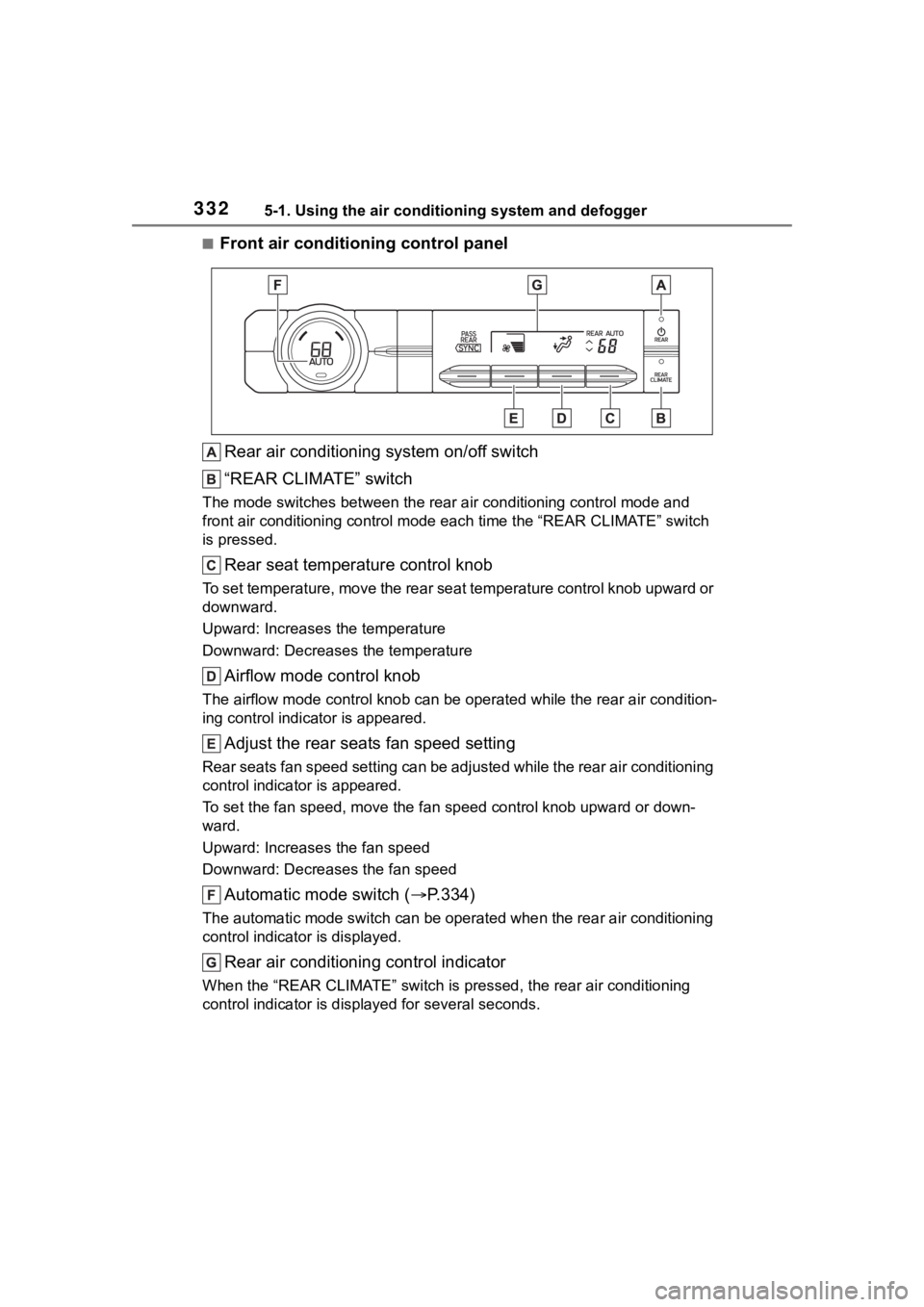
■Front air conditioning control panelRear air conditioning system on/off switch
“REAR CLIMATE” switch
The mode switches between the rea r air conditioning control mode and
front air conditioning control mode each time the “REAR CLIMATE ” switch
is pressed.
Rear seat temperature control knob
To set temperature, move the rear seat temperature control knob upward or
downward.
Upward: Increases the temperature
Downward: Decreases the temperature
Airflow mode control knob
The airflow mode control knob can be operated while the rear ai r condition-
ing control indica tor is appeared.
Adjust the rear seats fan speed setting
Rear seats fan speed setting can be adjusted while the rear air conditioning
control indicator is appeared.
To set the fan speed, m ove the fan speed control knob upward or down-
ward.
Upward: Increases the fan speed
Downward: Decreases the fan speed
Automatic mode switch ( P.334)
The automatic mode switch can be operated when the rear air con ditioning
control indicator is displayed.
Rear air conditioning control indicator
When the “REAR CLIMATE” switch is pressed, the rear air conditi oning
control indicator is displ ayed for several seconds.
Page 333 of 552
3335-1. Using the air conditioning system and defogger
5
Interior features
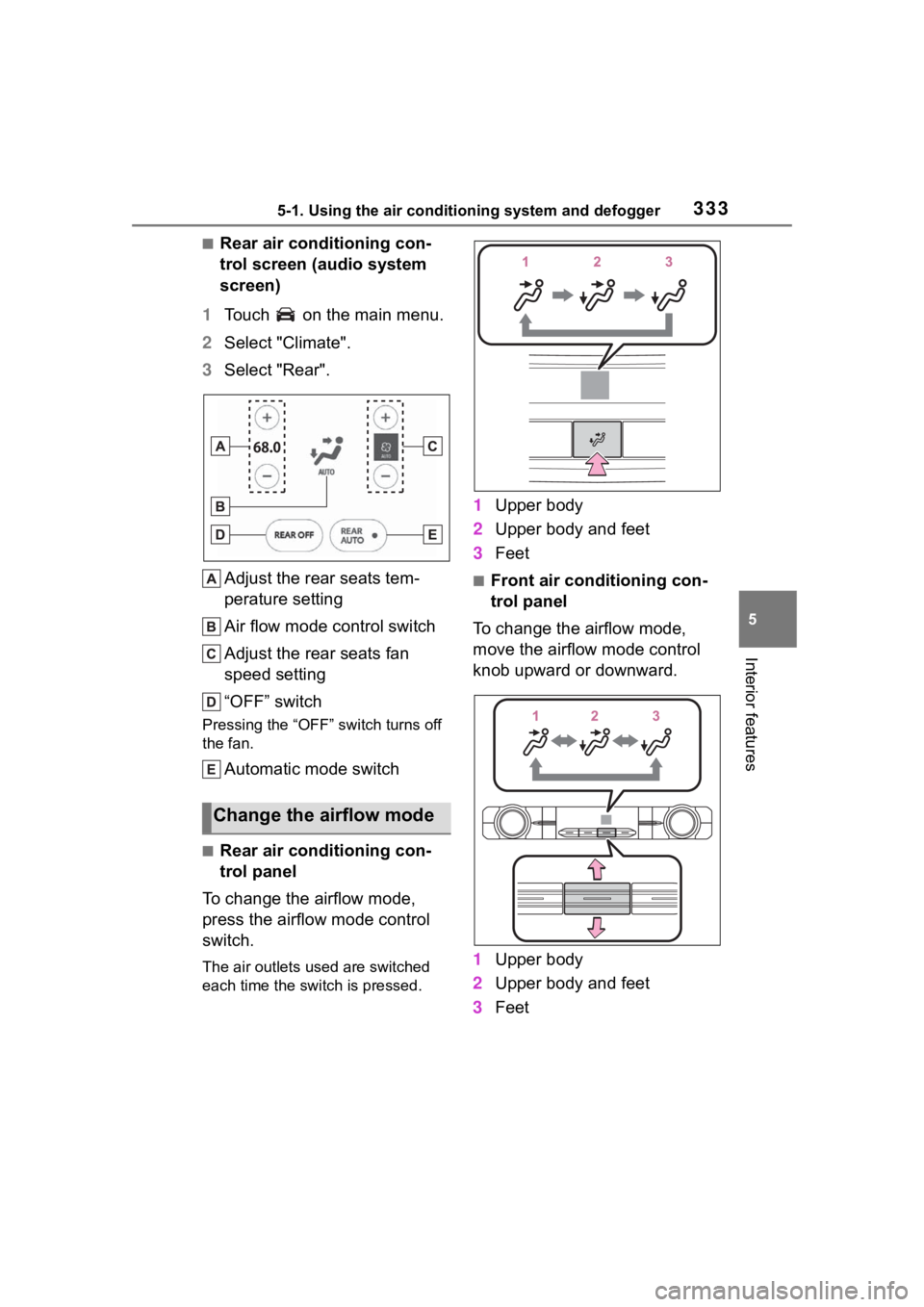
■Rear air conditioning con-
trol screen (audio system
screen)
1 Touch on the main menu.
2 Select "Climate".
3 Select "Rear".
Adjust the rear seats tem-
perature setting
Air flow mode control switch
Adjust the rear seats fan
speed setting
“OFF” switch
Pressing the “OFF” switch turns off
the fan.
Automatic mode switch
■Rear air conditioning con-
trol panel
To change the airflow mode,
press the airflow mode control
switch.
The air outlets used are switched
each time the switch is pressed.
1 Upper body
2 Upper body and feet
3 Feet
■Front air conditioning con-
trol panel
To change the airflow mode,
move the airflow mode control
knob upward or downward.
1 Upper body
2 Upper body and feet
3 Feet
Change the airflow mode
Page 334 of 552
3345-1. Using the air conditioning system and defogger
■Rear air conditioning con-
trol screen
To change the airflow mode,
select the airflow mode control
switch.
The air outlets used are switched
each time the switch is selected.
: Air flows to the upper body
: Air flows to the upper body and
feet
: Air flows to the feet
1Press the automatic mode
switch.
2 Adjust the temperature set-
ting.
3 To stop the operation, press
the “OFF” switch.
If the fan speed setting or air
flow modes are operated, the
automatic mode indicator goes
off. However, automatic mode
for functions other than that
operated is maintained.
■Using automatic mode
Fan speed is adjusted automati-
cally according to the temperature
setting and the ambient conditions.
Therefore, the fan may stop for a
while until warm or cool air is ready
to flow immediately after the auto-
matic mode switch is pressed.
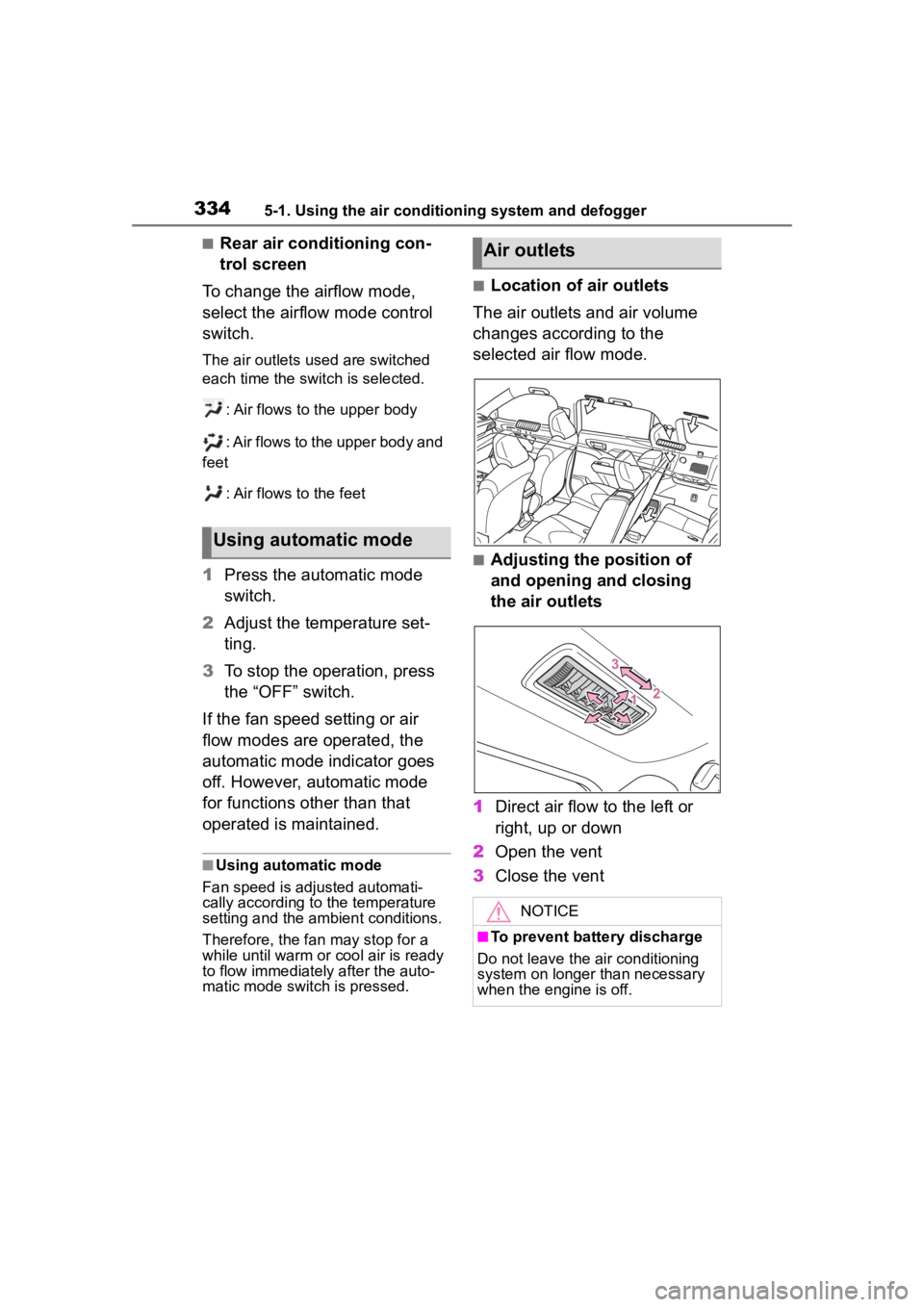
■Location of air outlets
The air outlets and air volume
changes according to the
selected air flow mode.
■Adjusting the position of
and opening and closing
the air outlets
1 Direct air flow to the left or
right, up or down
2 Open the vent
3 Close the vent
Using automatic mode
Air outlets
NOTICE
■To prevent battery discharge
Do not leave the air conditioning
system on longer than necessary
when the engine is off.
Page 335 of 552
3355-1. Using the air conditioning system and defogger
5
Interior features
*: If equipped
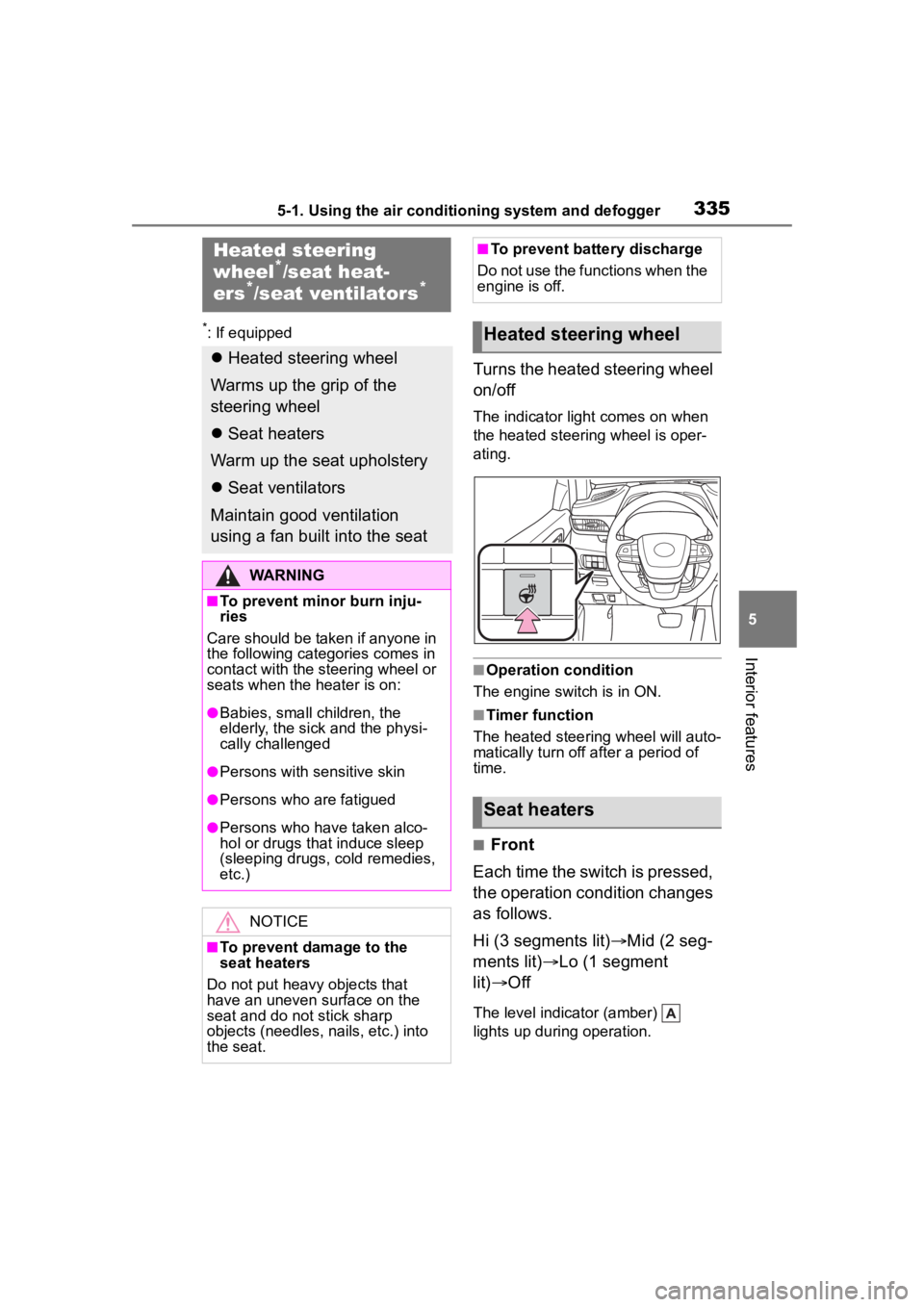
Turns the heated steering wheel
on/off
The indicator light comes on when
the heated steering wheel is oper-
ating.
■Operation condition
The engine switch is in ON.
■Timer function
The heated steering wheel will auto-
matically turn off after a period of
time.
■Front
Each time the switch is pressed,
the operation condition changes
as follows.
Hi (3 segments lit) Mid (2 seg-
ments lit) Lo (1 segment
lit) Off
The level indicator (amber)
lights up during operation.
Heated steering
wheel*/seat heat-
ers*/seat ventilators*
Heated steering wheel
Warms up the grip of the
steering wheel
Seat heaters
Warm up the seat upholstery
Seat ventilators
Maintain good ventilation
using a fan built into the seat
WARNING
■To prevent minor burn inju-
ries
Care should be taken if anyone in
the following categories comes in
contact with the steering wheel or
seats when the heater is on:
●Babies, small children, the
elderly, the sick and the physi-
cally challenged
●Persons with sensitive skin
●Persons who are fatigued
●Persons who have taken alco-
hol or drugs that induce sleep
(sleeping drugs, cold remedies,
etc.)
NOTICE
■To prevent damage to the
seat heaters
Do not put heavy objects that
have an uneven surface on the
seat and do not stick sharp
objects (needles, nails, etc.) into
the seat.
■To prevent battery discharge
Do not use the functions when the
engine is off.
Heated steering wheel
Seat heaters
Page 336 of 552
3365-1. Using the air conditioning system and defogger
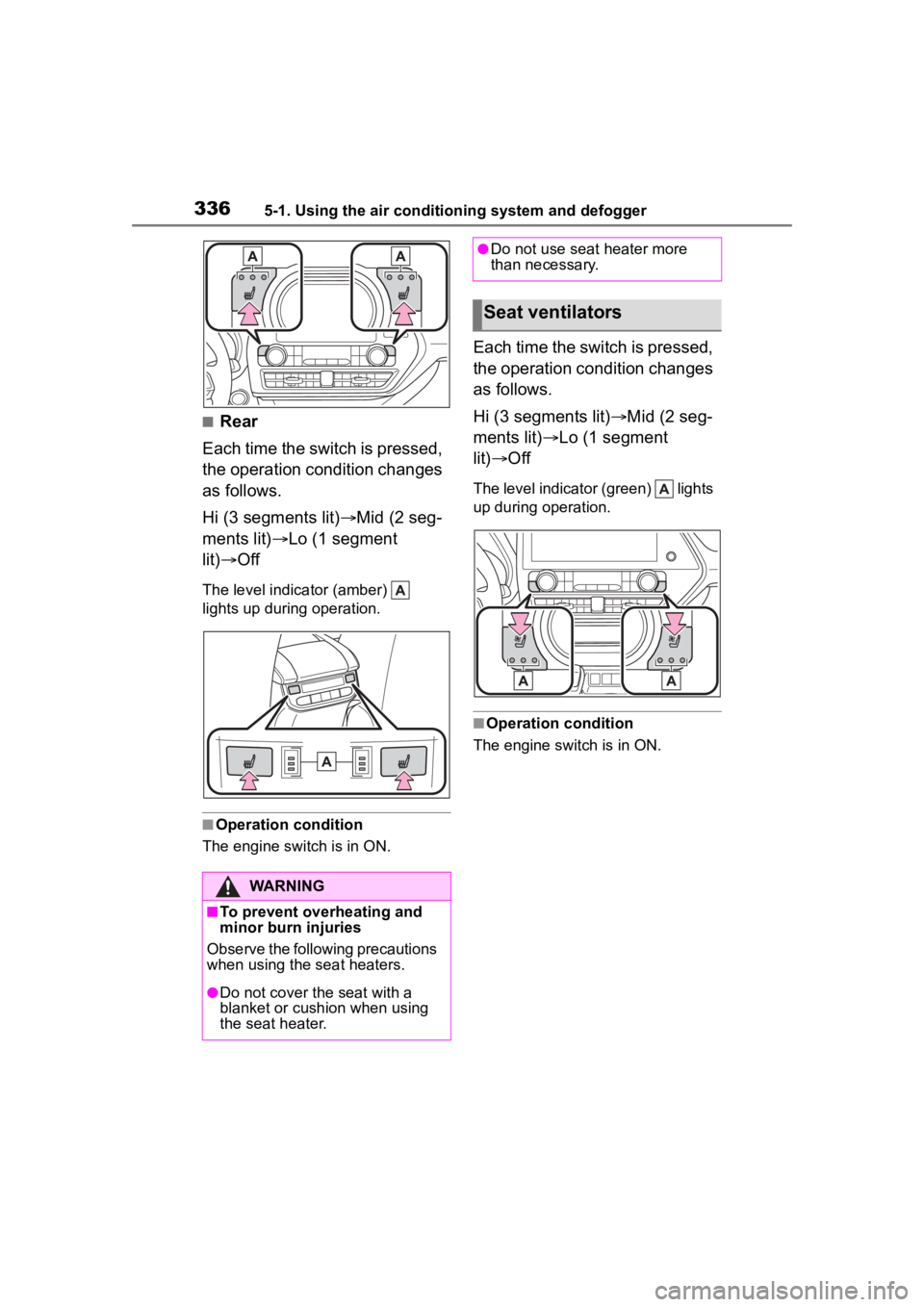
■Rear
Each time the switch is pressed,
the operation condition changes
as follows.
Hi (3 segments lit) Mid (2 seg-
ments lit) Lo (1 segment
lit) Off
The level indica tor (amber)
lights up during operation.
■Operation condition
The engine switch is in ON.
Each time the switch is pressed,
the operation condition changes
as follows.
Hi (3 segments lit) Mid (2 seg-
ments lit) Lo (1 segment
lit) Off
The level indicato r (green) lights
up during operation.
■Operation condition
The engine switch is in ON.
WARNING
■To prevent overheating and
minor burn injuries
Observe the following precautions
when using the seat heaters.
●Do not cover the seat with a
blanket or cushion when using
the seat heater.
●Do not use seat heater more
than necessary.
Seat ventilators