lock TOYOTA HIGHLANDER 2023 Workshop Manual
[x] Cancel search | Manufacturer: TOYOTA, Model Year: 2023, Model line: HIGHLANDER, Model: TOYOTA HIGHLANDER 2023Pages: 552, PDF Size: 13.36 MB
Page 140 of 552

1403-3. Adjusting the seats
2Stow the second seat belt
buckles.
3 Pass the outer seat belts
through the seat belt hangers
and secure the seat belt
plates.
This prevents the shoulder belts
from being damaged.
4Lower the head restraints to
the lowest position. ( P.145)
■Folding down the second
seats
1 Pull the seatback angle
adjustment lever or to
tilt the seatback forward.
Each seatback may be folded sep- arately.
2
Pull the seatback folding
lever to unlock the seatback.
The seatback will be folded
down.
■After folding down the sec-
ond seats
Slide the folded second seats
backward until they lock.
Page 141 of 552
1413-3. Adjusting the seats
3
Before driving
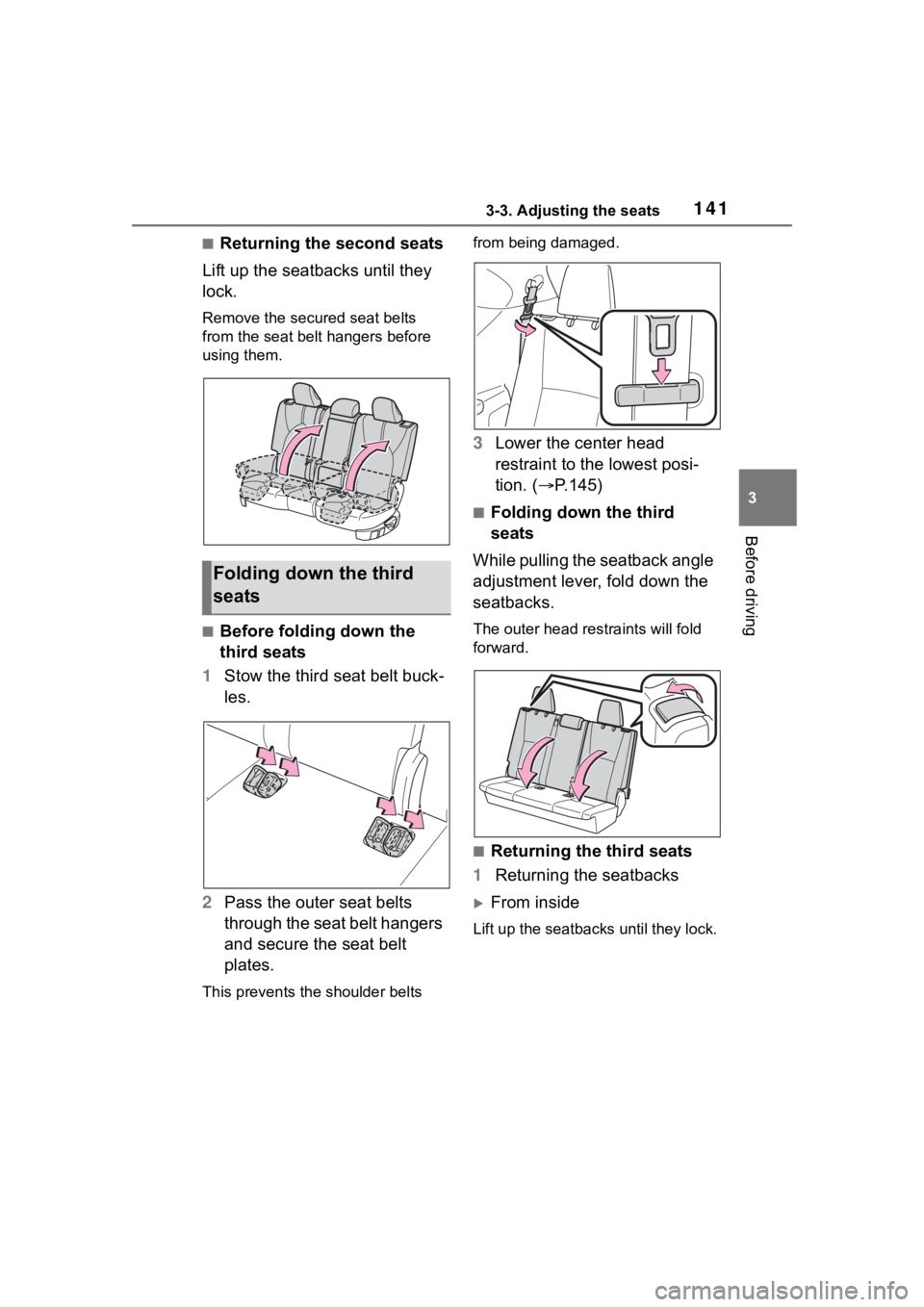
■Returning the second seats
Lift up the seatbacks until they
lock.
Remove the secure d seat belts
from the seat belt hangers before
using them.
■Before folding down the
third seats
1 Stow the third seat belt buck-
les.
2 Pass the outer seat belts
through the seat belt hangers
and secure the seat belt
plates.
This prevents the shoulder belts from being damaged.
3
Lower the center head
restraint to the lowest posi-
tion. ( P.145)
■Folding down the third
seats
While pulling the seatback angle
adjustment lever, fold down the
seatbacks.
The outer head restraints will fold
forward.
■Returning the third seats
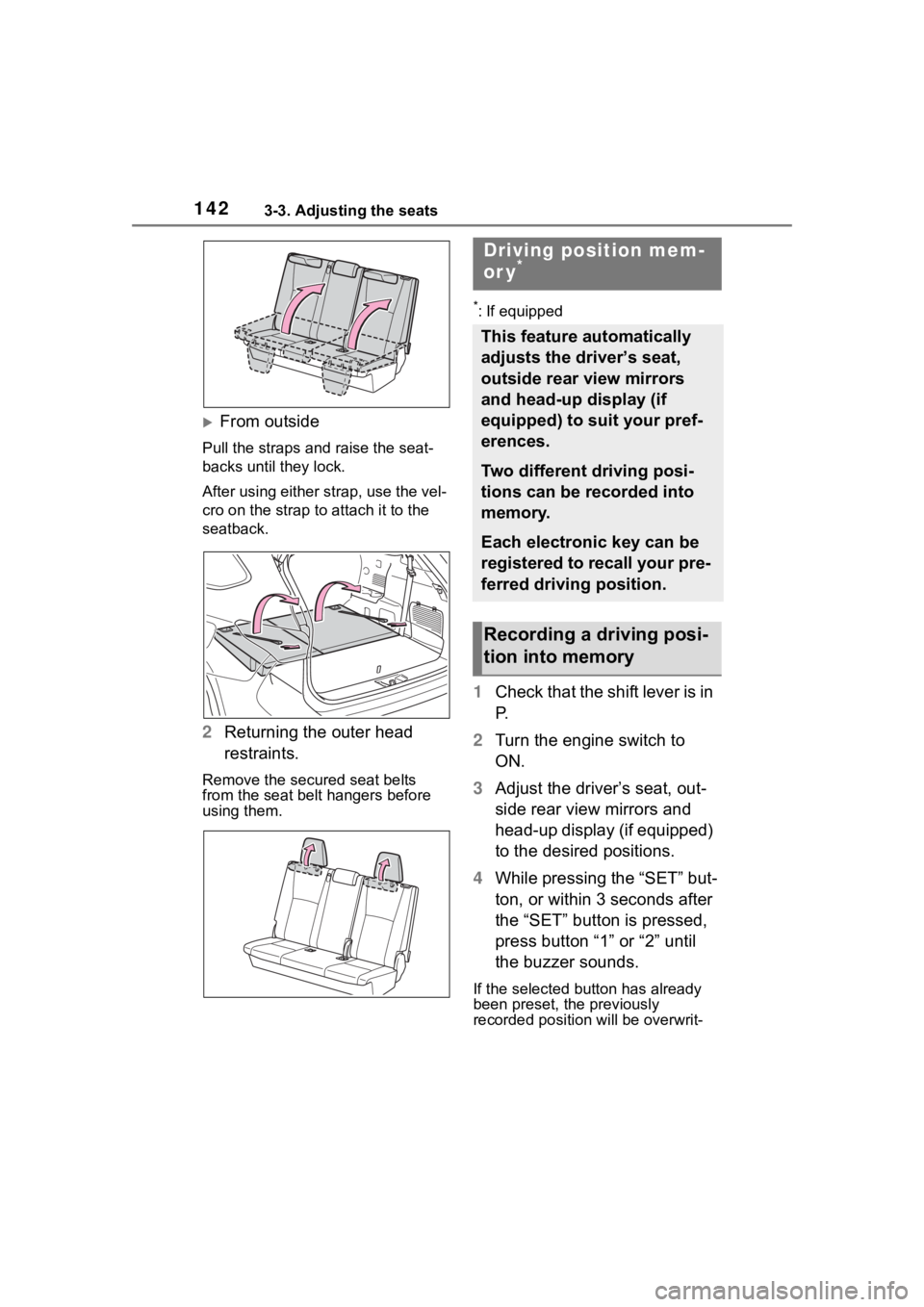
1 Returning the seatbacks
From inside
Lift up the seatbacks until they lock.
Folding down the third
seats
Page 142 of 552
1423-3. Adjusting the seats
From outside
Pull the straps and raise the seat-
backs until they lock.
After using either strap, use the vel-
cro on the strap to attach it to the
seatback.
2 Returning the outer head
restraints.
Remove the secure d seat belts
from the seat belt hangers before
using them.
*: If equipped
1 Check that the shift lever is in
P.
2 Turn the engine switch to
ON.
3 Adjust the driver’s seat, out-
side rear view mirrors and
head-up display (if equipped)
to the desired positions.
4 While pressing the “SET” but-
ton, or within 3 seconds after
the “SET” button is pressed,
press button “1” or “2” until
the buzzer sounds.
If the selected button has already
been preset, the previously
recorded positio n will be overwrit-
Driving position mem-
or y*
This feature automatically
adjusts the driver’s seat,
outside rear view mirrors
and head-up display (if
equipped) to suit your pref-
erences.
Two different driving posi-
tions can be recorded into
memory.
Each electronic key can be
registered to recall your pre-
ferred driving position.
Recording a driving posi-
tion into memory
Page 144 of 552
1443-3. Adjusting the seats
button “1” or “2” before perform-
ing the following:
Carry only the key you want to
register, and then close the
driver’s door.
If 2 or more keys are in the vehicle,
the driving position cannot be
recorded properly.
1Check that the shift lever is in
P.
2 Turn the engine switch to
ON.
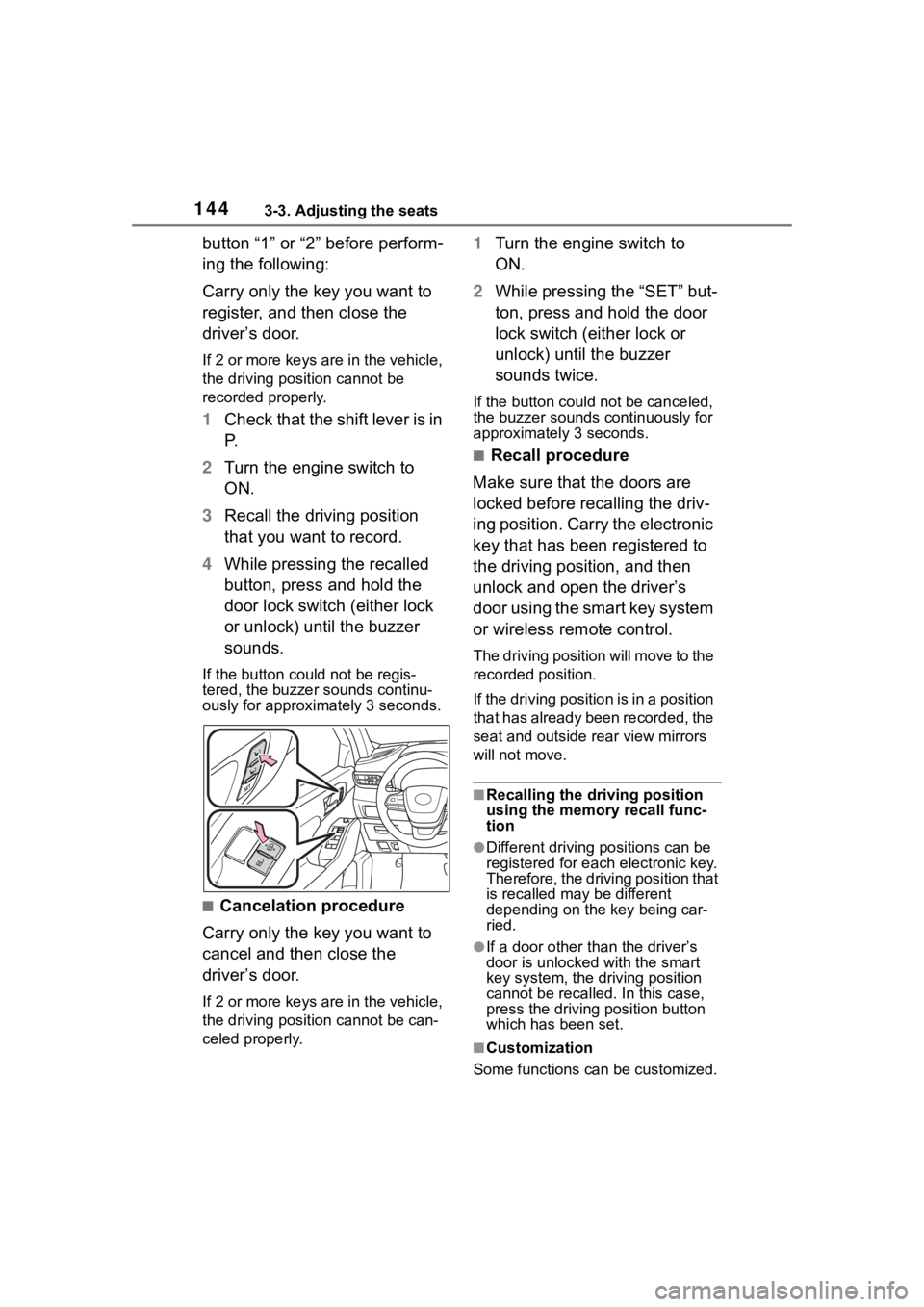
3 Recall the driving position
that you want to record.
4 While pressing the recalled
button, press and hold the
door lock switch (either lock
or unlock) until the buzzer
sounds.
If the button could not be regis-
tered, the buzzer sounds continu-
ously for approximately 3 seconds.
■Cancelation procedure
Carry only the key you want to
cancel and then close the
driver’s door.
If 2 or more keys are in the vehicle,
the driving position cannot be can-
celed properly.
1 Turn the engine switch to
ON.
2 While pressing the “SET” but-
ton, press and hold the door
lock switch (either lock or
unlock) until the buzzer
sounds twice.
If the button could not be canceled,
the buzzer sounds c ontinuously for
approximately 3 seconds.
■Recall procedure
Make sure that the doors are
locked before recalling the driv-
ing position. Carry the electronic
key that has been registered to
the driving position, and then
unlock and open the driver’s
door using the smart key system
or wireless remote control.
The driving position will move to the
recorded position.
If the driving position is in a position
that has already been recorded, the
seat and outside rear view mirrors
will not move.
■Recalling the driving position
using the memory recall func-
tion
●Different driving p ositions can be
registered for each electronic key.
Therefore, the driving position that
is recalled may be different
depending on the key being car-
ried.
●If a door other than the driver’s
door is unlocked with the smart
key system, the driving position
cannot be recalled. In this case,
press the driving position button
which has been set.
■Customization
Some functions can be customized.
Page 145 of 552

1453-3. Adjusting the seats
3
Before driving
( P.494)
■Front seats
1 Up
Pull the head restraints up.
2Down
Push the head restraint down while
pressing the lock release button .
Head restraints
Head restraints are provided
for all seats.
WARNING
■Head restraint precautions
Observe the following precautions
regarding the head restraints.
Failure to do so may result in
death or serious injury.
●Use the head restraints
designed for each respective
seat.
●Adjust the head restraints to the
correct position at all times.
●After adjusting the head
restraints, push down on them
and make sure they are locked
in position.
●Do not drive with the head
restraints removed.
Adjusting a head restraint
Page 146 of 552
1463-3. Adjusting the seats
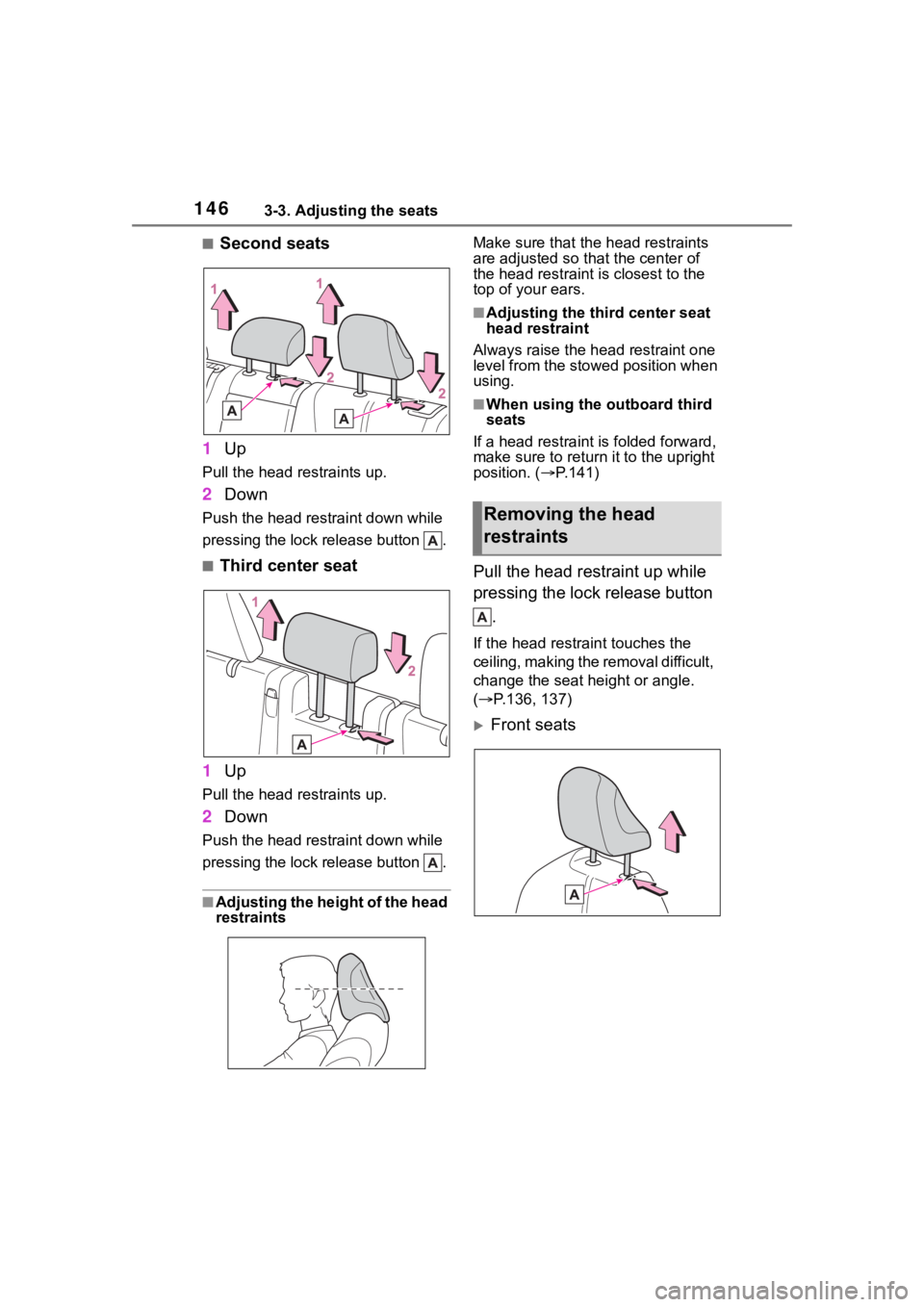
■Second seats
1 Up
Pull the head restraints up.
2Down
Push the head restraint down while
pressing the lock release button .
■Third center seat
1 Up
Pull the head restraints up.
2Down
Push the head restraint down while
pressing the lock release button .
■Adjusting the height of the head
restraints Make sure that the head restraints
are adjusted so that the center of
the head restraint i
s closest to the
top of your ears.
■Adjusting the third center seat
head restraint
Always raise the head restraint one
level from the stowed position when
using.
■When using the outboard third
seats
If a head rest raint is folded forward,
make sure to return it to the upright
position. ( P.141)
Pull the head restraint up while
pressing the lock release button
.
If the head restrai nt touches the
ceiling, making the removal difficult,
change the seat height or angle.
( P.136, 137)
Front seats
Removing the head
restraints
Page 147 of 552

1473-3. Adjusting the seats
3
Before driving
Second seats
Third center seat
Align the head restraint with the
installation holes and push it
down to the lock position.
Press and hold the lock release
button when lowering the
head restraint.
Front seats
Second seats
Third center seat
Installing the head
restraints
Page 148 of 552

1483-4. Adjusting the steering wheel and mirrors
3-4.Adjusting the steering wheel and mirrors
1Hold the steering wheel and
push the lever down.
2 Adjust to the ideal position by
moving the steering wheel
horizontally and vertically.
After adjustment, pull the lever up
to secure the steering wheel.
Press on or close to the
mark.
Steering wheel
Adjustment procedure
WARNING
■Caution while driving
Do not adjust the steering wheel
while driving.
Doing so may cause the driver to
mishandle the vehicle and cause
an accident, resul ting in death or
serious injury.
■After adjusting the steering
wheel
Make sure that the steering wheel
is securely locked.
Otherwise, the steering wheel
may move suddenly, possibly
causing an accident, and resulting
in death or serious injury. Also,
the horn may not sound if the
steering wheel is not securely
locked.
Sounding the horn
Page 161 of 552
1613-4. Adjusting the steering wheel and mirrors
3
Before driving
mirror angle at a desired position
with the shift lever in R.
The adjusted angle will be memo-
rized and the mirror will automati-
cally tilt to the memorized angle
whenever the shift lever is shifted to
R from next time.
The memorized downward tilt posi-
tion of the mirror is linked to the nor-
mal position (angle adjusted with
the shift lever in other than R).
Therefore, if the normal position is
changed after adjustment, the tilt
position will also change.
When the normal position is
changed, readjust the angle in
reversing.
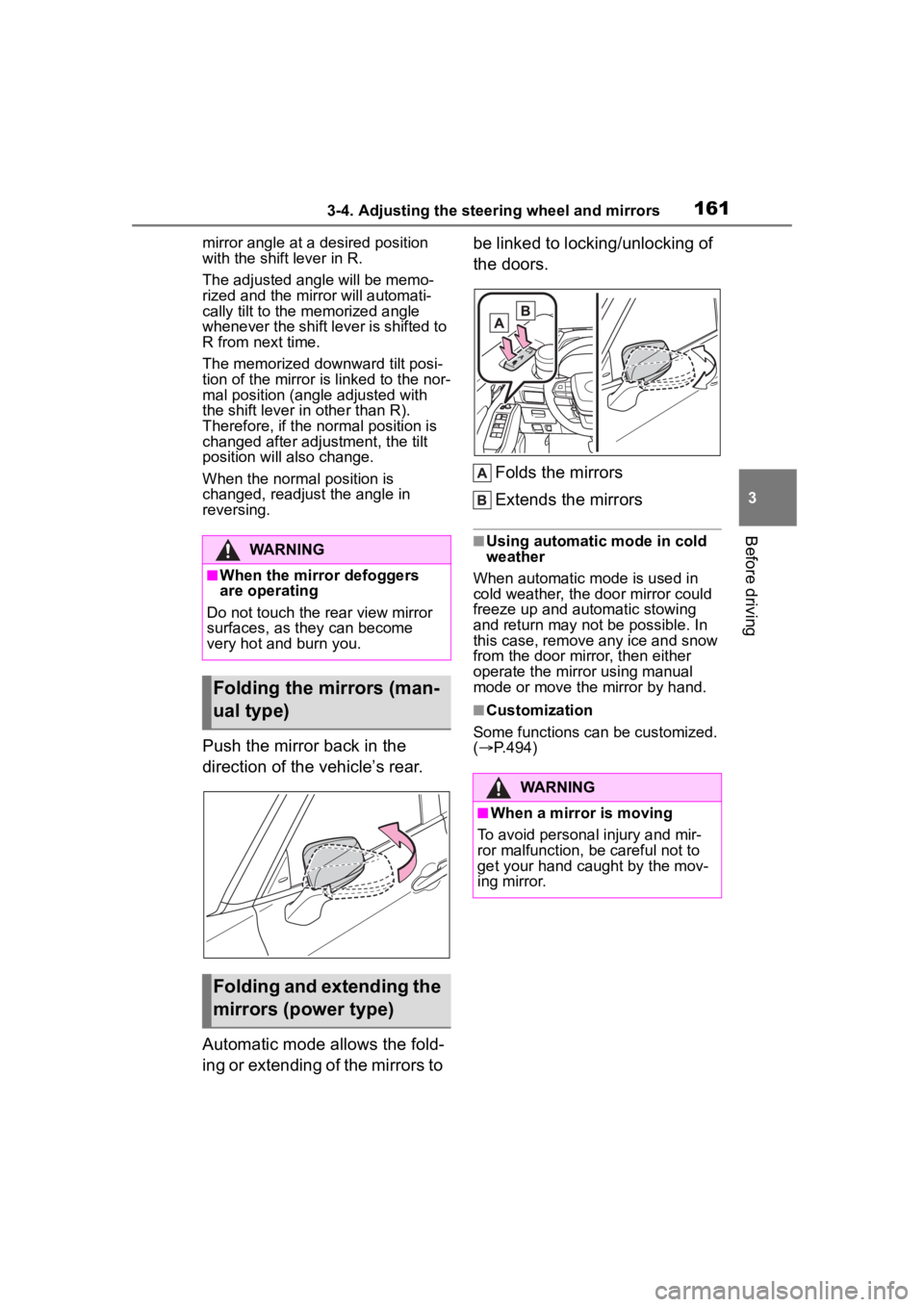
Push the mirror back in the
direction of the vehicle’s rear.
Automatic mode allows the fold-
ing or extending of the mirrors to be linked to locking/unlocking of
the doors.
Folds the mirrors
Extends the mirrors
■Using automatic mode in cold
weather
When automatic mode is used in
cold weather, the door mirror could
freeze up and automatic stowing
and return may not be possible. In
this case, remove any ice and snow
from the door mirror, then either
operate the mirror using manual
mode or move the mirror by hand.
■Customization
Some functions can be customized.
( P.494)
WARNING
■When the mirror defoggers
are operating
Do not touch the rear view mirror
surfaces, as they can become
very hot and burn you.
Folding the mirrors (man-
ual type)
Folding and extending the
mirrors (power type)
WARNING
■When a mirror is moving
To avoid personal injury and mir-
ror malfunction, be careful not to
get your hand caught by the mov-
ing mirror.
Page 163 of 552
1633-5. Opening, closing the windows and moon roof
3
Before driving
pushing the switch in the
one-touch opening direction, and
hold it there for approximately 4
seconds or more.
6 Pull and hold the power window
switch in the one-touch closing
direction again. After the door
window is completely closed,
continue holding the switch for a
further 1 second or more.
If you release the switch while the
window is moving, start again from
the beginning.
If the window reverses and cannot
be fully closed or opened, have the
vehicle inspected by your Toyota
dealer.
■Door lock linked window opera-
tion
●The power windows can be
opened and closed using the
mechanical key.
* ( P.463)
●The power windows can be
opened using the wireless remote
control.
* ( P. 1 1 5 )*: These settings must be custom-
ized at your Toyota dealer.
■Power windows open warning
buzzer
A buzzer sounds and a message is
shown on the multi -information dis-
play when the engine switch is
turned off and the driver’s door is
opened with the power windows
open.
■Customization
Some functions can be customized.
( P.494)
WARNING
Observe the following precau-
tions.
Failing to do so may result in
death or serious injury.
■Closing the windows
●The driver is responsible for all
the power window operations,
including the operation for the
passengers. In order to prevent
accidental operation, especially
by a child, do not let a child
operate the power windows. It is
possible for children and other
passengers to have body parts
caught in the power window.
Also, when ridin g with a child, it
is recommended to use the win-
dow lock switch. (
P.164)
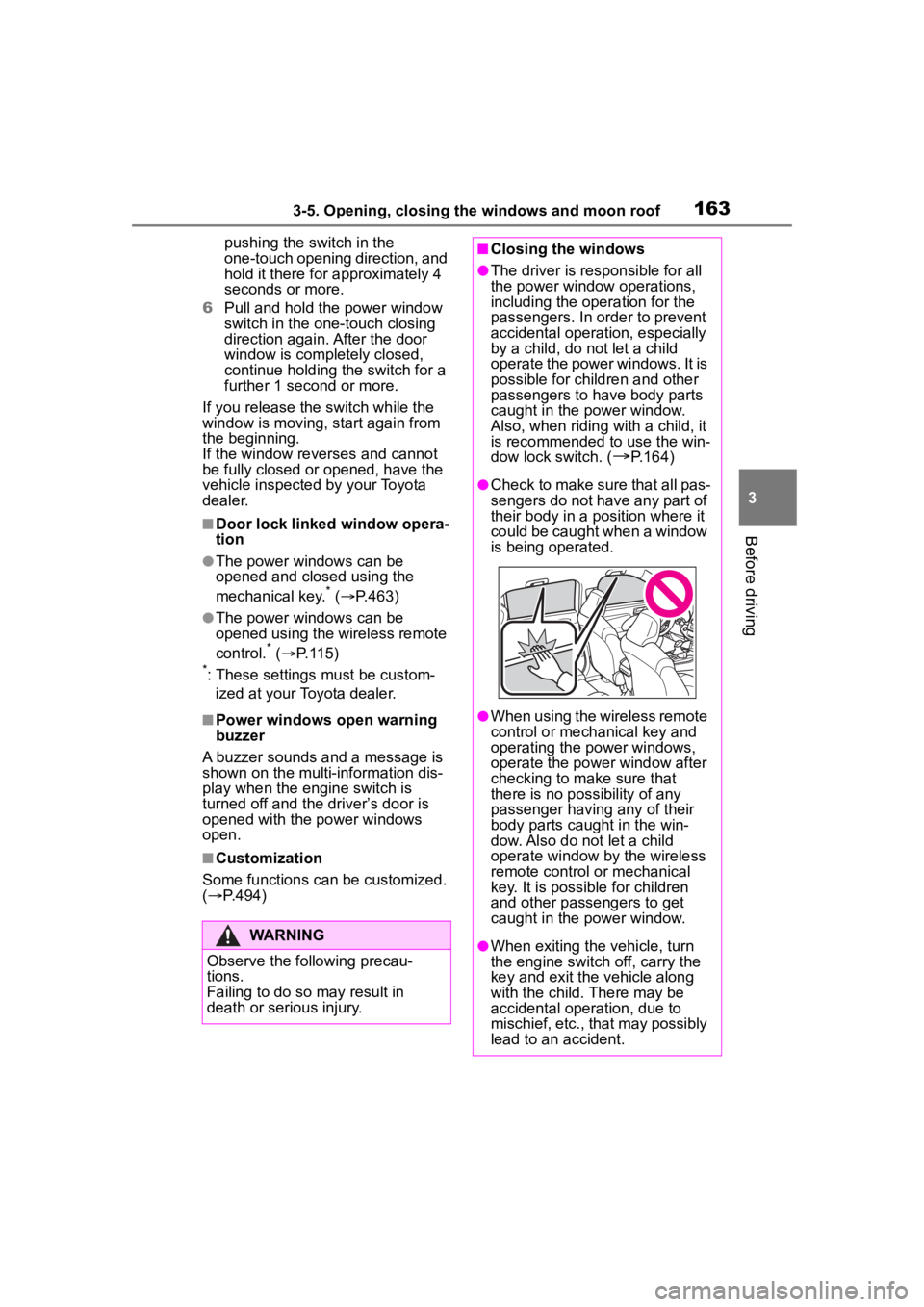
●Check to make sure that all pas-
sengers do not have any part of
their body in a pos ition where it
could be caught when a window
is being operated.
●When using the wireless remote
control or mechanical key and
operating the power windows,
operate the power window after
checking to make sure that
there is no possibility of any
passenger having any of their
body parts caug ht in the win-
dow. Also do not let a child
operate window by the wireless
remote control or mechanical
key. It is possib le for children
and other passengers to get
caught in the power window.
●When exiting the vehicle, turn
the engine switch off, carry the
key and exit the vehicle along
with the child. There may be
accidental operation, due to
mischief, etc., that may possibly
lead to an accident.