warning light TOYOTA HIGHLANDER 2023 Workshop Manual
[x] Cancel search | Manufacturer: TOYOTA, Model Year: 2023, Model line: HIGHLANDER, Model: TOYOTA HIGHLANDER 2023Pages: 552, PDF Size: 13.36 MB
Page 209 of 552
2094-2. Driving procedures
4
Driving
indicator light goes off. (P.205)
■When an inspection at your
Toyota dealer is necessary
When the brake hold standby indi-
cator (green) does not illuminate
even when the brake hold switch is
pressed with the brake hold system
operating conditions met, the sys-
tem may be malfunctioning. Have
the vehicle inspected at your Toyota
dealer.
■If “Brake Hold Malfunction
Press Brake to Deactivate Visit
Your Dealer” or “Brake Hold
Malfunction Visit Your Dealer”
is displayed on the multi-infor-
mation display
The system may be malfunctioning.
Have the vehicle inspected by your
Toyota dealer.
■Warning messages and buzzers
Warning messages and buzzers are
used to indicate a system malfunc-
tion or to inform the driver of the
need for caution. If a warning mes-
sage is shown on the multi-informa-
tion display, read the message and
follow the instructions.
■If the brake hold operated indi-
cator flashes
P. 4 3 8
WARNING
■When the vehicle is on a
steep incline
When using the brake hold sys-
tem on a steep incline, exercise
caution. The brake hold function
may not hold the vehicle in such a
situation.
■When stopped on a slippery
road
The system cannot stop the vehi-
cle when the gripping ability of the
tires has been exceeded. Do not
use the system when stopped on
a slippery road.
NOTICE
■When parking the vehicle
The brake hold system is not
designed for use when parking
the vehicle for a long period of
time. Turning the engine switch off
while the system is holding the
brake may release the brake,
which would cause the vehicle to
move. When operating the engine
switch, depress the brake pedal,
shift the shift lever to P and set
the parking brake.
Page 213 of 552
2134-3. Operating the lights and wipers
4
Driving
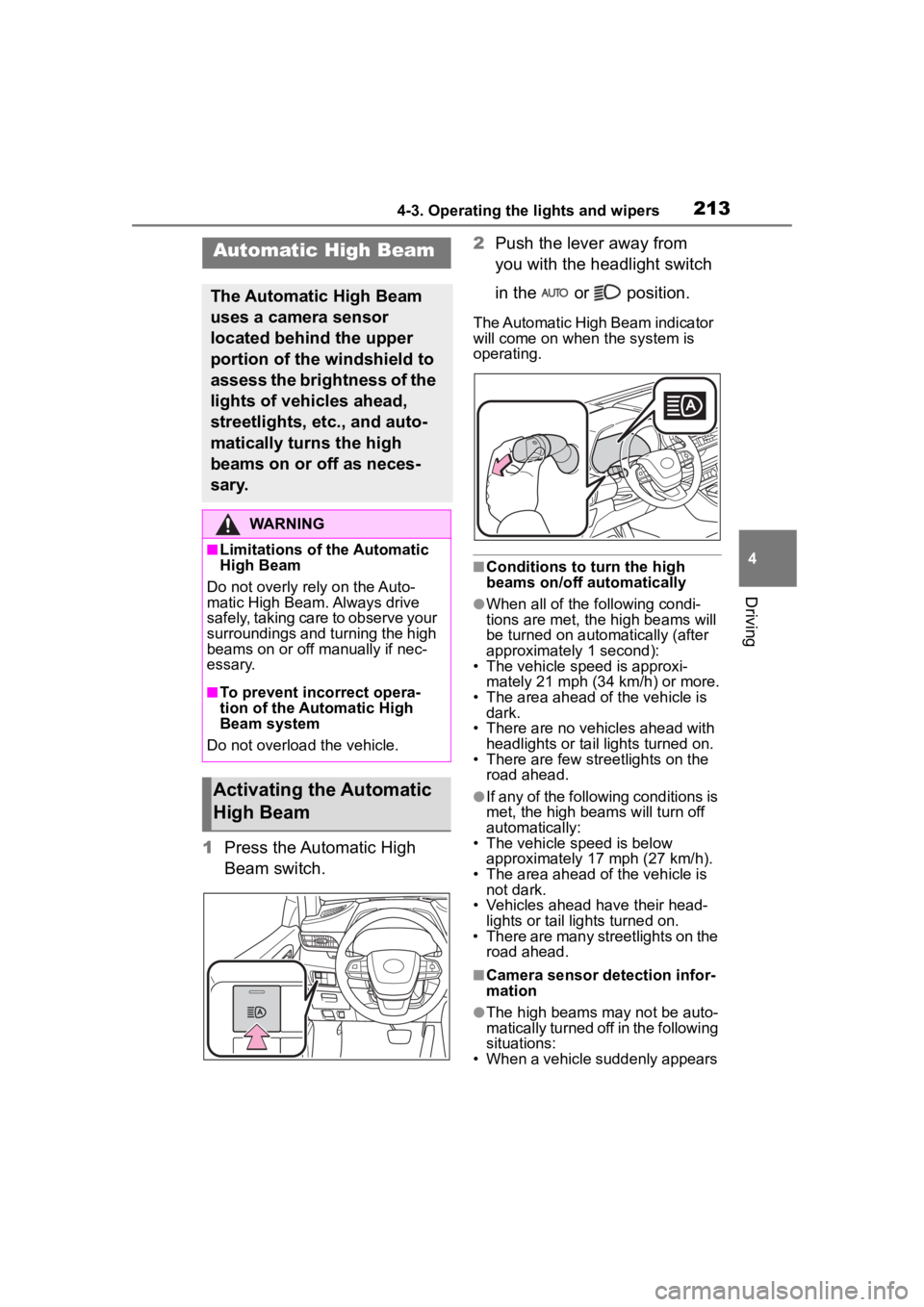
1Press the Automatic High
Beam switch. 2
Push the lever away from
you with the headlight switch
in the or position.
The Automatic High Beam indicator
will come on when the system is
operating.
■Conditions to turn the high
beams on/off automatically
●When all of the following condi-
tions are met, the high beams will
be turned on autom atically (after
approximately 1 second):
• The vehicle speed is approxi-
mately 21 mph (34 km/h) or more.
• The area ahead of the vehicle is dark.
• There are no vehicles ahead with headlights or tail lights turned on.
• There are few str eetlights on the
road ahead.
●If any of the following conditions is
met, the high beams will turn off
automatically:
• The vehicle speed is below
approximately 17 mph (27 km/h).
• The area ahead of the vehicle is not dark.
• Vehicles ahead have their head- lights or tail lights turned on.
• There are many streetlights on the road ahead.
■Camera sensor detection infor-
mation
●The high beams m ay not be auto-
matically turned off in the following
situations:
• When a vehicle suddenly appears
Automatic High Beam
The Automatic High Beam
uses a camera sensor
located behind the upper
portion of the windshield to
assess the brightness of the
lights of vehicles ahead,
streetlights, etc., and auto-
matically turns the high
beams on or off as neces-
sary.
WARNING
■Limitations of the Automatic
High Beam
Do not overly rely on the Auto-
matic High Beam. Always drive
safely, taking care to observe your
surroundings and turning the high
beams on or off manually if nec-
essary.
■To prevent incorrect opera-
tion of the Automatic High
Beam system
Do not overload the vehicle.
Activating the Automatic
High Beam
Page 219 of 552
2194-3. Operating the lights and wipers
4
Driving
windshield wipers are operating, if a
front door is opened, the operation
of the windshield wipers will be
stopped to prevent anyone enter-
ing/exiting the vehicle from being
sprayed by water from the wipers,
provided the vehicle is stopped with
the parking brake applied or the shift
lever in P. When the front door is
closed, wiper operation will resume.
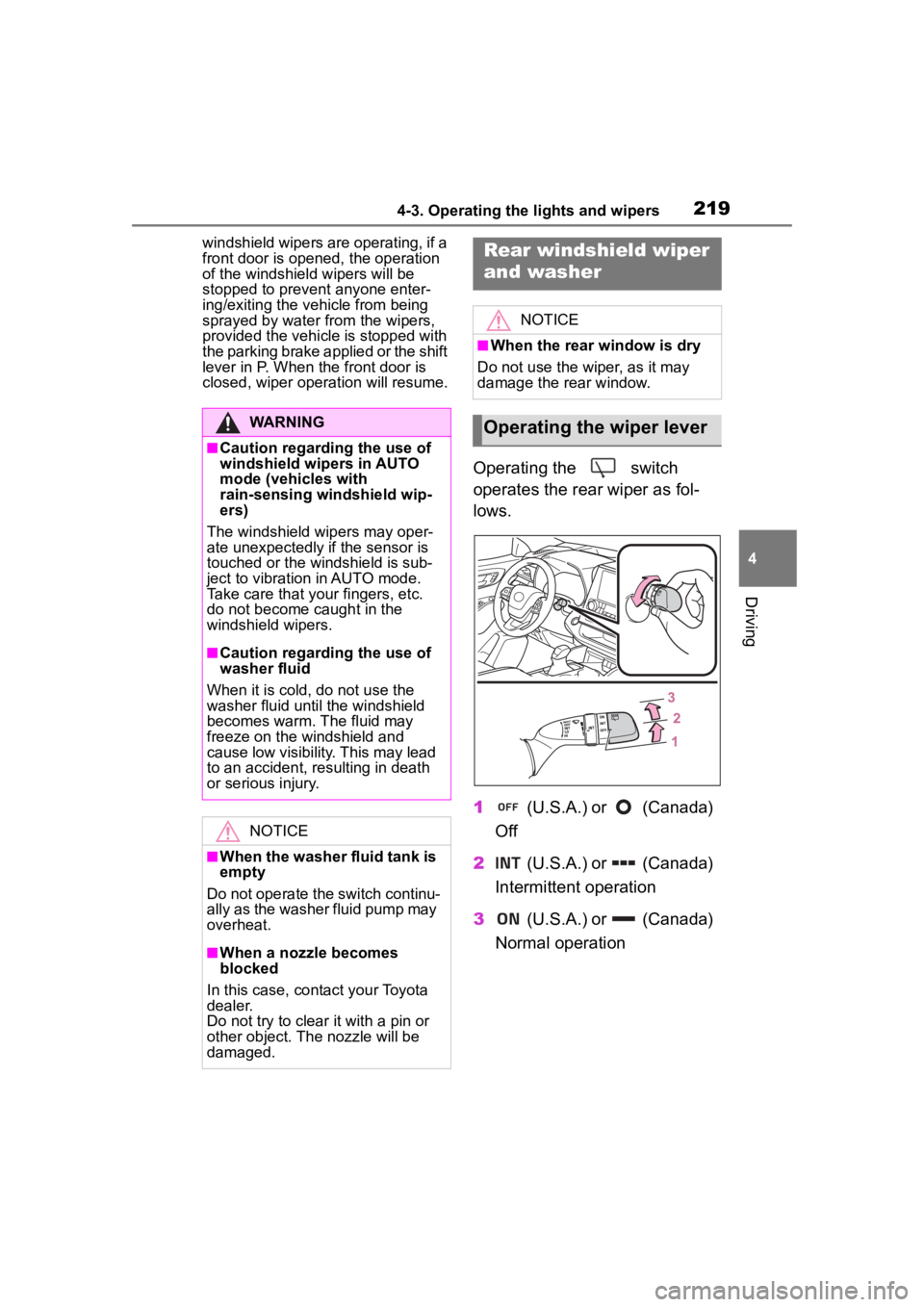
Operating the switch
operates the rear wiper as fol-
lows.
1 (U.S.A.) or (Canada)
Off
2 (U.S.A.) or (Canada)
Intermittent operation
3 (U.S.A.) or (Canada)
Normal operation
WARNING
■Caution regarding the use of
windshield wipers in AUTO
mode (vehicles with
rain-sensing windshield wip-
ers)
The windshield wipers may oper-
ate unexpectedly if the sensor is
touched or the windshield is sub-
ject to vibration in AUTO mode.
Take care that your fingers, etc.
do not become caught in the
windshield wipers.
■Caution regarding the use of
washer fluid
When it is cold, do not use the
washer fluid until the windshield
becomes warm. The fluid may
freeze on the windshield and
cause low visibility. This may lead
to an accident, resulting in death
or serious injury.
NOTICE
■When the washer fluid tank is
empty
Do not operate the switch continu-
ally as the washer fluid pump may
overheat.
■When a nozzle becomes
blocked
In this case, contact your Toyota
dealer.
Do not try to clear it with a pin or
other object. The nozzle will be
damaged.
Rear windshield wiper
and washer
NOTICE
■When the rear window is dry
Do not use the wiper, as it may
damage the rear window.
Operating the wiper lever
Page 222 of 552
2224-4. Refueling
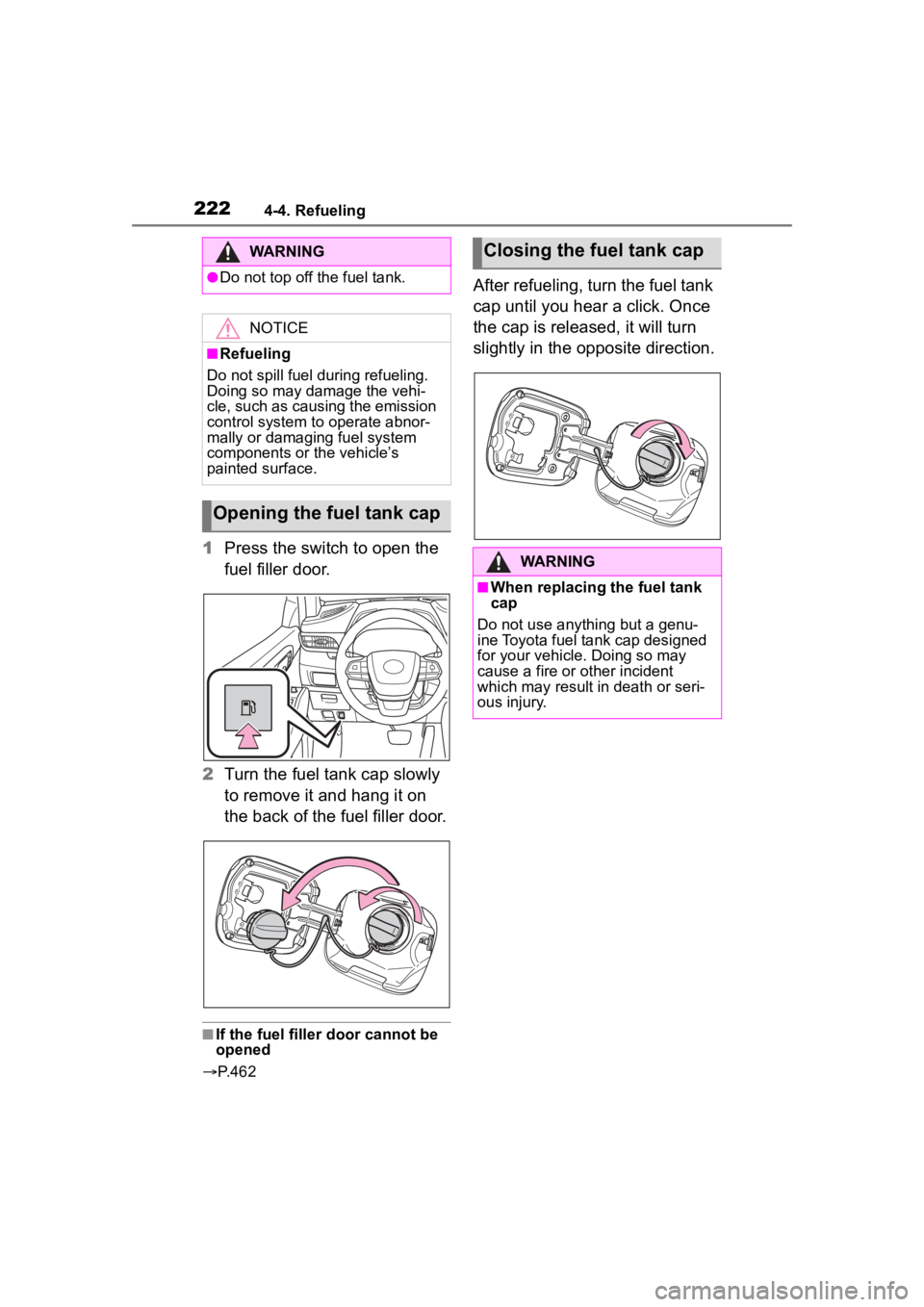
1Press the switch to open the
fuel filler door.
2 Turn the fuel tank cap slowly
to remove it and hang it on
the back of the fuel filler door.
■If the fuel filler door cannot be
opened
P. 4 6 2
After refueling, turn the fuel tank
cap until you hear a click. Once
the cap is released, it will turn
slightly in the opposite direction.
WARNING
●Do not top off the fuel tank.
NOTICE
■Refueling
Do not spill fuel during refueling.
Doing so may damage the vehi-
cle, such as causing the emission
control system to operate abnor-
mally or damaging fuel system
components or the vehicle’s
painted surface.
Opening the fuel tank cap
Closing the fuel tank cap
WARNING
■When replacing the fuel tank
cap
Do not use anything but a genu-
ine Toyota fuel tank cap designed
for your vehicle. Doing so may
cause a fire or other incident
which may result i n death or seri-
ous injury.
Page 225 of 552
2254-5. Using the driving support systems
4
Driving
WARNING
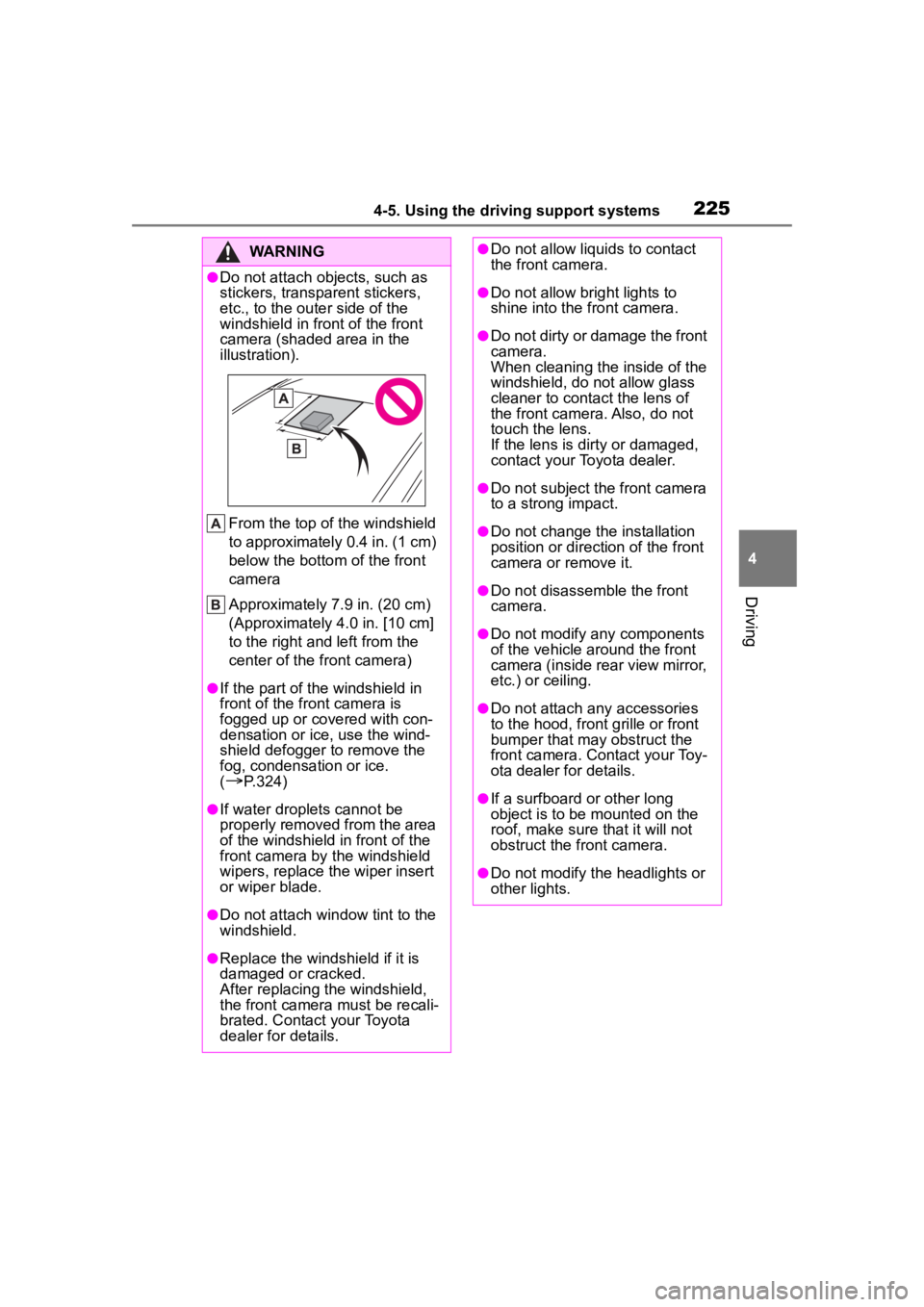
●Do not attach objects, such as
stickers, transparent stickers,
etc., to the outer side of the
windshield in fr ont of the front
camera (shaded area in the
illustration).
From the top of the windshield
to approximately 0.4 in. (1 cm)
below the bottom of the front
camera
Approximately 7.9 in. (20 cm)
(Approximately 4.0 in. [10 cm]
to the right and left from the
center of the front camera)
●If the part of the windshield in
front of the front camera is
fogged up or covered with con-
densation or ice, use the wind-
shield defogger to remove the
fog, condensation or ice.
(
P.324)
●If water droplets cannot be
properly removed from the area
of the windshield in front of the
front camera by the windshield
wipers, replace the wiper insert
or wiper blade.
●Do not attach win dow tint to the
windshield.
●Replace the windshield if it is
damaged or cracked.
After replacing the windshield,
the front camera must be recali-
brated. Contact your Toyota
dealer for details.
●Do not allow liquids to contact
the front camera.
●Do not allow bright lights to
shine into the front camera.
●Do not dirty or damage the front
camera.
When cleaning the inside of the
windshield, do not allow glass
cleaner to contact the lens of
the front camera. Also, do not
touch the lens.
If the lens is dirty or damaged,
contact your Toyota dealer.
●Do not subject the front camera
to a strong impact.
●Do not change the installation
position or direction of the front
camera or remove it.
●Do not disassemble the front
camera.
●Do not modify any components
of the vehicle around the front
camera (inside rear view mirror,
etc.) or ceiling.
●Do not attach any accessories
to the hood, front grille or front
bumper that may obstruct the
front camera. Contact your Toy-
ota dealer for details.
●If a surfboard or other long
object is to be mounted on the
roof, make sure that it will not
obstruct the front camera.
●Do not modify the headlights or
other lights.
Page 226 of 552
2264-5. Using the driving support systems
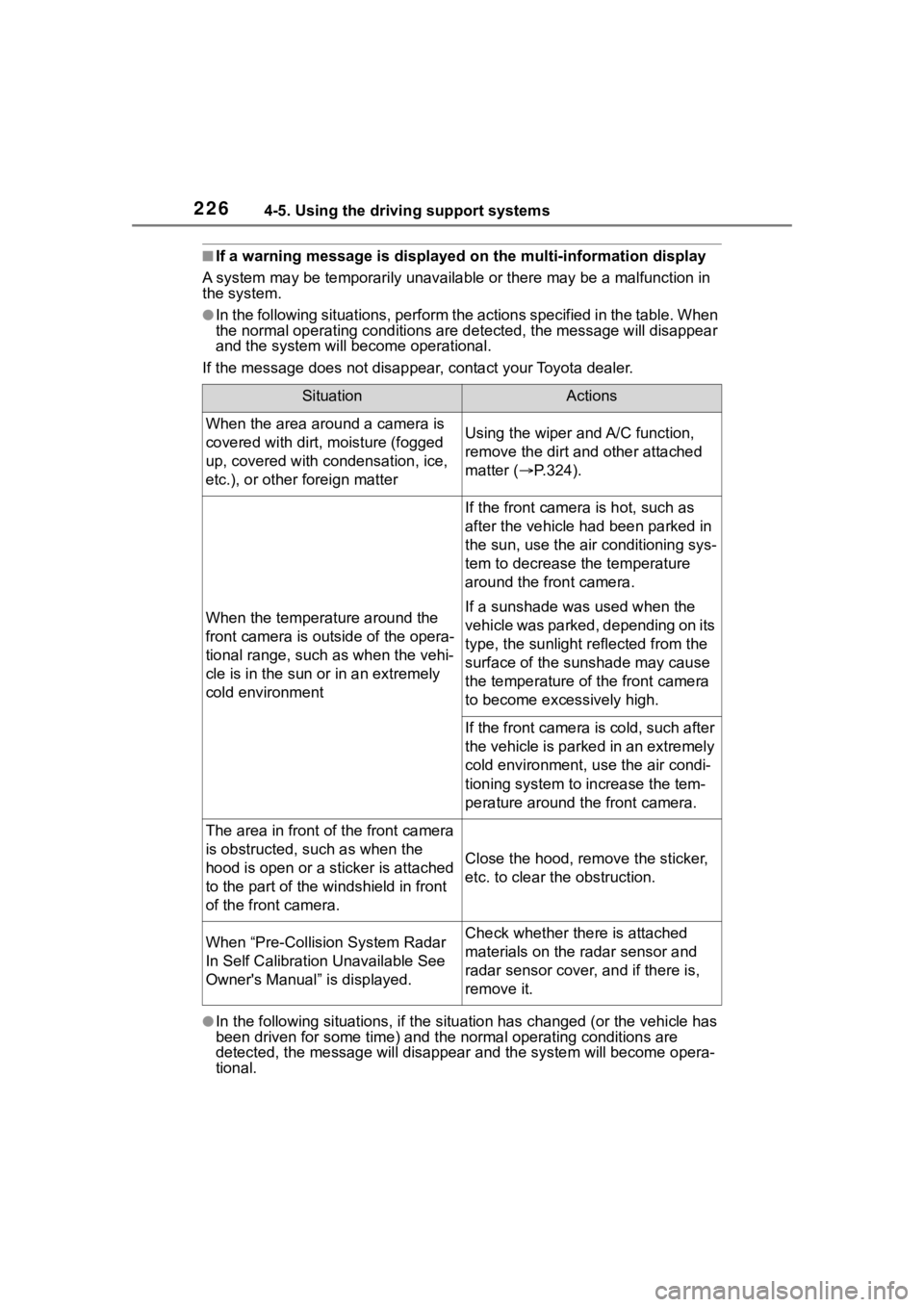
■If a warning message is displayed on the multi-information display
A system may be tempor arily unavailable or there may be a malfu nction in
the system.
●In the following situations, perform the actions specified in t he table. When
the normal operating conditions are detected, the message will disappear
and the system will be come operational.
If the message does not disapp ear, contact your Toyota dealer.
●In the following situations, if the situation has changed (or the vehicle has
been driven for some time) and the normal operating conditions are
detected, the message will disappear and the system will become opera-
tional.
SituationActions
When the area around a camera is
covered with dirt, moisture (fogged
up, covered with condensation, ice,
etc.), or other foreign matterUsing the wiper and A/C function,
remove the dirt and other attached
matter ( P.324).
When the temperature around the
front camera is out side of the opera-
tional range, such as when the vehi-
cle is in the sun or in an extremely
cold environment
If the front camera is hot, such as
after the vehicle had been parked in
the sun, use the air conditioning sys-
tem to decrease the temperature
around the front camera.
If a sunshade was used when the
vehicle was parked, depending on its
type, the sunlight r eflected from the
surface of the sunshade may cause
the temperature of the front camera
to become exce ssively high.
If the front camera is cold, such after
the vehicle is parked in an extremely
cold environment, use the air condi-
tioning system to increase the tem-
perature around the front camera.
The area in front of the front camera
is obstructed, such as when the
hood is open or a sticker is attached
to the part of the windshield in front
of the front camera.
Close the hood, remove the sticker,
etc. to clear the obstruction.
When “Pre-Collisi on System Radar
In Self Calibration Unavailable See
Owner's Manual” is displayed.Check whether there is attached
materials on the radar sensor and
radar sensor cover, and if there is,
remove it.
Page 231 of 552
2314-5. Using the driving support systems
4
Driving
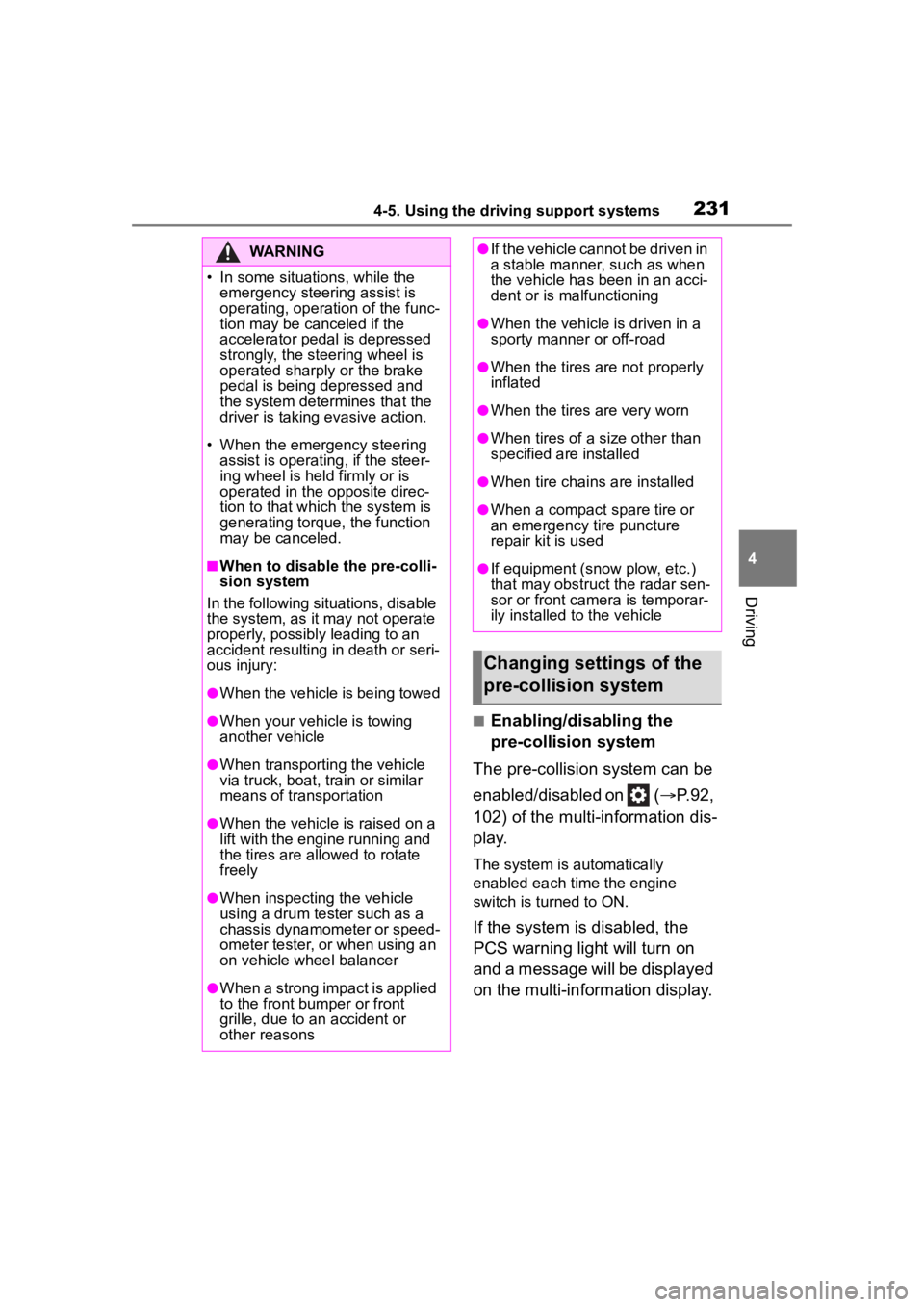
■Enabling/disabling the
pre-collision system
The pre-collision system can be
enabled/disabled on ( P.92,
102) of the multi-information dis-
p l a y.
The system is automatically
enabled each time the engine
switch is turned to ON.
If the system is disabled, the
PCS warning light will turn on
and a message will be displayed
on the multi-information display.
WARNING
Page 233 of 552
2334-5. Using the driving support systems
4
Driving
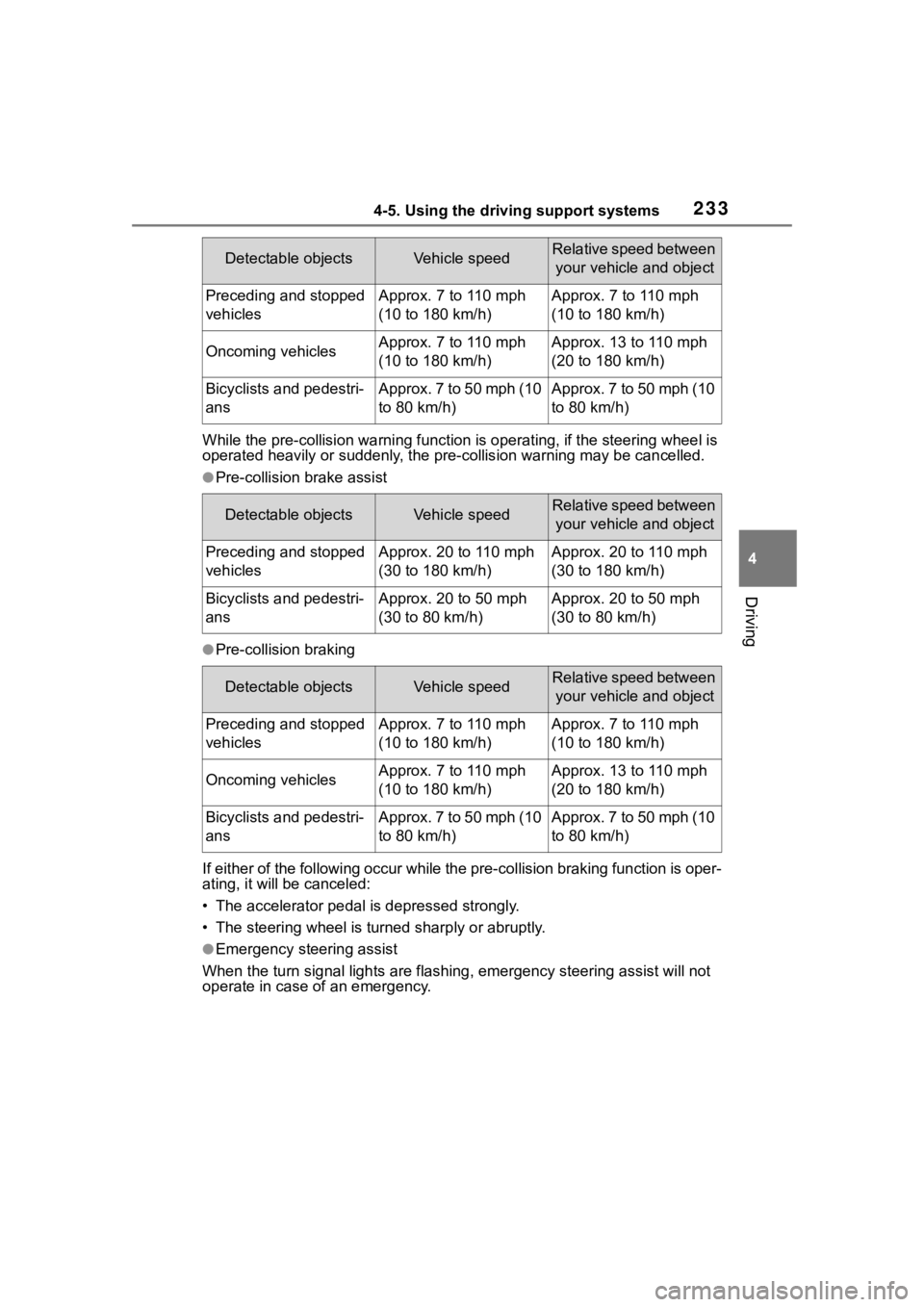
While the pre-collision warning function is operating, if the steering wheel is
operated heavily or suddenly, the pre-collis ion warning may be cancelled.
●Pre-collision brake assist
●Pre-collision braking
If either of the following occur while the pre-collision braking function is oper-
ating, it will be canceled:
• The accelerator pedal is depressed strongly.
• The steering wheel is tur ned sharply or abruptly.
●Emergency steering assist
When the turn signal lights are flashing, emergency steering as sist will not
operate in case of an emergency.
Detectable objectsVehicle speedRelative speed between
your vehicle and object
Preceding and stopped
vehiclesApprox. 7 to 110 mph
(10 to 180 km/h)Approx. 7 to 110 mph
(10 to 180 km/h)
Oncoming vehiclesApprox. 7 to 110 mph
(10 to 180 km/h)Approx. 13 to 110 mph
(20 to 180 km/h)
Bicyclists and pedestri-
ansApprox. 7 to 50 mph (10
to 80 km/h)Approx. 7 to 50 mph (10
to 80 km/h)
Detectable objectsVehicle speedRelative speed between your vehicle and object
Preceding and stopped
vehiclesApprox. 20 to 110 mph
(30 to 180 km/h)Approx. 20 to 110 mph
(30 to 180 km/h)
Bicyclists and pedestri-
ansApprox. 20 to 50 mph
(30 to 80 km/h)Approx. 20 to 50 mph
(30 to 80 km/h)
Detectable objectsVehicle speedRelative speed between your vehicle and object
Preceding and stopped
vehiclesApprox. 7 to 110 mph
(10 to 180 km/h)Approx. 7 to 110 mph
(10 to 180 km/h)
Oncoming vehiclesApprox. 7 to 110 mph
(10 to 180 km/h)Approx. 13 to 110 mph
(20 to 180 km/h)
Bicyclists and pedestri-
ansApprox. 7 to 50 mph (10
to 80 km/h)Approx. 7 to 50 mph (10
to 80 km/h)
Page 234 of 552
2344-5. Using the driving support systems
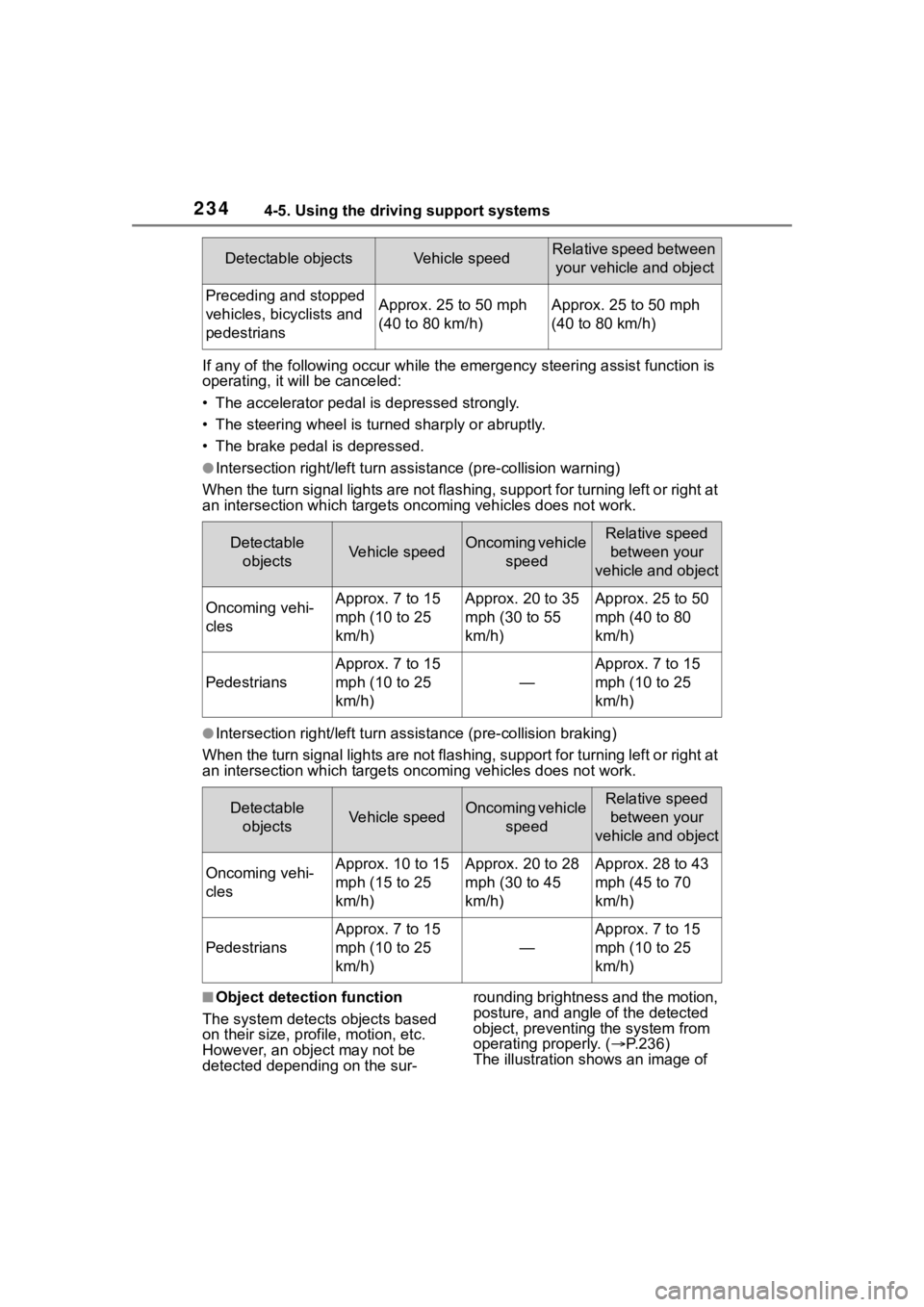
If any of the following occur while the emergency steering assi st function is
operating, it will be canceled:
• The accelerator pedal is depressed strongly.
• The steering wheel is tur ned sharply or abruptly.
• The brake pedal is depressed.
●Intersection right/left turn assistance (pre-collision warning)
When the turn signal lights are not flashing, support for turning left or right at
an intersection which targets on coming vehicles does not work.
●Intersection right/left turn assistance (pre-collision braking)
When the turn signal lights are not flashing, support for turning left or right at
an intersection which targets on coming vehicles does not work.
■Object detection function
The system detects objects based
on their size, profile, motion, etc.
However, an object may not be
detected depending on the sur- rounding brightness and the motion,
posture, and angle of the detected
object, preventing the system from
operating properly. (
P.236)
The illustration shows an image of
Detectable objectsVehicle speedRelative speed between
your vehicle and object
Preceding and stopped
vehicles, bicyclists and
pedestriansApprox. 25 to 50 mph
(40 to 80 km/h)Approx. 25 to 50 mph
(40 to 80 km/h)
Detectable objectsVehicle speedOncoming vehicle speedRelative speed between your
vehicle and object
Oncoming vehi-
clesApprox. 7 to 15
mph (10 to 25
km/h)Approx. 20 to 35
mph (30 to 55
km/h)Approx. 25 to 50
mph (40 to 80
km/h)
Pedestrians
Approx. 7 to 15
mph (10 to 25
km/h)
—
Approx. 7 to 15
mph (10 to 25
km/h)
Detectable objectsVehicle speedOncoming vehicle speedRelative speed between your
vehicle and object
Oncoming vehi-
clesApprox. 10 to 15
mph (15 to 25
km/h)Approx. 20 to 28
mph (30 to 45
km/h)Approx. 28 to 43
mph (45 to 70
km/h)
Pedestrians
Approx. 7 to 15
mph (10 to 25
km/h)
—
Approx. 7 to 15
mph (10 to 25
km/h)
Page 239 of 552
2394-5. Using the driving support systems
4
Driving
pre-collision brake assist and
pre-collision braking functions are
also disabled.
●The PCS warning light will turn on
and “VSC Turned OFF Pre-Colli-
sion Brake System Unavailable”
will be display ed on the
multi-informat ion display.
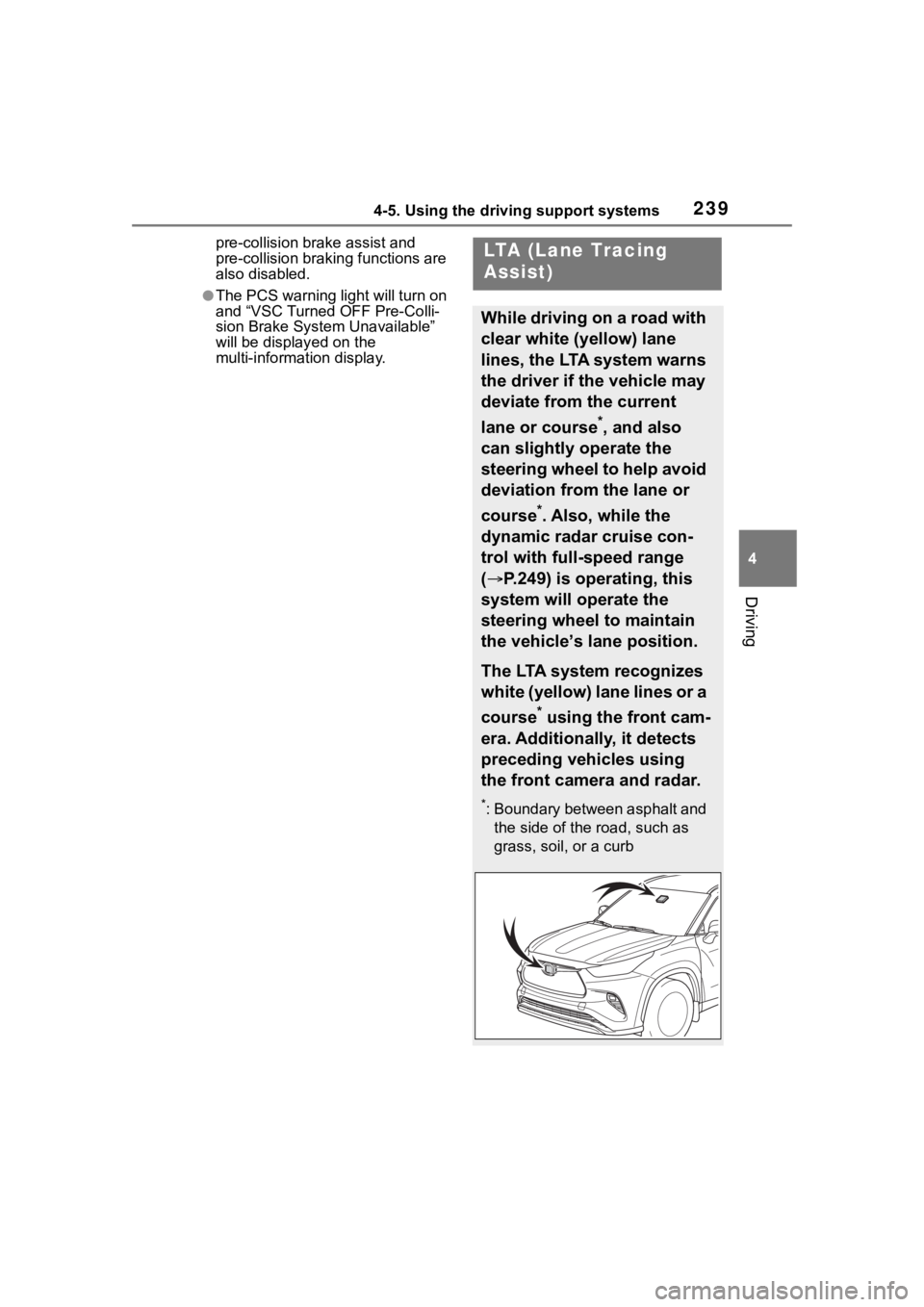
LTA (Lane Tracing
Assist)
While driving on a road with
clear white (yellow) lane
lines, the LTA system warns
the driver if the vehicle may
deviate from the current
lane or course
*, and also
can slightly operate the
steering wheel to help avoid
deviation from the lane or
course
*. Also, while the
dynamic radar cruise con-
trol with full-speed range
( P.249) is operating, this
system will operate the
steering wheel to maintain
the vehicle’s lane position.
The LTA system recognizes
white (yellow) lane lines or a
course
* using the front cam-
era. Additionally, it detects
preceding vehicles using
the front camera and radar.
*: Boundary between asphalt and the side of the road, such as
grass, soil, or a curb