interior light switch TOYOTA HIGHLANDER 2023 Owners Manual
[x] Cancel search | Manufacturer: TOYOTA, Model Year: 2023, Model line: HIGHLANDER, Model: TOYOTA HIGHLANDER 2023Pages: 552, PDF Size: 13.36 MB
Page 3 of 552
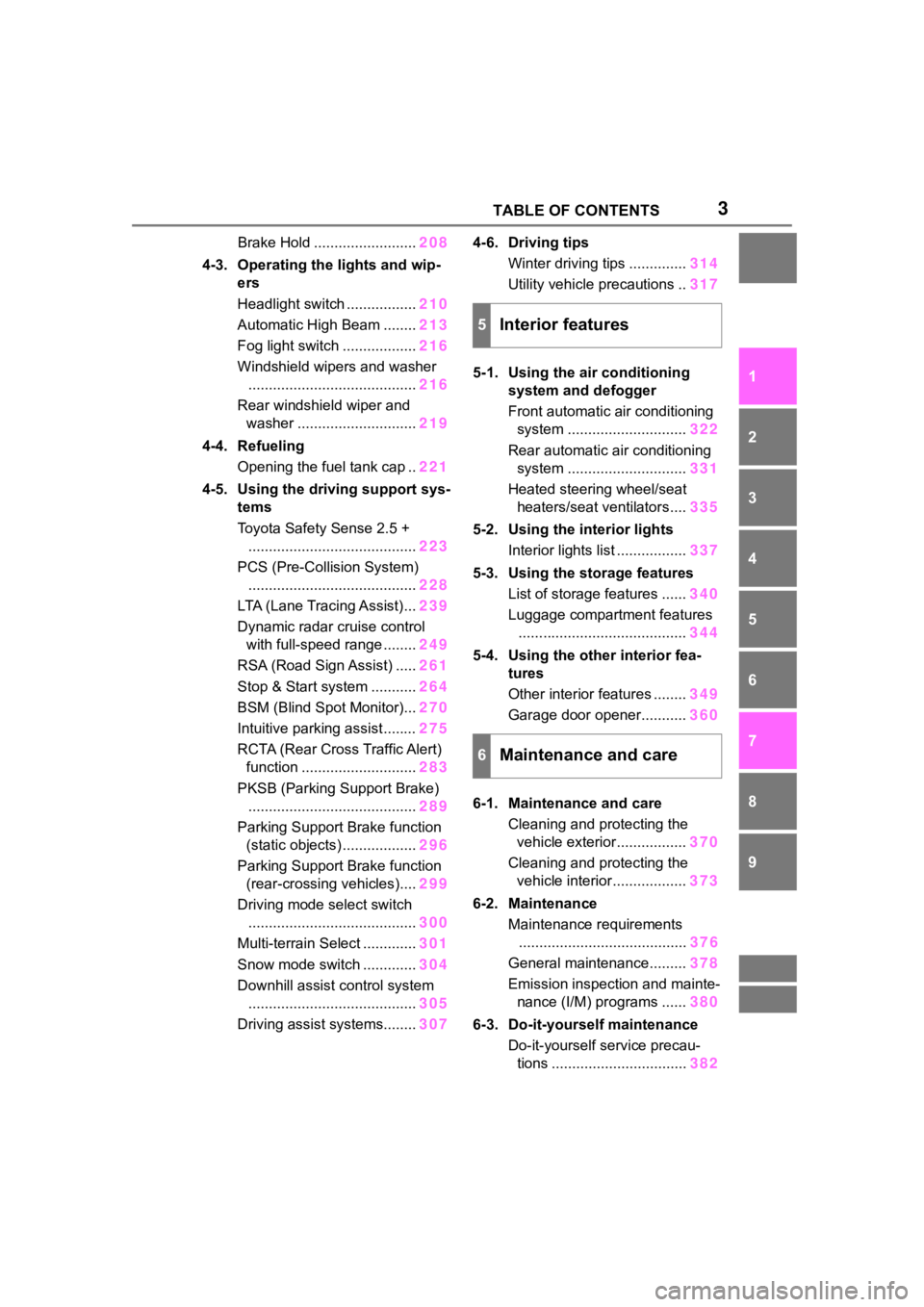
3TABLE OF CONTENTS
1
2
3
4
5
6
7
8
9
10
Brake Hold .........................208
4-3. Operating the lights and wip- ers
Headlight switch ................. 210
Automatic High Beam ........ 213
Fog light switch .................. 216
Windshield wipers and washer ......................................... 216
Rear windshield wiper and washer ............................. 219
4-4. Refueling Opening the fuel tank cap .. 221
4-5. Using the driving support sys- tems
Toyota Safety Sense 2.5 +......................................... 223
PCS (Pre-Collision System) ......................................... 228
LTA (Lane Tracing Assist)... 239
Dynamic radar cruise control with full-speed range ........ 249
RSA (Road Sign Assist) ..... 261
Stop & Start system ........... 264
BSM (Blind Spot Monitor)... 270
Intuitive parking assist ........ 275
RCTA (Rear Cross Traffic Alert) function ............................ 283
PKSB (Parking Support Brake) ......................................... 289
Parking Support Brake function (static objects) .................. 296
Parking Support Brake function (rear-crossing vehicles).... 299
Driving mode select switch ......................................... 300
Multi-terrain Select ............. 301
Snow mode switch ............. 304
Downhill assist control system ......................................... 305
Driving assist systems........ 3074-6. Driving tips
Winter driving tips .............. 314
Utility vehicle precautions .. 317
5-1. Using the air conditioning system and defogger
Front automatic air conditioning
system ............................. 322
Rear automatic air conditioning system ............................. 331
Heated steering wheel/seat heaters/seat ventilators.... 335
5-2. Using the interior lights Interior lights list ................. 337
5-3. Using the storage features List of storage features ...... 340
Luggage compartment features ......................................... 344
5-4. Using the other interior fea- tures
Other interior features ........ 349
Garage door opener........... 360
6-1. Maintenance and care Cleaning and protecting the vehicle exterior................. 370
Cleaning and protecting the vehicle interior.................. 373
6-2. Maintenance
Maintenance requirements ........ ................................. 37
6
General maintenance......... 378
Emission inspection and mainte- nance (I/M) programs ...... 380
6-3. Do-it-yourself maintenance Do-it-yourself service precau-tions ................................. 382
5Interior features
6Maintenance and care
Page 21 of 552
21Pictorial index
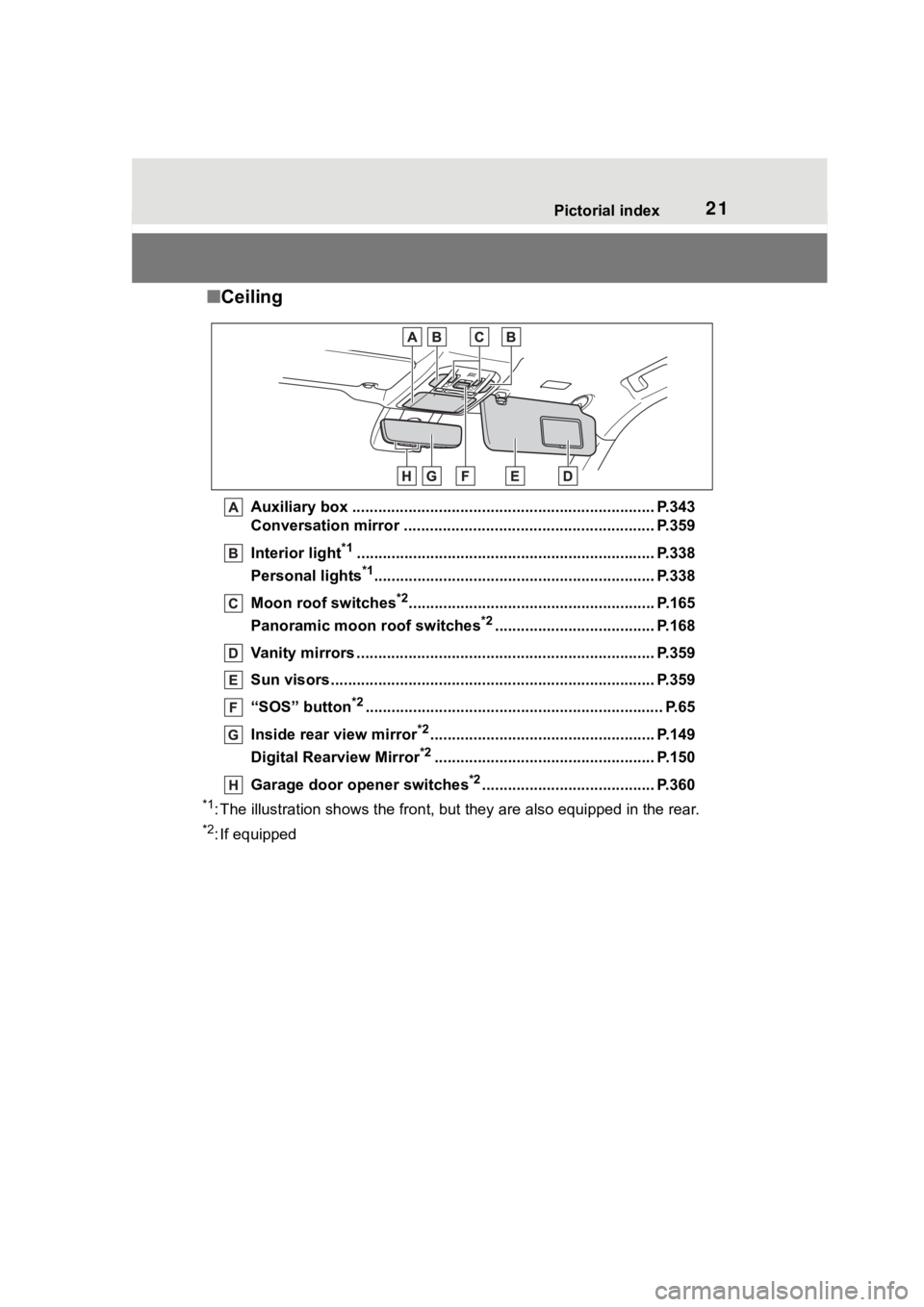
■Ceiling
Auxiliary box .................................................. .................... P.343
Conversation mirror .......................................................... P.359
Interior light
*1............................................................... ...... P.338
Personal lights
*1............................................................... .. P.338
Moon roof switches
*2......................................................... P.165
Panoramic moon roof switches
*2..................................... P.168
Vanity mirrors ................................................. .................... P.359
Sun visors..................................................... ...................... P.359
“SOS” button
*2............................................................... ...... P.65
Inside rear view mirror
*2.................................................... P.149
Digital Rearview Mirror
*2................................................... P.150
Garage door opener switches
*2........................................ P.360
*1: The illustration shows the fron t, but they are also equipped i n the rear.
*2: If equipped
Page 80 of 552
802-1. Instrument cluster
■The meters and display illumi-
nate when
The engine switch is in ON.
■Outside temperature display
●In the following si tuations, the cor-
rect outside tempe rature may not
be displayed, or the display may
take longer than normal to
change:
• When stopped, or driving at low
speeds (less than 12 mph [20
km/h])
• When the outside temperature
has changed suddenly (at the
entrance/exit of a garage, tunnel,
etc.)
●When “--” or “E” is displayed, the
system may be malfunctioning.
Take your vehicle to your Toyota
dealer.
■Liquid crystal display
Small spots or light spots may
appear on the display. This phenom-
enon is characteristi c of liquid crys-
tal displays, and there is no problem
continuing to use the display.
■Customization
The meters can be customized on of the multi-information display.
( P.94)
■Display items
Odometer
Displays the total distance the vehi-
cle has been driven.
Trip meter A/trip meter B
Displays the distance the vehicle
has been driven since the meter
was last reset. Trip meters A and B
can be used to record and display
different distances independently.
Distance until next engine oil
change
Displays the distance the vehicle
can be driven until an oil change is
WARNING
■The information display at
low temperatures
Allow the interior of the vehicle to
warm up before u sing the liquid
crystal informat ion display. At
extremely low temperatures, the
information display monitor may
respond slowly, and display
changes may be delayed.
For example, there is a lag
between the driver’s shifting and
the new gear number appearing
on the display. This lag could
cause the driver to downshift
again, causing rapid and exces-
sive engine braking and possibly
an accident resulting in death or
injury.
NOTICE
■To prevent damage to the
engine and its components
●Do not let the indicator needle
of the tachometer enter the red
zone, which indicates the maxi-
mum engine speed.
●The engine may be overheating
if the engine coolant tempera-
ture gauge is in the red zone
(H). In this case, immediately
stop the vehicle in a safe place,
and check the engine after it
has cooled completely.
( P.469)
Odometer and trip meter
display
Page 85 of 552
852-1. Instrument cluster
2
Vehicle status information and indicators
Take your vehicle to your Toyota
dealer.
■Liquid crystal display
Small spots or light spots may
appear on the display. This phenom-
enon is characteristi c of liquid crys-
tal displays, and there is no problem
continuing to use the display.
■Free/Open Source Software
Information
This product contains Free/Open
Source Software (FOSS). The
license information and/or the
source code of such FOSS can be
found at the following URL.
https://www.denso.com/global/en/
opensource/meter/toyota/
■Customization
The gauges and meters can be cus-
tomized in of the multi-informa-
tion display. ( P.494)
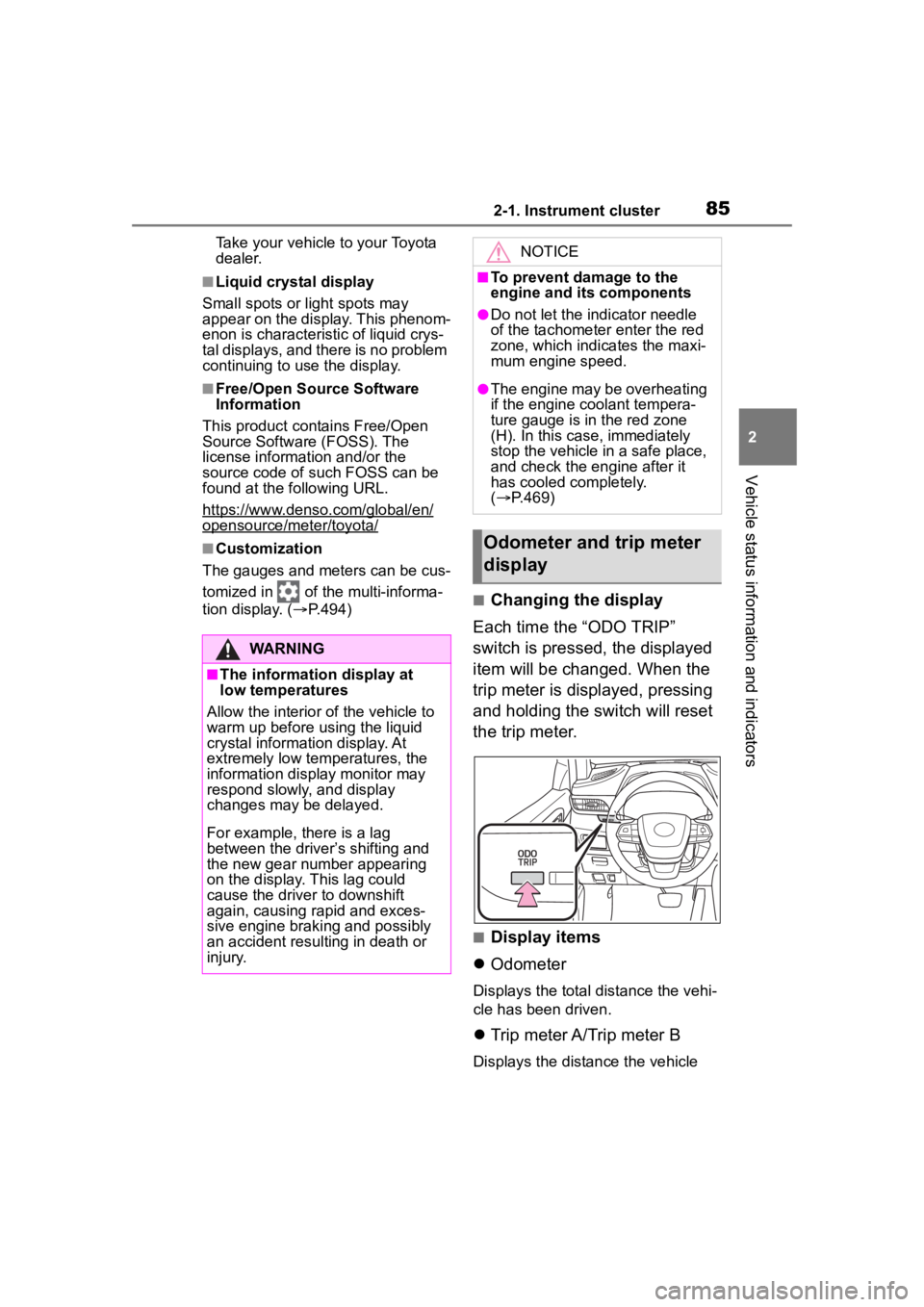
■Changing the display
Each time the “ODO TRIP”
switch is pressed, the displayed
item will be changed. When the
trip meter is displayed, pressing
and holding the switch will reset
the trip meter.
■Display items
Odometer
Displays the total distance the vehi-
cle has been driven.
Trip meter A/Trip meter B
Displays the distance the vehicle
WARNING
■The information display at
low temperatures
Allow the interior of the vehicle to
warm up before u sing the liquid
crystal informat ion display. At
extremely low temperatures, the
information display monitor may
respond slowly, and display
changes may be delayed.
For example, there is a lag
between the driver’s shifting and
the new gear number appearing
on the display. This lag could
cause the driver to downshift
again, causing rapid and exces-
sive engine braking and possibly
an accident resulting in death or
injury.
NOTICE
■To prevent damage to the
engine and its components
●Do not let the indicator needle
of the tachometer enter the red
zone, which indicates the maxi-
mum engine speed.
●The engine may be overheating
if the engine coolant tempera-
ture gauge is in the red zone
(H). In this case, immediately
stop the vehicle in a safe place,
and check the engine after it
has cooled completely.
( P.469)
Odometer and trip meter
display
Page 199 of 552
1994-2. Driving procedures
4
Driving
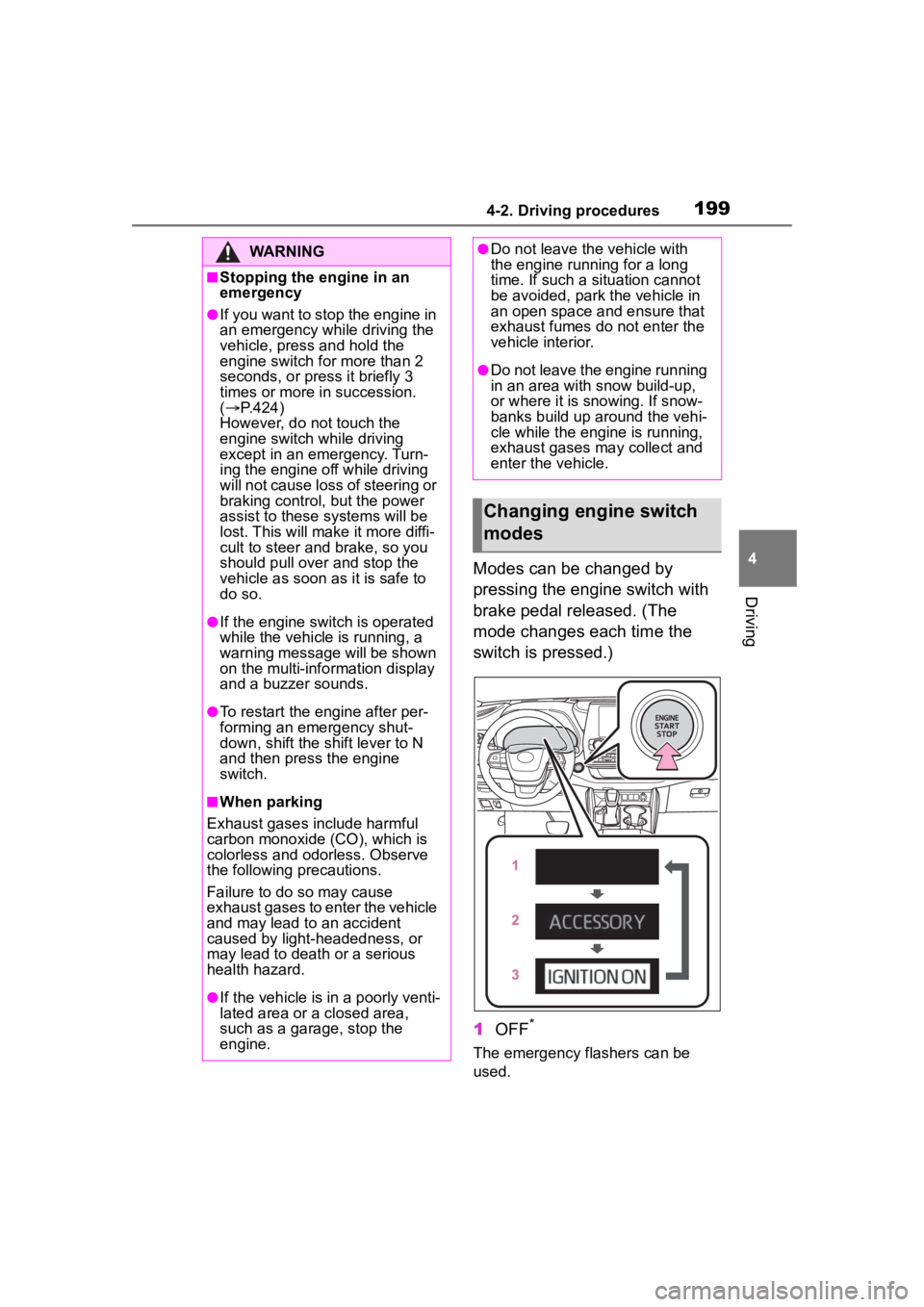
Modes can be changed by
pressing the engine switch with
brake pedal released. (The
mode changes each time the
switch is pressed.)
1OFF
*
The emergency flashers can be
used.
WARNING
■Stopping the engine in an
emergency
●If you want to stop the engine in
an emergency while driving the
vehicle, press and hold the
engine switch for more than 2
seconds, or press it briefly 3
times or more in succession.
( P.424)
However, do not touch the
engine switch while driving
except in an emergency. Turn-
ing the engine off while driving
will not cause loss of steering or
braking control, but the power
assist to these systems will be
lost. This will make it more diffi-
cult to steer and brake, so you
should pull over and stop the
vehicle as soon as it is safe to
do so.
●If the engine switch is operated
while the vehicle is running, a
warning message will be shown
on the multi-info rmation display
and a buzzer sounds.
●To restart the engine after per-
forming an emergency shut-
down, shift the shift lever to N
and then press the engine
switch.
■When parking
Exhaust gases include harmful
carbon monoxide (CO), which is
colorless and odorless. Observe
the following precautions.
Failure to do so may cause
exhaust gases to enter the vehicle
and may lead to an accident
caused by light-headedness, or
may lead to death or a serious
health hazard.
●If the vehicle is in a poorly venti-
lated area or a closed area,
such as a garage, stop the
engine.
●Do not leave the vehicle with
the engine running for a long
time. If such a situation cannot
be avoided, park the vehicle in
an open space and ensure that
exhaust fumes do not enter the
vehicle interior.
●Do not leave the engine running
in an area with snow build-up,
or where it is snowing. If snow-
banks build up around the vehi-
cle while the engine is running,
exhaust gases may collect and
enter the vehicle.
Changing engine switch
modes
Page 269 of 552
2694-5. Using the driving support systems
4
Driving
■Replacing the battery
P. 4 6 7
■If the Stop & Start cancel indica-
tor flashes continuously
The system may be malfunctioning.
Have the vehicle inspected by your
Toyota dealer.
■If “Stop & Start System Mal-
function Visit Your Dealer” is
displayed on the multi-informa-
tion display
The system may be malfunctioning.
Have the vehicle inspected by your
Toyota dealer.
WARNING
■When the Stop & Start system
is operating
Make sure to dis able the Stop &
Start system while the vehicle is in
a poorly ventilated area. If not dis-
abled, the engine may be auto-
matically restarted unexpectedly,
causing exhaust gases to collect
and enter the vehicle, possibly
resulting in death or a serious
health hazard.
●Do not leave the vehicle while
the engine is stopped by the
Stop & Start system (while the
Stop & Start indicator is on). An
accident may occur due to the
automatic engine start function.
●Depress the brake pedal and
apply the parking brake when
necessary while the engine is
stopped by the Stop & Start sys-
tem (while the Stop & Start indi-
cator is on).
NOTICE
■To ensure the system oper-
ates correctly
If any of the follo wing situations
occur, the Stop & Start system
may not operate correctly. Have
your vehicle inspected by your
Toyota dealer.
●While the driver’s seat belt is
fastened, the driver’s and front
passenger’s seat belt reminder
light flashes.
●Even though the driver’s seat
belt is not fastened, the driver’s
and front passenger’s seat belt
reminder light does not illumi-
nate.
●Even though the driver’s door is
closed, the open door warning
light is illuminated or the interior
light is illumina ted when the
interior light switch is in the door
position.
●Even though the driver’s door is
open, the open door warning
light does not illu minate or the
interior light doe s not illuminate
when the interior light switch is
in the door position.
Page 335 of 552
3355-1. Using the air conditioning system and defogger
5
Interior features
*: If equipped
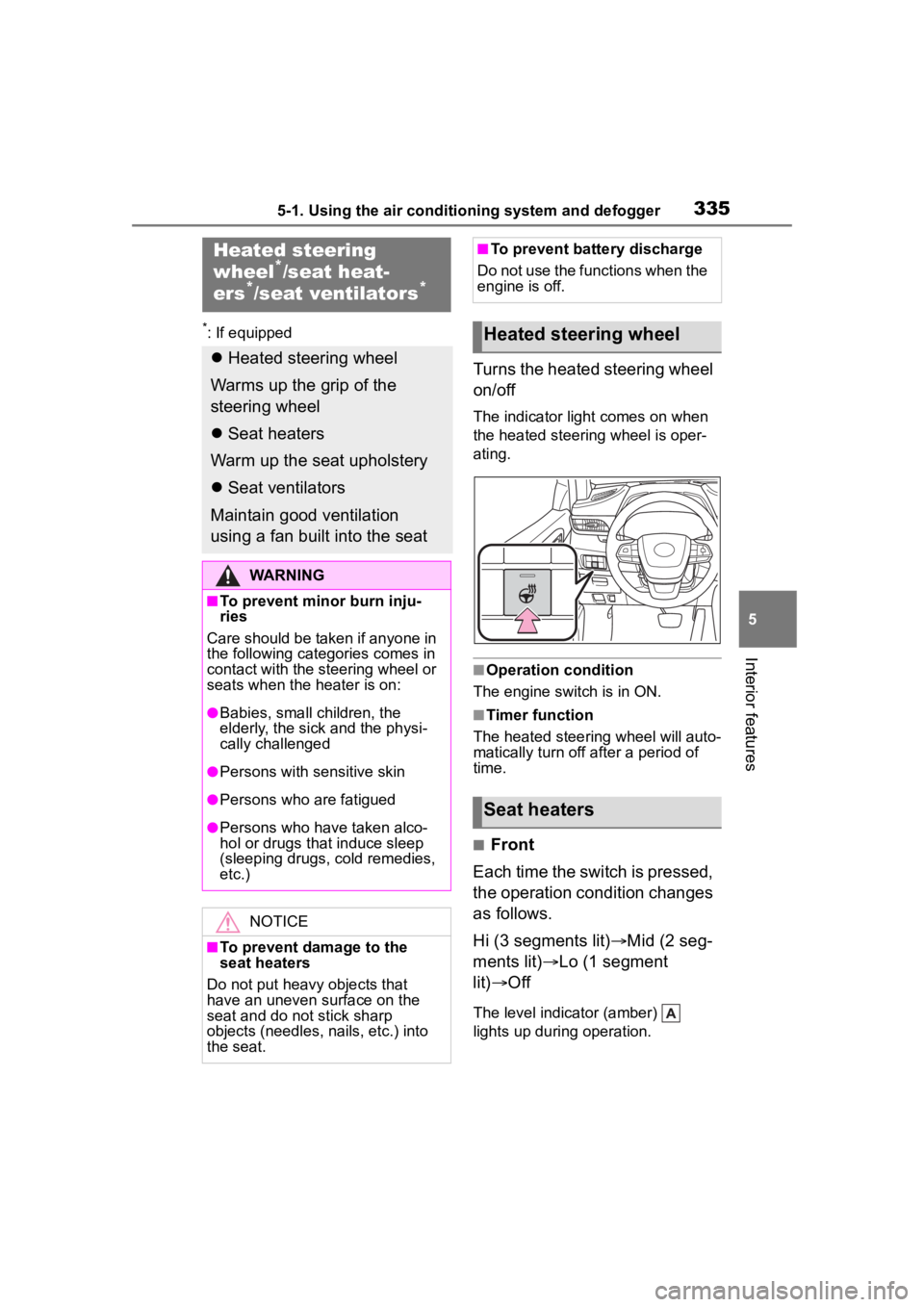
Turns the heated steering wheel
on/off
The indicator light comes on when
the heated steering wheel is oper-
ating.
■Operation condition
The engine switch is in ON.
■Timer function
The heated steering wheel will auto-
matically turn off after a period of
time.
■Front
Each time the switch is pressed,
the operation condition changes
as follows.
Hi (3 segments lit) Mid (2 seg-
ments lit) Lo (1 segment
lit) Off
The level indicator (amber)
lights up during operation.
Heated steering
wheel*/seat heat-
ers*/seat ventilators*
Heated steering wheel
Warms up the grip of the
steering wheel
Seat heaters
Warm up the seat upholstery
Seat ventilators
Maintain good ventilation
using a fan built into the seat
WARNING
■To prevent minor burn inju-
ries
Care should be taken if anyone in
the following categories comes in
contact with the steering wheel or
seats when the heater is on:
●Babies, small children, the
elderly, the sick and the physi-
cally challenged
●Persons with sensitive skin
●Persons who are fatigued
●Persons who have taken alco-
hol or drugs that induce sleep
(sleeping drugs, cold remedies,
etc.)
NOTICE
■To prevent damage to the
seat heaters
Do not put heavy objects that
have an uneven surface on the
seat and do not stick sharp
objects (needles, nails, etc.) into
the seat.
■To prevent battery discharge
Do not use the functions when the
engine is off.
Heated steering wheel
Seat heaters
Page 338 of 552
3385-2. Using the interior lights
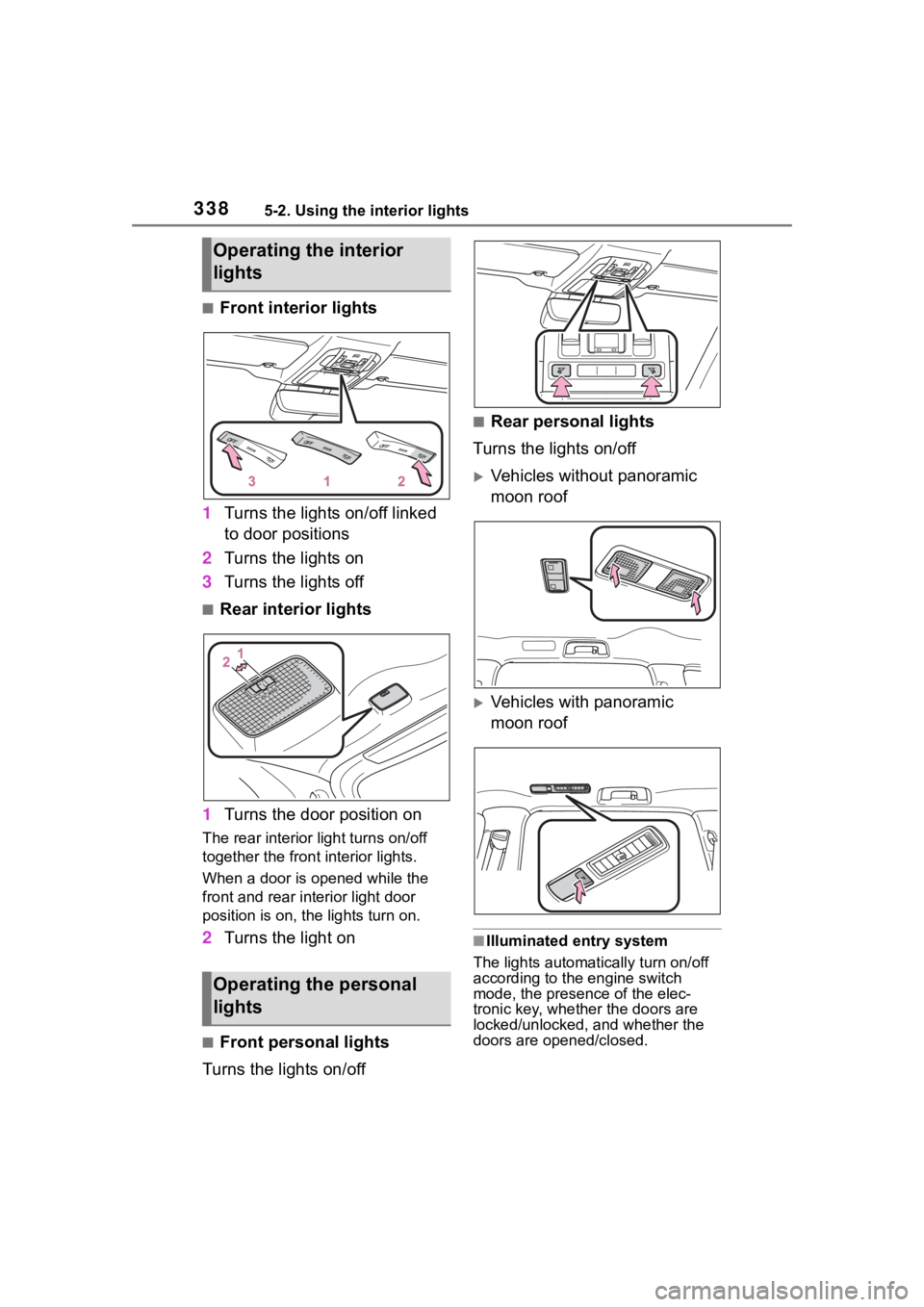
■Front interior lights
1 Turns the lights on/off linked
to door positions
2 Turns the lights on
3 Turns the lights off
■Rear interior lights
1 Turns the door position on
The rear interior light turns on/off
together the front interior lights.
When a door is opened while the
front and rear interior light door
position is on, the lights turn on.
2Turns the light on
■Front personal lights
Turns the lights on/off
■Rear personal lights
Turns the lights on/off
Vehicles without panoramic
moon roof
Vehicles with panoramic
moon roof
■Illuminated entry system
The lights automatically turn on/off
according to the engine switch
mode, the presence of the elec-
tronic key, whether the doors are
locked/unlocked, and whether the
doors are opened/closed.
Operating the interior
lights
Operating the personal
lights
Page 339 of 552
3395-2. Using the interior lights
5
Interior features
■To prevent the battery from
being discharged
If the interior lights remain on when
the engine switch is turned off, the
lights will go off automatically after
20 minutes.
■The interior lights may turn on
automatically when
If any of the SRS airbags deploy
(inflate) or in the event of a strong
rear impact, the interior lights will
turn on automatically.
The interior lights will turn off auto-
matically after approximately 20
minutes.
The interior lights can be turned off
manually. However, in order to help
prevent further collisions, it is rec-
ommended that they be left on until
safety can be ensured.
(The interior lights may not turn on
automatically depending on the
force of the impact and conditions of
the collision.)
■Customization
Some functions can be customized.
( P.494)
NOTICE
■To prevent battery discharge
Do not leave the lights on longer
than necessary when the engine
is not running.
Page 351 of 552
3515-4. Using the other interior features
5
Interior features
slowly illuminate in green and
orange alternatively and a sound of
charging coil operation may be
heard repeatedly.
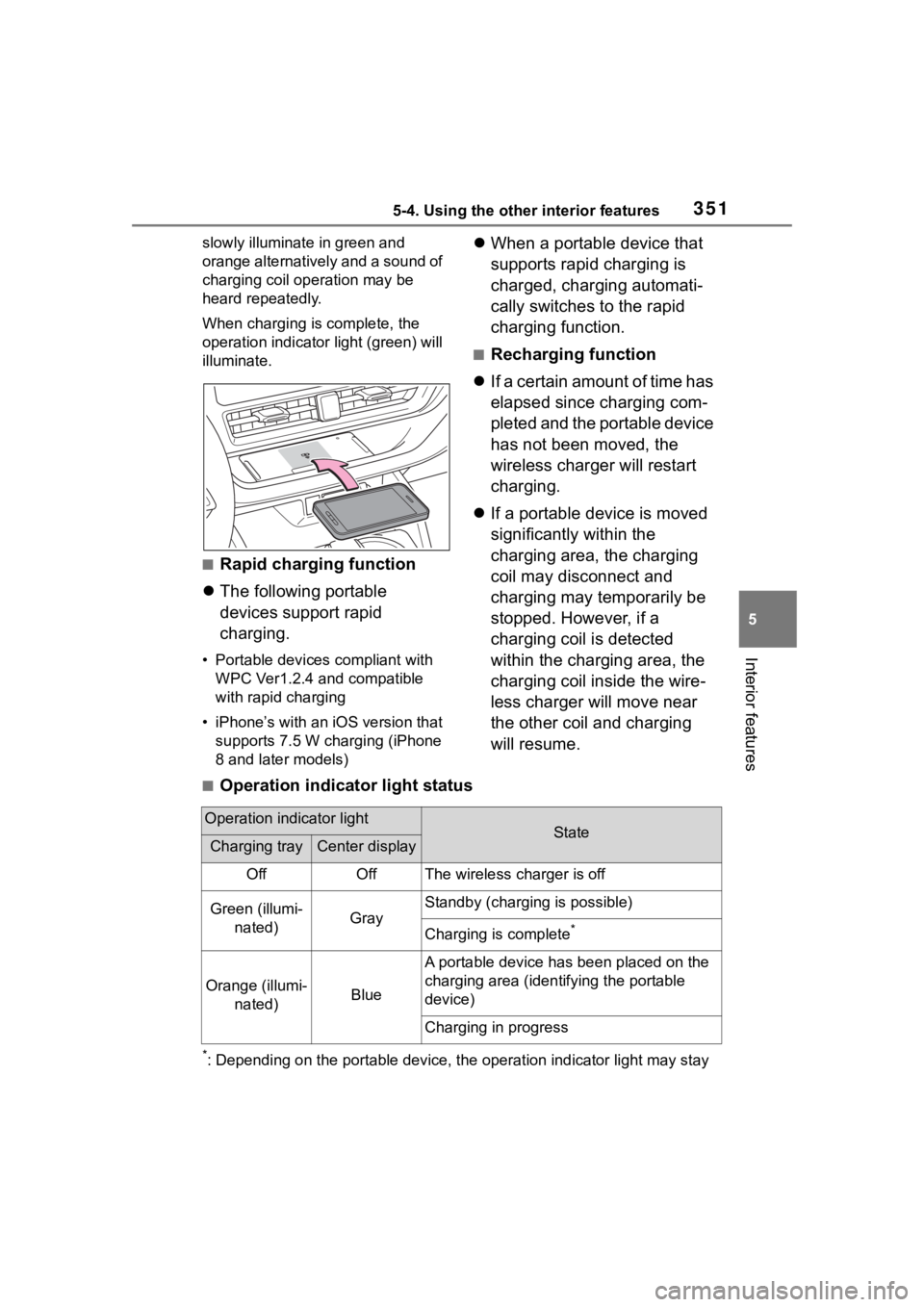
When charging is complete, the
operation indicator light (green) will
illuminate.
■Rapid charging function
The following portable
devices support rapid
charging.
• Portable devices compliant with
WPC Ver1.2.4 and compatible
with rapid charging
• iPhone’s with an iOS version that supports 7.5 W charging (iPhone
8 and later models)
When a portable device that
supports rapid charging is
charged, charging automati-
cally switches to the rapid
charging function.
■Recharging function
If a certain amount of time has
elapsed since charging com-
pleted and the portable device
has not been moved, the
wireless charger will restart
charging.
If a portable device is moved
significantly within the
charging area, the charging
coil may disconnect and
charging may temporarily be
stopped. However, if a
charging coil is detected
within the charging area, the
charging coil inside the wire-
less charger will move near
the other coil and charging
will resume.
■Operation indicator light status
*: Depending on the portable devic e, the operation indicator light may stay
Operation indicator lightStateCharging trayCenter display
OffOffThe wireless charger is off
Green (illumi-
nated)Gray
Standby (charging is possible)
Charging is complete*
Orange (illumi- nated)Blue
A portable device has been placed on the
charging area (ident ifying the portable
device)
Charging in progress