light TOYOTA HIGHLANDER HYBRID 2013 XU50 / 3.G Owners Manual
[x] Cancel search | Manufacturer: TOYOTA, Model Year: 2013, Model line: HIGHLANDER HYBRID, Model: TOYOTA HIGHLANDER HYBRID 2013 XU50 / 3.GPages: 676, PDF Size: 12.48 MB
Page 3 of 676

1
2
3
4
5
6
7
3
2-2. Instrument clusterGauges and meters ............ 200
Indicators and warning lights ................................. 202
Multi-information display ..... 207
2-3. Operating the lights and wipers
Headlight switch .................. 218
Fog light switch ................... 224
Windshield wipers and washer .............................. 226
Rear window wiper and washer .............................. 229
2-4. Using other driving systems
Cruise control ...................... 231
Rear view monitor system .............................. 235
Driving assist systems ........ 239
Hill-start assist control ......... 244
2-5. Driving information Utility vehicle precautions ....................... 246
Cargo and luggage ............. 251
Vehicle load limits ............... 255
Winter driving tips ............... 256
Trailer towing ...................... 260
Dinghy towing ..................... 279 3-1. Using the air conditioning
system and defogger
Front manual air conditioning system.......... 282
Front automatic air conditioning system.......... 288
Rear manual air conditioning system.......... 297
Rear automatic air conditioning system.......... 300
Rear window and outside rear view
mirror defoggers ............... 304
Windshield wiper de-icer .... 306
Using the steering wheel climate remote control
switches ........................... 307
3-2. Using the audio system Audio system types ............ 308
Using the radio ................... 316
Using the CD player ........... 323
Playing back MP3 and WMA discs ....................... 330
Operating an iPod .............. 337
Operating a USB memory ............................ 344
Optimal use of the audio system .............................. 352
Using the AUX port............. 355
Using the steering wheel audio switches.................. 357
3Interior features
Page 4 of 676

TABLE OF CONTENTSIndex
4
3-3. Using the Bluetooth®
audio system
Bluetooth
® audio system .... 360
Using the Bluetooth®
audio system .................... 363
Operating a Bluetooth
®
enabled portable player ... 368
Setting up a Bluetooth
®
enabled portable player ... 370
Bluetooth
® audio system
setup ................................ 375
3-4. Using the hands-free phone system
(for cellular phone)
Hands-free phone system (for cellular phone)
features ............................ 376
Using the hands-free phone system ................... 380
Making a phone call ........... 389
Setting a cellular phone...... 393
Security and system setup ................................ 398
Using the phone book ........ 402
3-5. Using the rear audio system
Rear seat entertainment system features ................ 409
Using the DVD player (DVD video)...................... 416
Using the DVD player (video CD) ........................ 425
Using the DVD player (audio CD/CD text) ........... 428
Using the DVD player (MP3 discs) ...................... 429
Using the video mode ........ 431 Changing the initial
setting ............................... 432
3-6. Using the interior lights Interior lights list.................. 439
• Personal/interior light main switch ....................... 440
• Personal/interior lights ...... 440
• Interior light ....................... 441
3-7. Using the storage features List of storage features ....... 442
• Glove box ......................... 443
• Console box ..................... 444
• Overhead console ............ 445
• Cup holders ...................... 446
• Bottle holders ................... 450
• Auxiliary boxes ................. 451
• Side table ......................... 453
3-8. Other interior features Sun visors ........................... 455
Vanity mirrors ..................... 456
Conversation mirror ............ 457
Power outlet........................ 458
Seat heaters ....................... 462
Armrests ............................. 464
Assist grips ......................... 465
Floor mat ............................ 466
Luggage compartment features ............................ 467
Garage door opener ........... 469
Compass ............................ 475
Page 5 of 676

1
2
3
4
5
6
7
5
4-1. Maintenance and careCleaning and protecting the vehicle exterior............ 480
Cleaning and protecting the vehicle interior............. 483
4-2. Maintenance Maintenance requirements ..................... 486
General maintenance.......... 488
Emission inspection and maintenance (I/M)
programs........................... 491
4-3. Do-it-yourself maintenance Do-it-yourself service precautions ....................... 492
Hood ................................... 496
Positioning a floor jack ........ 498
Engine compartment ........... 500
12-volt battery ..................... 511
Tires .................................... 515
Tire inflation pressure ......... 523
Wheels ................................ 526
Air conditioning filter............ 529
Wireless remote control/ electronic key battery ........ 532
Checking and replacing fuses ................................. 535
Light bulbs........................... 548 5-1. Essential information
Emergency flashers............ 558
If your vehicle needs to be towed................................ 560
If you think something is wrong ............................... 566
5-2. Steps to take in an emergency
If a warning light turns on or a warning buzzer
sounds... .......................... 567
If a warning message is displayed .......................... 577
If you have a flat tire ........... 579
If the hybrid system will not start ............................ 592
If the shift lever cannot be shifted from P ................... 594
If you lose your keys/ wireless remote control
transmitter ........................ 595
If the electronic key does not operate properly ......... 596
If the 12-volt battery is discharged........................ 598
If your vehicle overheats .... 602
If the vehicle becomes stuck ................................. 606
If your vehicle has to be stopped in an
emergency ....................... 607
4Maintenance and care5When trouble arises
Page 8 of 676
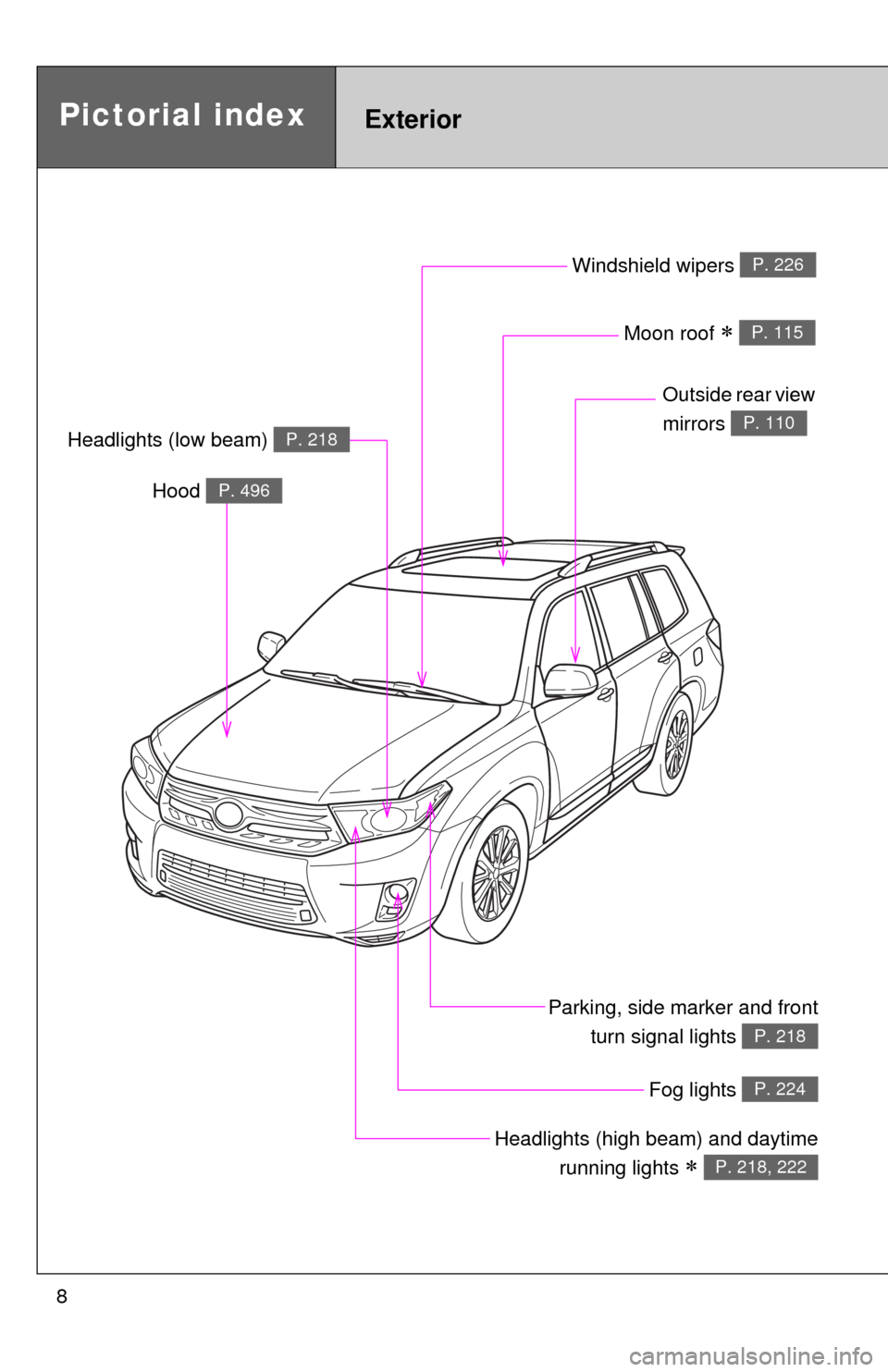
8
Pictorial indexExterior
Fog lights P. 224
Parking, side marker and frontturn signal lights
P. 218
Windshield wipers P. 226
Moon roof P. 115
Outside rear view
mirrors
P. 110Headlights (low beam) P. 218
Headlights (high beam) and daytime
running lights
P. 218, 222
Hood P. 496
Page 9 of 676
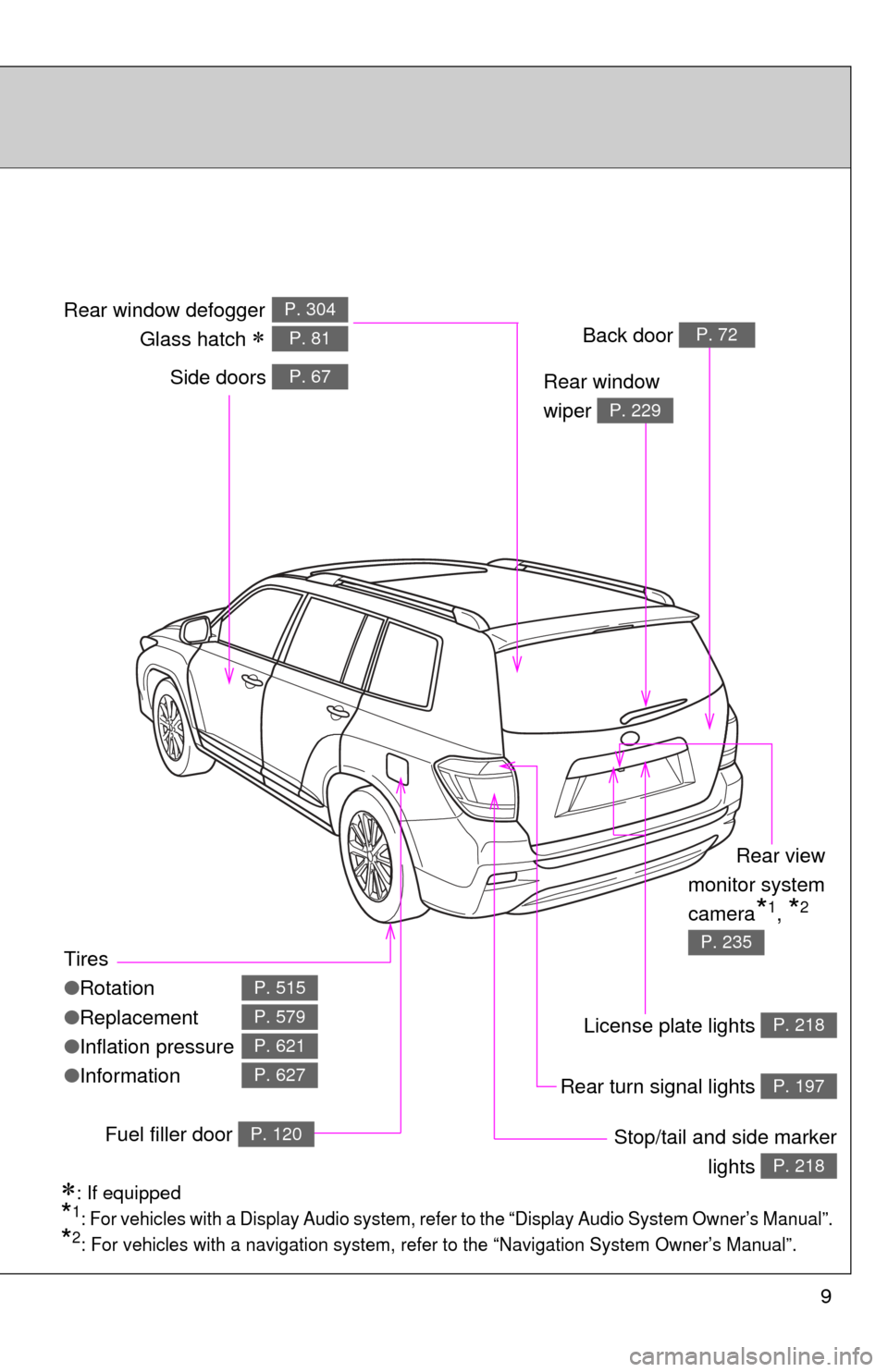
9
Tires
●Rotation
● Replacement
● Inflation pressure
● Information
P. 515
P. 579
P. 621
P. 627
Side doors P. 67
Stop/tail and side marker
lights
P. 218
Rear window
wiper
P. 229
Rear window defogger
Glass hatch
P. 304
P. 81
License plate lights P. 218
Rear turn signal lights P. 197
Back door P. 72
Rear view
monitor system
camera
*1, *2
P. 235
: If equipped
*1: For vehicles with a Display Audio system, refer to the “Display Audio System Owner’s Manual”.
*2: For vehicles with a navigation system, refe r to the “Navigation System Owner’s Manual”.
Fuel filler door P. 120
Page 13 of 676
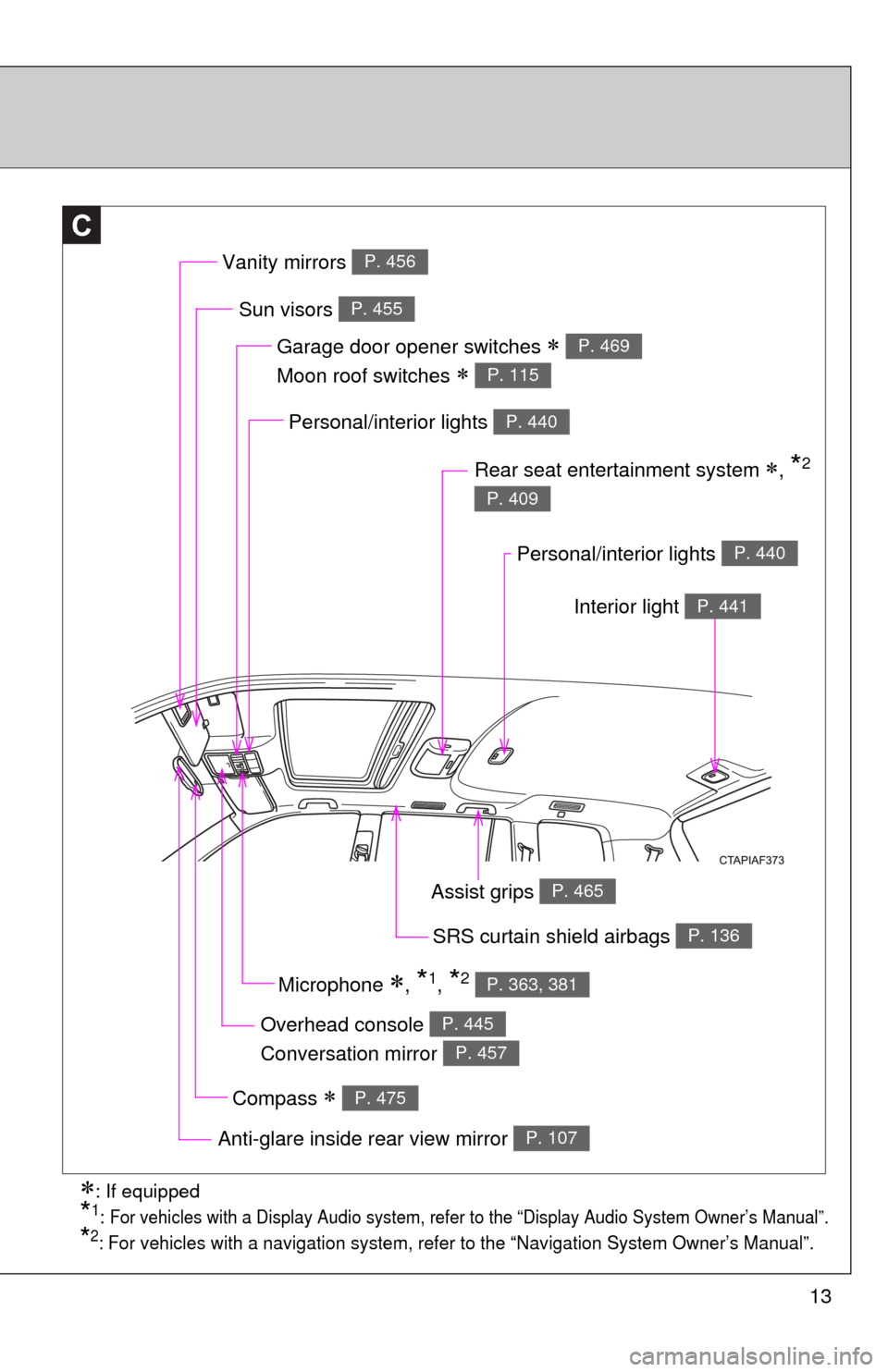
13
C
Overhead console
Conversation mirror P. 445
P. 457
Garage door opener switches
Moon roof switches
P. 469
P. 115
Sun visors P. 455
Personal/interior lights P. 440
Rear seat entertainment system , *2
P. 409
SRS curtain shield airbags P. 136
Compass P. 475
Anti-glare inside rear view mirror P. 107
Vanity mirrors P. 456
Personal/interior lights P. 440
Interior light P. 441
: If equipped
*1: For vehicles with a Display A udio system, refer to the “Displ ay Audio System Owner’s Manual”.
*2: For vehicles with a navigation system, refer to the “Navigation System Owner’s Manual”.
Assist grips P. 465
Microphone , *1, *2 P. 363, 381
Page 16 of 676
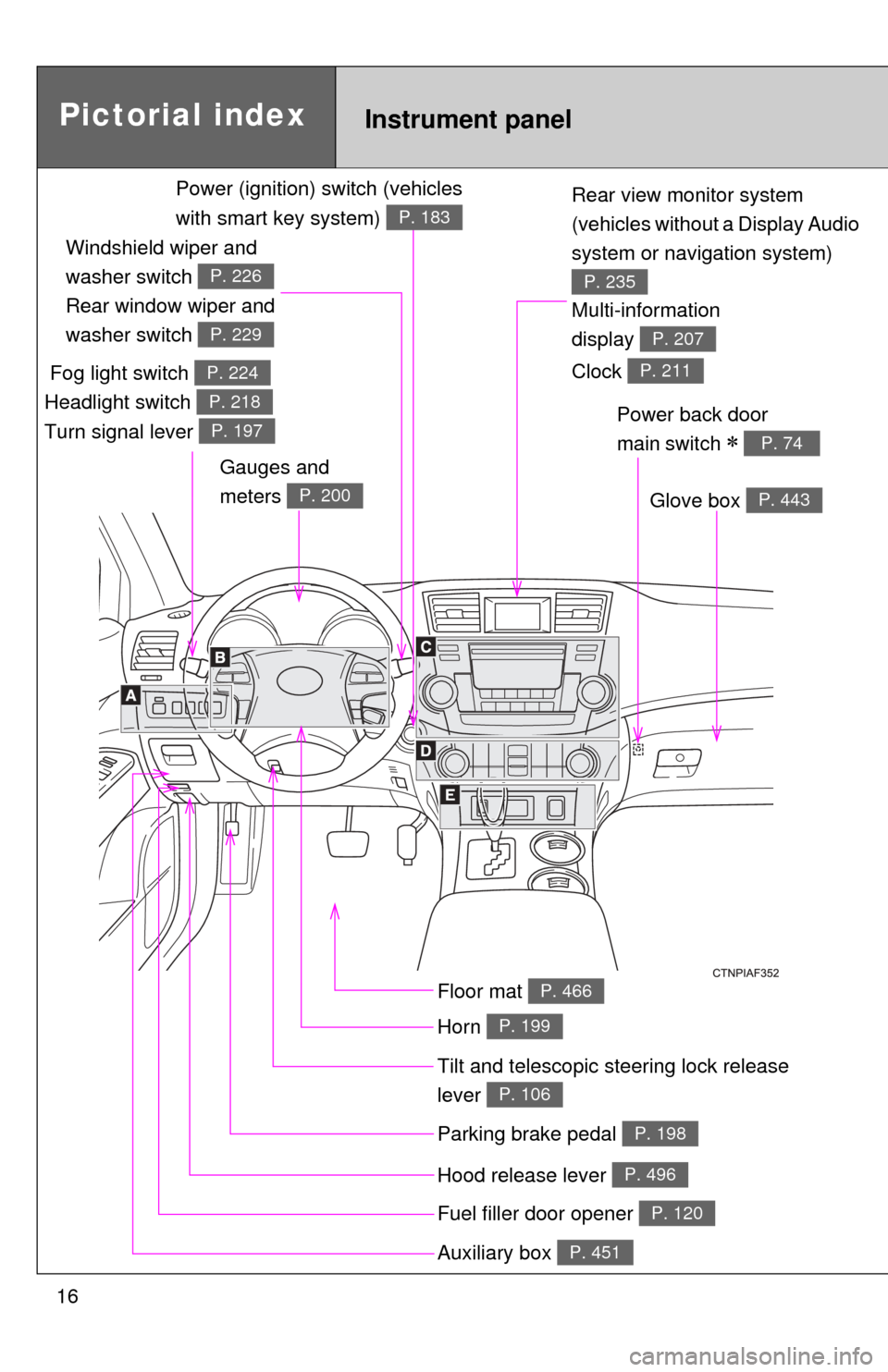
16
Rear view monitor system
(vehicles without a Display Audio
system or navigation system)
P. 235
Tilt and telescopic steering lock release
lever
P. 106
Glove box P. 443
Pictorial indexInstrument panel
Power back door
main switch
P. 74
Parking brake pedal P. 198
Hood release lever P. 496
Auxiliary box P. 451
Multi-information
display
P. 207
Fuel filler door opener P. 120
Fog light switch
Headlight switch
Turn signal lever P. 224
P. 218
P. 197
Windshield wiper and
washer switch
Rear window wiper and
washer switch
P. 226
P. 229
Gauges and
meters
P. 200
Floor mat P. 466
Horn P. 199
Power (ignition) switch (vehicles
with smart key system)
P. 183
Clock P. 211
Page 17 of 676
17
A
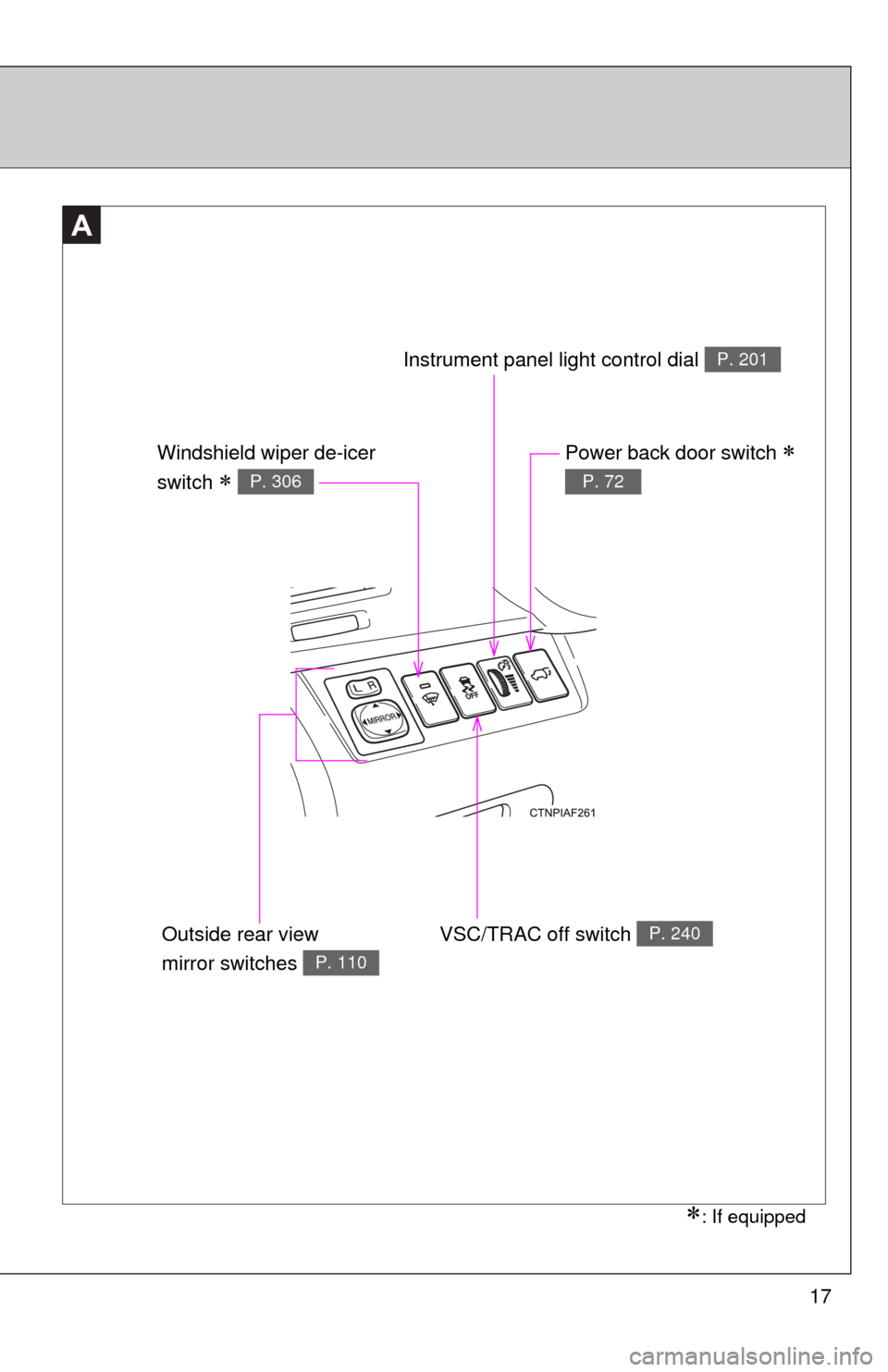
: If equipped
VSC/TRAC off switch P. 240
Power back door switch
P. 72
Instrument panel light control dial P. 201
Windshield wiper de-icer
switch
P. 306
Outside rear view
mirror switches
P. 110
Page 36 of 676

36 1-1. Hybrid system
●If the shift lever is in N, the hybrid battery (traction battery) will not be
charged. When driving in heavy traffic, operate the vehicle with the shift
lever in D to avoid discharging the battery.
● To help prevent the 12-volt battery from becoming discharged, drive the
vehicle at least once a month, and operate the accessories only when
the “READY” indicator is on. When parking the vehicle, make sure the
doors is closed and all lights are turned off.
■ Charging the 12-volt battery
P. 600
■ After the 12-volt battery has di scharged or has been changed or
removed
The gasoline engine may not stop even if the vehicle is running on the hybrid
battery (traction battery). If this continues for a few days, contact your Toyota
dealer.
■ Sounds and vibrations specific to a hybrid vehicle
There may be no engine sounds or vibration even though the vehicle is able
to move. Always shift the shift lever to P when parked.
The following sounds or vibrations may occur when the hybrid system is
operating, and are not a malfunction:
●Motor sounds may be heard from the engine compartment.
● Sounds may be heard from the hybrid battery (traction battery) under the
rear seat when the hybrid system starts or stops.
● Sounds from the hybrid system may be heard when the back door is
open.
● Sounds may be heard from the hybrid transmission when the engine is
started or stopped, or while the engine is idling.
● Engine sounds may be heard when accelerating sharply.
● Sounds may be heard due to regenerative braking when the brake pedal
is depressed or accelerator is loosened.
● Vibration may be felt when the gasoline engine starts or stops.
● Cooling fan sounds may be heard from the air intake vents under the rear
seat.
Page 38 of 676
38 1-1. Hybrid system
■Hybrid battery air vents
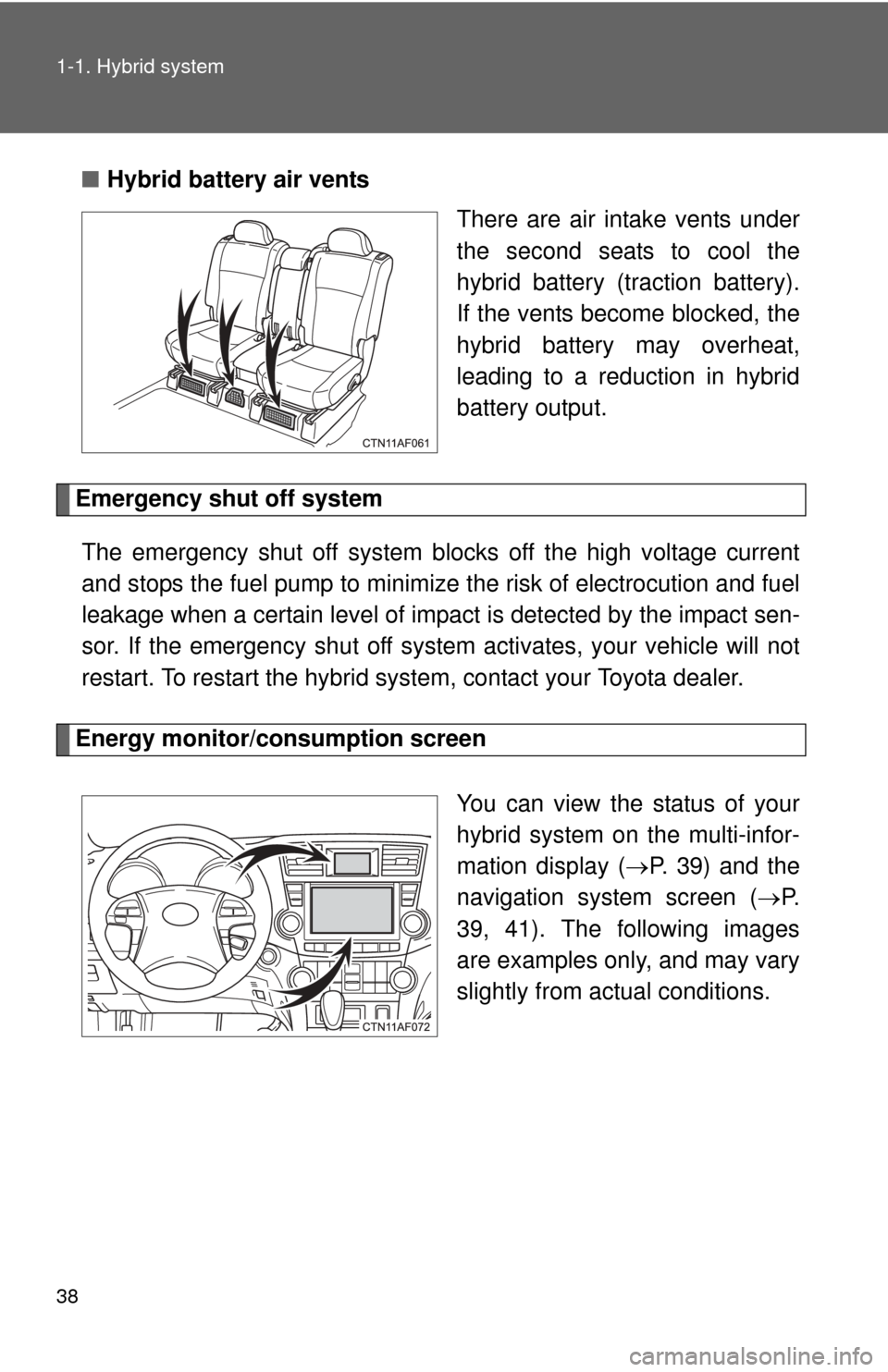
There are air intake vents under
the second seats to cool the
hybrid battery (traction battery).
If the vents become blocked, the
hybrid battery may overheat,
leading to a reduction in hybrid
battery output.
Emergency shut off system
The emergency shut off system blocks off the high voltage current
and stops the fuel pump to minimize the risk of electrocution and fuel
leakage when a certain level of impact is detected by the impact sen-
sor. If the emergency shut off syste m activates, your vehicle will not
restart. To restart the hybrid system, contact your Toyota dealer.
Energy monitor/consumption screen
You can view the status of your
hybrid system on the multi-infor-
mation display (P. 39) and the
navigation system screen ( P.
39, 41). The following images
are examples only, and may vary
slightly from actual conditions.