fuel consumption TOYOTA HIGHLANDER HYBRID 2021 Owners Manual (in English)
[x] Cancel search | Manufacturer: TOYOTA, Model Year: 2021, Model line: HIGHLANDER HYBRID, Model: TOYOTA HIGHLANDER HYBRID 2021Pages: 72, PDF Size: 6.05 MB
Page 14 of 72
12
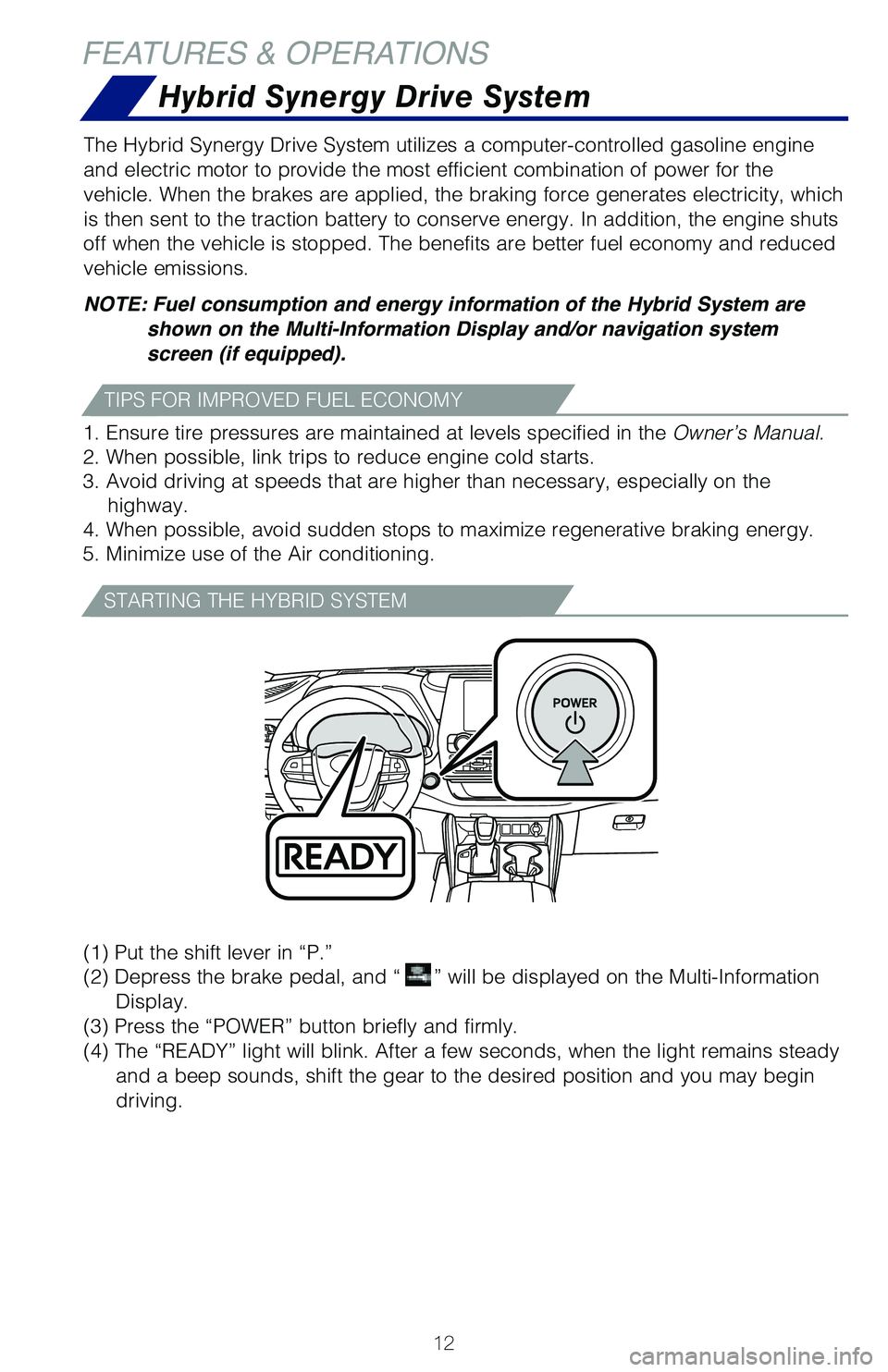
(1)
Put the shift lever in “P.”
(2) Depress the brake pedal, and “
” will be displayed on the Multi-Information
Display.
(3) Press the “POWER” button briefly and firmly.
(4) The “READY” light will blink. After a few seconds, when the light \�remains steady
and a beep sounds, shift the gear to the desired position and you may be\�gin
driving.
The Hybrid Synergy Drive System utilizes a computer-controlled gasoline \�engine
and electric motor to provide the most efficient combination of power fo\�r the
vehicle. When the brakes are applied, the braking force generates electr\�icity, which
is then sent to the traction battery to conserve energy. In addition, th\�e engine shuts
off when the vehicle is stopped. The benefits are better fuel economy an\�d reduced
vehicle emissions.
NOTE: Fuel consumption and energy information of the Hybrid System are
shown on the Multi-Information Display and/or navigation system
screen (if equipped).
1. Ensure tire pressures are maintained at levels specified in the Owner’s Manual.
2. When possible, link trips to reduce engine cold starts.
3. Avoid driving at speeds that are higher than necessary, especially on\� the highway.
4. When possible, avoid sudden stops to maximize regenerative braking en\�ergy.
5. Minimize use of the Air conditioning.
FEATURES & OPERATIONS
Hybrid Synergy Drive System
TIPS FOR IMPROVED FUEL ECONOMY
STARTING THE HYBRID SYSTEM
130493_MY21_Highlander_HV_QRG_V6_ML_070821_PRINT_R1.indd 12130493_MY21_Highlander_HV_QRG_V6_ML_070821_PRINT_R1.indd 127/9/21 2:40 AM7/9/21 2:40 AM
Page 32 of 72
30
Toyota multi-operation touch*
** Refer to the “Navigation and Multimedia System Owner’s Manual.
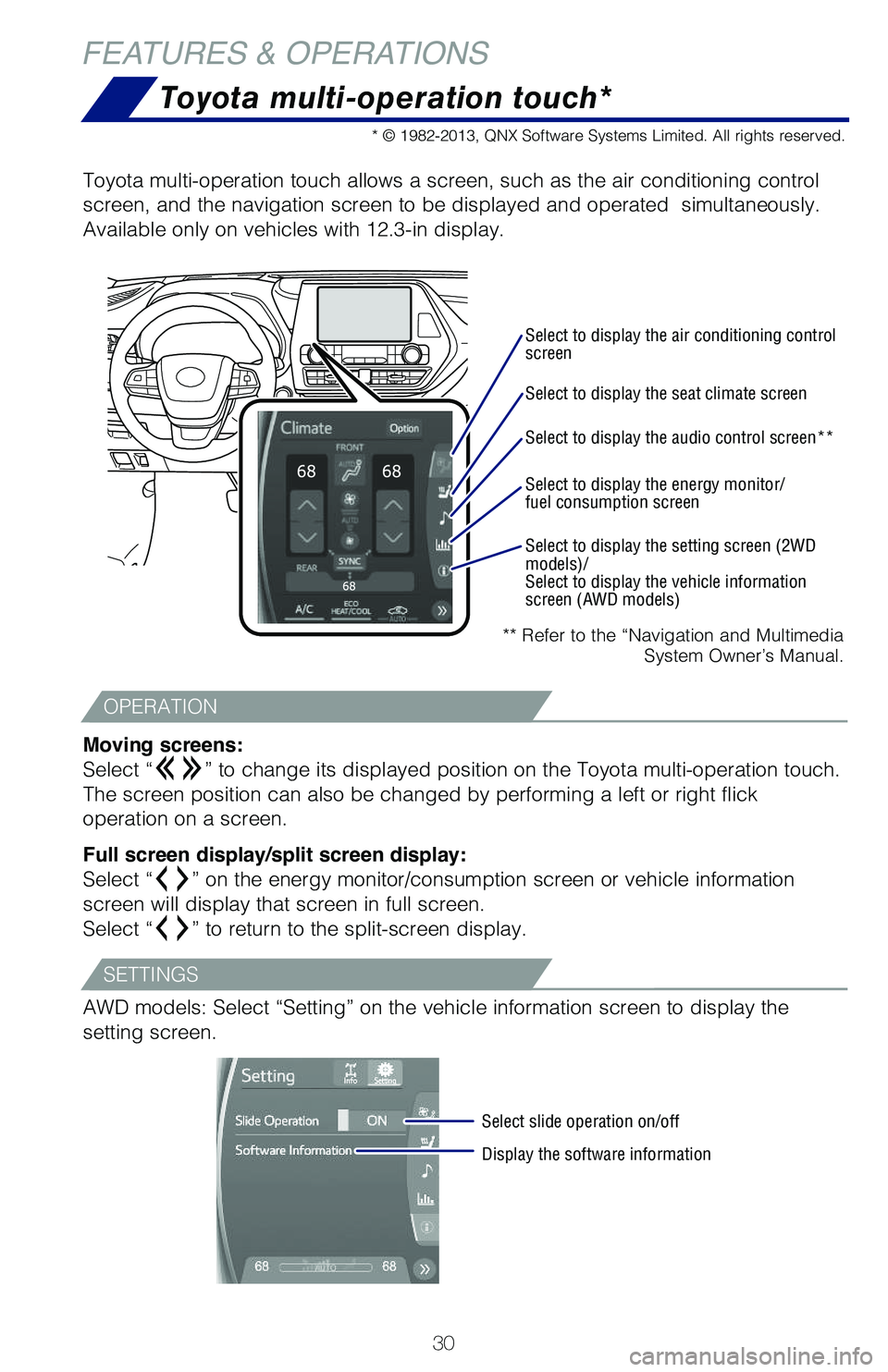
Toyota multi-operation touch allows a screen, such as the air conditioni\�ng control
screen, and the navigation screen to be displayed and operated simultan\�eously.
Available only on vehicles with 12.3-in display.
Moving screens:
Select “
” to change its displayed position on the Toyota multi-operation touc\�h.
The screen position can also be changed by performing a left or right fl\�ick
operation on a screen.
Full screen display/split screen display:
Select “
” on the energy monitor/consumption screen or vehicle information
screen will display that screen in full screen.
Select “
” to return to the split-screen display.
AWD models: Select “Setting” on the vehicle information screen to \�display the
setting screen.
Select to display the air conditioning control
screen
Select slide operation on/off
Display the software information
Select to display the seat climate screen
Select to display the audio control screen**
Select to display the energy monitor/
fuel consumption screen
Select to display the setting screen (2WD
models)/
Select to display the vehicle information
screen (AWD models)
* © 1982-2013, QNX Software Systems Limited. All rights reserved.
FEATURES & OPERATIONS
OPERATION
SETTINGS
130493_MY21_Highlander_HV_QRG_V6_ML_070821_PRINT_R1.indd 30130493_MY21_Highlander_HV_QRG_V6_ML_070821_PRINT_R1.indd 307/9/21 2:41 AM7/9/21 2:41 AM
Page 39 of 72
37
OVERVIEW
FEATURES & OPERATIONS
TOYOTA SAFETY SENSE
SAFETY & EMERGENCY FEATURES
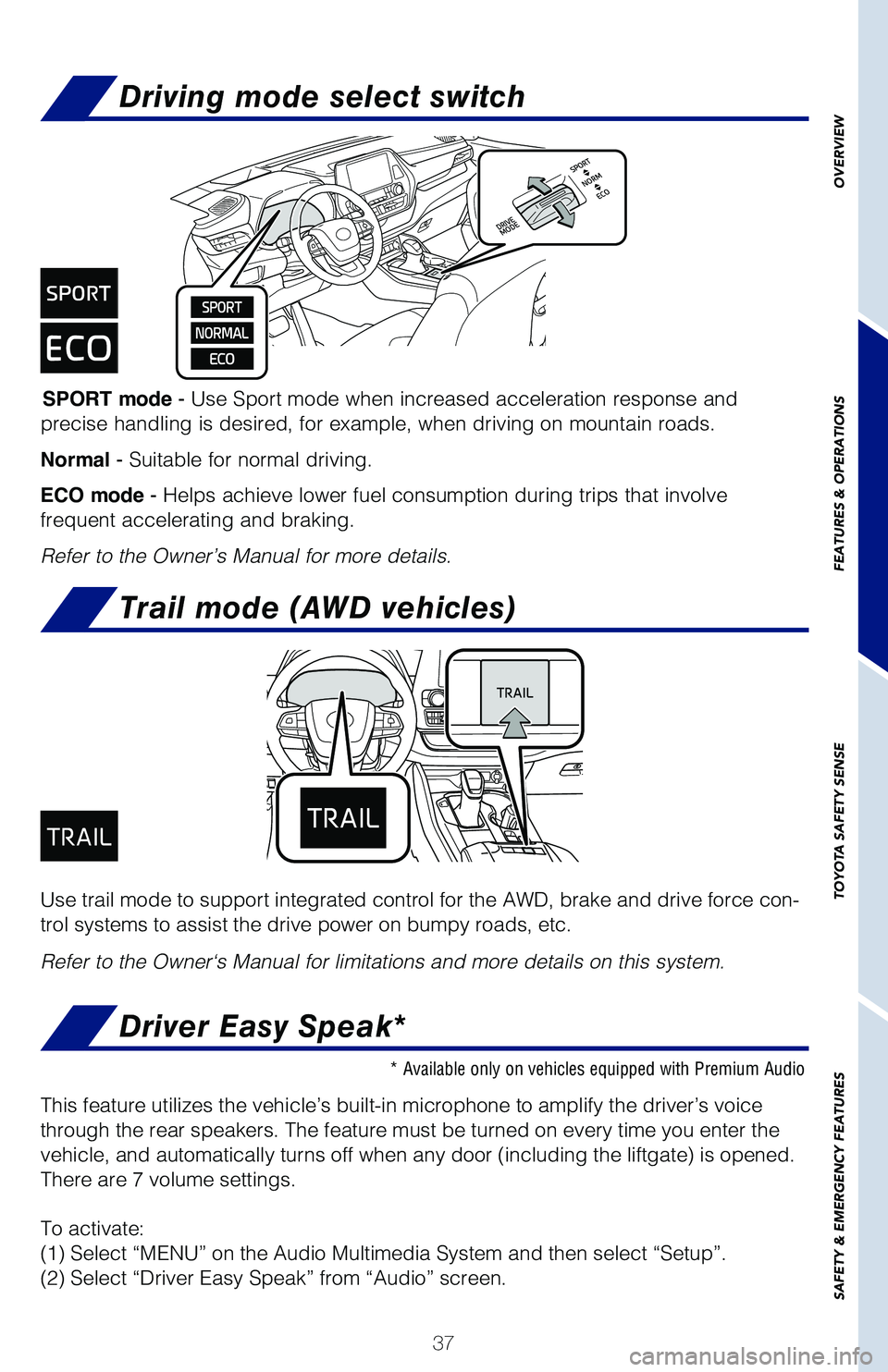
Driving mode select switch
SPORT mode - Use Sport mode when increased acceleration response and
precise handling is desired, for example, when driving on mountain roads\�.
Normal - Suitable for normal driving.
ECO mode - Helps achieve lower fuel consumption during trips that involve
frequent accelerating and braking.
Refer to the Owner’s Manual for more details.
Use trail mode to support integrated control for the AWD, brake and driv\�e force con-
trol systems to assist the drive power on bumpy roads, etc.
Refer to the Owner‘s Manual for limitations and more details on this \�system.
Trail mode (AWD vehicles)
* Available only on vehicles equipped with Premium Audio
This feature utilizes the vehicle’s built-in microphone to amplify th\�e driver’s voice
through the rear speakers. The feature must be turned on every time you \�enter the
vehicle, and automatically turns off when any door (including the liftg\�ate) is opened.
There are 7 volume settings.
To activate:
(1) Select “MENU” on the Audio Multimedia System and then select\� “Setup”.
(2) Select “Driver Easy Speak” from “Audio” screen.
Driver Easy Speak*
130493_MY21_Highlander_HV_QRG_V6_ML_070821_PRINT_R1.indd 37130493_MY21_Highlander_HV_QRG_V6_ML_070821_PRINT_R1.indd 377/9/21 2:41 AM7/9/21 2:41 AM