bluetooth TOYOTA HILUX 2013 (in English) User Guide
[x] Cancel search | Manufacturer: TOYOTA, Model Year: 2013, Model line: HILUX, Model: TOYOTA HILUX 2013Pages: 644, PDF Size: 34.35 MB
Page 376 of 644
376 3-3. Using the “touch screen”
HILUX_OM_OM0K134E_(EE)
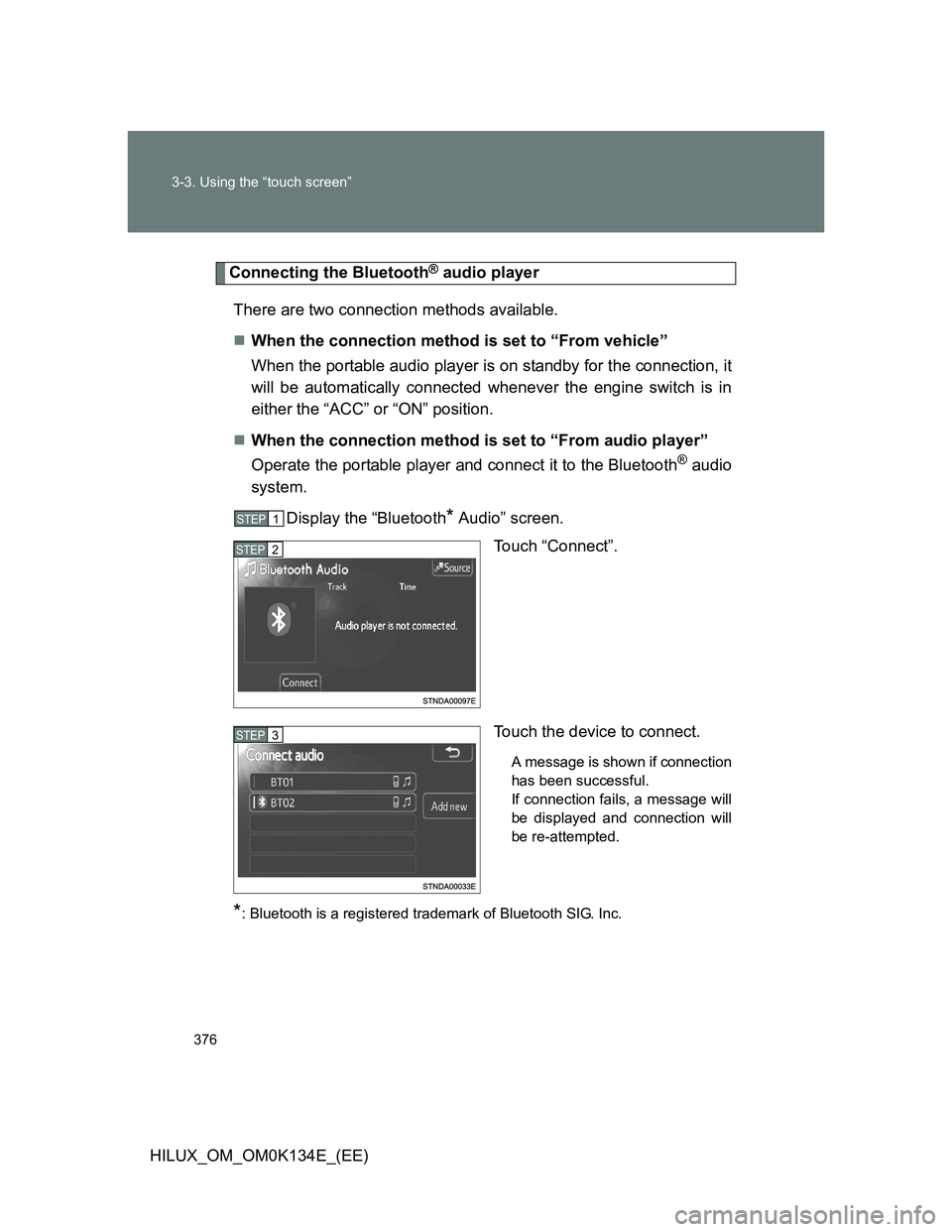
Connecting the Bluetooth® audio player
There are two connection methods available.
When the connection method is set to “From vehicle”
When the portable audio player is on standby for the connection, it
will be automatically connected whenever the engine switch is in
either the “ACC” or “ON” position.
When the connection method is set to “From audio player”
Operate the portable player and connect it to the Bluetooth
® audio
system.
Display the “Bluetooth
* Audio” screen.
Touch “Connect”.
Touch the device to connect.
A message is shown if connection
has been successful.
If connection fails, a message will
be displayed and connection will
be re-attempted.
*: Bluetooth is a registered trademark of Bluetooth SIG. Inc.
STEP1
STEP2
STEP3
Page 377 of 644
377 3-3. Using the “touch screen”
3
Interior features
HILUX_OM_OM0K134E_(EE)
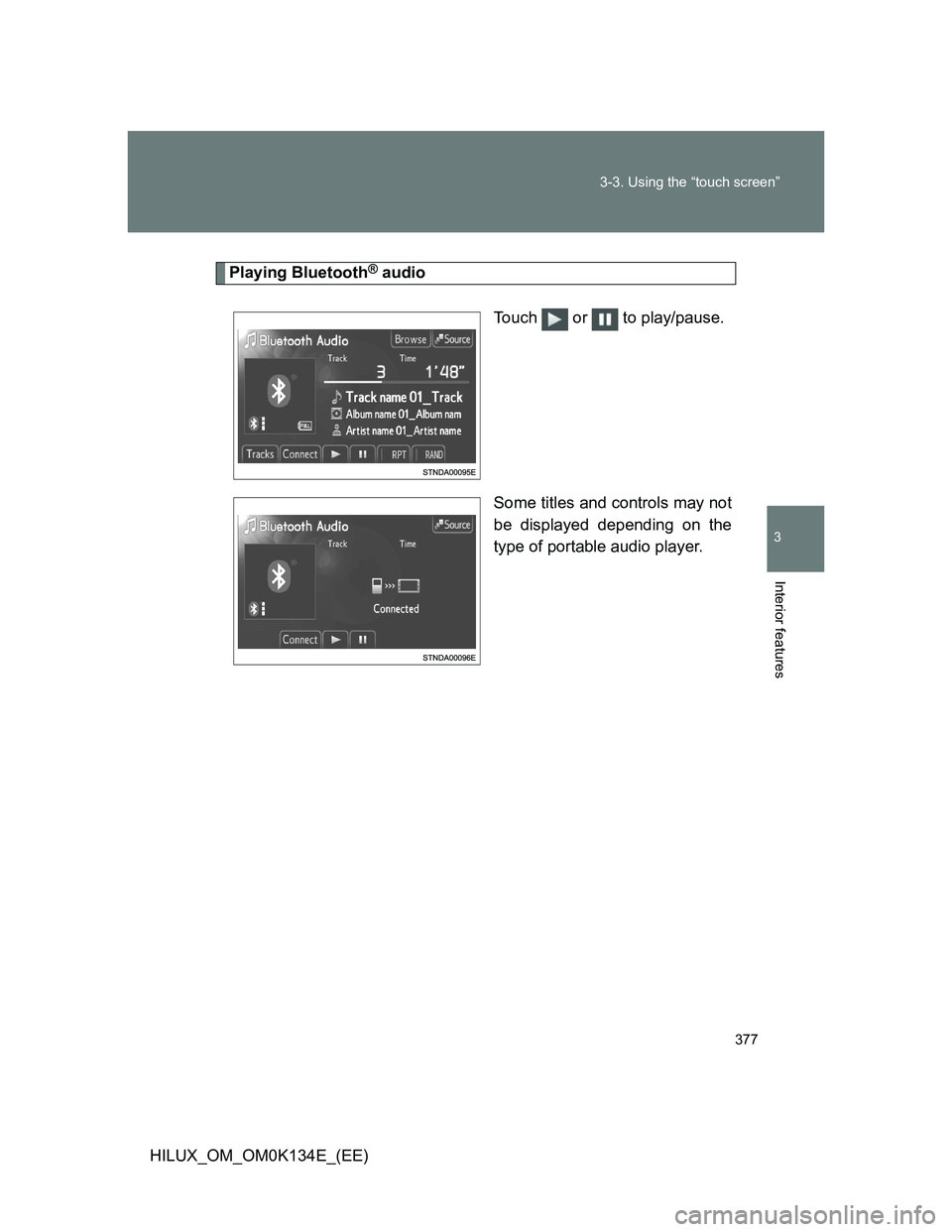
Playing Bluetooth® audio
Touch or to play/pause.
Some titles and controls may not
be displayed depending on the
type of portable audio player.
Page 381 of 644
381 3-3. Using the “touch screen”
3
Interior features
HILUX_OM_OM0K134E_(EE)
When using the Bluetooth® audio system
In the following conditions, the system may not function.
• If the portable audio player is turned off
• If the portable audio player is not connected
• If the portable audio player’s battery is low
There may be a delay if phone connection is carried out during Blue-
tooth
® audio play.
Depending on the type of portable audio player that is connected to the
system, operation may differ slightly and certain functions may not be
available.
Bluetooth
® antenna
The antenna is built into the display. If the portable audio player is behind the
seat or in the glove box or console box, or is touching or covered by metal
objects, connection status may deteriorate.
Battery charge/signal status
This display may not correspond exactly with the portable audio player, and
this system does not have a charging function.
About Bluetooth
®
Bluetooth is a registered trademark of
Bluetooth SIG. Inc.
The Bluetooth word mark and logos are
owned by the Bluetooth SIG, Inc. and any
use of such marks by Panasonic Corpo-
ration is under license. Other trademarks
and trade names are those of their
respective owners.
Page 382 of 644
382 3-3. Using the “touch screen”
HILUX_OM_OM0K134E_(EE)
Compatible models
Portable audio players must correspond to the specifications.
Bluetooth
® specifications:
Ver. 1.1, or higher (Recommended: Ver. 2.1 + EDR or higher)
Profiles:
• A2DP (Advanced Audio Distribution Profile) Ver. 1.0, or higher
(Recommended: Ver. 1.2 or higher)
This is a profile to transmit stereo audio or high quality sounds to the
headphone.
• AVRCP (Audio/Video Remote Control Profile) Ver. 1.0 or higher
(Recommended: Ver. 1.4 or higher)
This is a profile to remote control the A/V equipment.
However, please note that some functions may be limited depending on the
type of portable audio player.
Certification
P. 393
Reconnecting the portable audio player
If the portable audio player is disconnected due to a poor reception when the
engine switch is in the “ACC” or “ON” position, the system automatically
reconnects the portable audio player when possible.
If you have switched off the portable audio player yourself, follow the instruc-
tions below to reconnect:
Select the portable audio player again
Enter the portable audio player
When you release your car
Be sure to initialize your data. (P. 321)
Page 383 of 644
383 3-3. Using the “touch screen”
3
Interior features
HILUX_OM_OM0K134E_(EE)
CAUTION
While driving
Do not use the portable audio player or connect the Bluetooth
® system.
NOTICE
When leaving the vehicle
Do not leave your portable audio player in the vehicle. The inside of the vehi-
cle may become hot, causing damage to the portable audio player.
Page 384 of 644
384
3-3. Using the “touch screen”
HILUX_OM_OM0K134E_(EE)
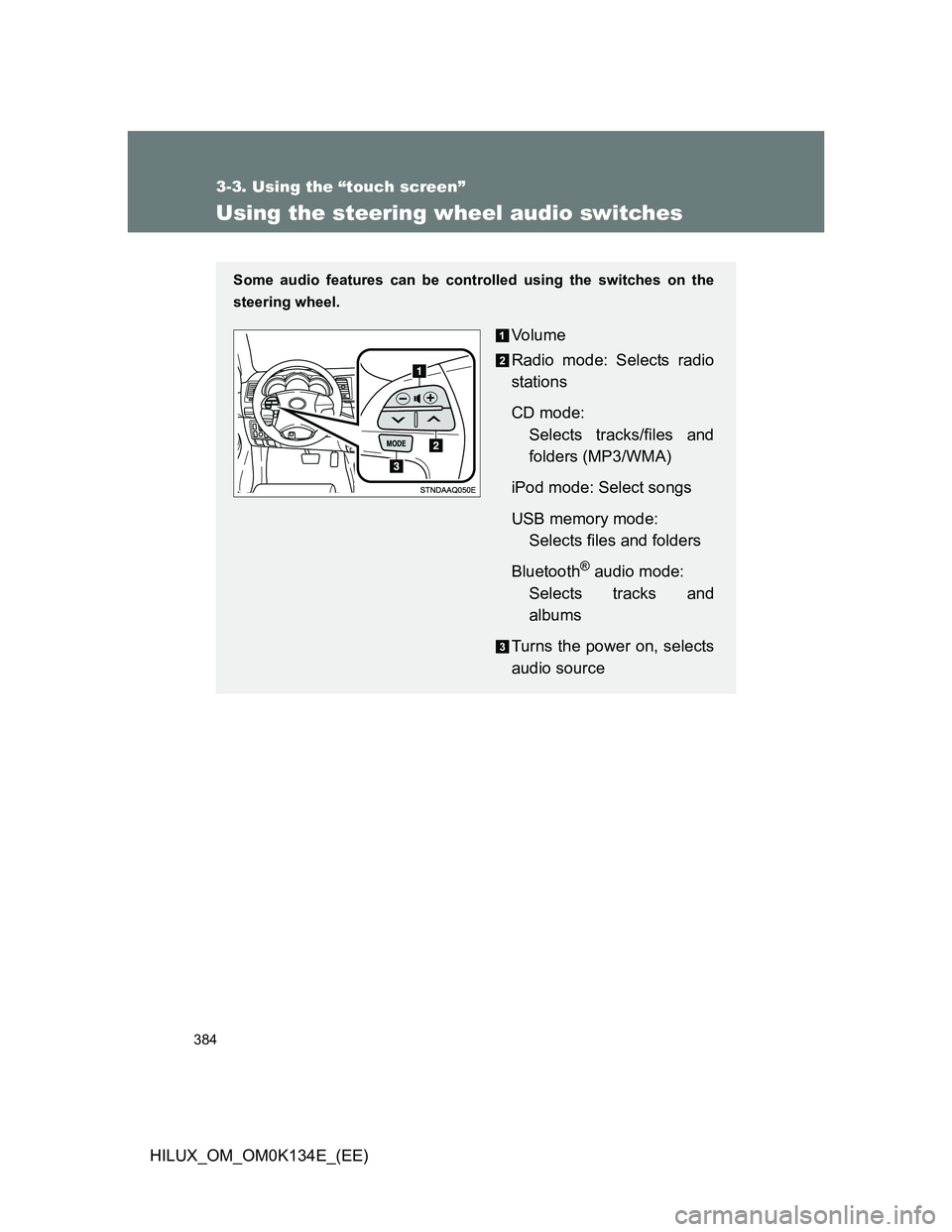
Using the steering wheel audio switches
Some audio features can be controlled using the switches on the
steering wheel.
Vo l u m e
Radio mode: Selects radio
stations
CD mode:
Selects tracks/files and
folders (MP3/WMA)
iPod mode: Select songs
USB memory mode:
Selects files and folders
Bluetooth
® audio mode:
Selects tracks and
albums
Turns the power on, selects
audio source
Page 385 of 644
385 3-3. Using the “touch screen”
3
Interior features
HILUX_OM_OM0K134E_(EE)
Turning on the power
Press “MODE” when the audio system is turned off.
Changing the audio source
Press “MODE” when the audio system is turned on. The audio source
changes as follows each time “MODE” is pressed. If no discs are
inserted in the player, or if the external device is not connected, that
mode will be skipped.
FMCD playeriPod or USB memoryBluetooth® audioAUXAM
Adjusting the volume
Press “+” on to increase the volume and “-” to decrease the
volume.
Hold the switch in that position to continue increasing or decreasing the
volume.
Silencing a sound
Press and hold the “MODE”.
To cancel, press and hold the “MODE”.
Page 386 of 644
386 3-3. Using the “touch screen”
HILUX_OM_OM0K134E_(EE)
Selecting a radio station
Press “MODE” to select the radio mode.
Press “” or “” on to select a radio station.
To seek stations, press and hold the switch until you hear a beep.
Selecting a track/file or song
Press “MODE” to select the CD, Bluetooth
® audio, iPod, USB
memory mode.
Press “” or “” on to select the desired track/file or
song.
Selecting a folder
Press “MODE” to select the CD (only when MP3/WMA disc is
in use) or USB memory mode.
Press and hold “” or “” on until you hear a beep.
Selecting an album
Press “MODE” to select the Bluetooth
® audio mode.
Press and hold “” or “” on until you hear a beep.
CAUTION
To reduce the risk of an accident
Exercise care when operating the audio switches on the steering wheel.
STEP1
STEP2
STEP1
STEP2
STEP1
STEP2
STEP1
STEP2
Page 387 of 644
387
3-3. Using the “touch screen”
3
Interior features
HILUX_OM_OM0K134E_(EE)
Hands-free system (for cellular phone)
Then hands-free system is a function that allows you to use your cel-
lular phone without touching it.
This system supports Bluetooth
®. Bluetooth® is a wireless data sys-
tem that allows the cellular phone to wirelessly connect to the
hands-free system and make/receive calls.
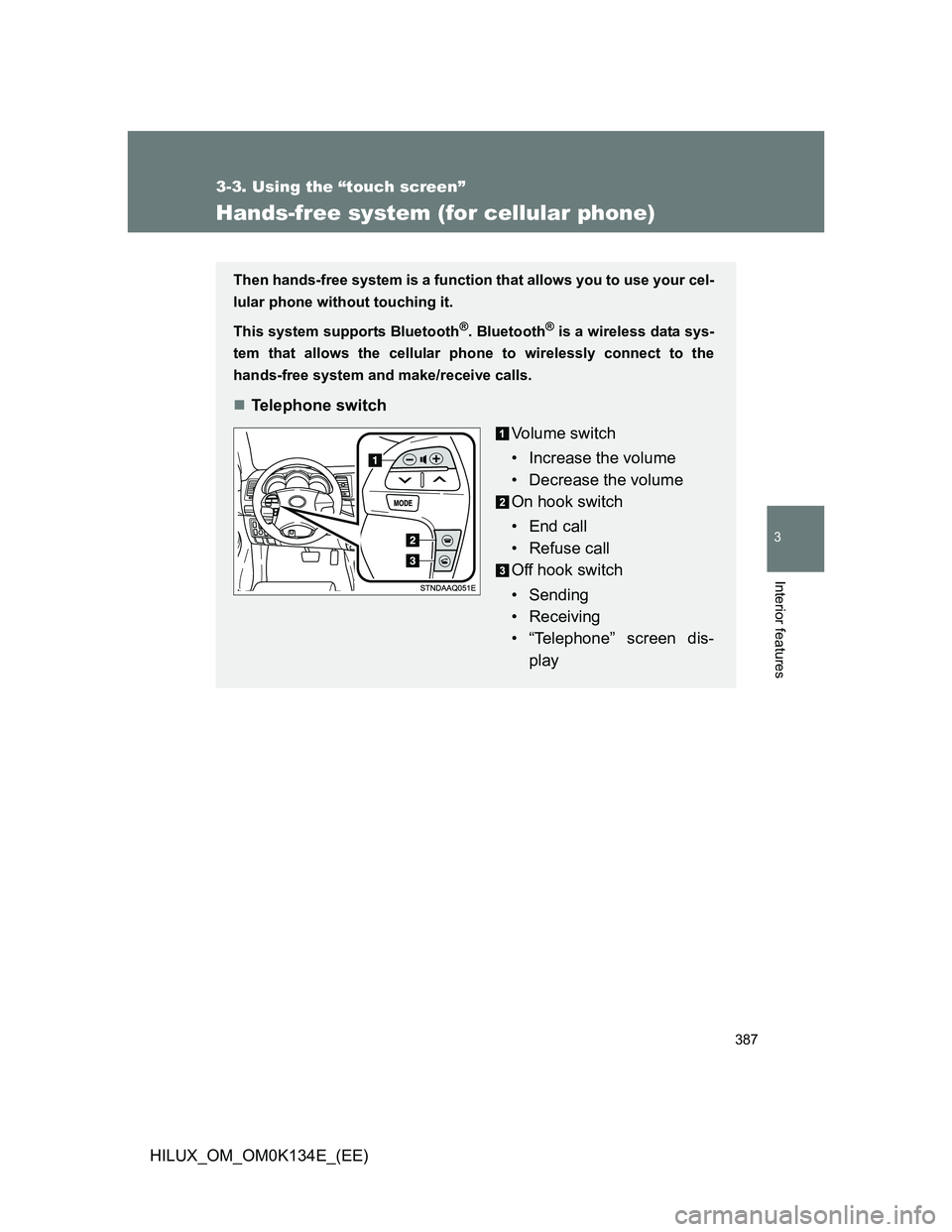
Telephone switch
Vo l u m e s w i t c h
• Increase the volume
• Decrease the volume
On hook switch
• End call
• Refuse call
Off hook switch
• Sending
• Receiving
• “Telephone” screen dis-
play
Page 388 of 644
388 3-3. Using the “touch screen”
HILUX_OM_OM0K134E_(EE)
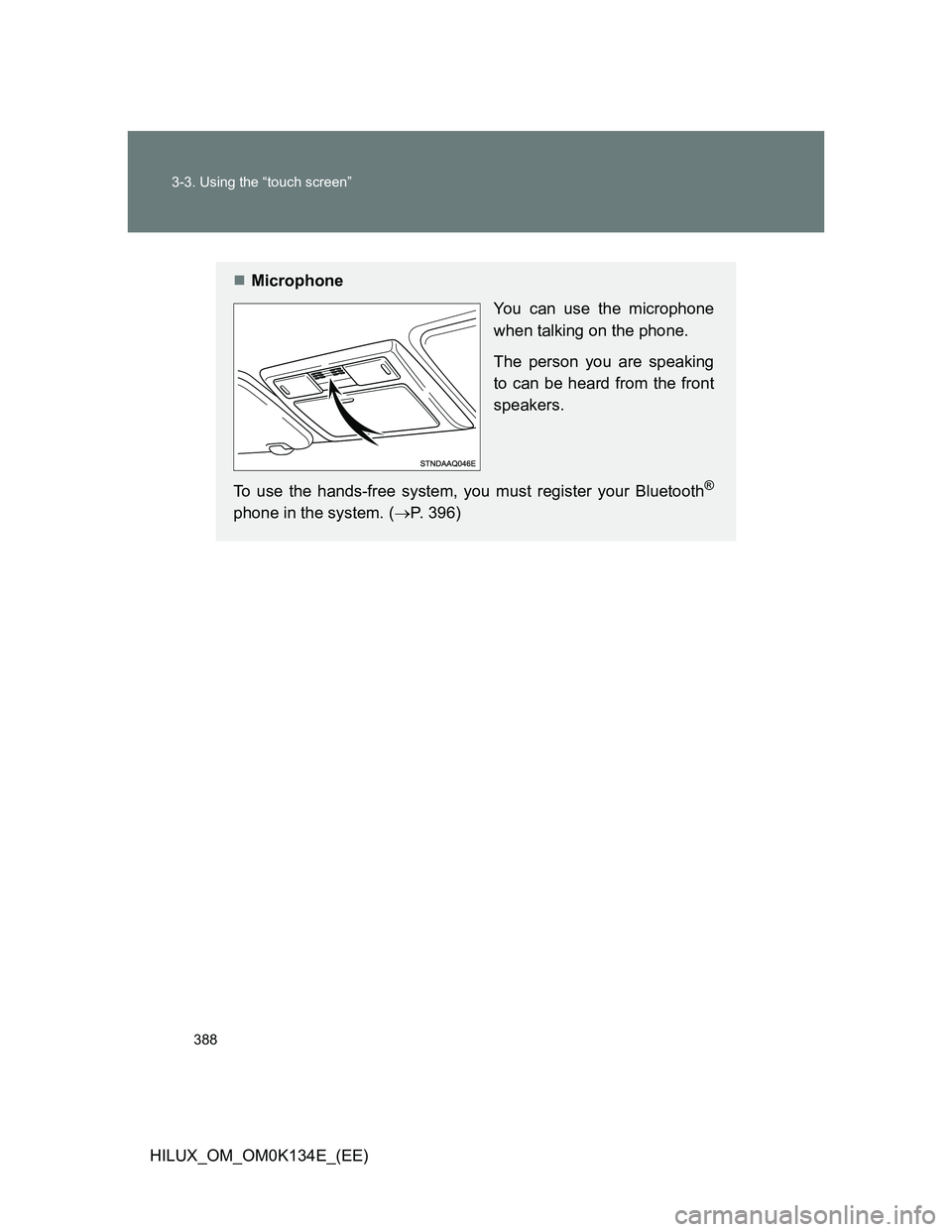
Microphone
You can use the microphone
when talking on the phone.
The person you are speaking
to can be heard from the front
speakers.
To use the hands-free system, you must register your Bluetooth
®
phone in the system. (P. 396)