light TOYOTA HILUX 2018 Owners Manual
[x] Cancel search | Manufacturer: TOYOTA, Model Year: 2018, Model line: HILUX, Model: TOYOTA HILUX 2018Pages: 708, PDF Size: 95.31 MB
Page 340 of 708
3404-5. Using the driving support systems
HILUX_OM_OM0K375E_(EE)
■ Conditions in which functions may not operate properly
In the following situations, the camera sensor may not detect white (yellow)
lines and various functions may not operate normally.
● There are shadows on the road that run parallel with, or cover, the white
(yellow) lines.
● The vehicle is driven in an area without white (yellow) lines, such as in front
of a tollgate or checkpoint, or at an intersection, etc.
● The white (yellow) lines are cracked, “Raised pavement marker” or stones
are present.
● The white (yellow) lines cannot be seen or are difficult to see due to sand,
etc.
● The vehicle is driven on a road surface that is wet due to rain, puddles, etc.
● The traffic lines are yellow (which may be more difficult to recognize than
lines that are white).
● The white (yellow) lines cross over a curb, etc.
● The vehicle is driven on a bright surface, such as concrete.
● The vehicle is driven on a surface that is bright due to reflected light, etc.
● The vehicle is driven in an area where the brightness changes suddenly,
such as at the entrances and exits of tunnels, etc.
● Light from the headlights of an oncoming vehicle, the sun, etc., enters the
camera.
● The vehicle is driven where the road diverges, merges, etc.
● The vehicle is driven on a slope.
● The vehicle is driven on a road which tilts left or right, or a winding road.
● The vehicle is driven on an unpaved or rough road.
● The vehicle is driven around a sharp curve.
● The traffic lane is excessively narrow or wide.
● The vehicle is extremely tilted due to carrying heavy luggage or having
improper tire pressure.
● The distance to the preceding vehicle is extremely short.
● The vehicle is moving up and down a large amount due to road conditions
during driving (poor r oads or road seams).
● The headlight lenses are dirty and emit a faint amount of light at night, or the
beam axis has deviated.
● The vehicle has just changed lanes or crossed an intersection.
Page 346 of 708
3464-5. Using the driving support systems
HILUX_OM_OM0K375E_(EE)
*1: A speed limit sign with a value greater than 130 may not be recognized
and a wrong speed limit may be displayed.
*2: If the turn signal indicator is not operated when changing lanes, the mark
does not display.
In the following situations, the RSA system alerts the driver using a
warning display.
● When the vehicle speed exceeds the speed warning threshold
applied to the speed limit of the sign displayed on the multi-informa-
tion display, the sign color becomes inverted.
● If it is detected that your vehicle is overtaking when a no overtaking
sign is displayed on the multi-information display, the sign flashes.
Depending on the situation, traffic environment (traffic direction,
speed, unit) may be detected incorrectly and a warning display may
not operate properly.
■ Automatic turn-off of RSA sign display
One or more signs automatically turn off in the following situations.
● A new sign is not recognized for a certain distance.
● The road changes due to a left or right turn, etc.
■ Conditions in which the function may not operate or detect correctly
In the following situations, RSA does not operate normally and may not rec-
ognize signs, display the incorrect sign, etc. However, this does not indicate a
malfunction.
● The camera sensor is misaligned due to a strong impact being applied to
the sensor, etc.
● Dirt, snow, stickers, etc. are on the windshield near the camera sensor.
● In inclement weather such as heavy rain, fog, snow or sand storms
● Light from an oncoming vehicle, the sun, etc., enters the camera sensor.
● The sign is dirty, faded, tilted or bent, and if an electronic sign, the contrast
is poor.
● All or part of the sign is hidden by the leaves of a tree, a pole, etc.
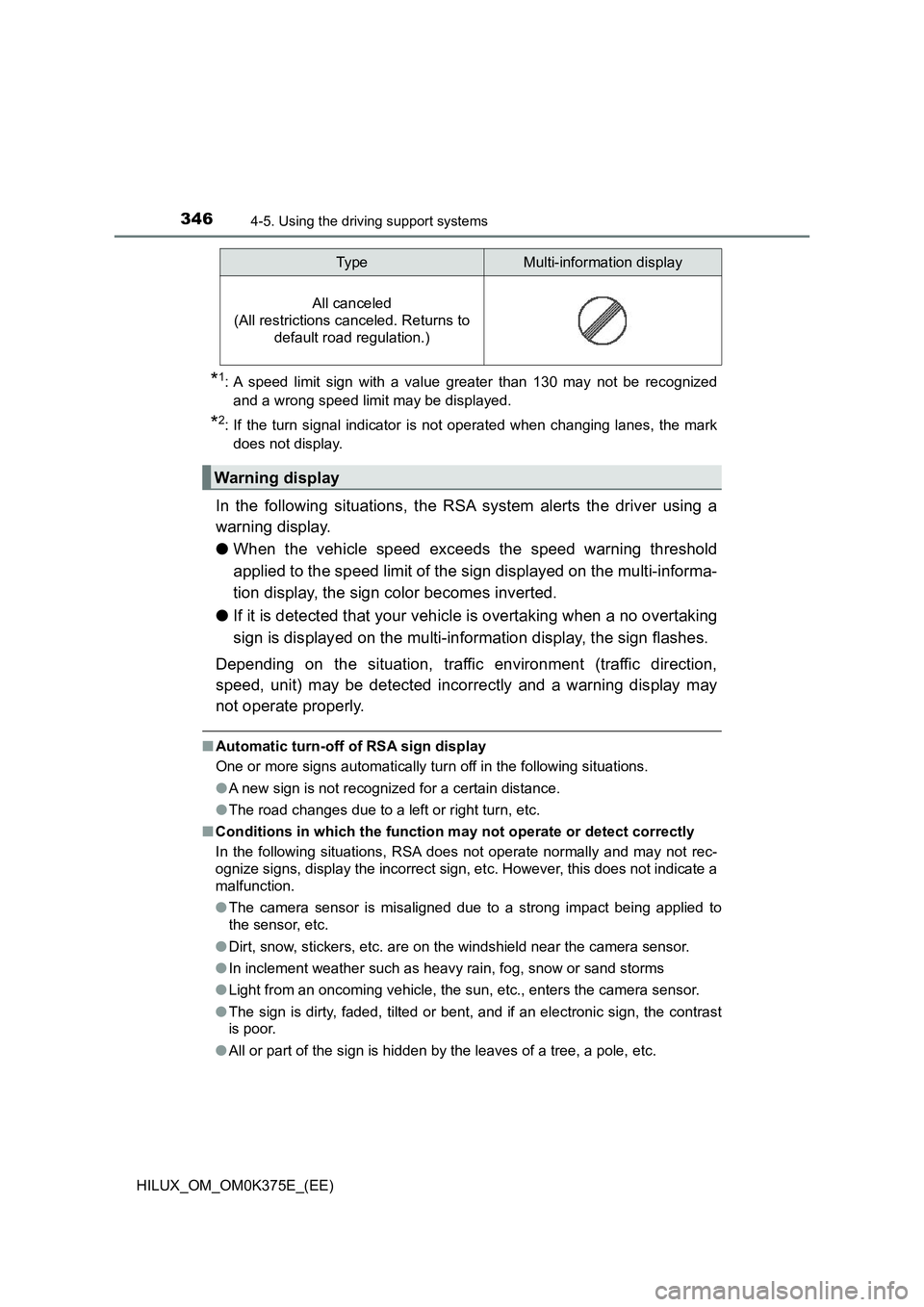
All canceled
(All restrictions canceled. Returns to
default road regulation.)
Warning display
Typ eMulti-information display
Page 359 of 708
3594-5. Using the driving support systems
4
Driving
HILUX_OM_OM0K375E_(EE)
■If you notice any symptoms
If you notice any of the following symptoms, refer to the likely cause
and the solution, and re-check.
If the symptom is not resolved by the solution, have the vehicle
inspected by any authorized Toyota retailer or Toyota authorized
repairer, or any reliable repairer.
Things you should know
Likely causeSolution
The image is difficult to see
• The vehicle is in a dark area
• The temperature around the lens
is either high or low
• The outside temperature is low
• There are water droplets on the
camera
• It is raining or humid
• Foreign matter (mud etc.) is
adhering to the camera
• There are scratches on the cam-
era
• Sunlight or headlights are shining
directly into the camera
• The vehicle is under fluorescent
lights, sodium lights, mercury
lights etc.
If this happens due to these causes,
it does not indicate a malfunction.
Back up while visually checking the
vehicle’s surroundings. (Use the
monitor again once conditions have
been improved.)
The image on the rear view monitor
system screen can be adjusted,
refer to the “Navigation and
multimedia system Owner’s
manual”.
The image is blurry
Dirt or foreign matter (such as water
droplets, snow, mud etc.) is adher-
ing to the camera.
Flush the camera with a large quan-
tity of water and wipe the camera
lens clean with a soft and wet cloth.
Page 362 of 708
3624-5. Using the driving support systems
HILUX_OM_OM0K375E_(EE)
NOTICE
■How to use the camera
● The rear view monitor system may not operate properly in the following
cases.
• If the back of the vehicle is hit, the position and mounting angle of the
camera may change.
• As the camera has a water proof construction, do not detach, disassem-
ble or modify it. This may cause incorrect operation.
• When cleaning the camera lens, flush the camera with a large quantity
of water and wipe it with a soft and wet cloth. Strongly rubbing the cam-
era lens may cause the camera lens to be scratched and unable to
transmit a clear image.
• Do not allow organic solvent, car wax, window cleaner or glass coat to
adhere to the camera. If this happens, wipe it off as soon as possible.
• If the temperature changes rapidly, such as when hot water is poured
on the vehicle in cold weather, the system may not operate normally.
• When washing the vehicle, do not apply intensive bursts of water to the
camera or camera area. Doing so may result in the camera malfunc-
tioning.
• When the camera is used under fluorescent lights, sodium light or mer-
cury light etc., the lights and the illuminated areas may appear to flicker.
● Do not expose the camera to strong impact as this could cause a malfunc-
tion. If this happens, have the vehicle inspected by any authorized Toyota
retailer or Toyota authorized repairer, or any reliable repairer as soon as
possible.
Page 363 of 708
363
4
4-5. Using the driving support systems
Driving
HILUX_OM_OM0K375E_(EE)
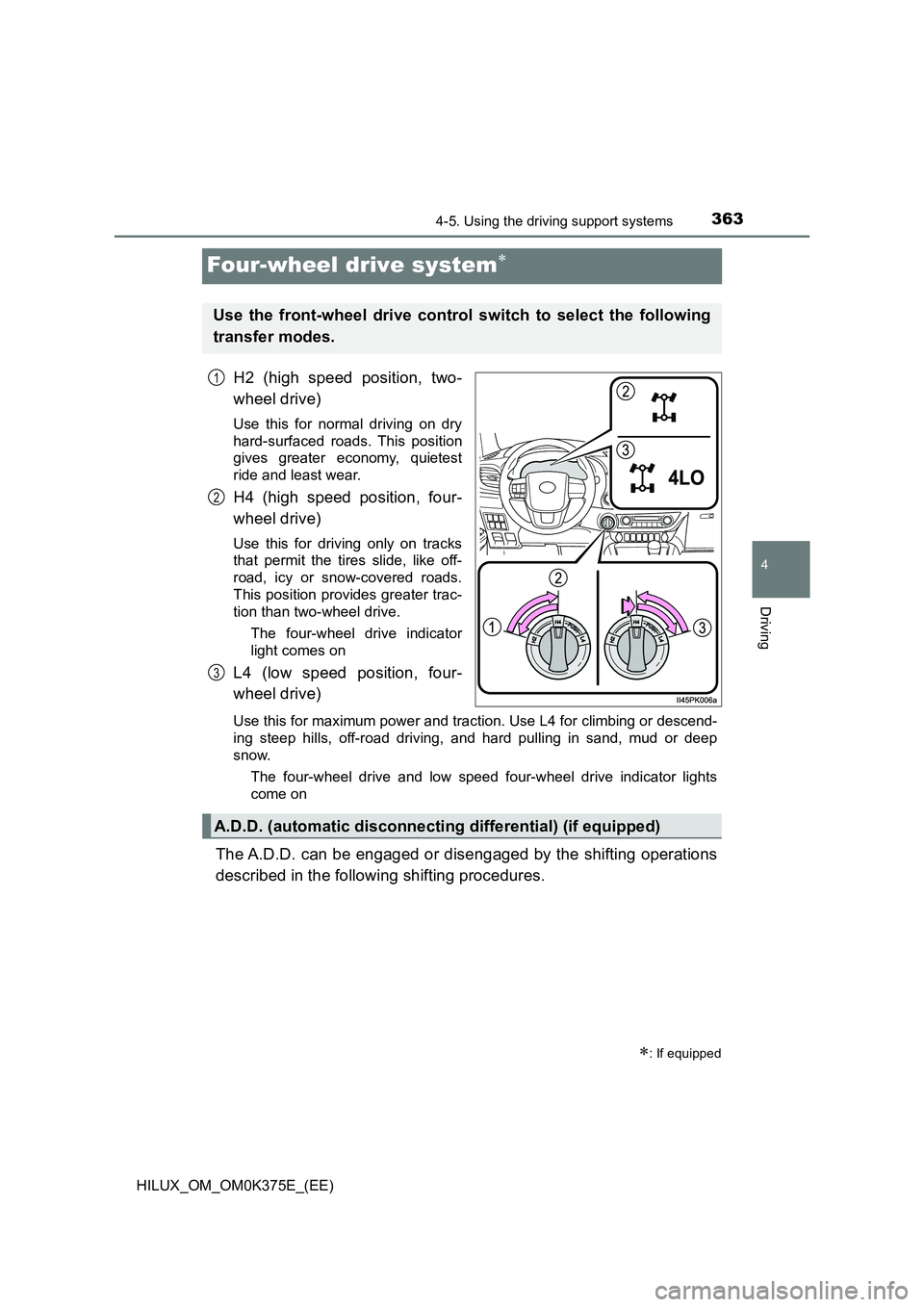
Four-wheel drive system
H2 (high speed position, two-
wheel drive)
Use this for normal driving on dry
hard-surfaced roads. This position
gives greater economy, quietest
ride and least wear.
H4 (high speed position, four-
wheel drive)
Use this for driving only on tracks
that permit the tires slide, like off-
road, icy or snow-covered roads.
This position provides greater trac-
tion than two-wheel drive.
The four-wheel drive indicator
light comes on
L4 (low speed position, four-
wheel drive)
Use this for maximum power and traction. Use L4 for climbing or descend-
ing steep hills, off-road driving, and hard pulling in sand, mud or deep
snow.
The four-wheel drive and low speed four-wheel drive indicator lights
come on
The A.D.D. can be engaged or disengaged by the shifting operations
described in the following shifting procedures.
: If equipped
Use the front-wheel drive control switch to select the following
transfer modes.
1
2
3
A.D.D. (automatic disconnecting differential) (if equipped)
Page 364 of 708
3644-5. Using the driving support systems
HILUX_OM_OM0K375E_(EE)
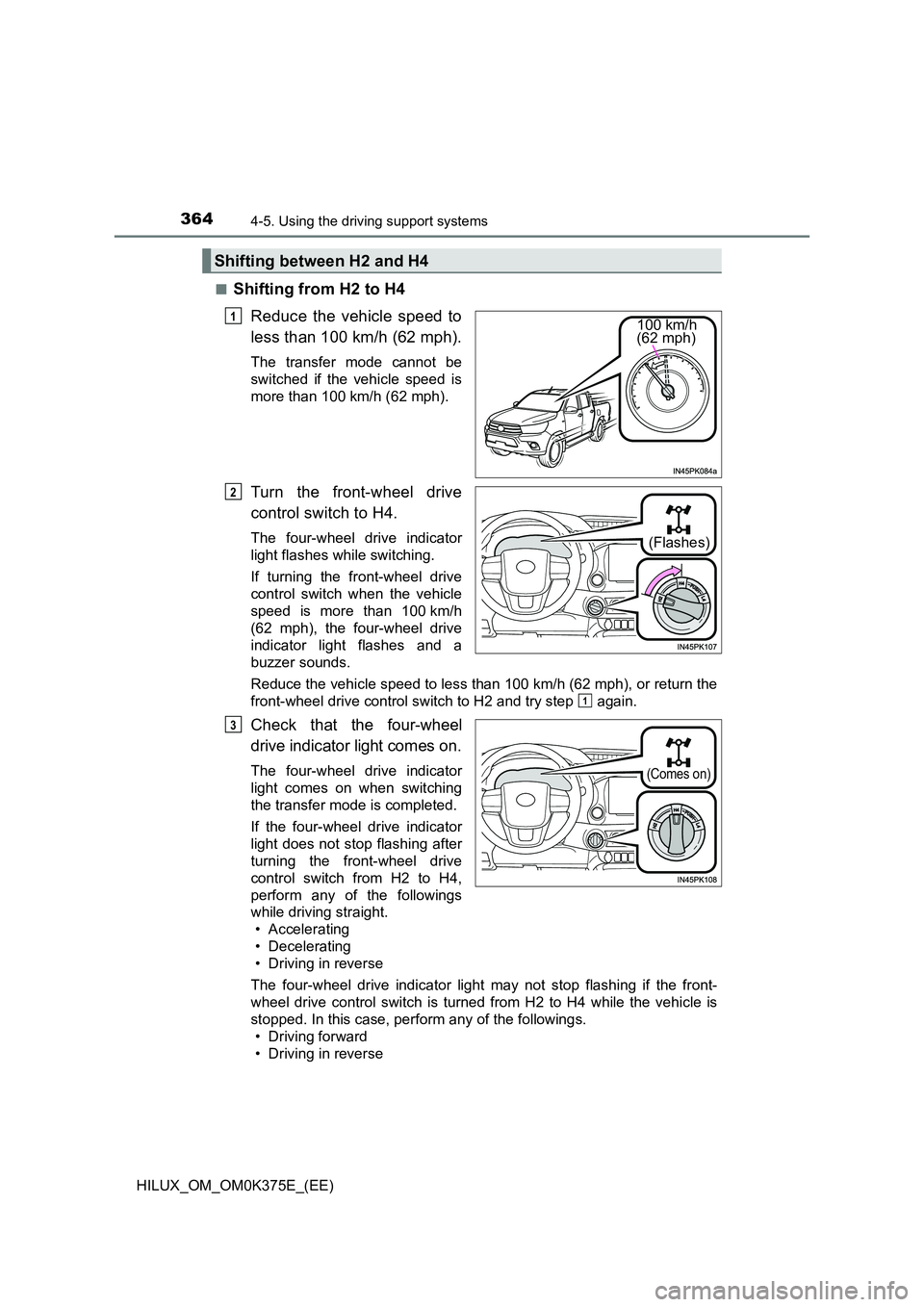
■Shifting from H2 to H4
Reduce the vehicle speed to
less than 100 km/h (62 mph).
The transfer mode cannot be
switched if the vehicle speed is
more than 100 km/h (62 mph).
Turn the front-wheel drive
control switch to H4.
The four-wheel drive indicator
light flashes while switching.
If turning the front-wheel drive
control switch when the vehicle
speed is more than 100 km/h
(62 mph), the four-wheel drive
indicator light flashes and a
buzzer sounds.
Reduce the vehicle speed to less than 100 km/h (62 mph), or return the
front-wheel drive control switch to H2 and try step again.
Check that the four-wheel
drive indicator light comes on.
The four-wheel drive indicator
light comes on when switching
the transfer mode is completed.
If the four-wheel drive indicator
light does not stop flashing after
turning the front-wheel drive
control switch from H2 to H4,
perform any of the followings
while driving straight.
• Accelerating
• Decelerating
• Driving in reverse
The four-wheel drive indicator light may not stop flashing if the front-
wheel drive control switch is turned from H2 to H4 while the vehicle is
stopped. In this case, perform any of the followings.
• Driving forward
• Driving in reverse
Shifting between H2 and H4
100 km/h (62 mph)
1
(Flashes)
2
1
(Comes on)
3
Page 365 of 708
3654-5. Using the driving support systems
4
Driving
HILUX_OM_OM0K375E_(EE)
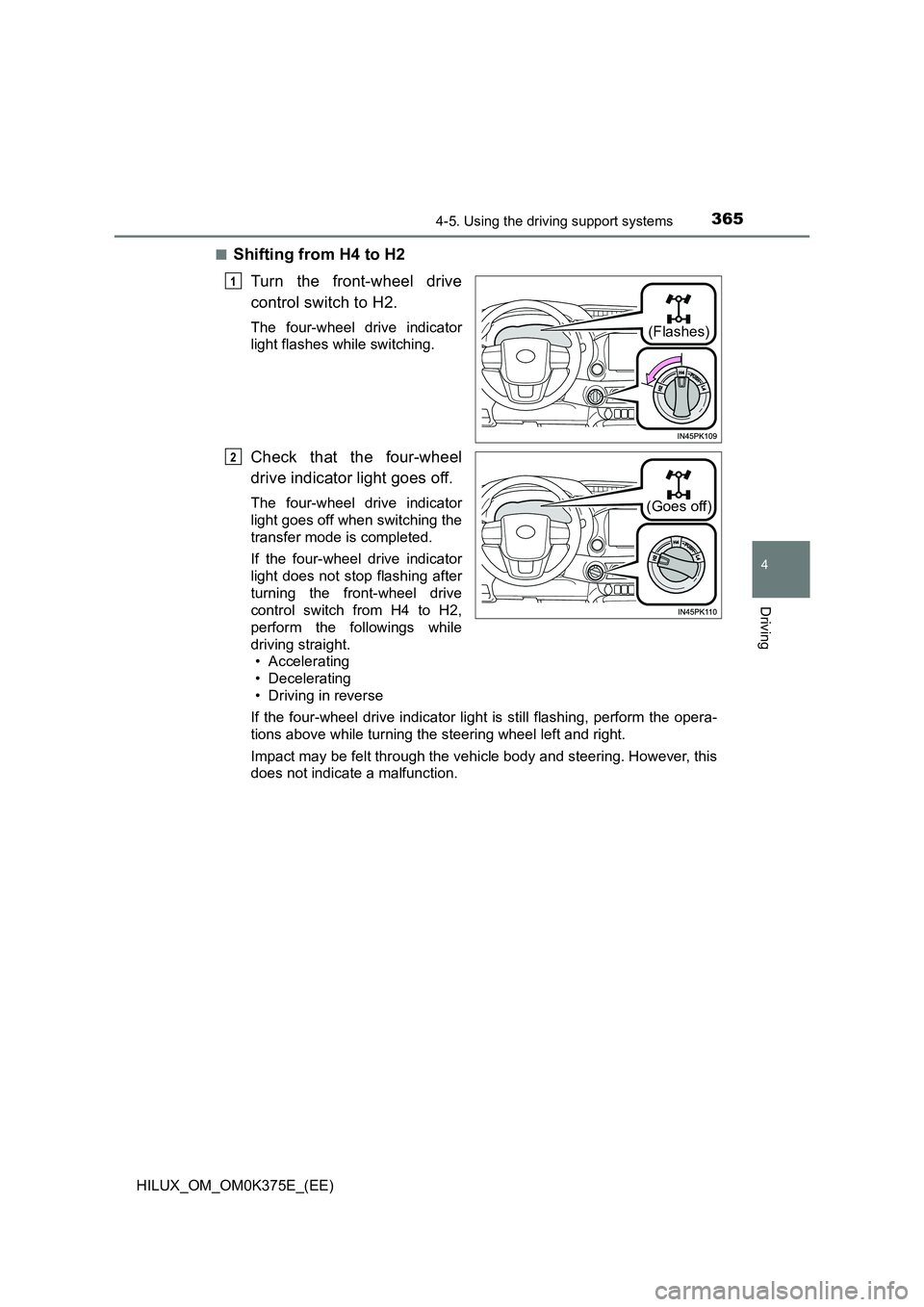
■Shifting from H4 to H2
Turn the front-wheel drive
control switch to H2.
The four-wheel drive indicator
light flashes while switching.
Check that the four-wheel
drive indicator light goes off.
The four-wheel drive indicator
light goes off when switching the
transfer mode is completed.
If the four-wheel drive indicator
light does not stop flashing after
turning the front-wheel drive
control switch from H4 to H2,
perform the followings while
driving straight.
• Accelerating
• Decelerating
• Driving in reverse
If the four-wheel drive indicator light is still flashing, perform the opera-
tions above while turning the steering wheel left and right.
Impact may be felt through the vehicle body and steering. However, this
does not indicate a malfunction.
(Flashes)
1
(Goes off)
2
Page 366 of 708
3664-5. Using the driving support systems
HILUX_OM_OM0K375E_(EE)
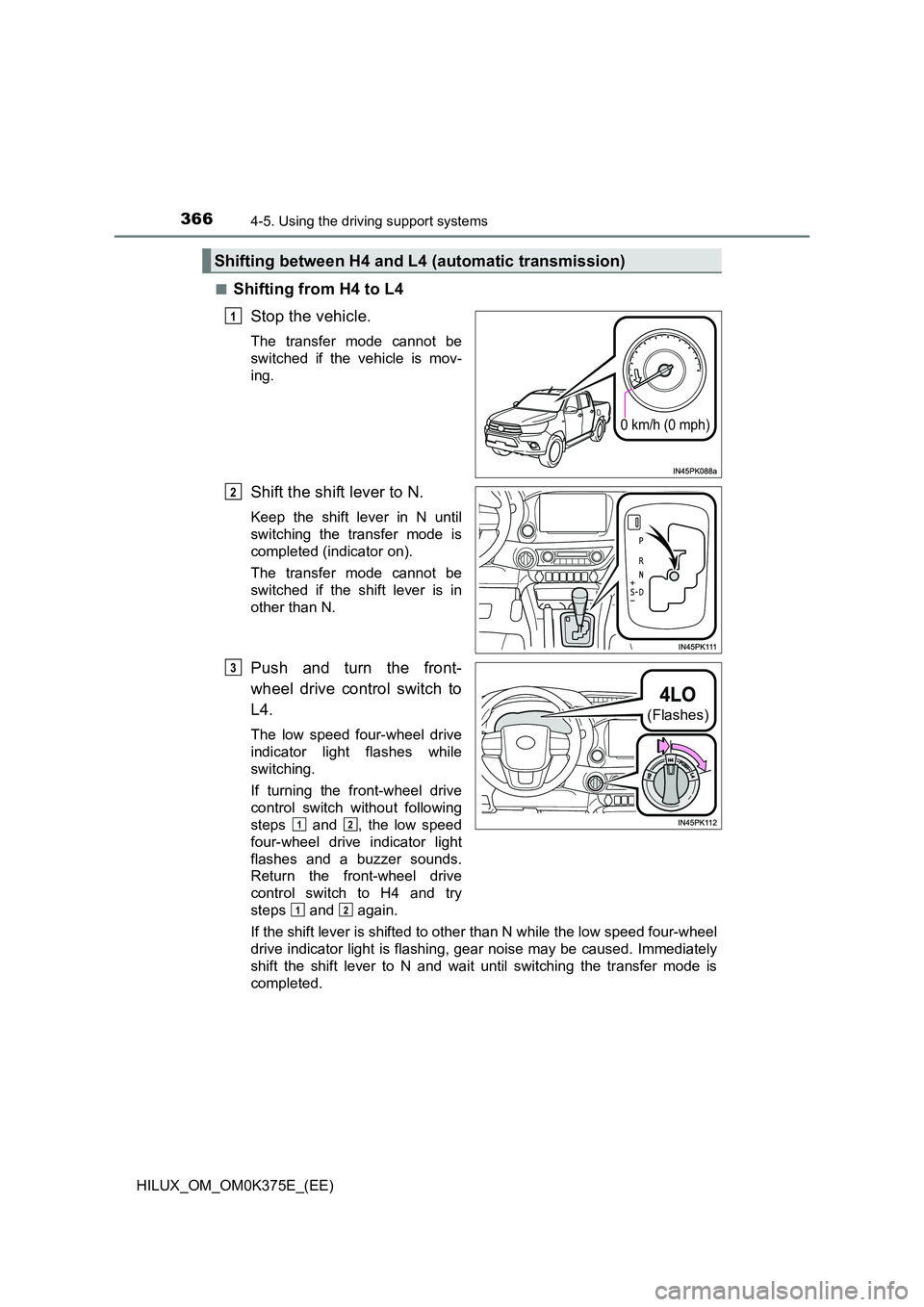
■Shifting from H4 to L4
Stop the vehicle.
The transfer mode cannot be
switched if the vehicle is mov-
ing.
Shift the shift lever to N.
Keep the shift lever in N until
switching the transfer mode is
completed (indicator on).
The transfer mode cannot be
switched if the shift lever is in
other than N.
Push and turn the front-
wheel drive control switch to
L4.
The low speed four-wheel drive
indicator light flashes while
switching.
If turning the front-wheel drive
control switch without following
steps and , the low speed
four-wheel drive indicator light
flashes and a buzzer sounds.
Return the front-wheel drive
control switch to H4 and try
steps and again.
If the shift lever is shifted to other than N while the low speed four-wheel
drive indicator light is flashing, gear noise may be caused. Immediately
shift the shift lever to N and wait until switching the transfer mode is
completed.
Shifting between H4 and L4 (automatic transmission)
0 km/h (0 mph)
1
2
(Flashes)
3
12
12
Page 367 of 708
3674-5. Using the driving support systems
4
Driving
HILUX_OM_OM0K375E_(EE)
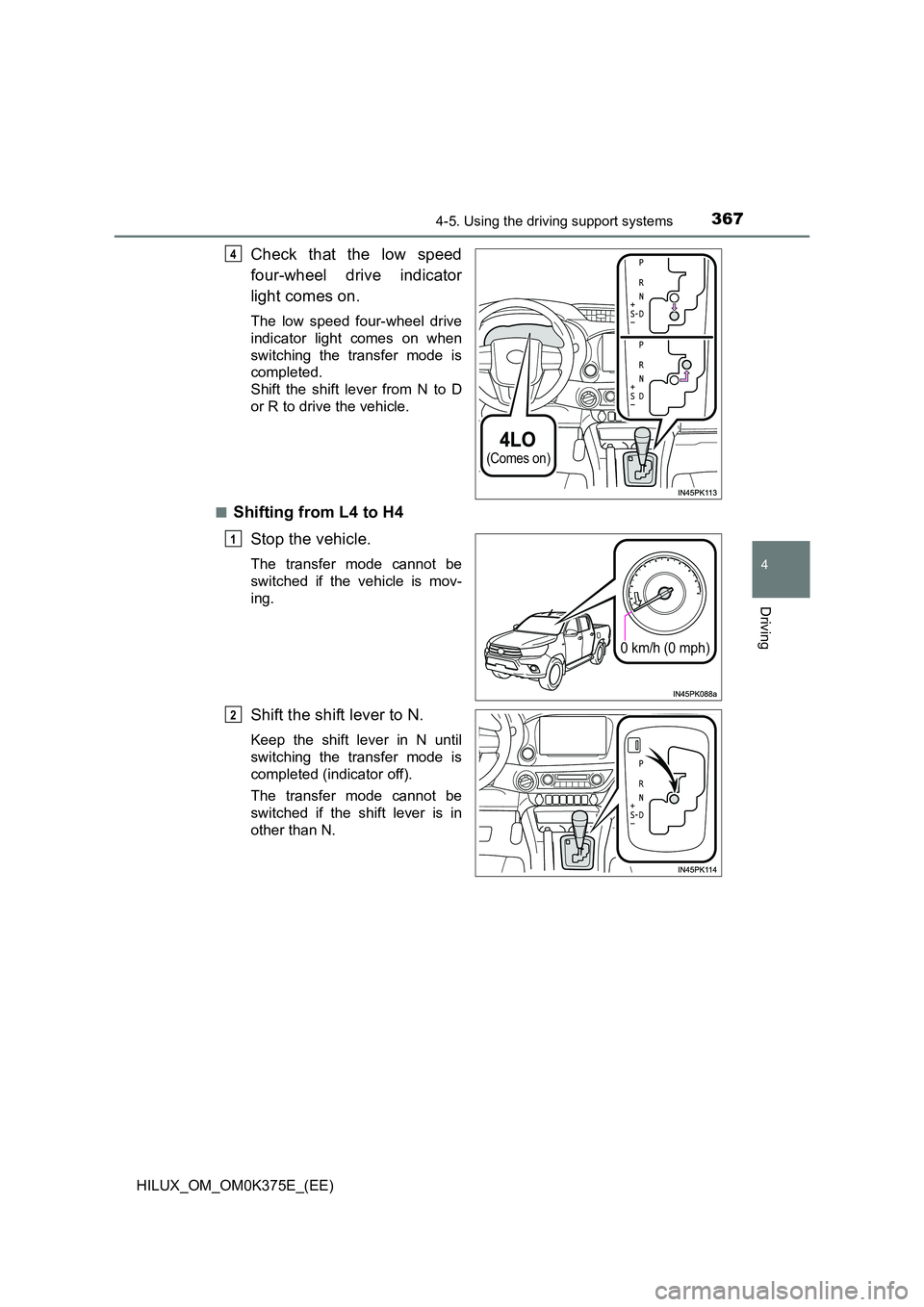
Check that the low speed
four-wheel drive indicator
light comes on.
The low speed four-wheel drive
indicator light comes on when
switching the transfer mode is
completed.
Shift the shift lever from N to D
or R to drive the vehicle.
■Shifting from L4 to H4
Stop the vehicle.
The transfer mode cannot be
switched if the vehicle is mov-
ing.
Shift the shift lever to N.
Keep the shift lever in N until
switching the transfer mode is
completed (indicator off).
The transfer mode cannot be
switched if the shift lever is in
other than N.
(Comes on)
4
0 km/h (0 mph)
1
2
Page 368 of 708
3684-5. Using the driving support systems
HILUX_OM_OM0K375E_(EE)
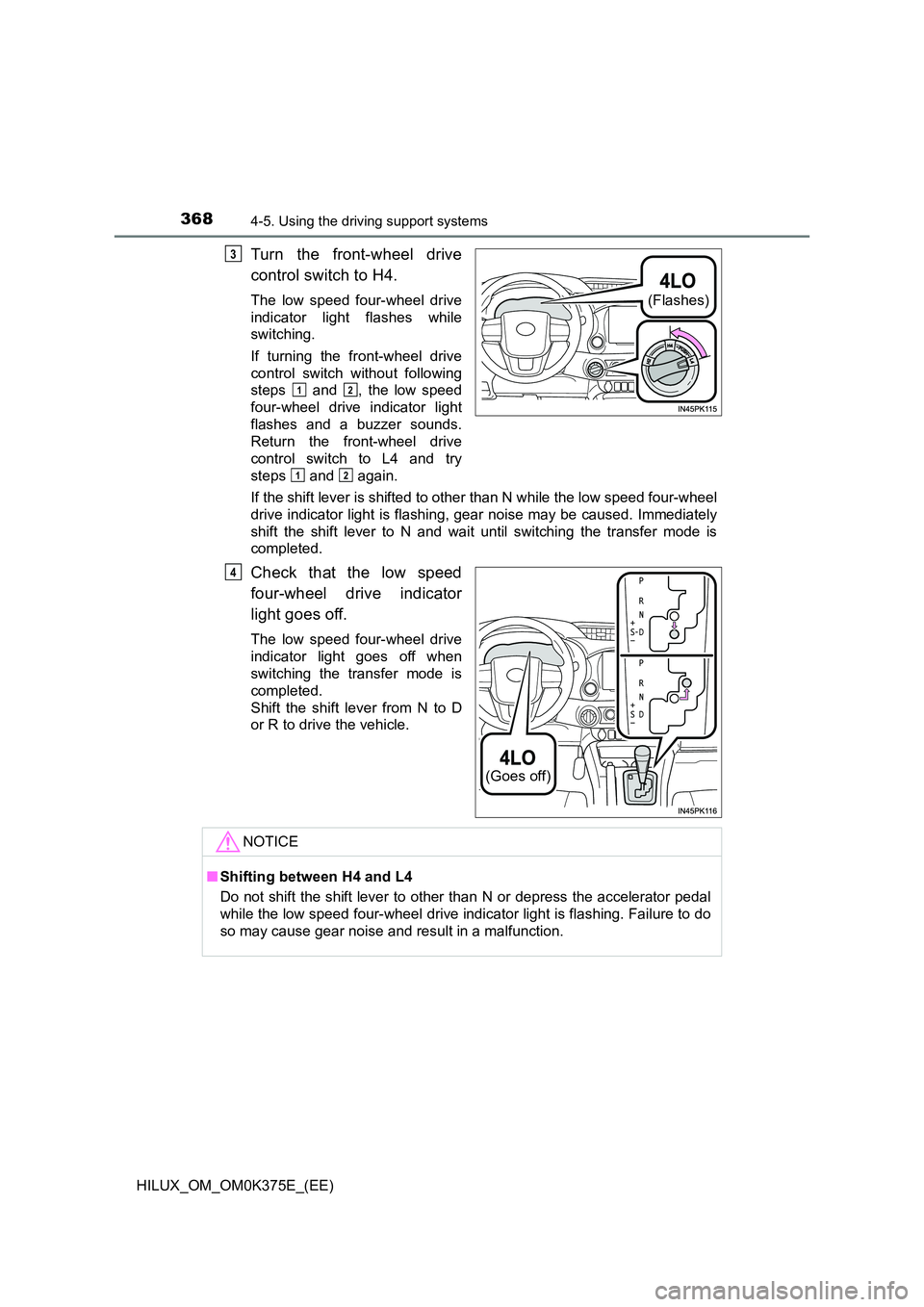
Turn the front-wheel drive
control switch to H4.
The low speed four-wheel drive
indicator light flashes while
switching.
If turning the front-wheel drive
control switch without following
steps and , the low speed
four-wheel drive indicator light
flashes and a buzzer sounds.
Return the front-wheel drive
control switch to L4 and try
steps and again.
If the shift lever is shifted to other than N while the low speed four-wheel
drive indicator light is flashing, gear noise may be caused. Immediately
shift the shift lever to N and wait until switching the transfer mode is
completed.
Check that the low speed
four-wheel drive indicator
light goes off.
The low speed four-wheel drive
indicator light goes off when
switching the transfer mode is
completed.
Shift the shift lever from N to D
or R to drive the vehicle.
(Flashes)
3
12
12
(Goes off)
4
NOTICE
■ Shifting between H4 and L4
Do not shift the shift lever to other than N or depress the accelerator pedal
while the low speed four-wheel drive indicator light is flashing. Failure to do
so may cause gear noise and result in a malfunction.