warning TOYOTA HILUX 2018 Owners Manual
[x] Cancel search | Manufacturer: TOYOTA, Model Year: 2018, Model line: HILUX, Model: TOYOTA HILUX 2018Pages: 708, PDF Size: 95.31 MB
Page 393 of 708
3934-5. Using the driving support systems
4
Driving
HILUX_OM_OM0K375E_(EE)
WARNING
■TRC/A-TRC/VSC may not operate effectively when
Directional control and power may not be achievable while driving on slip-
pery road surfaces, even if the TRC/A-TRC/VSC system is operating.
Drive the vehicle carefully in conditions where stability and power may be
lost.
■ Hill-start assist control does not operate effectively when
● Do not overly rely on the hill-start assist control. The hill-start assist control
may not operate effectively on steep inclines and roads covered with ice.
● Unlike the parking brake, the hill-start assist control is not intended to hold
the vehicle stationary for an extended period of time. Do not attempt to use
the hill-start assist control to hold the vehicle on an incline, as doing so
may lead to an accident.
■ When the TRC/VSC/Trailer Sway Control is activated
The slip indicator flashes. Always drive carefully.
Reckless driving may cause an accident. Exercise particular care when the
indicator flashes.
■ When the TRC/A-TRC/VSC/Trailer Sway Control systems are turned off
Be especially careful and drive at a speed appropriate to the road condi-
tions. As these are the systems to help ensure vehicle stability and driving
force, do not turn the TRC/A-TRC/VSC/Trailer Sway Control systems off
unless necessary.
■ Replacing tires
Make sure that all tires are of the specified size, brand, tread pattern and
total load capacity. In addition, make sure that the tires are inflated to the
recommended tire inflation pressure level.
The ABS, TRC, A-TRC, VSC, Trailer Sway Control, hill-start assist control
and downhill assist control systems will not function correctly if different tires
are installed on the vehicle.
Contact any authorized Toyota retailer or Toyota authorized repairer, or any
reliable repairer for further information when replacing tires or wheels.
■ Handling of tires and the suspension
Using tires with any kind of problem or modifying the suspension will affect
the driving assist systems, and may cause a system to malfunction.
Page 394 of 708
3944-5. Using the driving support systems
HILUX_OM_OM0K375E_(EE)
WARNING
■Trailer Sway Control precaution
The Trailer Sway Control system is not able to reduce trailer sway in all situ-
ations. Depending on many factors such as the conditions of the vehicle,
trailer, road surface, and driving envi ronment, the Trailer Sway Control sys-
tem may not be effective. Refer to your trailer owner’s manual for informa-
tion on how to tow your trailer properly.
■ If trailer sway occurs (vehicles with Trailer Sway Control)
Observe the following precautions.
Failing to do so may cause death or serious injury.
● Firmly grip the steering wheel. Steer straight ahead.
Do not try to control trailer sway by turning the steering wheel.
● Begin releasing the accelerator pedal immediately but very gradually to
reduce speed.
Do not increase speed. Do not apply vehicle brakes.
If you make no extreme correction with the steering or brakes, your vehicle
and trailer should stabilize. ( P. 261)
Page 397 of 708
3974-5. Using the driving support systems
4
Driving
HILUX_OM_OM0K375E_(EE)
■ System malfunction
In the following cases, have your vehicle checked by any authorized Toyota
retailer or Toyota authorized repairer, or any reliable repairer.
● The downhill assist control system indicator does not come on when the
engine switch is turned to the “ON” position (vehicles without smart entry &
start system) or IGNITION ON mode (vehicles with smart entry & start sys-
tem).
● The downhill assist control system indicator does not come on when the
“DAC” switch is pressed.
● The slip indicator comes on.
WARNING
■When using downhill assist control system
● Do not rely overmuch on the downhill assist control system. This function
does not extend the vehicle’s performance limitations. Always thoroughly
check the road conditions, and drive safely.
● Vehicles with manual transmission: Drive in a low gear. Driving in a high
gear when using downhill assist control system may cause the engine to
stall, which may lose the brake effectiveness and lock the tires, resulting in
an accident.
● Vehicles with manual transmission: On a steep slope, use the engine brak-
ing efficiently. If the vehicle is driven in N or with the clutch pedal
depressed on a steep slope, the load on the brake increases and con-
trolling the vehicle speed may be impossible, resulting in an accident.
■ The system may not operate on the following surfaces, which may lead
to an accident causing death or serious injury
● Slippery surfaces such as wet or muddy roads
● Icy surface
● Unpaved roads
Page 398 of 708
3984-5. Using the driving support systems
HILUX_OM_OM0K375E_(EE)
DPF (Diesel Particulate Filter) system
◆Regeneration
Regeneration is performed as necessary in accordance with driving
conditions.
◆System characteristics
The DPF system has the following characteristics:
● Idle speed increases during regeneration
● The smell of the exhaust gas differs from that of a conventional
diesel vehicle
● White smoke may be emitted from the exhaust pipe during
regeneration. However, this does not indicate a malfunction.
● If the DPF system warning light turns on (vehicles without multi-
information display) or the DPF system warning message “DPF
FULL MANUAL REGENERATION REQUIRED SEE OWNER’S
MANUAL”/“DPF full Manual regeneration required See owner’s
manual” appears on the display (vehicles with multi-information dis-
play), follow the procedure below to regenerate.
Stop the vehicle in a safe place.
Shift the shift lever to P (automatic transmission) or N (manual
transmission), and firmly set the parking brake.
Do not stop the engine.
Also, make sure that there are no flammable materials near the exhaust
pipe. ( P. 401)
Check the engine is warmed up. If the engine is cold, warm up the engine
by depressing the accelerator pedal.*1
: If equipped
When the deposit collected by the filter reaches a predetermined
amount, it is automatically regenerated.
DPF system failure warning
1
2
Page 399 of 708
3994-5. Using the driving support systems
4
Driving
HILUX_OM_OM0K375E_(EE)
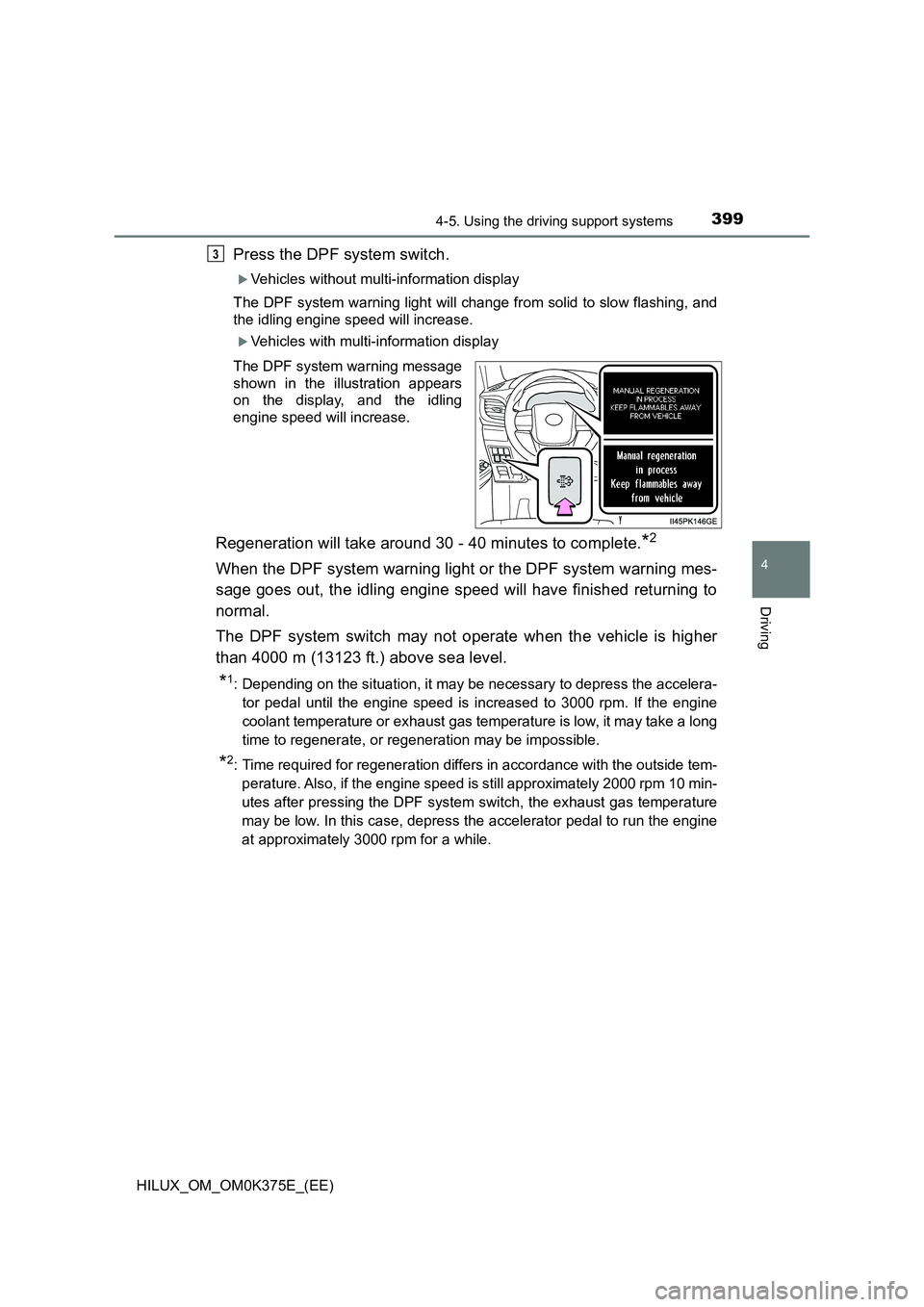
Press the DPF system switch.
Vehicles without multi-information display
The DPF system warning light will change from solid to slow flashing, and
the idling engine speed will increase.
Vehicles with multi-information display
The DPF system warning message
shown in the illustration appears
on the display, and the idling
engine speed will increase.
Regeneration will take around 30 - 40 minutes to complete.*2
When the DPF system warning light or the DPF system warning mes-
sage goes out, the idling engine speed will have finished returning to
normal.
The DPF system switch may not operate when the vehicle is higher
than 4000 m (13123 ft.) above sea level.
*1: Depending on the situation, it may be necessary to depress the accelera-
tor pedal until the engine speed is increased to 3000 rpm. If the engine
coolant temperature or exhaust gas tem perature is low, it may take a long
time to regenerate, or regeneration may be impossible.
*2: Time required for regeneration differs in accordance with the outside tem-
perature. Also, if the engine speed is still approximately 2000 rpm 10 min-
utes after pressing the DPF system switch, the exhaust gas temperature
may be low. In this case, depress the accelerator pedal to run the engine
at approximately 3000 rpm for a while.
3
Page 400 of 708
4004-5. Using the driving support systems
HILUX_OM_OM0K375E_(EE)
●If the DPF system warning light flashes rapidly (vehicles without
multi-information display) or the DPF system warning message
“DPF FULL VISIT YOUR DEALER”/“DPF full Visit your dealer”
appears on the display (vehicles with multi-information display), the
malfunction indicator lamp comes on, have the vehicle inspected by
any authorized Toyota retailer or Toyota authorized repairer, or any
reliable repairer immediately.
■ Regeneration with the DPF system switch
● After pressing the DPF system switch, depressing the accelerator pedal or
clutch pedal (manual transmission) will stop regeneration. If regeneration
has been stopped, restart regeneration as soon as possible.
● After regeneration is finished, race the engine several time to clean the
exhaust system.
■ DPF system warning
Under the following driving conditions, the DPF system warning light (vehi-
cles without the multi-information display) or the DPF system warning mes-
sage (vehicles with multi-information display) may come on earlier than
normal.*
● When only driving at low speeds (for example 20 km/h [12 mph] or below).
● If the engine is turned on and off frequently (if the engine is not left running
for more than 10 minutes at a time).
*: Differs in accordance with weather, driving conditions, etc.
Page 401 of 708
4014-5. Using the driving support systems
4
Driving
HILUX_OM_OM0K375E_(EE)
WARNING
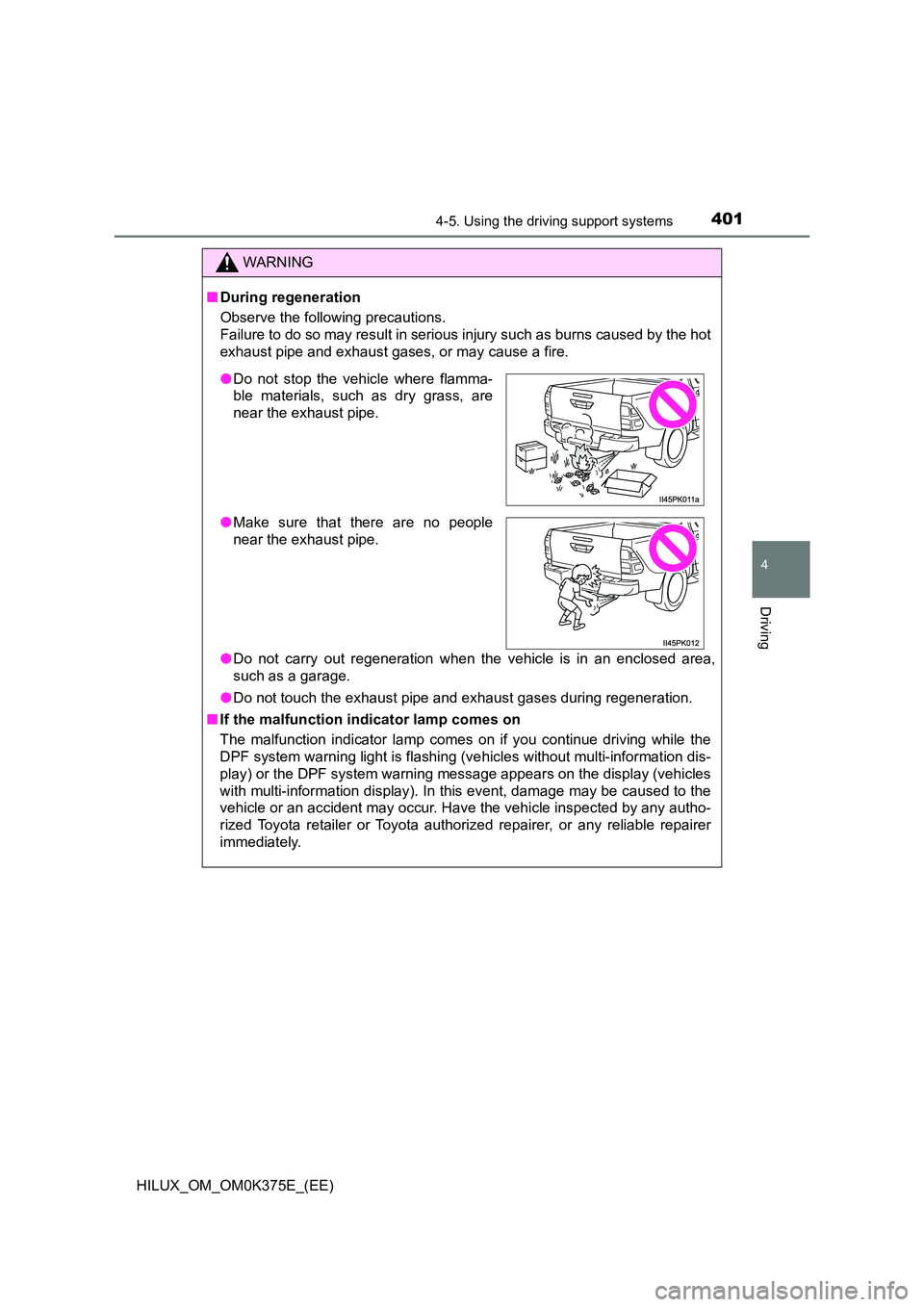
■During regeneration
Observe the following precautions.
Failure to do so may result in serious injury such as burns caused by the hot
exhaust pipe and exhaust gases, or may cause a fire.
● Do not carry out regeneration when the vehicle is in an enclosed area,
such as a garage.
● Do not touch the exhaust pipe and exhaust gases during regeneration.
■ If the malfunction indicator lamp comes on
The malfunction indicator lamp comes on if you continue driving while the
DPF system warning light is flashing (v ehicles without multi-information dis-
play) or the DPF system warning message appears on the display (vehicles
with multi-information display). In this event, damage may be caused to the
vehicle or an accident may occur. Have the vehicle inspected by any autho-
rized Toyota retailer or Toyota authorized repairer, or any reliable repairer
immediately.
● Do not stop the vehicle where flamma-
ble materials, such as dry grass, are
near the exhaust pipe.
● Make sure that there are no people
near the exhaust pipe.
Page 402 of 708
4024-5. Using the driving support systems
HILUX_OM_OM0K375E_(EE)
NOTICE
■To prevent the DPF system from failing
● Do not drive for long periods of time while the DPF system warning mes-
sage “DPF FULL VISIT YOUR DEALER”/“DPF full Visit your dealer”
appears on the display
● Do not use fuel other than the specified type
● Do not use engine oil other than the recommended type
● Do not modify the exhaust pipe
Page 405 of 708
4054-6. Driving tips
4
Driving
HILUX_OM_OM0K375E_(EE)
■Tire chain installation
Observe the following precautions when installing and removing chains:
● Install and remove tire chains in a safe location.
● Install tire chains on the rear tires. Do not install tire chains on the front tires.
● Install tire chains on rear tires as tightly as possible. Retighten chains after
driving 0.5 - 1.0 km (1/4 - 1/2 mile).
● Install tire chains following the instructions provided with the tire chains.
WARNING
■Driving with snow tires
Observe the following precautions to reduce the risk of accidents.
Failing to do so may result in a loss of vehicle control and cause death or
serious injury.
● Use tires of the specified size.
● Maintain the recommended level of air pressure.
● Do not drive at speeds in excess of the speed limit or the speed limit spec-
ified for the snow tires being used.
● Use snow tires on all, not just some wheels.
■ Driving with tire chains
Observe the following precautions to reduce the risk of accidents.
Failing to do so may result in the vehicle being unable to be driven safely,
and may cause death or serious injury.
● Do not drive in excess of the speed limit specified for the tire chains being
used, or 50 km/h (30 mph), whichever is lower.
● Avoid driving on bumpy road surfaces or over potholes.
● Avoid sudden acceleration, abrupt steering, sudden braking and shifting
operations that cause sudden engine braking.
● Slow down sufficiently before entering a curve to ensure that vehicle con-
trol is maintained.
● Do not use LDA (Lane Departure Alert) system.
Page 412 of 708
4125-1. Basic Operations
HILUX_OM_OM0K375E_(EE)
Press the “MODE” switch to select the CD, Bluetooth® audio, iPod
or USB memory mode.
Press the “ ” or “” switch to select the desired track/file or song.
Press the “MODE” switch to select Bluetooth® audio mode.
Press and hold the “ ” or “” switch until you hear a beep.
Press the “MODE” switch to select CD or USB memory mode.
Press and hold the “ ” or “” switch until you hear a beep.
Selecting a track/file or song
Selecting an album
Selecting a folder (MP3 and WMA or USB memory)
WARNING
■To reduce the risk of an accident
Exercise care when operating the audio switches on the steering wheel.
1
2
1
2
1
2