lock TOYOTA HILUX 2019 Owners Manual
[x] Cancel search | Manufacturer: TOYOTA, Model Year: 2019, Model line: HILUX, Model: TOYOTA HILUX 2019Pages: 708, PDF Size: 95.31 MB
Page 493 of 708
4936-1. Using the air conditioning system and defogger
6
Interior features
HILUX_OM_OM0K375E_(EE)
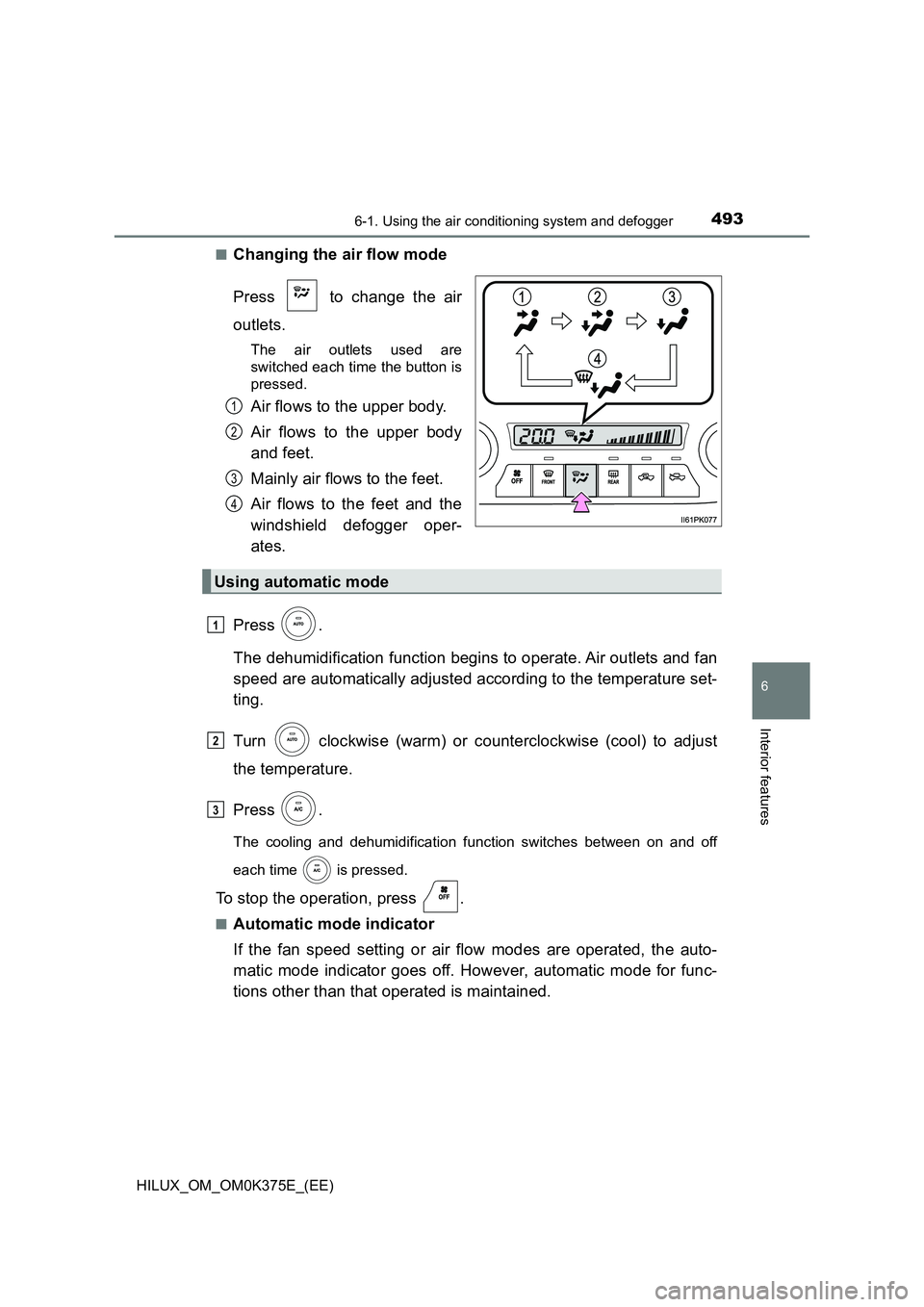
■Changing the air flow mode
Press to change the air
outlets.
The air outlets used are
switched each time the button is
pressed.
Air flows to the upper body.
Air flows to the upper body
and feet.
Mainly air flows to the feet.
Air flows to the feet and the
windshield defogger oper-
ates.
Press .
The dehumidification function begins to operate. Air outlets and fan
speed are automatically adjusted according to the temperature set-
ting.
Turn clockwise (warm) or counterclockwise (cool) to adjust
the temperature.
Press .
The cooling and dehumidification function switches between on and off
each time is pressed.
To stop the operation, press .
■Automatic mode indicator
If the fan speed setting or air flow modes are operated, the auto-
matic mode indicator goes off. However, automatic mode for func-
tions other than that operated is maintained.
1
2
3
4
Using automatic mode
1
2
3
Page 500 of 708
5006-1. Using the air conditioning system and defogger
HILUX_OM_OM0K375E_(EE)
WARNING
■To prevent the windshield from fogging up
● Do not use during cool air operation in extremely humid weather. The
difference between the temperature of the outside air and that of the wind-
shield can cause the outer surface of the windshield to fog up, blocking
your vision.
■ To prevent burns
● Vehicles with outside rear view mirror defoggers: Do not touch the rear
view mirror surfaces when the outsi de rear view mirror defoggers are on.
● Vehicles with windshield wiper de-icer: Do not touch the glass at lower part
of the windshield or the side of the front pillars when the windshield wiper
de-icer is on.
NOTICE
■ To prevent battery discharge
Do not leave the air conditioning syst em on longer than necessary when the
engine is not running.
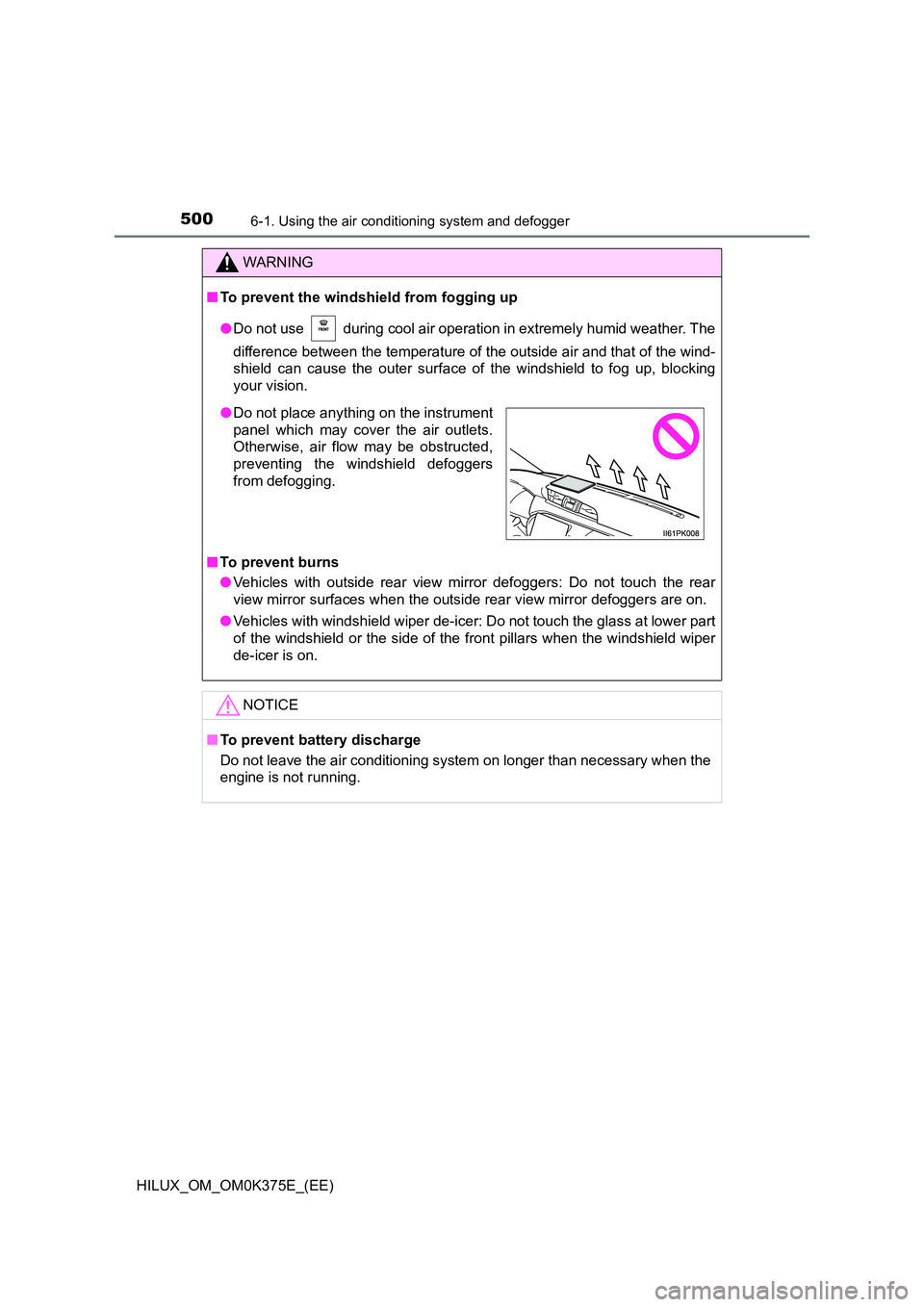
● Do not place anything on the instrument
panel which may cover the air outlets.
Otherwise, air flow may be obstructed,
preventing the windshield defoggers
from defogging.
Page 505 of 708
5056-2. Using the interior lights
HILUX_OM_OM0K375E_(EE)
6
Interior features
●Illuminated entry system (if equipped):
Vehicles without smart entry & start system
The lights automatically turn on/off according to the engine switch position,
whether the doors are locked/unlocked, and whether the doors are opened/
closed.
Vehicles with smart entry & start system
The lights automatically turn on/off according to engine switch mode,
whether the doors are locked/unlocked, and whether the doors are opened/
closed.
● If the following lights remain on when the engine switch is turned to the
“LOCK” position (vehicles without smart entry & start system) or off (vehicles
with smart entry & start system), the lights will go off automatically after 20
minutes:
• Personal/interior light
• Interior light (if equipped)
• Engine switch light (if equipped)
NOTICE
To prevent battery discharge, do not leave the lights on longer than neces-
sary when the engine is not running.
Page 507 of 708
5076-3. Using the storage features
HILUX_OM_OM0K375E_(EE)
6
Interior features
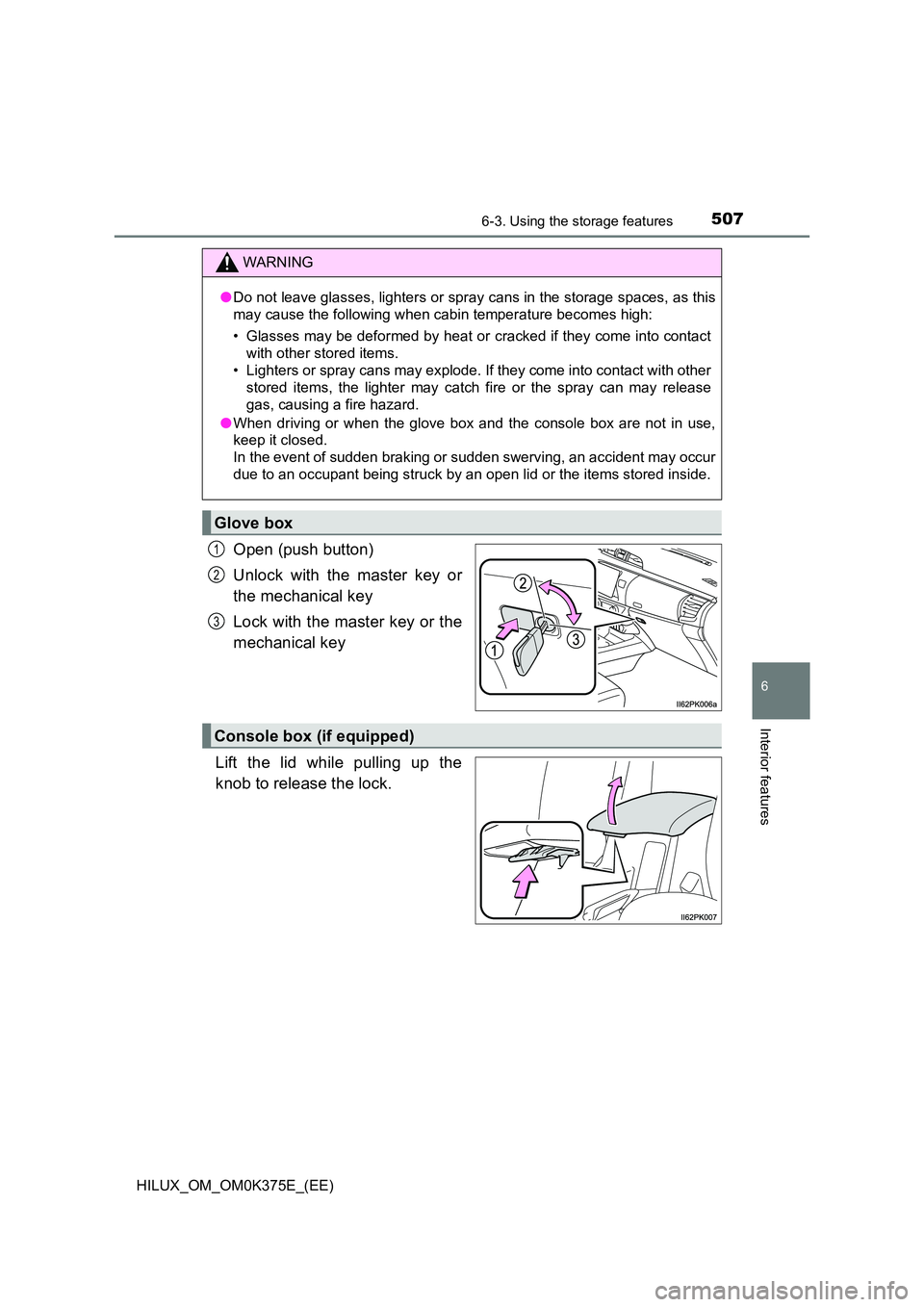
Open (push button)
Unlock with the master key or
the mechanical key
Lock with the master key or the
mechanical key
Lift the lid while pulling up the
knob to release the lock.
WARNING
● Do not leave glasses, lighters or spray cans in the storage spaces, as this
may cause the following when cabin temperature becomes high:
• Glasses may be deformed by heat or cracked if they come into contact
with other stored items.
• Lighters or spray cans may explode. If they come into contact with other
stored items, the lighter may catch fire or the spray can may release
gas, causing a fire hazard.
● When driving or when the glove box and the console box are not in use,
keep it closed.
In the event of sudden braking or sudden swerving, an accident may occur
due to an occupant being struck by an open lid or the items stored inside.
Glove box
1
2
3
Console box (if equipped)
Page 515 of 708
5156-4. Using the other interior features
HILUX_OM_OM0K375E_(EE)
6
Interior features
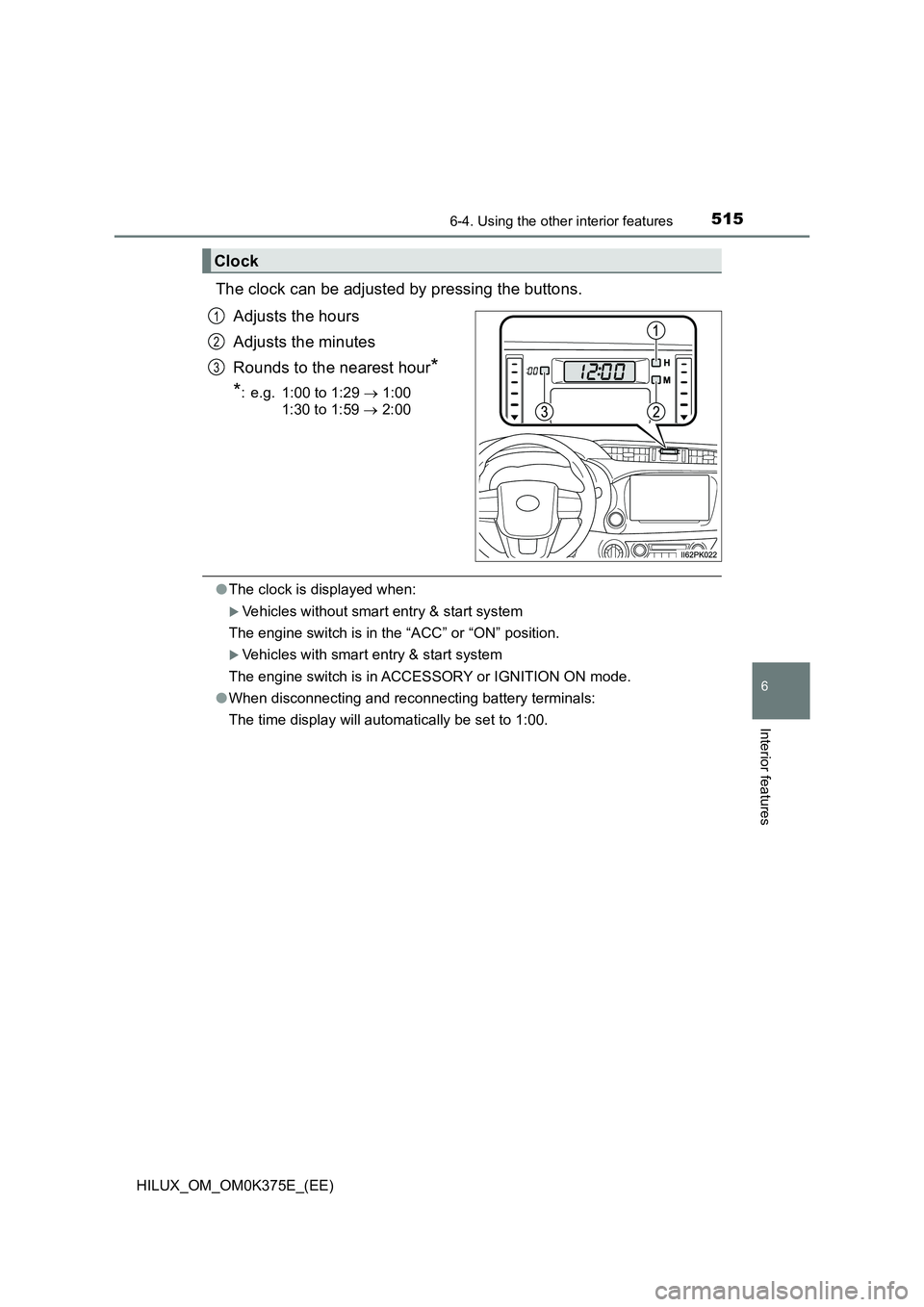
The clock can be adjusted by pressing the buttons.
Adjusts the hours
Adjusts the minutes
Rounds to the nearest hour*
*: e.g. 1:00 to 1:29 1:00
1:30 to 1:59 2:00
●The clock is displayed when:
Vehicles without smart entry & start system
The engine switch is in the “ACC” or “ON” position.
Vehicles with smart entry & start system
The engine switch is in ACCESSORY or IGNITION ON mode.
● When disconnecting and reconnecting battery terminals:
The time display will automatically be set to 1:00.
Clock
1
2
3
Page 537 of 708
5377-3. Do-it-yourself maintenance
HILUX_OM_OM0K375E_(EE)
7
Maintenance and care
Hood
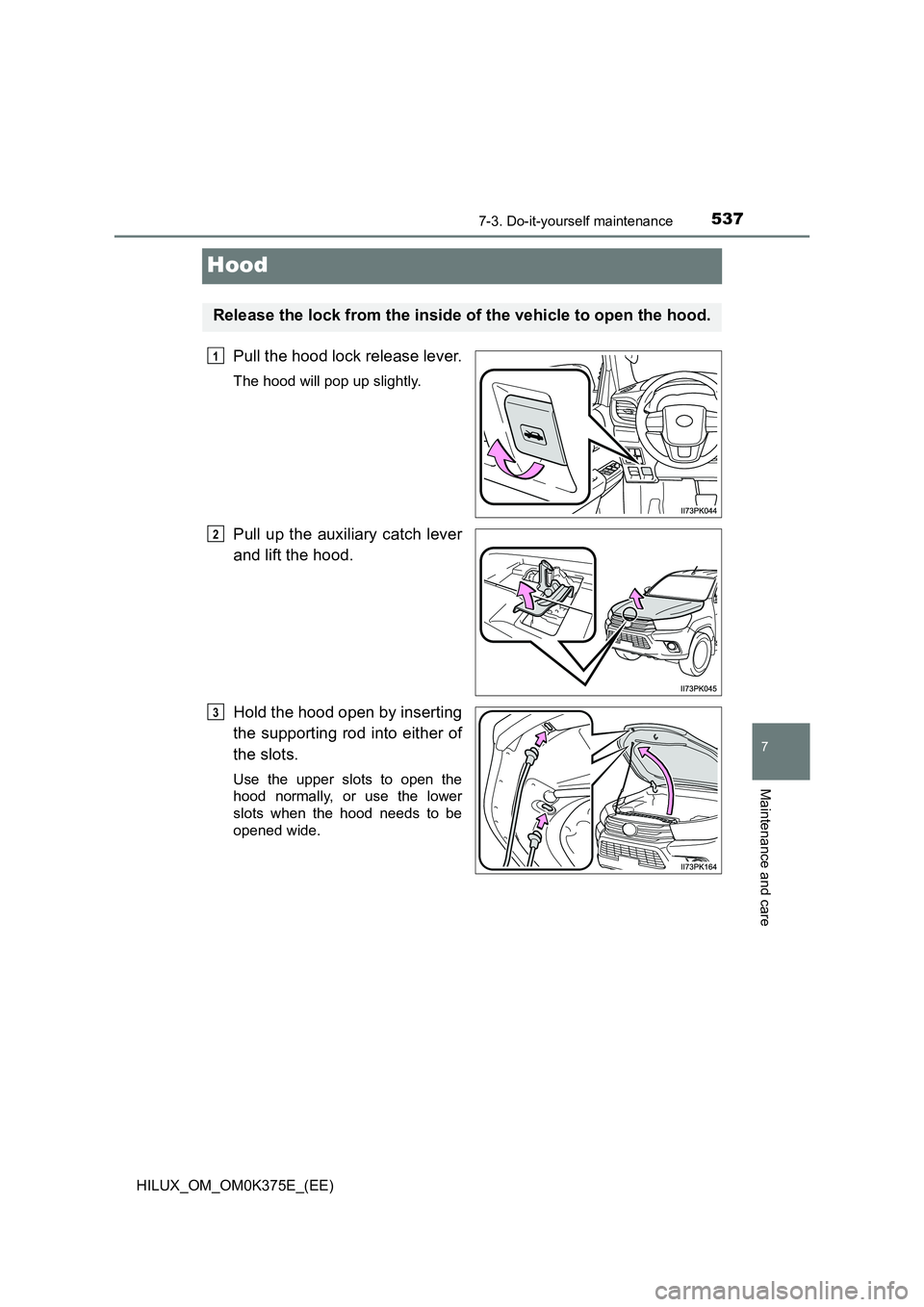
Pull the hood lock release lever.
The hood will pop up slightly.
Pull up the auxiliary catch lever
and lift the hood.
Hold the hood open by inserting
the supporting rod into either of
the slots.
Use the upper slots to open the
hood normally, or use the lower
slots when the hood needs to be
opened wide.
Release the lock from the inside of the vehicle to open the hood.
1
2
3
Page 538 of 708
5387-3. Do-it-yourself maintenance
HILUX_OM_OM0K375E_(EE)
WARNING
■Pre-driving check
Check that the hood is fully closed and locked.
If the hood is not locked properly, it may open while the vehicle is in motion
and cause an accident, which may result in death or serious injury.
■ After installing the support rod into the slot
Make sure the rod supports the hood securely from falling down on to your
head or body.
NOTICE
■ When closing the hood
Be sure to return the support rod to its clip before closing the hood. Closing
the hood with the support rod up could cause the hood to bend.
Page 542 of 708
5427-3. Do-it-yourself maintenance
HILUX_OM_OM0K375E_(EE)
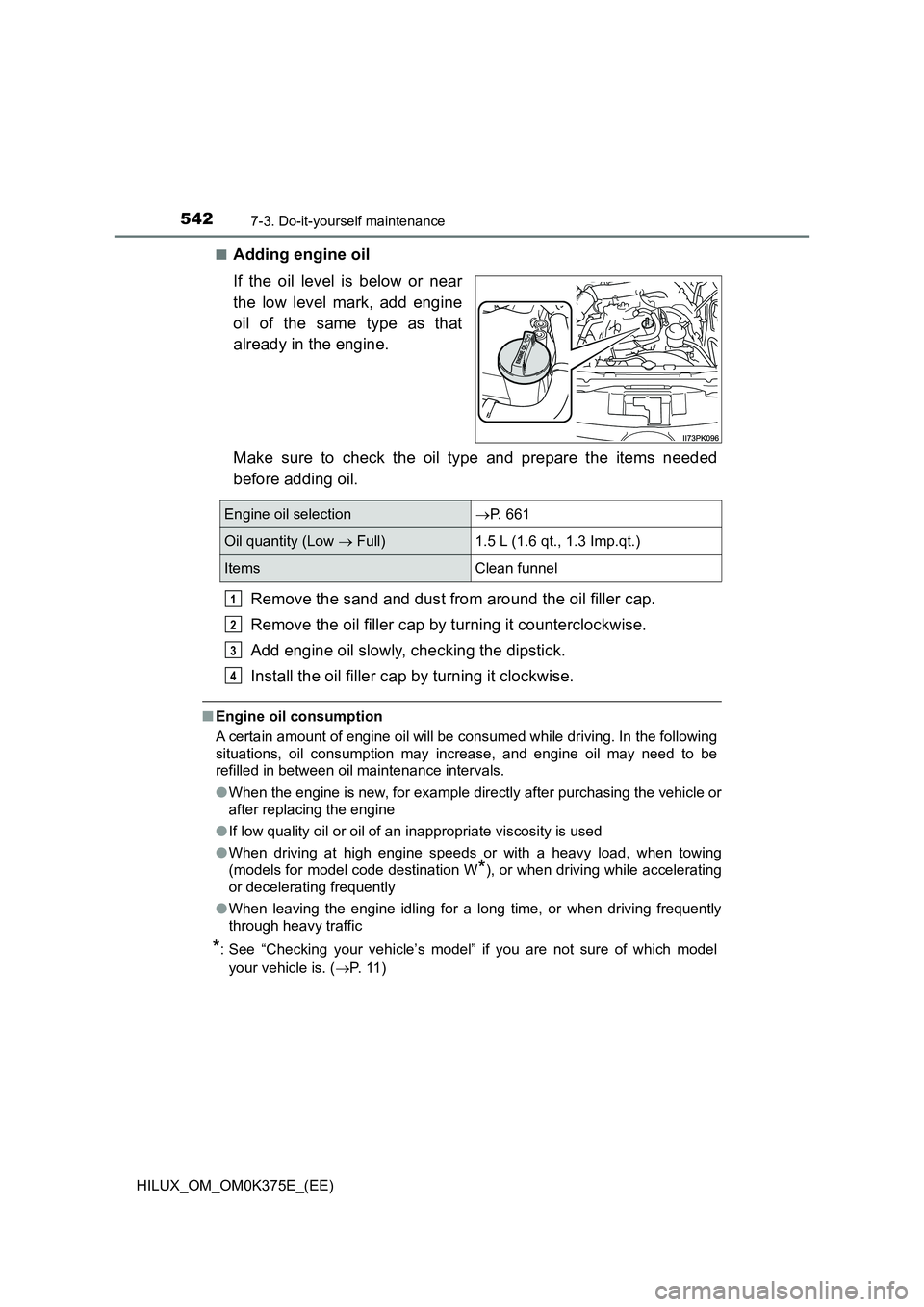
■Adding engine oil
If the oil level is below or near
the low level mark, add engine
oil of the same type as that
already in the engine.
Make sure to check the oil type and prepare the items needed
before adding oil.
Remove the sand and dust from around the oil filler cap.
Remove the oil filler cap by turning it counterclockwise.
Add engine oil slowly, checking the dipstick.
Install the oil filler cap by turning it clockwise.
■ Engine oil consumption
A certain amount of engine oil will be consumed while driving. In the following
situations, oil consumption may increase, and engine oil may need to be
refilled in between oil maintenance intervals.
● When the engine is new, for example directly after purchasing the vehicle or
after replacing the engine
● If low quality oil or oil of an inappropriate viscosity is used
● When driving at high engine speeds or with a heavy load, when towing
(models for model code destination W*), or when driving while accelerating
or decelerating frequently
● When leaving the engine idling for a long time, or when driving frequently
through heavy traffic
*: See “Checking your vehicle’s model” if you are not sure of which model
your vehicle is. ( P. 11 )
Engine oil selectionP. 661
Oil quantity (Low Full) 1.5 L (1.6 qt., 1.3 Imp.qt.)
Items Clean funnel
1
2
3
4
Page 543 of 708
5437-3. Do-it-yourself maintenance
HILUX_OM_OM0K375E_(EE)
7
Maintenance and care
■After changing the engine oil (models for model code destination W*)
The engine oil maintenance data should be reset. Perform the following pro-
cedures:
Switch the display to the trip meter A ( P. 134) when the engine switch is
in the “ON” position (vehicles without smart entry & start system) or IGNI-
TION ON mode (vehicles with smart entry & start system).
Turn the engine switch to the “LOCK” position (vehicles without smart entry
& start system) or off (vehicles with smart entry & start system).
While pressing the odometer/trip meter display change button ( P. 134),
turn the engine switch to the “ON” position (vehicles without smart entry &
start system) or IGNITION ON mode (vehicles with smart entry & start sys-
tem). (Do not start the engine because reset mode will be canceled.) Con-
tinue to press and hold the button for more than one second after the trip
meter displays “000000”.
*: See “Checking your vehicle’s model” if you are not sure of which model
your vehicle is. ( P. 1 1 )
WARNING
■Used engine oil
● Used engine oil contains potentially harmful contaminants which may
cause skin disorders such as inflammation and skin cancer, so care
should be taken to avoid prolonged and repeated contact. To remove used
engine oil from your skin, wash thoroughly with soap and water.
● Dispose of used oil and filters only in a safe and acceptable manner. Do
not dispose of used oil and filters in household trash, in sewers or onto the
ground. Call any authorized Toyota reta iler or Toyota authorized repairer,
or any reliable repairer, service station or auto parts store for information
concerning recycling or disposal.
● Do not leave used engine oil within the reach of children.
NOTICE
■To prevent serious engine damage
Check the oil level on a regular basis.
■ When replacing the engine oil
● Be careful not to spill engine oil on the vehicle components.
● Avoid overfilling, or the engine could be damaged.
● Check the oil level on the dipstick every time you refill the vehicle.
● Be sure the engine oil filler cap is properly tightened.
1
2
3
Page 548 of 708
5487-3. Do-it-yourself maintenance
HILUX_OM_OM0K375E_(EE)
■Before recharging
When recharging, the battery produces hydrogen gas which is flammable and
explosive. Therefore, observe the following before recharging:
● If recharging with the battery installed on the vehicle, be sure to disconnect
the ground cable.
● Make sure the power switch on the charger is off when connecting and dis-
connecting the charger cables to the battery.
■ After recharging/reconnecting the battery (vehicles with smart entry &
start system)
The engine may not start. Follow the procedure below to initialize the system.
Shift the shift lever to P (automat ic transmission) or depress the brake
pedal with the shift lever in N (manual transmission).
Open and close any of the doors.
Restart the engine.
● Unlocking the doors using the smart entry & start system may not be possi-
ble immediately after reconnecting the battery. If this happens, use the wire-
less remote control or the mechanical key to lock/unlock the doors.
● Start the engine with the engine switch in ACCESSORY mode. The engine
may not start with the engine switch turned off. However, the engine will
operate normally from the second attempt.
● The engine switch mode is recorded by the vehicle. If the battery is recon-
nected, the vehicle will return the engine switch mode to the status it was in
before the battery was disconnected. Make sure to turn off the engine
before disconnect the battery. Take extra care when connecting the battery
if the engine switch mode prior to discharge is unknown.
If the system will not start even after multiple attempts, contact any authorized
Toyota retailer or Toyota authorized repairer, or any reliable repairer.
■ If a symbol of a battery is shown on the multi-information display (if
equipped)
There is a malfunction in the vehicle’s charging system.
Immediately stop the vehicle in a safe place and contact any authorized
Toyota retailer or Toyota authorized repai rer, or any reliable repairer. Continu-
ing to drive the vehicle may be dangerous.
1
2
3